Solarized light theme, compact layout, think/tool-chain collapse capsules, and balance, session cost, and usage dashboards for the DSH web UI.
Install
# from GitHub (first run asks for allowBuilds approval — follow the hint, retry)
dsh plugin --profile web add github:jiangnanquan/dsh-ux
Any plugin you install runs third-party code with your own permissions — it can read your files, use your credentials, and reach the network, and tool approvals don’t sandbox it. GitHub-sourced plugins also run build scripts at install time — pnpm blocks those until you allow them, so an install can stop with ERR_PNPM_GIT_DEP_PREPARE_NOT_ALLOWED or ERR_PNPM_IGNORED_BUILDS; dsh prints the exact key to add under allowBuilds in your profile’s pnpm-workspace.yaml, and the install works on the next run. Allowing a build is a trust decision: only install sources you trust, and pin a commit (github:owner/repo#sha).
README
中文 | English
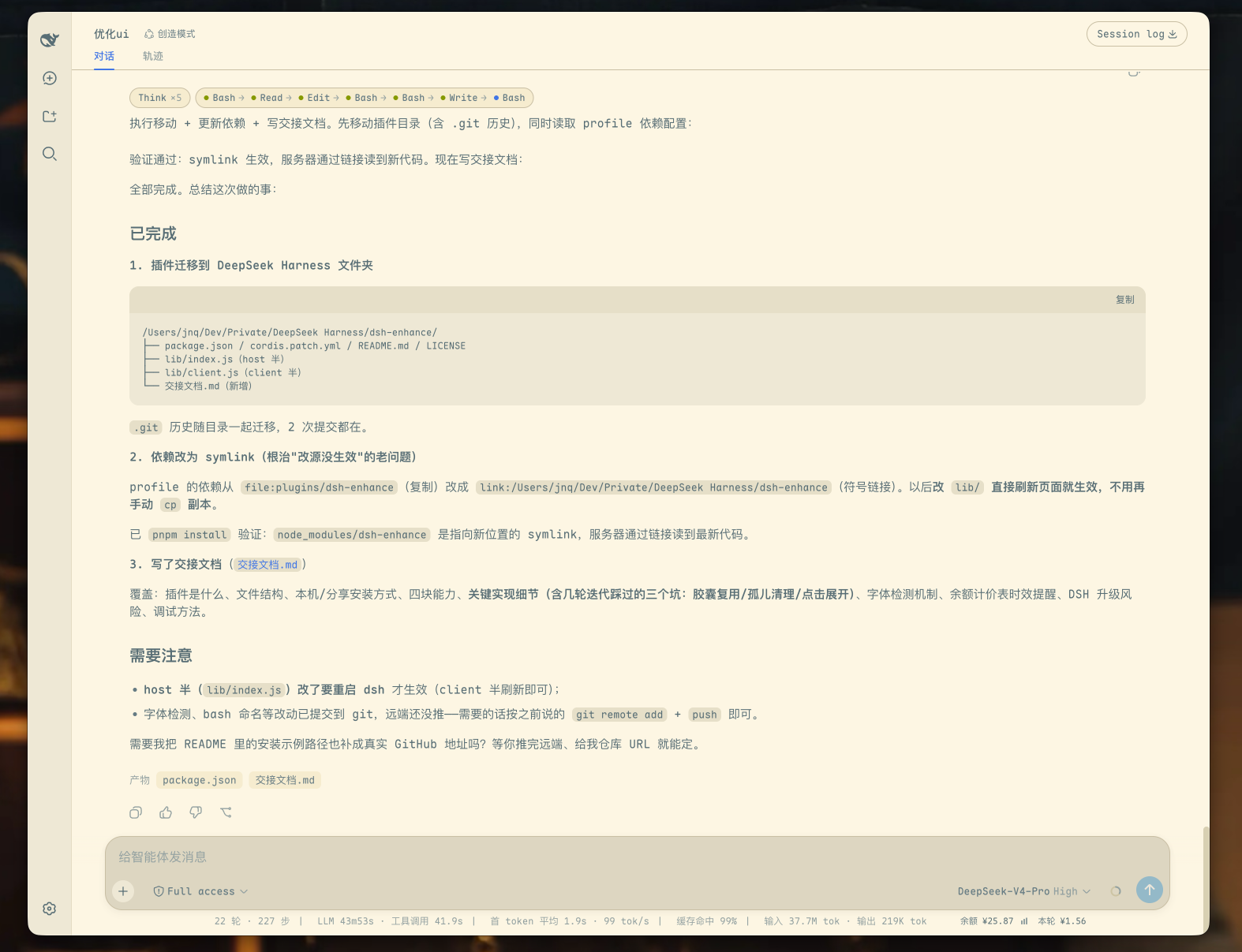
A Web UI enhancement plugin for DeepSeek Harness (DSH), personally built and released as free open source by Jiangnan Quan (江南泉). It adds a dedicated "界面增强" (Interface Enhancements) page to Settings where every toggle applies instantly: 25 terminal-aesthetics themes, text ink, CJK-first typography, compact layout, collapsible capsules, account balance/usage, and official peak/off-peak pricing hints.
Features
| Category | Description |
|---|---|
| Settings page | Its own page in the settings panel's left rail ("界面增强"): every switch applies instantly, no restart |
| Themes | 25 palettes from Jiangnan Quan's Terminal Aesthetics trilogy: classic CRT, paper-light, modern duals, and AI brands; dark themes set color-scheme: dark automatically |
| Text ink | Deep ink (default, recommended) / follow palette / pure black; changes text tokens only, on light themes |
| Typography | CJK-first 0.5-narrow monospace schemes (Sarasa Mono/Term SC, Noto Sans Mono CJK, Maple Mono…); weight defaults to SemiBold (recommended) |
| Layout | Wider message column, tighter spacing, aligned composer card and / @ candidate menu, rubber-band scrolling disabled |
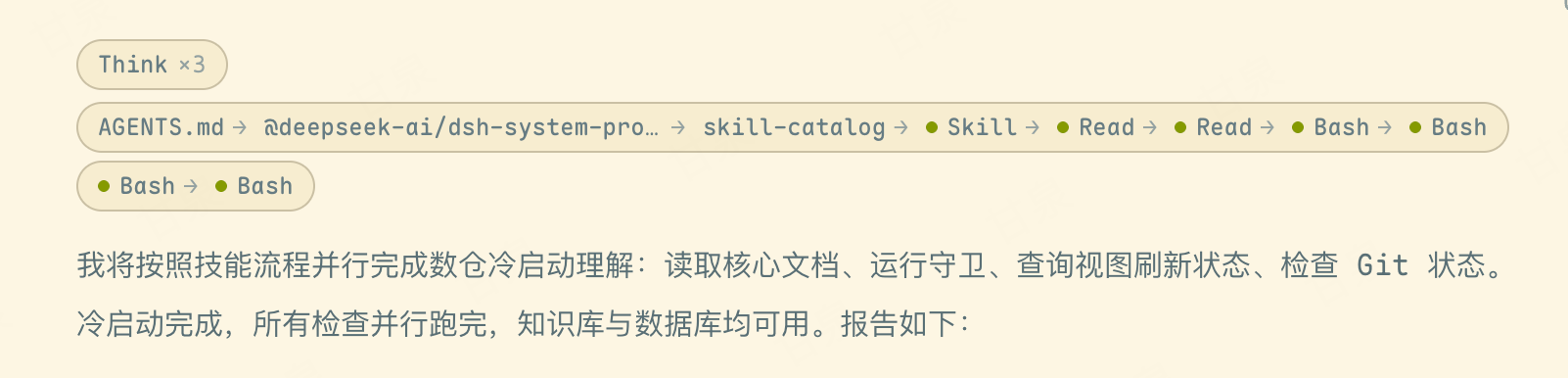
| Collapsible capsules | 0.1.x: aggregates reasoning into Think ×N and tool calls into an A → B → C chain. 0.2.0: the official process-group folding owns visibility; the plugin attaches a capsule summary below the visible "Completed, took X" row and clicks toggle the official disclosure; long chains wrap by available width |
| Balance and usage | Shows the official account balance, current-session token cost, and a 30-day chart below the composer; official API/account runs also get a peak / off-peak badge, and clicking it explains the official rules and the next switch |
| Accent | The send/stop button and the sidebar "New session" button both take the theme's third anchor (accent); on-accent text picks black or white per palette |
Long tool chains reflow with the message column while preserving a complete, independent capsule around each visual line:
If dsh-uxexo makes your interface a little nicer, a Star on the repository is the best way to support it.
Themes: 25 palettes from Jiangnan Quan's Terminal Aesthetics trilogy
Pick one from Appearance → Theme in Settings. Entries are grouped by origin and named
English · Chinese; the English half keeps each palette's official name and variant
(including the accent in Rosé), while the Chinese half is a short translation.
| Group | Palettes |
|---|---|
| Official | Official · 官方配色 |
| Classic CRT (part 1) | P1 Green Phosphor · 绿磷光, P3 Amber Phosphor · 琥珀光, Matrix Rain · 代码雨, Cyberpunk 2077 · 夜之城, Radar Red · 雷达血红, Weyland Corp · 维兰重工, NERV MAGI · 三贤者 |
| Paper light (part 2) | P4 White · 纸白, Everforest Light · 绿色森林, Parchment Classic · 羊皮纸, Solarized Light · 暖羊皮纸, Catppuccin Latte · 拿铁 |
| Modern (part 3) | Tokyo Night · 东京夜, Tokyo Night Day · 东京白昼, Kanagawa Wave · 神奈川·浪, Kanagawa Lotus · 神奈川·莲, Rosé Pine · 玫瑰松木, Rosé Pine Dawn · 玫瑰晨光, Catppuccin Mocha · 摩卡 |
| AI brands (part 3) | Claude Light · 书斋浅, Claude Dark · 书斋深, OpenAI Light · 涌现浅, OpenAI Dark · 涌现深, Gemini Light · 极光浅, Gemini Dark · 极光深 |
Each palette declares only four anchors — background, text, accent, and state colors — and the rest of
the surface / border / hover / on-accent tokens are derived by one shared rule set. That keeps the visual
hierarchy consistent across all 25 and makes a new palette a one-line addition. Dark themes set
color-scheme: dark and use the palette's own ink; the text-ink control applies to light themes only.
Since 0.2.x the official shared menus use a glass material (--dsw-menu-surface-fill: 58% light /
45% dark plus backdrop blur, backed by an opaque bg-base layer on macOS). The plugin solves the glass
fill so that it composites back to the palette's own layer-1, takes over the matching
--dsw-alias-menu-group-header-fill (94%), --dsw-alias-menu-icon, and
--dsw-alias-label-primary-dimmed, and rebinds the menu's selected/hover fill onto layer-1
(the global hover is base + accent, which is nearly invisible on top of layer-1). Without these,
dark palettes would inherit the official light glass and menus would turn into a pale sheet over a
dark page.
The same pass takes over every other token added to the official 0.2.x theme table (49 in total:
document preview, file diffs, state ladders, masks, tooltip / toast, inverted and bluish labels,
trajectory brand color, and so on) with rules isomorphic to the official ones: tertiary state fills are
the background mixed with the state color, diff surfaces are lighter mixes of the same, inverted labels
take the contrast side of the primary text, and link / deep-diving labels start from accent and are
nudged toward black or white until they reach AA. Solarized keeps its hand-tuned block with the official
fallbacks (official light values are already valid for a light palette).
The third anchor, accent, is applied to the send/stop button and the sidebar "New session"
button: the former always follows it, the latter follows it by default and can be switched to a quiet
style (only slightly darker than the sidebar surface) via Appearance → Quiet new-session button.
Every non-Solarized palette meets WCAG AA (4.5:1) for body text on both bg and layer-1; Solarized
keeps its hand-tuned token block and relies on the ink setting. Tokyo Night Day's original #3760BF
only reached 4.08:1 on layer-1, so its ink was deepened 4% to #2F55B5 (4.74:1).
Text ink: Deep ink (default) / Follow palette / Pure black
Solarized's default body color is base01 #586e75 (a cool grey-green), which looks "veiled" on a warm
cream background: 4.99:1 on #fdf6e3, and only 4.39:1 on layer-1 #eee8d5 (below WCAG AA's 4.5).
This control changes text tokens only — never backgrounds or brand colors:
| Setting | Effect |
|---|---|
| Deep ink (default, recommended) | Warm blue-black #002b36, one step deeper than most light palettes' own ink; on Solarized it lifts layer-1 body contrast from 4.39:1 to 12.2:1 |
| Follow palette | Inherits the palette's own ink (Solarized's cool grey-green above), closest to the original design |
| Pure black | #000000, 19.5:1; clearer in bright light or for low vision, but heavy for long-form body text |
It only applies to light themes: dark palettes carry their own ink, and the on-accent text token
(--dsw-alias-label-primary-foreground) is left untouched.
Typography: CJK-first and 0.5-narrow Latin
Based on Terminal Typography Philosophy: CJK-First and the 0.5 Narrow Monospace Practice (measured data below):
A Han character is an uncompromisable 1.0 square. For "2 Latin characters = 1 Han character" to hold exactly, the Latin advance must be narrowed to 0.5. Latin-first programming fonts (Menlo, JetBrains Mono, Fira Code, Maple Mono…) sit at 0.6–0.67, which stretches the Han container to 1.2 — Han glyphs are either widened by 20% (squat, counters collapsed) or surrounded by dead space.
Measured with CoreText on this machine (unitsPerEm=1000, glyph advance widths):
| Family | Latin a |
Han 中 |
Ratio | — |
→ |
★ |
|---|---|---|---|---|---|---|
| Sarasa Mono SC | 0.500 | 1.000 | 2.000 | 1.000 | 1.000 | 1.000 |
| Sarasa Term SC | 0.500 | 1.000 | 2.000 | 0.500 | 0.500 | 0.500 |
| Noto Sans Mono CJK SC | 0.500 | 1.000 | 2.000 | 0.894 | 1.000 | 1.000 |
| Sarasa Gothic / UI SC | 0.562 | 1.000 | 1.78 | 1.000 | 0.954 | 1.045 |
| Maple Mono NF CN | 0.600 | 1.200 | 2.000 | 0.600 | 0.600 | — |
| Maple Mono (non-CN) | 0.600 | no glyphs | — | 0.600 | 0.600 | — |
Sarasa Gothic is built exactly on that philosophy: Iosevka Latin (a strict 0.5) plus Source Han Sans Han glyphs (1.0), with baselines, x-height and weight curves aligned at the pixel level. The only difference between Mono and Term is the East Asian ambiguous-width set (—……→★■●): Mono keeps them full-width (best for reading Markdown and Chinese punctuation), Term squeezes them to half-width (best for dense grids and cursor movement). Maple Mono NF CN is the very case the article warns about — its Han glyphs are stretched to 1.2.
Available schemes in the settings page:
| Scheme | Notes |
|---|---|
| Auto (recommended) | Tries, in order: Sarasa Mono SC → Sarasa Term SC → Noto Mono CJK → Maple Mono; falls back to the official stack when none is installed |
| Sarasa Mono SC | 0.5 narrow Latin, full-width ambiguous characters |
| Sarasa Term SC | 0.5 narrow Latin, half-width ambiguous characters |
| Noto Mono CJK | Noto Sans Mono CJK SC, also 0.5/1.0 |
| Maple Mono | Legacy look (Latin 0.6 / Han 1.2), kept for compatibility |
| Off | Leaves the official font stack untouched |
Installed families are probed live and shown on the page (unavailable schemes are greyed out; install the
font and come back — no restart). A separate weight switch offers Standard and SemiBold; the default
is SemiBold (recommended), which lifts body text to 600 and emphasis to 700 using the family's real
vector SemiBold (the article's sweet spot). Both modes set font-synthesis: none — the CSS equivalent of
the article's "no algorithmic fake bold", which smears counters and glues strokes together.
The page also carries an alignment self-test block (the article's §5 text, re-padded so the columns line up): line 1's 40 half-width characters must be exactly as wide as line 2's 20 Han characters, and the box must render as a rectangle. If they do, the scheme is right.
Rationale, measurements and how to add another family: docs/字体方案-中文优先与0.5窄体.md (Chinese).
Peak / off-peak hints (official API / account)
A small badge appears after the "本轮 ¥x" (current-session cost) cell below the composer. It only shows
when the provider actually used by the latest request is deepseek-official or deepseek-account:
| State | Hours (Beijing time) | Display |
|---|---|---|
| Peak | Mon–Fri (excluding Chinese public holidays), 09:00–12:00 and 14:00–18:00 | Amber "峰" (peak), billed at peak rates |
| Off-peak | All other hours, including weekends and public holidays all day | Green "谷" (off-peak), billed at half price |
The rule follows DeepSeek's official pricing update of 2026-08-23 and the public-holiday clarification of 2026-09-19:
- Peak applies only on workdays (Mon–Fri, excluding Chinese public holidays) at 09:00–12:00 and 14:00–18:00;
- Saturdays and Sundays are off-peak all day; make-up work weekends (调休上班) still count as weekends;
- Chinese public holidays are off-peak all day; off-peak rates are half of peak rates.
Holiday calendar fetched automatically every year
China's holiday schedule is published by the State Council once a year, and the plugin does not require a yearly code update:
- the host half fetches the machine-readable calendar for the current and next year on demand (from
holiday-cn, maintained from the official notice, which is kept
in the JSON), parses the
isOffDaydates, and caches the result; - cache lives in
~/.dsh/dsh-uxexo/calendar-<year>.json; past years are immutable, while the current and next year refresh every 7 days, and the client syncs from the host every 6 hours; - if next year's schedule is not published yet (the source returns an empty list), it is not mistaken for "no holidays" — the workday rule is used until the data appears, then it is adopted automatically;
- when offline, the built-in 2026 table is used as a fallback and never breaks the badge or cost stats;
- year rollover is therefore automatic: once the 2027 schedule is published, the badge and cost basis switch by themselves with no code change.
Click the badge to open a rule popover: current state and reason (weekend / public holiday / non-peak
workday), the exact next switch time with countdown, the official definition, and a source link. Hovering
still shows the countdown, and the title of both the Send and model selector buttons carries
"官方 API 峰时计费 / 空闲半价" (official API peak / off-peak billing). The state is recomputed every 30
seconds, so crossing 12:00, 18:00, a weekend or a holiday boundary does not wait for the next usage poll.
The criterion is request/header.config.provider in the session log, not "the balance endpoint works" —
balance uses an API key, and you may well have switched to scnet or opencode2dsh. In that case no badge is
shown rather than a misleading one.
Settings (instant toggles)
Open Settings → 界面增强 (Interface Enhancements). That page holds every switch the plugin owns:
| Switch | What turning it off does |
|---|---|
| Enable dsh-uxexo enhancements | Master switch. The whole layer is removed immediately and the official look is restored; per-feature choices are remembered and come back when you re-enable it |
| Theme | Selecting "Official" returns to the official palette; the default is Solarized; the 25 palettes and their naming are described above |
| Quiet new-session button | Off by default (the button follows the accent); when on, the sidebar "New session" button becomes only slightly darker than the sidebar surface |
| Font scheme / weight | Back to the official font stack and weights; setting the scheme to "Off" disables just the typography layer; the default weight is SemiBold (recommended) |
| Text ink | Three-way choice: Deep ink (default, recommended), Follow palette, Pure black; affects light-theme text only, never backgrounds or brand colors |
| Compact layout tweaks | Message width, spacing, and composer-card alignment return to the official geometry |
| Collapsible capsules | Reasoning and tool calls expand inline again, and the injected capsule nodes are removed from the DOM |
| Balance and usage | The balance/current-cost row, peak badge, and chart disappear, and the balance endpoint is no longer polled |
Everything applies instantly; nothing needs a restart. Switches are projected onto data-dsh-ux-*
attributes on <html> (the CSS gates) and persisted in a cookie so the host half can restore them before
the first paint (otherwise the official palette would flash for one frame).
The only restart case is updating the plugin itself: the client half is replaced by a page reload or
client hot reload, while the host half (the /enh/* endpoints and the first-paint injection) is loaded by
the dsh process at startup and cannot be swapped live. The settings page compares the two builds and, when
they differ, says so plainly ("restart DeepSeek Harness to take effect") and offers a re-check button. That
is what GET /enh/ping is for.
Installation
Prerequisite: DSH is already running through its profile mechanism (dsh web).
dsh plugin --profile web add github:jiangnanquan/dsh-uxexo#main
The package declares both dsh.bundle.patch and dsh.client. dsh plugin add automatically adds the
plugin to the profile bundle list. Restart DSH to activate it; no manual configuration edits are
required. Running the installation command again is safe and idempotent. To update, run
dsh plugin --profile web update dsh-uxexo.
The official desktop app does not use this command: the
desktopprofile is owned exclusively by the Electron application anddsh plugin --profile desktop …is rejected outright. See INSTALL.md for the desktop path.
Hand It to Your AI Agent
If you prefer not to run the commands manually, paste the following prompt into any AI coding agent
(Claude Code, DSH, Gemini CLI, and others) and ask it to follow INSTALL.md:
Follow the instructions in https://github.com/jiangnanquan/dsh-uxexo/blob/main/INSTALL.md to install and verify the dsh-uxexo plugin on my machine using the web profile. Run the documented health checks and report the results. If any step fails, follow the rollback instructions and explain the cause.
Requirements and Notes
- Font: installing Sarasa Gothic (
Sarasa-SuperTTC, or the individualSarasa Term/Mono SCweights) is recommended — it is the one free family that satisfies both "0.5 narrow Latin" and "1.0 square Han" with aligned weight curves. Without it, Noto Sans Mono CJK SC also measures 0.5/1.0 but ships only Regular/Bold, and Maple Mono (Latin 0.6, Han 1.2) remains available as the legacy look. When none is installed the typography layer falls back to the official stack without affecting anything else. - Balance, current-session cost, usage chart, and peak hints: these features call the official
DeepSeek API and require
DEEPSEEK_API_KEYto be configured in DSH. If credentials are unavailable, the fields show an unavailable or failed state without affecting the other features. - The pricing table is hard-coded in
pricingFor/PRICE_TABLESinsidelib/index.js: peak applies only on workdays at 09:00–12:00 and 14:00–18:00 (Beijing time), while weekends and Chinese public holidays are off-peak all day (half of peak rates). Historical cost is split at 2026-08-17 (peak/off-peak introduced), 2026-08-23 (weekends fully off-peak) and 2026-09-10 12:00 (Flash price cut). - The Chinese public-holiday schedule is no longer hard-coded per year:
lib/calendar.jsfetches, parses and caches it automatically, so year rollover needs no manual work.lib/index.jsandlib/client.jseach keep a built-in 2026 table purely as an offline/first-paint fallback (the smoke test cross-checks them). DeepSeek price changes are still event-driven and require a manual table update.
Uninstallation
dsh plugin --profile web remove dsh-uxexo
License
MIT
Links
More in this category
zhu1090093659/dsh-web#packages/dsh-task-board★ 10357
Task board for the dsh web GUI: a sidebar multi-column kanban whose cards run in real DSH agent sessions and can also be scheduled with cron expressions, executed host-side even with the browser closed.
zhu1090093659/dsh-web#packages/dsh-web-all★ 10357
Plugin and skin collection for the DSH Web UI: task board, Git graph, right-side panel, remote mobile UI, pet, live token stats, and a skin center.
ccch1mneyyy/dsh-TUI★ 7530
Claude Code-style full-screen terminal UI: pixel-whale header, live status line, and streaming thought expansion.
MeteorNOX/DeepSeek-Balance-Whale-Widget★ 7157
A fixed-corner whale widget for the DSH web GUI — balance, today's usage and per-turn cost with peak/off-peak pricing, editable balance-alert and daily-budget bubbles, a module-based custom bubble queue with A/B weighted choices and random lines or images, 30+ vendor templates (OpenAI, OpenRouter, Kimi, SiliconFlow, Ark, Zhipu, MiniMax and more) with per-model balance and subscription quota, plus task-end sound, imported audio, custom roles and a resource manager. Local-only, no telemetry.
omdsh-dev/DSH-better-sidebar★ 5092
Full sidebar workbench with file rendering and editing, terminal, Git, and subagents; third-party plugins can register new tabs.
Devin-AXIS/deepseek-design#deepseek-idesign★ 1808
Visual design studio for websites, app prototypes, posters, cards, reports, and magazines, with templates, direct element editing, selection-aware AI draft handoff, and export.
Community comments
Comments are public GitHub Discussions. Loading them connects to GitHub and Giscus; a GitHub account is required to post.