In-app plugin marketplace for DSH: plugin discovery, install, upgrade, toggle and uninstall in one panel for Web and Desktop host profiles, pairing a community catalog of 4,000+ entries with customizable curated lists, plus eight agent tools and a standalone dshm CLI, without a marketplace server or account.
Install
# from npm (prebuilt)
dsh plugin --profile web add dsh-m
# from GitHub (first run asks for allowBuilds approval — follow the hint, retry)
dsh plugin --profile web add github:iasiv5/dsh-m
Any plugin you install runs third-party code with your own permissions — it can read your files, use your credentials, and reach the network, and tool approvals don’t sandbox it. GitHub-sourced plugins also run build scripts at install time — pnpm blocks those until you allow them, so an install can stop with ERR_PNPM_GIT_DEP_PREPARE_NOT_ALLOWED or ERR_PNPM_IGNORED_BUILDS; dsh prints the exact key to add under allowBuilds in your profile’s pnpm-workspace.yaml, and the install works on the next run. Allowing a build is a trust decision: only install sources you trust, and pin a commit (github:owner/repo#sha).
README
English · 中文
dsh-m brings plugin discovery, installation, management, and updates into one DeepSeek Harness (DSH) panel. Search the community directory and hand-curated picks together. The sidebar panel, eight Agent tools, and the dshm CLI share marketplace data. No additional marketplace server or account is needed; the local DSH host performs plugin operations.
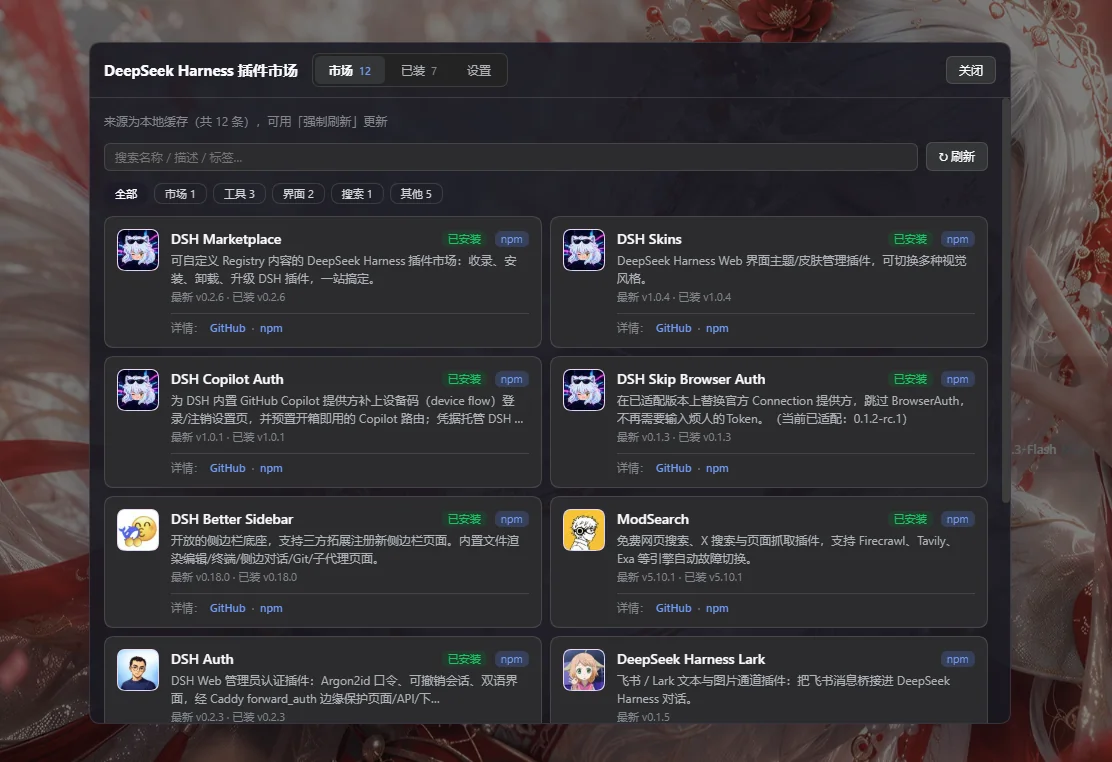
Quick start
In DSH's official Plugin Manager → Add plugin, enter dsh-m, select an installation source reachable from your network, and install. Restart DSH Web and refresh the page; on Desktop, quit and reopen the app. Open “Plugin Marketplace” at the bottom of the sidebar.
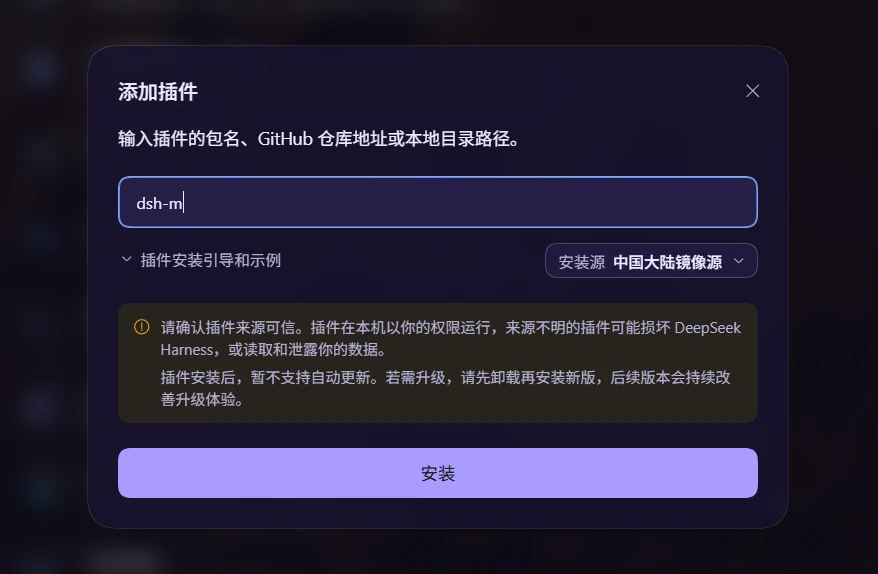
On a headless Web host, you can also run dsh plugin --profile web add dsh-m. Requires Node.js ≥ 22.19.0; see the compatibility table. npm install -g dsh-m installs only the standalone dshm CLI, not the marketplace plugin in a DSH profile.
In-place update support in the official plugin manager depends on the host version. If it explicitly says updates are unsupported, follow its guidance to uninstall the old version and install the new one. Uninstall does not silently erase plugin data.
Browse, search, install
- Community + Curated: the community directory is on by default, with 6,000+ listings (grows with the upstream catalog; the panel shows the live count). Curated picks are organized into Essentials / Cui Picks / iasi Self-dev / Tencent Lighthouse / Watchlist. Curated wins for same-name entries: cross-catalog search shows only the curated version, while Community browsing keeps such entries marked with a "Curated" badge.
- Zoned browsing, global search: each zone remembers its own category, sort (the Community zone sorts by downloads / stars / date added), and pagination. A Chinese or English query searches both catalogs and shows their separate hit counts. Favorites live in browser localStorage — they are not part of the profile or the server.
- Inspect before installing: cards show origin, installation status, and version; icons prefer the declared catalog/package icon and fall back to the GitHub avatar. Details show the description, compatibility information, and installation entry point. Badges like "Author's own" and "Version-independent" are audience/adaptation hints, not security or quality endorsements. npm installs pin an exact version with integrity verification; GitHub installs pin a commit SHA. Peer-incompatible installs require explicit risk acknowledgment.
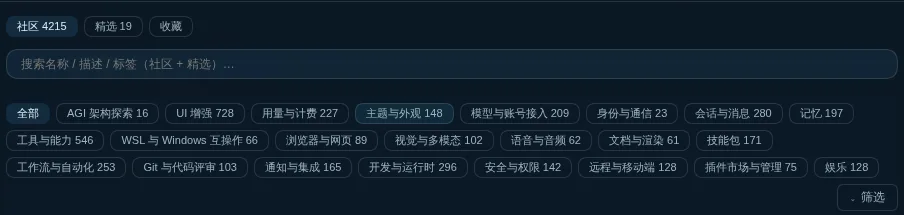
| Community categories | Curated buckets |
|---|---|
 |
 |
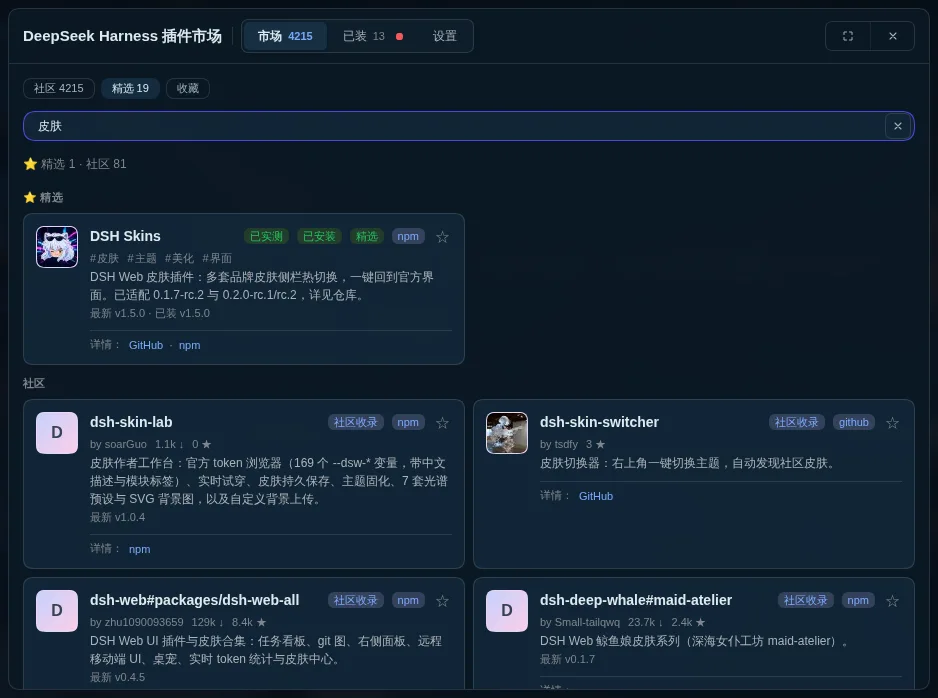
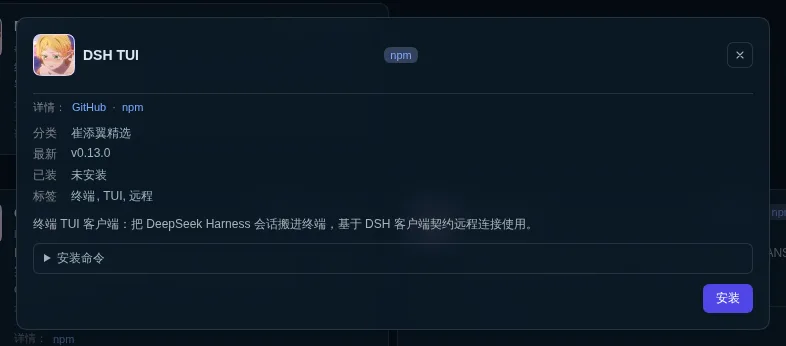
Community listing is not a security review. With 6,000+ entries from varied sources, inspect the author, code, and requested capabilities before installing. Missing capability data means “not scanned,” not “no risks found.”
Installed plugins & settings
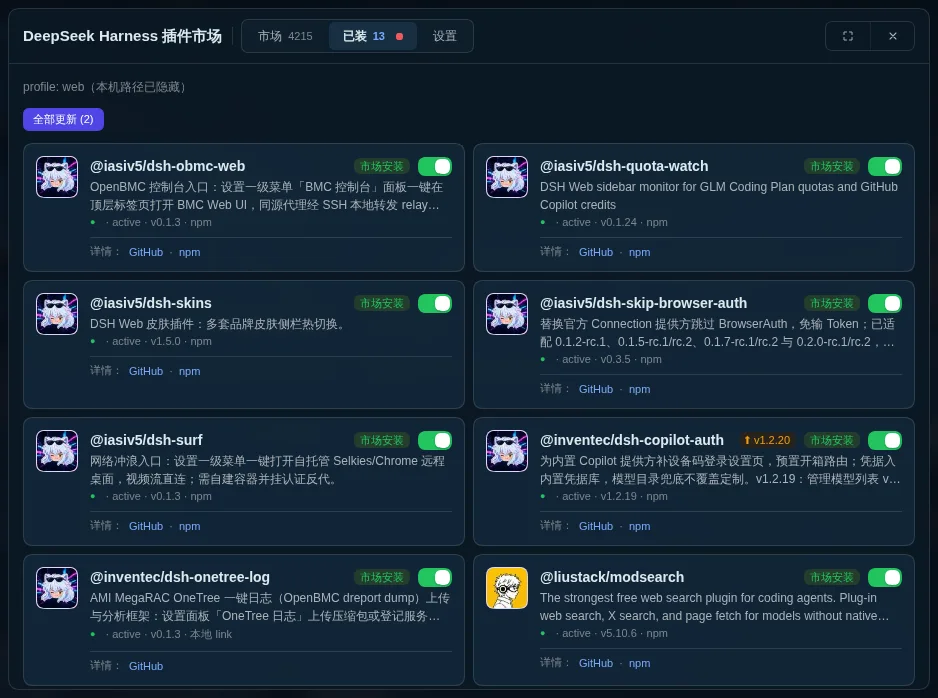
Installed reflects the current host profile's actual packages: marketplace/non-marketplace origin, runtime phase, available updates, toggles, upgrades, "Update all", and confirmed uninstall — batch updates run serially, stop at the first real failure, and always upgrade dsh-m itself last. Operation progress and results are tracked together. A toggle may apply live or require a restart; follow the returned result. Uninstall removes the package reference without silently deleting user data and reports possible leftover paths separately.
Settings shows the community catalog's version, fetch route, and cache state, and lets you disable or pin its version. You can download the default curated registry, provide a custom address, and validate before replacing the Curated zone as a whole (the Community zone is unaffected). Failed validation preserves the active configuration; successful apply and restore-default are live, without a restart.
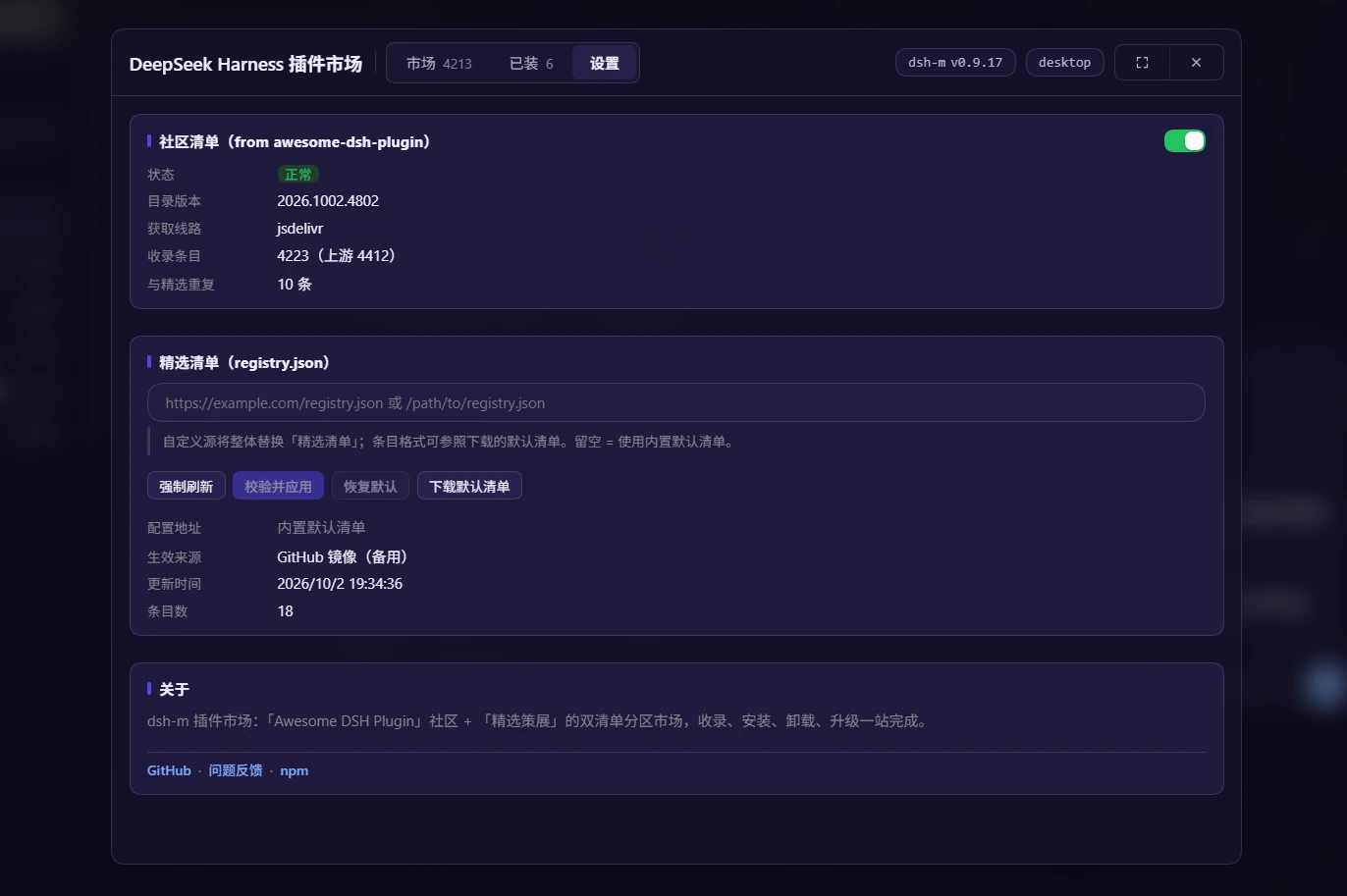
A custom registry may come from HTTPS, a local absolute path, or file:// (HTTP is for loopback debugging only); limits are 2 MiB and 1,000 entries. A custom source is an independent snapshot and does not sync automatically with the default curated registry. If it fails, its own last good cache remains in use; dsh-m never silently switches back to the default. See the registry copy guide and design document for the full rules.
Agent tools & CLI
| Agent tools | Purpose |
|---|---|
dshm_search |
Search community and curated catalogs; render cards in the conversation |
dshm_list · dshm_outdated |
List installed and outdated plugins in the current profile |
dshm_install · dshm_upgrade · dshm_uninstall |
Install, upgrade, and uninstall after confirmation; surface compatibility risks first |
dshm_toggle · dshm_restart |
Toggle runtime state; restart Web with the user's consent |
dshm search --query theme --source all
dshm list
dshm outdated
dshm registry
dshm doctor                # read-only health check; --profile desktop targets the desktop profile
dshm install --id dsh-web-search
dshm upgrade --pkg dsh-web-search --yes
dshm uninstall --pkg dsh-web-search --yes
dshm toggle --pkg dsh-web-search --off --yes
dshm restart --yes
The GUI and Agent tools manage the current host profile (Web or Desktop). The standalone CLI, by contrast, targets the web profile; the only exception is the read-only dshm doctor --profile desktop health check — other commands reject --profile desktop, and Desktop plugin management goes through the official plugin page. --force may be used with install/upgrade after the user accepts a peer-compatibility risk. If the catalog is unavailable, registry, search, and outdated fail explicitly while list still lists installed packages. See the design document for full parameters and runtime policy.
Compatibility & FAQ
| DSH Web generation | Settings path | Verification |
|---|---|---|
0.1.2-rc.1 |
cordis config-file fallback | Contract checked |
0.1.5-rc.1 / rc.2 |
register() scope |
Checked; rc.1 also page-tested |
0.1.7-rc.1 / rc.2 |
.volatile() + settings.update |
Checked |
0.2.0-rc.1 / rc.2 |
Same as 0.1.7 | rc.2 and restart path live-tested |
0.2.1-rc.2 |
Same as 0.2.0 | Install/upgrade and D3 self-upgrade dogfooded (0.10.x line) |
0.2.1-rc.3 |
Same as 0.2.0 | Last fully verified on dsh-m 0.10.11 (link-installed: 1719/1719 tests green + seven-item compatibility checklist); newer versions not re-verified |
0.2.1-rc.4 |
Same as 0.2.0 | Dogfood host of the 0.11.x line (dsh-m 0.11.0 resident on the local web profile); 0.11.1 shipped with 1841/1841 tests green + release gates all green; official contract verified against both rc.3/rc.4 (ADR-0027) |
0.2.1-rc.5 |
Same as 0.2.0 | Contract-surface equivalent re-release (host web-app patch zero-diff against rc.4); rc.4 verification carries over by equivalence; the 0.11.x dogfood web profile now runs rc.5 with the host upgrade |
0.2.2-rc.1 |
Same as 0.2.0 | First release of a new minor line (host web-app patch carries UI bundle row changes — not an equivalent re-release); the 0.12.x dogfood web profile now runs rc.1 with the host upgrade (2026-11-04 live acceptance: marketplace panel, settings path, and full client-bundle delivery all healthy) |
Each generation's verification reflects the dsh-m of its era: the 0.10.x line is fully verified only against DSH 0.2.1-rc.2 / rc.3, the 0.11.x line against 0.2.1-rc.4 (rc.5 is a contract-surface equivalent re-release; conclusions carry over by equivalence), and the 0.12.x line against 0.2.2-rc.1 (since 2026-11-04). Older generations have not been re-tested with the current version and are not a claim that current dsh-m runs on them.
Is Desktop identical to Web? No. Desktop browsing, new-package installation, and toggles act on the desktop profile. Upgrades and uninstalls require capabilities from the official host pluginManager; if absent, dsh-m returns a structured refusal and guidance. Desktop uses the official app lifecycle rather than Web's one-click restart; quit and reopen as instructed. Favorites, operations, and installed states are separate between profiles.
When do installs or updates take effect? On Web, follow the activation result: a client-only update needs a refresh; operations marked restart-required need consent before the host restarts, followed by background reconnection. Restarts hand control back to the service manager, which restarts per its Restart policy; systemd deployments should configure Restart=on-failure or Restart=always, and other deployments use their own restart method.
Why don't GitHub updates follow main? Intermediate commits may be unstable. dsh-m tracks releases/tags and pins their commit SHAs. Because anonymous GitHub API quota is limited, an incomplete passive check is labeled as such rather than “all up to date.”
What if my custom registry goes down? Its last successful cache is used first. Without any cache, the registry is reported unavailable while installed plugins remain manageable. Fix the address or restore the default in Settings.
Full history: CHANGELOG. Architecture and development details: DESIGN, ADRs. Coding and test discipline (required reading for reviews): CODING-STANDARDS. Screenshots were taken from a Web instance; panel version, catalog counts, and installation states vary over time and by profile. To reproduce from the source checkout, run npm install && npm run capture:readme with dsh-m installed on the Web host. The development-only capture script is not distributed in the npm plugin package.
License
Links
More in this category
dsh-market/dsh-market★ 10295
Browse, search and install community plugins from inside DeepSeek Harness settings, with category filters, one-click updates, enable/disable, theme switching and configuration backup.
zhu1090093659/dsh-web#packages/dsh-plugin-manager★ 9959
Plugin manager tab in DSH Settings → Plugins: install from npm or git with progress, enable/disable switches effective at next startup, conflict reconciliation with undo, and one-click hand-off to a fix session.
kingOfSoySauce/dsh-skin-market★ 295
Native skin marketplace and lifecycle manager that discovers community skins, displays previews and compatibility status, and provides verified one-click or manual installation paths.
awesome-dsh-plugin/dsh-find-plugin★ 216
Find plugins without leaving the agent: search this curated registry by keyword or category, with ready-to-run install commands.
bradeGithub/DSH-Plugins-Marketplace★ 199
GitHub-topic-driven plugin & skill marketplace: a Settings page that browses the auto-collected registry (the whole dsh-plugin topic plus the skills index, CI-refreshed every 2 hours) with one-click install, type detection, install-script and host-shadow-dependency safety confirmations, env-key management, and the STANDARD.md recognition spec.
Sanqi-normal/dsh-webui-market-plugin★ 103
In-harness plugin market for the dsh web GUI: browse the awesome-dsh-plugin.com catalog and install/uninstall plugins into a profile from Settings → Plugins → Plugin Market.
Community comments
Comments are public GitHub Discussions. Loading them connects to GitHub and Giscus; a GitHub account is required to post.