Per-directory access gate for DSH: deny / read / full levels for names and paths, roster groups, per-session overrides and an audit log, plus seven model-facing `gate_*` tools whose widening requests must be approved by the owner in the panel. Installs with `dsh plugin --profile desktop add dsh-isolation-gate`; MIT, no network calls, state stays on disk.
Install
# from npm (prebuilt)
dsh plugin --profile web add dsh-isolation-gate
# from GitHub (first run asks for allowBuilds approval — follow the hint, retry)
dsh plugin --profile web add github:huanlin-labs/dsh-isolation-gate
Any plugin you install runs third-party code with your own permissions — it can read your files, use your credentials, and reach the network, and tool approvals don’t sandbox it. GitHub-sourced plugins also run build scripts at install time — pnpm blocks those until you allow them, so an install can stop with ERR_PNPM_GIT_DEP_PREPARE_NOT_ALLOWED or ERR_PNPM_IGNORED_BUILDS; dsh prints the exact key to add under allowBuilds in your profile’s pnpm-workspace.yaml, and the install works on the next run. Allowing a build is a trust decision: only install sources you trust, and pin a commit (github:owner/repo#sha).
README
An isolation-zone authorization console for DeepSeek Harness (DSH): one screen that answers "which directories on this machine are managed, what level does each have, who changed it, and how can the agent check it itself?" — default-deny, roster-based, group batch switching, auditable, agent-readable.
⚠️ Scope and disclaimer (read this first)
The main target of this plugin is DeepSeek Harness (DSH) on Windows — that is what the author uses daily and the only combination verified end-to-end on a real machine. The host tool guard, the panel, the CLI and the audit log were all checked there.
Other harnesses (Claude Code, ZCode, Gemini CLI, opencode, pi, MCP) and other operating systems (Linux, macOS) are experimental:
- the code and unit tests exist, and CI runs on all three platforms — but that does not mean it works in your setup;
- it may be incomplete, and it may break when the host tool changes;
- enforcement strength differs by host: some give a real pre-execution hook, others (MCP) can only advise. See the support matrix below.
Feedback, bug reports and PRs are welcome: https://github.com/huanlin-labs/dsh-isolation-gate/issues . I do not label anything "supported" that I have not verified — if it breaks for you, that is a gap here, not a mistake on your side.
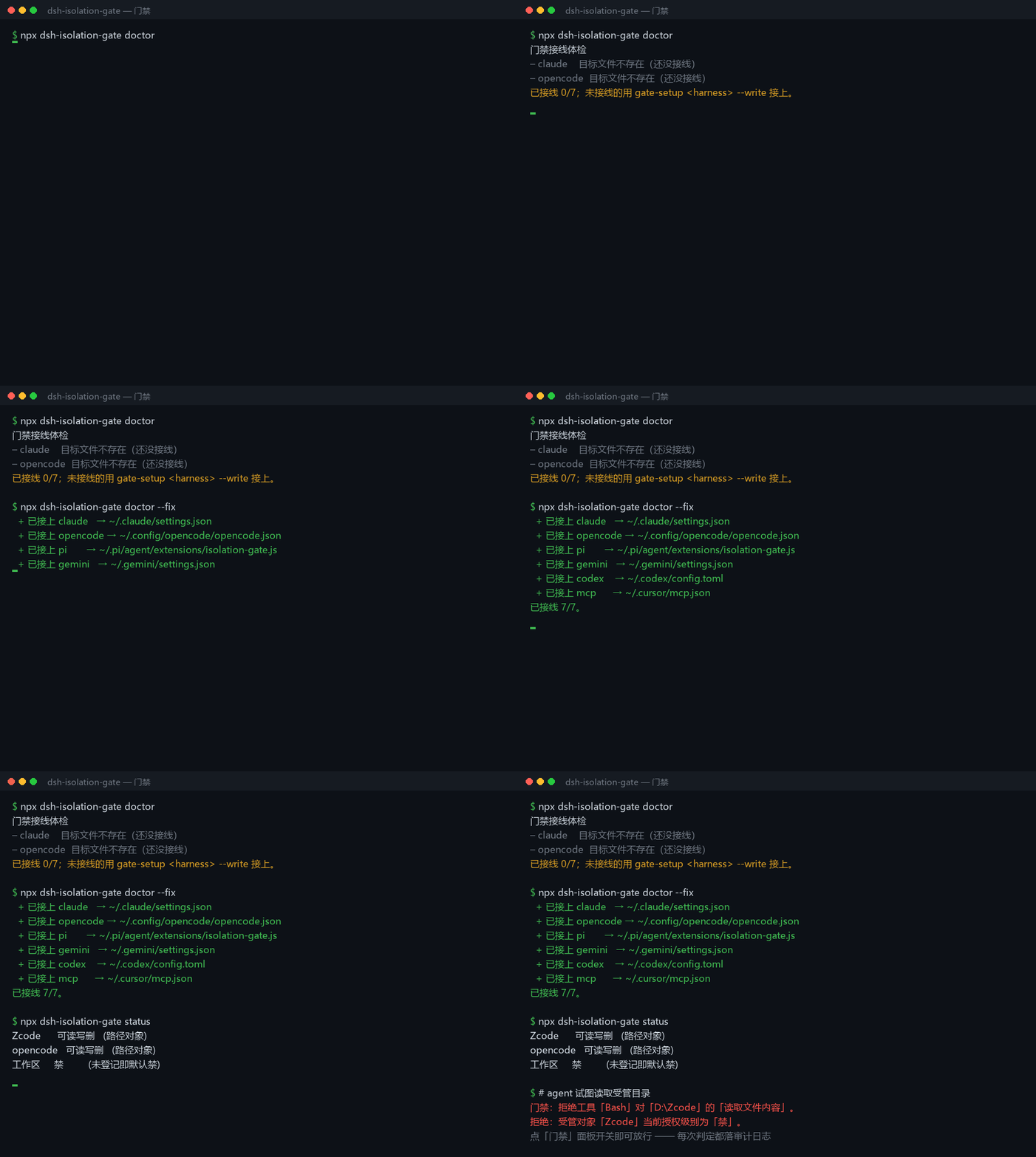
Quick start (3 commands)
npx dsh-isolation-gate doctor --fix   # wire the harnesses it can find
npx dsh-isolation-gate doctor         # expect 7/7
npx dsh-isolation-gate ui             # flip levels on one screen
Changing a level is a UI action (gate ui, or the Gate panel inside DSH). The gate CLI is the governed channel — it judges and reads/writes/deletes under the current policy; it does not grant anything.
Verified, not claimed
| Check | Result |
|---|---|
| Local test suite | 16/16 suites pass |
npm run verify:install |
packs the repo, installs into an empty temp dir, then doctor 0/7 → doctor --fix 7/7 → re-check 7/7 |
| CI | Ubuntu / macOS / Windows × Node 20 / 22 / 24 |
| Author machine | doctor 7/7; the plugin is loaded via a profile link: to the repo; a real tool call was denied by it |
Per-harness status lives in docs/VERIFY.md; a one-page walkthrough with real captured output is in docs/EXAMPLES.md.
How it wires into each harness
| Harness | Mechanism | Hard block? |
|---|---|---|
| DSH | native tool guard (ctx.tools.guard) |
yes |
| Claude Code / ZCode | PreToolUse hook |
yes |
| Gemini CLI | BeforeTool hook |
yes |
| opencode | in-process plugin | yes |
| pi | extension tool_call |
yes |
| Codex CLI | MCP server | no — advisory |
| Cursor / Windsurf | MCP server | no — advisory |
Honest limits: anything that only speaks MCP can be asked to respect the gate but cannot be stopped. opencode and Gemini are wired and unit-tested but have not been run through a full logged-in session.
What it is (and is not)
It is not another allow/deny rule engine, and it is not a sandbox.
- Others ask "how do I let the agent reach more directories?" (multi-root / allowlist / write-protect) or "how do I block tools with rules?" (permission-rules / safety-net).
- We ask: which directories are off-limits, what level each has, who changed it, and how does the agent check it?
So the product is the management surface:
| Capability | Detail |
|---|---|
| Three levels | deny (default) / read (read-only) / full (read-write-delete) |
| Two object kinds | Name (first-level directory under the drive root, e.g. Zcode) or any absolute path (e.g. <drive-root>\Zcode, E:\data\shared\project) |
| Default deny + roster | Only objects in the roster are managed; everything else is out of scope; new objects start at deny |
| One-screen switches | A segmented control per object; changes persist immediately and survive restarts |
| Groups | Named groups ("harness isolation", "cross-agent sharing"); one click applies a level to the whole group; groups live in the state file, the roster stays one-object-per-line |
| Folder picker | Uses the host's native directory picker when available; otherwise falls back to "unlisted first-level directories + path input" |
| Two enforcement points | ① the governed channel bin/gate.mjs; ② the host tool pre-execution guard ctx.tools.guard() |
| Audit | ~/.dsh/dsh-isolation-gate/access-log.jsonl: time / object / level / op / allowed / reason only — never file contents |
| Agent self-check | node bin/gate.mjs status — the model can read the policy instead of guessing |
Where it blocks
model issues a tool call
   │
   ├─ tools/pre-execute  ← ★ tool guard (this plugin's ctx.tools.guard)
   │      file-tool arguments / shell command text → three-level decision → denial reason returned to the model
   │
   ├─ tool actually executes (read / write / edit / bash …)
   │
   └─ bin/gate.mjs  ← ★ governed channel (agent explicitly reads/writes managed objects through it)
          denied ⇒ not a single byte is touched
Both paths call the same checkAccess, so the panel, the CLI, and the tool guard cannot disagree.
Install
A. dsh plugin add (recommended)
dsh plugin --profile desktop add dsh-isolation-gate
On the desktop build you can also use Plugins → Add plugin and enter the package name or a local path.
B. profile link: (development / local use)
// ~/.dsh/profiles/<profile>/package.json
"dependencies": { "dsh-isolation-gate": "link:D:/plugins/dsh-isolation-gate" }
# ~/.dsh/profiles/<profile>/cordis.patch.yml
- insert:
    - id: isolation-gate
      name: 'dsh-isolation-gate'
⚠️ Changing the composition requires a dsh restart. Switching levels or editing the roster does not.
Defaults
| Config | Default | Meaning |
|---|---|---|
statePath |
<data-root>/isolation-gate/state.json |
single source of truth |
rosterPath |
<data-root>/isolation-gate/roster.txt |
roster, one object per line |
backupDir |
<backup-dir> |
backup before roster edits |
root |
<drive-root>\ |
root whose first-level directories are listed |
auditPath |
~\.dsh\dsh-isolation-gate\access-log.jsonl |
audit log |
toolGate |
true |
false = channel-only enforcement |
suspectVocabulary |
built-in ['pi','codex',…] |
extra "suspected harness directory" names (legacy harnessVocabulary still read) |
State file (v3)
{
  "version": 3,
  "defaultLevel": "deny",
  "groups": { "harness isolation": { "note": "", "updatedAt": "…" } },
  "objects": {
    "Zcode": { "level": "deny", "note": "", "group": "harness isolation", "updatedAt": "…" },
    "E:\\data\\shared\\project": { "level": "read", "note": "", "group": "", "updatedAt": "…" }
  },
  "profiles": { "strict-delivery": { "mode": "allowlist", "allow": [{ "path": "E:\\data\\shared", "level": "read" }], "network": "deny", "unknownTool": "deny" } },
  "sessionOverrides": { "<sessionId>": "strict-delivery" }
}
- Legacy formats stay readable: v1
harnesses: { key: { level } }and v2objectsare normalised to v3 on read (levels are preserved;profiles/sessionOverridesdefault to empty); the next write persists v3. - Missing file = deny everything; corrupt JSON = deny everything and never overwrite it.
- No BOM; writes go through temp-file + rename (atomic).
state.harnessesremains a read-only in-memory alias; it is no longer written to disk.
Decision semantics
- For a path, compute the real path first (realpath of the target, or "deepest existing ancestor realpath + remainder") — junctions cannot smuggle you in;
- Find the longest path-segment prefix among path objects (case-insensitive;
<drive-root>\a\bdoes not match<drive-root>\a\bc); - If no path object matches, fall back to the first segment under the drive root against name objects;
- If nothing matches, the object is not managed and this channel allows it;
- Roster missing / unreadable ⇒ deny everything (fail-closed), never "allow all".
Tool guard (ctx.tools.guard)
- Covers
read / read_image / grep / glob / write / edit / str_replace_editor / apply_patch / mkdir / move / copy / delete / bash / pwsh / … - Shell commands are lexically decomposed:
cd+ relative paths, redirections, pipelines andbash -c "…"are followed; - Unknown commands that mention a managed absolute path are treated as writes (allowed only at
full) — false denials are preferred to false allows; - If the guard itself throws, it fails closed;
- Calls to
bin/gate.mjsitself are exempt (the channel performs its own check; otherwise it would double-block).
CLI
node bin/gate.mjs status
node bin/gate.mjs policy
node bin/gate.mjs check  --name Zcode --op read
node bin/gate.mjs check  --path "<drive-root>\Zcode\some-file" --op delete
node bin/gate.mjs traverse --path "<drive-root>\Zcode"
node bin/gate.mjs read   --path "<drive-root>\Zcode\some-file"
node bin/gate.mjs write  --path "<drive-root>\Zcode\some-file" --text "content"
node bin/gate.mjs delete --path "<drive-root>\Zcode\some-file"   # backed up to the recycle bin first
node bin/gate.mjs rmdir  --path "<drive-root>\Zcode\empty-dir"   # empty directories only, never recursive
node bin/gate.mjs log    --limit 20
node bin/gate.mjs stats  --days 7             # audit stats (allow/deny · objects · ops · per day)
node bin/gate.mjs grant  --name Zcode --for 30m --level read   # temporary grant, auto-reverts
node bin/gate.mjs grant  --list               # remaining time of temporary grants
node bin/gate.mjs set    --path "<drive-root>\Zcode\public" --level read  # per-subdirectory level (overrides parent)
Exit codes: 0 allowed / success · 3 denied (reason on stderr) · 2 usage or environment error.
HTTP routes
| Method | Path | Purpose |
|---|---|---|
| GET | /__dsh-isolation-gate/ping |
identity + route list + capabilities (toolGate / picker) |
| GET | /__dsh-isolation-gate/state |
full state (roster / levels / groups / diffs / audit / policy lines) |
| POST | /__dsh-isolation-gate/level |
{ name, level } |
| POST | /__dsh-isolation-gate/roster |
{ action:'add'|'remove', name } |
| POST | /__dsh-isolation-gate/group-level |
{ group, level } |
| POST | /__dsh-isolation-gate/group |
{ action:'assign'|'delete', name?, group } |
| POST | /__dsh-isolation-gate/prune |
remove orphan state keys |
| POST | /__dsh-isolation-gate/pick |
native directory picker (400 when unavailable) |
| POST | /__dsh-isolation-gate/toolcheck |
{ tool, args } dry-run of the tool guard |
| POST | /__dsh-isolation-gate/check |
{ name?|path?, op } |
| GET | /__dsh-isolation-gate/log?limit= |
recent audit |
External Origin → 403; wrong method → 405; bad JSON / invalid level → 400.
How it relates to other plugins
| Plugin | Scope | Relationship |
|---|---|---|
dsh-house-guard (built-in here) |
System assets: a fixed set of protected paths writable only by whitelisted butler sessions | Different purpose, disjoint objects; whichever denies wins |
PerryLink/dsh-permission-rules |
Rule engine: allow/deny/ask + tool params / shell / network | Complementary: it has no read-only level; we never write its YAML and do not depend on it |
cherrchen/dsh-plugin-multi-root-workspace |
Adds extra workspace roots (read-only / read-write) enforced by the kernel sandbox | Complementary: it grants, we fence; it is stronger at enforcement, we are stronger at management |
azazo1/dsh-write-protect |
Read-only protection inside the workspace + extra writable roots | Complementary; its shell protection has a documented Windows gap |
This plugin declares no
@deepseek-ai/dsh*peer dependencies — a DSH upgrade cannot silently disable it through the compatibility-exemption gate.
The 1.0 stability promise
From 1.0 onward, the surfaces below only grow, never break. A breaking change would ship as 2.0 with a migration note.
| Surface | Promise |
|---|---|
| State file | On-disk format v3; v1 / v2 are read-compatible and upgraded on write, levels preserved. New fields are appended only; existing field meanings do not change. |
| CLI | bin/gate.mjs subcommands and exit codes (0 allowed / 3 denied / 2 usage or environment error) are frozen; new flags are additive. |
| HTTP | Existing /__dsh-isolation-gate/* paths and methods are frozen; new routes are additive. |
| Decision semantics | The three levels (deny / read / full), longest-prefix matching, default deny and fail-closed are frozen — changing them would be a different product. |
Not promised: panel visuals and copy, and audit-log fields, may evolve; bug fixes are not breaking changes.
Known boundaries (read this)
- Raw filesystem access and separate processes are not blocked. Any program or script that bypasses DSH tool calls can read/write the disk directly.
- Shell scanning is heuristic. Variable indirection, command substitution, encoding, symlinks and
cmd /cwrappers can bypass it — the same known limitation as comparable in-process guards. - Not a kernel boundary. It changes no ACLs and does not take over the sandbox.
- The tool guard only covers host tools. An MCP tool that spawns its own process is constrained only by its argument text.
- Windows-first. Path comparison follows Windows semantics. CI (tests + a real
npm pack→ install →doctorrun) covers Linux, macOS and Windows, but end-to-end sessions inside each harness were only verified on Windows.
Tests
node test/run-all.mjs     # 16 suites · fully offline
node --check lib/*.js
Acknowledgements
- Design inspired by
PerryLink/dsh-permission-rules(Apache-2.0) and Claude Codepermissions— no code or README text was copied. - Coexists with
@dsh-external/dsh-house-guard; see the boundary table above.
License
MIT · see LICENSE.
Works with every harness
npx dsh-isolation-gate setup claude   # Claude Code PreToolUse hook (hard block)
npx dsh-isolation-gate setup zcode    # ZCode hook (same protocol)
npx dsh-isolation-gate setup opencode # in-process plugin (hard block)
npx dsh-isolation-gate setup pi       # pi extension (hard block)
npx dsh-isolation-gate setup codex    # MCP server (advisory only: Codex has no pre-tool hook)
npx dsh-isolation-gate ui             # local settings page: groups + deny/read/full
Default state paths follow the OS (~/.agents on non-Windows, D:\.agents when present on Windows).
Override with GATE_STATE_PATH / GATE_ROSTER_PATH / GATE_ROOT.
Links
More in this category
kenryu42/cc-safety-net★ 1900
Pre-execution guard that blocks destructive Git and filesystem commands and access to secrets such as SSH keys and .env files before a tool call runs.
ADWMC/helm-d#helmd★ 984
Security-analysis plugin for DeepSeek Harness: 33 tools spanning six security domains, evidence/reporting and toolbox, plus the case lifecycle, routing and tool ledger; a session-bound case workflow with an evidence chain, E-id validation and reproducible findings; 362 on-demand references; three hot-swappable persona profiles; and a four-tab workbench (armor / case / intercept / about) with case-state recovery after context compaction.
toby-bridges/api-relay-audit★ 904
Runs local security audits of AI API relays and LLM proxies from DeepSeek Harness, producing Markdown reports for prompt injection, model substitution signals, tool-call rewriting, error leakage, stream integrity, and profile-gated Web3 risks.
SeaOf0/dsh-redteam-model★ 807
Authorized-security DSH collection: nine work modes (redteam coordinator, pentest, code audit, binary analysis, attack-defense, AV evasion, incident response, cloud security, CTF solving) and fifteen runtime plugins, managed from a settings page with one-click deploy, install, update and uninstall.
howmp/dsh-pentest★ 616
Authorized pentest mode for DeepSeek Harness — exploration chain, assets and findings with a Web view.
PerryLink/dsh-auto-review★ 244
Second-model auto-review on the approval answerer chain: a read-only reviewer subagent returns structured allow/deny verdicts with reasons, fail-closed by default.
Community comments
Comments are public GitHub Discussions. Loading them connects to GitHub and Giscus; a GitHub account is required to post.