Manage global AGENTS.md in DSH Web with Markdown preview, reusable templates, version history, import/export, failed-import rollback, and revision-conflict protection.
Install
# from npm (prebuilt)
dsh plugin --profile web add @huanghai-lab/dsh-custom-instructions
# from GitHub (first run asks for allowBuilds approval — follow the hint, retry)
dsh plugin --profile web add github:huanghai-lab/dsh-custom-instructions
Any plugin you install runs third-party code with your own permissions — it can read your files, use your credentials, and reach the network, and tool approvals don’t sandbox it. GitHub-sourced plugins also run build scripts at install time — pnpm blocks those until you allow them, so an install can stop with ERR_PNPM_GIT_DEP_PREPARE_NOT_ALLOWED or ERR_PNPM_IGNORED_BUILDS; dsh prints the exact key to add under allowBuilds in your profile’s pnpm-workspace.yaml, and the install works on the next run. Allowing a build is a trust decision: only install sources you trust, and pin a commit (github:owner/repo#sha).
README
中文 · Changelog · Security · Contributing

A safe instruction manager for DSH Web: edit the global AGENTS.md, reuse templates, preview Markdown, restore history, and block silent overwrites when another window or program changes the data.
It is a portable, recoverable, conflict-safe workspace for global instructions rather than a bare rules textarea.
Stable v0.5.0 supports DSH
0.1.2-alpha.1and has passed a tagged-source build, isolated plugin-tarball installation, and real browser E2E.
DSH
0.1.1-rc.2users must pin plugin v0.4.0; older DSH installations should remain on v0.3.0.
Quick start
Requirements: Node.js ^22.19.0 || >=24.0.0, pnpm, and DSH 0.1.2-alpha.1.
dsh plugin --profile web add @huanghai-lab/dsh-custom-instructions
dsh web
Restart the Web profile, then open Settings → Custom instructions.
To pin the stable release explicitly:
dsh plugin --profile web add @huanghai-lab/dsh-custom-instructions@0.5.0
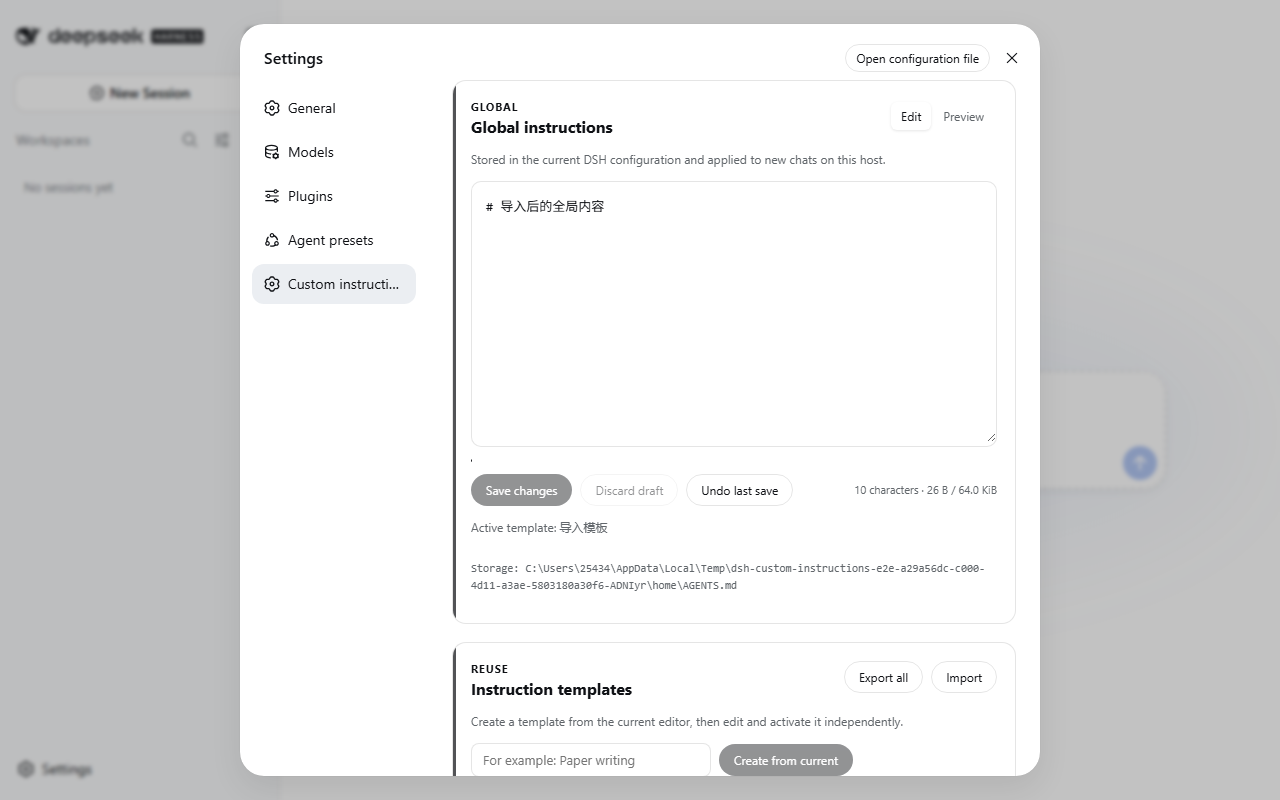
The UI follows the DSH locale and falls back to English. A Chinese screenshot is available at docs/assets/settings-zh.png.

Features
| Feature | Current behavior |
|---|---|
| Global instructions | Save, discard draft, undo last save, edit/Markdown preview; 65 KiB limit |
| Browser draft | Stored in sessionStorage per DSH profile; cleared after save or explicit discard |
| Conflict protection | Every mutation checks a disk-derived revision; conflicts preserve the draft |
| Templates | Unicode names, independent edit/preview/save, activate, and confirmed delete; up to 50 |
| History | Snapshot before every replacement, expandable preview and confirmed restore; newest 100 |
| Import/export | Current content, templates, history, and active state; strict validation and rollback |
| Project instruction overview | Read-only project AGENTS.md status for registered workspaces |
| Accessibility | Keyboard save, focus restoration, ARIA, native dialogs/file picker, responsive layout |
Markdown previews use DSH's official MarkdownText; the plugin does not ship another Markdown parser.
Data safety
- The plugin writes only
$DSH_HOME/AGENTS.mdand its siblinginstructions/data. Project instructions remain read-only. - Every mutation supplies a SHA-256
revisionderived from actual disk content. A multi-window or external edit returns409instead of being overwritten. - Mutations are serialized inside the DSH process. Files are written to a same-directory temporary file, read back for verification, and then replaced.
- Before replacing global content, the previous value is written to
AGENTS.md.bakand history. Undo is offered only when the backup truly exists. - Imports are fully validated before execution. A failed write restores the pre-import snapshot; the latest snapshot is retained as
instructions/import-rollback.json. - Each content item is limited to 65 KiB. Imports allow at most 50 templates, 100 history entries, and a 16 MiB request body.
- This plugin adds no product telemetry and does not change DSH's own telemetry setting.
Exports, backups, history, and rollback bundles may contain private instructions or paths. Treat them as sensitive and do not paste them into public issues without redaction.
Storage layout
$DSH_HOME/
├── AGENTS.md
├── AGENTS.md.bak
└── instructions/
    ├── active.json
    ├── import-rollback.json
    ├── templates/
    └── history/
Template filenames use Node's native Base64URL encoding. Display names are never appended directly to filesystem paths.
Upgrades and version selection
dsh plugin --profile web add @huanghai-lab/dsh-custom-instructions@0.5.0
Export once before upgrading from v0.3.0. v0.5.0 reads v0.3 ASCII template files and numeric history IDs; a legacy template migrates to the encoded filename on its first successful write. v0.3 exports and bundles without a format field are parsed as v0.3 data.
If DSH is still 0.1.1-rc.2, pin plugin v0.4.0:
dsh plugin --profile web add @huanghai-lab/dsh-custom-instructions@0.4.0
Import behavior
- Same-name templates are updated; extra local templates are kept. A merged total above 50 is rejected.
- History is merged by ID and trimmed to the newest 100 entries.
- Current content and active state are imported. The active template must exist after merging.
- One invalid field, template, or history entry rejects the entire import.
- Exports contain saved data only, not an unsaved browser draft.
Troubleshooting
“Custom instructions” is missing
Confirm that the package is installed into the web profile, then restart DSH:
dsh plugin --profile web why @huanghai-lab/dsh-custom-instructions
dsh web
The page reports a revision conflict
Choose Copy draft, then Load latest, merge manually, and save again. Repeated clicks do not bypass the protection.
The page cannot load or write
Check the displayed storage path, $DSH_HOME permissions, and DSH logs. The host distinguishes 400, 404, 409, 413, and 500; the client also reports network, empty-response, and non-JSON failures.
The plugin stopped loading after a DSH upgrade
Stable v0.5.0 guarantees compatibility only with 0.1.2-alpha.1. It removes the client runtime deleted by that release, supports the new Markdown labels and browser-authentication APIs, and has completed isolated installation against the official tagged source build. DSH 0.1.1-rc.2 users should install plugin v0.4.0.
Compatibility
| Plugin | DSH | Node.js | Status |
|---|---|---|---|
v0.5.0 (latest) |
0.1.2-alpha.1 |
`^22.19.0 | |
| v0.4.0 | 0.1.1-rc.2 |
`^22.19.0 | |
| v0.3.0 | 0.1.0-rc.6 |
`^22.19.0 |
Development and verification
pnpm install --frozen-lockfile
pnpm typecheck
pnpm test
pnpm build
pnpm compat:dsh /path/to/deepseek-harness
pnpm typecheck:dsh-source /path/to/deepseek-harness
pnpm e2e -- /path/to/deepseek-harness
First run the locked install and build in the official dsh-v0.1.2-alpha.1 source checkout. pnpm e2e -- <source-directory> uses that build and the current plugin tarball, creates an isolated DSH_HOME and workspace under the OS temporary directory, then exercises one-time login, save, preview, templates, history, import/export, and both locales in the real GUI. It never touches the user's real AGENTS.md.
pnpm compat:dsh checks the DSH source directory for the client Context, Markdown, settings, workspace, and Web route interfaces used by this plugin. CI runs it against the official dsh-v0.1.2-alpha.1 tag.
CI runs locked install, typecheck, tests, build, and committed-lib freshness on Node 24 for Ubuntu and Windows. Ubuntu also builds the official alpha tag, typechecks against its declarations, and runs isolated browser E2E. Once upstream npm packages are installable, the npm installation path must still be rechecked against the published artifacts.
Community
Use the issue templates for reproducible bugs, and Discussions for usage notes and ideas. Report vulnerabilities privately as described in SECURITY.md.
If the plugin genuinely helps, a Star, a concrete use case, or a reproducible report all help the project improve.
License
Links
More in this category
zhu1090093659/dsh-web#packages/dsh-task-board★ 8759
Task board for the dsh web GUI: a sidebar multi-column kanban whose cards run in real DSH agent sessions and can also be scheduled with cron expressions, executed host-side even with the browser closed.
zhu1090093659/dsh-web#packages/dsh-web-all★ 8759
Plugin and skin collection for the DSH Web UI: task board, Git graph, right-side panel, remote mobile UI, pet, live token stats, and a skin center.
MeteorNOX/DeepSeek-Balance-Whale-Widget★ 4819
A fixed-corner whale widget for the DSH web GUI — balance, today's usage and per-turn cost with peak/off-peak pricing, editable balance-alert and daily-budget bubbles, a module-based custom bubble queue with A/B weighted choices and random lines or images, 30+ vendor templates (OpenAI, OpenRouter, Kimi, SiliconFlow, Ark, Zhipu, MiniMax and more) with per-model balance and subscription quota, plus task-end sound, imported audio, custom roles and a resource manager. Local-only, no telemetry.
ccch1mneyyy/dsh-TUI★ 4602
Claude Code-style full-screen terminal UI: pixel-whale header, live status line, and streaming thought expansion.
omdsh-dev/DSH-better-sidebar★ 4181
Full sidebar workbench with file rendering and editing, terminal, Git, and subagents; third-party plugins can register new tabs.
Devin-AXIS/deepseek-design#deepseek-idesign★ 1461
Visual design studio for websites, app prototypes, posters, cards, reports, and magazines, with templates, direct element editing, selection-aware AI draft handoff, and export.
Community comments
Comments are public GitHub Discussions. Loading them connects to GitHub and Giscus; a GitHub account is required to post.