Project board, task schedule (gantt) and project memory: sessions opened from a card auto-load the latest project STATE; interface in 中文 / English / Русский. Its HTTP routes have no DSH access check, so a web page open in your browser could call them.
Install
# from npm (prebuilt)
dsh plugin --profile web add dsh-project-manager
# from a prebuilt release tarball
dsh plugin --profile web add -w "https://github.com/hoyyang/dsh-project-manager/releases/download/v0.80.0/dsh-project-manager-0.80.0.tgz"
# from GitHub (first run asks for allowBuilds approval — follow the hint, retry)
dsh plugin --profile web add github:hoyyang/dsh-project-manager
Any plugin you install runs third-party code with your own permissions — it can read your files, use your credentials, and reach the network, and tool approvals don’t sandbox it. GitHub-sourced plugins also run build scripts at install time — pnpm blocks those until you allow them, so an install can stop with ERR_PNPM_GIT_DEP_PREPARE_NOT_ALLOWED or ERR_PNPM_IGNORED_BUILDS; dsh prints the exact key to add under allowBuilds in your profile’s pnpm-workspace.yaml, and the install works on the next run. Allowing a build is a trust decision: only install sources you trust, and pin a commit (github:owner/repo#sha).
README
dsh-project-manager
Project board and persistent project memory for DeepSeek Harness. Open a session from a card and the AI starts with full project state on turn one.
简体中文 · English · Русский · Releases · Changelog · Issues
Install
dsh plugin add dsh-project-manager
Alternative: dsh plugin add github:hoyyang/dsh-project-manager. Restart dsh after installing. Zero config, no account, no API key required.
Requires the dsh web UI (
dsh webor DSH Desktop). Tested on dsh0.2.0-rc.2. Project memory requirespython3(on Windows, only project memory is disabled).
Highlights
| Feature | Summary | |
|---|---|---|
| 🗂 | Project board | Card group = parent project, card = project; one search box covers titles and everything inside cards |
| 🧠 | Auto-loaded project memory | Sessions opened from a card receive full STATE.md and must-read docs automatically, syncing updates across CLIs |
| 🛡 | Guarded memory writes | Rejects writes without a full read first or when commits, paths, or versions disappear undeclared (DROPPED_ANCHORS) |
| 📅 | Schedule + Today panel | Plan, actual and deadlines on one timeline; after 00:00, yesterday's in-flight work is logged automatically |
| ⚡ | Task ↔ session sync | When a linked session starts running, the task moves to In progress |
| 📚 | Knowledge base + EN/中文 UI | Reusable knowledge cards attached to projects; switch UI language instantly |
Features
Project board
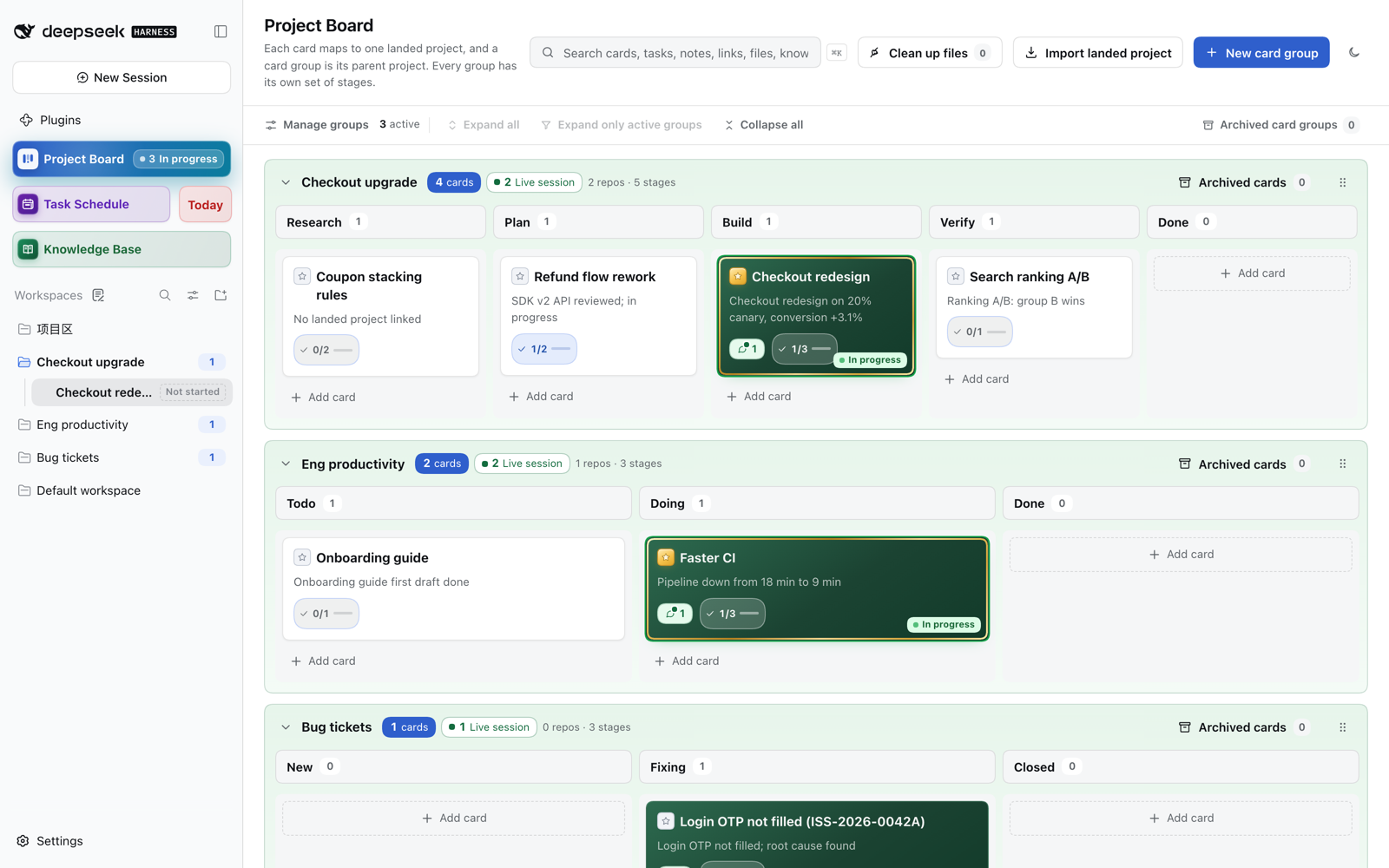
- Swimlane groups: Each card group is a swimlane with customizable stages (rename or reorder); drag cards across stages to track progress.
- Live activity indicators: Cards display session counts and task progress; cards with an active session glow green.
- Starred projects: Star any card to show a gold badge across the board, detail drawer, Gantt schedule, and Today panel.
- Deep search: One query searches card titles and inner content (tasks, subtasks, notes, links, files, attached knowledge cards) with hit snippets that jump straight to the matching item.
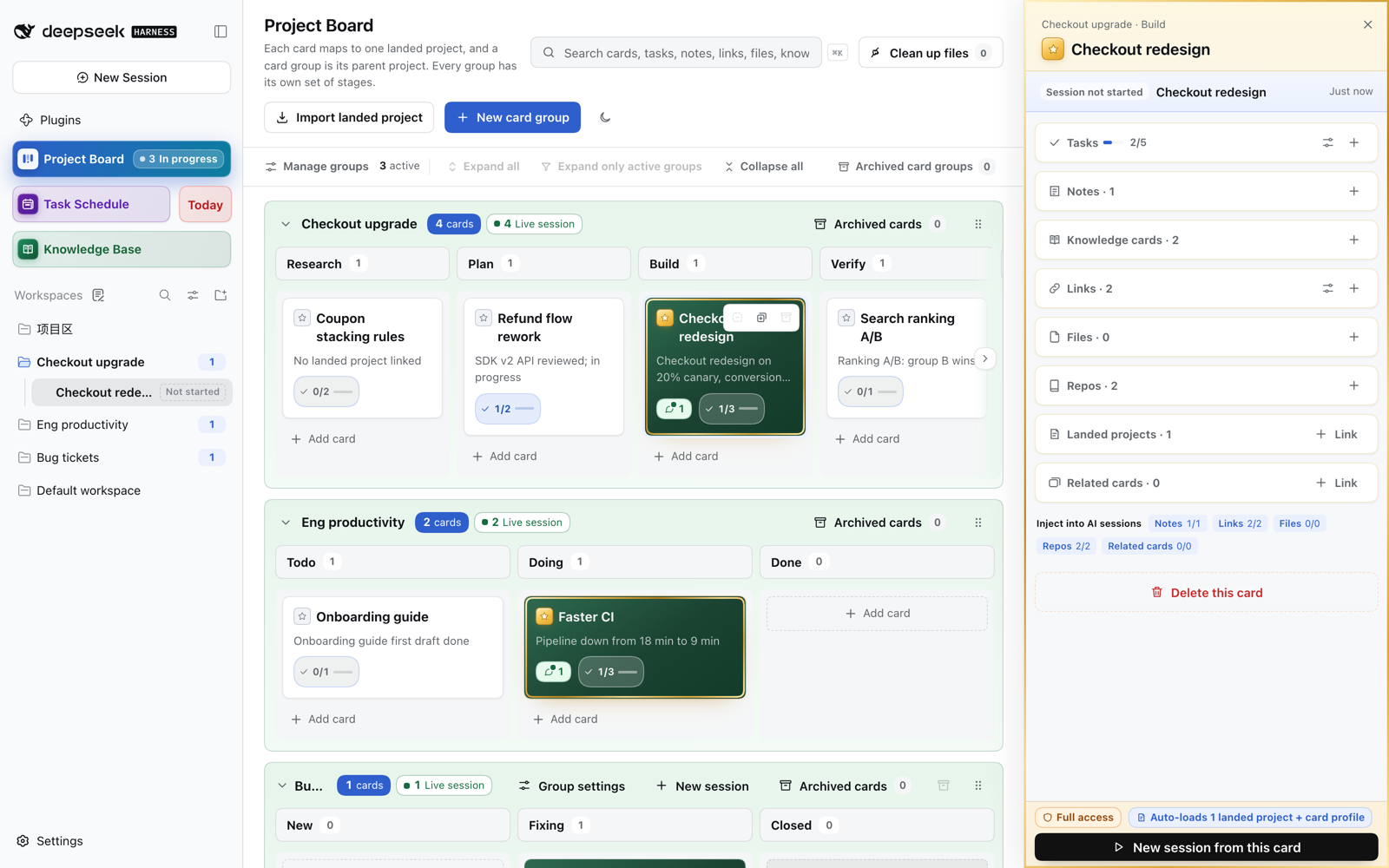
- Card details: tasks, notes, knowledge cards, links, files, repos and the linked landed project in one drawer; each item can be switched in or out of session injection.
Sessions start with project memory
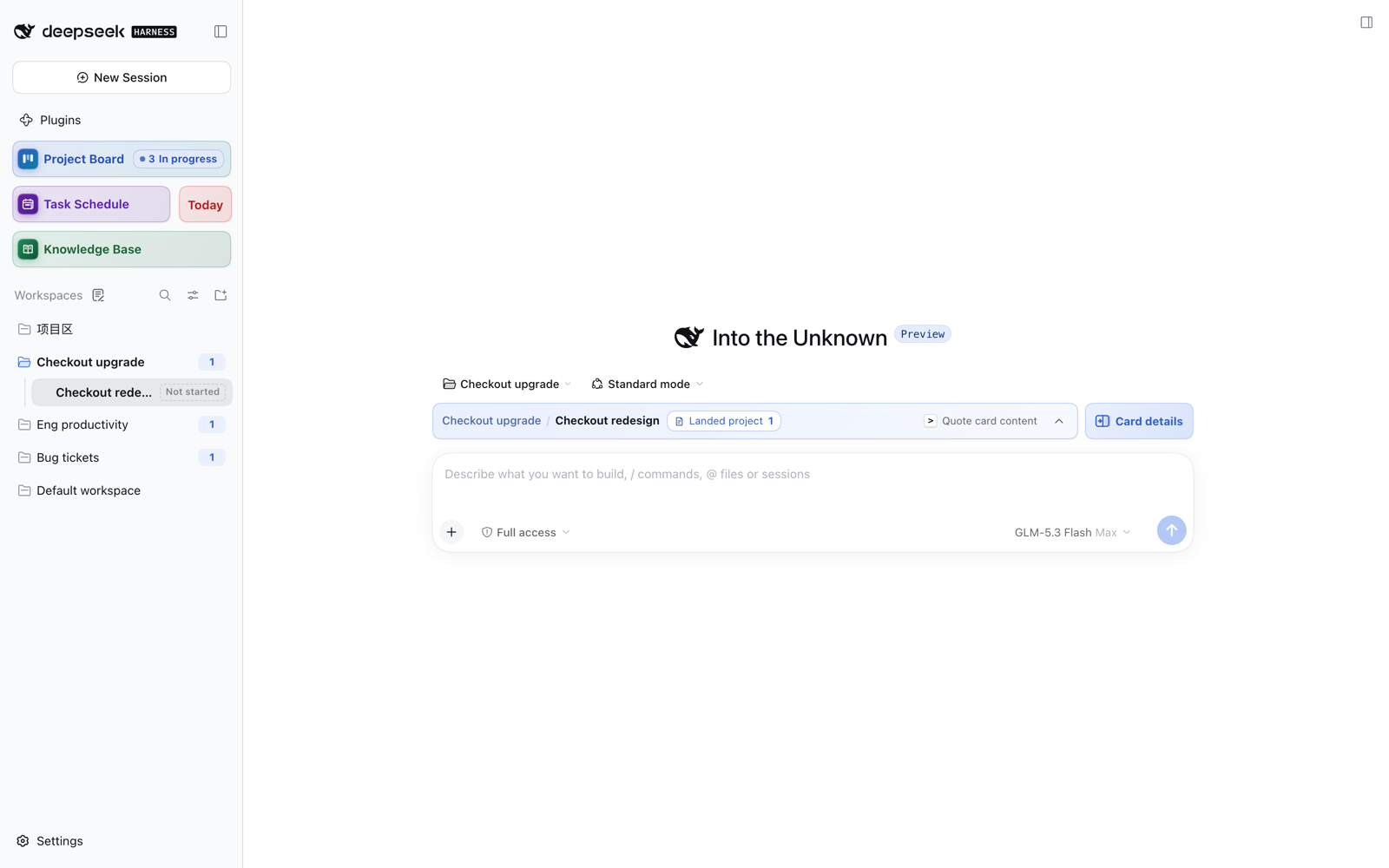
- Full-text injection: Sessions started from a card automatically receive the full linked
STATE.mdand its[必读](must-read) sub-documents on the first turn. - Cross-CLI version tracking: If another session or external CLI (Codex / Claude Code) edits
STATE.md, the next turn in your session receives the updated version (each version is sent once). - Info bar: above the input — shows the card and landed project; Quote card content drops tasks, notes or knowledge cards into the chat; you can view the raw text the AI received.
- One-line persist & recall: say
落盘项目 <name>(persist) to write progress back,回忆 <name>/继续 <name>(recall / continue) to read it all and pick up. The trigger words are Chinese by design. - Write-back guards: All writes go through the bundled
ai-memorytool (file locks + optimistic concurrency). The AI must read the full state before writing; if a new draft drops commit IDs, file paths, or version numbers without declaring them, the write is rejected withDROPPED_ANCHORS. - Housekeeping: merge duplicate landed projects, archive by card group — all undoable.
Task Schedule and Today panel
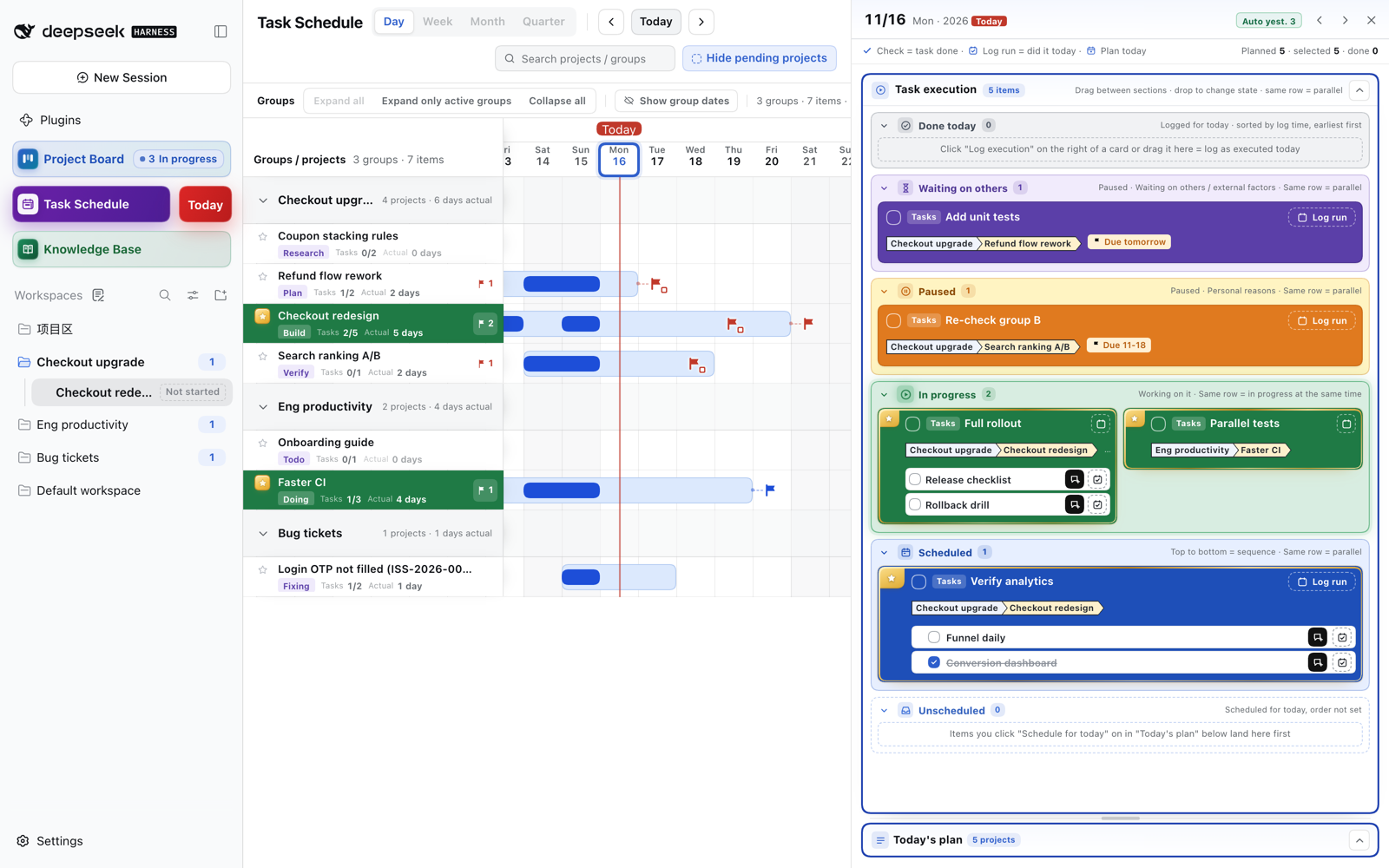
- Unified timeline: View planned dates (light blue), actual active days (dark blue, recorded automatically on days with conversation), and deadline flags (red) on one Gantt chart.
- Today panel: zones Waiting on others / Paused / In progress / Scheduled / Unscheduled; drag to change state. Plan today sends a task straight to Scheduled.
- Tasks follow sessions: a task can link several sessions (one active). When a linked session starts running, the task or subtask moves to In progress right away.
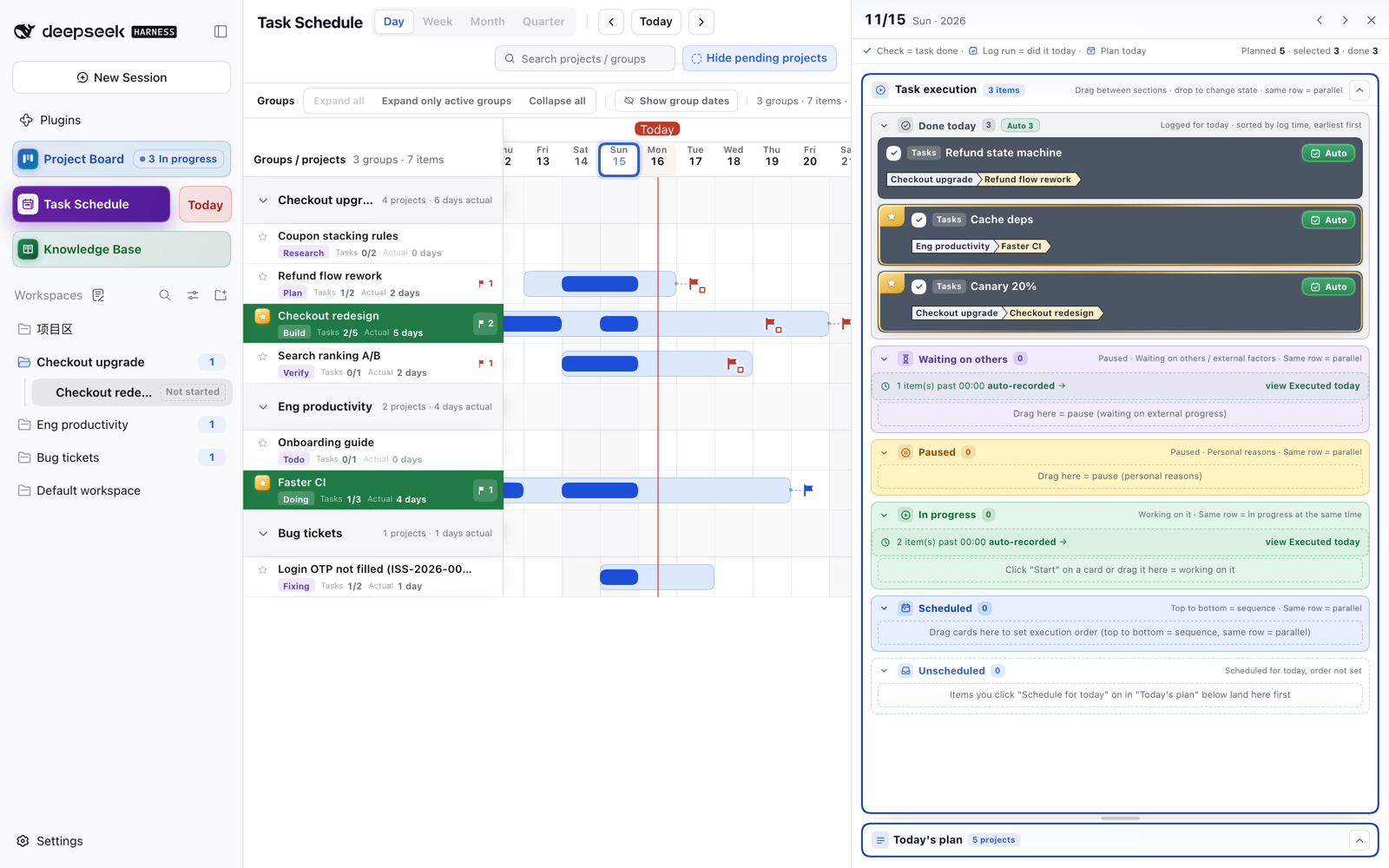
- Auto-log at 00:00 (new in 0.79): cards still in Waiting on others / Paused / In progress when the day ends are logged as run for that day (not marked done). A badge next to today jumps to yesterday; click Auto on a card to undo that batch — it won't be re-added.
Knowledge base, language and file cleanup
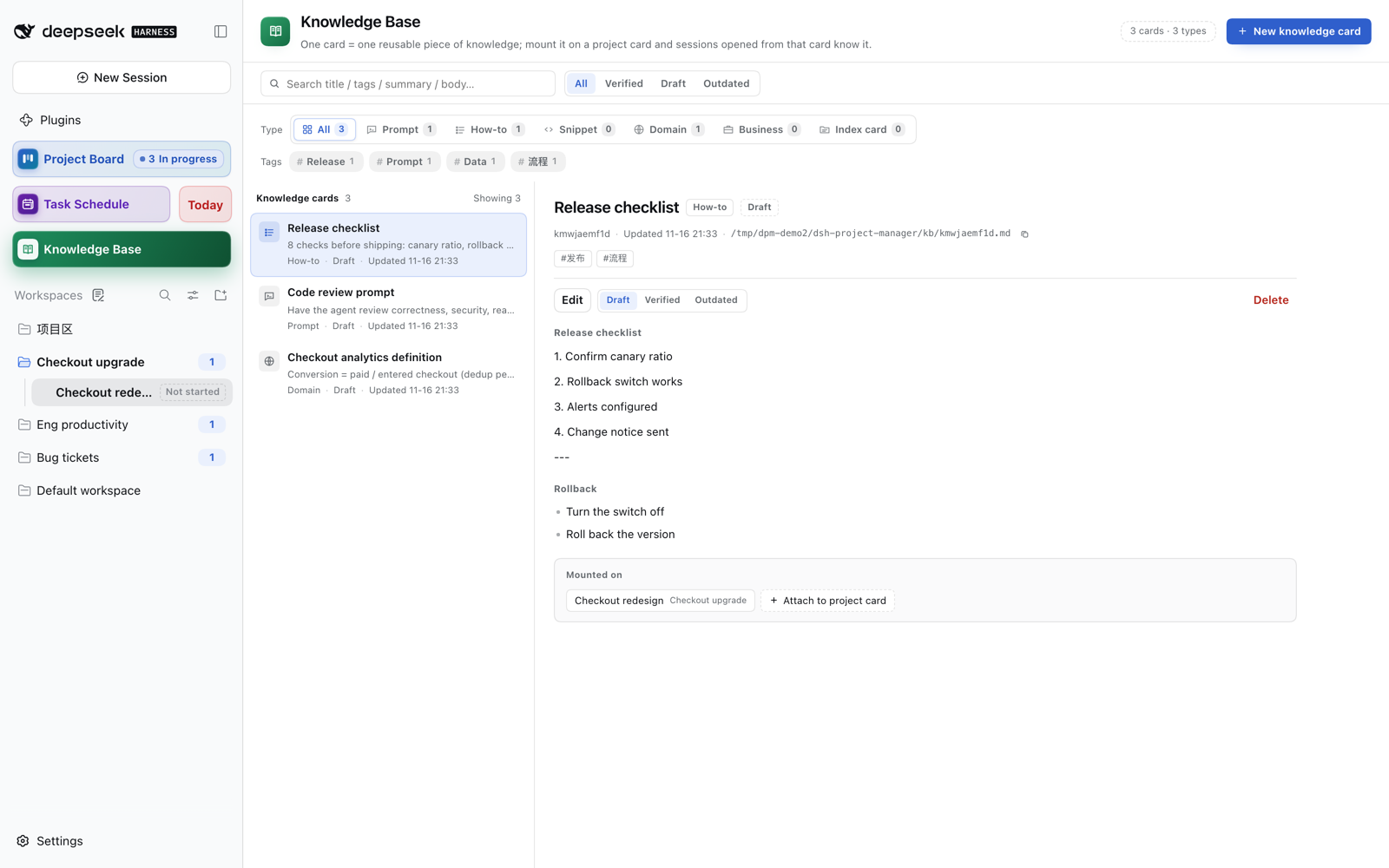
- Knowledge cards: prompts, how-tos, snippets, domain and business knowledge, summary cards — with tags and search.
- Attach or quote: attach a knowledge card to a project and its sessions see it; or quote a whole card, or just one section split by a titled divider.
- Interface language: Settings → Project Board → Interface language: Follow DSH / 中文 / English. Instant, no reload; your own content is never translated.
- Clean up files: lists files linked from cards in landed projects, grouped by card; filters for useless / tasks all done / archived / in use / missing. Delete goes to the Trash and can be undone.
Quick start
- Click Project Board in the sidebar, then New card group and Add card.
- Open the card drawer to add tasks, notes, or repositories.
- Click New session from this card.
- Open Task Schedule → Today and drag tasks into zones.
- At a milestone, type
落盘项目in the session to persist. - Open the Knowledge Base panel, create a knowledge card and attach it to the project from the card details.
- Click "Quote card content" above the session input box to insert selected notes or knowledge card sections straight into your prompt.
- Type a keyword in the board search box and click a matched snippet to jump to that item inside the card.
- Click the star on a card to mark it with a gold badge across the board, the schedule timeline and the Today panel.
- Open the file cleanup panel, filter by "Unused" or "All tasks done", select the files and move them to the trash — undo stays available.
- Mount or remove repositories in the card details and toggle session injection for each item.
- Drag cards across stages to advance progress, or rename and reorder stages in a card group.
- Open Settings → Project Board → Interface language to switch between 中文 / English / Русский instantly.
| Action | Result |
|---|---|
| Click New session from this card | Session shows up under the sidebar Project area, with card material and STATE.md already loaded |
| Persist project state in chat | Validated and written to ~/.ai via ai-memory; rejected with DROPPED_ANCHORS if key facts were omitted |
Another CLI updates STATE.md |
The next turn in your active session automatically receives the new version |
| A session linked to a task starts running | The task moves to In progress in the Today panel |
The clock passes 00:00 |
Yesterday's in-flight tasks are logged as run; a badge next to today links to them |
| Click "Quote card content" in the session info bar and pick a knowledge card section | The section is inserted straight into the chat input box |
| Type a query in the board search box and click a matched snippet | The card details open and scroll to the matched task, subtask, note or knowledge card |
| Select linked files of archived projects in the cleanup panel and delete them | Files move to the OS trash instead of being erased, and an Undo button appears |
Inside a project session, the agent can drive the board (no card = this session's card):
phase_move  {"status":"verify"}
task_manage {"op":"add","text":"Add regression tests"}
landfill    {"op":"recall"}
card_manage and kb_manage are also available.
card_manage {"op":"update","star":true}
kb_manage {"op":"list","tag":"prompt"}
task_manage {"op":"check","num":"2.1","done":true}
Use cases
Long-running projects: persist today, open a new session tomorrow and pick up where you left off.
Multi-repo work: one card mounts front-end, SDK and infra repos; the session sees all of them.
One memory across CLIs: DSH, Codex and Claude Code read and write the same
~/.ai.Daily stand-up: the Today panel shows what each project is doing and what got done yesterday.
Bug tickets: one card per ticket; recall by ticket ID to get the analysis back.
Handover: the card's memory, notes, links and sessions are the handover list.
Tidy scattered memory: several copies of the same project merge into one; old names become aliases.
Let the agent drive: ask the agent to move stages or add tasks; the board updates live.
Reusing prompts and runbooks: keep coding standards or troubleshooting SOPs as knowledge cards and attach them to several cards, so every session shares the same rules.
Cleaning up stale artifacts: after a project wraps up, filter linked files by "All tasks done" or "Archived" and move the old ones to the trash in one batch.
Spot priority projects with stars: star key cards so they stand out with a gold badge on the board, the schedule timeline and the Today panel.
Good fit / not a fit
- Good fit: Multi-day projects you return to repeatedly, multi-repo work, sharing project memory between DSH and other CLIs, and daily stand-up reviews.
- Not a fit: Simple standalone todo lists, or real-time multi-user collaboration (all data stays on your machine).
Results
Sessions opened from a card get
STATE.mdand the must-read docs on step one.Persisted STATE lands at
~/.ai/projects/<group folder>/memory/designs/<name>/STATE.md.Every move, link and migration is appended to
events.jsonl.The sidebar Project area groups project sessions by card group, with live counts.
After 00:00, yesterday's in-flight tasks show up in Done today with an Auto tag.
Merged folders go to
inbox/retired/and can be restored.Knowledge cards attached to a card are injected into new sessions automatically; switching one item off stops sending it on the next turn.
Switching the interface language in Settings → Project Board (Follow DSH / 中文 / English / Русский) updates board and panel labels instantly, without reloading.
Comparison
| dsh-project-manager | Generic kanban / todo plugins | Memory-only plugins | |
|---|---|---|---|
| Project board + custom stages | ✅ | ✅ | — |
| Auto-inject project memory into sessions | ✅ Full text + version tracking | — | Retrieval only |
| Write-back guards against dropped facts | ✅ | — | — |
Shared ~/.ai across CLIs |
✅ | — | — |
| Task ↔ session status sync | ✅ | — | — |
| Daily schedule + auto day close | ✅ | — | — |
| Multi-user / cloud sync | — | Depends | Depends |
How it works
- Two local stores: the board lives in
<DSH_HOME>/dsh-project-manager/; project memory lives in~/.ai, shared with other CLIs. - Versioned injection: the first step gets card material +
STATE.md+ must-read docs; when a file changes, the next step gets the new version. - One write path: memory is written only through the bundled
ai-memory— full read first, file lock, optimistic concurrency, anchor check. - Host-side settlement: session state drives task zones; the 00:00 close runs in the host, once per day.
Reliability
Tested twice: every release is click-tested in an isolated staging
DSH_HOME, then on a real instance; cold-start static checks must pass.Tests: 596 unit tests + 9
ai-memorytests.Fails loudly: error codes like
NEED_FULL_READ,DROPPED_ANCHORS,SPEC_ISSUESname the cause.Safe by default: loopback-only routes; no credential reads, no network calls, no git; deleting a card group only removes symlinks.
Degrades quietly: if a dsh update changes the page structure, sidebar add-ons hide themselves; data is untouched.
Undoable: file deletes go to the Trash; merges and the 00:00 auto-log can be undone.
Known limits: data stays on this machine (no multi-user sync); persisting is unavailable on Windows (needs
python3).Inspectable context injection: the session info bar shows the exact text the AI received, and each card item can be toggled on or off.
FAQ
There is no "Project area" in the sidebar. It appears after your first project session. Until then, use the Project Board entry.
How do I see what the AI received? In the info bar above the input, click View the raw text the AI received.
My persist was rejected.
Follow the error code: recall the full state first (NEED_FULL_READ), or list intentional removals in drop (DROPPED_ANCHORS).
Why were yesterday's tasks logged automatically? That's the 0.79 auto-log at 00:00. Jump to yesterday and click Auto on a card to undo the batch; it won't come back.
How do I switch the UI to English? Settings → Project Board → Interface language → English.
"Restore" is greyed out. Install dsh-manage-sessions.
Configuration
Zero config by default. To customize, add a top-level entry to your profile's cordis.patch.yml:
- id: dsh-project-manager
  config:
    aiRoot: ''                              # memory directory, defaults to ~/.ai
    landfill: true                          # false = board only
    projectSessionMode: danger-full-access  # or inherit
Uninstall
dsh plugin --profile web remove dsh-project-manager
Uninstall keeps both <DSH_HOME>/dsh-project-manager/ and ~/.ai intact.
Local development
npm install && npm run build && npm run build:client && npm test
License
MIT © hoyyang
Links
More in this category
loopx-project/loopx#dsh-loopx-plugin★ 6766
LoopX, a provider-neutral, local-first state kernel and control plane for long-horizon agents: keeps Goal, Todo, gate, evidence, quota, recovery, and handoff state above DeepSeek Harness, while the plugin bootstraps the CLI and skills, admits bounded same-session continuation, and adds a loopback GoalBar for the exact bound loop. Its HTTP routes have no DSH access check, so a web page open in your browser could call them.
Q00/ouroboros#integrations/dsh-plugin★ 6386
Config-only bundle that mounts Ouroboros through the DSH MCP client, exposing 36 interview, Seed, execution, evaluation, and evolution workflow tools in DSH.
chuspeeism/dashi-taskboard#deepseek-harness★ 3534
Embeds the active installed Codex Taskboard runtime in the DeepSeek Harness sidebar, using its launcher runtime descriptor instead of a fixed port.
NanmiCoder/dsh-agent-teams★ 3098
AgentTeams multi-agent teams.
EthanYoQ/AI-Novel-Writer#dsh-ai-novel-writer★ 2901
Installs a dedicated AI novel-writing preset and workbench: revisioned local project assets, a compact side drawer, and native approval-gated single-file changes.
shanliuling/dsh-image-gen★ 1760
Native conversational image generation for DeepSeek Harness: ask the agent to create an image, and it handles generation and keeps the result directly in the conversation.
Community comments
Comments are public GitHub Discussions. Loading them connects to GitHub and Giscus; a GitHub account is required to post.