The complete #dsh-plugin mall inside DeepSeek Harness: browse, search and score the full GitHub dsh-plugin topic catalog refreshed every 2 hours, AI pre-install review with install/caution/avoid verdicts, five-dimension scores with radar charts, nine-language UI, editor picks and personalized recommendations, one-click install/update/rollback with a global task panel, and an in-agent /dsh-mall skill.
Install
# from npm (prebuilt)
dsh plugin --profile web add dsh-mall
# from GitHub (first run asks for allowBuilds approval — follow the hint, retry)
dsh plugin --profile web add github:hoyyang/dsh-mall
Any plugin you install runs third-party code with your own permissions — it can read your files, use your credentials, and reach the network, and tool approvals don’t sandbox it. GitHub-sourced plugins also run build scripts at install time — pnpm blocks those until you allow them, so an install can stop with ERR_PNPM_GIT_DEP_PREPARE_NOT_ALLOWED or ERR_PNPM_IGNORED_BUILDS; dsh prints the exact key to add under allowBuilds in your profile’s pnpm-workspace.yaml, and the install works on the next run. Allowing a build is a trust decision: only install sources you trust, and pin a commit (github:owner/repo#sha).
README
Every #dsh-plugin repo on GitHub, in one mall: browse, search, compare scores, install in one click. Not sure about a plugin? Let AI read its code first.
Install
dsh plugin add dsh-mall
Restart dsh web and DSH Mall appears in the sidebar. Requires dsh web 0.1.0-rc.8 or newer (tested on 0.1.0-rc.8).
What's inside
- The whole catalog — every repo tagged
#dsh-plugin, refreshed every 30 minutes, keeps working through rate limits. - AI pre-install review — AI reads the repo code before you install and returns install / caution / refuse; "refuse" blocks the install.
- Smart search — type a plain-language request, AI turns it into retrieval terms and picks recommendations plus alternates from the whole catalog.
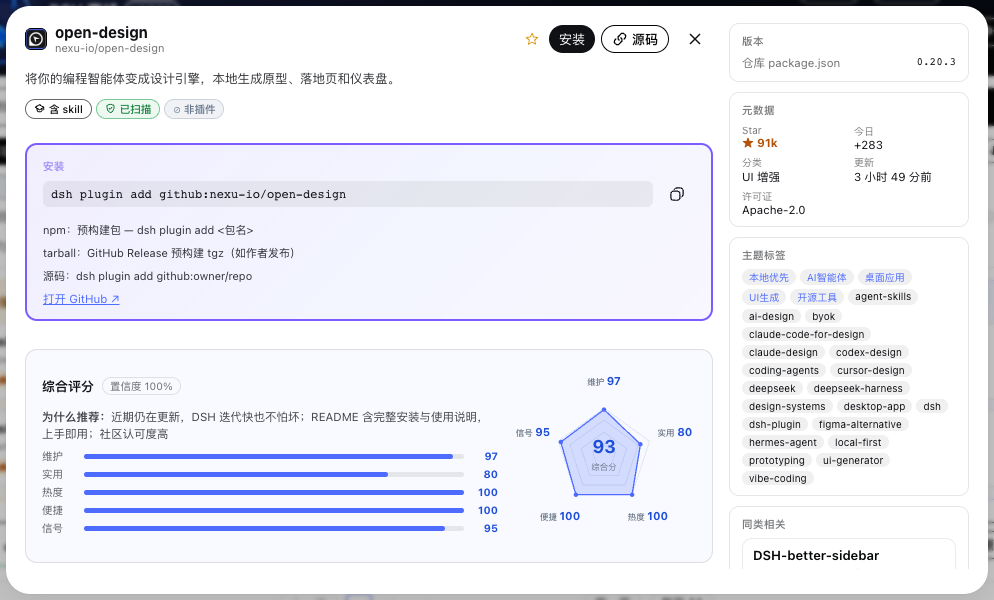
- Five-dimension score — maintenance, practicality, popularity, ease, and signal combine into one score with a radar chart on every card.
- Score explanation — hover the radar chart for a plain-language per-dimension breakdown of where the score comes from.
- Chinese tags — every plugin gets auto-generated Chinese feature tags and one-line intros in nine languages.
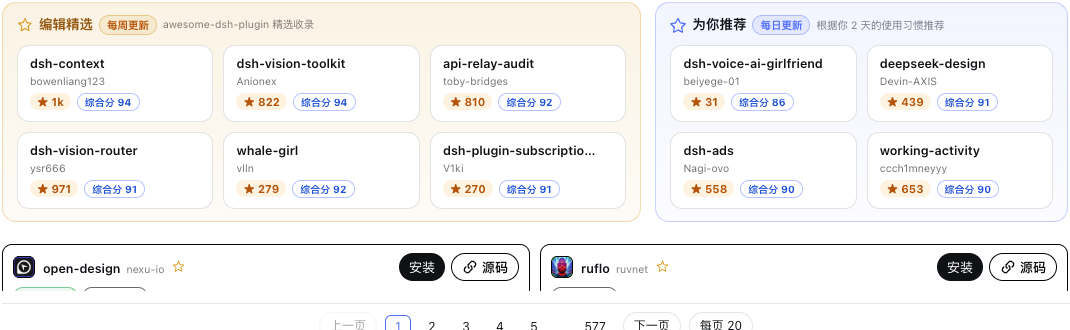
- Editor picks — a weekly shelf of the highest-scored plugins from the awesome human-curated directory.
- For-you recommendations — personalized picks from your installed plugins and a 30-second quiz, with reasons on hover.
- One-click install — install straight from a card, in plain mode or smart mode with AI review.
- Update & rollback — upgrade installed plugins in one click and roll back to the previous version when a release misbehaves.
- Daily auto-update — checks installed plugins for updates every day at 03:30; the mall itself is exempt.
- Task panel — every install, update, and uninstall becomes a trackable, cancellable global task.
- Trust badges — scanned, curated, verified, has-skill, and dormant badges show each plugin's footing at a glance.
- Nine languages — zh/en/ja/ko/es/fr/de/pt/ru interface, one click to switch.
- Find plugins in-session — ships a skill: run /dsh-mall in your agent session to query the catalog without leaving the terminal.
- Safe rendering — README badge fragments are stripped before rendering; install commands are extracted for one-click copy.
Use cases
- Before installing a new plugin, let AI review the repo code first to rule out malicious behavior.
- When you need a plugin for a job, describe it in plain words and let smart search comb the catalog.
- While working in an agent session, run /dsh-mall to query plugins without leaving the terminal.
- When deciding between two similar plugins, compare their radar charts and score explanations.
- When a batch of plugins needs upgrading, use one-click update and watch progress in the task panel.
- When a new version misbehaves, roll back to the previous version instead of reinstalling by hand.
- When you don't want to manage updates, enable the daily auto-update that checks at 03:30.
- Right after installing dsh, answer a 30-second quiz to get a personalized recommendation list.
- When writing a plugin shortlist for your team, filter by downloads, score, and category to collect candidates.
- When you suspect a plugin is abandoned, check the dormant badge and last commit time before deciding.
Usage guide
- Open the dsh home page, click the DSH Mall button in the left sidebar above Settings.
- Click the top search box and type keywords to search the catalog by name or description.
- Click ✦ Smart search, type a plain-language request, and wait for the results window.
- Click a card in the results window to open the detail panel with README and score card.
- Click Install, choose plain or smart install, and confirm to start the download.
- Open the task panel to watch progress; click cancel when you need to stop a task.
- Run
dsh webrestart and the new plugin appears in the sidebar. - Open the installed list, click Update to upgrade, or Rollback to restore the previous version.
- Click the language button in the top-right to switch between nine interface languages.
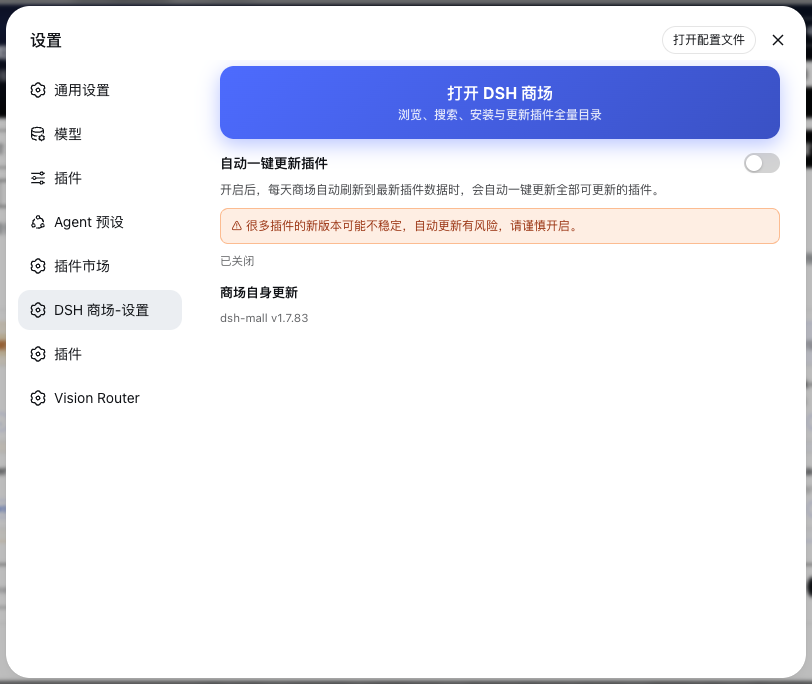
- Open DSH Mall settings inside the settings window to toggle the entry and auto-update.
Calling it in a session
/dsh-mall find me a plugin that can delete sessions
/dsh-mall recommend code-review plugins with a verified badge
More prompts
/dsh-mall compare the score radar of dsh-mall and dshmarket
/dsh-mall list task-panel plugins updated in the last week
Input and output
| Input | Output |
|---|---|
| Search "session" | Lists all session-management plugin cards |
| Smart-search "delete sessions" | Results window with recommendation and alternate columns |
| Click the radar chart | A per-dimension plain-language score explanation pops up |
| Click "Install" | The task panel adds an install task and starts executing |
| Click "Rollback" | The plugin returns to its previous version, recorded in the panel |
| Finish the quiz | A personalized recommendation list is generated |
| Click the language button | Interface text switches to the target language |
| Open the task panel | Shows all running and finished tasks |
Interface tour
The DSH Mall entry sits in the left sidebar right above Settings:
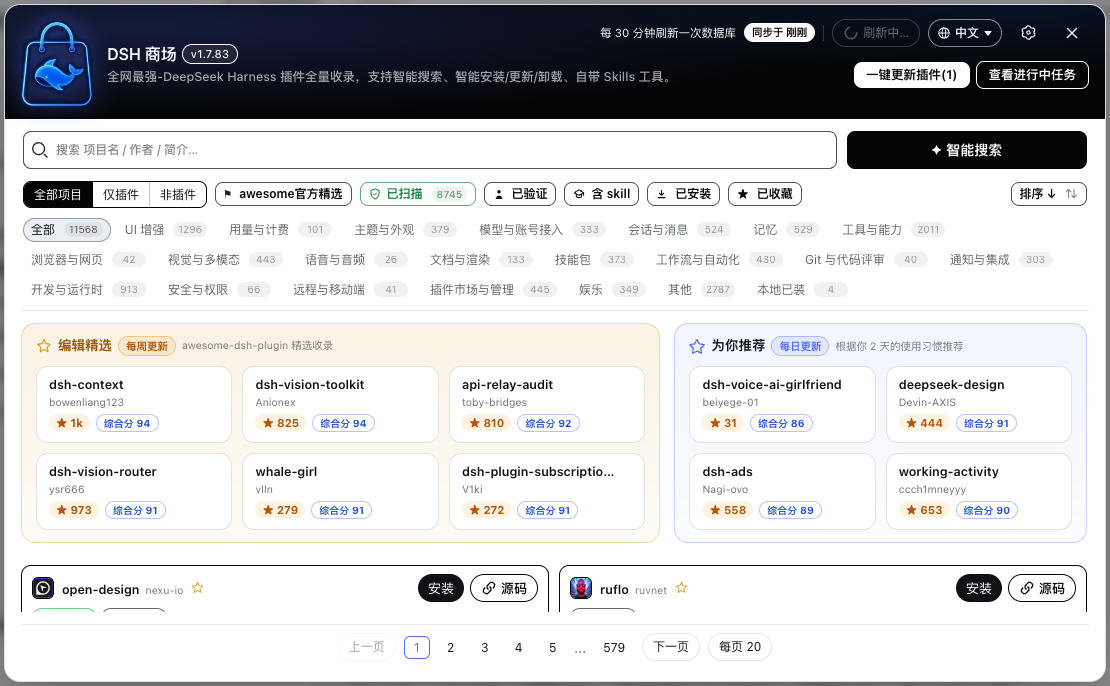
One floating window is the whole mall: search and filters on top, picks and recommendations in the middle, plugin cards below:
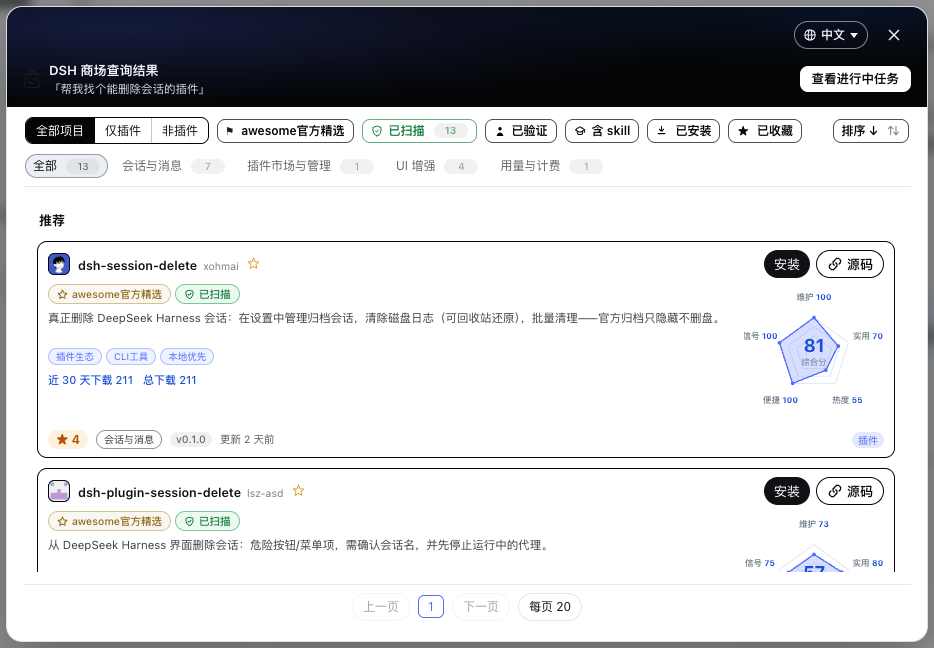
Smart search opens its own results window with recommendations first:
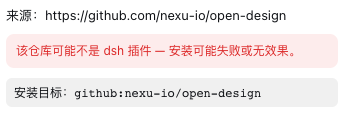
Smart install shows the AI review verdict right in the confirm dialog:
The detail panel carries the full score card with per-dimension explanations:
Editor picks on the left, for-you recommendations on the right, plus a 30-second quiz:
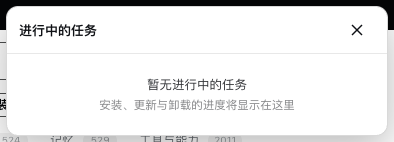
Install, update, and uninstall progress all live in the global task panel:
Run /dsh-mall in an agent session and the reply ends with a button that opens the mall:
Settings live in one place, inside the settings window:
What you get
- After install, the sidebar shows a DSH Mall entry button that opens the full-catalog card wall.
- Smart search generates a results window with a recommendation column, cards matching the main mall.
- Every card renders a five-axis radar chart with the composite score at the center.
- Hovering the radar chart generates a mouse-following card that explains each dimension.
- The task panel shows live progress and status for every task.
- The recommendation shelf generates a personalized plugin list with reasons on hover.
- The downloads badge shows each plugin's npm downloads over the last 30 days.
- Each card displays a version pill, trust badges, and Chinese feature tags.
Reliability and limits
- Tested and verified on dsh web 0.1.0-rc.8; compatible with that version and newer.
- The GitHub token stays in memory only, never written to disk, and clears on page refresh.
- When AI review fails or times out, the flow falls back to plain install without blocking.
- Index data refreshes every 30 minutes and switches to a fallback channel on GitHub rate limits.
- Editing plugin source code inside the mall is not supported; installed plugins remain managed by the dsh CLI.
- Dormant repositories (long inactive) show a dormant warning badge on their cards.
- Scores use a weighted geometric mean; a 0-star new repo honestly scores low on popularity with no simulated points.
- Upload is currently not supported — the entry button is hidden until the publish channel opens.
- README content is stripped of badge fragments and scripts before rendering to prevent rich-text injection.
- The daily auto-update runs at 03:30 and the mall itself never auto-updates.
License
MIT © hoyyang. Data comes from GitHub and awesome-dsh-plugin (MIT), each under its own terms.
Links
More in this category
zhu1090093659/dsh-web#packages/dsh-plugin-manager★ 8598
Plugin manager tab in DSH Settings → Plugins: install from npm or git with progress, enable/disable switches effective at next startup, conflict reconciliation with undo, and one-click hand-off to a fix session.
dsh-market/dsh-market★ 6087
Browse, search and install community plugins from inside DeepSeek Harness settings, with category filters, one-click updates, enable/disable, theme switching and configuration backup.
kingOfSoySauce/dsh-skin-market★ 186
Native skin marketplace and lifecycle manager that discovers community skins, displays previews and compatibility status, and provides verified one-click or manual installation paths.
awesome-dsh-plugin/dsh-find-plugin★ 182
Find plugins without leaving the agent: search this curated registry by keyword or category, with ready-to-run install commands.
bradeGithub/DSH-Plugins-Marketplace★ 173
GitHub-topic-driven plugin & skill marketplace: a Settings page that browses the auto-collected registry (the whole dsh-plugin topic plus the skills index, CI-refreshed every 2 hours) with one-click install, type detection, install-script and host-shadow-dependency safety confirmations, env-key management, and the STANDARD.md recognition spec.
Sanqi-normal/dsh-webui-market-plugin★ 104
In-harness plugin market for the dsh web GUI: browse the awesome-dsh-plugin.com catalog and install/uninstall plugins into a profile from Settings → Plugins → Plugin Market.
Community comments
Comments are public GitHub Discussions. Loading them connects to GitHub and Giscus; a GitHub account is required to post.