DSH productivity plugin: timeline navigation, prompt library, conversation export, quick notes, and more.
Install
# from npm (prebuilt)
dsh plugin --profile web add dsh-timeline
# from GitHub (first run asks for allowBuilds approval — follow the hint, retry)
dsh plugin --profile web add github:houyanchao/dsh-timeline
Any plugin you install runs third-party code with your own permissions — it can read your files, use your credentials, and reach the network, and tool approvals don’t sandbox it. GitHub-sourced plugins also run build scripts at install time — pnpm blocks those until you allow them, so an install can stop with ERR_PNPM_GIT_DEP_PREPARE_NOT_ALLOWED or ERR_PNPM_IGNORED_BUILDS; dsh prints the exact key to add under allowBuilds in your profile’s pnpm-workspace.yaml, and the install works on the next run. Allowing a build is a trust decision: only install sources you trust, and pin a commit (github:owner/repo#sha).
README
dsh-timeline
A super productivity plugin for DeepSeek Harness
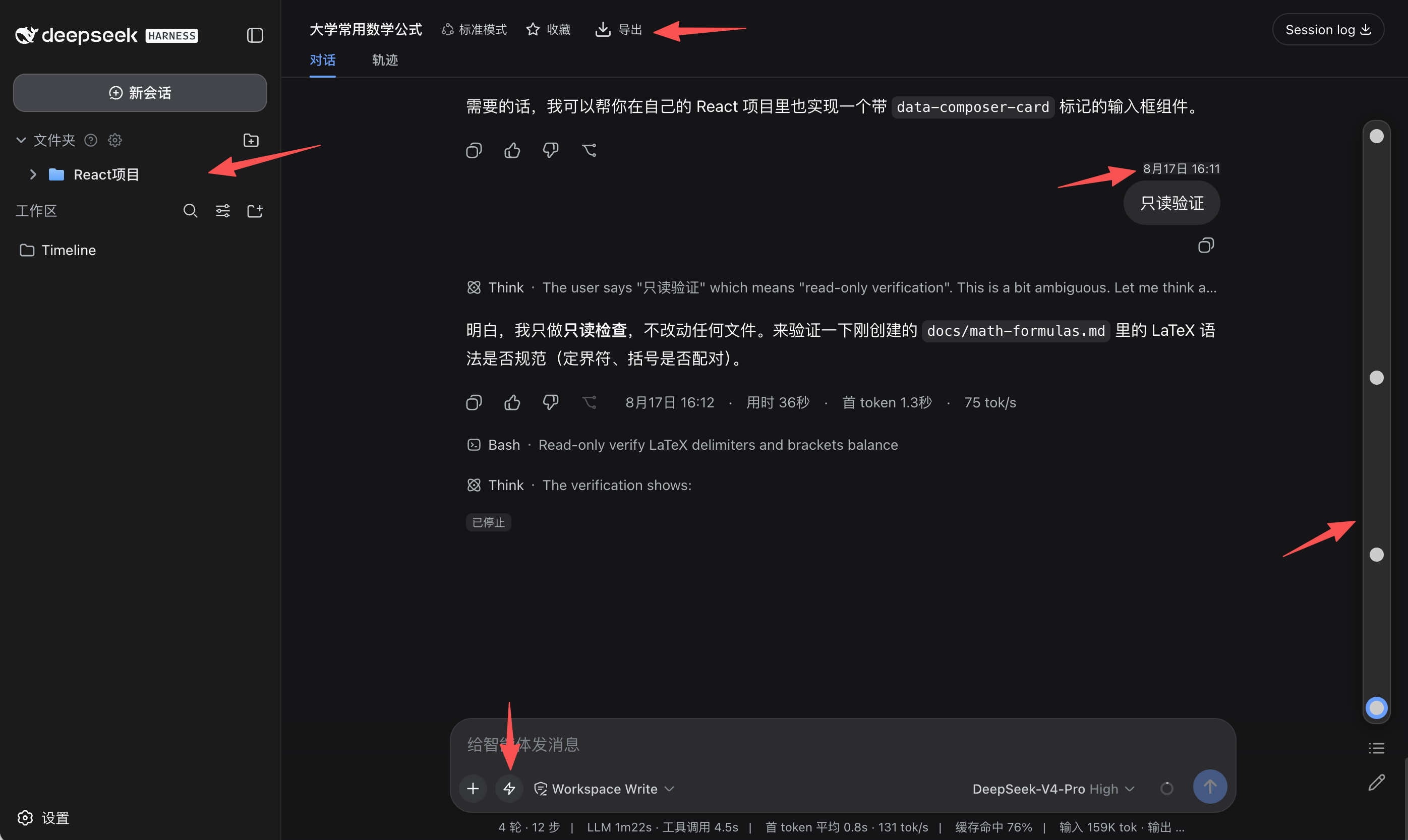
Timeline navigation · Starred folders · Prompt library · Conversation export · Formula copy
简体中文 | English
📖 What is dsh-timeline?
dsh-timeline is a feature-enhancement plugin for DeepSeek Harness.
Once an AI conversation gets long, finding things becomes a chore: revisiting a question means endless scrolling, key takeaways get scattered across sessions, and formulas or content are hard to take with you. dsh-timeline was built for exactly this — it renders a visual timeline beside the conversation so you can jump anywhere in one click, and rounds out the workflow with starred folders, pin markers, quick notes, a prompt library, and multi-format export: find it, note it, organize it, take it with you.
The plugin blends right into the host UI: it follows the light / dark theme in real time, ships with an English / Chinese interface, and every feature can be toggled independently — install it and go, without disrupting your habits.
✨ Features
- 🧭 Timeline navigation — a rail on the right maps every question; click to jump, with a compact mode, virtualized rendering, and
↑/↓shortcuts - 📌 Key-point markers — long-press a timeline node to pin it, so important questions stand out
- 📋 Question list — numbered list of all questions, active row follows your reading position
- ⭐ Starred folders — file whole conversations, single questions, and notes into two-level folders; drag to organize, pin, and search
- 📝 Notepad — a draggable, resizable quick-notes panel for capturing ideas
- 💬 Prompt library — save frequently used prompts and insert them from beside the composer in one click
- ⌨️ Smart input —
Enterfor a newline, double-Enterto send; quote selected text as a follow-up; keep your reading position after sending - 📤 Conversation export — Markdown / TXT / JSON / CSV / PNG / PDF, with math formulas rendered as usual
- 🧮 Formula copy — click a formula to copy it as LaTeX or MathML, ready to paste into Word
- 🔔 Reply alerts — toast and optional sound when a reply finishes while you are reading earlier messages
- 💾 Data backup — one-click export / import of all plugin data (JSON)
- 🎨 Native feel — follows the host's light / dark theme, English / Chinese UI, per-feature toggles
📦 Installation
Install from npm (recommended):
# install the dsh-timeline plugin
dsh plugin --profile web add dsh-timeline

# launch DeepSeek Harness
dsh web
Upgrade:
dsh plugin --profile web update dsh-timeline
[!TIP] Seeing
command not found: dsh? You are running DSH from a source checkout without the global CLI. Run the commands above from the root of the DSH source repository, replacing the leadingdshwithpnpm dsh— e.g.pnpm dsh plugin --profile web add dsh-timeline.
⭐ Support
If dsh-timeline helped you, share it with your friends — and a GitHub Star helps more people discover it!
📄 License
This project is open-sourced under the GPL-3.0-or-later license.
You are free to use, study, modify, and distribute this project, but derivative works must be released under the same license and keep the original copyright notice. Please make sure your usage complies with the license before any commercial use.
Links
More in this category
zhu1090093659/dsh-web#packages/dsh-task-board★ 8262
Task board for the dsh web GUI: a sidebar multi-column kanban whose cards run in real DSH agent sessions and can also be scheduled with cron expressions, executed host-side even with the browser closed.
zhu1090093659/dsh-web#packages/dsh-web-all★ 8262
Plugin and skin collection for the DSH Web UI: task board, Git graph, right-side panel, remote mobile UI, pet, live token stats, and a skin center.
omdsh-dev/DSH-better-sidebar★ 3943
Full sidebar workbench with file rendering and editing, terminal, Git, and subagents; third-party plugins can register new tabs.
ccch1mneyyy/dsh-TUI★ 3913
Claude Code-style full-screen terminal UI: pixel-whale header, live status line, and streaming thought expansion.
MeteorNOX/DeepSeek-Balance-Whale-Widget★ 3793
A fixed-corner whale widget for the DSH web GUI — balance, today's usage and per-turn cost with peak/off-peak pricing, editable balance-alert and daily-budget bubbles, a module-based custom bubble queue with A/B weighted choices and random lines or images, 30+ vendor templates (OpenAI, OpenRouter, Kimi, SiliconFlow, Ark, Zhipu, MiniMax and more) with per-model balance and subscription quota, plus task-end sound, imported audio, custom roles and a resource manager. Local-only, no telemetry.
Devin-AXIS/deepseek-design#deepseek-idesign★ 1414
Visual design studio for websites, app prototypes, posters, cards, reports, and magazines, with templates, direct element editing, selection-aware AI draft handoff, and export.
Community comments
Comments are public GitHub Discussions. Loading them connects to GitHub and Giscus; a GitHub account is required to post.