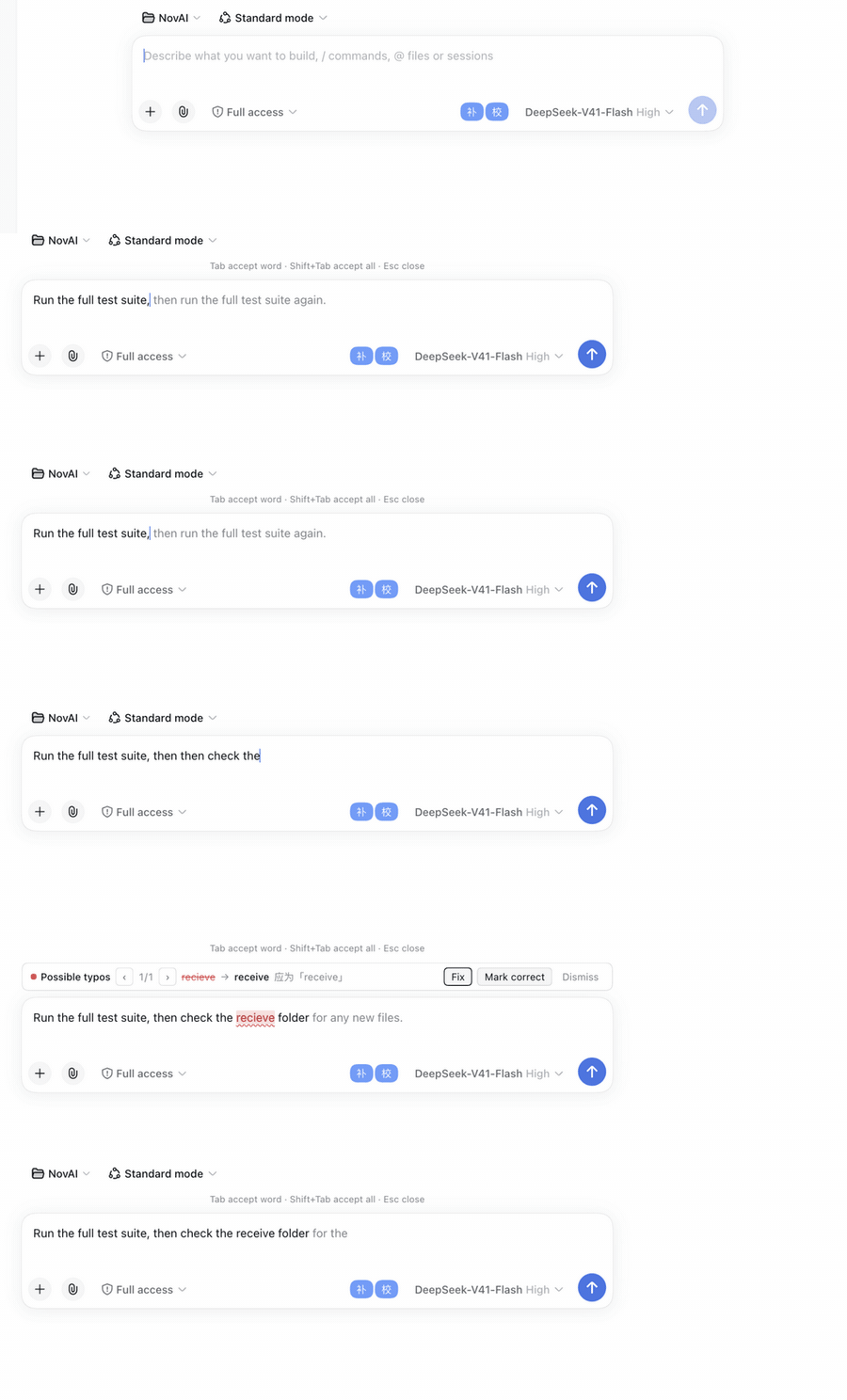
Ghost-text completion for the composer: FIM suggestions stream in inline after a typing pause (SSE, first token rendered immediately), Tab accepts one word at a time and Shift+Tab takes all, in-flight requests are truly cancelled on retyping or Esc. Plus two-layer typo checking: a browser-local dictionary scan (Chinese wrong phrases, English misspellings and proper-noun capitalization, user-defined per-browser entries) with a debounced LLM context pass, underlined in red in the text with per-item navigation and click-to-fix.
Install
# from npm (prebuilt)
dsh plugin --profile web add dsh-input-assist
# from GitHub (first run asks for allowBuilds approval — follow the hint, retry)
dsh plugin --profile web add github:honlnk/dsh-input-assist
Any plugin you install runs third-party code with your own permissions — it can read your files, use your credentials, and reach the network, and tool approvals don’t sandbox it. GitHub-sourced plugins also run build scripts at install time — pnpm blocks those until you allow them, so an install can stop with ERR_PNPM_GIT_DEP_PREPARE_NOT_ALLOWED or ERR_PNPM_IGNORED_BUILDS; dsh prints the exact key to add under allowBuilds in your profile’s pnpm-workspace.yaml, and the install works on the next run. Allowing a build is a trust decision: only install sources you trust, and pin a commit (github:owner/repo#sha).
README
English | 中文
An input assistant plugin for DeepSeek Harness (dsh):
- Inline completion (ghost text) — after a typing pause, calls the DeepSeek FIM endpoint (
/beta/completions) and renders the suggestion inline right after your cursor as gray text (the Copilot look: transparent mirror layer, no floating panel). Suggestions appear progressively via SSE streaming — the first token hits the screen immediately and the ghost text grows as it generates.Tabaccepts one word at a time (works mid-stream without breaking the stream),Shift+Tabaccepts everything,Escdismisses. - Typo checking — two layers: a dictionary layer that runs entirely in your browser (228 Chinese wrong phrases + 211 English misspellings / proper-noun capitalizations + 8 context rules; the word lists live as plain text under
data/and can be merged with a per-browser custom dictionary; highlights in 200 ms, offline, zero cost) plus an LLM context pass (mixed Chinese/English: 在/再, 的/得/地, English spelling; debounced 800 ms, same cadence as completion). Errors are underlined in red inside the text (current item highlighted, click red text to select), a navigation bar walks through fixes one by one — never a bulk replace.
Completion shortcuts (active while a ghost suggestion is visible)
| Action | Shortcut |
|---|---|
| Accept one word (Chinese segmented by word) | Tab |
| Accept all | Shift+Tab |
| Dismiss suggestion | Esc |
The shortcut hint shows on a dock line outside the input box (same spot as the typo navigation bar) — no overlays inside the input itself.
Typo-check shortcuts (active while the input is focused and errors are found)
| Action | Shortcut |
|---|---|
| Next / previous error | Ctrl+Shift+. / Ctrl+Shift+, |
| Fix the selected error | Ctrl+Shift+F |
| Mark as correct input (no replace) | Ctrl+Shift+G |
| Stop reminding for this draft | Esc |
Quick start
Requires dsh ≥ 0.2.1-rc.2 (declared via engines.dsh; the host rejects incompatible versions at install/startup — 0.1.x users should stay on plugin 0.7.x).
dsh plugin --profile web add dsh-input-assist   # or @honlnk/dsh-input-assist — identical content
dsh --profile web          # start, then open http://127.0.0.1:3080
Local development (install from source):
git clone https://github.com/honlnk/dsh-input-assist && cd dsh-input-assist
npm install && npm run build
dsh plugin --profile web add "$PWD"
Website (demo + install guide): https://honlnk.github.io/dsh-input-assist/
API key — pick one of three (needed by completion and the LLM layer; the dictionary layer needs no configuration at all):
- Do nothing — the plugin automatically reuses the
DEEPSEEK_API_KEYalready saved in dsh (.credentials.yaml) or from the environment - Fill it in on the plugin detail page: sidebar Plugins → dsh-input-assist → config section → Input Assist card (recommended — every option is graphical)
- Run with an environment variable:
DEEPSEEK_API_KEY=sk-… dsh web(the old way of writinginput-assist.*into~/.dsh/settings.yamlis gone in 0.2.x)
Settings card (plugin detail page)
Every option can be edited graphically in the plugin manager: sidebar Plugins → open the dsh-input-assist detail page, expand the Input Assist card in the config section. The interaction mirrors the official cards: staged edits → one unified “Save / Discard”, numeric and required-text validation, per-field “unsaved” dots and per-field undo (×). The card registers through the official plugins.bundle.config slot (keyed by bundle package name — since 0.2.x plugin settings live in the plugin manager; the old settings.plugin.item slot was removed) — no extra services required. Config persists into the plugin's profile entry (profiles/<name>/cordis.patch.yml), and external edits still hot-sync back into the card.
The model fields support fetching the catalog from the API: click the ▾ square button next to the field to open a custom dropdown that pulls the latest catalog every time it opens; click to fill. The field always stays a free-text input — any custom model name on an OpenAI-compatible endpoint can be typed by hand. If the fetch fails (no key configured, endpoint unreachable) it falls back to manual entry. Default models have followed the official migration: deepseek-chat was retired on 2026-07-24; the default is now deepseek-flash (V4.1 Flash).
Custom dictionary (per-browser only)
The “Custom dictionary (this browser only)” section at the bottom of the settings card is a paired-entry list: wrong word on the left, correct word on the right, Chinese or English. “+ Add entry” appends a pair, × deletes a row, drag the row handle to reorder (or focus and move with ↑/↓); add / delete / reorder all animate smoothly.
- Entries are merged with the built-in dictionary for the local dictionary-layer scan: an entry with the same wrong word overrides the built-in one; mapping a word to itself (self-mapping) disables checking for that built-in entry; English entries automatically use word-boundary matching (camelCase, snake_case and dot-joined identifiers never false-positive)
- Stored only in this browser's localStorage (key
dsh-input-assist:user-dict:v1, format is still onewrong => rightper line) — never synced through plugin config - The header row has “Import / Export / Copy”: import picks a
.txtfile (onewrong => rightper line, same format as the built-in lists,#comments); same-word entries update in place, the rest append to the staged list — still reviewable before saving. Export downloads the current list (including unsaved edits) as the same.txtformat; copy goes to the clipboard. That's how you move dictionaries between browsers and machines - Limits: 2000 entries, wrong word ≤ 16 chars; validation issues (empty words, runs of whitespace, overlong, duplicates) show inline per row and block saving; edits share the card-level “Discard / Save” buttons, and a successful save immediately re-highlights the current draft with the new dictionary
Configuration (edit graphically on the plugin detail page; persists into the plugin's profile entry config)
| Key | Default | Description |
|---|---|---|
completionEnabled |
true |
Completion switch (same as the 「补」 button next to the input) |
completionBaseUrl |
https://api.deepseek.com/beta |
FIM endpoint (swap for any OpenAI-compatible one) |
completionApiKey |
'' |
Empty = credential fallback |
completionModel |
deepseek-flash |
Completion model (pick from the dropdown in the settings card, ⟳ fetches the catalog from the API) |
completionDebounceMs |
800 |
How long after typing stops before requesting (same cadence as the LLM proofread) |
completionMaxTokens |
64 |
Suggestion length cap |
completionStream |
true |
Stream completion via SSE for progressive rendering; turn off to receive whole suggestions if the endpoint lacks streaming |
proofreadEnabled |
true |
Typo-check switch (same as the 「校」 button) |
proofreadUseLlm |
true |
Stack the LLM layer on top (off = zero cost) |
proofreadModel |
deepseek-flash |
LLM proofread model (same dropdown) |
proofreadDebounceMs |
800 |
LLM-layer debounce (same cadence as completion; both return together) |
proofreadDictDebounceMs |
200 |
Dictionary-layer debounce (browser-local scan, zero cost) |
Development & testing
Sources live in src/*.ts (TypeScript strict mode), built with tsdown into two entries:
src/index.ts→lib/index.js(ESM +.d.ts, the host half, imported directly by the cordis loader)src/client.ts→lib/client.js(CJS, wrapped automatically bywindow.__ModuleLoader__.loadvia banner/footer, react / dsh-client-runtime kept external, local modules like the dictionary bundled in)
npm install
npm run build   # tsdown dual-entry build into lib/ (no strict tsc check)
npm test        # build → tsc --noEmit → node --test (type errors caught locally)
Dictionary data is maintained as plain text under data/ (zh-wrong-phrases.txt + en-wrong-spellings.txt + en-proper-nouns.txt line-based lists + zh-context-rules.json context rules). Before building, scripts/gen-dict.mjs parses, validates and generates src/proofread-dict-data.generated.ts (committed to git; CI guards sync via gendict + git diff) — to update the dictionaries, just edit the data/ files; npm run build picks it up. test/client-bundle.test.js executes the real bundle artifact with a fake ModuleLoader, covering the full data → bundle chain. User dictionaries (localStorage) are merged with the built-in lists for scanning, browser-side.
Architecture at a glance
Browser half (lib/client.js, bundled from src/client.ts)      Host half (lib/index.js)
  input.overlay   error hints only (no popup)       loopback    settings namespace input-assist
  input.dock      typo panel + fixes              ───RPC (0.1.5+: fetch route /api/input-assist/rpc;
  input.right     补 / 校 toggles                     ≤0.1.1: rpc.handle /input-assist)───▶
  fetch POST /api/input-assist/stream                complete   → FIM /beta/completions (non-stream)
    ↳ SSE frames drive ghost progressive render      proofread → LLM layer (llmOnly)
  plugins.bundle.config  settings card (Plugins → plugin detail page)  cancel → abort in-flight requests (RPC & stream alike)
  useInput reads draft · inputActions.insertText / setDraft write back  settings.update(entryId, patch) persists into the profile
  Mirror layer (mounted on body): red errors in text + gray ghost suggestion at the cursor (rAF-batched render)
  Dictionary layer runs locally (single source src/proofread-dict.ts, bundled into the client at build time)
  Ships its own snapshot store (src/snapshot-store.ts, satisfying the host ObservableSnapshot contract)
Status
- Research & feasibility (2026-08-23)
- First release: dual-side plugin scaffold + completion suggestion bar + typo checking (dictionary + LLM layers, click to fix)
- Typo-check redesign (in-text red underline, per-item navigation, mark-as-correct, shortcuts)
- Inline completion redesign (ghost text, Tab word-by-word accept, dictionary layer moved into the browser at 200 ms, LLM/completion unified 800 ms)
- TypeScript rewrite (all of src/ in TS, tsdown dual-entry build, single-source dictionary)
- CI/CD & release (dual-name npm packages, Trusted Publishing with no token, GitHub Pages website)
- Settings card (Settings → Plugins → Plugin Settings: 11 staged-editable options, save/discard, local validation)
- Model catalog fetching (models.list RPC + dropdown suggestion combobox; default model migrated to deepseek-flash)
- Externalized dictionaries & custom dictionary (data/ plain-text lists + gen-dict generator + CI sync guard; browser localStorage custom dictionary edited in the settings card)
- English spell checking (misspelling + proper-noun dictionaries, word-boundary scanning; LLM layer proofs mixed Chinese/English)
- Real-Chrome UX acceptance: shortcuts field-tested (passed 2026-09-13; clicks, settings card, dictionary section verified on a real dsh on 2026-09-12)
- In-flight request cancellation (retyping re-schedules / Esc / toggling off aborts pending completion and LLM requests; late responses never resurrect and never burn tokens; verified on real hardware 2026-09-13, including Esc inside the debounce window)
- Custom-dictionary import/export (same .txt format: import merges into the staged list, export downloads / copies to clipboard; verified 2026-09-13)
- Streaming progressive render (SSE first-token progressive display + mid-stream cut-off; code & tests done, accepted on real hardware 2026-09-20: SSE frames driving ghost growth, mid-stream Tab accept)
- dsh 0.1.5-rc.2 compatibility (2026-09-15: cordis webServer injection, client-runtime-less snapshot store takeover, RPC over fetch dual path; compatible with the old 0.1.1 runtime — 116 tests green + real-machine curl smoke)
- Composer contenteditable compatibility (2026-09-20: the 0.1.5 composer switching to a Lexical contenteditable silently broke ghost text; findComposer for both runtimes, cursor block-level walk, mirror layer / Tab accept / keyboard interception adapted end-to-end, accepted in a real browser — see docs/17)
- Mid-sentence completion rendering (ghost positioned at sugCaret instead of appended at the end of the draft; hides when the caret moves away; shifts right on word-by-word accept; buildMirrorHtml extracted as a pure function + 7 unit tests)
- dsh 0.2.1-rc.2 compatibility (2026-10-23: settings-system migration — volatile Config +
settings.update(entryId)persisting into the profile, settings card moved to theplugins.bundle.configslot, Tab accept now goes throughinsertTextso mid-sentence accepts keep the caret in place,engines.dshversion gate; 124 tests green + accepted in an isolated dsh 0.2.1-rc.2 environment — see docs/19)
Release process
Pushing a v* tag triggers automatically (version must match package.json):
- Release npm — after tests pass, one publish under both names:
dsh-input-assist(bare) +@honlnk/dsh-input-assist(scoped mirror), identical content. Auth via npm Trusted Publishing (OIDC), no NPM_TOKEN; already-published names are skipped (idempotent). - Deploy Pages — site files under
docs/deploy to GitHub Pages.
One-time setup: a Trusted Publisher entry on npmjs.com for each of the two package names (repo honlnk/dsh-input-assist, workflow release-npm.yml, environment empty); GitHub Settings → Pages → Source set to “GitHub Actions”.
git tag v0.1.0 && git push origin v0.1.0 # that's the release
Community
- Show Your Plugins! thread — bilingual intro post in the dsh upstream discussion board, feedback welcome
- Blog: Copilot-style input for DeepSeek Harness — a user-perspective feature tour (Chinese)
- More dsh plugins: GitHub topic
dsh-plugin
Uninstall
dsh plugin --profile web remove dsh-input-assist
Links
More in this category
zhu1090093659/dsh-web#packages/dsh-task-board★ 9967
Task board for the dsh web GUI: a sidebar multi-column kanban whose cards run in real DSH agent sessions and can also be scheduled with cron expressions, executed host-side even with the browser closed.
zhu1090093659/dsh-web#packages/dsh-web-all★ 9967
Plugin and skin collection for the DSH Web UI: task board, Git graph, right-side panel, remote mobile UI, pet, live token stats, and a skin center.
MeteorNOX/DeepSeek-Balance-Whale-Widget★ 6767
A fixed-corner whale widget for the DSH web GUI — balance, today's usage and per-turn cost with peak/off-peak pricing, editable balance-alert and daily-budget bubbles, a module-based custom bubble queue with A/B weighted choices and random lines or images, 30+ vendor templates (OpenAI, OpenRouter, Kimi, SiliconFlow, Ark, Zhipu, MiniMax and more) with per-model balance and subscription quota, plus task-end sound, imported audio, custom roles and a resource manager. Local-only, no telemetry.
ccch1mneyyy/dsh-TUI★ 6630
Claude Code-style full-screen terminal UI: pixel-whale header, live status line, and streaming thought expansion.
omdsh-dev/DSH-better-sidebar★ 4833
Full sidebar workbench with file rendering and editing, terminal, Git, and subagents; third-party plugins can register new tabs.
Devin-AXIS/deepseek-design#deepseek-idesign★ 1681
Visual design studio for websites, app prototypes, posters, cards, reports, and magazines, with templates, direct element editing, selection-aware AI draft handoff, and export.
Community comments
Comments are public GitHub Discussions. Loading them connects to GitHub and Giscus; a GitHub account is required to post.