Radial right-click menu on conversation turns in the DSH web GUI for forking a session from a chosen turn, interrupting generation, copying the working directory path or session ID, opening the working directory, and exporting session logs.
Install
# from npm (prebuilt)
dsh plugin --profile web add dsh-round-rightclick
# from a prebuilt release tarball
dsh plugin --profile web add "https://github.com/hmr-BH/dsh-round-rightclick/releases/download/v0.1.0/dsh-round-rightclick-0.1.0.tgz"
# from GitHub (first run asks for allowBuilds approval — follow the hint, retry)
dsh plugin --profile web add github:hmr-BH/dsh-round-rightclick
Any plugin you install runs third-party code with your own permissions — it can read your files, use your credentials, and reach the network, and tool approvals don’t sandbox it. GitHub-sourced plugins also run build scripts at install time — pnpm blocks those until you allow them, so an install can stop with ERR_PNPM_GIT_DEP_PREPARE_NOT_ALLOWED or ERR_PNPM_IGNORED_BUILDS; dsh prints the exact key to add under allowBuilds in your profile’s pnpm-workspace.yaml, and the install works on the next run. Allowing a build is a trust decision: only install sources you trust, and pin a commit (github:owner/repo#sha).
README
A radial right-click menu for DeepSeek Harness. Right-click a specific turn in the conversation to run common session actions at the cursor.
Why this plugin exists
Session actions in DSH are spread across the interface. The workspace folder has to be found in a sidebar, interrupting generation requires catching the right moment, and branching from an earlier turn is not available at all — the only option is copying the preceding conversation into a new session by hand and verifying nothing was missed.
The radial menu collects these actions in one place. Right-click a specific question or answer and six actions are arranged around the cursor, selectable by mouse or keyboard.
The central action is Fork this turn. Take a session with three completed turns:
Turn 1: pin down the request
Turn 2: compare approaches
Turn 3: polish the copy
Forking turn 1 produces a session containing only turn 1; forking turn 2 produces one containing turns 1–2. The source session is left unchanged, so both can stay open for comparison. When a conversation drifts, work resumes from the turn before the drift instead of re-supplying context to a blank session.
Screenshot
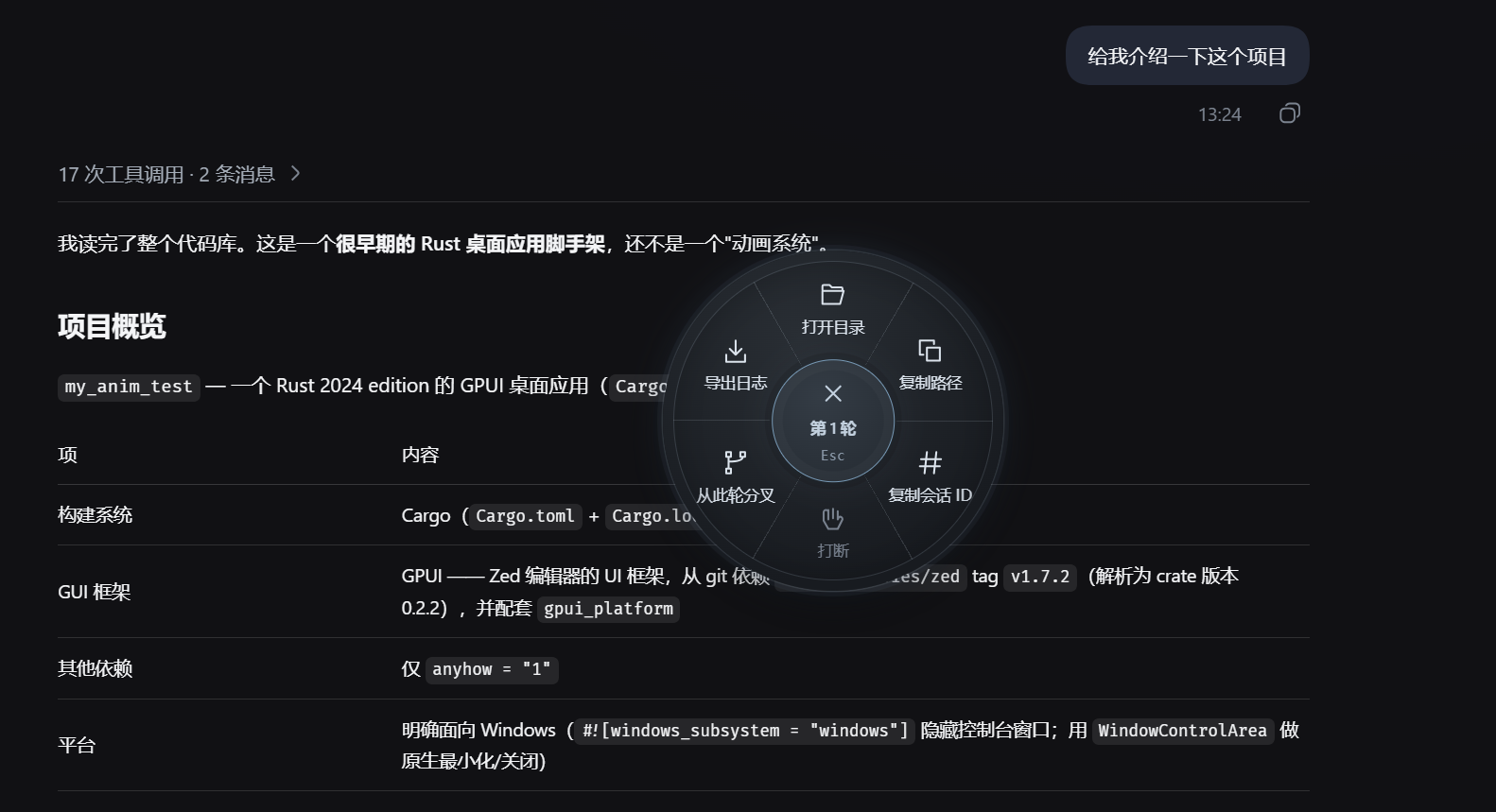
The six actions
| Action | Purpose | Available when |
|---|---|---|
| Open folder | Opens the session's workspace in the OS file manager | The session has a directory and DSH runs locally |
| Copy path | Writes the full workspace path to the clipboard | The browser permits clipboard writes |
| Copy session ID | Copies the current session's ID | A session is open |
| Interrupt | Stops the running generation or tool call, keeping the conversation | The session is running |
| Fork this turn | Creates a branch session carrying the conversation through that turn | The turn is complete and loaded |
| Export log | Downloads this session and its children as a log ZIP | The host exposes the export service |
Install
From npm (recommended)
dsh plugin --profile web add dsh-round-rightclick
Restart dsh web and refresh the page. The npm package ships built output, so neither pnpm nor a local build is required; a prebuilt publish does not trigger a build approval either.
From GitHub
dsh plugin --profile web add github:hmr-BH/dsh-round-rightclick
Restart dsh web and refresh the page. The repo commits its built lib/ bundles, so installing runs no build script and needs no pnpm build approval.
From a release tarball
Download the .tgz attached to the relevant Release, then run:
dsh plugin --profile web add ./dsh-round-rightclick-<version>.tgz
Restart dsh web and refresh the page. The tarball contains built output as well.
From source
git clone https://github.com/hmr-BH/dsh-round-rightclick.git
cd dsh-round-rightclick
pnpm install --frozen-lockfile
pnpm run build
dsh plugin --profile web add .
Restart dsh web after a source install as well. To remove the plugin:
dsh plugin --profile web remove dsh-round-rightclick
Interaction
- Right-click a completed question or answer to open the wheel.
- Left-click a sector to run it, or navigate with the arrow keys and press Enter.
- Releasing the right button never fires an action, so holding it while moving across sectors is safe.
- Escape, Tab, page scrolling, window blur, window resizing, and clicking outside the wheel all close the menu.
- The menu is locked while an action runs; repeated clicks do not issue a second request.
- Inputs,
contenteditableregions, and other editable controls keep the browser's native context menu. The plugin does not take over these areas.
Troubleshooting
Right-click does nothing. Confirm the plugin is installed under the web profile, restart dsh web, and refresh the page. The click must land on conversation content; the composer is deliberately excluded.
"Fork this turn" is disabled. Check that the right-click landed on a specific turn's question or answer, and that the turn has finished. If it is still generating, run Interrupt first and reopen the menu once the end event has loaded.
Copy fails. There are two common causes: the browser has not granted clipboard permission to the page, or the page is not served over localhost or HTTPS. The Clipboard API refuses writes in both cases.
Open folder is unavailable in an SSH session. This is intentional. The file manager can only launch on the machine running DSH; mapping it regardless would open a window on a server with no attached display, so the plugin refuses and reports the reason.
Development
pnpm install --frozen-lockfile
pnpm typecheck
pnpm test
node scripts/package-release.mjs
The built lib/ bundles are committed for GitHub-source installs: run pnpm run build after touching src/ and commit before pushing, so the repo never ships stale output.
Code layout:
src/client/RadialMenu.tsx  rendering, keyboard navigation, action feedback
src/client/menu-layout.ts  wheel geometry, sector hit areas, viewport avoidance
src/client/fork-target.ts  fork turn resolution
src/client/index.ts        wiring to the host session service
src/client/styles.ts       wheel, icon, and notification styles
src/opener.ts              directory validation and file-manager launch
tests/                     unit and component tests
License
MIT. A community plugin maintained by an individual, with no affiliation to DeepSeek.
Links
More in this category
zhu1090093659/dsh-web#packages/dsh-task-board★ 9796
Task board for the dsh web GUI: a sidebar multi-column kanban whose cards run in real DSH agent sessions and can also be scheduled with cron expressions, executed host-side even with the browser closed.
zhu1090093659/dsh-web#packages/dsh-web-all★ 9796
Plugin and skin collection for the DSH Web UI: task board, Git graph, right-side panel, remote mobile UI, pet, live token stats, and a skin center.
MeteorNOX/DeepSeek-Balance-Whale-Widget★ 6532
A fixed-corner whale widget for the DSH web GUI — balance, today's usage and per-turn cost with peak/off-peak pricing, editable balance-alert and daily-budget bubbles, a module-based custom bubble queue with A/B weighted choices and random lines or images, 30+ vendor templates (OpenAI, OpenRouter, Kimi, SiliconFlow, Ark, Zhipu, MiniMax and more) with per-model balance and subscription quota, plus task-end sound, imported audio, custom roles and a resource manager. Local-only, no telemetry.
ccch1mneyyy/dsh-TUI★ 6206
Claude Code-style full-screen terminal UI: pixel-whale header, live status line, and streaming thought expansion.
omdsh-dev/DSH-better-sidebar★ 4738
Full sidebar workbench with file rendering and editing, terminal, Git, and subagents; third-party plugins can register new tabs.
Devin-AXIS/deepseek-design#deepseek-idesign★ 1632
Visual design studio for websites, app prototypes, posters, cards, reports, and magazines, with templates, direct element editing, selection-aware AI draft handoff, and export.
Community comments
Comments are public GitHub Discussions. Loading them connects to GitHub and Giscus; a GitHub account is required to post.