Pressing Enter with an empty composer steers the first queued message into the running turn while the agent is busy.
Install
# from a prebuilt release tarball
dsh plugin --profile web add "https://github.com/himeope/dsh-queue-first-enter/releases/latest/download/dsh-queue-first-enter.tgz"
# from GitHub (first run asks for allowBuilds approval — follow the hint, retry)
dsh plugin --profile web add github:himeope/dsh-queue-first-enter
Any plugin you install runs third-party code with your own permissions — it can read your files, use your credentials, and reach the network, and tool approvals don’t sandbox it. GitHub-sourced plugins also run build scripts at install time — pnpm blocks those until you allow them, so an install can stop with ERR_PNPM_GIT_DEP_PREPARE_NOT_ALLOWED or ERR_PNPM_IGNORED_BUILDS; dsh prints the exact key to add under allowBuilds in your profile’s pnpm-workspace.yaml, and the install works on the next run. Allowing a build is a trust decision: only install sources you trust, and pin a commit (github:owner/repo#sha).
README
English | 中文
A DeepSeek Harness (dsh) Web plugin: with an empty composer, pressing Enter immediately steers the first queued message into the running turn.
While an agent is busy, the composer's Enter key queues the next message. A queued message normally waits for the current turn to end. This plugin adds one gesture: clear the composer, press Enter, and the first queued message is steered into the running turn at its next step boundary — the rest of the queue keeps its order.
Install
From GitHub:
dsh plugin --profile web add github:himeope/dsh-queue-first-enter
From a local checkout:
dsh plugin --profile web add /path/to/dsh-queue-first-enter
Then restart dsh web.
The package is distributed through this repository only — it is not published to npm, so dsh plugin --profile web add dsh-queue-first-enter (the bare name) will not resolve. Because the plugin is git-hosted, pnpm may block its prepare script; if dsh plugin prints an allowBuilds hint, add the key it names to the profile's pnpm-workspace.yaml and re-run. This package has no build step, so a blocked script is harmless.
Requires dsh web 0.1.0-rc.6 or newer. The browser half is a dsh.client bundle (platform: web); the host half contributes no behavior and exists so the package is a normal installable plugin row.
Behavior
The gesture fires only when all of these hold:
- the composer is empty — no text and no pending images;
- the addressed agent is running (a turn is in progress);
- the queue holds at least one item with placement
queued; - the composer is enabled, and the session is an ordinary session (not a subagent).
Everything else is left untouched:
- Enter with text or images behaves exactly as before (queue or direct send);
Ctrl/Cmd+Enterkeeps its built-in meaning — steer all queued messages;- when the feature is switched off in Settings, an empty Enter is a no-op again, as shipped.
Delivery is a strict steer: the message is handed to the running turn at its next step boundary and is visible to the model then. It does not interrupt the current turn, and it does not wait for the turn to end. dsh's queue API offers exactly three operations — edit, remove, steer — so "skip the current turn and start a new one" is not something this plugin does; interrupting a turn is a separate, destructive action (cancel with the inbox preserved).
Convergence: if the turn ends in the same instant (steer-unavailable) or the agent has already claimed the item (queue-item-not-found), the failure is silent and the message stays in the queue.
Settings
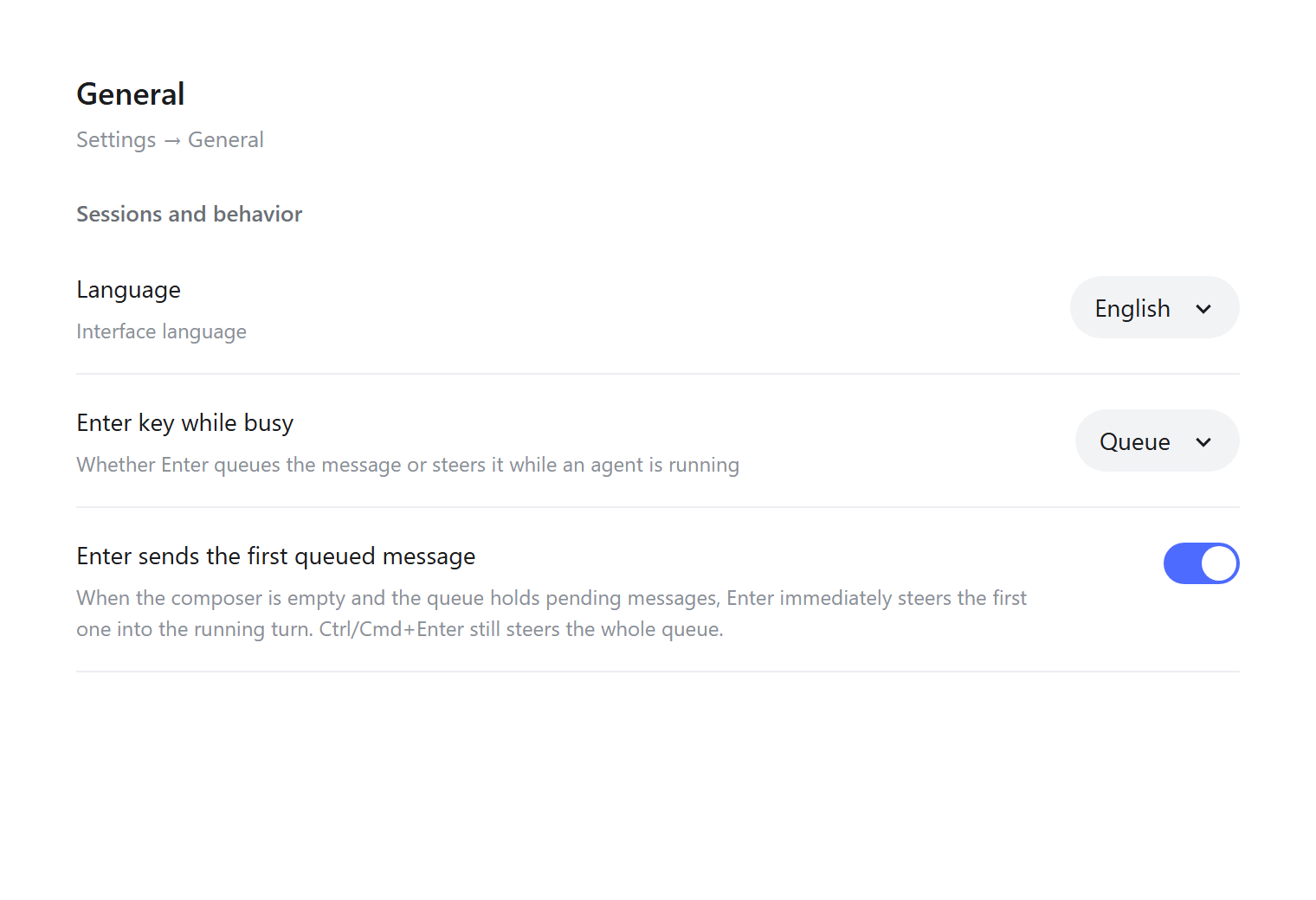
Settings → General → "Enter sends the first queued message" — a switch directly below dsh's own "Enter key while busy" row.
The row's label and description follow the product's interface language: with the interface set to English they read as above, with 简体中文 they read 「回车立即发送队列首条」. The switch itself has no per-locale state — only the copy changes.
The preference lives in browser localStorage under dsh.queueFirstEnter.enabled (default: on).
How it works
| File | Role |
|---|---|
index.js |
Host half. Contributes no host behavior; exists so the package is mountable. |
client.js |
Browser half. Registers the composer listener and the settings row through the client slot system. |
cordis.patch.yml |
Inserts the host row into the profile's layer stack. |
smoke-test.mjs |
Loads client.js against a stubbed module system and Cordis context, then asserts both slot registrations, the zh/en dictionaries, and that the row copy follows the active locale. |
The listener is attached in the capture phase to the composer's own textarea, located by walking up from the plugin's own anchor element inside the composer card — no product CSS class or absolute DOM path is used. It reads the authoritative session/queue snapshot and calls the existing updateQueue(itemId, { kind: 'steer' }) RPC; it does not send prompts of its own, does not touch the network, and stores nothing beyond the on/off flag. Copy is registered as a dsh-queue-first-enter locale namespace in both shipped locales (zh, en) and read through the client locale service, so it follows the interface language and re-renders on a switch.
The screenshots above are rendered from screenshots/settings-mockup.html and screenshots/settings-mockup.en.html, static mocks of the Settings → General panel that reuse the shipped row geometry and the plugin's own inline styles. Open either in a browser to see exactly what the row renders.
npm test          # node smoke-test.mjs
npm run check     # node --check on both halves
License
MIT
Links
More in this category
zhu1090093659/dsh-web#packages/dsh-task-board★ 9673
Task board for the dsh web GUI: a sidebar multi-column kanban whose cards run in real DSH agent sessions and can also be scheduled with cron expressions, executed host-side even with the browser closed.
zhu1090093659/dsh-web#packages/dsh-web-all★ 9673
Plugin and skin collection for the DSH Web UI: task board, Git graph, right-side panel, remote mobile UI, pet, live token stats, and a skin center.
MeteorNOX/DeepSeek-Balance-Whale-Widget★ 6324
A fixed-corner whale widget for the DSH web GUI — balance, today's usage and per-turn cost with peak/off-peak pricing, editable balance-alert and daily-budget bubbles, a module-based custom bubble queue with A/B weighted choices and random lines or images, 30+ vendor templates (OpenAI, OpenRouter, Kimi, SiliconFlow, Ark, Zhipu, MiniMax and more) with per-model balance and subscription quota, plus task-end sound, imported audio, custom roles and a resource manager. Local-only, no telemetry.
ccch1mneyyy/dsh-TUI★ 6018
Claude Code-style full-screen terminal UI: pixel-whale header, live status line, and streaming thought expansion.
omdsh-dev/DSH-better-sidebar★ 4645
Full sidebar workbench with file rendering and editing, terminal, Git, and subagents; third-party plugins can register new tabs.
Devin-AXIS/deepseek-design#deepseek-idesign★ 1607
Visual design studio for websites, app prototypes, posters, cards, reports, and magazines, with templates, direct element editing, selection-aware AI draft handoff, and export.
Community comments
Comments are public GitHub Discussions. Loading them connects to GitHub and Giscus; a GitHub account is required to post.