Toasts from DeepSeek Harness when a turn finishes, and when it stops for approval, a question or a plan exit. Native on Windows, text and timing configurable.
Install
# from npm (prebuilt)
dsh plugin --profile web add dsh-desktop-toast
# from GitHub (first run asks for allowBuilds approval — follow the hint, retry)
dsh plugin --profile web add github:hhaosheng/dsh-desktop-toast
Any plugin you install runs third-party code with your own permissions — it can read your files, use your credentials, and reach the network, and tool approvals don’t sandbox it. GitHub-sourced plugins also run build scripts at install time — pnpm blocks those until you allow them, so an install can stop with ERR_PNPM_GIT_DEP_PREPARE_NOT_ALLOWED or ERR_PNPM_IGNORED_BUILDS; dsh prints the exact key to add under allowBuilds in your profile’s pnpm-workspace.yaml, and the install works on the next run. Allowing a build is a trust decision: only install sources you trust, and pin a commit (github:owner/repo#sha).
README
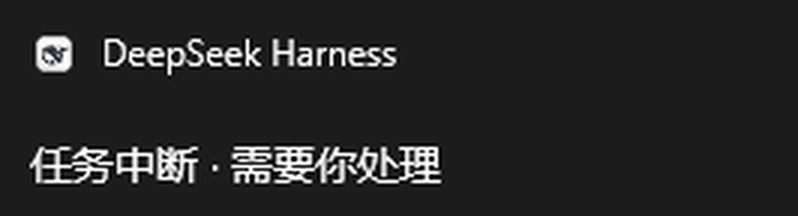
A DeepSeek Harness plugin that pops a native desktop notification when a task is interrupted (waiting on your approval, your answer, or a plan confirmation) or finished — so you do not have to babysit the window.
Successor of the
dsh-desktop-notify0.1.0 prototype (which copied files into a profile viainstall.ps1). This release is a proper bundle: install, configure and remove through the official plugin manager. The name changed becausedsh-desktop-notifyis already published by someone else.
When it fires
| Session event | Notification | Notes |
|---|---|---|
tool/call with ask_user_question / exit_plan_mode |
任务中断 · 需要你处理 | the model waits for your answer or plan approval |
approval/asked |
任务中断 · 需要你处理 | an action waits for authorization |
turn/end with reason.kind === 'completed' |
任务完成 | |
turn/end with reason.kind blocked / error / max-tokens |
任务中断 · 需要你处理 | needs a look before it can continue |
turn/end with reason.kind === 'aborted' |
nothing | you cancelled it yourself |
Subagent sessions are ignored entirely, so one task never turns into a notification storm.
Install
Official route — same as any other plugin:
dsh plugin --profile desktop add dsh-desktop-toast

# or point at a local checkout while developing
dsh plugin --profile desktop add D:\code\dsh-notify\dsh-desktop-toast
Or use the DSH desktop app: sidebar → Plugins → install dsh-desktop-toast. Takes effect immediately, no restart.
Manual fallback (not recommended): copy the two lines under insert in cordis.patch.yml into %USERPROFILE%\.dsh\profiles\<profile>\cordis.patch.yml, keeping the row id unique.
Configuration
Override config on the row in the profile's cordis.patch.yml (restart DSH to apply):
- id: desktop-toast
  name: dsh-desktop-toast
  config:
    onDone: false
    dedupeWindowMs: 5000
| Key | Default | Meaning |
|---|---|---|
onInterrupt |
true |
send "task interrupted" notifications |
onDone |
true |
send "task finished" notifications |
silent |
false |
no notification sound (on Windows) |
dedupeWindowMs |
3000 |
at most one notification of each kind per window (0 disables) |
bootQuietMs |
3000 |
swallow "finished" toasts right after load, so startup does not spam; interrupts still fire |
interruptText |
任务中断 · 需要你处理 |
interrupted body text |
doneText |
任务完成 |
finished body text |
appId |
com.deepseek.dsh |
Windows AUMID; defaults to reusing DSH's own identity |
Why is there no form in Settings? This Config only validates and supplies defaults; the DSH Plugins page does not render schema-driven forms. A bundle's own configuration area (plugins.bundle.config) is filled by the bundle's own web-side code, and this is a host-only plugin — so configuration goes through cordis.patch.yml.
Platforms
- Windows (primary): PowerShell 5.1 + WinRT
ToastNotificationManager, so toasts appear as DeepSeek Harness in the notification centre. Needs notifications enabled for the app. - macOS:
osascript -e 'display notification ...', best effort, attributed to Script Editor. - Linux:
notify-send, requires libnotify.
Known limitations
- On Windows the body is a single line; no title is set, the system shows the app name.
- Each toast spawns a PowerShell process (a few hundred ms), already
unref()d so it never holds the host open. - Clicking a toast does not focus the session (that needs a registered COM activator on the host side).
- Host-side session events only; a pure client (browser-attached) session gets no system toast.
Development
cd D:\code\dsh-notify\dsh-desktop-toast
npm install          # only for the test run: @deepseek-ai/schemastery
npm test             # node --test test
npm pack --dry-run   # inspect the published file list
To try a change locally, install from the directory as shown above, then send a message or trigger a question.
License
MIT
Links
More in this category
xmanrui/dsh-im★ 2328
Connect IM bots to DeepSeek Harness via QR codes or bot credentials (9 channels: Feishu, WeChat, DingTalk, WeCom, QQ, Slack, Telegram, Discord, and WhatsApp).
shaobeichen/dsh-pocket★ 2244
Remote phone access to the DSH Web UI: scan a QR code for LAN or public (cloudflared tunnel) access with real-time sync, a mobile-adaptive layout, and a settings tab.
OpenPetsHQ/openpets#dsh★ 1320
Bridges DeepSeek Harness lifecycle status, errors, and approval requests to a locally running OpenPets desktop companion.
inclusionAI/Avernet#deepseek-harness-channel-bcn★ 590
Connects DeepSeek Harness to Avernet's Bot Collaboration Network over WebSocket V2, with automatic onboarding, isolated agent sessions, tool-call events, and multi-bot routing tools.
c1overzz/dsh-bili-scroll★ 423
Let your DSH agent browse Bilibili on its own, read subtitles, write a daily digest, and @ you when it finds something worth your attention.
omdsh-dev/dsh-notification★ 89
Desktop notifications for turn completions, with per-outcome controls and keyword rules.
Community comments
Comments are public GitHub Discussions. Loading them connects to GitHub and Giscus; a GitHub account is required to post.