Long-context preparation, Dream memory, task verification, workflows and computer interaction for DSH.
Install
# from a prebuilt release tarball
dsh plugin --profile web add "https://github.com/gulagala001/oh-my-dsh/releases/download/v0.2.2-rc.1.omd.1.3.5/oh-my-dsh-0.2.2-rc.1.omd.1.3.5.tgz"
# from GitHub (first run asks for allowBuilds approval — follow the hint, retry)
dsh plugin --profile web add github:gulagala001/oh-my-dsh
Any plugin you install runs third-party code with your own permissions — it can read your files, use your credentials, and reach the network, and tool approvals don’t sandbox it. GitHub-sourced plugins also run build scripts at install time — pnpm blocks those until you allow them, so an install can stop with ERR_PNPM_GIT_DEP_PREPARE_NOT_ALLOWED or ERR_PNPM_IGNORED_BUILDS; dsh prints the exact key to add under allowBuilds in your profile’s pnpm-workspace.yaml, and the install works on the next run. Allowing a build is a trust decision: only install sources you trust, and pin a commit (github:owner/repo#sha).
README
Current release: OMD 1.3.5.
Quick start
Required environment: DSH 0.2.2-rc.1, Node.js 24.9.0+.
Models use your DSH configuration. The default installation grants full file/command access and disables execution approval; explicit profile settings take precedence. OpenCU is included; the full in-app browser and native monitoring also require matching host adapters and OS permissions.
1. Install
Open Plugins → Add plugin in the DSH instance you use, then paste:
https://github.com/gulagala001/oh-my-dsh/releases/download/v0.2.2-rc.1.omd.1.3.5/oh-my-dsh-0.2.2-rc.1.omd.1.3.5.tgz
Wait for active tasks to finish, then follow the host’s activation/restart prompt. Keep your existing profile and data. See the installation guide · SHA256SUMS.
2. Try this first
Create a conversation, choose Oh My DSH, and use your configured model in a shareable project:
Read this project’s README and explain its purpose and startup steps. Use only what you actually read; do not change files.
Success looks like: The answer reflects the actual file; the OMD console shows context and call records.
A composed workspace and independent products
OMD combines Workflow, Rewind, Persona, Extensions and DeepSeek Workbench with OpenCU, theme management and its Glyph appearance. Use the composed OMD workspace or choose a published independent product for a specific need.
Workflow handles execution and resumption; Rewind restores conversations and files; Persona manages personalities; Extensions manages skills and tool connections; Workbench handles web chat and migration. Matching independent and embedded entries coordinate service and UI ownership. Optional startup failures retain core conversations, while plugin data, versions and host requirements keep their own boundaries.
Architecture, independent releases and coinstallation · Upgrade and data migration
From conversation to delivery
Keep the work in view
The session overview brings outputs, sources, background processes, Workflow and subagents together. Open a member to continue its sidebar conversation. Ultra offers Workflow, Agent Team and Free collaboration modes. Better Todo connects original requirements, tasks and verification results, retaining completed checks and actual execution receipts.
Start without a project: a new chat prepares its own directory and reuses it from the first send onward. Chat titles are independent of file locations. The ✨ composer control offers light polish, structured rewriting and step planning, with saved requirements, versions, undo and redo.
Everyday usage · Ultra and Workflow
Preserve context and retrieve original results
Context optimization is on by default. It shortens recognized read-only results and uses references or deltas when a complete baseline remains available, while retaining actual tool execution and authorized originals. View original on a tool card supports line ranges, search, paging and export; evidence archives can migrate with their conversations.
On-demand tool discovery, file and webpage views, AST pattern search and CodeGraph help locate relevant material. History processing, Auto Compact and Dream manage context and session/project/global memory. Optional Billion Context can own compaction while Dream, recall, tasks, side questions and branches continue working together.
Tool calls are more efficient, with less repeated work in code search, article reading, original-result lookup and screenshot transfer. Repetitive tool output is shortened to reduce context use and token consumption, while complete originals remain available when you need the details.
Optimization and originals · Compaction and BC · Dream
Choose your workspace and voice
Glyph combines a three-dimensional character whale, local ripples and character controls. Choose from Glyph, native DSH, Codex Desktop, iOS Liquid Glass, Claude Desktop, Claude CLI and Google Material, with 30 palettes, backgrounds, fonts and region colors. Existing appearance choices remain saved.
Personality management separates identity, language style, communication and answer presentation. Manage multiple presets, duplicate and edit them, import/export JSON, or use the supplied creation prompt with an AI. Optional session personalities let each main conversation inherit the global preset, select its own, or disable personality guidance.
Choose between two built-in personality presets for the task:
- Economical: aims for lower token use, efficient execution and quick delivery, focusing effort on useful results. The author reports a 50% efficiency improvement in their tests.
- Overclock: aims for greater depth, completeness and polish, investing more effort in reasoning and detail for complex tasks.
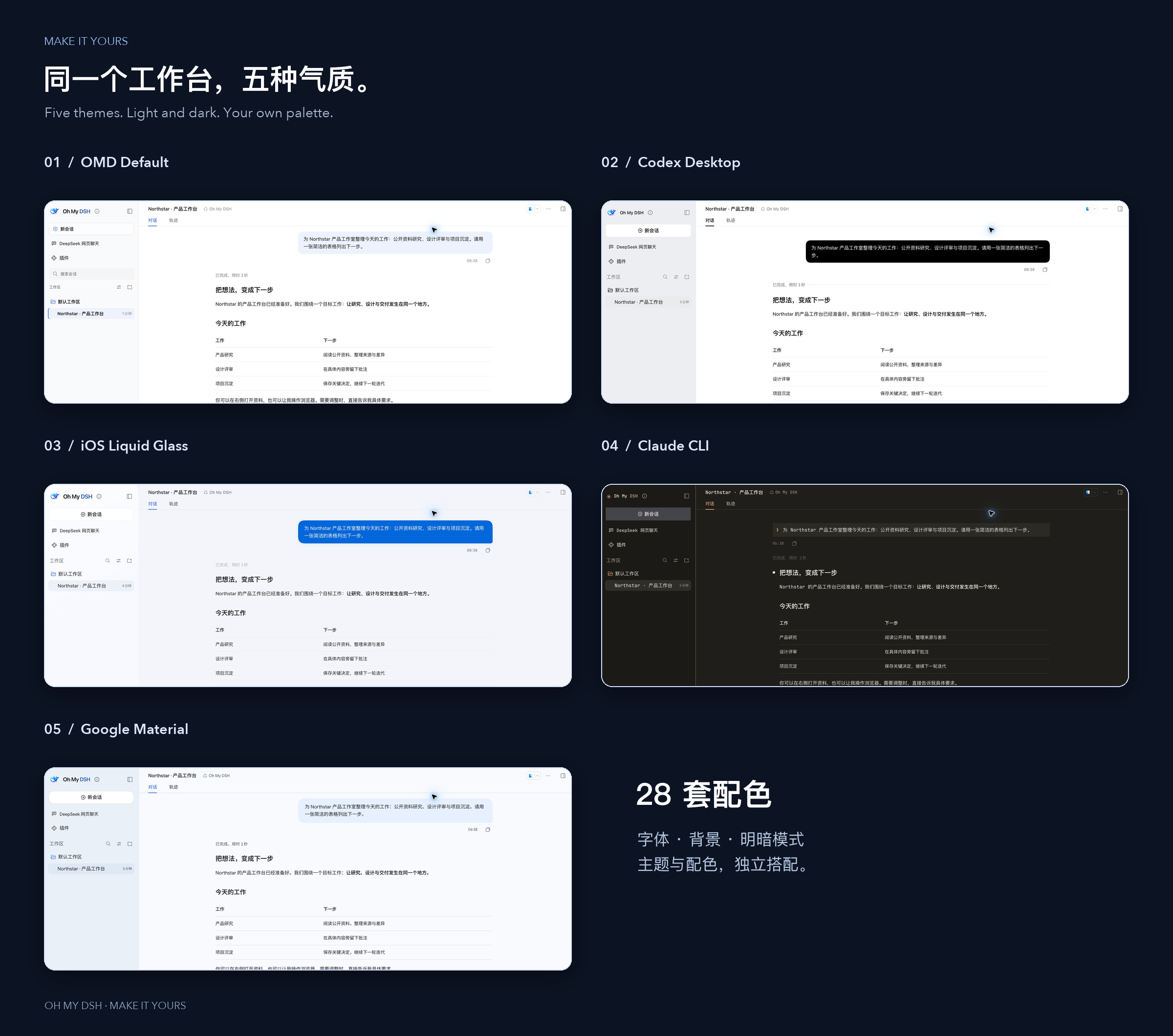
Appearance · Personalities and settings
Work with browsers, apps and extensions
Bundled OpenCU 2.2.0 provides browser and app discovery, observation, background-first actions, annotations and floating previews. Stop and cancellation track actual input release, with explicit outcomes for stalled reads, approval timeouts and replaced targets. Full embedded surfaces require matching host adapters and system permissions.
Extension management brings skills, MCP, instruction files, commands and hooks into the plugin page. Optional dsh-ops adds file, document, shell and on-demand tool capabilities through a fixed compatibility package for the matching host.
Computer use · Extensions · dsh-ops
Keep side discussions and usage visible
/侧栏 opens a temporary text chat using the current model; closing it stops generation and clears its messages. /侧栏(网页版) opens a temporary DeepSeek website conversation. Regular web chat can import readable history and attachments into DSH. /btw asks a side question about the main task, while turn rewind can restore conversation history and checkpointed file changes.
The OMD console combines context, memory, call logs and background activity. Filter usage and costs by date, model, component or conversation. Unknown usage stays unknown, and ≥ denotes a known lower bound; optimization estimates remain separate from provider billing.
Side chats and rewind · DeepSeek Workbench · Monitoring
Supported use
| Scenario | Requirements |
|---|---|
| Conversations, appearance, tasks and memory | A matching DSH build and configured model. |
| Browser and desktop actions | An available OpenCU backend and OS permissions; full embedded UI also requires host adapters. |
| Web chat and history import | Corresponding DeepSeek Workbench desktop capabilities and website login; only readable messages and attachments can migrate. |
| Other DSH versions | Use their dedicated builds; rc.1 and rc.2 packages are not interchangeable. |
The main branch may contain improvements not yet included in a fixed Release. Public archives do not change when main changes. See release packages for actual downloads and checksums.
FAQ
Check that you installed into the profile used by this instance, fully restarted it and enabled the plugin. Choose Oh My DSH in a new conversation; existing conversations retain their presets. Troubleshooting
The embedded browser, native monitoring and sidebar annotations require matching host adapters. Fixed releases provide source materials, not a complete desktop installer. Computer Use requirements
Finish active tasks and back up first. Install the fixed package matching the same host, preserving the data directory and profile. Do not clear data or bypass version checks. Upgrade guide
Contributing and attribution
Reproducible reports, documentation improvements and practical examples are welcome. Contributing · Development
OMD-owned code is licensed under MIT. Third-party code, components and materials retain their original licenses; see third-party notices. This is a community project with no official affiliation or endorsement from the referenced brands.
Documentation and support
| I want to | Where to go |
|---|---|
| Install, update or remove | Installation guide |
| Learn the features and limits | Documentation |
| Read release changes | Releases |
| Report a problem | Issues |
For a bug report, include the full DSH and plugin versions, the entry point, minimal reproduction steps, and expected versus actual behavior. Remove private data before sharing logs or screenshots.
Documentation structure and contributing
Projects, components and acknowledgements
Complete project, source and dependency inventory
| Project | Purpose |
|---|---|
| OpenCU | Computer and browser observation, interaction, annotations and previews |
| DSH Workflow | Task planning, execution, budgets and recovery |
| DSH Rewind | Turn undo and conversation rewind |
| DSH Persona | Personality import, management and global or per-chat selection |
| DSH Extensions | Manage skills, MCP, instructions, commands and hooks |
| DeepSeek Workbench | DeepSeek web workspace and conversation import |
| DSH BTW | Side chats, local history, follow-ups and independent cancellation |
| DSH Theme | Themes, colors, backgrounds, fonts and appearance management |
| Glyph | Animated character interface and whale visuals |
| DSH Response ID Reuse | Automatic Responses ID continuation and full-request fallback |
| Billion Context | Long-context compression, original-content recovery and cache diagnostics. |
| dsh-ops | Bounded file, document and shell tools with on-demand discovery. |
| DSH Intelligent UI | Interactive charts, forms, calculators, simulations and games in answers. |
| Oh My Agents Above All | Choose a Codex, Grok Build, Cursor, Pi Coding Agent or ZCode preset in Settings → OMAA to use with DSH sessions and tools. |
| Subscription Login | Connect supported subscription providers and discover models. |
| OpenDesign | Design skills, templates and design systems. |
| Prompt Optimizer | Review and clarify requests before sending. |
| DSH Market | Browse and manage community plugins and themes. |
| Infinite Gen 4 | Prompt research and response-state presentation. |
| Status Rotator | Rotating activity text in the interface. |
| DSH × Blender | Connect DSH tools to Blender. |
| Balance Whale Widget | Usage and balance widget with interactive characters. |
Links
More in this category
loopx-project/loopx#dsh-loopx-plugin★ 6537
LoopX, a provider-neutral, local-first state kernel and control plane for long-horizon agents: keeps Goal, Todo, gate, evidence, quota, recovery, and handoff state above DeepSeek Harness, while the plugin bootstraps the CLI and skills, admits bounded same-session continuation, and adds a loopback GoalBar for the exact bound loop.
Q00/ouroboros#integrations/dsh-plugin★ 6308
Config-only bundle that mounts Ouroboros through the DSH MCP client, exposing 36 interview, Seed, execution, evaluation, and evolution workflow tools in DSH.
chuspeeism/dashi-taskboard#deepseek-harness★ 3434
Embeds the active installed Codex Taskboard runtime in the DeepSeek Harness sidebar, using its launcher runtime descriptor instead of a fixed port.
NanmiCoder/dsh-agent-teams★ 2647
AgentTeams multi-agent teams.
EthanYoQ/AI-Novel-Writer#dsh-ai-novel-writer★ 2265
Installs a dedicated AI novel-writing preset and workbench: revisioned local project assets, a compact side drawer, and native approval-gated single-file changes.
Miaotofu01/Study-Mate★ 1307
Your AI learning companion: helping you plan your studies, understand concepts, and build projects to master a subject.
Community comments
Comments are public GitHub Discussions. Loading them connects to GitHub and Giscus; a GitHub account is required to post.