Access DSH from your phone or anywhere: Cloudflare Quick Tunnel public link + LAN HTTP/HTTPS direct access (auto self-signed cert), token auth, gzip compression, floating phone-icon panel with QR codes, and a NapCat QQ bot channel to fetch the link.
Install
# from GitHub (first run asks for allowBuilds approval — follow the hint, retry)
dsh plugin --profile web add github:godchen520/dsh-web-remote
Any plugin you install runs third-party code with your own permissions — it can read your files, use your credentials, and reach the network, and tool approvals don’t sandbox it. GitHub-sourced plugins also run build scripts at install time — pnpm blocks those until you allow them, so an install can stop with ERR_PNPM_GIT_DEP_PREPARE_NOT_ALLOWED or ERR_PNPM_IGNORED_BUILDS; dsh prints the exact key to add under allowBuilds in your profile’s pnpm-workspace.yaml, and the install works on the next run. Allowing a build is a trust decision: only install sources you trust, and pin a commit (github:owner/repo#sha).
README
A plugin for DeepSeek Harness (DSH) that enables mobile and remote access via phone browser or WeChat.
✨ Features
| Feature | Description |
|---|---|
| 🌐 Public Access | Cloudflare Quick Tunnel — no public IP or registration needed; auto-downloads cloudflared |
| 📡 LAN Direct | HTTP + HTTPS direct connection (HTTPS with auto-generated self-signed cert, zero config) |
| 🔒 Secure Auth | Random token per start; HttpOnly Cookie; LAN can be token-free |
| ⚡ Performance | Reverse proxy with automatic gzip compression for faster large session loads |
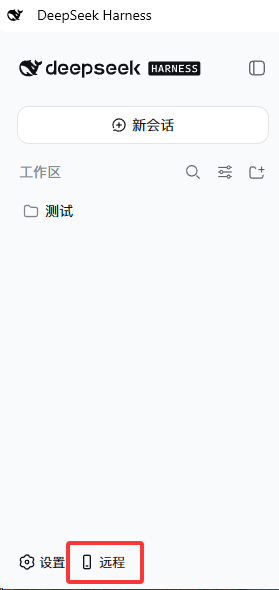
| 📱 Sidebar Icon | Phone shortcut button persists in the bottom-left corner |
| 🔗 Custom Public URL | Set your own public URL (e.g. ngrok); edit/clear from the panel |
| 🔌 Custom Port | Change the LAN HTTPS port with occupancy detection |
| 🤖 WeChat Bot | iLink protocol direct connection to WeChat; AI chat, session control, model switching |
| 💬 Feishu Bot | WebSocket long connection; command control, monitor notifications |
| ✈️ Telegram Bot | Long polling; HTTP proxy support, command control, monitor push |
| 👁️ Session Monitor | /monitor — get notified on your bound channel when the agent finishes |
| 🩺 Channel Health | Per-channel monitoring; auto-stops after 3 consecutive failures, with one-click reconnect |
🚀 Quick Start
3 steps:
# 1. Install plugin (run in DSH profile directory)
cd $DSH_HOME/profiles/web
pnpm add github:godchen520/dsh-web-remote

# 2. Register bundle (edit package.json)
# Add "dsh-web-remote" to the "dsh.profile.bundles" array

# 3. Restart DSH
dsh web
A 📱 icon appears in the bottom-left corner → click to open the remote panel.
📸 Screenshots
Sidebar button (bottom-left corner):
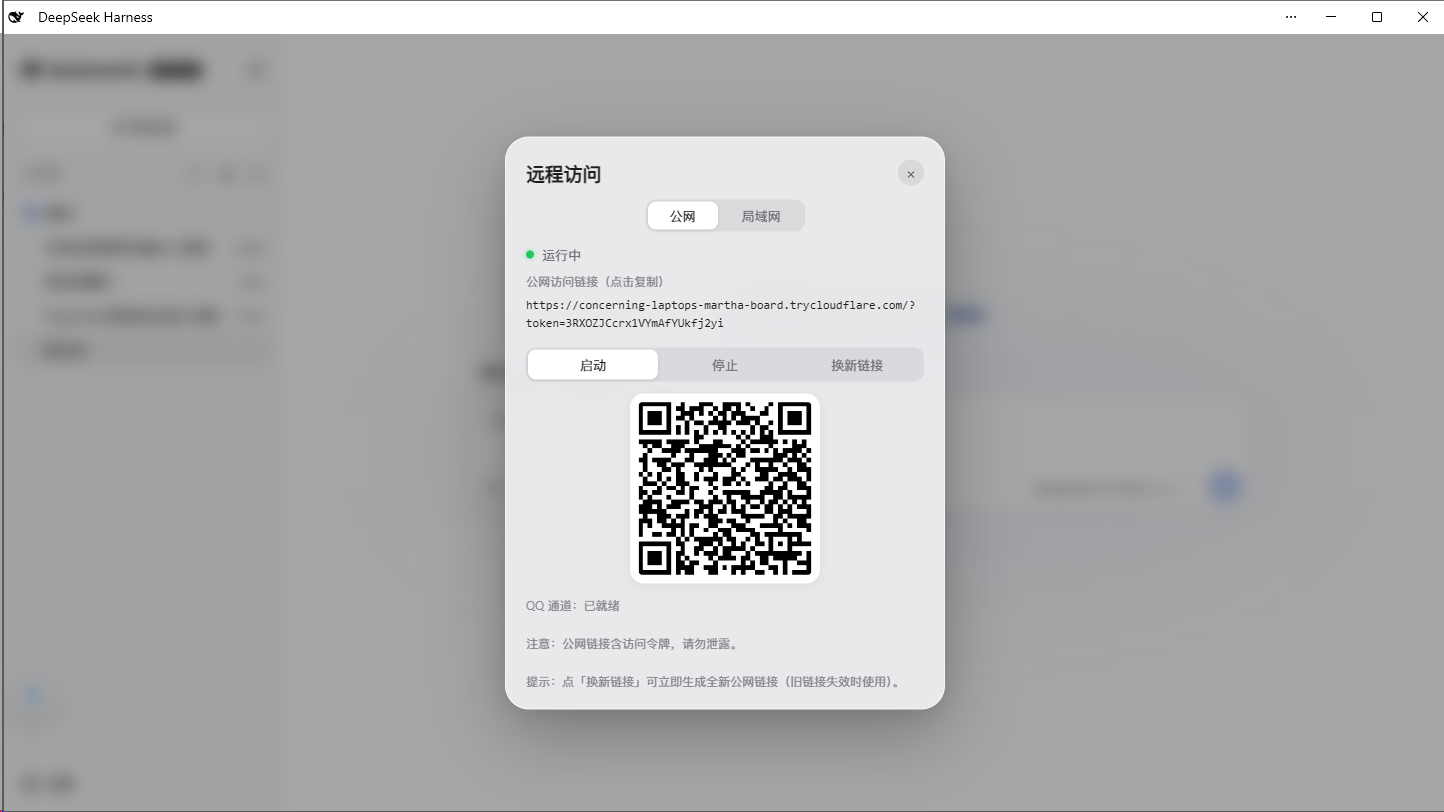
Remote Panel (Public / LAN switch, copy link, QR code, start/stop):
📋 Installation
Option 1: GitHub Install (Recommended)
cd $DSH_HOME/profiles/web
pnpm add github:godchen520/dsh-web-remote
Add "dsh-web-remote" to dsh.profile.bundles in package.json, then restart DSH.
Use
--config.minimumReleaseAge=0if pnpm 11 blocks new packages.
Option 2: Manual Patch
Place the package in profile's node_modules, then add to cordis.patch.yml:
- insert:
    - id: web-remote
      name: 'dsh-web-remote'
Bundle install requires restart; cordis.patch.yml supports HMR hot-reload.
⚙️ Configuration
All optional. Override in cordis.patch.yml:
| Option | Default | Description |
|---|---|---|
targetPort |
3080 |
DSH's own port |
httpPortStart |
3081 |
LAN HTTP start port (auto-skips occupied) |
httpsPortStart |
3082 |
LAN HTTPS start port |
qqPortStart |
3001 |
QQ OneBot bridge start port |
cloudflaredPath |
'' |
Specify cloudflared path; empty = auto-detect / auto-download |
pfxPath |
'' |
PFX certificate; empty = auto-generate self-signed |
pfxPass |
'' |
PFX password |
toolsDir |
'' |
Tool & cert cache directory; empty = $DSH_HOME/tools |
autoStart |
true |
Auto-start on plugin load |
lanOpen |
true |
LAN token-free mode (private network bypass) |
📱 Usage
- After start, a 📱 icon appears in the bottom-left corner
- Click the icon → panel shows status and links
- Open the link in your phone browser
Public: https://xxx.trycloudflare.com/?token=...
LAN: https://192.168.x.x:3082 (same Wi-Fi; token-free by default)
🤖 WeChat Bot
Control DSH directly from WeChat:
Remote Control Commands:
/link— Get public link (auto-starts if stopped)/stop— Stop remote service/monitor— Toggle session monitor (notify when agent finishes)
Session Management:
/sessions— List all sessions/select N— Select session N/session— Show selected session name/history— Show session's recent output
Model Switching:
/model— Show current model/switch-model— List and switch models/effort N— Set reasoning effort
Chat:
- Send content directly → auto-sends to selected session with result
- Shows prompt to select a session when none is selected
💬 Feishu Bot
Control DSH directly from Feishu (Lark):
/link— Get public link/stop— Stop remote service/monitor— Toggle session monitor/help— Show command list
Setup: DSH Web panel → Bot tab → Feishu, fill in App ID and App Secret, then bind.
✈️ Telegram Bot
Control DSH directly from Telegram:
/link— Get public link/stop— Stop remote service/monitor— Toggle session monitor/help— Show command list
Setup: DSH Web panel → Bot tab → Telegram, fill in the Bot Token, then bind.
Proxy: If the Telegram API is unreachable from your network, configure an HTTP proxy in the panel.
🩺 Channel Health Monitoring
WeChat / Feishu / Telegram are monitored independently:
- 3 consecutive send failures → that channel stops automatically and raises an alert
- The remote icon shows a red dot
- A disconnect page offers a one-click reconnect button
❓ FAQ
Q: Public link shows "not secure"? A: Expected for self-signed HTTPS certs. Choose "Continue anyway" in your phone browser. Edge may need "Enhanced Security" turned off.
Q: Link changes after DSH restart? A: Public tunnel generates a new address each restart — this is normal. WeChat-bound tokens auto-restore.
Q: cloudflared download fails?
A: First start needs internet to download cloudflared (~10MB). Afterwards it's cached. You can also manually place it in toolsDir.
Q: WeChat disconnects after scanning?
A: After DSH restart, WeChat auto-reconnects (token is persisted). If still disconnected, re-send /link to rebind.
📝 Changelog
See CHANGELOG.md for version history.
🤝 Contributing
See CONTRIBUTING.md for development and submission guidelines.
📄 License
Links
More in this category
zhu1090093659/dsh-web#packages/dsh-remote-web-ui★ 8121
Remote control of a dsh web workspace from phone or PC: QR-code pairing through a token-gated channel, SSE real-time sync, and separate mobile and full desktop GUI modes.
zhu1090093659/dsh-web#packages/dsh-ssh★ 8121
SSH ops panel for DSH: web terminal, SFTP transfer with progress, local port forwarding, and one-command cluster execution across hosts; agents share the same host config.
saya-ch/dsh-mobile★ 333
Access DeepSeek Harness from the Android app or a mobile browser with secure LAN and remote connections, persistent device pairing, and a customizable mobile interface.
ZSeven-W/dsh-ios★ 308
A live iOS Simulator or USB-connected iPhone inside the conversation: 22 agent tools for booting, building, driving the UI by accessibility identity or OCR text, list-row actions and SwiftUI preview hot reload, plus a streaming sidebar panel you can tap and drag on.
liguobao/ds-harness-remote★ 234
Multi-device remote access for DeepSeek Harness: continue an active session from your phone, tablet, browser, or another computer over an end-to-end encrypted channel (Noise IK + adaptive relay/WebRTC transport), with device authorization, ApiProxy-only remote capabilities, and read-only file preview via dsh-file-viewer — no shell, remote desktop, or write access.
wenbin-wb/dsh-bridge★ 177
Remote and mobile access for DeepSeek Harness: provides LAN QR code connection, Cloudflare/custom tunnels, WeChat, QQ, Feishu, Telegram bot integration, and security authentication.
Community comments
Comments are public GitHub Discussions. Loading them connects to GitHub and Giscus; a GitHub account is required to post.