Conversation navigator panel: turn-folded outline of the current session with per-step kind badges (assistant, tool, command, compaction, error), a hover bubble showing the full user question, a minimal mode that hides turn numbers for an all-badge view, keyword filter over user questions and assistant replies, click-to-jump with reading-position tracking, and load-earlier/load-all history paging. Host >= 0.1.2-rc.1; legacy hosts install @legacy/0.2.5.
Install
# from npm (prebuilt)
dsh plugin --profile web add dsh-conversation-navigator
# from GitHub (first run asks for allowBuilds approval — follow the hint, retry)
dsh plugin --profile web add github:gjj-star/dsh-conversation-navigator
Any plugin you install runs third-party code with your own permissions — it can read your files, use your credentials, and reach the network, and tool approvals don’t sandbox it. GitHub-sourced plugins also run build scripts at install time — pnpm blocks those until you allow them, so an install can stop with ERR_PNPM_GIT_DEP_PREPARE_NOT_ALLOWED or ERR_PNPM_IGNORED_BUILDS; dsh prints the exact key to add under allowBuilds in your profile’s pnpm-workspace.yaml, and the install works on the next run. Allowing a build is a trust decision: only install sources you trust, and pin a commit (github:owner/repo#sha).
README
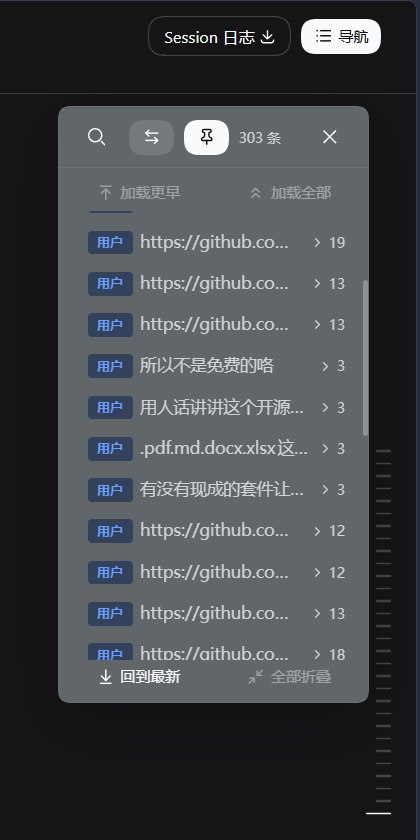
A DeepSeek Harness (DSH) Web conversation navigator panel: a turn-folded outline floating on the right side of the conversation page. Click any node to smooth-jump, watch the current reading position highlight as you scroll, with step badges colored to match the built-in "Trajectory" view.
Browser-only (no host behavior), plain JavaScript, zero build step, zero npm dependencies (buttons/tooltips reuse the official primitives from the DSH kernel seed).
| Dark mode | Light mode |
|---|---|
 |
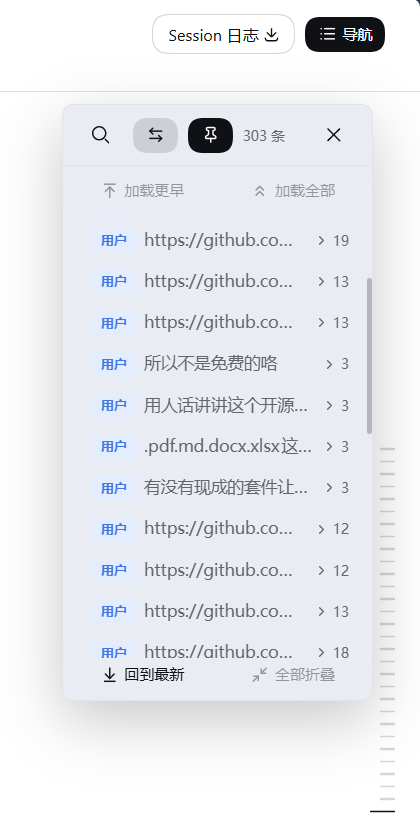 |
The conversation navigator in dark and light mode. Three forms: full, hidden, and minimal-left (minimal-right is shelved as of 0.2.6, code retained). The minimal strips collapse to the in-row indicator bars; hover expands the positioning panel. More screenshots in assets/screenshots.
Features
- Turn-folded outline: shows "Turn N + your question" rows by default, long conversations at a glance
- Keyword filter: click the top-left search icon to reveal the inline input; matches only your questions + the assistant's actual reply text (context, tool calls, commands, compaction and reasoning never match); hits are highlighted and the list text is windowed to the keyword
- Jump straight to the hit: clicking a search result scrolls to where the keyword actually appears in the conversation (not just the top of the message) and marks every occurrence inside that message — a brief flash that eases into a soft persistent tint, so long replies no longer need hunting
- Expand / collapse steps: the arrow button on the right of each turn row (
▸ N, rotates to▾when expanded) smoothly expands or collapses the turn's step details (assistant replies, tool calls, commands, compaction points, etc.) - Hover full text: rest the mouse on a turn row and a bubble shows the user's complete question, no longer truncated to one line
- Full / Hidden / Minimal-left modes: the header toggle cycles three states —
- Full: the classic grouped view (system events like compaction are shown bold, at the same level as turns)
- Hidden: every row is a trajectory badge + text (user = business blue, assistant = violet, compaction = neutral gray)
- Minimal-left: the indicator-bar strip pinned to the left edge of the conversation area (at the right border of the DSH sidebar), leaving the right side for dsh-better-sidebar and zero overlap with the official rail
- The minimal strip collapses to the in-row indicator bars (current = solid brand color, others = 40% foreground-color mix); hovering expands a fixed 7-row positioning panel (click to jump, hover bubble for the full question, thumb-only scrollbar beyond 7 rows; left-aligned expands from left to right); a floating button above the bars keeps cycling forward (minimal-left → Full); the toggle yields while the search input is open
- Draggable panel: in Full / Hidden mode, grab the header to drag the panel anywhere in the viewport (auto-clamped to the edges; the expanded height is capped at half the viewport with the top edge fixed and the panel growing downward — expanding a huge turn scrolls the list internally while the "Back to latest / Collapse all" footer stays reachable); the pin button in the header toggles between the default right-dock and the last dragged position; the dragged position and the minimal left/right alignment survive page reloads via localStorage
- Resizable panel: drag from the bottom-left rounded corner (Full / Hidden modes only) — width 240–560 px, height vertical. Height follows a content-adaptive + cap model: actual height = min(turn content, the cap you drag to), tracking the number of turns with no blank space under the footer; floor ~3 turns, ceiling within the conversation viewport. The drag tracks the pointer 1:1 and is fully reversible; width/height persist in localStorage
- Silky motion: panel fade, step expand/collapse height transitions, staggered fade-in of filter results, rotating collapse arrow — all pure CSS, zero dependencies
- Click to locate: click a turn or a step to smooth-scroll the conversation to that exact position (fold state is preserved)
- Load earlier / Load all: two buttons on top — "Load earlier" pages one batch back, "Load all" loads every historical turn into the navigator for arbitrary jumps (the page itself stays lazily loaded until you click)
- Position tracking: scrolling the conversation highlights and follows the turn you are currently reading
- Right-side docking (default): the panel is anchored to the right edge of the viewport and stays put when the left sidebar collapses or expands; unpin (drag it or hit the pin) to place it anywhere
- Back to latest / Collapse all: two shortcut buttons at the bottom; "Collapse all" is disabled when no turn is expanded, so it never looks broken for doing nothing
- Trajectory colors: user/steering = business blue, context = success green, assistant = violet, tool = amber, compaction = neutral gray (
--dswtheme tokens matching the built-in trajectory view, light/dark adaptive) - Native DSH look: action buttons reuse the official
Button/Tooltipcomponents and official icons (search, close); the remaining icons (navigate, load earlier, load all, back to latest, collapse all, switch modes, …) are outline icons from Lucide (ISC License, lucide.dev),currentColoradaptive to light/dark themes - Follows workspace/session switches automatically and rebuilds the outline
Install
This plugin is a spec-compliant bundle (dsh.bundle manifest + dsh.client declaration), plain JavaScript with no build step. Install with the official CLI:
# Option 1: npm (no build authorization needed once published)
dsh plugin --profile web add dsh-conversation-navigator

# Option 2: GitHub (pure JS package, no prepare/allowBuilds required)
dsh plugin --profile web add github:gjj-star/dsh-conversation-navigator

# Option 3: local tarball
pnpm pack
dsh plugin --profile web add ./dsh-conversation-navigator-<version>.tgz
dsh plugin forwards to pnpm inside the profile directory, so pnpm must be on your PATH; installation appends this package to the profile's dsh.profile.bundles, and its bundled cordis.patch.yml layer inserts the plugin row. Restart dsh web and the panel appears. Dual-form defaults: on official DSH < 0.1.2-rc.1 (no built-in navigator) the panel is expanded by default; on official DSH ≥ 0.1.2-rc.1 (the conversation view ships the built-in TurnNavigator rail) the panel starts closed in "minimal-left" form with the search box collapsed, summoned by the "导航" title-bar toggle, with zero overlap against the official right-edge rail.
Manual install (no pnpm): place the repo at
<DSH_HOME>\profiles\<profile>\node_modules\dsh-conversation-navigatorand append the content ofexample.patch.ymlto the top-level array of the profile'scordis.patch.yml.
Updates
Edit lib/client.js and restart dsh web. Docked state, dragged position, minimal alignment and the panel width/height persist (localStorage dsh-cnvnav:ui:v2); the open/closed state is deliberately NOT persisted — on the new host the panel always starts closed — and search keywords still live only within the page session.
Published to npm as
dsh-conversation-navigator(the version badge above always shows the latest release); to upgrade an installed copy, update from the marketplace or rundsh plugin --profile web add dsh-conversation-navigatoragain, then restart.
How it works
- Slots:
conversation.session.header.utilities(the "导航" toggle in the title bar) +shell.overlay(the floating panel) - Data (dual-form): legacy hosts read the session-level standard props
useSession; new hosts (official ≥ 0.1.2-rc.1) read theuiConversation.binding(binding).target("chat")snapshot — the primary channel groups by the officialtimeline.turnOrder+locationsindex, backs off toChatNodeStore.values()(mapping via the node's ownlocationor itsanchorSeqagainst the official turn boundaries), and finally merges the officialturnOutlineprojection (sessions.projectionStore(sid).get("turnOutline")/ the slot standard propuseProjection, the same source the official rail'smergeTurnRailItemsuses) to restore user messages the assembly index drops and to add out-of-window turns; re-derived automatically onloadOlder - History backfill: pages back through
sessions'sbinding(sessionId).session.loadOlder(), "Load all" loops untilhasMore=false - Jumping: reuses the DSH chat view's own stable DOM anchor
[data-chat-anchor-key](the same anchor the product uses internally for paging/scroll positioning) withscrollIntoViewsmooth scrolling - Position tracking: captures scroll events on the
[data-conversation-scroll]container (throttled 120ms) and computes the first visible node at the viewport top - Keyword filter: extracts searchable text only for
userandassistant-stepnodes (dialogueText), case-insensitive matching, hits wrapped in<mark>and the display windowed around the first hit - Hover full text: the turn-row bubble reads
fullDialogueText(all text blocks of the user node joined), shown viaTooltipwith a 340px width cap - Modes: the header button cycles
viewMode(full/hidden/minimal-left;minimal/minimal-right is commented out and retained); hidden replaces the turn head title with a trajectory badge (titleNodestrategy); minimal-left is pinned toscrollport.left + 12(the placement key includesr.leftand a ResizeObserver on the chat area re-anchors it whenever the left sidebar expands or collapses); the toggle yields while the search input is open - Drag & persistence: the full-panel header is draggable (pointer events, clamped to the viewport); dragging or the pin toggles
docked;place()only clamps a freely-placed panel into the viewport instead of re-docking it; the position, docked state and alignment choice persist in localStorage (dsh-cnvnav:ui:v1) - Resize: a transparent bottom-left corner grip captures pointer events; width writes
style.widthdirectly (240–560), height only adjustsmaxHeightwhileheightstaysauto, so the actual height is always min(content, cap) with no blank space; dragging follows the start point linearly (base + delta) and shares the same container/viewport clamps asplace()so nothing snaps on release; width/height persist aspanelWidth/panelHeight - Styling:
Button/Tooltip/search & close icons reuse@deepseek-ai/dsh-client-ui-primitives, the rest are inline Lucide SVGs (ISC License); the panel injects its own<style>element, colors use--dsw-*theme tokens; everything is cleaned up with the fiber on unload
Compatibility
- Target platform: DSH Web (
dsh.client.platform: web), depends on the kernel seed'sreact,slots,sessionsservices and@deepseek-ai/dsh-client-ui-primitives;dsh.client.injectdeclares@deepseek-ai/dsh-client-ui-conversation(dsh-client-runtimewas removed in official v0.1.2-rc.1 and is no longer injected) - Dual form (0.2.6): the host form is detected at runtime via feature detection — the presence of the
uiConversationservice marks the new host (official ≥ 0.1.2-rc.1); no hardcoded version numbers.uiConversationis now declared in the clientexports.inject, so the runtime guarantees it is ready and host detection no longer flips with load timing. Legacy hosts keep the full navigator (expanded by default); new hosts coexist with the official TurnNavigator: closed by default, "minimal-left" form, search box collapsed by default — the official rail handles jumping, this plugin focuses on keyword search, bulk "Load all" and step-level badges - Host version note: fully verified on official DSH v0.1.2-rc.1 (Web) — the new
uiConversationservice, theconversation.session.header.utilitiesempty-props contract, the chat target snapshot (timeline/locations/nodes/navigation/legacy) and theturnOutlineprojection. Legacy hosts (nouiConversation) are covered by theuseSessionpath; older official versions are not individually regression-tested - Host dependency declaration:
@deepseek-ai/dsh-client-ui-conversationis declared as apeerDependenciessemver range (the awesome-dsh-plugin convention; dshmarket's dependency check surfaces host compatibility from it) - Version-sensitive points:
[data-chat-anchor-key]/[data-conversation-scroll]are the current DOM anchor conventions of the DSH chat view (verified still present in official v0.1.2-rc.1); if they change after a DSH upgrade, onlyfindAnchor/computeActiveKeyinlib/client.jsneed adjusting - No hard
timerdependency: the client timer service is used for throttling when present, and degrades to unthrottled otherwise
Host ↔ plugin version
Official v0.1.2-rc.1 made a breaking change to the conversation data layer (conversation nodes moved from the session.chat snapshot to the uiConversation chat target snapshot), so the plugin forks by host version:
Host dsh-client-ui-conversation |
Matching plugin version | npm tag |
|---|---|---|
≥ 0.1.2-rc.1 (has the uiConversation service) |
0.2.6 and later (currently 0.2.11) | latest (default) |
≤ 0.1.1-rc.2 (no uiConversation, legacy session.chat snapshot) |
0.2.5 and earlier | legacy |
- New hosts can install the latest normally (
dsh plugin --profile web add dsh-conversation-navigator). - Legacy hosts should pin the legacy tag:
npm i dsh-conversation-navigator@legacy(= 0.2.5). - From 0.2.6 the
peerDependenciesrange is>=0.1.2-rc.1 <0.3.0(both the conversation data layer and the UI primitives package). - Icon export compatibility: DSH 0.1.7 silently renamed
IconXxxOutline16toIconXxxOutlineRegular / Medium(0.1.2–0.1.6 only ship the old names). From 0.2.11 the plugin resolves them in one place, preferring the new names and falling back to the old ones, and degrades to placeholder components with a diagnostic error instead of letting the whole slot die on minified React error #130. CI checks the host export contract against released DSH versions (scripts/check-host-exports.mjs).
Structure
lib/
  index.js   # empty host entry (browser-only plugin)
  client.js  # full browser implementation (window.__ModuleLoader__ module format)
assets/
  screenshots/   # screenshots (README hero + market gallery)
scripts/
  check-host-exports.mjs   # CI: host export contract check (silent removals like icon renames)
cordis.patch.yml     # bundle patch layer (inserts the plugin row)
example.patch.yml    # patch example for manual installs
Traffic
Window 2026-08-17 → 2026-10-06 (refreshed daily by GitHub Actions):
| npm downloads | GitHub unique visitors | GitHub unique cloners | Stars | Forks |
|---|---|---|---|---|
| 7,567 | 631 | 528 | 23 | 1 |
- Details: traffic-report.md | raw archive: traffic-archive.json | chart & docs: docs/traffic
- Caveats: npm downloads include mirrors, CI and reinstalls, with a 1–2 day settlement lag; GitHub unique visitors / cloners are closer to real user counts.
License
MIT
Links
More in this category
zhu1090093659/dsh-web#packages/dsh-task-board★ 8440
Task board for the dsh web GUI: a sidebar multi-column kanban whose cards run in real DSH agent sessions and can also be scheduled with cron expressions, executed host-side even with the browser closed.
zhu1090093659/dsh-web#packages/dsh-web-all★ 8440
Plugin and skin collection for the DSH Web UI: task board, Git graph, right-side panel, remote mobile UI, pet, live token stats, and a skin center.
MeteorNOX/DeepSeek-Balance-Whale-Widget★ 4135
A fixed-corner whale widget for the DSH web GUI — balance, today's usage and per-turn cost with peak/off-peak pricing, editable balance-alert and daily-budget bubbles, a module-based custom bubble queue with A/B weighted choices and random lines or images, 30+ vendor templates (OpenAI, OpenRouter, Kimi, SiliconFlow, Ark, Zhipu, MiniMax and more) with per-model balance and subscription quota, plus task-end sound, imported audio, custom roles and a resource manager. Local-only, no telemetry.
ccch1mneyyy/dsh-TUI★ 4130
Claude Code-style full-screen terminal UI: pixel-whale header, live status line, and streaming thought expansion.
omdsh-dev/DSH-better-sidebar★ 4031
Full sidebar workbench with file rendering and editing, terminal, Git, and subagents; third-party plugins can register new tabs.
Devin-AXIS/deepseek-design#deepseek-idesign★ 1424
Visual design studio for websites, app prototypes, posters, cards, reports, and magazines, with templates, direct element editing, selection-aware AI draft handoff, and export.
Community comments
Comments are public GitHub Discussions. Loading them connects to GitHub and Giscus; a GitHub account is required to post.