Self-hosted DSH Web operations panel for safe restart and upgrade, health diagnostics, model-usage statistics and provider quota lookup, backup and session management, task notifications, skill controls, subagent model routing, and Linux permission maintenance.
Install
# from npm (prebuilt)
dsh plugin --profile web add @gehennawu/dsh-service
# from GitHub (first run asks for allowBuilds approval — follow the hint, retry)
dsh plugin --profile web add github:gehennawu/dsh-service
Any plugin you install runs third-party code with your own permissions — it can read your files, use your credentials, and reach the network, and tool approvals don’t sandbox it. GitHub-sourced plugins also run build scripts at install time — pnpm blocks those until you allow them, so an install can stop with ERR_PNPM_GIT_DEP_PREPARE_NOT_ALLOWED or ERR_PNPM_IGNORED_BUILDS; dsh prints the exact key to add under allowBuilds in your profile’s pnpm-workspace.yaml, and the install works on the next run. Allowing a build is a trust decision: only install sources you trust, and pin a commit (github:owner/repo#sha).
README
🛠️ dsh-service
A service-control and operations plugin for DSH Web: safe restart, version management and one-click upgrade, health diagnostics, model-usage statistics, quota lookup, backup management, task notifications, skills management, session management, and Linux file-permission maintenance.
📑 Contents
- 🚀 Features
- 🏗️ Architecture
- ⚡ Installation · 🔄 Automatic restart · 🖥️ Platform support
- 🔒 Security design · ❓ FAQ · 🤝 Contributing · 📄 License
🚀 Features
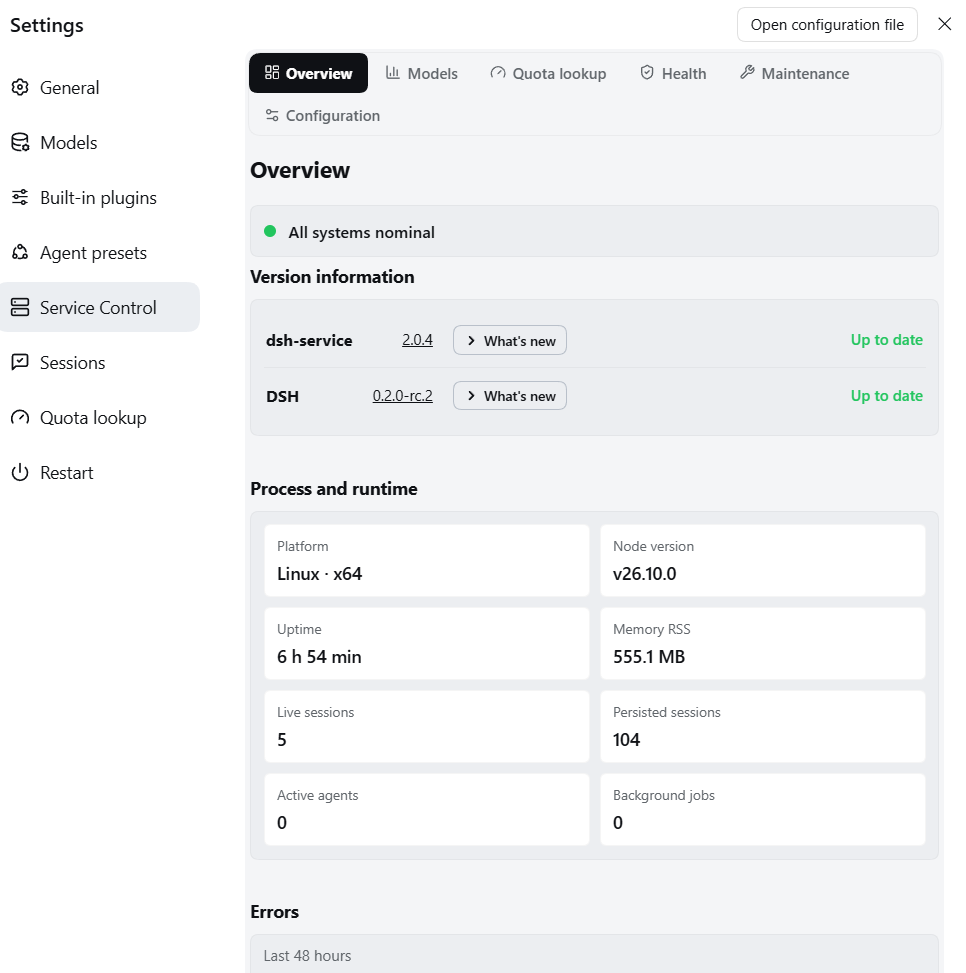
The Settings "Service Control" panel has a six-page navigation: Overview · Model stats · Quota lookup · Health · Maintenance · Configuration; "Maintenance" aggregates five subpages — Sessions · Skills · Subagents · Backups · Restart — and "Configuration" aggregates Features · Task notifications · Settings Nav. Restart, Quota lookup, and Sessions can each enable a quick entry in the settings left navigation (off by default; the Skills and Subagents sidebar entries were removed).
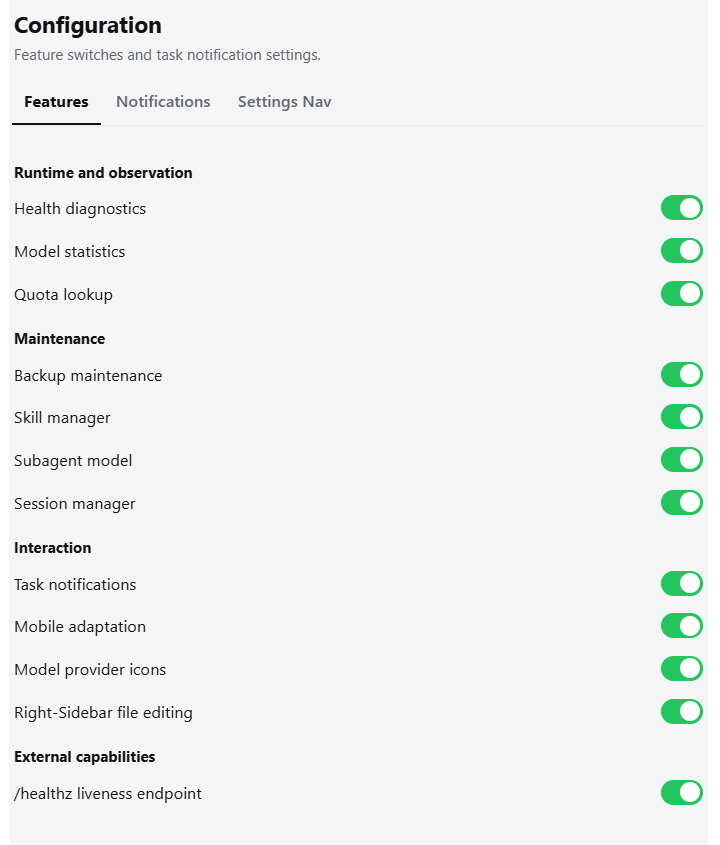
Under Plugins → Plugin configuration, twelve host-level switches: Health diagnostics, Model statistics, Quota lookup, Backup maintenance, Task notifications, Skill manager, Subagent model, Session manager, Mobile adaptation, Model provider icons, Right-Sidebar file editing, /healthz liveness endpoint (all on by default except Mobile adaptation). All are live settings: disabling hides the UI, stops polling/subscriptions, and makes the host reject that capability; Overview and Restart stay available.
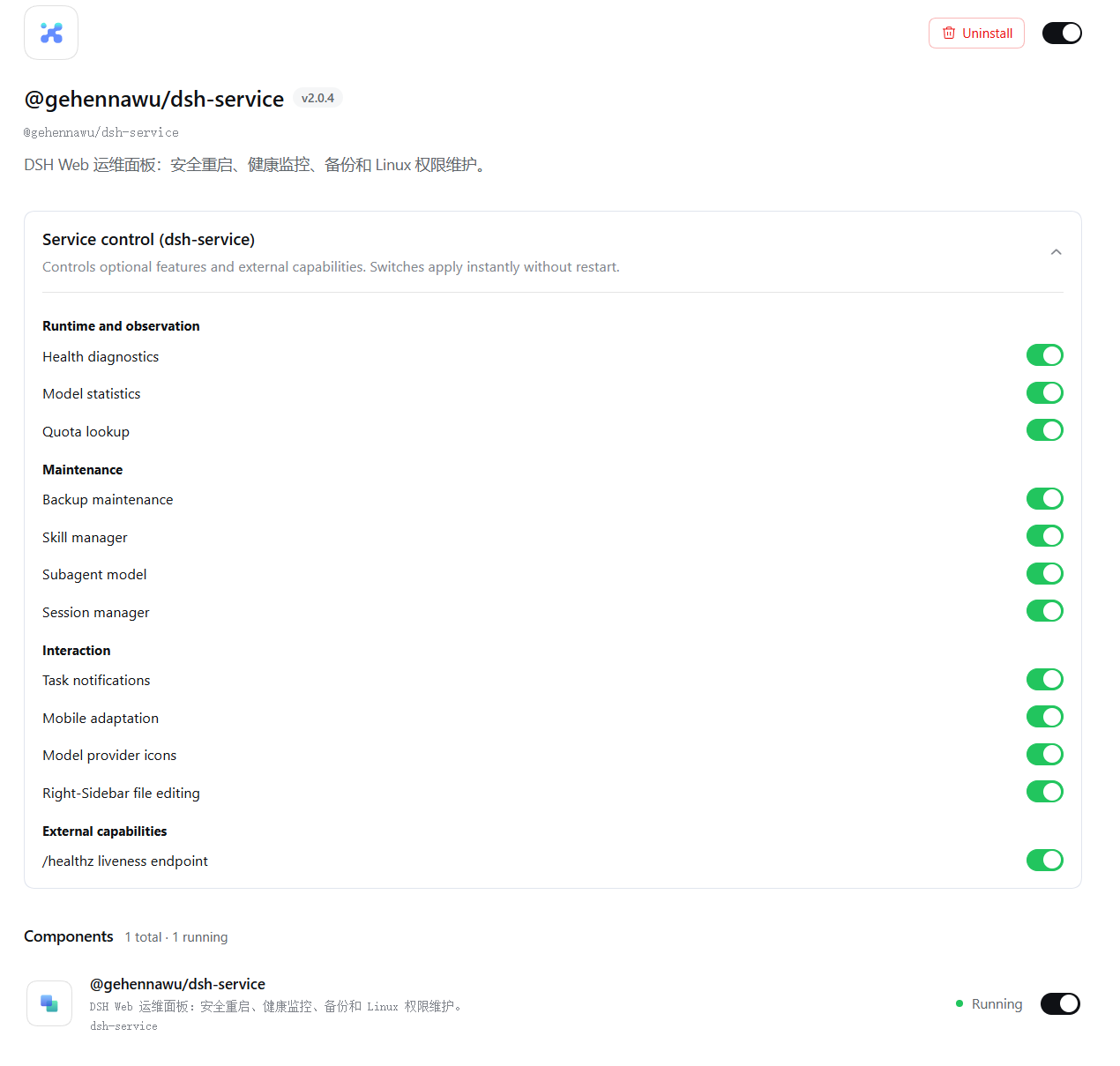
Overview
- Status summary (error → warning → info → normal aggregation with a status dot) → actionable items (only when present) → version and runtime → metrics grid → recent errors (rendered only when non-empty, collapsed by default)
- Aggregation rules: any health/diagnostics/backup/statistics/quota/restart failure is error; permission issues and non-advisory diagnostic warnings are warning; available updates and no backups yet are info (high quota-window usage only shows as a progress bar on the quota page, and a likely manual terminal launch — a standing environment fact — appears only in the health checks and in the restart/upgrade confirmations; neither surfaces as an overview reminder)
Maintenance and Configuration pages
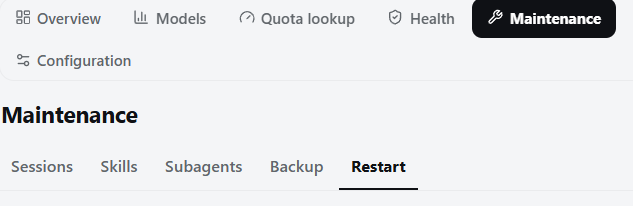
- Maintenance groups Sessions, Skills, Subagents, Backups, and Restart; it remembers the most recent subpage and falls back to an available item when a feature is disabled
- Configuration groups feature switches, task notifications, and settings nav tabs; switches are grouped and apply live, Notifications stays visible but disabled when that feature is off, and Settings Nav supports manual reordering (drag / arrows) and visibility management of all tabs in the settings dialog sidebar, persisted to the server-side unified config file
$DSH_HOME/dsh-service-config.json(cross-device sync, auto-fetched on startup with a local-cache fallback), applying live (the Service Control tab is permanently locked visible to prevent lockout); quota card order and visibility use the same config (thequotaCardssection, fetched when the quota page opens) - Unified plugin config file: lightweight per-feature preferences converge into a single
$DSH_HOME/dsh-service-config.json(atomic write,0600), partitioned by feature section — updating or clearing one section never touches others; large caches (usage index etc.) and encrypted credentials stay out of this file
Version and updates
- Shows the current DSH and plugin versions, linking to GitHub Releases
- Automatically checks npm stable + preview (latest / next dist-tags)
- "What's new" sits right after the current version number and is always available: it opens the notes for the version you are running; when a new version exists, the status text ("New version: x.y.z") is clickable and expands the new version's release info. Either way the host fetches the body from the GitHub Releases API and the client renders it in place (plain Markdown — no iframe, no navigation), with the version number, publish date and a pre-release tag; a missing Release or a failed read each get their own message; clicking anywhere outside the version card or pressing Escape closes it. Both rows lay their version number and "What's new" button out on one shared set of columns, with the version number right-aligned so that the gap before the button is fixed — they line up regardless of version-number length, since a longer version only widens the whole column instead of knocking one row out of place; narrow containers (phones and narrow settings panels) keep the same alignment — the version number absorbs the row's slack and right-aligns, so both rows still share their column edges
- One-click upgrade with automatic restart; when no process manager is detected, it confirms the consequences first, keeps running, and shows manual-restart instructions
- Between the upgrade landing and the process restart (common in a manual-launch environment) the version row reads "Installed X — restart to take effect" and the upgrade button is withdrawn; reopening the panel or refreshing the page keeps that state until the process is restarted
Safe restart
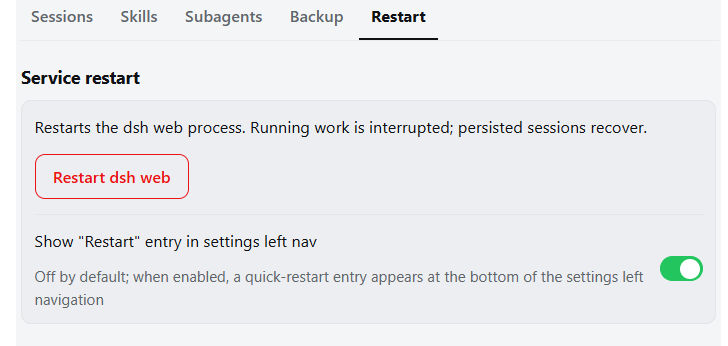
- Detects active agents, background jobs, and terminals before restart; lists them and requires explicit confirmation
/restartalso works in conversations; automatically refuses while work is running- Probes the new process after restart and reloads the page; manual reload offered after 60 seconds. A restart triggered by
/restartin a conversation reloads the same way: the page records the process identity at load time and comparesinstanceIdon reconnect, reloading as soon as the new process is up - Optional "Restart" entry in the settings left navigation (off by default), sharing the same confirmation flow as the "Maintenance → Restart" subpage
- A suspected manual terminal launch warns that nothing will bring the process back and gets a yellow caution in Health
Health diagnostics
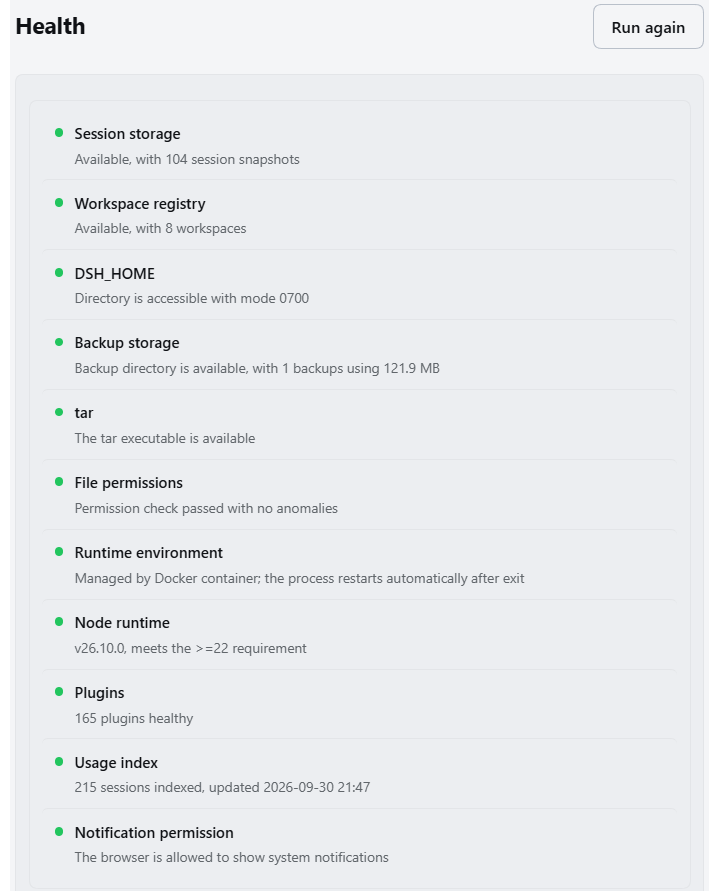
- Uptime, memory, session count, active agents, and background jobs; a "Process and runtime" card shows platform, architecture, and Node version
- Full diagnostics: session storage, workspace registry, backup storage, tar availability, file permissions, runtime environment, Node version, and the usage index — rendered as a two-line check list (name + status dot / detail) with abnormal rows locally emphasized
- Usage index: reports how many sessions are indexed, when the index was last updated, and how many sessions failed to index (a failed fold silently undercounts usage). Failed sessions are partial-success, so they are reported as informational rather than a warning and do not surface as an overview attention item; an index that has never been built (the Model statistics page has not been opened yet) is informational; the whole check is omitted while the Model usage feature is off (the host only skips refreshing the index in that state, so reporting would be stale and misleading)
- Notification permission: the diagnostics page appends a browser-side check after the host checks — a blocked or not-yet-granted system-notification permission both mean "notifications will not fire", with a pointer to restore it; an unsupported browser is informational. The row stays inside the diagnostics page: it never enters overview attention items or lights the ⚠ (using notifications is a user choice), and it is not rendered at all while Task notifications is off
- Plugin health checks: checks for anomalies only (the official plugin page already provides the full inventory and toggles, so no duplicate list here) — a failed plugin or one waiting on dependencies marks the check as error/warning, while fresh pending/loading fibers receive a short startup grace period; disposed or unknown states are explicit informational rows and do not become warnings. Affected plugins are listed below the check list with clipped, redacted failure text and missing deps; failed plugins can be reloaded behind a two-step confirmation (only entries the host confirmed as failed); manually disabled plugins (built-in or custom) never count as an anomaly
- File-permission deep scan and repair (two-step confirmation) behind a collapsed "Permissions & repair" section
- Suspected manual launch → yellow "no restart assurance" caution; no backups is informational only and never lights the ⚠
Model statistics
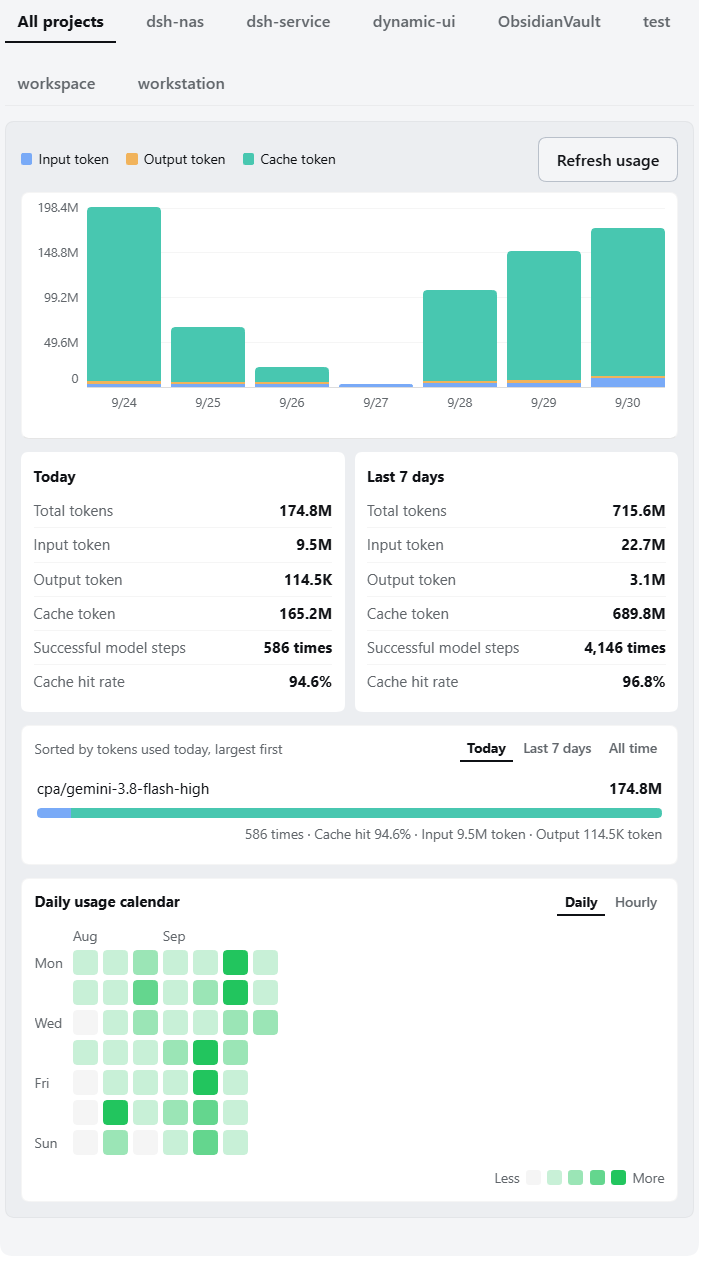
- 7-day stacked bar chart of input / output / cache tokens; filter by project, hover for exact values; legend and refresh live in a unified region header; an accessible text summary accompanies the chart. The hover tooltip has seven lines: the date plus input/output/cache-hit detail, then total tokens, successful model steps, and cache hit rate; the hit rate is the host's per-day weighted value (ratios must not be summed across buckets)
- Per-model horizontal bars with a "Today / Last 7 days / All time" toggle
- A daily usage heatmap calendar at the bottom of the card: every day in the index (up to 20 weeks, columns aligned to Monday), four intensity steps by single-day peak, hover for that day's details; follows the project filter. The chart covers only the last 7 days, so this adds the long-range view
- The heatmap header can switch to an hourly punch card: 7 rows (Monday–Sunday) × 24 columns (00–23), each cell the tokens for that slot, answering "when am I busiest". It is the same hourly buckets re-folded along a different axis, with no new persisted fields. The square-cell layout reserves space for weekday labels and gaps, with internal horizontal scrolling on narrow screens
- Indexed usage is kept permanently: deleting a session or a project folder never subtracts history, so totals and the heatmap are always the complete history since the index was built; an index version bump preserves old summaries until readable sessions are fully rebuilt successfully; failures retain history and are retried
- When a project folder no longer exists, that project disappears from the project filter, yet its usage still counts toward the "All projects" totals, day buckets, and model breakdown
- Last-48-hour model/tool errors (collapsed by default, rendered only when present)
- Steps whose provider reports no token usage are excluded
- A session that cannot be read, migrated, or parsed no longer blocks other sessions. An all-projects warning shows successful/skipped counts and expandable session IDs, error categories, and safe summaries. Previously indexed data is retained and marked stale; first-time failures contribute nothing and are retried on the next refresh. Only global errors, such as an unavailable service, failed session listing, or failed index write, fail the entire refresh. The warning can be dismissed (remembered locally), and silencing it mutes only that same failure set: a newly skipped session or a changed error category brings it back, so dismissing once never hides a new problem for good
Quota lookup
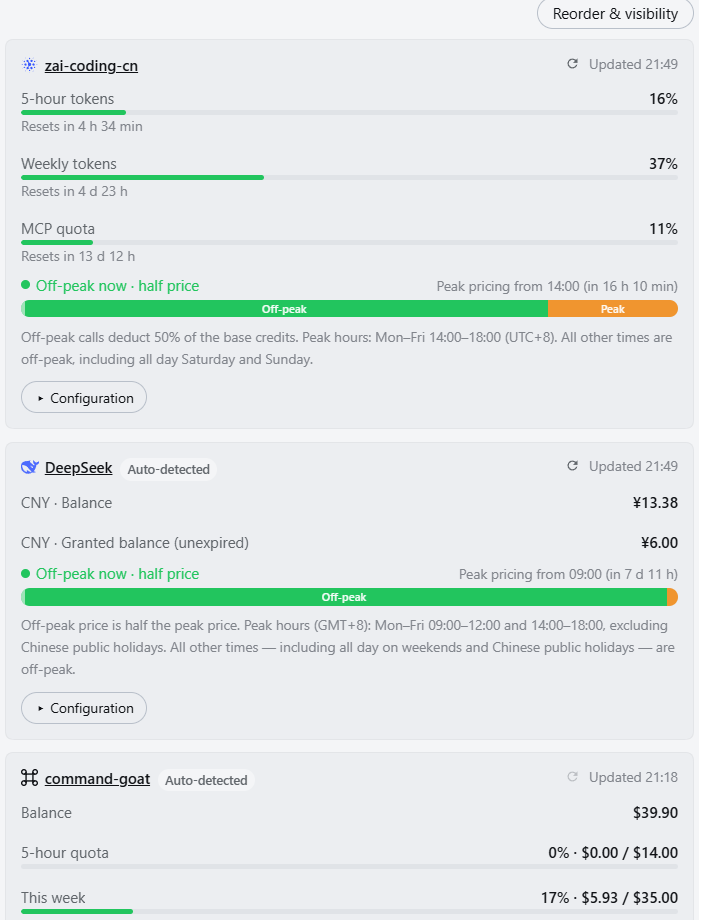
- Provider cards keep the existing window presentation (label + percent / independent bar / reset countdown); configuration (credentials, kind switching, manual reset entries) is collapsed per card by default
- Card order and visibility: "Reorder & visibility" on the quota page expands a management list where cards can be dragged or nudged with ↑/↓, and a toggle hides cards you rarely need (hiding only affects display, not querying); the config shares one backend with the Settings Nav tabs, stored in the
quotaCardssection of the unified server-side config$DSH_HOME/dsh-service-config.json(cross-device sync with a local-cache fallback, sections never affect each other) - A quota ring in the conversation composer follows the current session's model provider and shows the tightest budget window (<80% green, ≥80% amber); clicking opens a detail panel that becomes a centered overlay on narrow screens
- Built-in adaptations:
| Provider | Data source |
|---|---|
| DeepSeek Platform | Official balance + peak/off-peak ribbon and countdown (peak = Mon–Fri 09:00–12:00 and 14:00–18:00 UTC+8, excluding Chinese public holidays; weekends and public holidays are off-peak all day) |
| Zhipu GLM Coding Plan | Official endpoint: 5-hour rolling / weekly / monthly MCP windows + peak/off-peak ribbon and countdown (peak = Mon–Fri 14:00–18:00 UTC+8) |
| OpenCode Go | {baseURL}/usage (built-in channel without an explicit baseURL uses the registry default https://opencode.ai/zen/go/v1) |
| OpenRouter | Credits used % |
| Kimi / SiliconFlow | CNY balance |
| StepFun Balance | Official GET /v1/accounts (API key, com/ai dual domains) |
| StepFun Step Plan | Console BFF subscription quota (Oasis-Token console session; 5-hour/weekly windows vs Credit pool auto-detected) |
| Xiaomi MiMo Token Plan | Console-origin plan quota (web session cookie) |
| Command Code (command-goat) | Official account quota plane api.commandcode.ai/alpha/* (same key reused: balance + period spend + plan + 5-hour/weekly windows) |
| CLIProxyAPI deployment | Official remaining quota of each OAuth upstream account |
- Credentials go into the DSH credential store (
$DSH_HOME/.credentials.yaml, hot-effective): an API key, the CPA management key, the Xiaomi console cookie, or the StepFun Step Plan console token (Oasis-Token; theOasis-Webidis derived from the token automatically — no manual entry); the Command Code quota plane reuses the inference key, so no extra credential is needed - Credentials can be changed at any time: every adapted card keeps a credential entry in its Config area — unconfigured rows show the per-channel wording, configured rows show "Edit credential (configured)", where the stored value can be overwritten (key rotation, another account, a typo) or cleared; the value is only ever sent with the save request and is never echoed back
- Anti-rate-limit pacing: 60 s result cache, exponential backoff for transient network errors (30 s doubling, capped at 15 min); deterministic failures switch to manual — credential errors, 4xx, expired plans, management API disabled, unexpected response shapes and anything else only a config change can fix stop the automatic retries (the error line then reads "Auto-retry paused — retry manually"), and only a successful manual reconnect via the refresh button (5 s cooldown) returns the channel to automatic mode; querying is fully manual — a snapshot is fetched when you open the quota page, expand the ring, or hit refresh, and the client never arms a periodic poll (upstream throttling still lives entirely in the host)
- CLIProxyAPI management-plane bans get their own notice: five consecutive auth failures from one IP ban that IP for 30 minutes on the management plane; while banned the card reads "Temporarily banned by CLIProxyAPI" plus the upstream message (including the remaining time). That state offers no credential form (the key is fine) — wait for the ban to expire, or change the host's egress IP, then hit "Retry connection". The ban covers the management plane only; model inference through that CPA is unaffected
- CLIProxyAPI: when an account's live query fails, its last cached snapshot windows are shown with a "cached" badge; snapshot windows whose reset time has already passed (the window they described has ended) are dropped, avoiding the illusion of quota stuck on yesterday
- Failures state their real reason: cards and the ring show "error copy (HTTP status · failing endpoint · failing account · upstream message) · next automatic retry" — a wrong key, an unpaid balance, rate limiting, and a moved endpoint each read differently instead of one generic notice; an upstream 401/403 is classified as "credential rejected by upstream" and the card keeps its credential form available, and business error codes inside an HTTP 200 envelope are classified the same way (auth failure → credential rejected, expired plan → no active subscription, vendor-side failure → upstream service error) instead of being reported as "unexpected response format"; rows switched to manual mode end with "Auto-retry paused — retry manually" instead of a retry time
- API keys are resolved only inside the host process; the browser receives normalized window data only; unadapted providers are never requested
Backup management
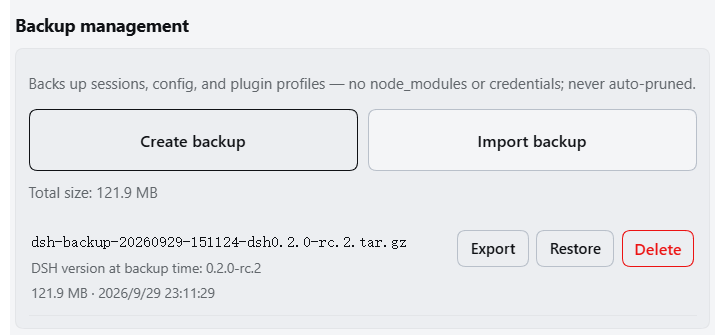
Backup records use light two-line rows (name on the first line, size · time on the second, separator layout; same style as the session list)
Creates
.tar.gzarchives of sessions, configuration, and plugin-profile manifests; sessions are snapshotted through the persistence layer's stable-read seam (active-agent writes no longer fail creation), and creation shows one continuous phase progress bar (copy / pack / verify / publish, step counter 1/4–4/4, real percentage during copy)DSH version at backup time: the archive filename carries the DSH version running when the backup was taken (
dsh-backup-YYYYMMDD-HHmmss-dsh0.1.7-rc.1.tar.gz), andmeta/backup.jsoninside the archive records the DSH version, plugin version, and creation time; both the panel row and the restore preflight show it, so you can tell which version a snapshot came from (restoring across a downgrade cannot read newer session formats). Archives written by older plugin versions have no version segment: they still list and restore normally, they simply show no version line, and import accepts filenames both with and without the segmentExport download / import upload / delete (two-step confirmation); unlimited, never auto-pruned; imported archives must pass the same integrity inspection used by restore
Integrity inspection validates gzip/tar structure, paths, and entry types. Only
sessions, the three allowlisted config files,profiles/<name>/package.json, andmeta/backup.jsonare accepted; traversal, links, special files, unknown content, corrupt archives, and invalid profile manifests are rejectedRestore preflight produces a single-use five-minute plan showing the full sessions replacement, config replacements/removals, and profile-manifest updates. Final commit rechecks the archive SHA-256 and current-target fingerprint; any drift rejects the restore
Cross-device / cross-platform restore: every path inside an archive is relative and restore lands under the local
$DSH_HOME, so a different DSH_HOME, username, or mount point makes no difference to import;meta/backup.jsonalso records the source platform and architecture, and the preflight reports when the source system differs from the current one. The preflight additionally lists read-only notices (they never block a restore): paths past the classic Windows limit, paths differing only by case collapsing on this volume, and a sessions directory that is currently unwritable (in use or lacking permissions)Target profile selection: you choose which local profile the archive's
profiles/<name>content restores into — candidates come from the profiles that actually exist here (the active one is marked), or you can keep the source name. A cross-name mapping does not overwrite the local profile's plugin manifest (package.json) by default; tick the box to overwrite it explicitly. The Profile configuration layer (cordis.patch.yml) is restored whenever the archive carries itRestore uses a transaction journal and rollback directory: sessions are replaced in full, config is made exact to the snapshot, and profiles update according to that mapping while keeping node_modules, credentials, and attachments. Managed runtimes restart automatically; manual launches receive hand-restart instructions. On Windows, a target left in use by another process fails with explicit guidance (quit the desktop app, pause sync clients, disable real-time antivirus scanning, then retry)
Skills management
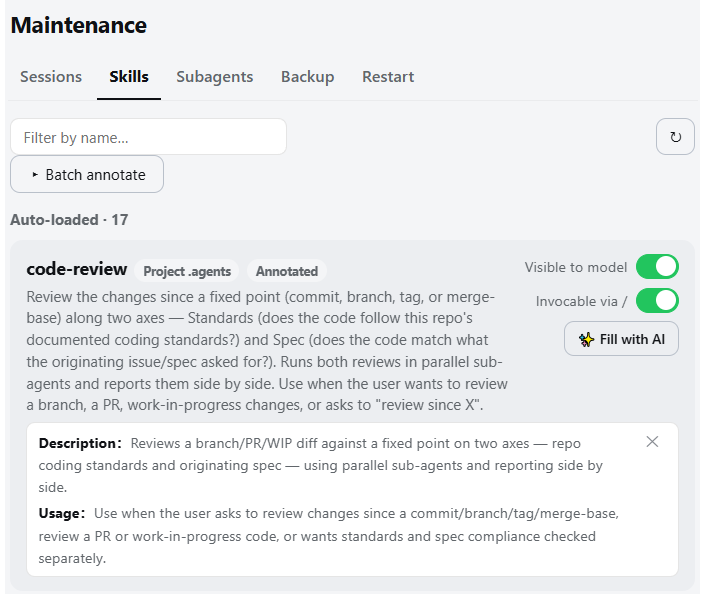
- Lists local skills in three sections — auto-loaded / manual-only / fully disabled; same-name shadowing marks both copies, bundled directories are read-only
- Entries start collapsed into one row (name plus source / read-only / annotated badges); the top button expands or collapses every visible entry at once, and clicking an entry's name row toggles that entry alone; an invalid entry keeps its ⚠ and one-click fix visible while collapsed
- Two switches edit the SKILL.md frontmatter directly (
disable-model-invocation/user-invocable); changes go live within ~200 ms - Entries with legacy camelCase keys are dropped by the official parser: ⚠ warning + one-click canonical fix
- ✨ Fill with AI: pick a model to draft a description (follows the UI language), saved to a plugin sidecar index — SKILL.md is never modified; one-click batch fill runs in the host background and can be cancelled. Already-annotated skills are listed separately in the plan and are only overwritten after a "Confirm forced refill" second confirmation (annotating no longer blocks future batch fills forever); completion-log timestamps use your local timezone
Subagent model
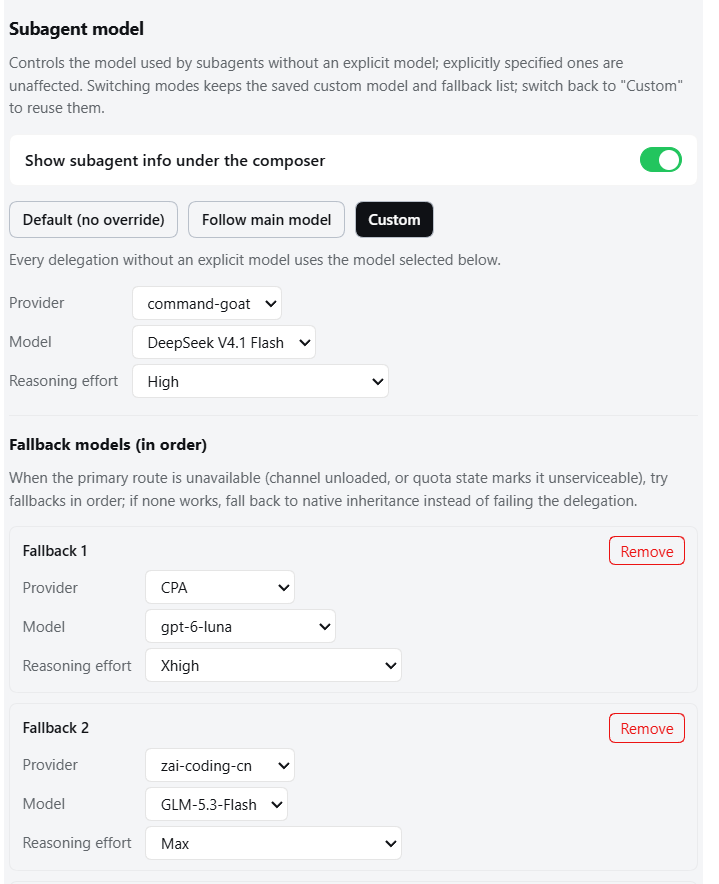
- Three modes: Default (no override) / Follow main model (the provider/model actually used by the latest main-conversation request) / Custom (pin every unspecified subagent)
- A provider/model explicitly carried by the delegation always wins; pinned presets are never overridden
- Custom mode optionally selects a reasoning effort: the dropdown appears only for the exact provider/model when its adapter declares selectable levels; leaving it empty means "use the target model default", materialized by the adapter
- Values come from adapter metadata (
reasoning.efforts[].id); effort ids are opaque to the host. Models with no declared levels disable the dropdown and show a hint - inherit / follow / feature gate off inject no provider, model, or reasoning effort at all; subagents that carry an explicit provider/model are unaffected
- Mode switching keeps the config — the saved custom model (including its reasoning effort) and the fallback list survive switching between the three modes; a mode only decides whether the route applies, so switching back to "Custom" needs no re-selection (provider/model missing from the runtime catalog fall back to the first catalog entry)
- No shift on entry — the page seeds its first frame from the most recent successful read, so it lands directly on the real mode instead of showing "Default" and then jumping to "Custom"; on a fresh install or a different browser (no cache) it briefly shows "Reading configuration…"
- Fallback models (in order) — both Follow and Custom modes accept an ordered fallback list: when the primary route is unavailable (channel unloaded, or quota state marks it unserviceable), the next model is tried in order; if none works, delegations fall back to native inheritance instead of failing. Fallback entries pass the same allow-list check as the primary route, with an optional reasoning effort per entry
- Conversation-page visibility — a session-level line sits under the composer listing the models your subagents actually ran on, e.g.
Subagents: cpa/gpt-5.6-luna (xhigh) · opencode-go/deepseek-v4-flash (max)— covering fallback hits, explicit routes, and inherited sources, so you can verify the custom route at a glance. The line is mounted on the officialconversation.composer.dockslot, occupying its own line right below the official stats instead of sharing their row; 20s refresh, independent of turn data (it keeps showing even when compaction folds the delegation tool calls), covered from the host dispatch records and visible in any view; switch it off independently from Maintenance → Subagent. Records live in host memory (survive page reloads, cleared on process restart). Works regardless of the official "assign subagent models" switch - Config stored in
$DSH_HOME/dsh-service-subagent-route.json(atomic writes,0600); one-click reset
Task notifications
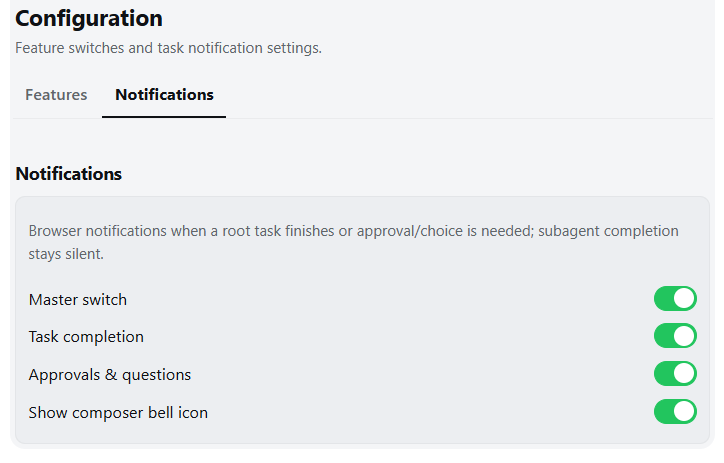
- Browser notification when a root session finishes its turn or any session needs approval / plan review / an answer; subagent completion is silent; clicking focuses the page
- Subagent approval / plan-review / question requests still notify
- Four independent toggles: master, task completion, approvals & questions, composer-bell visibility
- The composer bell toggles the master switch quickly; all toggles persist across reloads
Mobile adaptation
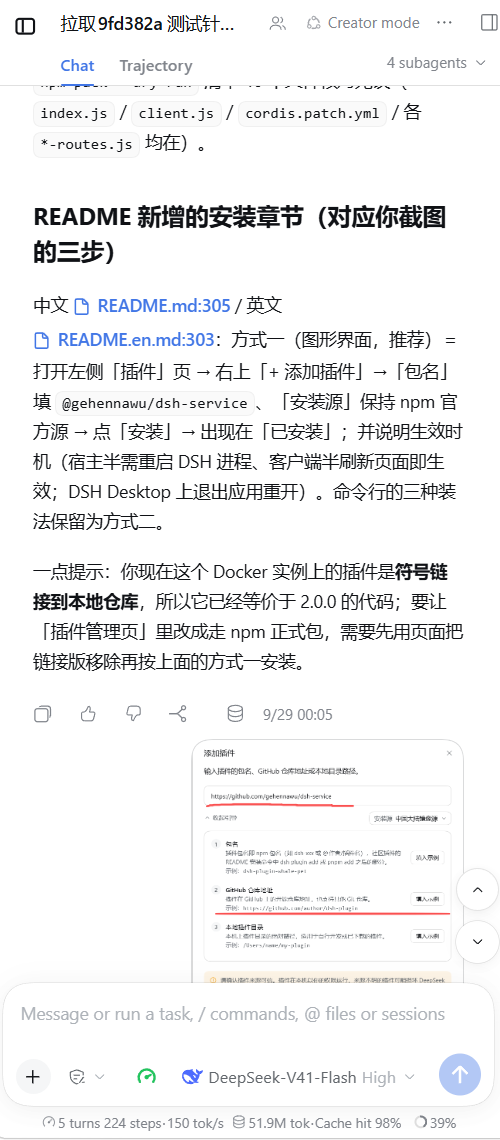
- Off by default; active only below a 1024 px viewport (phones / narrow windows), desktops unaffected
- Sidebar becomes a drawer, details column is hidden on mobile (matching the official narrow-screen behavior), modals become full-screen panels, settings left nav a horizontal top strip
- The official Plugins panel header never wraps its text on phones: when "title + intro" and "refresh / Add plugin" no longer fit one row, the whole toolbar drops to a second row flush right, keeping the intro and the button label each on a single line; this also fixes the old drawer-button clearance rule that rewrote this page header's vertical/right padding (it used to squeeze the intro into two lines with an orphan character and wrap the "Add plugin" label inside its pill)
- The model selector follows dynamic untruncated measurement with persistent reasoning effort: removes the 45cqw clamp so measurement reflects natural unclipped text; when space allows, it shows the brand icon, full model name, and reasoning effort without truncation; when space is tight (narrow screens, long names, or tools added by other plugins), the model name collapses into compact form while the reasoning effort (e.g. High / Low) and brand icon remain persistently displayed ([brand icon] High ▾), models without reasoning effort collapse into a sleek 45px icon button, with zero wrapping and zero awkward clipping; on mobile the "Search models…" input row is hidden to prevent autoFocus from forcing up the mobile on-screen keyboard, presenting the model list directly
- The stats line under the composer ("turns/steps · tok/s | tok · cache hit") stays on one line, centred and straight on phones: this row's own horizontal padding is tightened (official 32 px → 2 px) along with its gaps to free up width, and the official
justify-contentcentres both chips — zero truncation from ~420 px up, proportionally less text cut than the official fixed truncation below that, with no wrapping and no horizontal scrolling; this also works on older DSH (on 0.1.5-rc.2 the row spans the full width, where the earlier sub-itemflex-growpushed both chips as a group to the left — they no longer grow) (desktops unaffected) - The session header is re-flowed on phones (≤560 px): the title row keeps only the title + preset chip (the chip hugs the "…" button on the right, the title stays nearly fully visible), while the "N subagents" and "N background jobs running" counter chips park as a pair on the right of the Conversation/Trajectory tab row (tab gap 36→20, tapping a chip still opens its menu); the official crumbs hard-clip is eliminated, and layouts ≥561 px keep the official flow. From DSH 0.1.7-rc.1 the official preset label hides itself via
@container (width<=540px)(the container is the title row, roughly viewports up to 606 px), so the mode chip vanished on every phone; the plugin overrides that back to visible across the whole mobile range (from 390 px up the title stays untruncated, only 320–375 px trade away 15–70 px of title as an ellipsis) - The Agent Team panel stays on screen on phones (<1024 px): the official panel is left-anchored (
left:0), so sitting in the header's right-hand action slot pushes it off the right edge (measured 112–352 px past the viewport at 320–1023 px). On mobile the session header becomes the positioning context and the panel is re-anchored to the right with a 16 px inset and capped at100vw − 32px, leaving 16 px on each side; desktop ≥1024 px keeps the official geometry byte-for-byte - Scroll immersion: inside a conversation, swiping down auto-hides the header, the top-left drawer icon, and composer for full-screen reading (the top-left drawer icon slides up and fades out in sync with the top-right sidebar button, and the composer yields its layout space so the transcript really fills the screen; on reveal, if you are still at the end of the conversation it re-aligns to the bottom). Swipe up, tapping the official "Back to bottom" button, or focusing the composer brings them back (no extra floating button); already sitting at the end of the conversation, a single small backward nudge reveals it right away (no full threshold needed), and after a back-to-bottom tap the resting position gets one extra bottom snap. Programmatic scrolling (streaming pinning, anchor jumps) never triggers it
- Swipeable drawers: with both drawers closed, a horizontally dominant swipe rightward anywhere opens the sidebar drawer and a swipe leftward anywhere opens the official right sidebar (DSH 0.1.5+; stays inert when unavailable); once open, a swipe in the reverse direction anywhere closes them. Swipes starting at the screen edge additionally benefit from stolen-gesture completion for browser edge navigation, and horizontal scrolling inside editors never misfires
- The "Back to bottom" button is shifted flush right on mobile (no more large empty strip); a matching circular up-arrow now sits above it on all platforms, jumping to the previous user message on each click for step-by-step back navigation. Targets outside the loaded history auto-trigger the official "load earlier" action; the button hides once you reach the very top and reappears when you scroll back down
- Transparent large-JSON compression (≥4KB auto gzip/brotli per
Accept-Encoding) speeds up long session histories - Adds
viewport-fit=coverwith safe-area avoidance, disables double-tap zoom, keeps inputs ≥16px against iOS focus zoom ?dshsvc-mobile-debug=1shows a floating diagnostics chip (debugging only)
Session manager
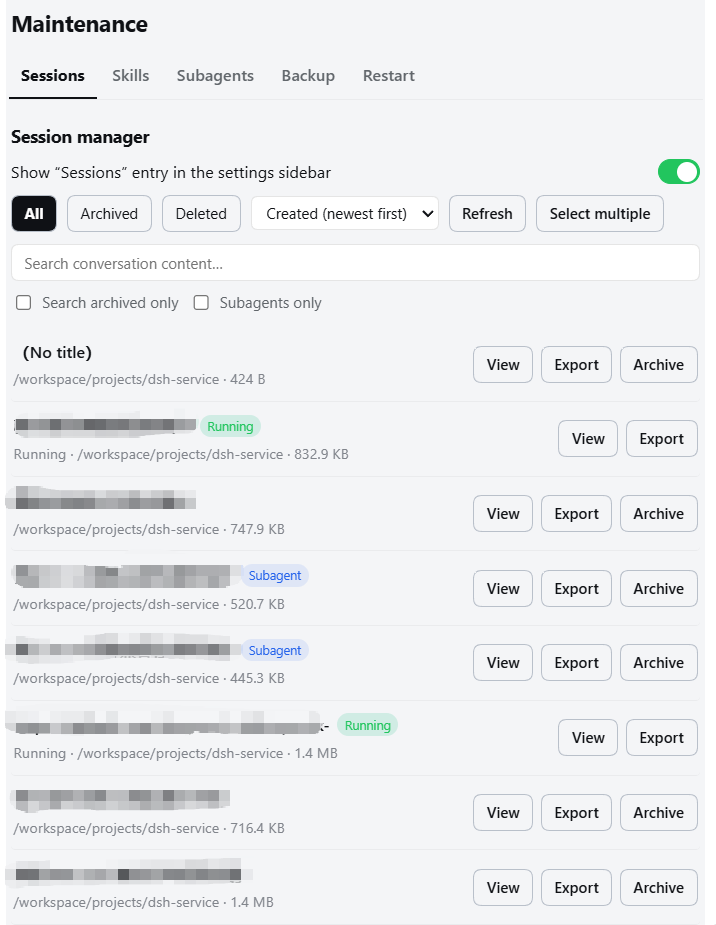
- View: one unified list for sessions (running / cold / archived) with status badges, workspace, event count, and size; the list sorts by creation time (newest/oldest first) or by title, or by project — grouped into one section per workspace (each section header shows the path and session count; newest first within a project; sections are collapsed by default and expand/collapse on header click); starts on the “Archived” view by default, and each of the All / Archived / Deleted filters fetches its own subset from the host once, then keeps it in a module-level cache — switching filters sends no requests, and closing and reopening the panel renders the cache instantly while quietly refreshing the current view once in the background (only a page reload clears the cache), with a “Refresh” button for a forced refetch of the current view; normal lists also provide a “Select multiple” button; in that mode, clicking anywhere on a session row selects or clears it without requiring a precise checkbox click, while one-click select-all / clear-all remains available for the current filtered result, and selected rows use a slim brand-colored edge without replacing their background; the toolbar shows eligible counts and runs batch export / archive / delete actions (changing filters, searching, or opening details exits selection mode automatically); sizes are never shipped with the list — each row fetches its size lazily (double-cached in the module and in host memory: reopened panels and refreshed pages reuse it, cleared on delete); the detail page walks events as paged cards (single-slot host snapshot cache: paging and reopening the same session never re-reads the log, live sessions stay fresh within 30 seconds), with event bodies rendered as official Markdown (reusing the platform renderer
MarkdownText, same look as the chat UI: code blocks, lists, tables, math — raw HTML and unsafe links are rejected by default; older DSH shells without the renderer automatically fall back to plain text), and consecutive system events and tool messages each collapse into their own countable block by default (tool messages =tool/call,tool/resultand the othertool/*events, plus assistant messages that carry nothing but tool calls — those dominate real long sessions, so tool arguments no longer flood the detail page); click a collapsed line to expand the details and click again to collapse; when a search hit falls inside a collapsed block that block opens automatically and keeps the hit highlighted; entering a detail remembers the list scroll position and returning to the list drops you back exactly where you were (reusing the official panel's scroll container; changing the filter or search while in the detail discards the restore) - Subagent recognition: sessions delegated to subagents carry a “Subagent” badge (the marker comes from official session header fields:
origin=subagentis the product classification, withdelegationDepthas the fallback for older logs; a plain fork lineage carrying onlyparentSessiondoes not count); a “Subagents only” checkbox in the search row focuses the list (same row and widget language as “search archived only”; an orthogonal qualifier layered on top of All / Archived — hidden in the Deleted view, and its state survives view switches), and batch mode offers “Select subagents” to fold every visible subagent session into the selection (without clearing existing picks; the button stays hidden when no subagent rows are visible) for quick batch archive / delete cleanups; on older plugin hosts that do not ship the flag the list behaves as before, and enabling the qualifier explains that the host is outdated and carries no subagent flags instead of showing an unexplained empty list - Export: one-click or batch download through the official export path (one full ZIP per session, including subagents and attachments) — the host never assembles a package itself
- Archive & unarchive: archive one or many non-running sessions, hiding them from the official sidebar; hosts running DSH ≥0.1.6 support unarchiving individually or in batches, while older DSH hosts keep the one-way notice
- Content search: full-text semantic search over conversations (case-insensitive, whitespace-flexible) with cross-session hits (matched text is highlighted; multiple matches show seq chips for one-click jumps) → hit-window view: opening a result centers a context window on the matched seq (15 events on each side; the matched event gets a HIT badge, is highlighted, auto-scrolled into view and flashes for 2 seconds), with previous / next match navigation and navigator seq chips for direct jumps (mirroring dsh-session-kb's Locate interaction); the window can keep loading later events; optionally restricted to the archived zone
- Delete: Only archived sessions can be deleted, and a session that becomes live is rejected again immediately before execution; the two-phase confirmation shows its id / title / workspace / size, persists the deletion record atomically first, and only then removes the log directory; deleted records stay visible under the Deleted filter, with support for single-item clear or batch multi-select / select-all clear (two-phase confirmation, permanently removes from record list); a successful delete notifies the official side immediately — it re-emits the official session-removed event and clears the dead id from the archive set — so the official sidebar and the “Archived sessions” Settings page reflect the new state without a browser reload
- Entry: the “Sessions” subpage under “Maintenance” (on by default); the optional settings-sidebar entry is off by default
- Delete records live at
$DSH_HOME/dsh-service-sessions-deleted.json(atomic write,0600, title/time only — no content, not recoverable)
Model provider icons
- The model button in the composer shows the current provider's brand icon: on wide screens (>480px) it is prepended to the model name; on phones (≤480px, where the official UI collapses the name into an icon) it replaces the official generic icon
- Providers with no matching icon keep the official default icon untouched (nothing prepended on wide screens, official icon unchanged on phones) — never a blank or a wrong logo
- Covers 38 of pi-ai's 40 built-in providers (
ant-lingandradiushave no matching brand mark, so they fall back), plus commonly used routes: Ollama, vLLM, LM Studio, Perplexity, Cohere, Volcengine, Doubao, Hunyuan, Yuanbao, StepFun, SenseNova, Baichuan, 01.AI, Fal, Replicate, Midjourney and more — 62 marks across 76 provider mappings; regional and billing variants (e.g.xiaomi-token-plan-*,qwen-token-plan-*) share one brand mark - Custom route names are recognised by prefix/alias:
opencode-goo→ opencode,openrouter-f→ openrouter,zai-coding-cn→ Zhipu,xiaomi-token-plan-cn→ Xiaomi,command-goat→ Command Code - Unrecognised names fall back to the quota manual adaptation: when a channel matches neither the built-in table nor any prefix rule, but you have manually adapted it in the quota page to some kind (
cpa→ CLIProxyAPI, or any relay → OpenRouter / Zhipu / Command Code / StepFun…), its brand mark is shown; changing the adapted kind swaps the icon immediately, and un-adapting falls back to the official default icon. Two premises: only manual adaptation counts (a kind merely auto-inferred from the baseURL does not), and the channel name always wins when it matches (openrouter-fkeeps showing OpenRouter even if you adapt it to something else) - The CLIProxyAPI icon appears on demand: the hand-drawn "concave diamond + mirrored swirl" mark shows on the model button only after you have manually adapted some provider as CLIProxyAPI in the quota page (regardless of the provider's name —
cpaor a custom one alike); it is one instance of the fallback rule above, and un-adapting immediately falls back to the official default icon - Quota cards carry the icons too: adapted provider cards show the same brand mark before the channel name (14px; colour tiers keep their brand colour, mono tiers follow the theme text colour). The same "fall back to the manual adaptation" rule applies here — the card list is exactly where you adapt, so the mark appears/swaps immediately
- The model picker's group headings carry them too: open the model button → the "Model" list, and each provider/channel group heading gets the same mark in front of it (13px, matching the 12px heading scale). Same resolution and fallback rules: unrecognised groups keep the official heading untouched, with no icon added
- Legible in both light and dark themes: a brand colour is kept only when its contrast is adequate against both a light and a dark background; otherwise the icon automatically switches to a monochrome variant that follows the theme's text colour — so you never get a black logo on a dark background, or a nearly invisible one in light mode
- Zero runtime network requests: icons are inlined into the client bundle at build time, so it works offline, needs no CSP exceptions, and never leaks your provider names to a third party
- The icon is sized to match the quota ring beside the composer (each mark's viewBox is tightened to its real drawn extent and squared at build time, so every brand reads at the same visual size instead of some filling the box and others shrinking)
- Toggle under Plugins → Plugin configuration → Interaction (on by default, applied live)
- Icons come from the MIT-licensed LobeHub Icons (pinned to
@1.95.0); the Xiaomi icon uses the plain "mi" mark from CC0 Simple Icons (LobeHub's version is a two-line "Xiaomi / MIMO" wordmark that turns to mush at 15px). Brand marks remain the property of their owners, so review each vendor's brand guidelines before public-facing use - Every icon is browsable in one page: icon catalog — 62 marks, 76 provider mappings, the matching rules, and a light/dark comparison; a single offline file, generated from the very data inlined into the client bundle
Right-Sidebar file editing
- The official right-Sidebar preview header gains an “Edit” button in its top-right corner (next to the renderer name): one click enters editing — a monospaced editor with a dirty marker,
Ctrl/Cmd + Ssaving, “Reload”, “Undo save”, and a one-click “Preview” back to the official renderer - Two equivalent extra routes: the original renderer dropdown, and right-click the tab → ⋯ menu → “Edit” (the latter uses an official menu seat with no DOM injection at all, as the fallback if the header button ever stops working); while the editor tier is active the header button retracts itself
- The official renderers keep their default status: suffixes they own (
.md,.js, …) still open as Markdown / code previews; only suffixes with no official renderer — the ones that used to fall back to plain text, such as.txt,.log,.conf— default to the editor. When the official preview is absent (older DSH), the whole block stays silent - Writes go through the session's own file service and sandbox policy: the browser only sends a
dsh-resource://file/session/<session>/<path>resource address, and the host resolves the session and workspace root itself — free-form paths are refused. Saving carries the version read earlier, so a file changed by an Agent or another window is never overwritten silently; you choose “Reload (discard edits)” or “Overwrite with mine”. Read-only sandbox sessions stay preview-only - Keep typing while saving: a save response acknowledges only the submitted text; any newer typing stays in the editor as unsaved changes. The status distinguishes saving, unsaved changes, and saved. You can keep editing after a conflict, and overwrite uses the latest draft shown in the editor
- Protect drafts before leaving: the editor's own “Preview” and “Reload” buttons show an inline confirmation when changes are unsaved, with a cancel action to keep editing. “Undo save” also requires confirmation and retains its version guard rather than silently overwriting newer disk changes
- One 2 MiB cap per file (larger files are read-only); editing is unavailable when the session is inactive or the sandbox policy service is missing (the official preview remains available)
- Not in this first version: syntax highlighting, multi-cursor, find/replace (the plugin half has no bundler to borrow an editor component), and no unsaved-changes prompt when a tab closes
- The switch lives under Plugins → Plugin configuration → Interaction (on by default, live)
External liveness probe
GET/HEAD /healthzreturns an empty 200; other methods return 405- Suitable for Uptime Kuma, Docker, Kubernetes, and other external monitors
🏗️ Architecture
The plugin is a Cordis two-half structure: the Host half (index.js) owns all capabilities and data access, while the Client half (client.js) only renders UI in the browser; the two sides communicate over Typert JSON-RPC on a single-layer absolute path channel /dsh-service, with loopback authority throughout.
flowchart TB
    subgraph Client["🌐 Client browser half (client.js)"]
        UI["Settings : Service Control panel (six-page navigation + quick entries)<br/>quota ring · notification bell · mobile adaptation"]
    end

    subgraph Host["⚙️ Host half (index.js)"]
        RPC["Loopback RPC · /dsh-service<br/>version / check-update / restart / quota / skills / backup"]
        SPAWN["Controlled spawn<br/>chmod / chown / npm upgrade"]
    end

    subgraph DSH["🚀 DSH core runtime (read-only consumption)"]
        CORE["agents · jobs · terminals · sessions<br/>sessionQuery · skills · credentials"]
        WEB["webServer routes<br/>GET/HEAD /healthz"]
    end

    subgraph OS["💾 Host machine & external"]
        PM["Process manager<br/>Docker / systemd / pm2"]
        FS["$DSH_HOME<br/>config / backups / credentials / skills index"]
        REG["npm registry"]
        QUOTA["Upstream quota APIs"]
    end

    UI -- "Typert JSON-RPC (loopback)" --> RPC
    RPC --> CORE
    RPC --> SPAWN
    RPC --> REG
    RPC --> QUOTA
    RPC -- "process.exit(42)" --> PM
    SPAWN --> FS
    MON["External monitors<br/>Uptime Kuma / Docker / K8s"] -- "GET /healthz" --> WEB
Key contracts:
- Loopback only: capabilities are exposed solely through the
/dsh-serviceloopback channel; webServer routes return only information-free status codes - Restart =
process.exit(42): the plugin only sends an exit signal; an external process manager brings it back — no manager, no restart guarantee - Zero input concatenation: the browser side never supplies URLs, package names, commands, or paths; all commands go through a host-side whitelist
- Credentials never leave the host: API keys are resolved only inside the host process; the browser receives only normalized window data
⚡ Installation
Option 1: DSH plugin manager (graphical, recommended)
- Open the Plugins page in the left sidebar.
- Click the + Add plugin button in the top-right corner.
- In the dialog, fill in one of the three source forms (the same field accepts all three, and the hint below it follows what you type):
- npm package name (recommended):
@gehennawu/dsh-service; - GitHub repository URL:
https://github.com/gehennawu/dsh-service(public repository, no token needed; the shorthandgithub:gehennawu/dsh-serviceworks too); - Local plugin directory: an absolute path on this machine, e.g.
/path/to/dsh-service(for your own or pre-downloaded plugins).
- npm package name (recommended):
- Pick the install source for your network: the default official npm registry, or the China mainland mirror if fetching from npm is restricted there (it affects package-name installs only; GitHub URLs and local
…
Links
More in this category
yjh051108/dsh-routing-suite★ 7018
One repository, three parts: a runtime injector for DSH plugin packages (inject, hot-reload, unload, promote a dev staging tool to the front, route self-heal, plus a settings-page plugin manager that lists, unloads and drags folders in to internalize), a task-aware reasoning-mode router agent preset (router-standard / router-spec / router-react), and a graded two-level task protocol whose six tools (commit_star, lock_stage, revise_do, edit_plan, mark_task, redteam_verdict) pin task state to disk. The injector implementation ships in-tree, so the install carries its own behaviour rather than a dependency list.
strukto-ai/mirage#dsh★ 3681
Swaps the filesystem and bash providers for a mirage virtual workspace: file tools and shell commands run over mounted resources (RAM, S3, Redis, Slack, Gmail, Notion, Postgres) instead of the host disk, with per-mount read/write/exec modes, per-command sandbox routing (monty, pyodide, quickjs in process; docker, e2b, daytona remote), and installed CLIs (git, gh, slack, linear, ntn, gws, or one you register) as head words in the virtual terminal.
hust-open-atom-club/oh-dsh★ 322
Community distribution: TUI, desktop, and Web UI as one bundle with layered installation.
weijiafu14/pi2dsh★ 212
Pi Host ABI compatibility engine: after one install, unmodified Pi extensions from npm mount as native DSH plugins with `dsh plugin add <pi-package>`. Verified end to end on stock DSH with pi-mcp-adapter (full MCP manager: OAuth, resources, prompts, MCP Apps, elicitation, sampling), @tintinweb/pi-subagents, pi-code, pi-hermes-memory and pi-background-tasks; `pi2dsh inspect` reports a package's compatibility before installing.
Fishquito7/dsh-skill-mcp-panel★ 194
Manages DSH skills and MCP servers from the web settings: skill cards with hot enable/disable, workspace scopes, groups, batch migration and drag-and-drop import, plus stdio/HTTP MCP CRUD with connection tests, secret redaction and the unified dsh-panel CLI.
lire1131/dsh-undo-savepoint★ 179
Undo/redo & rollback system for DSH: every config change is auto-snapshotted; undo/redo/restore to any version from the WebUI or the offline CLI/GUI tools (works even when DSH fails to boot).
Community comments
Comments are public GitHub Discussions. Loading them connects to GitHub and Giscus; a GitHub account is required to post.