Side chats and selection annotations for DeepSeek Harness, preserving full conversation history and bringing findings back to the main thread.
Install
# from npm (prebuilt)
dsh plugin --profile web add dsh-sidenote
# from GitHub (first run asks for allowBuilds approval — follow the hint, retry)
dsh plugin --profile web add github:g-yixuan/dsh-sidenote
Any plugin you install runs third-party code with your own permissions — it can read your files, use your credentials, and reach the network, and tool approvals don’t sandbox it. GitHub-sourced plugins also run build scripts at install time — pnpm blocks those until you allow them, so an install can stop with ERR_PNPM_GIT_DEP_PREPARE_NOT_ALLOWED or ERR_PNPM_IGNORED_BUILDS; dsh prints the exact key to add under allowBuilds in your profile’s pnpm-workspace.yaml, and the install works on the next run. Allowing a build is a trust decision: only install sources you trust, and pin a commit (github:owner/repo#sha).
README
Install
With DSH already installed, run:
dsh plugin --profile web add dsh-sidenote
Open DSH Web and click Side in the session header, or select a passage in a reply. You can also open a side chat with /side and switch focus between main and side inputs with Alt+S.
The main branch maintains DSH 0.2.2 (from rc.1) using the native conversation interface. Version 0.2.2-rc.1 is verified, and later RCs and the unsuffixed release in that series may be installed, with verification recorded against exact versions. DSH 0.2.2 requires Node.js 24.9 or newer. This range applies from plugin 0.8.3. Version 0.8.2 supports the 0.2.1 series. DSH 0.2.1 users pin dsh-sidenote@0.8.2, 0.2.0-rc.2 pins dsh-sidenote@0.7.6, and earlier hosts retain their last compatible package. See the compatibility policy.
One task. Room to explore.
Follow a question on the side
Clarify a detail during a design review or explore an implementation while reading code. Open a side chat from the current conversation. The fork preserves the full history, so you can pick up without explaining the context again.
Put your feedback on the passage
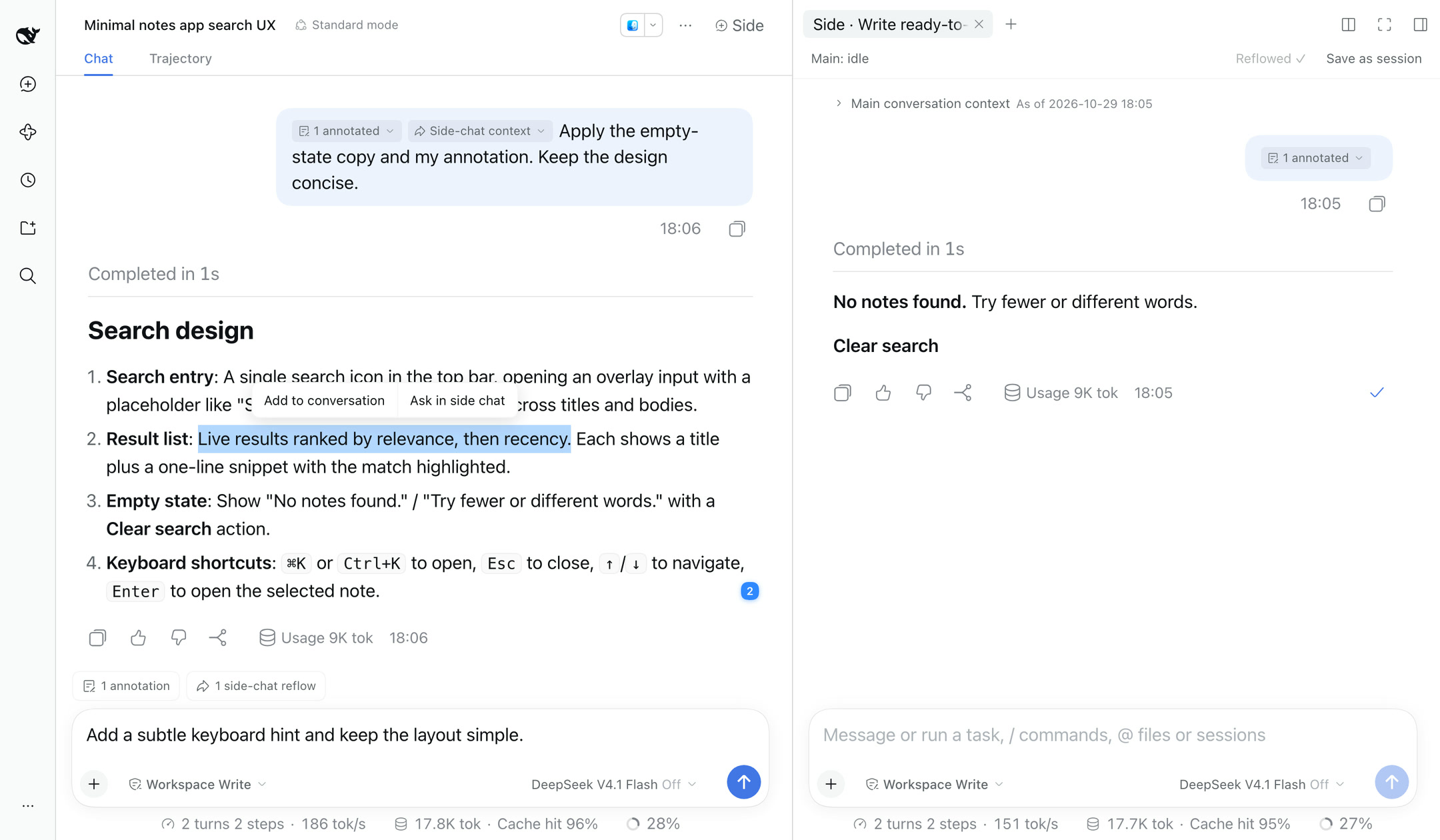
Select part of a reply in the main conversation or a side chat, then add a question or comment. The original passage and your note stay together. Collect several notes, preview or remove them before sending, and keep writing in the composer.
For example, select the suggestion to show “No notes found” and ask for ready-to-use empty-state copy.
Bring useful answers back
Click the Bring back to main conversation icon on the right of a side reply’s action row to bring back both the question and its answer. They appear above the main composer and travel with your next message. You can also send back the whole conversation or save a side chat as a regular session.
See it in action
Select a passage → explore it with context → bring the answer back.
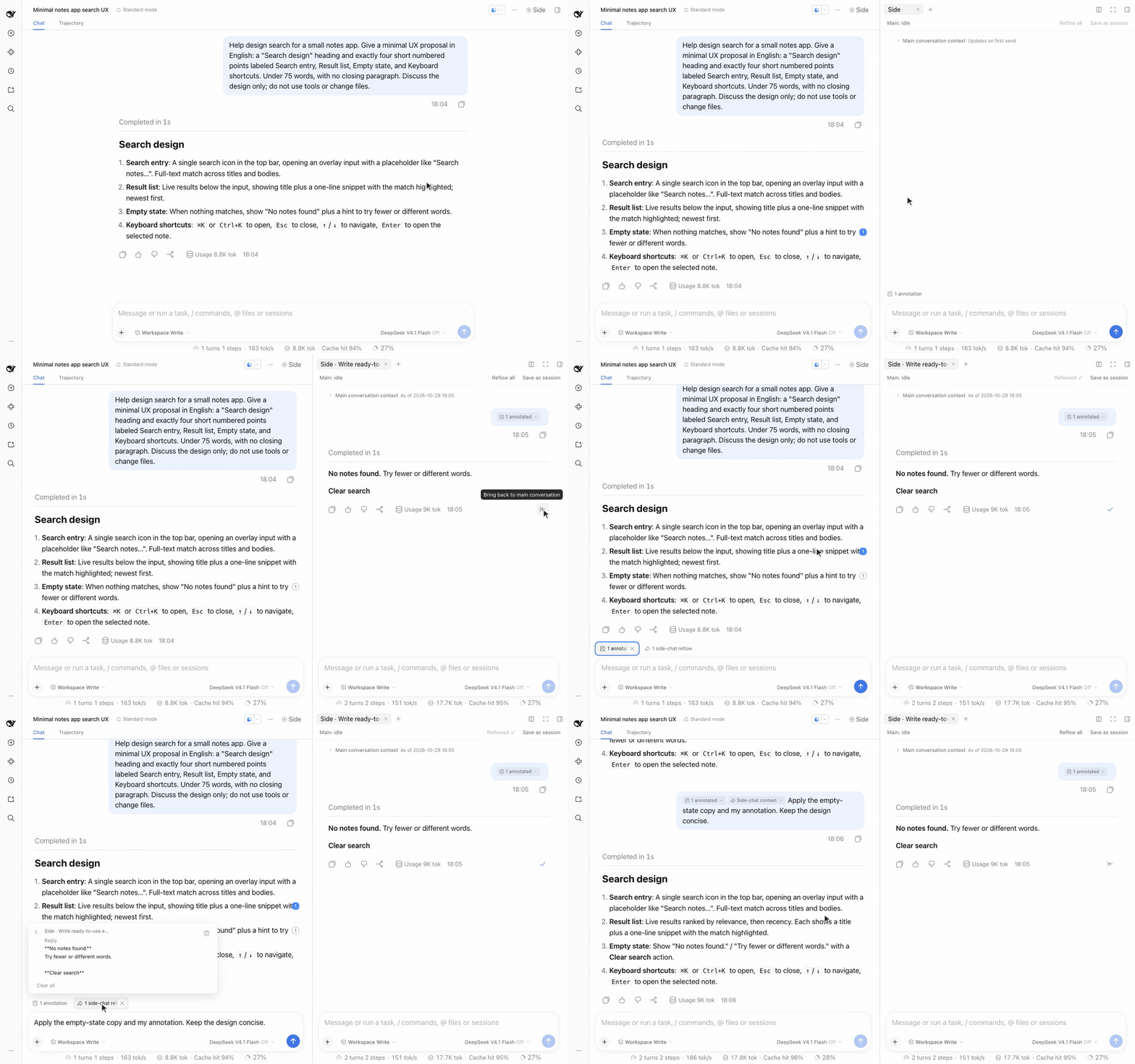
Watch the full-resolution MP4 · View the still screenshot

Recorded on 2026-10-29 with dsh-sidenote 0.7.6 / DSH 0.2.1-rc.2. This English-language note-search design example uses real responses from the official DeepSeek V4.1 Flash API. The approximately 38-second recording shows the real interactions and complete model responses. About the media
Details that keep work moving
| What matters | How Sidenote handles it |
|---|---|
| Explore several questions | Keep independent side-chat tabs in the right sidebar, switch freely, and reopen closed conversations. |
| Earlier context | Side chats inherit the full history, collapsed until you need it. |
| Side-chat input costs | A plain first question inherits the latest original mainline history where possible, preserving reusable cache prefixes; later questions keep that frozen context. |
| A familiar chat experience | The composer and messages match the native experience, with images, tool cards, and in-panel approvals. |
| Several pieces of feedback | Send annotations together, or preview and remove them individually. |
| A failed send | Annotations and draft text stay available for retry. |
| Picking up after a reload | Side-chat messages and the inherited-context section persist. If the sidebar is not restored, reopen through /side. |
| Keeping the session list focused | Side chats stay out of the list and search until saved as regular sessions. |
| A conversation worth keeping | Save it as a regular session and continue later. |
Before the first send, newly recorded mainline messages are inherited in their native form, with unfinished output added as a progress snapshot. Drafts with attachments, native references, annotations or handbacks, and side chats with their own commands or content, keep their original session and snapshot path to preserve content and settings. Actual cache hits depend on the model service; new questions, uncached output, model changes and compaction can still cause misses.
If the mainline changes its access permissions or approval policy after a side chat opens, the side chat keeps its original session and permissions and uses the progress snapshot. Changes to the side chat's own model, permissions or content during send preparation preserve the draft and prompt a retry.
If the side chat closes during first-send preparation or the session handoff cannot be saved, submission stops and the original draft is retained. Closing the panel does not retract a message already submitted. Failed candidates that were never handed over and have no independent work are archived where possible and released; history files and previously displayed side chats are kept. First-send preparation can add latency, and cache hits do not reduce context-window usage.
Select excerpts from official sidebar previews of Markdown, plain text/code, selectable-text PDFs, and Word/PowerPoint files. They accumulate as Document quotes in the main conversation and travel with the next message, retaining file sources and PDF page numbers without markers in the document. Browser pages and scanned documents are not supported yet.
Document quotes, chat annotations, and side-chat reflows share one reference block in the same message, preserving full content and distinguishing file sources, the main conversation, and side discussions. PDF/Office page numbers refer to the official preview; older messages remain readable.
See the user guide for controls, recovery behavior, and selection boundaries.
Compatibility and help
The rolling window covers the current RC/release series, with one optional admitted alpha series, sharing native Conversation. Full validation admits an alpha series while maintenance continues for the current RC series. PRs test each series' minimum and latest verified hosts. Daily discovery tracks latest / next / alpha and new in-window hosts, with weekly regression across all in-window versions. When the current series rolls forward, retired hosts retain their last compatible plugin. See the compatibility and maintenance policy; published installations follow their Release declarations.
Report a problem or suggest an improvement, including your DSH and plugin versions, reproduction steps, or a screenshot.
Help shape Sidenote
Feedback, reproductions, documentation, and code contributions are welcome in English or Chinese. See the contributing guide for the development setup, commands, and required checks.
Links
More in this category
zhu1090093659/dsh-web#packages/dsh-task-board★ 10669
Task board for the dsh web GUI: a sidebar multi-column kanban whose cards run in real DSH agent sessions and can also be scheduled with cron expressions, executed host-side even with the browser closed.
zhu1090093659/dsh-web#packages/dsh-web-all★ 10669
Plugin and skin collection for the DSH Web UI: task board, Git graph, right-side panel, remote mobile UI, pet, live token stats, and a skin center.
ccch1mneyyy/dsh-TUI★ 8366
Claude Code-style full-screen terminal UI: pixel-whale header, live status line, and streaming thought expansion.
MeteorNOX/DeepSeek-Balance-Whale-Widget★ 7489
A fixed-corner whale widget for the DSH web GUI — balance, today's usage and per-turn cost with peak/off-peak pricing, editable balance-alert and daily-budget bubbles, a module-based custom bubble queue with A/B weighted choices and random lines or images, 30+ vendor templates (OpenAI, OpenRouter, Kimi, SiliconFlow, Ark, Zhipu, MiniMax and more) with per-model balance and subscription quota, plus task-end sound, imported audio, custom roles and a resource manager. Local-only, no telemetry.
omdsh-dev/DSH-better-sidebar★ 5362
Full sidebar workbench with file rendering and editing, terminal, Git, and subagents; third-party plugins can register new tabs.
omdsh-dev/dsh-genui★ 1070
Interactive UI components rendered inline in replies: layout, charts, forms, quizzes, mermaid, 3D scenes, and an action event loop back to the model.
Community comments
Comments are public GitHub Discussions. Loading them connects to GitHub and Giscus; a GitHub account is required to post.