A local calendar and to-do panel for DSH: day, week and month views over six fixed daily time blocks, goals with two completion models, category boxes, progress and blocker snapshots, append-only progress timelines, notes and collections, spaced-review prompts, a daily exercise prescription, and calendar_read/calendar_write agent tools that only schedule into empty slots. Data stays in a local JSON file with no network calls or telemetry.
Install
# from npm (prebuilt)
dsh plugin --profile web add dsh-zack-todocalendar
# from GitHub (first run asks for allowBuilds approval — follow the hint, retry)
dsh plugin --profile web add github:fzjmaclearn/zack-calendar
Any plugin you install runs third-party code with your own permissions — it can read your files, use your credentials, and reach the network, and tool approvals don’t sandbox it. GitHub-sourced plugins also run build scripts at install time — pnpm blocks those until you allow them, so an install can stop with ERR_PNPM_GIT_DEP_PREPARE_NOT_ALLOWED or ERR_PNPM_IGNORED_BUILDS; dsh prints the exact key to add under allowBuilds in your profile’s pnpm-workspace.yaml, and the install works on the next run. Allowing a build is a trust decision: only install sources you trust, and pin a commit (github:owner/repo#sha).
README
This plugin publishes its README in Chinese only.
一个把「今天怎么过」和「长期要去哪」放进同一块屏幕的日程插件。
它不是又一个待办清单,也不是一张冷冰冰的日历。它把接住想法、排进时间、拆解目标、留下痕迹这件事串成一条线:想到的事先记下来,重要的事排进具体时段,长期的事拆成能一步步推进的目标,做完的事自动沉淀成复习和记录。
为 DeepSeek Harness(DSH)设计,MIT 开源,可以自由改造。
为什么是它
大多数工具让你在「计划」和「执行」之间来回切:待办在一个 App,日历在另一个,目标写在第三处,最后哪边都没跟上。这个插件把三件事合成一个界面:
- 日程 + 待办:左侧排时间,右侧接住想法,随手记的事可以一键排进某一天的空块。
- 目标拆解:一个长期目标变成可推进的轮次、可回顾的时间线、可排进日程的具体动作。
- AI 协作:AI 读得到你的日程和目标,但只能往空槽里排,动不了你自己安排好的事。
日常:三种视图 × 六个时间块
每天固定六个块——上午两块、下午两块、晚上两块,每块都有真实起止时间。这不是把一天切成六等份,而是按注意力的节奏切:上午放最难的事,午后用固定开始时间对抗低谷,晚上只安排一件轻一点的事,最后一块留给复盘。空档是设计的一部分,不是「剩下的时间」。
- 日视图:纵向时间轴,点空行输入就排进去;点开任意一块可以改时间、改类型、挂目标、写这块自己的记录。
- 周视图:六行 × 七天的网格,跨天拖动,空单元格点一下就跳到那天。
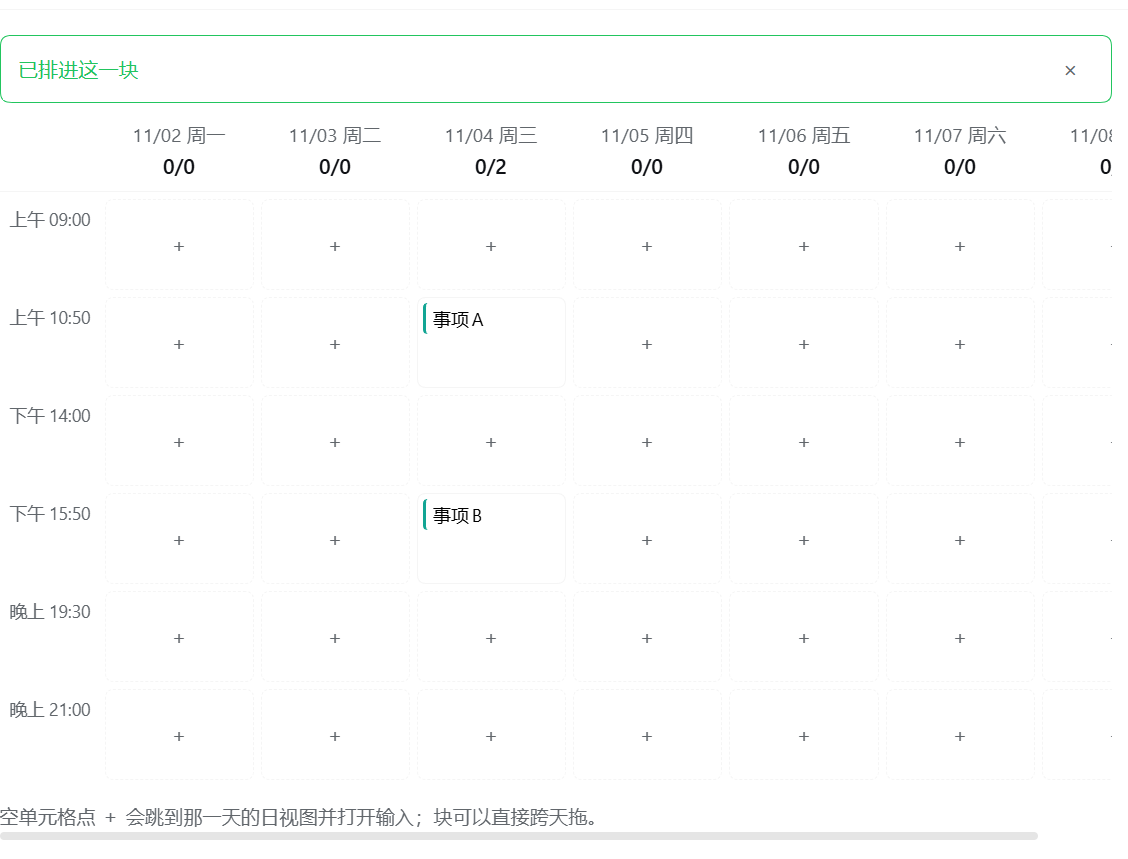
- 月视图:每天六个点,一眼看出哪些天排满、哪些天空着。
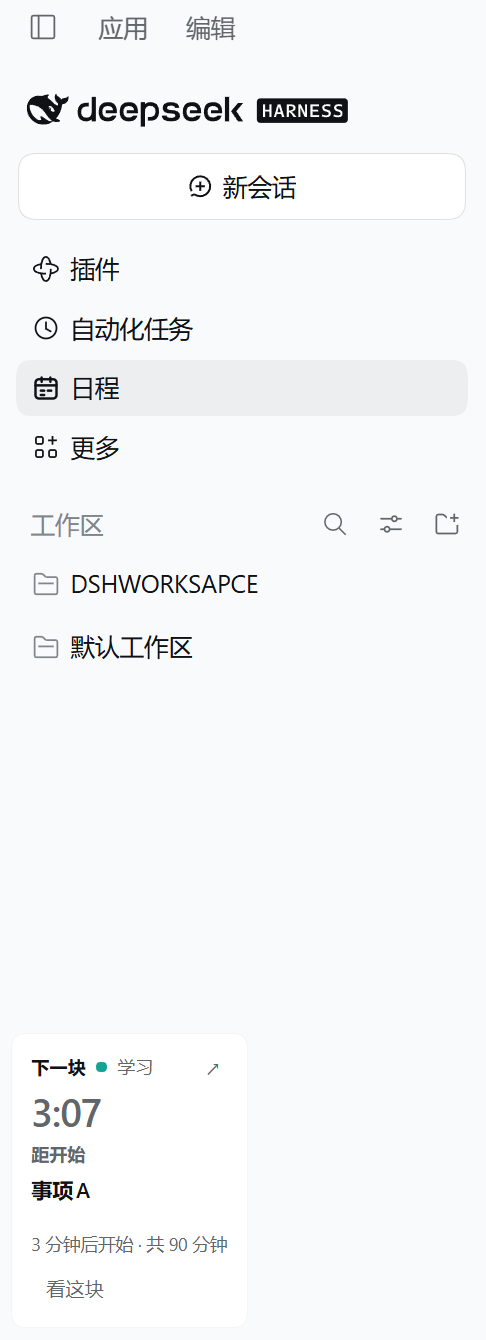
侧栏还有一个倒计时窗:不看日历也能看到「现在这块还剩多久」。它按块的起止时间推算,每秒只重渲染自己,不额外请求数据。
目标:从一句话到可推进的拆解
目标页不是一张空表格,它替你回答三个问题:这个目标现在到哪、卡在哪、是怎么走到今天的。
- 两种目标类型:练习型看「有没有在发生」——近 13 周热力、完成次数、连续天数;工作型看「推进到哪一轮」——轮次圆点、本轮投入、累计投入。
- 分类盒:目标一多就归盒,盒子可折叠、可拖拽排序;一个目标只属于一个盒子,也可以不属于任何盒子。
- 进度、卡点、时间线:两个会覆盖的快照写「现在到哪」「卡在哪」,一条只追加的时间线负责留痕,改文字、删除都能撤销。
- 从目标直接排进日程:在目标卡上点「排进日程」,选任意一天的空块,目标自动挂好,不用先去日历里新建再关联回来。
- 记录与合集:右栏随手记,回车就存,之后归到目标或合集;完成时写的一句话进入 2 / 4 / 8 天后的复习队列。
AI 协作与二次开发
插件注册了 calendar_read / calendar_write 两个工具。AI 排程前必须先读;它只能往空槽里排,你自己排的块和固定锚点会作为冲突返回,不会被覆盖。
它也是一份可以改的源码。MIT 协议、逻辑集中在 index.js 和 client.js:
- 六块不够或太多?改
WINDOWS和SLOT_INDEXES就能变成 8 块、4 块或你自己的节奏。 - 时间窗、目标类型、运动模板都在源码里,可以照着自己的习惯改。
- 你可以直接把仓库交给 AI,说「帮我把日程改成 4 块,上午一块下午两块晚上一块」,让它改完你自己再装回去。
安装
npm(推荐)
包已发布在 npm:dsh-zack-todocalendar。在 DSH 的插件管理界面按包名搜索或添加即可。
本地 link(自用 / 开发)
- 把本仓库克隆或下载到本地,例如
F:/DSHWORKSAPCE/dsh-calendar。 - 在 DSH 里进入 Plugins → Add plugin,选本地 / link 方式,路径填上面的目录;如果输入框要求完整协议,填
link:F:/DSHWORKSAPCE/dsh-calendar。 - 完全退出并重新打开 DSH,打开日历面板确认能加载。
也可以直接改 profile 的 package.json:在 dependencies 里加一项 "dsh-zack-todocalendar": "link:<你的目录>",并在 dsh.profile.bundles 里加上 "dsh-zack-todocalendar"。
数据存在哪
日程数据默认在 ~/.dsh/calendar/calendar.json,会跟随 DSH_HOME 环境变量指向的宿主数据目录。它是一个普通 JSON 文件:可以备份、可以 git、可以手动改。删除这个文件等于清空日历。
可以用环境变量 DSH_CALENDAR_FILE 指向别的文件路径,例如用另一个文件来截图或试用,不碰真实日历。
隐私边界(重要)
- 插件会注册
calendar_read工具。你的日程、目标、块记录、笔记会作为工具结果进入模型上下文——这是它能帮你排程的前提,不是 bug;如果你不希望某些内容进入对话,就不要写进日历。 - 除了访问 DSH 宿主提供的本地同源 API(
/api/dsh-calendar),插件不发起任何外部网络请求,也没有遥测。 - 数据是本地明文 JSON,没有加密。请自行控制文件权限和备份位置。
- 卸载插件不会删除数据文件。要清空日历,需要手动删除
calendar.json。
已知限制
- 每天默认 6 个块;块数和时间窗在源码里可改,但面板本身不提供设置界面。
- 每个块最多保留最近 50 条记录,每个目标的进展时间线最多 60 条。
- 没有提醒推送:复习到期、今日运动只在面板里显示,不弹系统通知。
- 侧栏收起成图标列时,计时窗只显示剩余分钟。
- 面板按桌面宽度设计,窄窗口下右栏会挤到主区域。
完整设计说明见 docs/DETAIL.md。
许可
MIT,见 LICENSE。
Links
More in this category
loopx-project/loopx#dsh-loopx-plugin★ 6769
LoopX, a provider-neutral, local-first state kernel and control plane for long-horizon agents: keeps Goal, Todo, gate, evidence, quota, recovery, and handoff state above DeepSeek Harness, while the plugin bootstraps the CLI and skills, admits bounded same-session continuation, and adds a loopback GoalBar for the exact bound loop. Its HTTP routes have no DSH access check, so a web page open in your browser could call them.
Q00/ouroboros#integrations/dsh-plugin★ 6389
Config-only bundle that mounts Ouroboros through the DSH MCP client, exposing 36 interview, Seed, execution, evaluation, and evolution workflow tools in DSH.
chuspeeism/dashi-taskboard#deepseek-harness★ 3539
Embeds the active installed Codex Taskboard runtime in the DeepSeek Harness sidebar, using its launcher runtime descriptor instead of a fixed port.
NanmiCoder/dsh-agent-teams★ 3120
AgentTeams multi-agent teams.
EthanYoQ/AI-Novel-Writer#dsh-ai-novel-writer★ 2944
Installs a dedicated AI novel-writing preset and workbench: revisioned local project assets, a compact side drawer, and native approval-gated single-file changes.
shanliuling/dsh-image-gen★ 1798
Native conversational image generation for DeepSeek Harness: ask the agent to create an image, and it handles generation and keeps the result directly in the conversation.
Community comments
Comments are public GitHub Discussions. Loading them connects to GitHub and Giscus; a GitHub account is required to post.