Displays and copies absolute paths for files produced by DSH turns in remote Web.
Install
# from GitHub (first run asks for allowBuilds approval — follow the hint, retry)
dsh plugin --profile web add github:flyhigao/dsh-produced-file-paths
Any plugin you install runs third-party code with your own permissions — it can read your files, use your credentials, and reach the network, and tool approvals don’t sandbox it. GitHub-sourced plugins also run build scripts at install time — pnpm blocks those until you allow them, so an install can stop with ERR_PNPM_GIT_DEP_PREPARE_NOT_ALLOWED or ERR_PNPM_IGNORED_BUILDS; dsh prints the exact key to add under allowBuilds in your profile’s pnpm-workspace.yaml, and the install works on the next run. Allowing a build is a trust decision: only install sources you trust, and pin a commit (github:owner/repo#sha).
README
An independent DSH Web plugin that displays the absolute paths of files produced or modified during the current turn and makes those paths easy to copy.
Why is this plugin needed?
DSH's remote Web interface shows files created or modified during a turn as clickable file items. However, those items are implemented as JavaScript buttons rather than ordinary links with an href. This creates several practical problems in remote Web deployments:
- There is no normal “Copy link address” browser action;
- The complete absolute path is not directly visible on the page;
- The remote Web Host often has no desktop application available, so clicking a file item may not open anything;
- Users still need to copy the path into SSH, a terminal, an editor, or another tool.
This plugin does not try to turn a Host filesystem path into a browser URL, and it does not add a file-download service. Instead, it reuses DSH's own produced-file list, displays the corresponding absolute paths, and provides copy controls. The original DSH file-opening behavior remains unchanged, while remote Web users gain a simple way to see and copy the paths they need.
Screenshot
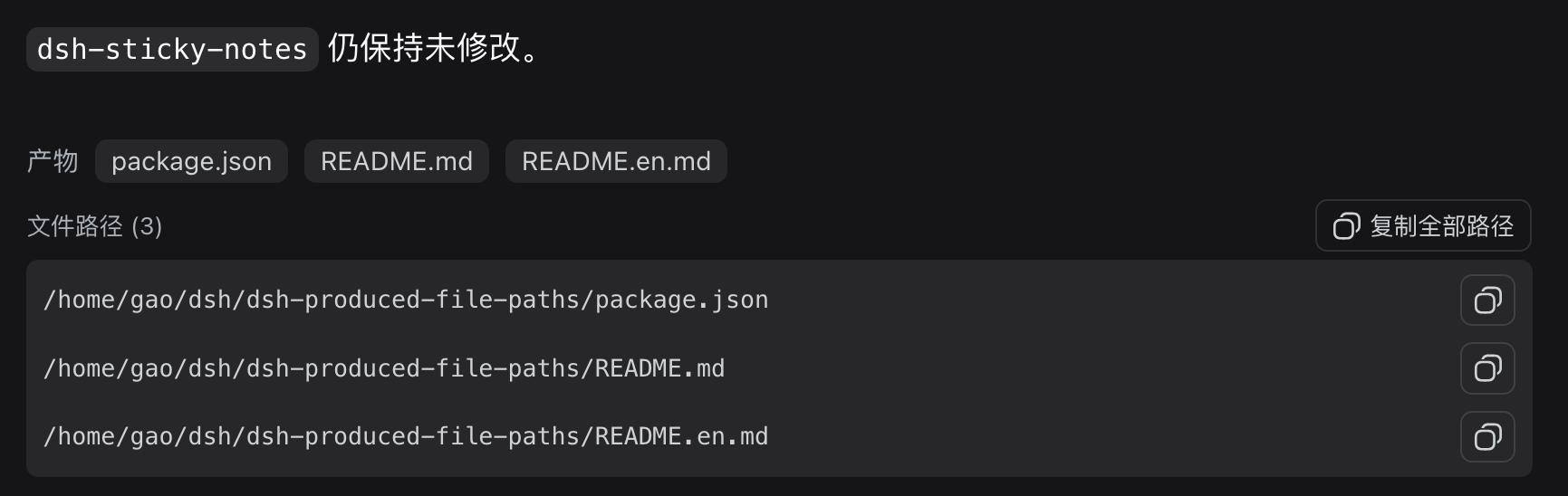
The following screenshot shows the plugin working in the DSH remote Web interface:
Features
- Displays absolute paths below DSH's built-in produced-files row;
- Copies one file path at a time;
- Copies all produced paths, one per line;
- Keeps the path text selectable for ordinary text copying;
- Reads DSH's published produced-file list without modifying files;
- Does not add a file-download endpoint;
- Does not modify
dsh-sticky-notes.
Compatibility
- Supports DSH
0.1.0-rc.6,0.1.0-rc.8,0.1.1-rc.2,0.1.2-alpha.2, and later versions. - Zero external runtime dependencies; does not depend on the deprecated
dsh-client-runtime. - Injects via DSH standard slot
conversation.chat.turnTailto coexist with built-in deliverables.
Installation
Install it directly from GitHub with the DSH plugin manager:
dsh plugin --profile web add github:flyhigao/dsh-produced-file-paths
After installation, restart dsh web and hard-refresh the remote Web page (Ctrl+Shift+R).
Local development
To develop from a local checkout instead, use a local directory source:
dsh plugin --profile web add file:/path/to/dsh-produced-file-paths
Refresh the page after client-bundle changes. Restart dsh web after changing the host entry or bundle composition.
Path semantics and security boundary
The plugin copies an absolute filesystem path under the current DSH Session workspace. It does not create a browser URL or a file:// link. For example:
/home/gao/dsh/reports/summary.md
Paths come from DSH's published produced-file data, with relative paths resolved against the current Session workspace. The plugin only reads and displays those paths; it does not accept user-supplied paths, scan the workspace, or read file contents.
Copying a path therefore does not grant any new file access. Whether the path can be used remains determined by SSH, a terminal, an editor, or another tool where the path is pasted.
Troubleshooting after an upgrade
If the copy control is not visible after installation, check the following in order:
Make sure the plugin was installed into the Web profile:
dsh plugin --profile web add github:flyhigao/dsh-produced-file-pathsRestart
dsh web, becausecordis.patch.ymland the browser plugin manifest are composed at startup.Hard-refresh the browser page (
Ctrl+Shift+R) to discard an old client-bundle cache.Confirm that DSH's built-in produced-files row appears first. This plugin only renders paths that DSH has already identified; it does not guess files from prose or scan the workspace.
When developing from a local checkout, remove the stale profile copy and reinstall it:
cd ~/.dsh/profiles/web
rm -rf node_modules/dsh-produced-file-paths
pnpm install
A remote Web Host without a desktop file opener can still use path copying; the feature only needs the browser clipboard and the current Session's path data.
Development and release checks
This is a small hand-maintained plugin and does not require an additional build tool. The browser bundle is client/client.js, and the host entry is lib/index.js.
Before committing or publishing, run:
node --check client/client.js
node --check lib/index.js
npm pack --dry-run
tar -tzf dsh-produced-file-paths-*.tgz
The release package must contain lib/, lib/types/, client/, assets/, cordis.patch.yml, and both README files. The dsh.bundle declaration in package.json and the root cordis.patch.yml are the composition entry required by the DSH plugin manager and the plugin market.
Links
More in this category
zhu1090093659/dsh-web#packages/dsh-remote-web-ui★ 8440
Remote control of a dsh web workspace from phone or PC: QR-code pairing through a token-gated channel, SSE real-time sync, and separate mobile and full desktop GUI modes.
zhu1090093659/dsh-web#packages/dsh-ssh★ 8440
SSH ops panel for DSH: web terminal, SFTP transfer with progress, local port forwarding, and one-command cluster execution across hosts; agents share the same host config.
saya-ch/dsh-mobile★ 387
Access DeepSeek Harness from the Android app or a mobile browser with secure LAN and remote connections, persistent device pairing, and a customizable mobile interface.
ZSeven-W/dsh-ios★ 315
A live iOS Simulator or USB-connected iPhone inside the conversation: 22 agent tools for booting, building, driving the UI by accessibility identity or OCR text, list-row actions and SwiftUI preview hot reload, plus a streaming sidebar panel you can tap and drag on.
liguobao/ds-harness-remote★ 269
Multi-device remote access for DeepSeek Harness: continue an active session from your phone, tablet, browser, or another computer over an end-to-end encrypted channel (Noise IK + adaptive relay/WebRTC transport), with device authorization, ApiProxy-only remote capabilities, and read-only file preview via dsh-file-viewer — no shell, remote desktop, or write access.
wenbin-wb/dsh-bridge★ 184
Remote and mobile access for DeepSeek Harness: provides LAN QR code connection, Cloudflare/custom tunnels, WeChat, QQ, Feishu, Telegram bot integration, and security authentication.
Community comments
Comments are public GitHub Discussions. Loading them connects to GitHub and Giscus; a GitHub account is required to post.