Embedded task management engine: decision-point protocol, idea capture wall, Linear-style issue store.
Install
# from GitHub (first run asks for allowBuilds approval — follow the hint, retry)
dsh plugin --profile web add github:fakechris/dsh-track
Any plugin you install runs third-party code with your own permissions — it can read your files, use your credentials, and reach the network, and tool approvals don’t sandbox it. GitHub-sourced plugins also run build scripts at install time — pnpm blocks those until you allow them, so an install can stop with ERR_PNPM_GIT_DEP_PREPARE_NOT_ALLOWED or ERR_PNPM_IGNORED_BUILDS; dsh prints the exact key to add under allowBuilds in your profile’s pnpm-workspace.yaml, and the install works on the next run. Allowing a build is a trust decision: only install sources you trust, and pin a commit (github:owner/repo#sha).
README
English | 中文
The embedded task-management engine for DeepSeek Harness — turns thoughts, decisions, and tasks into structured, traceable, foldable data. Capture with zero friction, decisions leave a trail, tasks have a lifecycle. Everything lives inside the harness (session events + storage KV), zero external dependencies.
Status Active · Tests 240 passing · Build pnpm run build · Version 0.6.0
v0.6.0 · session graphs + calendar yarn + evidence discipline (2026-08-21): Session execution graphs (M1) — build any session into a deterministic turn→step→tool tree (every edge cites (sessionId, seq) back into the raw log), batch-build per workspace, rendered as a "Session graph" conversation.view tab (host-spec compliant); Calendar yarn — session lifecycle / drift / switching across projects in one view (swimlanes sorted by event volume, idle repos folded, cross-session/cross-project golden-diamond edges), exportable as a self-contained visualization (data JSON + HTML view + README, interactive offline); Genealogy semantic layer —
track_genealogy(fork lineage / issue↔session / capture→issue / decision→session / project induction, dry-run by default),track_git_artifacts(align git commits to sessions & issues — "which commit landed this requirement"),track_evolution_brief(zero-LLM project brief + gap proposals); Evidence discipline (P4/P6/P5a) — evidence drawer + layered guard (the deterministic graph and the semantic layer are separate pipelines; semantic methods may only writecandidate) + output-first delivery metrics (soft delete + evidence grading + explicit commit-trailer channel); project attribution now means "the repo the session actually touched". v0.5.0 · panel task actions + pager (2026-08-14): issue cards gain direct 完成/取消 (done/canceled) actions with two-step confirm, plus a batch mode (checkboxes + batch done/cancel); pagers gain first-page / page-number jump / last-page controls and scroll anchoring (the pager stays put across page switches instead of jumping). v0.4.0 · auto-maintenance + config panel (2026-08-14): a lifecycle sweep surfaces zombie tasks in a pending-confirmation section; capture auto-promotion + near-duplicate auto-merge (configurable similarity threshold); canceled proposals auto-confirm past a grace period; scheduled sync (weekly v1, capped); a Track-panel settings UI (⚙) backed by /api/track/config. lib artifacts are committed; npm publishing runs LOCALLY (IP trust + hardware 2FA) — GitHub Actions validates the tag and packs the tarball. v0.3.0 · dedup + panel fixes (2026-08-14): no more duplicate entries on the capture wall —createCaptureis the single gate (durable per-session marker + content-hash fallback, survives restarts); the right panel/tab are fixed (mounted on the real conversation root in the formal-release layout, the Track tab toggles the panel); the composer strip shows the live capture count and opens the panel on click. v0.2.1 · final-release compatibility (2026-08-12): the official final release (snapshots/20260812T172954Z-final-unwatermarked) renamed two surfaces without aliases —SessionQueryService→SessionQueryEngine(dsh-session-query) andctx.httpServer→ctx.webServer(dsh-host-webserver) — both adapted (tsc + 342 tests + production-equivalent smoke verified).
🖥️ Screenshots
| Panel overview (capture wall + issue wall on the right) | Jump back to the source prompt (highlighted) |
|---|---|
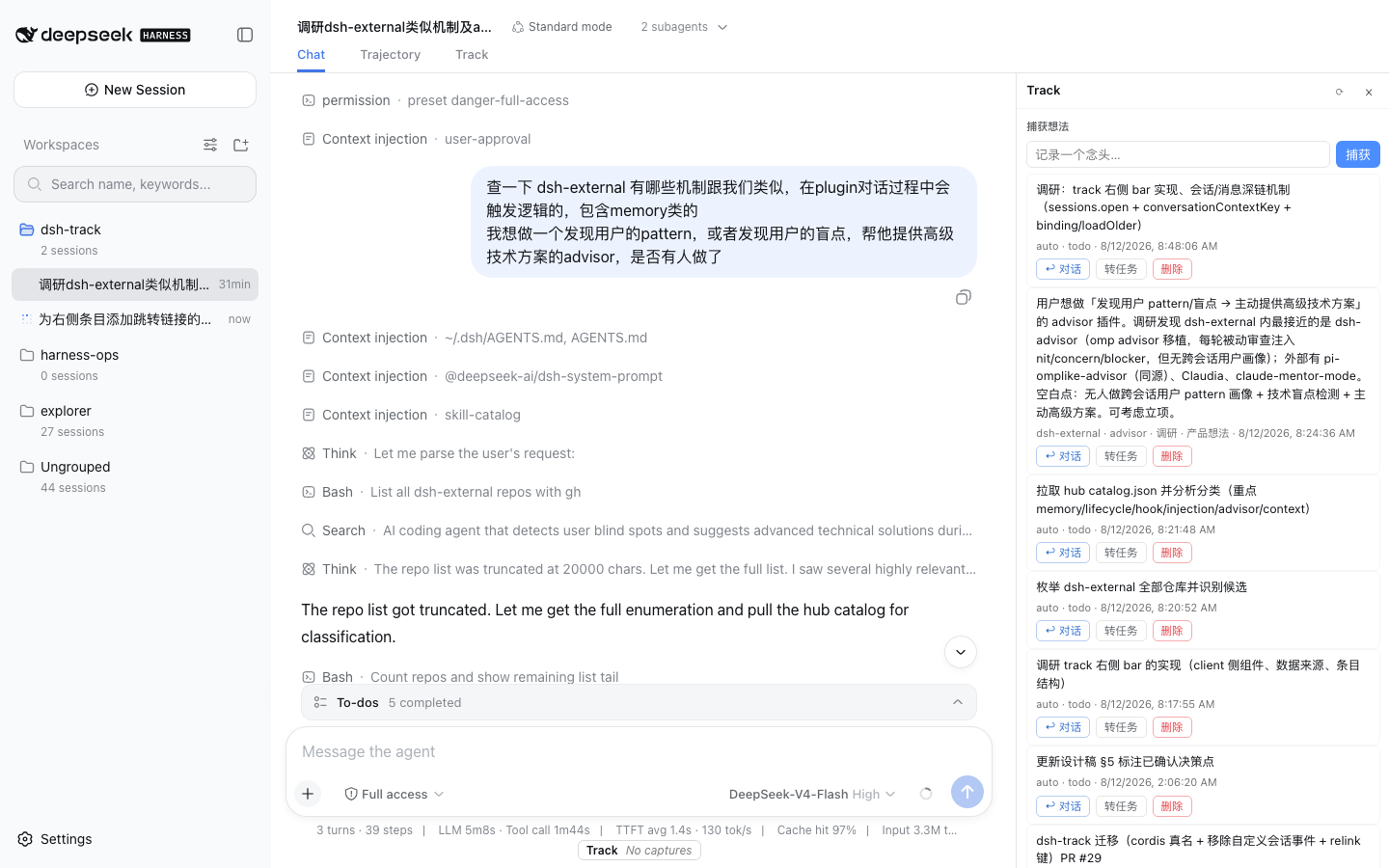 |
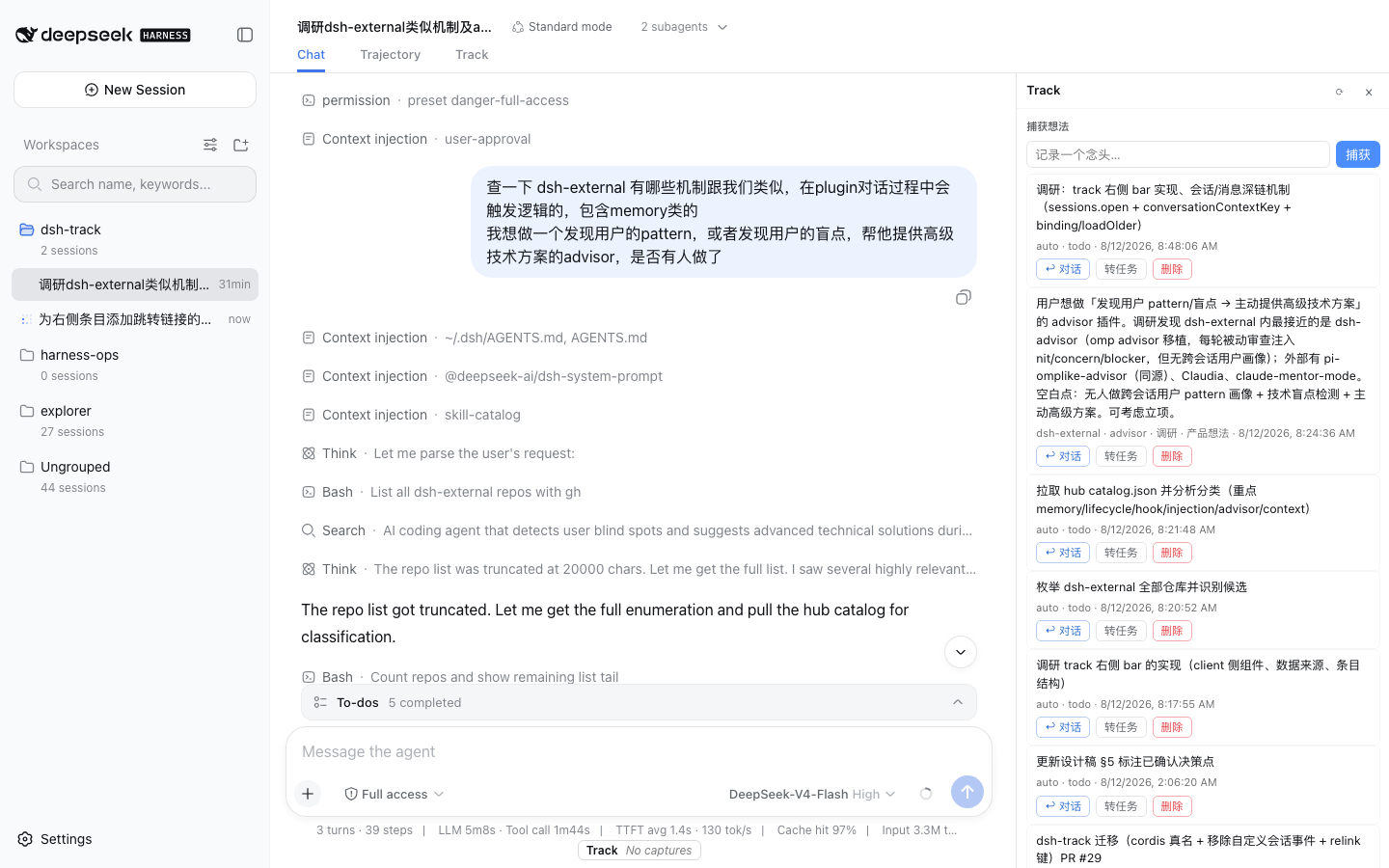 |
| Calendar yarn (session lifecycle / drift / switching across projects) | Self-contained visualization export (data JSON + HTML view, interactive offline) |
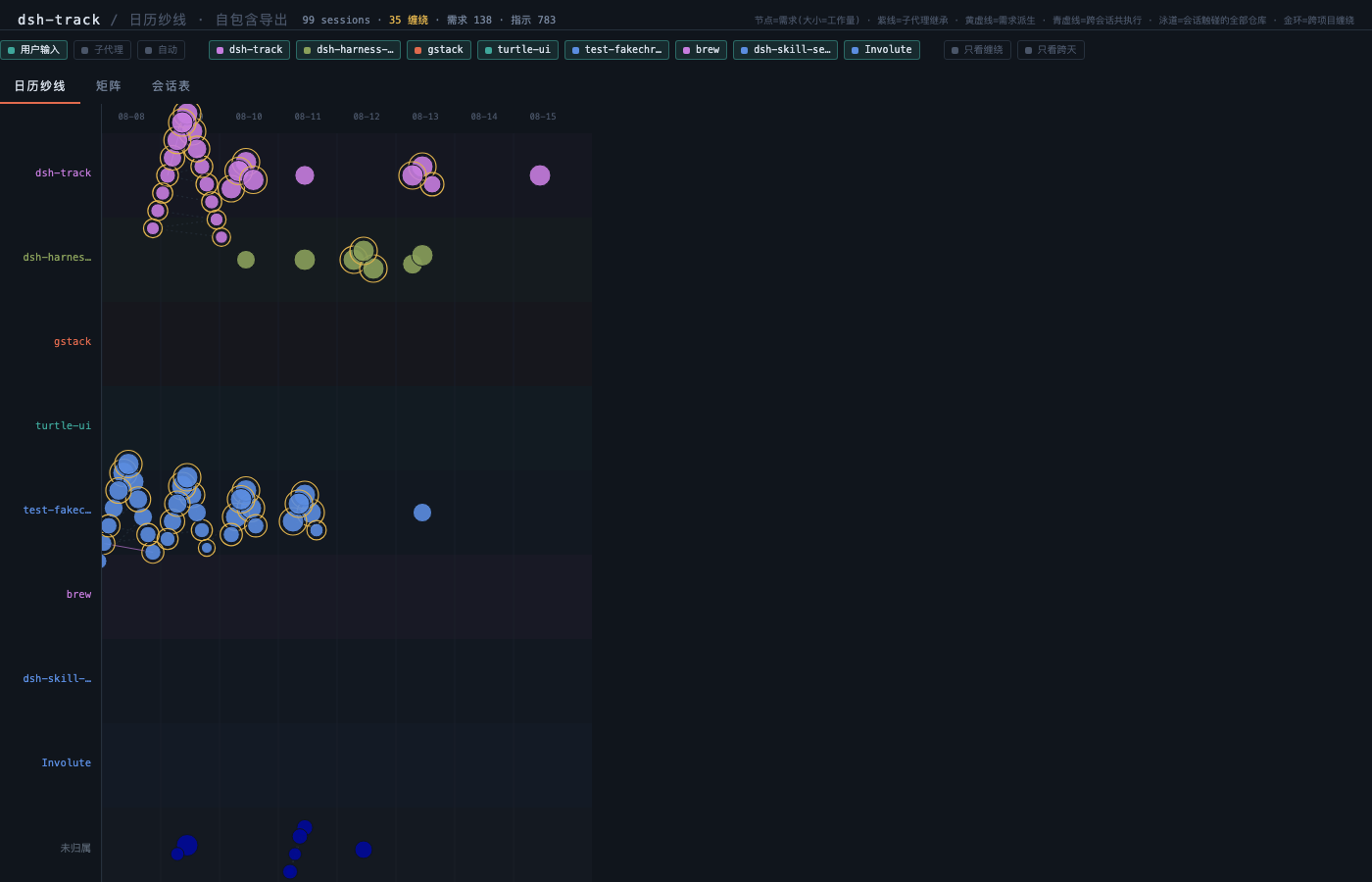 |
See export/track-calendar-view.html (sample export) |
✨ Features
- 🧠 Capture Wall —
capture_thoughtcaptures thoughts with zero friction; planning signals (todo_write) are auto-captured too, and every entry carries its motivation context (the user request behind it) — never a list of context-free fragments. - ⚖️ Decision Ledger — for irreversible / risky / scope / acceptance decisions, raise a decision point first; the user answers with a lightweight choice, and the choice + rationale are persisted and queryable (answer rate feeds the funnel).
- 📋 Evidence-driven Lifecycle — a Linear-compatible issue model with an evidence-driven state
machine:
done/canceledare never auto-claimed — they always require a user nod. - 🔄 History Sync — fold past workspace sessions into epic/issue candidates in one command; dry-run by default, written only after confirmation.
- 💰 Usage Ledger — the LLM cost (tokens / dollars) of track's own engine calls is metered separately; "how many tokens did track spend" is one question away.
- 🖥️ Web Panel — a right-hand capture wall + issue wall; every entry has a 「↩ 对话」 link that jumps back to the source conversation and the exact original prompt, highlighted.
- 🕸️ Session Graphs —
track_session_graphbuilds any session into a deterministic turn→step→tool tree; every edge cites (sessionId, seq) back into the raw log; batch-build per workspace (idempotent, force-rebuildable); a "Session graph" conversation.view tab renders the current session live. - 🧵 Calendar Yarn — session lifecycle / drift / switching across projects in one view: swimlanes sorted by event volume, idle repos folded, line-level "only entanglement" filter; exportable as a self-contained visualization (data JSON + HTML view + README — open the HTML in a browser and interact offline).
- 🧬 Genealogy Semantic Layer —
track_genealogystrings requirements into a graph (fork lineage / issue↔session / capture→issue / decision→session / project induction, dry-run by default);track_git_artifactsaligns commits to sessions and issues;track_evolution_briefproduces a zero-LLM project brief with gap proposals. - 🛡️ Evidence Discipline — an evidence drawer plus a layered guard: the deterministic graph
(git facts / hash links) and the semantic layer (LLM clustering) are separate pipelines, and
semantic methods may only ever write
candidate— evidence is never silently upgraded; output-first delivery metrics (soft delete + evidence grading + explicit commit-trailer channel).
🚀 Quick Start
# 1. Install the plugin (official form: published dsh; or `dsh plugin ...` if installed)
# npm package (published — recommended):
npx -p @deepseek-ai/dsh dsh plugin --profile web add @fakechris/dsh-track
# git source (fallback):
# npx -p @deepseek-ai/dsh dsh plugin --profile web add github:fakechris/dsh-track
#    (or a local path: `... add /absolute/path/to/dsh-track`)

# 2. Install the protocol skill (decision-point / task-advance discipline)
mkdir -p ~/.dsh/skills && cp -r skills/dsh-track ~/.dsh/skills/

# 3. Restart dsh web (the guard auto-restarts it); tools mount automatically
dsh web
Verify: open the panel in the browser (the ◆ button, or the Track tab in the session tab strip) — you should see the Captures and Issues sections.
📖 Core Workflows
| Flow | What | Entry points |
|---|---|---|
| Capture | Drop a thought into the wall anytime; agent planning (todo_write) auto-captures with motivation context | capture_thought · panel input |
| Decide | Raise a decision point for irreversible/risky/value/scope/acceptance choices; the user answers; choice + rationale are persisted | report_decision_point → track_respond_decision |
| Task | Turn requirements into issues; declare the driving session so execution evidence accumulates; the state machine advances, done needs a user nod |
track_create_issue → track_attach_issue → track_update_issue_state |
| Review | Fold past sessions into issue candidates; jump back to any entry's source conversation and original prompt | track_sync_history · panel 「↩ 对话」 |
🧰 Tools
| Tool | Purpose |
|---|---|
capture_thought(content, tags?) |
capture a thought into the wall with zero friction |
report_decision_point(question, options, my_preference, rationale, impact, need) |
raise a decision point; the user answers; auto-persisted to the decision ledger |
track_respond_decision(decision_id, choice, rationale?) |
record the user's answer (choice + rationale); idempotent; dismissed to skip |
track_list_decisions(state?, since?, session_id?) |
read decision history (pending / answered / dismissed) |
track_create_issue(title, description?, priority?, acceptance?, parent_id?) |
create a Linear-compatible issue |
track_attach_issue(issue_id) |
declare the current session is driving an issue; execution evidence is then recorded against it automatically |
track_update_issue_state(issue_id, target, note?, confirmed_by_user?) |
propose or confirm a state change; done / canceled require confirmed_by_user=true (never auto-marked) |
track_issue_evidence(issue_id) |
read one issue's evidence ledger and inferred state |
track_list_issues(team_id?, state?) |
list issues |
track_sync_history(workspace?, since?, dry_run?, max_sessions?, engine?) |
fold workspace session history into epic/issue candidates (dry-run by default) |
track_usage(since?) |
report LLM cost incurred by the track engine: request counts, token buckets, wall time, estimated cost |
track_backfill_captures() |
backfill motivation context on legacy open captures (idempotent, safe to re-run) |
track_session_graph(session_id?, workspace?, max_sessions?, rebuild?) |
build / read a session execution graph (turn→step→tool tree with seq citations; batch-build per workspace) |
track_genealogy(workspace?, dry_run?) |
build the semantic layer (fork lineage / issue↔session / capture→issue / decision→session / project induction; dry-run by default) |
track_git_artifacts(workspace?, project_level?, dry_run?, limit?) |
scan git commits and align them to sessions (landed-in) and issues |
track_evolution_brief(project_id?) |
zero-LLM project brief: issue stats, recent activity, proposed gaps |
🖥️ Web Panel & HTTP API
The panel (src/client/right-panel.ts) mounts into the conversation column's right side — plain
DOM injection, no framework:
- Capture wall: inline capture, paging, two-step confirmed delete, one-click promote to issue;
- Issue wall: grouped by state (in-progress first), expandable details, delete;
- ↩ 对话 (jump back): every capture/issue jumps to the source session and the exact original user prompt — switches the left conversation, pages into deep history, scrolls to the row with a highlight flash; legacy entries without a message id fall back to the session's first user message;
- 20s lightweight auto-refresh, draggable panel width, ◆ floating toggle when collapsed;
- Session graph tab: the "Session graph" conversation.view tab renders the current session's turn→step→tool tree live (host tab-spec compliant; the active step is underlined and followed).
HTTP API (the panel's data face, under /api/track/*):
| Endpoint | Purpose |
|---|---|
GET/POST /api/track/captures · DELETE /:id · POST /:id/promote |
capture-wall CRUD + promote |
GET /api/track/issues · DELETE /:id · GET /:id/evidence |
issue list / delete / evidence ledger |
GET /api/track/decisions?state=&since=&session_id= |
decision history |
GET /api/track/usage?since=&limit= |
LLM usage summary + recent records |
GET /api/track/funnel |
tool-invocation funnel (capture conversion, etc.) |
POST /api/track/sync |
history sync (same as track_sync_history) |
🔗 Deep Links
Jump from outside (terminal / another agent / jump launcher / script) straight to a specific conversation in the Web GUI (optionally to a specific message):
- Path form
http://<host>:<port>/s/<sessionId>[/<messageId>]— persistent; bookmarks / refresh / sharing keep working; - Query form
http://<host>:<port>/?open=<sessionId>[&message=<messageId>]— one-shot; the params are stripped after the jump; - Implemented in
src/client/deep-link.ts(reusesjumpToConversation's open + scroll logic, see the 「↩ 对话」 link above). - Handoff guide for other agents / scripts (how to resolve
sessionId/messageId, open, and verify):docs/deep-link-handoff.md
🏗️ Architecture
Fat skill + thin harness: decision criteria and calling discipline live in
skills/dsh-track/SKILL.md; the harness only registers tools and
storage — it makes no judgment.
Storage placement: decision points/todos stay in session events (replayable); Capture / Issue /
Decision / Usage live in ctx.storage KV (independent across sessions) with Linear-compatible
shapes (migratable anytime).
src/index.ts          host plugin: tool registration + event subscription + store wiring + HTTP API
src/store.ts          TrackStore: KV cell wrapper (serial write chain)
src/types.ts          Linear-compatible data shapes
src/capture/          auto-capture + motivation context (observer / context / backfill)
src/lifecycle/        evidence observer + state machine (evidence-driven lifecycle)
src/sync/             history-sync engine (extract → segment → intent → synthesize → align)
src/usage.ts          LLM usage ledger (recorder + aggregation + cost estimation)
src/graph/            session graphs / calendar yarn / genealogy (build / calendar / links / commits / service)
src/client/           web panel (right-panel / composer strip)
skills/dsh-track      fat skill: decision-point criteria / format / discipline
cordis.patch.yml      bundle patch (auto-applied by dsh plugin add)
Design constraint (plugin developers, read this): do not write custom session events for
business data — since 2026-08-11 the harness refuses to read an entire log containing an unknown
event type. Observe sessions only through the official event stream, read-only (see the trailing
comment in src/types.ts and the repo AGENTS.md).
🛠️ Development
pnpm install
pnpm run build      # tsc artifacts to lib/ + client bundle
pnpm test           # vitest (188 tests)
- Develop in a repo-nested worktree (
.worktrees/<name>) + branch + PR + squash merge (repoAGENTS.mdL4/L5). - Adding an
@deepseek-ai/*dependency requires updating tsconfig paths, vitest aliases, and ab-config relink together (L7).
📚 Links
- Repo: github.com/fakechris/dsh-track (the old
dsh-external/dsh-trackname redirects here) - Protocol skill:
skills/dsh-track/SKILL.md(decision-point criteria, task-advance discipline) - Repo conventions:
AGENTS.md(commit / worktree / bilingual-docs rules)
📄 License
Private plugin repo (package.json marks private); the skill metadata declares BSD-3-Clause.
Links
More in this category
Q00/ouroboros#integrations/dsh-plugin★ 6118
Config-only bundle that mounts Ouroboros through the DSH MCP client, exposing 36 interview, Seed, execution, evaluation, and evolution workflow tools in DSH.
loopx-project/loopx#dsh-loopx-plugin★ 6072
LoopX, a provider-neutral, local-first state kernel and control plane for long-horizon agents: keeps Goal, Todo, gate, evidence, quota, recovery, and handoff state above DeepSeek Harness, while the plugin bootstraps the CLI and skills, admits bounded same-session continuation, and adds a loopback GoalBar for the exact bound loop.
chuspeeism/dashi-taskboard#deepseek-harness★ 3244
Embeds the active installed Codex Taskboard runtime in the DeepSeek Harness sidebar, using its launcher runtime descriptor instead of a fixed port.
NanmiCoder/dsh-agent-teams★ 1829
AgentTeams multi-agent teams.
EthanYoQ/AI-Novel-Writer#dsh-ai-novel-writer★ 1149
Installs a dedicated AI novel-writing preset and workbench: revisioned local project assets, a compact side drawer, and native approval-gated single-file changes.
tong-io/tongflow#dsh-tongflow★ 1033
TongFlow film-crew studio for image, voice, music and video production: the agent writes per-asset TongFlow workflow files (.tongflow.json) that run through TongFlow plugins, with an embedded workflow canvas, a shot/character/take project layout and a manga-drama template; sessions starting with @tongflow open the Studio view.
Community comments
Comments are public GitHub Discussions. Loading them connects to GitHub and Giscus; a GitHub account is required to post.