Tender search and bid intelligence in DeepSeek Harness with proposed project search, rule screening, human review and Excel/PDF exports using user-authorized Qichacha MCP.
Install
# from npm (prebuilt)
dsh plugin --profile web add dsh-tender-workbench
# from GitHub (first run asks for allowBuilds approval — follow the hint, retry)
dsh plugin --profile web add github:duhu2000/dsh-tender-workbench
Any plugin you install runs third-party code with your own permissions — it can read your files, use your credentials, and reach the network, and tool approvals don’t sandbox it. GitHub-sourced plugins also run build scripts at install time — pnpm blocks those until you allow them, so an install can stop with ERR_PNPM_GIT_DEP_PREPARE_NOT_ALLOWED or ERR_PNPM_IGNORED_BUILDS; dsh prints the exact key to add under allowBuilds in your profile’s pnpm-workspace.yaml, and the install works on the next run. Allowing a build is a trust decision: only install sources you trust, and pin a commit (github:owner/repo#sha).
README
Tender search and bid intelligence in DeepSeek Harness with proposed project search, rule screening, human review and Excel/PDF exports using user-authorized Qichacha MCP.
Install a pinned release using the command in the Chinese quick start, review the preview or evidence before confirming, and keep the previous version and task-directory backup for rollback. Qichacha calls use the customer's authorized account.
Related agents: 数据清洗补全 · AI填表 · 访前尽调 · 招投标
中文 | English
dsh-tender-workbench is an open-source DeepSeek Harness plugin for finding, screening, reviewing, and delivering tender opportunities. It combines authorized qcc-tender data, deterministic screening rules, bounded Agent analysis, explicit human decisions, and immutable Excel/PDF reports in one Session-scoped Better Sidebar workbench.
Current stable version: 0.5.11 (stable release).
Version 0.5.11 adds a one-time native introductory draft for new tender Sessions. Existing text, attachments, IME composition and user-cleared drafts are protected; initialization never sends, calls tools or opens the workbench. UX-48 admission reveal, Profile history and actual execution telemetry are retained. See the release record for publication status and verification boundaries.
Base mode targets the full DSH 0.1.2-rc.1 distribution; Better Sidebar 0.18.1 is optional and only provides the visual workbench. Legacy hosts remain unsupported. Back up the complete Profile and verify dependencies before upgrading.
What it does
The workbench follows four business phases:
- Find opportunities: search tender notices and proposed projects with source, keyword, date, region, stage, procurement, industry, type, amount, approval, and investment conditions supported by the connected data source.
- Screen candidates: edit Agent-proposed criteria, run deterministic impact previews, confirm a rule set, and inspect five mutually exclusive outcomes: included, observed, manual review, rule excluded, and unmatched.
- Human confirmation: review pending and completed records separately, prioritize Agent recommendations, make individual or batch decisions, retain notes, and undo the latest review operation.
- Deliver: confirm the reviewed scope and generate Excel and PDF files from one immutable report snapshot. Partial delivery remains explicit when records are still pending.
Agent analysis covers every record classified as included, observed, or requiring manual review. Rule-excluded and unmatched records are not analyzed. Analysis runs in deterministic batches until the eligible set is complete, and interrupted work resumes from the remaining records.
The human-review queue keeps Agent recommendations separate from user decisions. Its default ordering is priority review, watch, not recommended, then unanalyzed. Classification lists are ordered included, observed, manual review, rule excluded, then unmatched before pagination.
Architecture
The package is a Host + Client DeepSeek Harness plugin:
- The Client registers one Session-targeted Better Sidebar tab and public launcher actions. It builds typed, user-visible intents and consumes bounded Session projections and Artifact APIs.
- The Host validates intents, calls the exact authorized MCP tools, owns workflow state transitions, stores Session-private Artifacts, and renders reports.
- Persistent business state is reconstructed from typed conversation events and immutable Artifact references. The UI does not infer state from model text or maintain a second cross-Session state machine.
- Query, criteria, analysis, review, and report writes share a Session-scoped single-flight guard. Read-only browsing remains available while a write is running.
- Registrations, subscriptions, portals, routes, and other side effects are tied to the plugin Context lifecycle and are disposed on unload or hot reload.
The plugin uses public DeepSeek Harness services and the public dsh-better-sidebar contract. It does not modify Harness source, access Provider internals, fetch MCP from the browser, read connector storage, hold API credentials, or write internal data to the Workspace.
Data and report boundaries
Each Session has one active normalized dataset. A successful new query atomically replaces that active snapshot instead of merging results; historical Artifacts remain available for traceability while downstream state from the old snapshot becomes inactive.
Schema-valid MCP fields are retained as source facts. Missing values, disclosed-but-unparseable values, source failures, rule exclusions, and user exclusions remain distinct states and are not inferred from one another.
Excel is organized for analysis and verification, with separate overview, distribution, source-specific result, review, traceability, and data-quality sheets. PDF is organized for business readers, leading with deterministic conclusions, result distributions, deadline windows, and a bounded set of records requiring near-term verification. Both formats use the same immutable report snapshot; a failed format can be retried without re-querying or changing successful files.
Requirements and compatibility
This release constrains core peers to ~0.1.2-rc.1; future combinations require verification:
- DeepSeek Harness public packages:
0.1.2-rc.1 dsh-mcp-connector:0.2.31- Optional visual workbench:
dsh-better-sidebar@0.18.1; the peer range is not an acceptance claim for untested versions
The active Profile must provide one coherent runtime with public Session Projection, JSONL Session Persistence, Tools, Skill, Sessions, and WebServer services. Only the visual workbench needs Better Sidebar and its targetedOpen / stateSubscription features; missing or incompatible capabilities do not block conversation activation.
Before installing, run node scripts/check-host-compatibility.mjs --host-root /actual/node_modules/@deepseek-ai/dsh --profile-root /actual/profiles/web. It only reads package manifests: known incompatible hosts, mixed core packages and old Sidebar fail; unknown combinations are reported as unverified. The Windows mount script requires -DshHostRoot and executes this gate before mutation. Upgrade the complete host explicitly after backing up the Profile: npm install -g @deepseek-ai/dsh@0.1.2-rc.1.
Context is not required. If already installed, 0.36.0 has a known removed settingsNamespace dependency; the coexistence baseline is 0.48.0. Update only with user approval and a backup. Rollback requires a complete verified host/plugin combination: do not install the original 0.5.4 or older package alone on the new host. Startup smoke does not prove live QCC or four-product acceptance.
An installed and authorized qcc-tender MCP connection must expose these exact tools:
mcp__qcc-tender__search_tendersmcp__qcc-tender__search_proposed_projects
The default preflight accepts Sidebar-free base mode. Add --workbench (Windows mount: -Workbench) only when explicitly enabling the visual workbench; the Windows flag also checks its enabled bundle before any Profile write. No script automatically installs Sidebar. An already-installed Sidebar 0.17.1 breaking the new host is still blocked, even in base mode. Runtime capability probes and Tab preferences remain separate from manifest inspection.
Without Sidebar, native Sessions, input drafts, the prompt builder, action Skills and Host tools remain available. Conversation-driven query, rule preview/confirmation, human review and report generation retain their contracts; actual model orchestration and paid MCP are separate acceptance layers. Existing authorized Excel/PDF artifact links can be downloaded, but visual table/detail/filter controls, batch-review controls, history view and download buttons require the workbench. All five shortcuts only explain this boundary, preserving state without starting tasks. No alternate drawer or native-workbench rewrite is implemented. Other missing required services, unavailable MCP tools and non-JSONL persistence fail explicitly.
Install
Install base mode. The connector is needed for authorized QCC queries; Sidebar is not required:
dsh plugin --profile web add 'dsh-mcp-connector@>=0.2.31'
dsh plugin --profile web add dsh-tender-workbench
dsh web --no-open
Optionally enable the visual workbench with dsh plugin --profile web add dsh-better-sidebar@0.18.1, enable the tender Tab and fully restart the Profile.
To install the exact 0.5.11 release:
dsh plugin --profile web add 'dsh-mcp-connector@>=0.2.31'
dsh plugin --profile web add dsh-tender-workbench@0.5.11
To install base mode from an independent checkout:
corepack pnpm@11.7.0 install --frozen-lockfile
corepack pnpm@11.7.0 run build
dsh plugin --profile web add 'dsh-mcp-connector@>=0.2.31'
dsh plugin --profile web add .
dsh web --no-open
To install a packed build:
dsh plugin --profile web add 'dsh-mcp-connector@>=0.2.31'
dsh plugin --profile web add ./dsh-tender-workbench-0.5.11.tgz
dsh web --no-open
The package's dsh.bundle.patch declaration activates cordis.patch.yml, which contributes the dsh-tender-workbench Loader row. Restart the Web profile after adding or removing the plugin.
To remove it:
dsh plugin --profile web remove dsh-tender-workbench
Upgrade and rollback
Upgrade an existing installation by installing the stable version and fully restarting the Web profile:
dsh plugin --profile web add dsh-tender-workbench@0.5.11
dsh web --no-open
Version 0.5.11 retains Workspace ownership, the ordinary Session guard and the 0.5.6 snapshotEvents/turn-start authorization contract. Business state remains Session-local; Profile history stores metadata only, never writable projections or download capabilities. Existing unopened Sessions are not scanned: reopening indexes their current task, without restoring old snapshots. Back up the Profile's .dsh-tender-workbench/history-v1.json alongside task directories. Live MCP is not verified. Roll back the complete backed-up host/plugin combination, not an old plugin alone on the new host.
Using the workbench
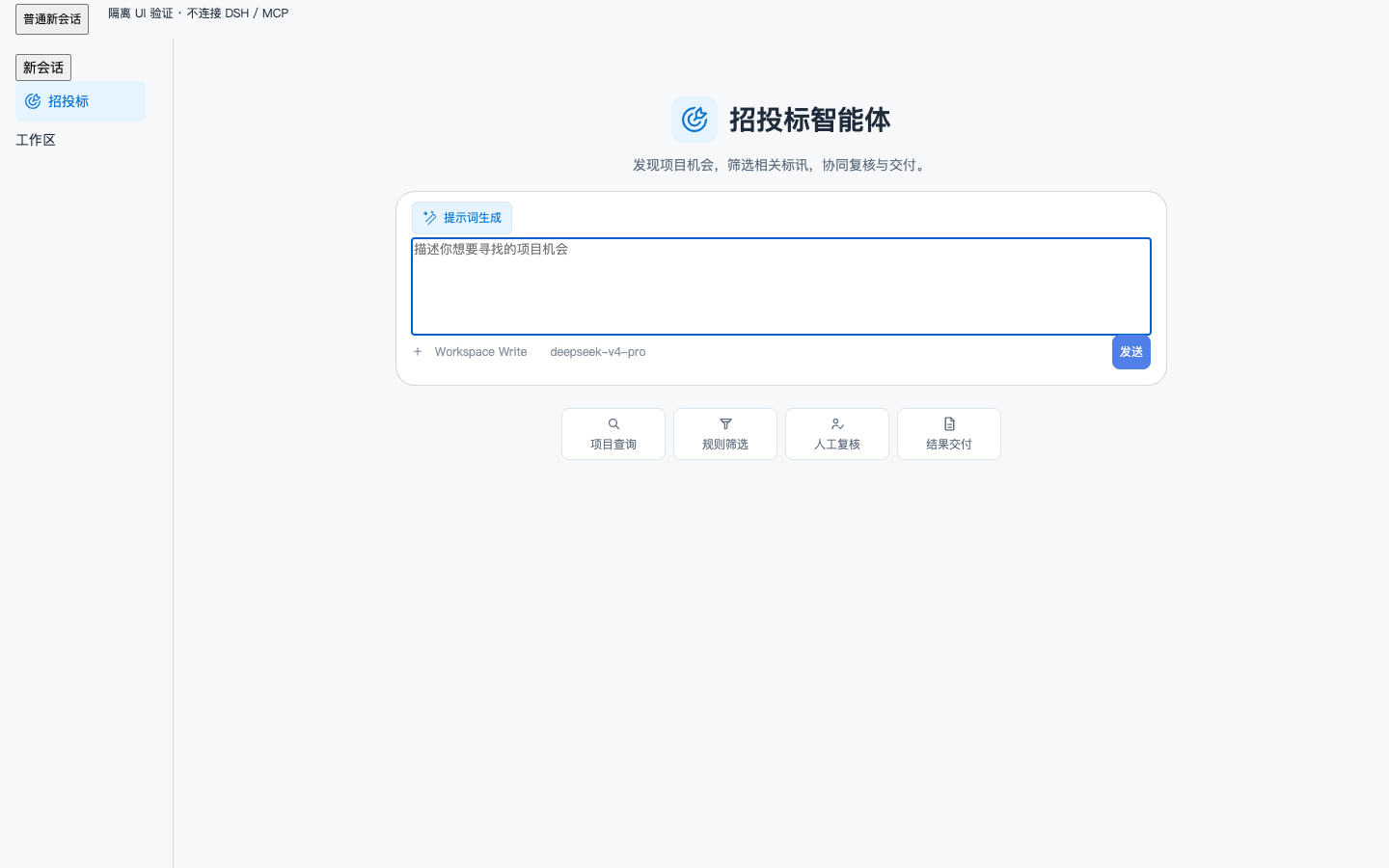
The top-left “招投标” launcher creates a distinct native Session using the current, recent, or first available workspace path. It shows the “招投标智能体” title and goal icon without opening the workbench. Below-composer shortcuts explicitly open the query, screening, review, or delivery view; the Session Header recovery action remains available. Other Sessions retain their original branding.
Interface examples and marketplace submission
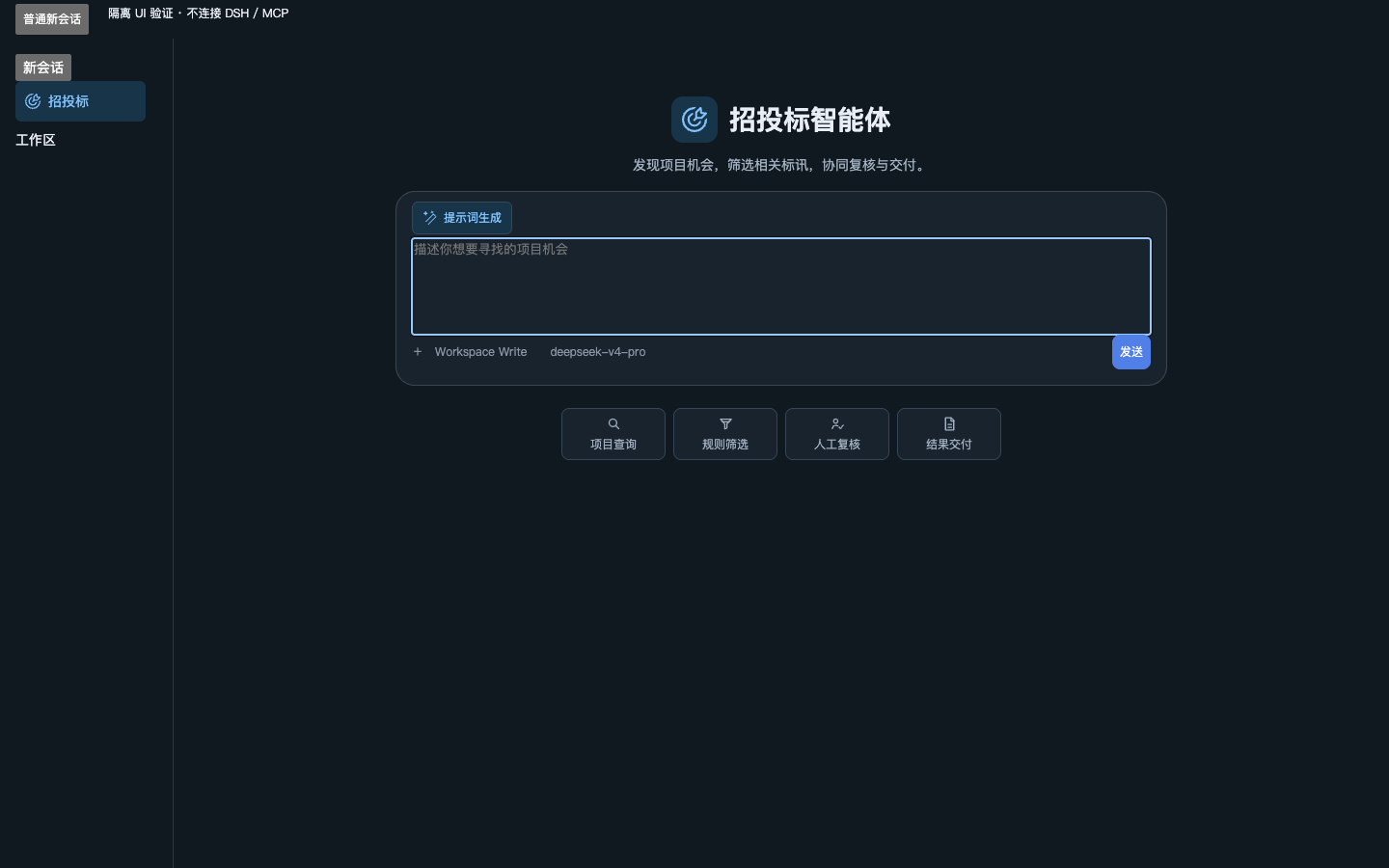
These screenshots show the actual 0.5.2 React components in an isolated host fixture, visibly labeled as isolated UI validation without DSH/MCP connections. They contain no customer information or real business responses. They do not demonstrate live DSH/QCC operation or marketplace one-click installation.
See submission status and isolated install/uninstall evidence. An open PR is not a completed marketplace listing.
Navigation only changes the visible workbench phase. It does not mutate business state or run a later action. Criteria are proposed, edited, previewed, and confirmed as distinct steps. Agent recommendations never become user decisions automatically. Report generation always shows the reviewed and pending scope before creating a delivery snapshot.
The layout is container-responsive: wide workspaces use master/detail grids, while medium and narrow workspaces preserve the same information order with local table scrolling and reachable fixed actions.
Development
Use the Node.js and pnpm versions declared by the repository:
corepack pnpm@11.7.0 install --frozen-lockfile
corepack pnpm@11.7.0 run check
The build emits the Host loader at lib/index.js, the Client bundle at lib/client.js, and declarations under lib/types/.
check runs type checking, the full Vitest suite, the production build, README/release-state validation, and an npm tarball whitelist preview. Release tags are published by the release workflow through npm Trusted Publishing with provenance when Trusted Publishing is configured; manual npm publication must not claim provenance. The repository must never contain npm tokens, GitHub tokens, QCC credentials, source datasets, or Session-private Artifacts.
The province, city, and district source snapshot is maintained in resources/area.ts.
See CHANGELOG.md and the 0.5.2 release checklist for the stable-release scope and operational checks.
Current scope
The plugin does not provide online PDF preview, delivery-version comparison, regeneration of already successful files, subscriptions, CRM follow-up, enterprise profiles, source-accuracy verification, or Bid/No-Bid decisions. Query, classification, analysis, and review are all valid stopping points; later actions only run after explicit user input.
Links
More in this category
loopx-project/loopx#dsh-loopx-plugin★ 6398
LoopX, a provider-neutral, local-first state kernel and control plane for long-horizon agents: keeps Goal, Todo, gate, evidence, quota, recovery, and handoff state above DeepSeek Harness, while the plugin bootstraps the CLI and skills, admits bounded same-session continuation, and adds a loopback GoalBar for the exact bound loop.
Q00/ouroboros#integrations/dsh-plugin★ 6260
Config-only bundle that mounts Ouroboros through the DSH MCP client, exposing 36 interview, Seed, execution, evaluation, and evolution workflow tools in DSH.
chuspeeism/dashi-taskboard#deepseek-harness★ 3388
Embeds the active installed Codex Taskboard runtime in the DeepSeek Harness sidebar, using its launcher runtime descriptor instead of a fixed port.
NanmiCoder/dsh-agent-teams★ 2368
AgentTeams multi-agent teams.
EthanYoQ/AI-Novel-Writer#dsh-ai-novel-writer★ 1753
Installs a dedicated AI novel-writing preset and workbench: revisioned local project assets, a compact side drawer, and native approval-gated single-file changes.
Miaotofu01/Study-Mate★ 1144
Your AI learning companion: helping you plan your studies, understand concepts, and build projects to master a subject.
Community comments
Comments are public GitHub Discussions. Loading them connects to GitHub and Giscus; a GitHub account is required to post.