MCP Connector for DeepSeek Harness: an MCP manager with one panel to connect servers, configure authorization, search tools across connections, and troubleshoot failures. Browse a continuously updated catalog of over one hundred connectors; filter by connection/server/status, inspect readable parameters and the last successful cache time, and rediscover tools. Supports OAuth 2.0 PKCE, API keys, stdio/HTTP, and mcpServers JSON import. Maintained by Qichacha/QCC.
Install
# from npm (prebuilt)
dsh plugin --profile web add dsh-mcp-connector
# from GitHub (first run asks for allowBuilds approval — follow the hint, retry)
dsh plugin --profile web add github:duhu2000/dsh-mcp-connector
Any plugin you install runs third-party code with your own permissions — it can read your files, use your credentials, and reach the network, and tool approvals don’t sandbox it. GitHub-sourced plugins also run build scripts at install time — pnpm blocks those until you allow them, so an install can stop with ERR_PNPM_GIT_DEP_PREPARE_NOT_ALLOWED or ERR_PNPM_IGNORED_BUILDS; dsh prints the exact key to add under allowBuilds in your profile’s pnpm-workspace.yaml, and the install works on the next run. Allowing a build is a trust decision: only install sources you trust, and pin a commit (github:owner/repo#sha).
README
MCP Connector for DeepSeek Harness: one panel to connect MCP servers, manage authorization, search tools across connections, and troubleshoot failures; browse 100+ connectors in a continuously updated catalog.
Connect MCP servers from a continuously updated catalog. Search tools across enabled connections in the current scope, inspect readable parameters, source metadata, and the last successful cache time, then check a connection or rediscover its tools when discovery fails. Supports OAuth 2.0 PKCE, API keys, Streamable HTTP/stdio, and mcpServers JSON import.
OAuth availability depends on each provider's client-registration policy and account permissions. Verify a saved connection, discovered/registered tools, and a successful business call as separate outcomes.
Here, “skill extension” means extending an agent through MCP tools and prompts; this package does not present itself as a standalone DSH Skill.
Tool discovery and troubleshooting
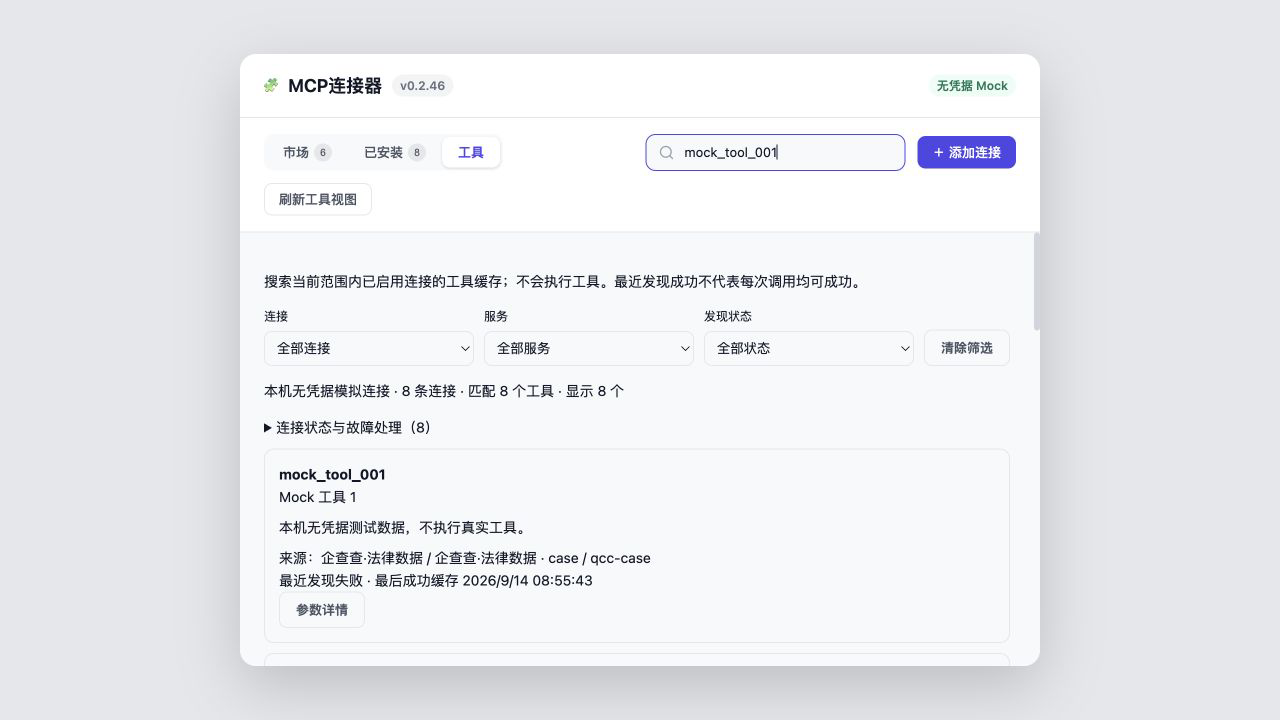
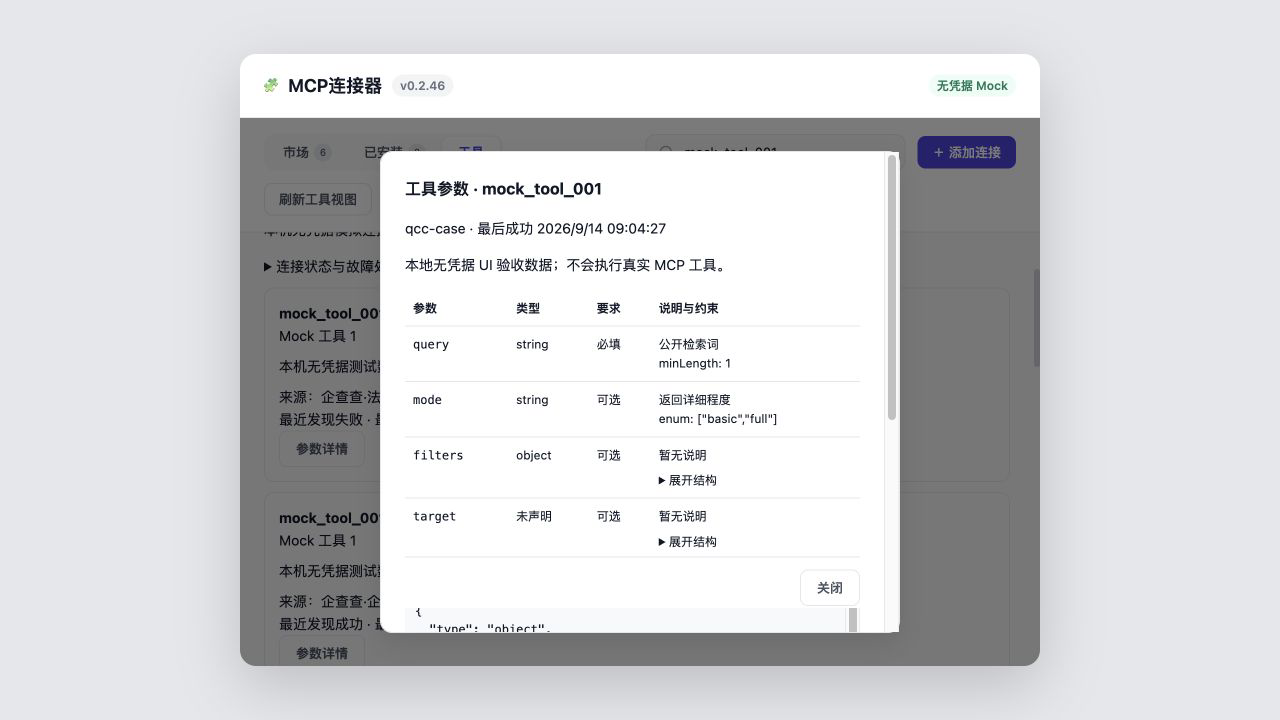
Search cached tools across enabled connections visible to the current workspace in the Tools tab. Filter by connection, service and latest discovery status, then open parameter details for types, required fields and nested structures. Without a selected workspace, only global connections appear.
Results identify their source and last successful cache time. A cached tool is not a guarantee that the service is currently callable. Expand connection diagnostics to check the connection or rediscover tools. Healthy discovery becomes due after five minutes; while the page remains connected, background scheduling checks due tasks. Failures back off, and authentication failures pause automatic retries.
Tool browsing does not execute target tools. Parameter summaries may omit complex rules; the original-schema view contains the sanitized, size-limited cached schema, not an untouched server response. See the Chinese tool-workspace guide.
Chinese user guide · Connector onboarding · First contribution · Contributing · Issues

Start in 30 seconds
dsh plugin --profile web add dsh-mcp-connector
Fully restart DeepSeek Harness Desktop or dsh web after installation or upgrade, then open MCP Connector in the primary sidebar, or open it directly from Settings → Plugins → Plugin Configuration → MCP Connector.
For a first successful use, confirm the connection and scope in Installed, find the expected tool and source in Tools, then complete one provider-permitted read-only call through the normal DSH Host approval flow. Cached visibility alone does not prove that a service is currently callable.
First-success guide (Chinese): install → connect → find a tool → make the first read-only call. Task details: three acceptance-ready scenarios · migrate mcpServers JSON · diagnose OAuth · find and recover tools · trusted status copy.
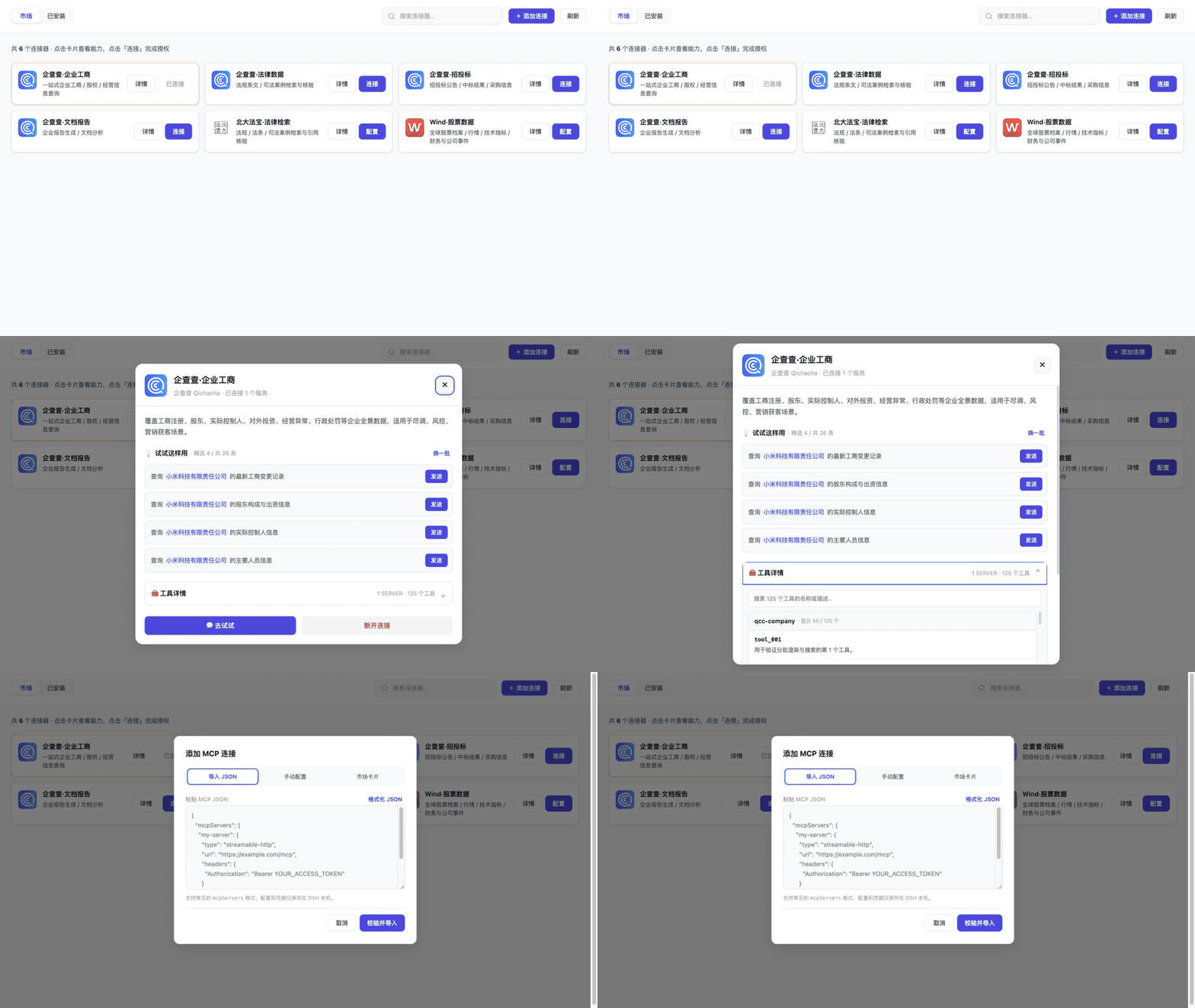
If the plugin helps you connect an MCP server faster, consider starring the repository, submitting a connector, or contributing a fix.
What MCP Connector provides
| Capability | What it gives you |
|---|---|
| Continuously updated catalog | Browse featured connectors and nine business categories; refresh after a Registry update to fetch new cards |
| Multiple connection paths | Connect with OAuth 2.0 PKCE, API keys, Streamable HTTP/stdio, or mcpServers JSON |
| Cross-connection tool search | Search the last-success cache of enabled connections in the current scope, then filter by connection, service, or state |
| Readable parameters and sources | Inspect types, required fields, enums, nested summaries, sources, cache time, and a sanitized schema |
| Connection troubleshooting | Use observed stages and stable error codes to check a connection or rediscover tools while retaining an available last-success cache |
| Scope and governance | Manage project/global visibility plus Connection, Server, and Tool rules |
| Per-session tool injection | Keep a connection online while hiding its schemas by default, then activate exact tools only for the current Agent |
| Safer lifecycle management | Keep credentials local, refresh grants, export redacted backups, restore snapshots, and preserve the previous connection on failure |
| Plugin updates | Detect newer versions and, when the host exposes a compatible Update Provider, show progress, failures, and rollback results |
Features
- A primary sidebar entry below New Conversation and above workspaces/conversations, with a public footer-slot fallback for incompatible DSH DOM versions.
- A profile-wide sidebar visibility preference; even when the shortcut is hidden, the existing connector dialog remains available from Settings → Plugins → Plugin Configuration → MCP Connector.
- Searchable Marketplace and Installed views; the default Marketplace groups cards into Featured plus nine business-category sections, previews four cards per section, keeps the category bar visible while scrolling, and shows every card when a single category is selected.
- OAuth 2.0 Authorization Code with PKCE, including DCR public clients and
client_secret_post/client_secret_basic; API key/Bearer/unauthenticated HTTP configuration, stdio local-process configuration, andmcpServersJSON import. - Installation from a credential-free connector descriptor URL.
- Credential and MCP initialize validation before HTTP API-key connectors are saved as installed, plus declarative multi-field credential-to-env bindings for marketplace stdio connectors.
- Dynamic tool discovery grouped by MCP server, including descriptions, search, parameter details, batched rendering, and an independent scroll region. When live discovery fails, the UI shows the last successful tool cache with observation-time and stale markers.
- Same-origin SSE updates the UI after connection, catalog, health, tool, governance, or scope changes. Event payloads contain no connection identifiers, endpoints, errors, or credentials.
- Progressive
mcp_connector_tool_searchandmcp_connector_tool_detailtools search last-success metadata and reveal a bounded, sanitized input schema on demand without executing the target MCP tool. - Curated prompt templates that can open a DSH conversation and prefill its draft; missing variables are requested before the prompt is sent.
- Persistent connection lifecycle management: restore on restart, enable/disable, disconnect, retry transient OAuth refresh failures with bounded backoff, and revoke authorization. Cards declaring issuer-level sharing reuse one grant; a cross-process lock and per-grant atomic journal prevent Desktop and Web hosts from consuming or overwriting the same rotating refresh token.
- In-place configuration editing for custom and JSON-imported connections: edit normalized JSON from Installed and reconnect without deleting the connection. Existing sensitive values use local keep markers, and validation, startup, or persistence failures leave the previous connection usable.
- Portable redacted configuration export plus up to 20 local pre-change snapshots, with preview and atomic restore. Credentials, local paths, and OAuth grants never enter the export.
- Project/global connection scopes: choose the current DSH Workspace or profile-global visibility when connecting, preview affected servers/tools, then copy, move, or roll back by revision. Credentials remain single-copy and project-only tools are enforced by the DSH Host.
- Three-layer Connection, Server, and Tool governance with Tool > Server > Connection > default-allow precedence, preview, revision-checked commits, and rollback. DSH Host restrictions narrow schemas/lookups/dispatch while a final execution guard prevents UI-only enforcement.
- Per-session tool injection: choose Always inject or Enable per session for an installed connection. Session mode keeps the server online but hides its business-tool schemas until exact public tool names are previewed and explicitly confirmed for the current Agent, for at most 30 minutes. Session state is memory-only and cannot override scope, governance, or Host approval.
- Explainable diagnostics report only observed evidence. Unchecked or Host-unobservable connections remain
unknown, with a failure stage, stable code, suggested action, check time, and process-local last-success time. - Built-in, remote, and local catalogs with
publishedandfeaturedcontrols. - A standalone remote Registry, allowing new marketplace cards to appear after refresh without publishing a new npm version.
- Plugin version and one-click updates: version discovery is independent of the installation source, while an Update Provider adapter layer negotiates safe mutation capabilities. DSH Market API v1 is the first adapter and supports progress, normalized failures, rollback, and capability-gated restart/refresh actions. Without a compatible provider the UI offers update instructions; if Desktop has no plugin-market section, it opens the npm package page instead of leaving the user on generic Settings.
- Explicit, non-destructive migration from the two earlier Qichacha OAuth plugins, plus active-plugin conflict detection that blocks duplicate server management and credential overwrites.
As of 2026-10-06, the public Registry publishes 109 connector descriptors. After merging and deduplicating them with the 4 bundled Qichacha cards, the Marketplace exposes 113 cards across 9 business categories. Recommendations remain limited to the four Qichacha cards, PKULaw, and Wind, for 6 featured cards in total. The Registry evolves independently; the badge shown after a client refresh and the live badges above are the authoritative current counts.
Interface and demo
| Marketplace overview | Connector details and curated prompts |
|---|---|
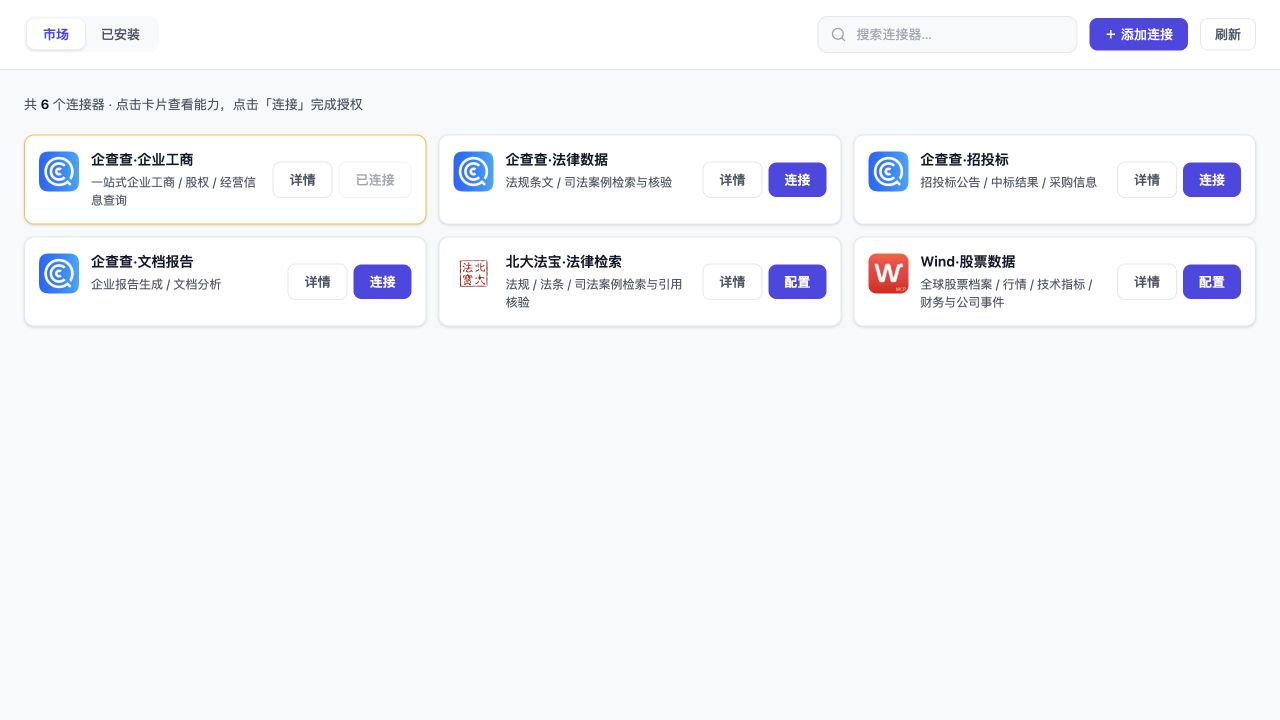 |
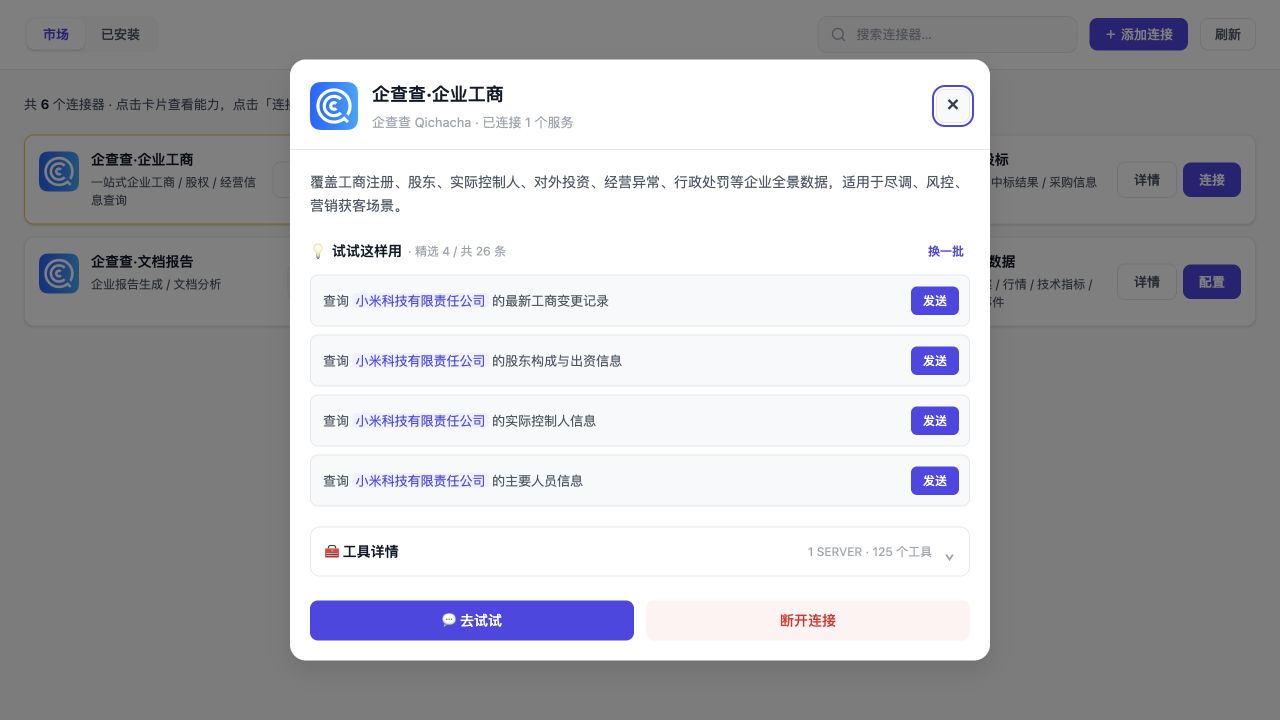 |
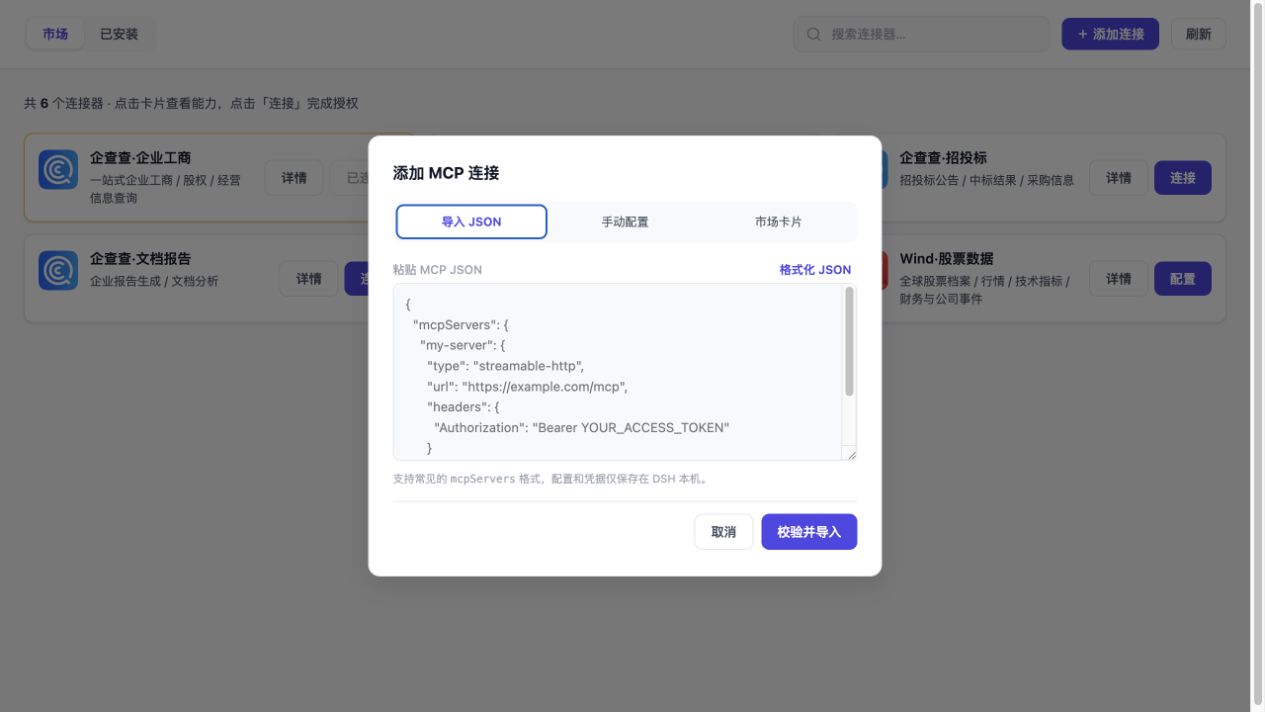
| Tool discovery, descriptions, and scrolling | JSON import |
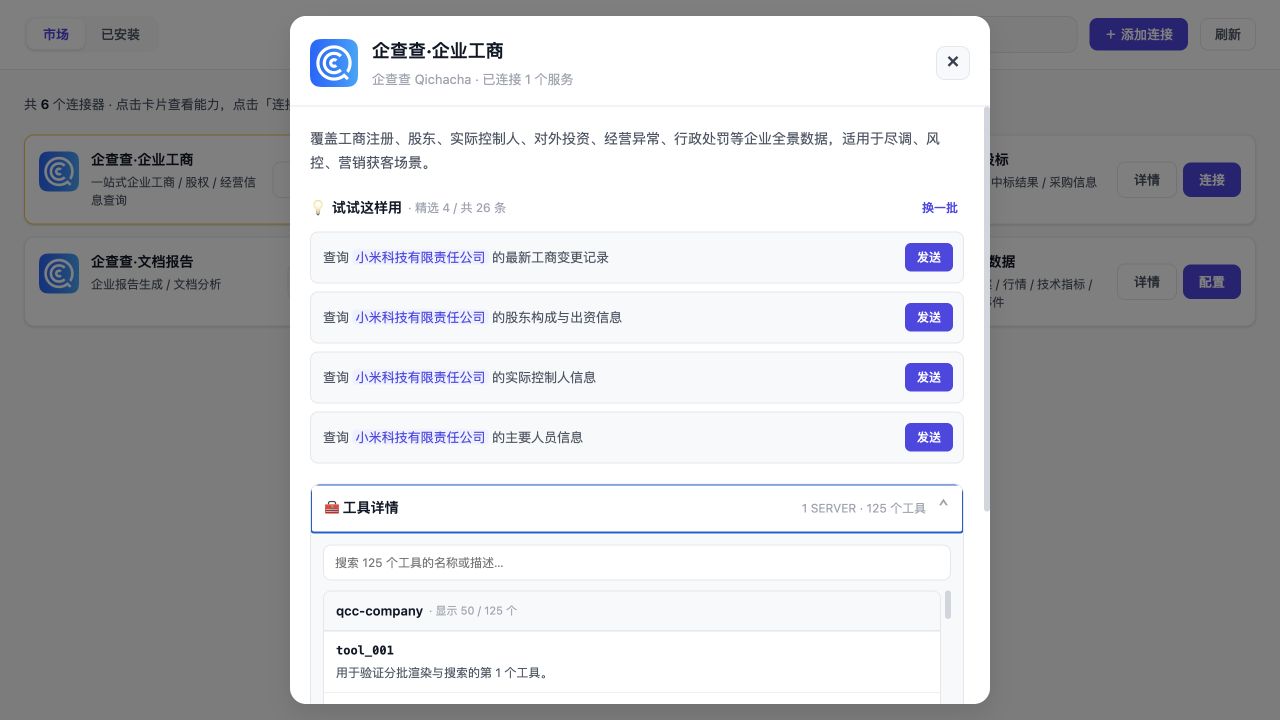 |
 |
| Unified tool search and sources | Parameter details and safe schema |
 |
 |
| Connection diagnostics and last-success cache | |
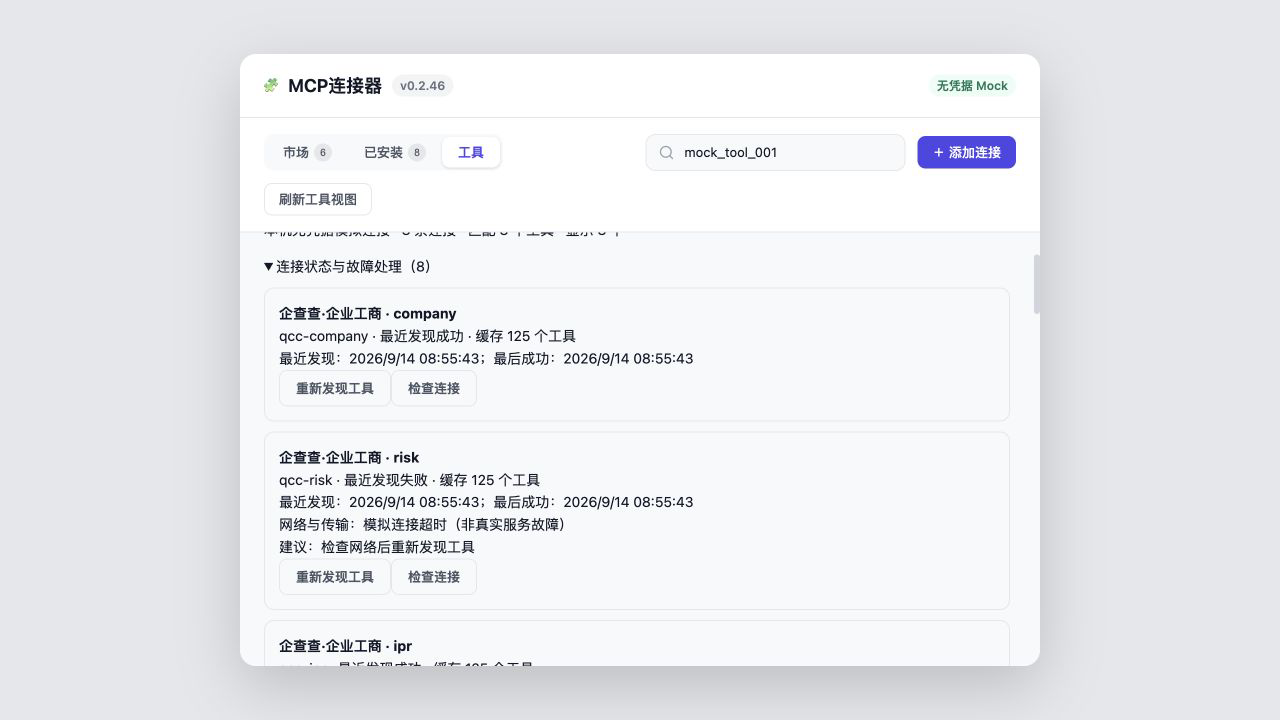 |
Assets 01–04 preserve the historical v0.2.37 marketplace snapshot. Assets 05–07 and the 43-second walkthrough come from the current v0.2.46 credential-free UI harness. The harness mirrors the real 800px product panel, producing two cards per desktop row. It shows only public marketplace metadata, example prompts, and explicitly marked mock tool descriptions—never credentials, local paths, or query results. See docs/screenshots/README.md for provenance.
Installation
Requirements: DeepSeek Harness Desktop or web profile, and Node.js 20 or later.
dsh plugin --profile web add dsh-mcp-connector
Or use the installer:
bash <(curl -fsSL https://raw.githubusercontent.com/duhu2000/dsh-mcp-connector/main/install.sh)
Run the same command again to upgrade. Fully quit and restart DeepSeek Harness Desktop after installation or upgrade. For dsh web, stop the original process before starting it again; EADDRINUSE 127.0.0.1:3080 means another instance is already listening.
Usage
- Select MCP Connector in the primary sidebar, or choose Open MCP Connector from Settings → Plugins → Plugin Configuration → MCP Connector.
- Choose a connector, confirm Current project or All projects (global), and complete authorization or configuration.
- Open its details to inspect tools or send an example prompt to a new conversation draft.
- Use Installed or the conversation tools to enable, disable, inspect, or disconnect a connection.
- After connecting, open Tools to search by tool name or description and filter by connection or service. Provider authorization, fees, and actual execution remain under the provider and DSH Host.
Connected tools are exposed to the model with the mcp__<serverName>__* prefix.
The detailed Chinese user guide covers category browsing, authentication and connection states, HTTP/stdio configuration, JSON import, explainable diagnostics, compatibility, responsibility boundaries, and troubleshooting.
Guides and ecosystem
- User guide: installation, authorization, diagnostics, compatibility, and troubleshooting
- First-success guide: install, connect, find a tool, and make a read-only call (Chinese)
- Task guides: JSON migration, OAuth diagnostics, and cross-connection tool recovery
- Connection scopes: project/global inheritance, copy, move, and rollback
- Connection, Server, and Tool governance
- Per-session tool activation, TTL, and Host safety boundary
- Tool trial: official API evidence and safety design
- Plugin updates: version discovery, providers, and rollback
- Marketplace registration: local cards, the public Registry, and OAuth requirements
- Third-party connector onboarding
- First contribution: from a good first issue to your first PR
- Development, forks, and contributions
- Growth baseline and monthly review template
Connector catalog
The package contains a bundled fallback catalog. By default, it refreshes the public dsh-mcp-connector-registry through jsDelivr, then tries GitHub raw if the primary source fails; cached or bundled data remains available if neither remote source can be reached. jsDelivr branch URLs can lag behind a newly merged registry commit, so new cards may not appear immediately.
The public connector registration process and descriptor requirements are documented in docs/MARKET-REGISTRATION.md. The stdio architecture, passthrough boundary, and security constraints are documented in docs/STDIO-SUPPORT.md.
Configuration
The default bundle configuration is in cordis.patch.yml:
- id: mcp-connector
  name: dsh-mcp-connector
  config:
    catalogUrl: 'https://cdn.jsdelivr.net/gh/duhu2000/dsh-mcp-connector-registry@main/catalog.json'
    persistSecrets: true
    entryPrefix: mcp
    refreshSkewMs: 300000
    openBrowser: true
    showSidebarEntry: true
Set catalogUrl to an empty string for an explicitly offline/private setup. A custom non-default URL is used as-is and does not fall back to the public registry.
showSidebarEntry defaults to true. Users can override it from the DSH plugin configuration page; turning it off hides only the shortcut and does not disable the connector, connected MCP servers, or tools.
Compatibility and responsibility boundary
| Area | Current boundary |
|---|---|
| Host and runtime | DSH Desktop / web profile; Node.js 20+ |
| MCP client | Official @deepseek-ai/dsh-mcp-client ^0.1.1-rc.2 |
| Transports | Streamable HTTP and stdio; legacy sse normalizes to Streamable HTTP |
| Configuration scope | Workspace project / profile global, with Host enforcement, impact preview, copy/move, and revision rollback |
| Configuration exchange | JSON import, redacted export, up to 20 local snapshots, preview, and atomic restore |
| Governance and execution | Connection / Server / Tool allow/deny with preview, revision commits, and rollback; no tool trial yet |
| Session injection | Existing connections default to always; an explicit session mode uses per-Agent Host restriction + guard with a memory-only TTL of at most 30 minutes |
The plugin owns the catalog, authorization, connection records, governance rules, official-client provisioning, read-only health checks, tool discovery, and diagnostics. DSH Host and the official MCP client own transport, stdio subprocesses, tool registration, real tool execution, and permission/approval flows. Governance uses the Host's official restriction/guard boundary; the plugin never invokes MCP tools from the browser. See the user guide for status semantics, limitations, and troubleshooting.
Development and release checks
npm run check
npm run marketing:check:live
npm run registry:build
npm run registry:validate
npm run market:check
npm run dev:ui
marketing/metadata.json is the source of truth for the npm description/keywords, GitHub About/Topics, bilingual first-screen CTAs, and external listing copy. npm run check blocks repository drift offline; npm run marketing:check:live also compares the public GitHub and npm metadata for metadata changes and monthly reviews. npm run market:check tracks the external DSH marketplace PR and live directory. Tags matching v* trigger GitHub Actions; the tag must match package.json. npm releases use Trusted Publishing through GitHub OIDC and do not require a long-lived NPM_TOKEN.
Every Registry merge regenerates catalog-stats.json; an hourly workflow in this repository synchronizes the Chinese and English product copy plus a local stats snapshot. The static npm README updates with package releases, while the live badges above read the Registry directly and therefore stay current without another npm release.
The current public version is dsh-mcp-connector@0.2.68, with GitHub Release v0.2.68.
See CHANGELOG.md for version history and docs/DESKTOP-E2E.md for the Desktop release checklist.
Security and limitations
- Credentials stay inside the local DSH storage boundary: connection records use the storage domain, while rotating OAuth credentials are also saved in
$DSH_HOME/storages/mcp_connector_grants_v1so stale host snapshots cannot overwrite them. The directory is mode 0700 and records are mode 0600; credentials are never written to the catalog, Git repository, page, logs, or conversation history. - Failed API key/token validation is not persisted; authentication, timeout, DNS, and TLS/network errors are reported separately.
- Unchecked or Host-unobservable connections are reported as
unknown, never as healthy. Health history and last-success timestamps are currently process-local. - External URLs use HTTPS by default, and HTTP is allowed for loopback development. A user-created connection may explicitly opt in to plaintext HTTP for literal RFC1918 IPv4 or RFC4193 IPv6 ULA addresses; hostnames, public HTTP, link-local addresses, and cloud metadata addresses remain blocked.
- Remote descriptors and catalogs are limited to 2 MiB, Web API requests to 1 MiB, and imported JSON is scanned for credential fields before normalization.
- Streamable HTTP and stdio are supported end to end. Legacy
sseentries are normalized to Streamable HTTP. Restored stdio connections run their original command through a transparent startup guard; persisted records, environment and working directory remain unchanged. Tool registration and execution still belong to@deepseek-ai/dsh-mcp-client. - On restoration,
server/discover,initializeand initialtools/listrequests (including pagination) userequestTimeoutMs, capped at 15 seconds per request. A timeout closes that connection and its child processes rather than blocking Host startup. Connections stay enabled; requests after initial discovery keep the Host deadline. - Official CLIs that are not MCP servers can be exposed through a separate controlled CLI Provider. Only code-reviewed commands and arguments are available; the initial DingTalk
dwsprovider is read-only. - stdio starts a local process. Import or connect only trusted commands and packages. Catalog descriptors may declare
credentialFieldsandcredentialBindings, but may never contain actual token/secret values; user input is injected only into the local Host process environment. - OAuth DCR client secrets share the same local-only boundary as access and refresh tokens and are omitted from catalog/status responses and logs.
- OAuth failures identify resource discovery, server discovery, client registration, browser callback, or token exchange. A DCR HTTP 403 is reported as provider-side client admission rejection rather than a missing user authorization.
- Redacted exports replace tokens, API keys, static header/env values, stdio arguments, local directories, and URLs containing query/user information with explicit placeholders. OAuth entries contain only a reconnect reference; full snapshots remain inside the current profile's storage domain.
- The primary sidebar placement uses the stable DSH
data-slotmarker and falls back to the footer if that marker is removed. - Project/global scopes apply only inside the current DSH profile and do not synchronize across profiles. If a Workspace is deleted, its project-only bindings remain fail-closed until moved to another project or global.
- Tool trials are not implemented. Governance and scopes are enforced in the DSH Host execution path. The tool-trial design records the official API evidence, but remains blocked until DSH exposes safe out-of-turn approval orchestration and the MCP bridge preserves side-effect metadata. A local snapshot cannot recreate a server-side OAuth grant after revocation.
License
MIT
Links
More in this category
Tencent/WeKnora#dsh-weknora★ 32318
Four read-only tools over a WeKnora knowledge base: list knowledge bases, hybrid passage search, reassemble one document's chunks in order, and WeKnora's own cited RAG or ReAct-agent answer with a resumable session id.
superdesigndev/treg★ 4452
Tool catalog for agents: search ~2,600 external endpoints (SEO and SERP, backlinks, social, people and company enrichment, ad libraries, scraping) by the task you want done, read each one's parameters and per-call price, then call it with the credential injected server-side. Ships the skill plus an MCP row that stays disabled until TREG_TOKEN is set.
TencentCloudBase/CloudBase-AI-Toolkit#dsh-plugin★ 1132
Tencent CloudBase backend for DeepSeek Harness — scaffold and deploy full-stack apps from chat, render query results as table cards with paging, sorting and CSV export, preview a deployment on its domain, and call the CloudBase MCP toolset (`mcp__cloudbase__*`) with device-code login.
gitroomhq/postiz-agent#dsh-postiz★ 504
Connects DeepSeek Harness to Postiz over MCP: list connected social media channels, fetch per-platform posting rules, and schedule, draft, or publish posts to X, LinkedIn, Instagram, Facebook, Threads, TikTok, YouTube, Reddit, Bluesky, Mastodon, Discord, Slack, Telegram and more; adds a postiz workflow skill.
EthanYoQ/Invoice-Downloader#dsh-invoice-downloader★ 496
Local IMAP invoice download, OCR, archive, and Excel reimbursement summaries for DeepSeek Harness.
anysearch-team/anysearch-dsh★ 447
AnySearch-powered real-time web and vertical search provider for DeepSeek Harness.
Community comments
Comments are public GitHub Discussions. Loading them connects to GitHub and Giscus; a GitHub account is required to post.