Registers the Loomy desktop app's locally signed-in chat models as a `loomy` provider in DSH. Several accounts can be signed in at once and switched from a drawer on the composer badge, with each account's points shown per row, optional per-call rotation between healthy accounts, a settings section with per-model toggles and an upstream diagnostics table, and a status/doctor CLI. Shares the `loomy` provider id with 2239058652/dsh-loomy-connect, so the two cannot be installed together; this one differs by the account drawer, the per-account points breakdown and the CLI.
Install
# from a prebuilt release tarball
dsh plugin --profile web add "https://github.com/diudiu62/dsh-connect-loomy/releases/latest/download/dsh-connect-loomy.tgz"
# from GitHub (first run asks for allowBuilds approval — follow the hint, retry)
dsh plugin --profile web add github:diudiu62/dsh-connect-loomy
Any plugin you install runs third-party code with your own permissions — it can read your files, use your credentials, and reach the network, and tool approvals don’t sandbox it. GitHub-sourced plugins also run build scripts at install time — pnpm blocks those until you allow them, so an install can stop with ERR_PNPM_GIT_DEP_PREPARE_NOT_ALLOWED or ERR_PNPM_IGNORED_BUILDS; dsh prints the exact key to add under allowBuilds in your profile’s pnpm-workspace.yaml, and the install works on the next run. Allowing a build is a trust decision: only install sources you trust, and pin a commit (github:owner/repo#sha).
README
Brings the chat models you are already signed in to in Loomy (iFlytek's office assistant) into DSH's model picker — install it, pick Loomy, and talk to it like any other model. It also shows how many points you have left.
It only reads the sign-in that the Loomy desktop app already stored on this machine. The plugin provides no accounts, shares no credentials and bypasses no billing: every call spends points from your own account.
Screenshots
| Accounts | Account drawer in the composer | Credits |
|---|---|---|
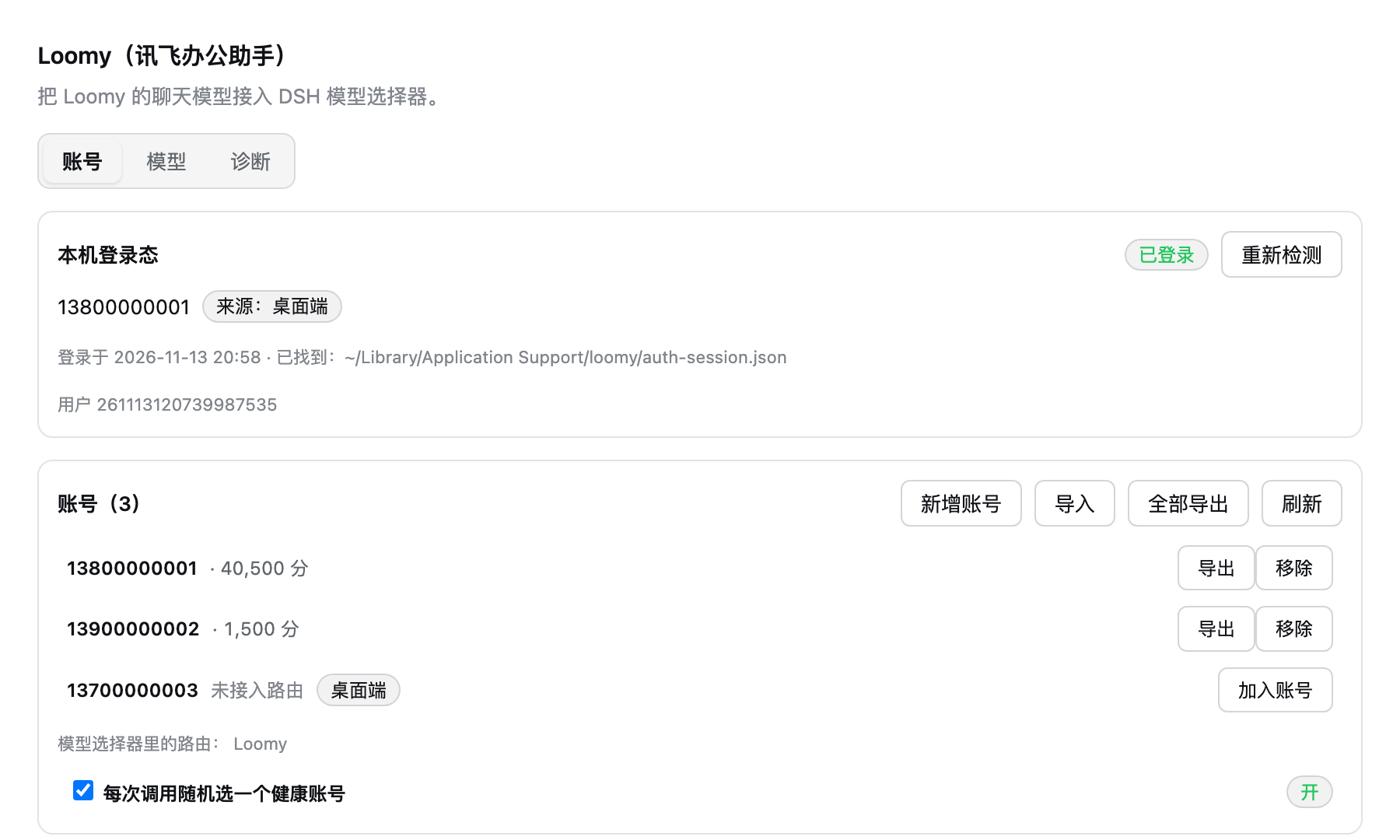 |
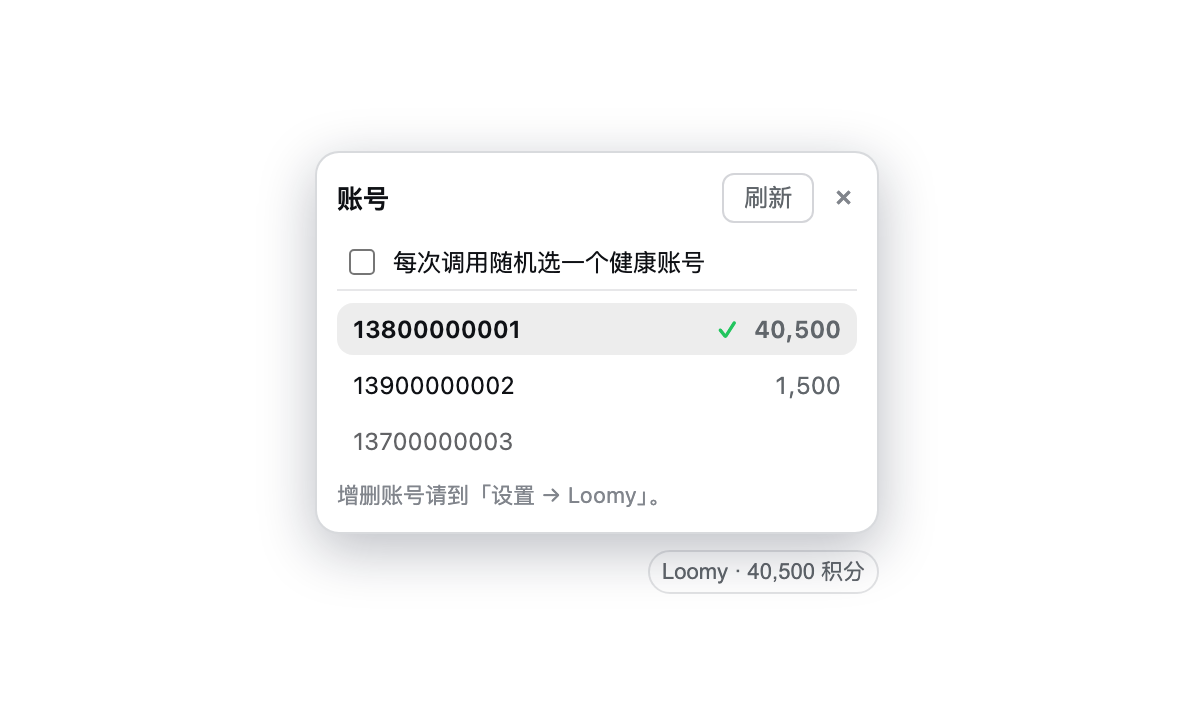 |
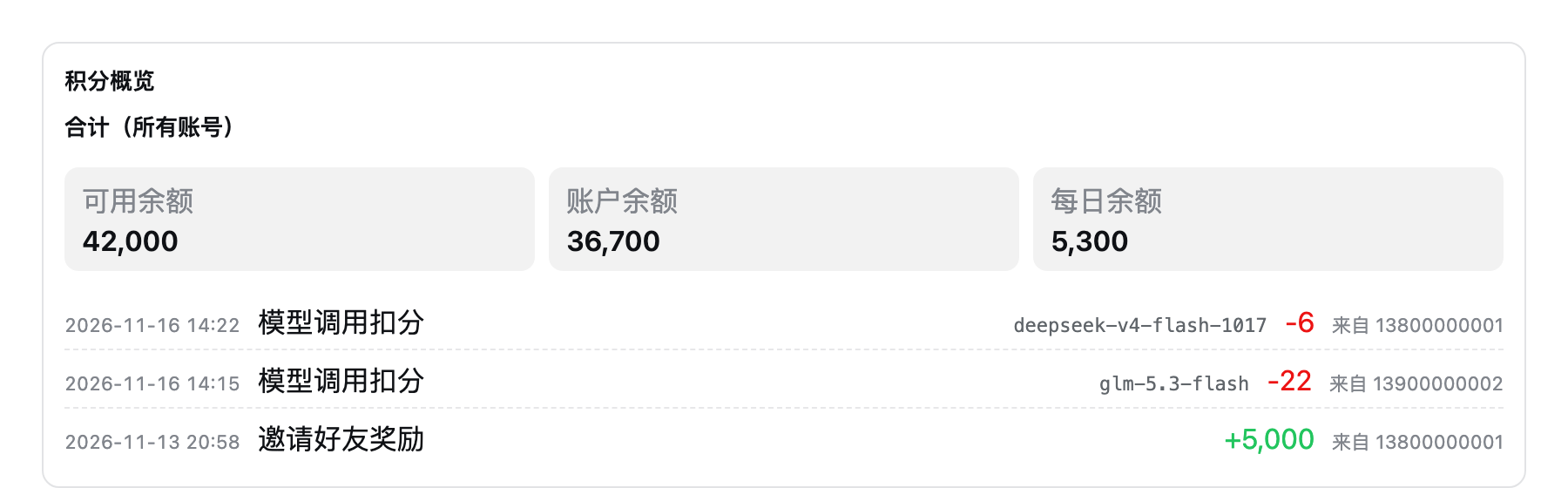 |
Before you start, check two things
- The Loomy desktop app is installed and you have signed in once (the plugin reads the sign-in it saved; the app does not need to keep running)
- DSH is installed (0.2.2-rc.1 or newer)
Install: three steps
Open a terminal and paste the commands one block at a time.
Step 1 — download and build
cd ~/Documents
git clone https://github.com/diudiu62/dsh-connect-loomy.git
cd dsh-connect-loomy
pnpm install
pnpm build
Step 2 — install into DSH
dsh plugin --profile web add link:$PWD
Use
link:, notfile:.file:copies the plugin into DSH, so later rebuilds never reach it.
Step 3 — restart DSH
Quit DSH and start it again. Afterwards:
- Settings → Loomy shows a card → installed
- the model picker shows a Loomy group → connected
Using it
1. Check you are signed in
Open Settings → Loomy. You should see Signed in and your phone number.
If not: sign in through the Loomy desktop app, then press Re-check here.
2. Pick a model and chat
In the model picker under the composer, choose Loomy and then a model.
3. Keep an eye on your points
Next to the model picker there is a small badge:
Loomy · 40,500 pts
That is how much the current account has left. Press it to see the details.
4. More than one account?
Add as many Loomy accounts as you like and switch between them:
- Settings → Loomy → New account (sign in with an SMS code) or Import (paste an export from another machine)
- Back in the composer, click the badge to open the account list
- Click an account to spend that one
The drawer also has a switch: pick a healthy account at random for each call.
- On: every call picks an account that still has points, and one that stops working is skipped automatically
- Off: always the account you selected
5. Moving an account to another machine
In the settings card press Export on an account's row, copy the text, and press Import on the other machine. No SMS code needed.
The export is the credential itself — treat it like a password. Do not share it or commit it.
Troubleshooting
No Loomy card in settings?
Restart DSH (not just the browser). If it still is not there, check step 2 with dsh plugin --profile web list dsh-connect-loomy.
No Loomy group in the model picker? You are not signed in yet. Sign in through Loomy, then press Re-check in the card.
"No usable Loomy app configuration"? The Loomy desktop app is not installed on this machine (or lives somewhere unusual). Install it, then press Re-check.
"Sign-in has expired"? Sign in through the Loomy desktop app again, then press Re-check.
The badge is missing? It only appears while the current conversation is on a Loomy model.
Switched account but the number did not change? Press Refresh in the drawer; otherwise the host answers from a 60-second cache.
Points show as unavailable? That account's sign-in expired. Sign in again — the other accounts are unaffected.
Learn more
- Technical details: plugin contract · measured upstream contract · verification report
- CLI:
node lib/bin.js status --json(account and balance),node lib/bin.js doctor --json(network and sign-in diagnostics) - Configuration: cache lifetimes and endpoints live in the DSH profile config
- Not supported yet: daily check-in (Loomy has no such endpoint), rotating across models, transferring points to others
Uninstall
dsh plugin --profile web remove dsh-connect-loomy
Then restart DSH.
License
MIT
Links
More in this category
Ebony-Vinyl/dsh-our-free-model★ 77208
Adds free model lanes to DeepSeek Harness — DeepSeek V4.1 Flash, Kimi K3 and others — with no login, sign-up or API key, plus a local OpenAI-compatible gateway, fallback routing and a usage dashboard.
dingminhua/dsh-connect-workbuddy★ 1681
Connects locally signed-in WorkBuddy models, CN and international alike, to DSH, reading each model's credit multiplier from the upstream catalog on every refresh, with per-model image input toggles, account switching backed by an auto-failing-over pool, manual daily check-in, and read-only credit overviews shown as compact pills on the card and in the composer.
Alice-Marx/dsh-model-router★ 966
Routes DeepSeek Harness work across configured model APIs and supported vendor CLIs with dependency-aware packages and cost previews.
V1ki/dsh-plugin-subscriptions★ 618
Use ChatGPT (Codex), Claude, and Grok subscriptions as DeepSeek Harness LLM providers, with Settings login, model catalogs, usage, plus image_generate, video_generate, and x_search tools.
XDTrees/dsh-workbuddy-xdpool★ 541
Merge every locally signed-in WorkBuddy account into DeepSeek Harness as one auto-failing-over model pool (multi-account rotation, live credits, and a model catalog showing per-model credit multipliers and free/night-discount tags).
XDTrees/dsh-xdpool★ 541
Merge every locally signed-in WorkBuddy account into DeepSeek Harness as one auto-failing-over model pool: multi-account rotation, 429 cooldowns, live credits, a model catalog with per-model credit multipliers and free/night-discount tags, QR-code login for 13 vendors, and aggregate free-tier channels. Accounts persist across restarts.
Community comments
Comments are public GitHub Discussions. Loading them connects to GitHub and Giscus; a GitHub account is required to post.