Right-click menu for file links in chat: open with registered apps, save as, copy path or content, reveal in Finder or Explorer.
Install
# from GitHub (first run asks for allowBuilds approval — follow the hint, retry)
dsh plugin --profile web add github:dengsixue-stack/dsh-file-context-menu
Any plugin you install runs third-party code with your own permissions — it can read your files, use your credentials, and reach the network, and tool approvals don’t sandbox it. GitHub-sourced plugins also run build scripts at install time — pnpm blocks those until you allow them, so an install can stop with ERR_PNPM_GIT_DEP_PREPARE_NOT_ALLOWED or ERR_PNPM_IGNORED_BUILDS; dsh prints the exact key to add under allowBuilds in your profile’s pnpm-workspace.yaml, and the install works on the next run. Allowing a build is a trust decision: only install sources you trust, and pin a commit (github:owner/repo#sha).
README
This plugin publishes its README in Chinese only.
DeepSeek Harness (DSH) 聊天区文件超链接右键上下文菜单增强插件。
在 DeepSeek Harness 对话区域中,右键点击本地文件超链接、文件引用标签(Chip)、代码块文件路径时,提供类似操作系统原生体验的快捷操作上下文菜单。
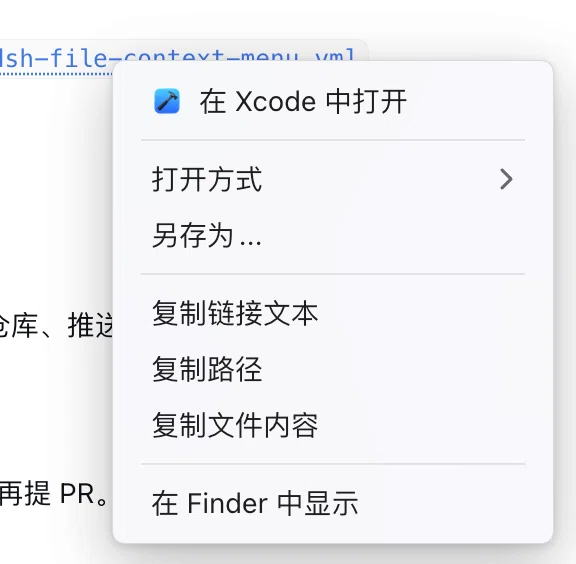
✨ 核心特性
- 🚀 智能上次使用应用:顶部第一行记忆上次用来打开该类型文件的应用,一键极速重开。
- 📂 系统级打开方式:
- Windows:自动解析系统注册表中的关联应用列表与
OpenWithList,使用 PowerShell 高性能批量提取对应高清应用图标。已修复 Electron 环境下外部应用(如 VS Code、Trae CN 等)继承ELECTRON_RUN_AS_NODE导致的唤起失效问题。 - macOS:通过 LaunchServices 提取与 Finder 完全一致的应用列表与图标。
- Windows:自动解析系统注册表中的关联应用列表与
- 🛡️ 丝滑子菜单防抖:采用原生级悬停缓冲区与 280ms 延时保护,斜向滑动平滑稳定,杜绝鼠标稍微划偏子菜单就意外消失的问题。
- 💾 另存为...:直接呼出系统原生保存对话框,将工作区文件保存至任意自定义目录。
- 📋 快速复制:一键复制文件名/链接文本、绝对文件路径、文件内容(支持 5MB 以内文本文件)。
- 🔍 在资源管理器/Finder 中显示:直接打开父目录并在资源管理器中精准高亮选中该文件。
- ⚡ 原生快捷穿透:按住
Shift键再右键,无缝直通操作系统或浏览器原生菜单,完全不破坏原生体验。
🖥️ 平台兼容性
| 平台 | 打开方式支持 | 图标提取 | 状态 |
|---|---|---|---|
| Windows | 注册表关联应用 (HKCU/HKLM) |
PowerShell 批量提取关联图标 | ✅ 已真机适配与环境净化 |
| macOS | LaunchServices 动态解析 | 系统原生图标映射 | ✅ 支持 |
提示:Windows 上的部分受限 UWP 沙盒应用(如系统自带简易照片)不会出现在传统打开方式列表中。
📦 安装与使用
方式 1:通过 npm 安装(推荐)
在终端中执行:
dsh plugin --profile desktop add @dengsixue/dsh-file-menu
方式 2:通过 Release / 本地打包安装
- 从 GitHub Releases 下载最新安装包,或本地打包:
pnpm pack - 在 DSH Desktop 的「插件」页面选择该
.tgz安装; 或者命令行安装:dsh plugin --profile desktop add .\dengsixue-dsh-file-menu-1.0.0.tgz
方式 3:本地开发目录链接安装(便于调试)
直接将本地源码目录作为插件加入:
dsh plugin --profile desktop add "C:\Users\Administrator\Documents\dsh-file-context-menu"
⚠️ 重要提示:安装、更新或修改前端 Client 注入代码后,必须完全退出并重新打开 DSH Desktop(重启主进程),仅在界面按
Ctrl + R刷新无法重新加载底层客户端扩展。
📄 许可证
本项目基于 MIT 许可证 开源。
Links
More in this category
zhu1090093659/dsh-web#packages/dsh-task-board★ 10247
Task board for the dsh web GUI: a sidebar multi-column kanban whose cards run in real DSH agent sessions and can also be scheduled with cron expressions, executed host-side even with the browser closed.
zhu1090093659/dsh-web#packages/dsh-web-all★ 10247
Plugin and skin collection for the DSH Web UI: task board, Git graph, right-side panel, remote mobile UI, pet, live token stats, and a skin center.
ccch1mneyyy/dsh-TUI★ 7252
Claude Code-style full-screen terminal UI: pixel-whale header, live status line, and streaming thought expansion.
MeteorNOX/DeepSeek-Balance-Whale-Widget★ 7046
A fixed-corner whale widget for the DSH web GUI — balance, today's usage and per-turn cost with peak/off-peak pricing, editable balance-alert and daily-budget bubbles, a module-based custom bubble queue with A/B weighted choices and random lines or images, 30+ vendor templates (OpenAI, OpenRouter, Kimi, SiliconFlow, Ark, Zhipu, MiniMax and more) with per-model balance and subscription quota, plus task-end sound, imported audio, custom roles and a resource manager. Local-only, no telemetry.
omdsh-dev/DSH-better-sidebar★ 5011
Full sidebar workbench with file rendering and editing, terminal, Git, and subagents; third-party plugins can register new tabs.
Devin-AXIS/deepseek-design#deepseek-idesign★ 1778
Visual design studio for websites, app prototypes, posters, cards, reports, and magazines, with templates, direct element editing, selection-aware AI draft handoff, and export.
Community comments
Comments are public GitHub Discussions. Loading them connects to GitHub and Giscus; a GitHub account is required to post.