Lets text-only models handle pasted chat images, with a native vision experience, batch image viewing, and a built-in OpenAI-compatible analyze_image tool; vision-capable models are unaffected.
Install
# from npm (prebuilt)
dsh plugin --profile web add dsh-image-pathify
# from GitHub (first run asks for allowBuilds approval — follow the hint, retry)
dsh plugin --profile web add github:dami9527/dsh-image-pathify
Any plugin you install runs third-party code with your own permissions — it can read your files, use your credentials, and reach the network, and tool approvals don’t sandbox it. GitHub-sourced plugins also run build scripts at install time — pnpm blocks those until you allow them, so an install can stop with ERR_PNPM_GIT_DEP_PREPARE_NOT_ALLOWED or ERR_PNPM_IGNORED_BUILDS; dsh prints the exact key to add under allowBuilds in your profile’s pnpm-workspace.yaml, and the install works on the next run. Allowing a build is a trust decision: only install sources you trust, and pin a commit (github:owner/repo#sha).
README
This plugin publishes its README in Chinese only.
0.2.0 需要 DeepSeek Harness >= 0.1.7-rc.1。dsh 0.1.5 及以下请继续使用
dsh-image-pathify@0.1.9。
让 deepseek-v4 这类「不能看图」的模型,也能处理你贴进聊天里的图片,并直接调用插件内置的识图工具。
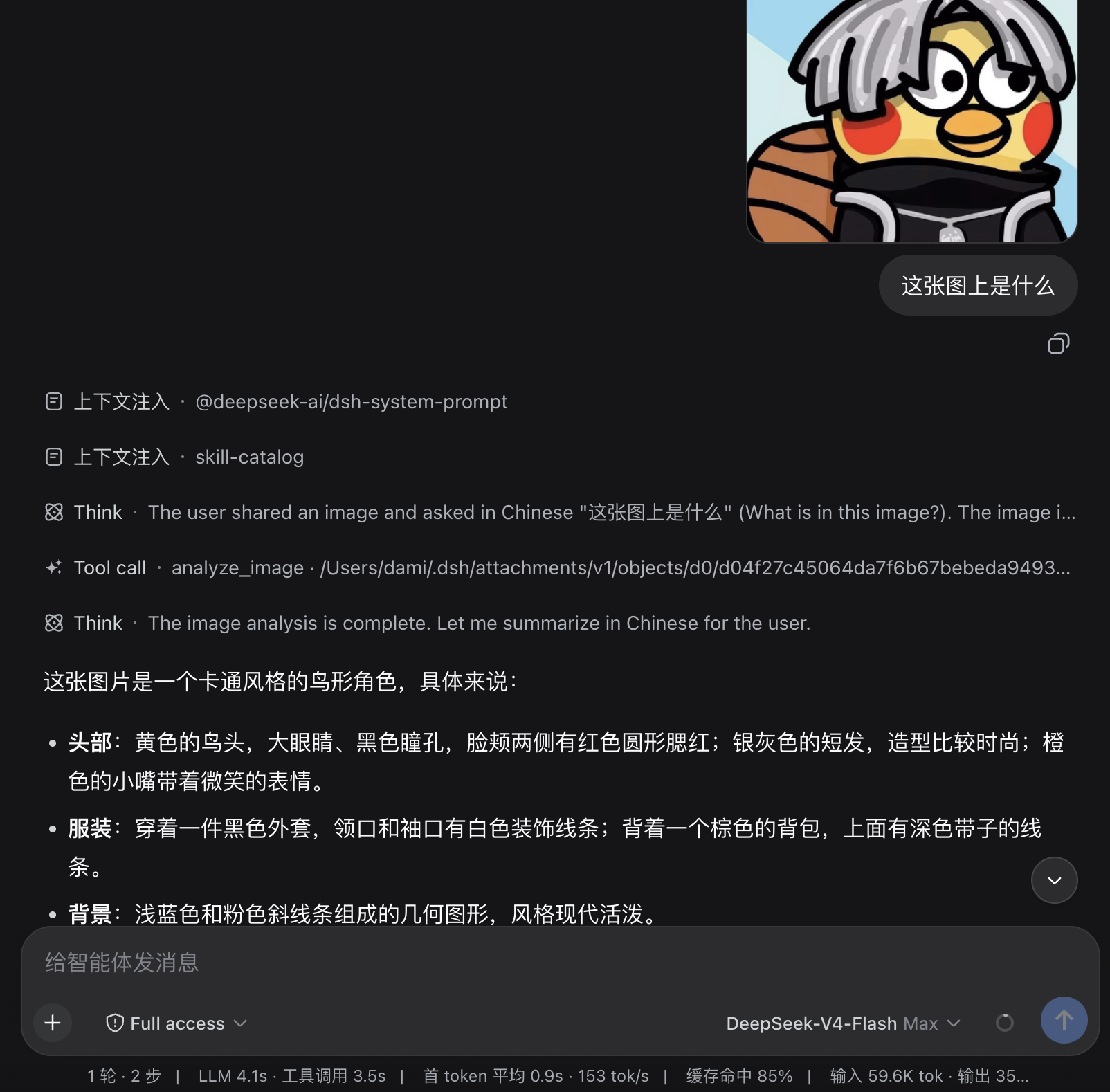
聊天记录和界面里的缩略图不会变。插件只在把消息发给模型前,把图片换成一行本地文件路径;模型再调用 analyze_image 读这个文件,通过你配置的视觉 API 得到文字描述。
你贴一张图  →  聊天里照常显示缩略图
           ↓
发给不能看图的模型前  →  变成:Saved attachments: /某路径/某文件
           ↓
模型调用 analyze_image  →  视觉 API 返回文字描述(多张图一次请求、同一次看见全部)
已经能看图的模型不受影响:图片会原样发给它们,analyze_image 不会出现在它们的工具列表和系统提示里。read_image 在不能看图的模型上会被拒绝,并提示改用 analyze_image。
磁盘上的图片文件是 dsh 自己保存的附件(~/.dsh/attachments/v1/...),不是本插件另存的一份。
安装
dsh plugin --profile web add dsh-image-pathify
dsh web
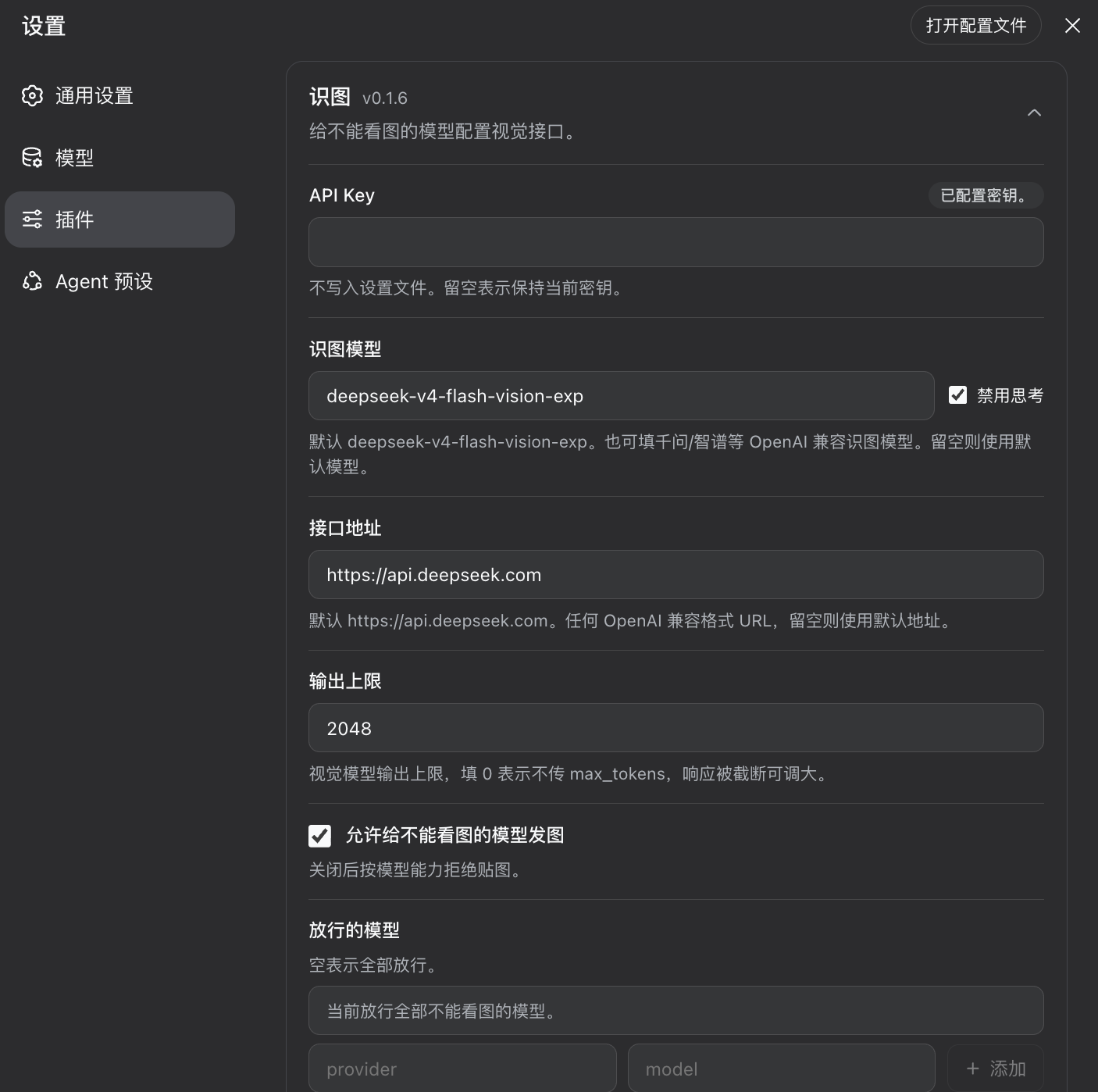
打开 插件 → 识图 进详情页可配置(插件旧版 0.1.x 在 设置 → 插件 → 识图),填写后点保存:
- API 密钥(写入
$DSH_HOME/.credentials.yaml,不进设置文件) - 识图模型(默认
deepseek-flash) - 识图 API 地址(默认
https://api.deepseek.com) - 禁用思考(默认勾选)。DeepSeek 识图模型(如
deepseek-flash)默认会思考,思考 token 计入输出上限;取消勾选才会走思考模式,开启思考时应增大输出上限
任何 OpenAI 兼容的视觉接口都可以,把地址(部分地址需要后面加/v1)和模型改成你的服务即可。设置页改动保存后立即生效,不用重启。
更新
已装版本落后于 npm 最新版时,识图卡片 header会显示「发现新版本 x → y」和 复制升级命令,点按钮把命令复制到剪贴板。命令里的 --profile 按当前进程解析,取不到兜底 web。
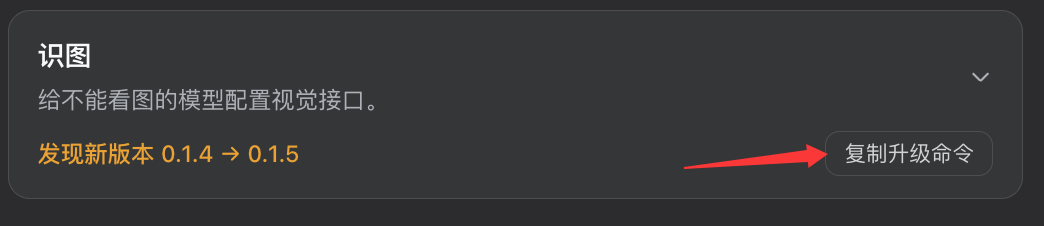
- 结束当前正在跑的dsh,例如:
dsh web(终端里Ctrl+C) - 执行复制出来的命令:
dsh plugin --profile web add dsh-image-pathify@version
再启动 dsh web
怎么确认可用
- 插件页里打开 识图,详情上方出现识图设置
- 给不能看图的模型发一张图:界面里缩略图还在;模型调用
analyze_image而不是read_image - 给不能看图的模型发本地图片路径或图片URL:应直接调用
analyze_image,不会先read_image - 给能看图的模型发一张图:模型直接回答,不调用
analyze_image - 给能看图的模型发本地图片路径或图片URL:应直接调用
read_image,不会先analyze_image
配置
插件页保存后立即生效。识图字段写在该插件的 Loader 配置里,也就是 $DSH_HOME/profiles/name/cordis.patch.yml(0.1.x 写在 settings.yaml 的 image-pathify 段,不会自动导入,需要在插件页重新填写);API 密钥仍写在 $DSH_HOME/.credentials.yaml。
| 选项 | 默认 | 做什么 |
|---|---|---|
apiKeyEnv |
IMAGE_PATHIFY_API_KEY |
凭据引用名。密钥本身写在 $DSH_HOME/.credentials.yaml,不进设置文件 |
visionModel |
deepseek-flash |
识图模型 id。 |
visionBaseUrl |
https://api.deepseek.com |
OpenAI 兼容基址。(部分地址需要后面加/v1) |
disableThinking |
true |
默认勾选。仅 DeepSeek 等支持 thinking 的接口会带上该字段,如果需要思考和详细输出请取消勾选,并增大输出上限,防止输出内容被截断(思考也会占用tokens) |
maxTokens |
2048 |
输出上限。0 = 不传 max_tokens(不传时各家默认值处理方式并不统一) |
models |
空 = 全部不能看图的模型 | 只决定哪些模型允许发图。空 = 都能发。填了就只放行名单里的模型 |
relaxAdmission |
true |
允许给不能看图的模型发图。关闭后按模型能力拒绝贴图 |
apiKeyEnv 未配置时默认指向 IMAGE_PATHIFY_API_KEY, 将 API Key 指向官方环境变量的例子:
- id: dsh-image-pathify
  name: dsh-image-pathify
  config:
    visionModel: deepseek-flash
    visionBaseUrl: https://api.deepseek.com
    apiKeyEnv: DEEPSEEK_API_KEY
  disabled: false
只允许 deepseek-v4 发图的例子:
- id: dsh-image-pathify
  name: dsh-image-pathify
  config:
    models:
      - provider: deepseek-official
        model: deepseek-v4-flash
      - provider: deepseek-official
        model: deepseek-v4-pro
用千问 DashScope 识图:
- id: dsh-image-pathify
  name: dsh-image-pathify
  config:
    visionModel: qwen-vl-plus
    visionBaseUrl: https://dashscope.aliyuncs.com/compatible-mode/v1
模型侧只多一个工具 analyze_image(仅不能看图的模型能看见、能调用,防止与具备识图能力的模型冲突)。
- 一张图:
image填本地绝对路径或http(s)图片 URL(不要带路径前缀) - 多张图:用
images一次传入全部路径,插件会在同一次视觉请求里带上所有图片,不必一张一张等 prompt可选
同一轮里有多张图时,系统提示会要求模型把所有路径放进一次 analyze_image 调用,而不是循环调用。
开发与构建
pnpm install
pnpm check
pnpm check 会按顺序执行 typecheck、test、build。
License
MIT
Links
More in this category
liustack/modlens★ 4121
Vision bridge for text-only models: paste an image, get structured JSON evidence (OCR, layout, semantics).
ysr666/dsh-vision-router★ 1126
Free vision for text-only agents: built-in keyless vision chain plus pixel tools (Q&A, grounding, crop, pixel diff, colors, OCR, SVG trace, cutout, screenshots); paste an image to use it.
Anionex/dsh-vision-toolkit★ 884
Vision for text-only models: paste an image and the model switches to a Vision Toolkit variant for image Q&A, multi-image comparison, long-screenshot OCR, screenshot-to-UI reproduction, element grounding, and pixel diff. No API key by default — images are processed by the author-hosted free service, 100 per machine per day; configurable to your own provider.
dickpy/dsh-imagegen★ 99
AI image generation for the DSH Web GUI: text-to-image and image-to-image through a configurable OpenAI-compatible endpoint (gpt-image-2 / gpt-image-1 / dall-e-3), with an api_url/api_key settings card and a sidebar split-pane generation studio.
fandc520/dsh-comfyui★ 97
Drive a local or remote ComfyUI server from DeepSeek Harness: comfyui_run / comfyui_object_info / comfyui_workflow tools generate and edit images and videos, with a workflow library (graph extraction: per component / main flow / all), a load area with resolution auto-match, a live queue, SDXL and Wan 2.1 templates, a companion skill, and a same-origin media proxy.
sunxin-ai/dsh-design-qa★ 44
Design-fidelity QA for text-only models: a `deepseek_vision` tool borrows an eye from any OpenAI-compatible vision route, so the model can judge whether an implementation matches its mock — shipped with the benchmark behind that judgement (four fixtures, 23 injected defects, raw transcripts) and the questioning discipline it depends on.
Community comments
Comments are public GitHub Discussions. Loading them connects to GitHub and Giscus; a GitHub account is required to post.