Multi-window wall for the DSH Web UI: run and monitor N conversations side-by-side in one screen, with auto-discovery, per-window controls, and an authenticated LAN gateway for phone/tablet access.
Install
# from npm (prebuilt)
dsh plugin --profile web add dsh-multi-chat
# from GitHub (first run asks for allowBuilds approval — follow the hint, retry)
dsh plugin --profile web add github:daetz-coder/dsh-multi-chat
Any plugin you install runs third-party code with your own permissions — it can read your files, use your credentials, and reach the network, and tool approvals don’t sandbox it. GitHub-sourced plugins also run build scripts at install time — pnpm blocks those until you allow them, so an install can stop with ERR_PNPM_GIT_DEP_PREPARE_NOT_ALLOWED or ERR_PNPM_IGNORED_BUILDS; dsh prints the exact key to add under allowBuilds in your profile’s pnpm-workspace.yaml, and the install works on the next run. Allowing a build is a trust decision: only install sources you trust, and pin a commit (github:owner/repo#sha).
README
English | 中文
Run N conversations in DeepSeek Harness at once, watch every Agent's live progress side-by-side, and check in from your phone or tablet. One browser tab goes from "one conversation at a time" to "a panoramic multi-conversation cockpit."
Install a multi-window wall into the official DeepSeek Harness (DSH) Web UI: a grid that shows N running DSH conversation instances simultaneously (each instance runs its own task), so every Agent's live progress, chat, and output are visible at a glance — no more hopping between endless tabs and windows.
✨ What it does
| Capability | Description |
|---|---|
| 📺 Multi-window | One-click entry from the sidebar; the chat area becomes a window grid showing every task side-by-side, one pane per port |
| 🔍 Auto-discovery | Scans a port range to auto-find running DSH instances; manual management is also supported |
| ➕ One-click new window | Launch a brand-new DSH instance right inside the wall to grow your conversation matrix |
| 📱 Phone access | The "Phone access" button starts a built-in authenticated LAN gateway — open the URL on your phone, enter the token, and watch progress |
| 🛑 Window controls | Maximize, refresh, open in a new tab, stop an instance, and switch column count (auto/1/2/3/4/6) |
Multi-chat = multi-port. Start N
dsh web --port <n>instances (each running one conversation/task), open the wall from any of them, and you see all of them side-by-side.
📸 Screenshots
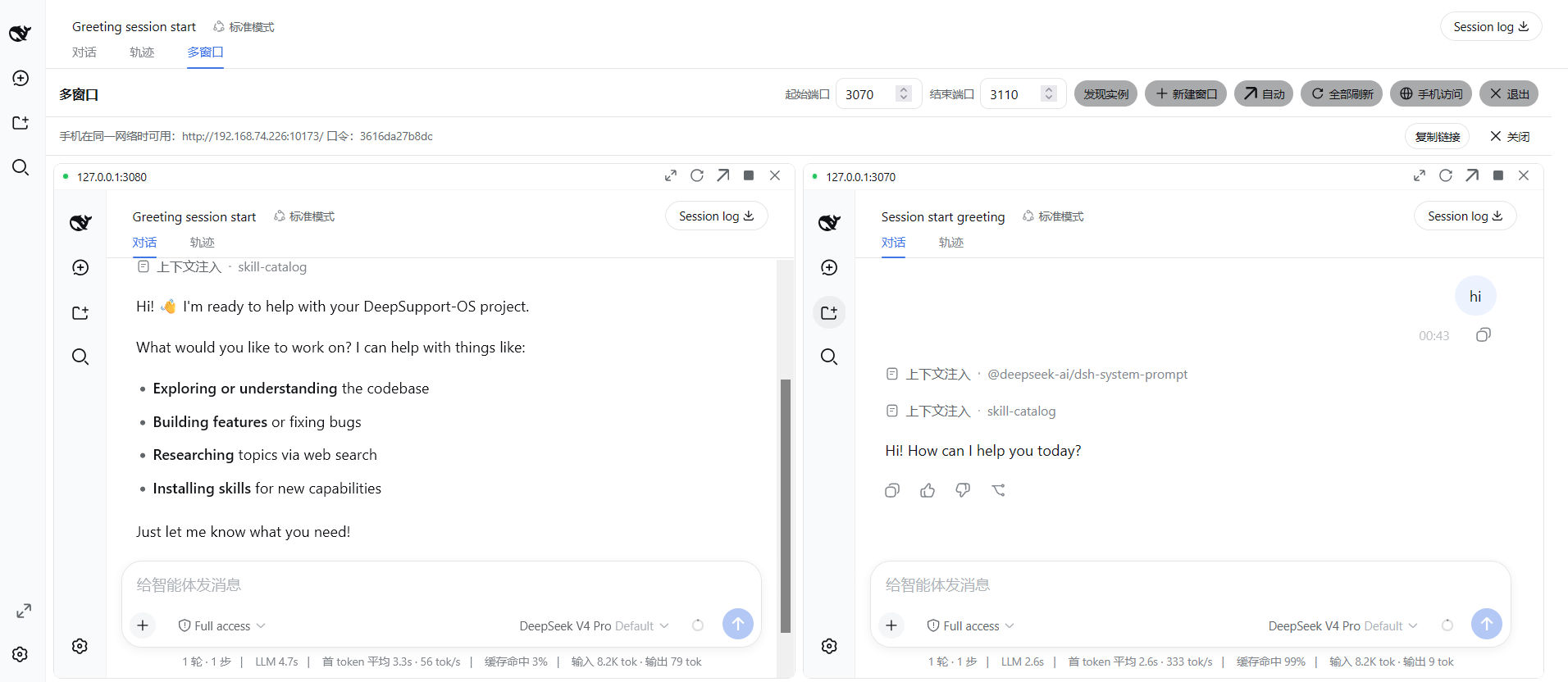
🖥️ Windows · Two chats side-by-side — two running DSH instances laid out together, each pane a full official conversation UI with live online status dots and per-window controls (maximize / refresh / new tab / remove):
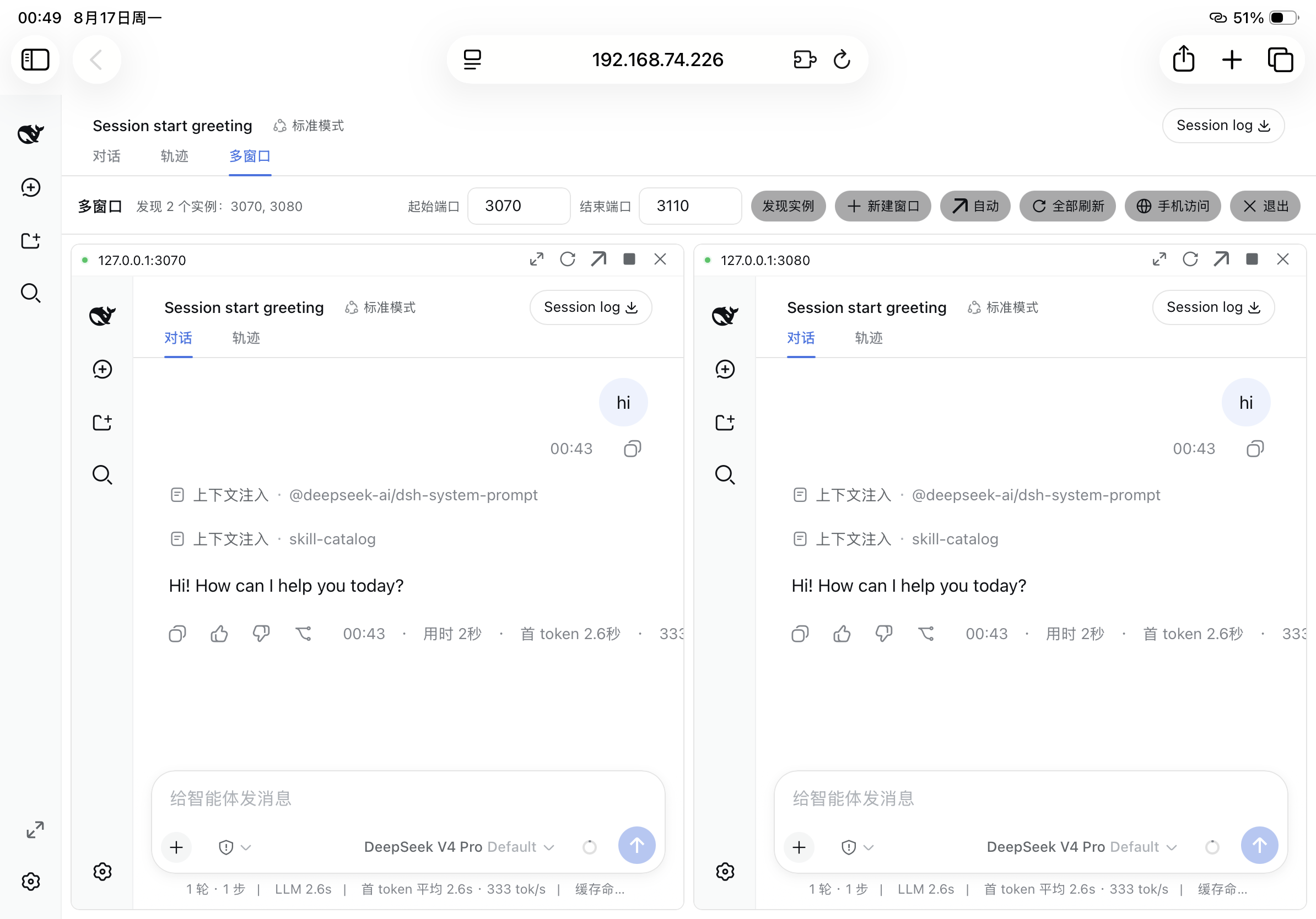
📱 iPad · Two chats on mobile — on the same LAN, open the token-authenticated gateway URL on an iPad to watch two Agents' live progress on one tablet screen:
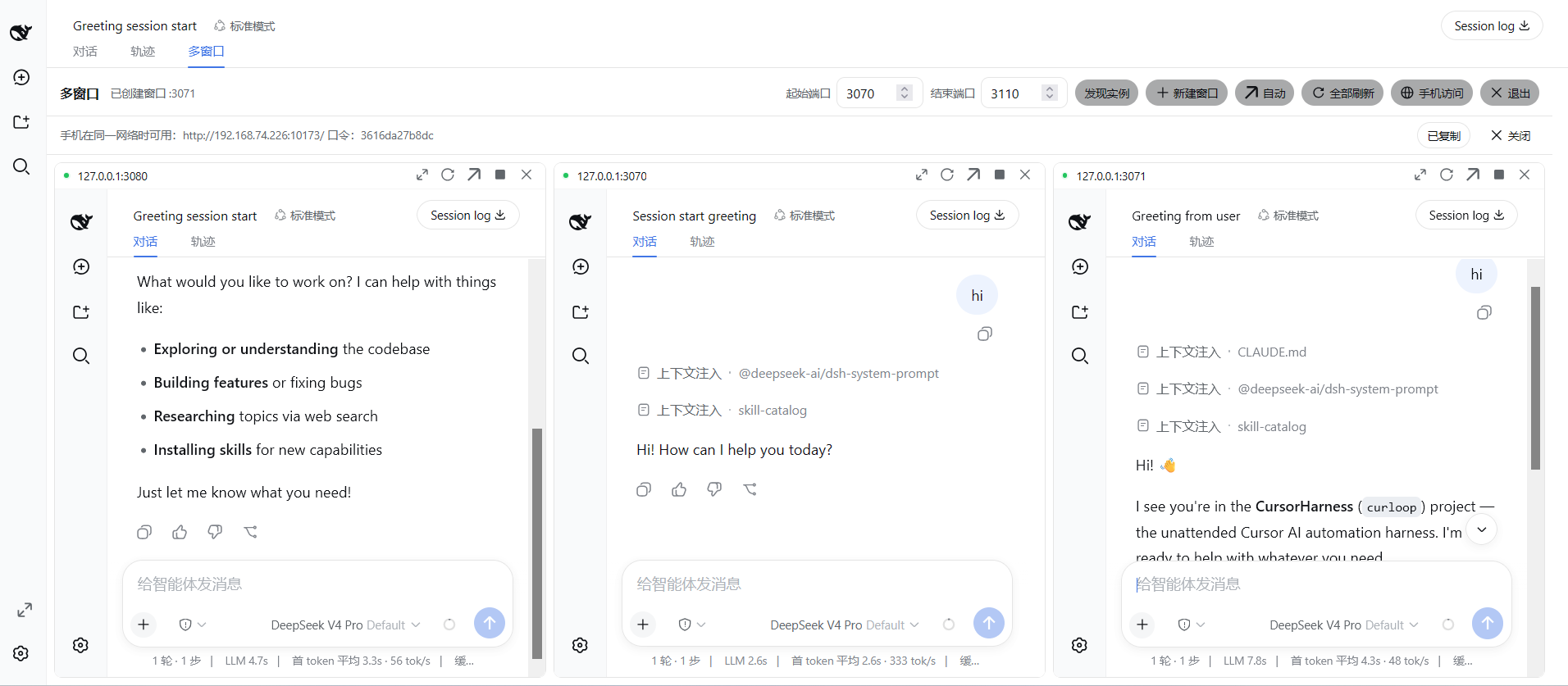
🖥️ Windows · Three-chat panorama — a 3-column grid of three running instances, all Agents on one screen, upgrading you from "one conversation at a time" to "a panoramic multi-conversation cockpit":
🚀 30-second quick start
# 1. Install — ONE command straight from the npm registry (no CLI to download):
dsh plugin --profile web add dsh-multi-chat       # for `dsh web`
dsh plugin --profile desktop add dsh-multi-chat   # for the Desktop app

#    …or via the plugin's own npx CLI (packs a tarball and installs it):
npx dsh-multi-chat install

# 2. Start a few instances
npx dsh-multi-chat start --ports 3080,3081,3082

# 3. (Re)start any instance and click "Multi-window" in the sidebar footer → done 🎉
Why this approach
- No official logic is touched: the plugin only registers two additive list slots (
conversation.viewring entry,sidebar.footer.actionsidebar shortcut) and five read-only JSON routes (/multi/api/ports,/multi/api/status,/multi/api/stop,/multi/api/create,/multi/api/link). No existing slot is replaced, no line is rewritten, and no core session/agent/tool logic is touched. - The UI is the official UI: the wall is a view in the official view ring rendered inside the chat panel (not a popup). Theme, type scale, icons, and controls all use the official
--dsw-*tokens and official primitives (Button/Input/Menu/StateDot). - Recursion guard: the wall never embeds its own port; embedded pages carry a
?multi-wall=embedflag and register no wall UI, preventing infinite "wall-in-wall" recursion. - Minimal footprint: one declarative client plugin package — it ships its own
dsh.bundle.patch+cordis.patch.yml, so DSH mounts it as a bundle layer automatically.
Directory layout
dsh-multi-chat/                    # single-package structure
  lib/                             # built artifacts (lib/index.js + lib/client.js + types)
  src/                             # source (node half + browser half)
  bin/dsh-multi-chat.mjs           # cross-platform npx CLI (install/start/stop/gateway)
  scripts/
    install-plugin.ps1             # pack + install into profile (DSH auto-mounts the bundle)
    start-multi.ps1 / stop-multi.ps1 # start/stop multiple dsh web instances
    gateway.mjs                    # token-authenticated reverse-proxy gateway (phone/remote)
  cordis.patch.yml                 # DSH bundle layer declaration
  platform-seeds.json              # the DSH module-table contract this plugin builds against
Install & enable (Windows)
# 1) Pack and install into the web profile. The plugin declares dsh.bundle.patch,
#    so DSH auto-mounts its bundle layer — no manual patch edit.
.\scripts\install-plugin.ps1

# 2) Restart dsh web and open any instance
dsh web --port 3084
# Browser: http://127.0.0.1:3084 — a "Multi-window" button appears in the sidebar footer
Or manual:
npm pack                                                  # produce a tarball (dsh-multi-chat-<version>.tgz)
dsh plugin --profile web add ./dsh-multi-chat-*.tgz        # DSH adds the package to the bundle layer stack automatically
Uninstall (one command, nothing manual to clean up — restart dsh web to unload it):
dsh plugin --profile web remove dsh-multi-chat
Usage
- Start several instances:
.\scripts\start-multi.ps1 -Ports "3080,3081,3082,3084"(or manualdsh web --port <n>). - Open any instance and click the "Multi-window" shortcut in the sidebar footer (or the "Multi-window" tab at the top of the chat area).
- Inside the wall view: auto-discovery (own port excluded), column switching (auto/1/2/3/4/6, horizontally filled by default), click title to maximize, ⟳ refresh one, ↗ open in a new tab, ✕ remove from view, refresh all, and live online status dots. The layout is persisted to
localStorage. - To exit the wall, click the "Exit" button in the toolbar's top-right to switch back to the chat view in one click.
Launch tokens (DSH 0.2)
Since DSH 0.2, every dsh web process mints a launch token, answers an unauthenticated / with 401, and only then serves the shell. An unauthenticated liveness probe therefore sees every real instance as dead, and the wall stays empty.
The wall presents the token automatically. dsh-multi-chat start reads each instance's token off its console and records it in $DSH_HOME/multi-wall-instances.json, which the node half picks up — no configuration needed:
dsh-multi-chat start --ports 3080,3081 # tokens captured automatically
Instances you start some other way must be listed by hand, either by editing that same JSON file or via the profile patch:
- id: ui-multi-wall
  name: dsh-multi-chat
  config:
    tokens:
      "3085": "<the token dsh web printed>"
      "3086": "<the token dsh web printed>"
Tokens are per-process: restarting an instance mints a new one, so re-read it from that instance's startup output. dsh-multi-chat start also keeps each instance's full console log in $DSH_HOME/multi-wall-logs/instance-<port>.log.
Phone / remote access (built-in authenticated gateway)
The official dsh web deliberately forbids --host 0.0.0.0 (it would expose remote code execution to the network). This plugin ships a built-in token-authenticated intranet gateway: click the "Phone access" button and it automatically starts a gateway for the current instance (listening on 0.0.0.0, reverse-proxying to 127.0.0.1:<this instance's port>), returning a LAN URL + login token.
Click "Phone access" → you get:
  Available on your phone on the same network: http://10.105.7.204:9477  token: 2efb23eade16
Open that URL on your phone and enter the token to reach the full DSH UI. The gateway's security model:
- HMAC-signed HttpOnly/SameSite session cookie (12h default),
?token=for script convenience, per-IP rate limiting on failed logins - All proxied requests rewrite Host/Origin to the loopback target, so the official
/apibrowser-trust fence (the DNS-rebinding defense) treats it as a local request — no restart /--trusted-hostneeded - WebSocket upgrades and SSE streams pass through unchanged
- When the intended port hits a Windows excluded range or is already bound, it automatically falls back to an OS-assigned free port
A standalone
scripts/gateway.mjs(with optional TLS) is also available for advanced manual use.
Distribution & install
dsh-multi-chat is published to npm (unscoped public package) and released on GitHub (source zip/tarball per tag). Every channel below ends in the same three things: the package lands as a dependency of the target profile, DSH reconciles it into the bundle layer stack (the package declares dsh.bundle.patch, so its own cordis.patch.yml is mounted automatically — no manual patch edits), and a restart of that profile loads the wall.
Which profile? (web or desktop)
Both work, and they run the same browser surface with the same platform module table:
web (dsh web) |
desktop (the Desktop app) |
|
|---|---|---|
Host half — /multi/api/* routes |
✅ needs the webServer service |
✅ dsh-web-app provides it |
| Browser half — slot registrations | ✅ | ✅ identical seed table |
| Marketplace listing | ✅ | ✅ |
Swap --profile web for --profile desktop in any command below. dshmarket is the precedent: it ships the same dsh.client.platform: "web" manifest and runs in both.
Install / uninstall cheat-sheet
| Channel | Install | Uninstall |
|---|---|---|
| One-command (registry) | dsh plugin --profile web add dsh-multi-chat |
dsh plugin --profile web remove dsh-multi-chat |
| npx (no download) | npx dsh-multi-chat install |
dsh plugin --profile web remove dsh-multi-chat |
| Global CLI (npm) | npm i -g dsh-multi-chat then dsh-multi-chat install |
dsh plugin --profile web remove dsh-multi-chat then npm rm -g dsh-multi-chat |
| Tarball (offline) | npm pack → dsh plugin --profile web add ./dsh-multi-chat-*.tgz |
dsh plugin --profile web remove dsh-multi-chat |
| Git clone | node bin/dsh-multi-chat.mjs install |
dsh plugin --profile web remove dsh-multi-chat |
Every row takes
--profile desktopas well; see Which profile?.
dsh plugin --profile web remove dsh-multi-chatis the single uninstall command for every channel: it removes the dependency from the profile, and DSH strips it from thedsh.profile.bundleslayer stack automatically (reconciled from the installed dependency set — seedsh plugin --help). Restartdsh webafterwards to unload the wall.
pnpm ≥ 11 gotcha: pnpm 11's
minimumReleaseAgesupply-chain guard skips freshly published versions (default cutoff: 1 day) and silently installs the newest "aged" release instead. Ifdsh plugin --profile web add dsh-multi-chatreports an older version than the latest, addminimumReleaseAge: 0to the profile's~/.dsh/profiles/web/pnpm-workspace.yamland re-run the add. The bundled CLI (npx dsh-multi-chat install) writes that setting for you automatically.
The repo also bundles a cross-platform CLI, dsh-multi-chat (bin/dsh-multi-chat.mjs). Its install command probes $DSH_HOME (default ~/.dsh), packs the package into the profile's plugins/ folder, and runs dsh plugin --profile web add <tarball> (same behavior as install-plugin.ps1).
Channel 1: npm / npx (recommended, easiest)
# Published on npm — one line installs on any machine (node + pnpm required)
npx dsh-multi-chat install

# Or install the CLI globally, then install the plugin from anywhere
npm i -g dsh-multi-chat
dsh-multi-chat install

# Or run single commands straight from npx (no plugin install needed)
npx dsh-multi-chat start --remote --token <token> --ports 3080,3081
npx dsh-multi-chat gateway --target 127.0.0.1:3080 --token <token>
Maintaining / republishing (maintainer): npm publish (unscoped public package dsh-multi-chat).
Channel 2: GitHub Release
Download the source zip/tarball from Releases, unpack it, and cd in:
node bin/dsh-multi-chat.mjs install           # pack + dsh plugin add (see cheat-sheet)
node bin/dsh-multi-chat.mjs start --ports 3080,3081
Tagging a release makes GitHub auto-generate the source zip/tarball assets; you can also attach a
npm pack-produced.tgzas an offline install bundle.
Channel 3: direct git install
git clone https://github.com/daetz-coder/dsh-multi-chat.git
cd dsh-multi-chat

node bin/dsh-multi-chat.mjs install           # pack + dsh plugin add (see cheat-sheet)
node bin/dsh-multi-chat.mjs start --ports 3080,3081
node bin/dsh-multi-chat.mjs gateway --target 127.0.0.1:3080 --token <token>
For the one-command-on-this-machine flow,
dsh plugin --profile web add dsh-multi-chatalso works straight from a git clone — install the plugin from the repo checkout without packaging it yourself.
Running straight from this repo (development)
node bin/dsh-multi-chat.mjs install
node bin/dsh-multi-chat.mjs start --ports 3080,3081
node bin/dsh-multi-chat.mjs stop
node bin/dsh-multi-chat.mjs gateway --target 127.0.0.1:3080 --token <token>
🔍 Discovery & ecosystem
This plugin follows the official DeepSeek Harness client plugin spec:
- Be found in the GitHub plugin ecosystem: adding the
dsh-plugintopic to this repo makes it searchable on the officialdsh-plugintopic page (the officially recommended third-party discovery path). - Bilingual technical docs: this repo ships
README.md(English) andREADME.zh.md(Chinese) at the root, matching the bilingual convention of officialpackages/client/*plugins. - Purely additive, no core touching: registers only the
conversation.view/sidebar.footer.actionlist slots +/multi/api/*read-only routes, changing no official core logic.
Building from source
The single-package layout uses tsdown for bundling and tsc for type declarations:
npm install
npm run build          # tsc + tsdown → lib/
npm test               # vitest (browser half in jsdom + node half)
Testing
npm test # builds first, then runs vitest
npm test builds before it tests, so the suite always exercises the artifact
that ships rather than a stale lib/.
tests/browser-plugin.client.spec.tsx— the browser half (view-ring entry, sidebar shortcut, wall store, recursion guard, HMR disposal) against a real cordis Context in jsdom, plus the node half (probe routes, config schema, stop semantics).tests/client-bundle.spec.ts— loads the builtlib/client.jsthroughtests/dsh-module-loader.ts, a stand-in for the web shell's module table. This is the regression test for the v1.0.3 boot failure described below.
The platform contract
A client plugin bundle is not an ES module. The web shell loads it as a
script whose only top-level effect is window.__ModuleLoader__.load({ id, factory }), and every require(spec) inside the factory resolves against the
shell's module table. That table has exactly two sources:
- the platform seed table — a fixed set of specifiers the shell hardcodes into its own Vite bundle, and
- boot-graph package rows — other plugins' bundles.
A plugin cannot conjure another package's row, so requiring anything outside
the seed table throws missed the module table. The boot is fail-closed: the
whole web UI stops on its "Failed to load plugins" card.
That is how v1.0.3 broke. It required @deepseek-ai/dsh-client-runtime/client,
a package upstream deleted, and nothing in the build noticed — the types came
from an unversioned local checkout of the harness monorepo, so the plugin
compiled happily against a platform that no longer existed.
platform-seeds.json pins the seed table, and is the single source of truth
for both tsdown.config.ts (which specifiers to leave unresolved) and
scripts/check-platform-contract.mjs (which fails the build if the bundle
requires anything else):
npm run check:platform                                      # runs inside `npm run build`
npm run check:platform:against -- <path-to-installed-dsh>   # diff against a real install
npm run sync:platform -- <path-to-installed-dsh>            # adopt a new release's table
The @deepseek-ai/* platform packages are pinned as exact devDependencies,
so the surface this plugin compiles against is versioned and reviewable instead
of coming from a local checkout.
License
MIT
Links
More in this category
zhu1090093659/dsh-web#packages/dsh-task-board★ 8262
Task board for the dsh web GUI: a sidebar multi-column kanban whose cards run in real DSH agent sessions and can also be scheduled with cron expressions, executed host-side even with the browser closed.
zhu1090093659/dsh-web#packages/dsh-web-all★ 8262
Plugin and skin collection for the DSH Web UI: task board, Git graph, right-side panel, remote mobile UI, pet, live token stats, and a skin center.
omdsh-dev/DSH-better-sidebar★ 3943
Full sidebar workbench with file rendering and editing, terminal, Git, and subagents; third-party plugins can register new tabs.
ccch1mneyyy/dsh-TUI★ 3913
Claude Code-style full-screen terminal UI: pixel-whale header, live status line, and streaming thought expansion.
MeteorNOX/DeepSeek-Balance-Whale-Widget★ 3793
A fixed-corner whale widget for the DSH web GUI — balance, today's usage and per-turn cost with peak/off-peak pricing, editable balance-alert and daily-budget bubbles, a module-based custom bubble queue with A/B weighted choices and random lines or images, 30+ vendor templates (OpenAI, OpenRouter, Kimi, SiliconFlow, Ark, Zhipu, MiniMax and more) with per-model balance and subscription quota, plus task-end sound, imported audio, custom roles and a resource manager. Local-only, no telemetry.
Devin-AXIS/deepseek-design#deepseek-idesign★ 1414
Visual design studio for websites, app prototypes, posters, cards, reports, and magazines, with templates, direct element editing, selection-aware AI draft handoff, and export.
Community comments
Comments are public GitHub Discussions. Loading them connects to GitHub and Giscus; a GitHub account is required to post.