Auto-hide a sidebar workspace the moment its last unarchived session is archived, and add a "隐藏工作区" entry to each workspace row's own "..." menu. The restore entry sits at the bottom of the sidebar. It only toggles display and never archives, deletes or rewrites a workspace.
Install
# from npm (prebuilt)
dsh plugin --profile web add dsh-hide-empty-workspace
# from GitHub (first run asks for allowBuilds approval — follow the hint, retry)
dsh plugin --profile web add github:d0ublecl1ck/dsh-hide-empty-workspace
Any plugin you install runs third-party code with your own permissions — it can read your files, use your credentials, and reach the network, and tool approvals don’t sandbox it. GitHub-sourced plugins also run build scripts at install time — pnpm blocks those until you allow them, so an install can stop with ERR_PNPM_GIT_DEP_PREPARE_NOT_ALLOWED or ERR_PNPM_IGNORED_BUILDS; dsh prints the exact key to add under allowBuilds in your profile’s pnpm-workspace.yaml, and the install works on the next run. Allowing a build is a trust decision: only install sources you trust, and pin a commit (github:owner/repo#sha).
README
🌐 中文 · English
dsh-hide-empty-workspace
"The moment you archive its last session, the empty workspace removes itself from the sidebar."
[!WARNING] This repository is no longer maintained (2026-10-24). The shipped DSH sidebar now does the same job: a workspace with no visible sessions is never rendered at all. The plugin's automatic hiding is therefore a duplicate implementation, and it no longer tracks upstream UI changes. Do not install it; existing installs can be removed as described below.
Automatic sidebar housekeeping. It acts on exactly one rule: a workspace's unarchived session count drops from 1+ to 0. It never archives, deletes or rewrites workspaces — the only thing it writes is a hidden-set in your browser.
The problem · What it looks like · Maintenance status · Install (archived) · When it fires · Safety · Layout
The problem
Archiving is a manual action in DSH, and nobody tells you that a workspace has gone empty.
So the sidebar rots: you open one or two sessions in a project, archive them when you are done, and the workspace itself stays — no sessions, no purpose, one more row. After a dozen of those, the workspaces you actually use have been pushed below the fold.
This plugin turns "it is empty now" into a passive signal: the moment a workspace's unarchived session count falls from 1+ to 0, its sidebar row hides itself.
That moment is the only moment it acts on its own. Manual hiding lives in each workspace row's own "..." menu, and the restore entry sits at the bottom of the sidebar. The plugin owns no state.
What it looks like
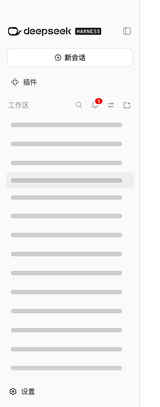
The frame above is clipped to the sidebar column, with workspace names redacted. Hiding two workspaces in a row leaves exactly one at display:none — the other is the workspace currently in use, which stays visible by design.
Maintenance status
The shipped sidebar (@deepseek-ai/dsh-client-ui-workspace) already applies this rule: a workspace whose visible session count filters down to 0 is not rendered at all, and a blank session is visible only while it is the selected one. In practice:
- Automatic hiding: covered upstream; this plugin's half is a duplicate — it re-applies
display:noneon the DOM. - Manual hiding and the "已隐藏 N" restore entry: upstream has no equivalent, but this repository is no longer maintained and will not track upstream changes.
- Recommendation: do not install it; if you already have it, run
dsh plugin --profile web remove dsh-hide-empty-workspaceand let the shipped sidebar own workspace visibility.
This repository is kept for the record only: no new releases, no bug fixes.
Install (archived)
These commands only matter if you still run the plugin; for new setups use the shipped sidebar.
# from npm (shortest)
dsh plugin --profile web add dsh-hide-empty-workspace

# or straight from GitHub (no npm account, no mirror sync wait)
dsh plugin --profile web add https://codeload.github.com/d0ublecl1ck/dsh-hide-empty-workspace/tar.gz/refs/heads/main

# while editing the source, link the working copy instead
dsh plugin --profile web add /absolute/path/dsh-hide-empty-workspace
dsh plugin add writes both dependencies and dsh.profile.bundles in the profile, so a page refresh is enough.
When it fires
- Automatic: you archive a workspace's last unarchived session → its row hides.
- Manual: hover any workspace row and pick "隐藏工作区" from its "..." menu.
- Restore: click the "已隐藏 N" entry at the bottom of the sidebar, then the shipped dialog opens and each "恢复" button restores one workspace; the dialog closes itself when none are left.
- Automatic restore: a hidden workspace gains an unarchived session again → it reappears.
It will not fire for:
- A freshly added workspace. The plugin only records it, never hides it; if it has no visible sessions, the shipped sidebar does not render the row anyway — that is upstream behavior, not this plugin.
- The workspace in use, which stays visible even when it matches the rule.
- The "ungrouped" bucket, which is never hidden.
Safety
- Never archives, unarchives or deletes any session or workspace.
- Never rewrites the workspace registry: it does not touch the
workspacesservice orsettings.yaml. - Never talks to the network.
- The only write is a hidden-set in browser
localStorage(dsh-hide-empty-workspace.hidden.v1). Clear it and everything is back. - Never replaces the official UI: it only toggles
displayon rows the shell already rendered, appends one entry to the row's own "..." menu, and opens the shippedModalfor restores; it does not take over or redraw any shipped component. If a DSH upgrade removes those rows it will not fail silently — the sidebar footer shows⚠ 工作区行标记失配,插件未生效. When the sidebar is collapsed into its rail (auto-collapse in a narrow window) or switched to the single-list grouping, no workspace row is rendered by design, so the self-check stays quiet.
Layout
index.js                    host half (this plugin needs no host capability; a placeholder apply)
client.js                   browser half: the rule, the row-menu entry, the shipped-Modal restore dialog, the self-check
cordis.patch.yml            the bundle layer that inserts this plugin
tests/hidden-workspaces.test.mjs   28 pure-function unit tests
scripts/verify-browser.mjs  live-browser verification + showcase recording
scripts/check-release.mjs   offline release gate
assets/showcase/            screenshots and GIF produced by verify-browser
screenshots.json            storefront screenshot manifest
AGENTS.md                   boundaries and commands for the next session
.freak                      open leads: competitor watch + unverified list
Links
More in this category
zhu1090093659/dsh-web#packages/dsh-task-board★ 10172
Task board for the dsh web GUI: a sidebar multi-column kanban whose cards run in real DSH agent sessions and can also be scheduled with cron expressions, executed host-side even with the browser closed.
zhu1090093659/dsh-web#packages/dsh-web-all★ 10172
Plugin and skin collection for the DSH Web UI: task board, Git graph, right-side panel, remote mobile UI, pet, live token stats, and a skin center.
ccch1mneyyy/dsh-TUI★ 7101
Claude Code-style full-screen terminal UI: pixel-whale header, live status line, and streaming thought expansion.
MeteorNOX/DeepSeek-Balance-Whale-Widget★ 6959
A fixed-corner whale widget for the DSH web GUI — balance, today's usage and per-turn cost with peak/off-peak pricing, editable balance-alert and daily-budget bubbles, a module-based custom bubble queue with A/B weighted choices and random lines or images, 30+ vendor templates (OpenAI, OpenRouter, Kimi, SiliconFlow, Ark, Zhipu, MiniMax and more) with per-model balance and subscription quota, plus task-end sound, imported audio, custom roles and a resource manager. Local-only, no telemetry.
omdsh-dev/DSH-better-sidebar★ 4959
Full sidebar workbench with file rendering and editing, terminal, Git, and subagents; third-party plugins can register new tabs.
Devin-AXIS/deepseek-design#deepseek-idesign★ 1744
Visual design studio for websites, app prototypes, posters, cards, reports, and magazines, with templates, direct element editing, selection-aware AI draft handoff, and export.
Community comments
Comments are public GitHub Discussions. Loading them connects to GitHub and Giscus; a GitHub account is required to post.