Terminal UI for DeepSeek Harness on jump hosts and high-latency links: plain ANSI, incremental repaint, and a session that survives a dropped SSH connection (resume it from the log).
Install
# from npm (prebuilt)
dsh plugin --profile web add dsh-ssh-tui
# from GitHub (first run asks for allowBuilds approval — follow the hint, retry)
dsh plugin --profile web add github:cyjyyd/dsh-ssh-tui
Any plugin you install runs third-party code with your own permissions — it can read your files, use your credentials, and reach the network, and tool approvals don’t sandbox it. GitHub-sourced plugins also run build scripts at install time — pnpm blocks those until you allow them, so an install can stop with ERR_PNPM_GIT_DEP_PREPARE_NOT_ALLOWED or ERR_PNPM_IGNORED_BUILDS; dsh prints the exact key to add under allowBuilds in your profile’s pnpm-workspace.yaml, and the install works on the next run. Allowing a build is a trust decision: only install sources you trust, and pin a commit (github:owner/repo#sha).
README

A resilient terminal workspace for DeepSeek Harness. remote-first · reconnectable · in your terminal
SSH drops. The session survives. Reconnect. Reattach. Continue.
That is the whole idea behind the name: the display can disappear without the session disappearing. The host process stays up, and the same command attaches back to the same session — transcript, plan cards, approvals, queued messages, all where you left them. It is a remote-first terminal workspace, not just an SSH-flavoured screen.
What happens to the turn that was running? That depends on
/disconnect: the defaultpausestops the in-flight turn when the display goes away and keeps the session — you reconnect and carry on;continuelets that turn keep running in the background and finish without you. The host survives under both. The demo below runscontinue(the caption says so); do not read it as the default.
The npm package name has not changed, and neither has the install command. The published coordinate is still
dsh-ssh-tui;DSH Relayis the product's display name. Seedocs/decisions/brand-dsh-relay.md.
npm i -g @deepseek-ai/dsh
dsh plugin --profile tui add dsh-ssh-tui@latest
dsh --profile tui
Reconnect with dsh --profile tui --resume.
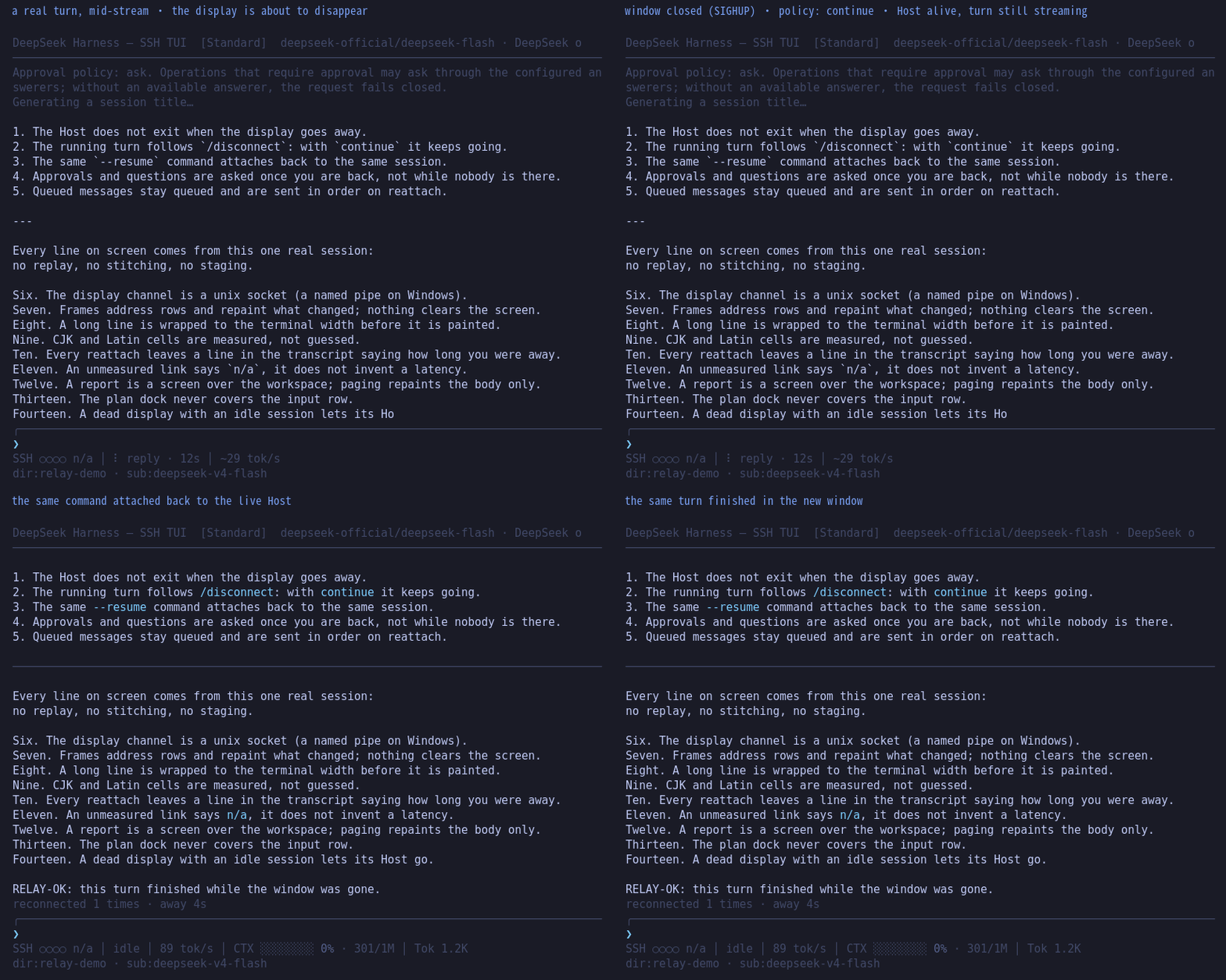
Recorded, not staged: a real PTY, a real host, a real SIGHUP, a real resume
(npm run screenshots:reconnect regenerates it). The demo sets /disconnect continue, which is why the turn finishes on screen after the window is gone; under
the default pause the same run would stop mid-turn and the session would still be
there to attach back to.
中文部署指南:README.md
Plain ANSI and incremental redraws. No browser required.
If you mostly work over SSH — a jump host, a test box, a keyboard-only session — start here. A local desktop terminal with themes and layout you already like can stay as it is.
How this differs from what already exists:
- Official headless: the same task prints only its last reply to stdout; the rest stays in the session log.
- Official
dsh-ssh(from 0.1.6): the Harness runs locally and files and processes run remotely, which needs a helper installed ahead of time. Use this plugin when you are already SSH'd onto the machine. The two stack; neither replaces the other. - Other terminal skins (
dsh-TUIand the like): a good-looking local terminal, competing on themes and layout. This plugin competes on incremental redraws over a slow link, a Host that survives the drop, and a plain line mode.
How to get back in after a drop is under After an SSH drop.
A SuperGrok / X Premium subscription goes through the standalone plugin dsh-llm-xai-oauth (headless, web, or this TUI). It reuses a local grok-bridge token; no xAI API key.
Listed on the dshfind plugin directory:
Install with the official CLI (no clone):
dsh plugin --profile tui add dsh-ssh-tui@latest
dsh --profile tui
Current dsh requires --profile (dsh plugin add … errors without it).
Swap tui for another profile name.
Which host line? 0.8.3 is latest (0.8.4-rc.1 is the next candidate) and supports the 0.2.0-rc line (the desktop harness's baseline) as well as 0.2.1-rc.2 (upstream next); the 0.1.7 line was dropped in 0.8.4-rc.1 and is refused by the launcher's version check, as is everything older. 0.1.5 and older hosts are no longer supported as of 0.8.0.
Updates must use @latest. dsh plugin forwards the rest of the line to
pnpm in the profile directory. A bare add dsh-ssh-tui keeps the version
already pinned in pnpm-lock.yaml (often 0.3.7). Do not put --profile
after add: dsh plugin add --profile tui add dsh-ssh-tui is not valid.
Remove with dsh plugin --profile tui remove dsh-ssh-tui.
Verified, not assumed
Measured on 100×20, median of 40 runs per action (npm run bench; this block is
generated by npm run bench:report, not typed by hand):
| Action | ms | bytes | rows addressed | full clears |
|---|---|---|---|---|
| one streamed delta while an answer is arriving | 1.69 | 501 | 3 | 0 |
| one repaint while the agent is busy (the wait card’s clock) | 1.37 | 465 | 3 | 0 |
| one page key inside a report Screen (PgDn, then PgUp) | 1.37 | 2457 | 17 | 0 |
| one cursor key inside an open control-plane menu (↓, then ↑) | 0.99 | 588 | 4 | 0 |
| one character into the wizard’s own field | 0.21 | 140 | 1 | 0 |
0 full-screen clears across all five actions. That is the performance promise for this version: however slow the terminal and however bad the link, frames repaint by row — no tick repaints the whole screen.
Both commands above are the evidence: npm run bench (the numbers), npm run freeze
(that the architecture stayed what it claims). CI re-runs them on every leg — Linux and
Windows, four host versions. The link-side promises have their own real-PTY probes:
drop/reattach, a host that outlives the window mid-turn, a resume with history, and the
"terminal does not answer cursor probes" case; npm run freeze lists them.
Tested DSH Relay on a terminal we have not covered yet?
Add a compatibility report — one
form, no code required; results land in the community section of
docs/terminals.md.
If DSH Relay makes remote Harness sessions more reliable for you, starring the repository helps other terminal users find it.
Official headless vs this TUI
There is no shipped TUI. The default terminal entry on a remote box is
dsh --profile headless: one task, then the last assistant message on
stdout. Reasoning, tool calls, subagents, and the plan stay in the session
log.
Both frames below are the same task. Top: official headless stdout
(@deepseek-ai/dsh-headless prints outcome.text only). Bottom: this plugin
painting the same events in an 88-column SSH window.
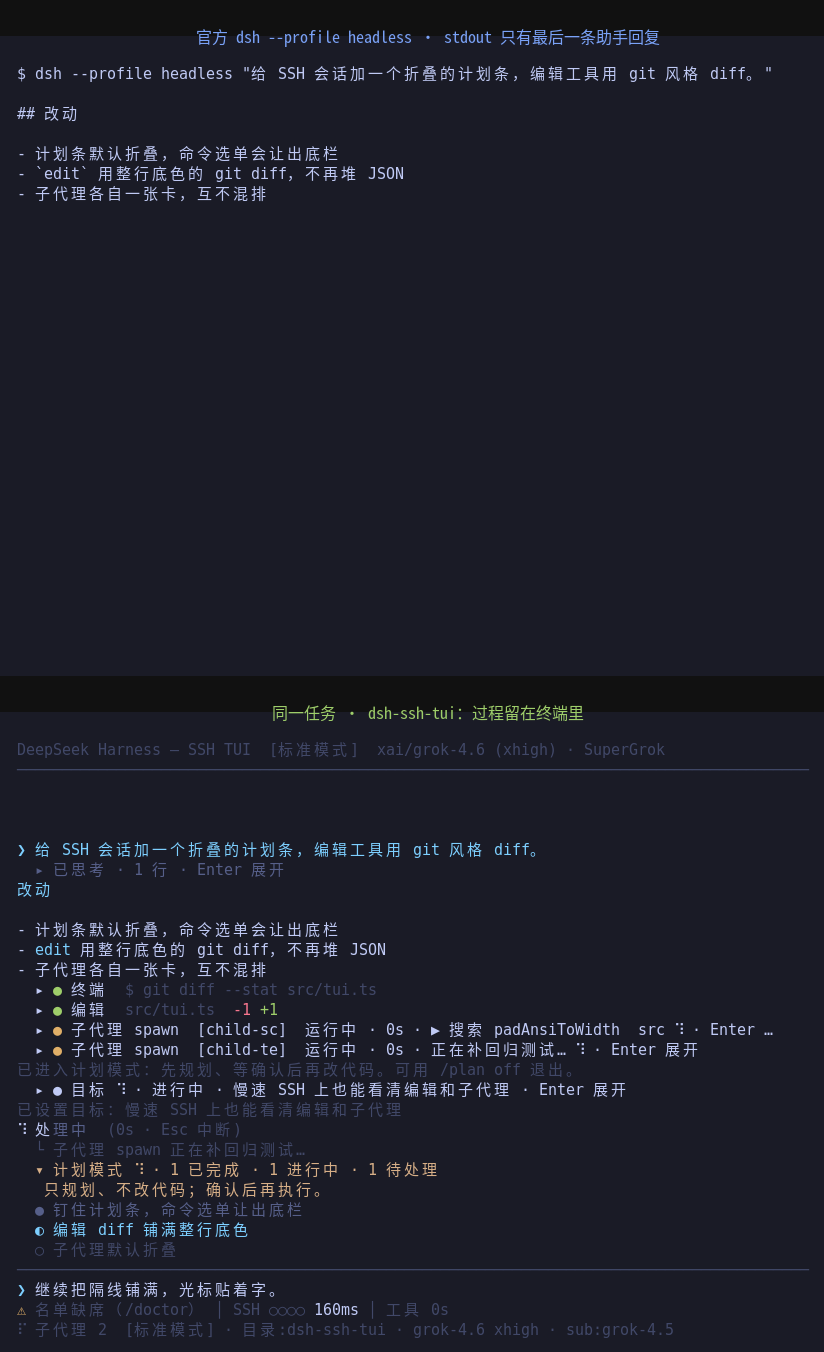
Top: $ dsh --profile headless "…" then the final markdown.
Bottom: reasoning collapsed, full-row red/green diff, each subagent on its
own card, the plan strip pinned above the input.
Singles: headless stdout · dsh-ssh-tui


Still visible on a slow SSH pipe
Same task, replayed at 2 kB/s through the real incremental painter
(88×30, one stdout.write per frame). Official headless on that pipe
would stay blank until the final markdown. Here reasoning, the edit
diff, subagent cards, and the plan strip appear as the bytes arrive.
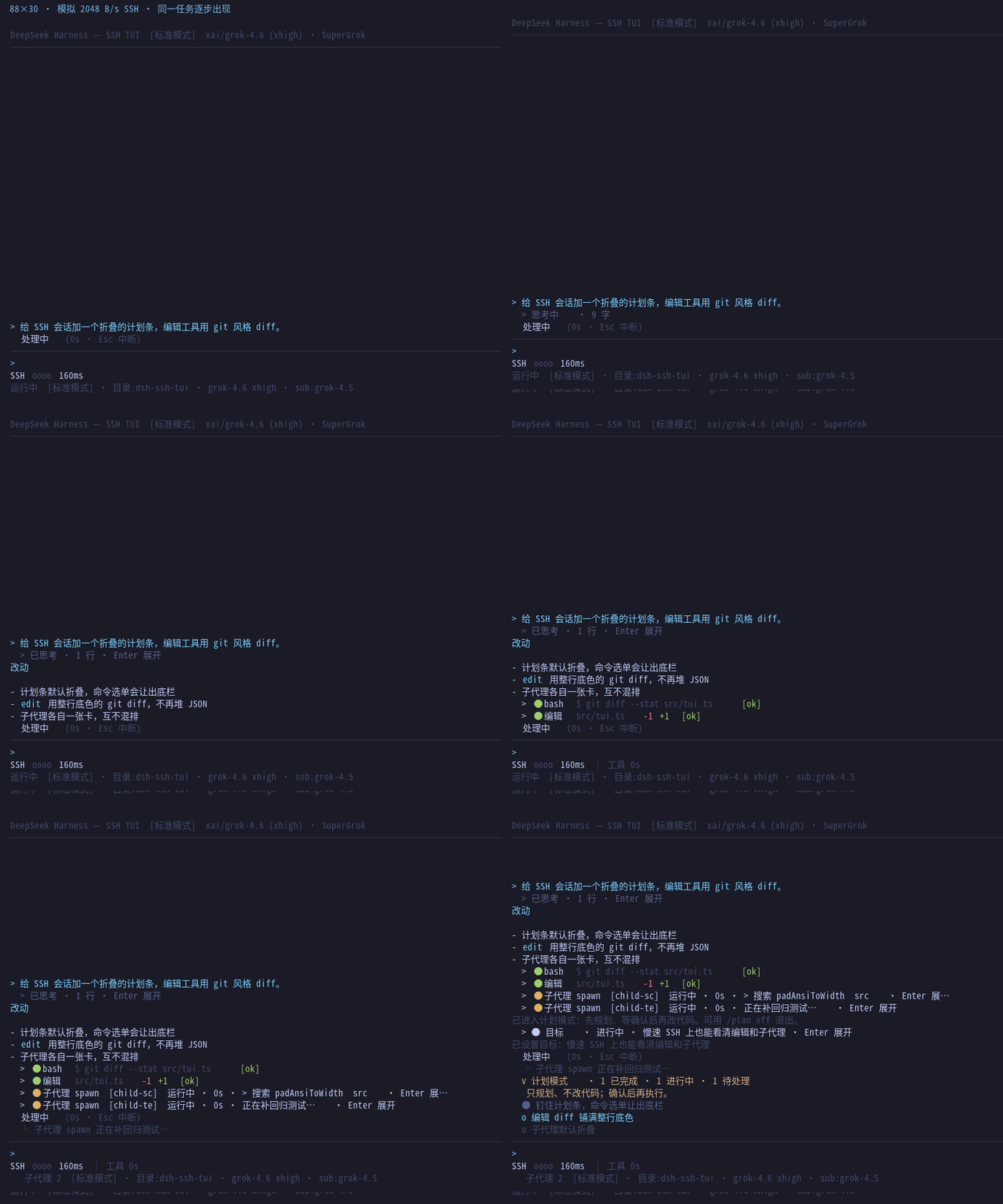
Reproducible, no model in the loop: npm run screenshots:slow writes
docs/screenshots/slow-link.json. This capture is 14 paints, about
18.0 KB, 8.8 s at 2 kB/s. Byte ledger for this event sequence.
0.7 highlights: drag-select any part of a model reply to copy it (hold the button, or Shift;
OSC 52 into your local clipboard; a tool card still expands on click; an SSH session copies
into the local terminal and no longer warns that it cannot) · a reply is a selectable card too:
one ↑ on an empty input lands on the newest reply-or-card (marked ▶, in screen order;
Alt+4 selects the latest reply), /copy then takes that one as written rather than the
wrapped screen text, and Enter opens it full-screen · the status row answers five questions
in one order — link health, what is running, tokens per second, quota left, context used — and
degrades by dropping cells as the terminal narrows (⚠ still opens /doctor; the install
warning outranks everything), and the row under it is ordered by priority and cut from the
right — dir:… · search n/m · queued n · sub:…, closed by OpenCode-GO or
CommandCode-GOAT on those two subscriptions, so a narrow terminal loses the least
load-bearing part first · the quota meter is on screen from the first frame and names
its window (5Hr/1Wk/1Mo, smallest window by default, ?% with a 15-second retry until
a reading arrives) · /mode groups presets and filters with / · the compact view names
every changed file · tool diffs are line-level, emphasise only what changed, and go
side-by-side at 100 columns or more · DSH_TUI_LINE_MODE=1 appends plain lines for screen
readers and tee · ssh-tui.keys rebinds keys, refusing conflicts · DSH_TUI_COLOR_DEPTH
pins the palette (truecolor / 256 / 8 / none).
Which host lines this covers
The plugin declares and tests every @deepseek-ai/dsh line in flight:
| Host line | Status |
|---|---|
0.2.1-rc.2 (upstream next) |
declared compatible; default development line — the committed manifest, the lock and the test-windows leg install it, and it gets the full real-PTY probe set |
0.2.0-rc.1 / 0.2.0-rc.2 (latest, also the desktop app's baseline) |
declared compatible; rc.2 gets the full probe set, rc.1 gets typecheck + suite |
0.1.7-rc.1 / 0.1.7-rc.2 |
dropped in 0.8.4-rc.1: dshReleases says incompatible and the launcher refuses it, so a user still on that line gets "upgrade" rather than a half-working plugin |
0.1.5 and older |
unsupported as of 0.8.0, with an explicit incompatible entry in dshReleases |
The declared window is >=0.2.0-rc.1 <0.2.1 || >=0.2.1-rc.2 <0.2.2 (peer dependencies and dshReleases
state the same fact). The second comparator is not a typo: node-semver only admits a prerelease through a
comparator carrying the same major.minor.patch tuple. Every release re-installs those versions in a clean
tree and re-runs the types, the suite and the real-PTY probes — not "no errors, so it probably works". Many
terminal plugins on npm are still stranded on the 0.1.5 line; few terminal UIs install on a 0.2.x-rc line at
all, which is why the window is maintained this tightly.
A warning before the Desktop section
⚠ Do not add this plugin to a Desktop (or
web) profile. It is not "installed but idle" — it crashes the application. The desktop host's command line belongs to the web app (it passes--no-open), and dsh does not arbitrate: every app plugin parses the same argv with its own grammar, and an unknown flag exits the process. From 0.8.2 the plugin's startup row declines a command line that is not its own (the desktop launcher, or a web app that has already taken over); 0.8.1 and earlier exited 1 witherror: unknown option '--no-open', and the app reporteddsh desktop host exited with 1and died. If it is already in there, remove the fourssh-tui-*rows fromprofiles\desktop\cordis.patch.yml(or restore that file from a backup) and the application works again.
Desktop Harness users, read this first
The official desktop app (https://www.deepseek.com/harness/) does not need this plugin — use its own UI
or dsh web. This plugin is a terminal UI and must run on a real TTY; the launcher the desktop app puts on
your PATH (DeepSeek Harness.exe with ELECTRON_RUN_AS_NODE) is a GUI-subsystem process with no console, so
dsh --profile tui cannot start under it. For a terminal session, install the npm CLI:
npm i -g @deepseek-ai/dsh        # a real console runtime
dsh --profile tui                # from a terminal or an SSH session
Under the desktop app this plugin stays inert rather than failing: it logs one "inactive here" line through ctx.logger and mounts nothing (no locks, no timers, no update check), so the desktop never shows a failed plugin and cannot be broken by it. A profile that would rather fail loudly can set requireTerminal: true.
The full diagnosis, both desktop defects, the strategy and a copy-paste-ready upstream issue are in docs/desktop.md and docs/upstream-desktop-report.md.
Requirements
- Node.js >= 22.19
@deepseek-ai/dshCLI:npm i -g @deepseek-ai/dsh(this repo develops on0.2.1-rc.2; CI covers0.2.1-rc.2/0.2.0-rc.2/0.2.0-rc.1: the default leg installs the committed manifest and gets the full real-PTY probe set, every other leg rewrites the manifest withscripts/ci-pin-line.mjsand installs from scratch without a lock, andtest-windowsruns the default line on ConPTY.0.1.7and older are no longer supported — if the install is refused, upgrade the host first)- pnpm (used by
dsh pluginto manage profile dependencies) - an ANSI terminal (SSH directly, or PowerShell / Windows Terminal on Windows)
- Windows: install, troubleshooting and how to read
/doctorare in docs/windows.md
Install
The recommended install is the command at the top of this README:
dsh plugin --profile tui add dsh-ssh-tui@latest. The CLI pulls npm, writes the
profile dependency, and appends this package to dsh.profile.bundles
because the manifest declares dsh.bundle.
Optional: put a SuperGrok subscription on dsh (standalone plugin, this TUI is not required):
dsh plugin --profile tui add dsh-llm-xai-oauth@latest
dsh plugin --profile headless add dsh-llm-xai-oauth@latest
SuperGrok access tokens last about an hour. The TUI refreshes a due token on open, and /usage force-refreshes once after HTTP 401. If dsh is not running overnight, install the companion refresher or the next session starts with 401:
npx dsh-llm-xai-oauth daemon --install
See dsh-llm-xai-oauth.
Smoke the route before opening the TUI. The TUI exits immediately without a TTY:
dsh --profile headless "Reply with exactly: tui-install-ok. Do not use tools."
dsh --profile tui
From a checkout: node scripts/smoke-headless.mjs (or bash scripts/smoke-headless.sh; prints an outcome summary, never a token).
After an SSH drop
Closing the laptop or an idle jump host tears down the TTY. The TUI treats
SIGHUP, stdin close, and a failed TTY write as hangup: it drops the display
and flushes the session log. Idle hangup does not keep the Host (next
--resume replays the log). A busy turn — thinking, reply, tools, subagents —
keeps the Host. Reconnect with the same command — the picker prefers a live
process (labelled attachable). Do not start a second Host:
dsh --profile tui --resume                 # picker (live hosts first)
dsh --profile tui --resume <session-id>    # attach if live, else resume the log
The picker gives every live session one of two words and the Host's pid:
attachable (one keystroke in) or occupied (another window has it). When it
says occupied, --resume <session-id> is refused rather than kicking that window:
take it over from the picker instead — select the row and confirm with y /
Enter, and the other window exits.
A cut link does not block you. When SSH dies the server usually does not
know yet: sshd waits for TCP keepalive (which can be hours), the launcher stays
connected to the display channel, and the lock still reads attached. So the
Host asks the terminal itself (a cursor round trip through the relay — see
scripts/tui-cut-probe.mjs). A terminal that cannot answer means that window is
gone, the picker says attachable, one keystroke attaches, and so does
--resume <session-id>. Only a terminal that confirms it is still there needs
the takeover question above — and that answer is resolved before the list is
painted, so a row never says occupied and then changes its mind.
A second Host on the same sessionId is refused (it would steal the jsonl
and approvals). Locks live under $DSH_HOME/tui-locks/; the display socket
under $DSH_HOME/tui-socks/. A leftover lock from a crash is stolen if the
pid is dead. DSH_TUI_NO_SESSION_LOCK=1 skips this.
A busy hangup pauses the turn by default (cancelled). After attach, send another
message to continue. /disconnect continue, ssh-tui.disconnect: continue,
or DSH_TUI_DISCONNECT=continue leaves the turn running in the background;
approvals and questions wait until a Display attaches. Idle hangup exits
immediately. A leftover Host holds the session's kernel write lock
(session.lock), which is exactly what makes the Web UI refuse the same session
(resume failed for session … is already owned by an active write handle), so
once the turn it stayed for has finished it waits at most one more minute
(DSH_TUI_IDLE_EXIT_MS, or ssh-tui.idleExit in settings.yaml, in
milliseconds; 0/off restores the old behavior) and then exits, handing the
lock back — long enough for the old window to reattach, after which --resume
reopens the flushed log. A Host that never finishes its turn still falls back to
DSH_TUI_DETACHED_IDLE_MS (6h). Optional: wrap the TUI in tmux.
Copy-paste recipes for keeping a session reachable (tmux, screen, systemd --user, long turns) are in docs/remote-ops.md (Chinese for now), together with what the reconnected N times · away X and away … transcript lines mean.
New sessions inherit the directory you launched from. Resuming a session
chdirs into that session's recorded working directory. The footer shows
目录:srv (last path segment); click it to print the full path.
On start, if npm has a newer dsh-ssh-tui, a first-launch picker offers
Update now / Later / Skip this version. Update now installs the exact
version just looked up (dsh plugin --profile tui add dsh-ssh-tui@<version>),
not @latest: pnpm resolves @latest a second time, and a release still inside
its minimumReleaseAge window is then skipped silently — the install succeeds
and you are left on the old one. It asks you to restart afterwards.
Set DSH_TUI_NO_UPDATE_CHECK=1 to skip. /status also shows the plugin version, the link chip, the quota window, and whether the subagent model is in the same family as the parent route.
From git:
git clone https://github.com/cyjyyd/dsh-ssh-tui.git
cd dsh-ssh-tui
node scripts/install.mjs          # installs into the `tui` profile
bash scripts/install.sh is a thin wrapper around that script, so it does the
same thing where bash exists. On Windows run the Node form — there is no bash.
Or manually:
npm install --no-audit --no-fund
npm run build
dsh plugin --profile tui add "link:$(pwd)"
The PowerShell equivalent, since $(pwd) is a POSIX substitution:
npm install --no-audit --no-fund
npm run build
dsh plugin --profile tui add "link:$((Get-Location).Path)"
The preset roster /mode needs
A terminal profile built on dsh-base composes no preset roster (only the Web
bundle, @deepseek-ai/dsh-web-app, does), and DSH STORE accepts additive bundle
patches with plugin-owned ids and no @deepseek-ai/* module names — so this
plugin's own patch cannot mount the roster. The row belongs to the profile's
user layer, and it is not just the /mode menu: the preset owns
ask_user_question, present, PTC's presentation layer, and the subagent
model-selection rows, so without it those tools are absent from the agent's
catalog.
Three ways to repair it (idempotent, pick one):
- In-app:
/mode fixwrites the block below and tells you to restart. This is the generic path — an npm install and the in-app "Update now" both go throughdsh plugin addand never run the repository scripts. - From a checkout:
node scripts/profile-rows.mjs [profile](defaulttui;bash scripts/ensure-profile-rows.shis the same command). - By hand, in
$DSH_HOME/profiles/<profile>/cordis.patch.yml:
- insert:
    - id: agent-presets
      name: '@deepseek-ai/dsh-agent-presets'
      config:
        default: standard
The script also mounts code-runtime (the TypeScript runtime the ptc preset
needs) and subagent-model-selection-settings (the host-owned delegation
setting), and skips a profile that already composes the roster (one bundling
@deepseek-ai/dsh-web-app, for example). Restart the TUI to pick it up.
The reverse order bites: adding dsh-web-app to a profile that already carries
this block lists the roster row twice, and the second mount fails with
service "agentPresets" has been registered — delete the block first.
Without the row, the TUI prints a boot line ("No agent-preset roster is
composed…"), /mode reports the patch path plus the /mode fix entry point,
and node scripts/verify.mjs (scripts/verify.sh) says the same. Preset identity is per module instance,
so a dsh install tree carrying two copies of @deepseek-ai/dsh-scope (an
npm-nested checkout can) fails the mount with refusing to compose an unscoped context; a global npm i -g install is not affected.
For the optional 智能路由模式 (routing-suite) mode, also run:
node scripts/install-routing-suite.mjs
The script adds dsh-routing-suite, registers its preset for the /mode
menu, and mounts the in-box loopback webServer service (127.0.0.1 on an
OS-assigned port) that the plugin requires for its read-only status API.
Set DEEPSEEK_API_KEY (or a $DSH_HOME/settings.yaml / .env with the
credentials), then start:
dsh --profile tui
Verify and uninstall:
node scripts/verify.mjs
node scripts/uninstall.mjs
First-launch setup
On first launch (when no API key is configured) the TUI opens a setup wizard:
- choose a provider template, matching the official Models page:
- DeepSeek official;
- OpenCode Go (
opencode.ai/zen/go/v1, Responses protocol); - OpenCode Go · Completions (same gateway on its chat route; Zen's model list
does not publish which route a model speaks, so pick this row for one that
only answers
/chat/completions); - Command Code (
api.commandcode.ai, Completions protocol, with its own quota); - Command Code · Responses (same gateway and key on its Responses route; the gateway lists 55 of 71 models on both routes, 8 on Completions only, and the Claude family on Messages only — pick the row that matches your model);
- custom OpenAI-compatible gateway (Completions);
- custom OpenAI Responses gateway;
- Anthropic Messages-compatible gateway;
- for custom providers, enter a lowercase Provider ID (permanent), base URL,
API key (masked while typing), and one or more model IDs — each step has a
sensible template default. On the models step, press
Ctrl+Fto fetch the current model list straight from the provider endpoint, then press Enter to open a checklist of what was fetched (the template's models are pre-checked: the listing offers candidates, it does not configure them all for you). When more than one model is kept, a second step picks which one this session should run; typing a model list instead skips both questions; - confirm and save.
The wizard sizes each model's context window automatically: the endpoint
/models capacities first, then the installed pi-ai catalog by model name
(stripping the thinking-level suffixes providers bake into an id — -high,
-low, -thinking — plus vendor/ prefixes, :free tags, and date stamps).
Only when some pick still has no capacity does a route-default step appear,
pre-filled with the smallest window the route proved, so accepting it needs no
typing; when every pick matched, that step is skipped entirely. What is saved
is the route-level defaultContextWindow, which models added later through
/model inherit too — and /model itself looks the model up in the catalog
first, writing that model's contextWindow directly when it matches.
The wizard writes the key to ~/.dsh/.credentials.yaml when no environment
variable shadows it; if the machine injects DEEPSEEK_API_KEY from
/etc/profile.d or similar, it writes ~/.dsh/env.sh (sourced by
~/.profile / ~/.bashrc / ~/.zshenv / ~/.zshrc automatically,
idempotently) so your
value wins on the next launch. On Windows it runs setx and writes
%USERPROFILE%\.dsh\env.cmd as a fallback. Custom gateway base URLs are saved
to $DSH_HOME/settings.yaml as an llm-pi-ai.providers.<id> route (the same
shape the official custom-provider form writes). After saving a custom
provider, exit and launch with:
The wizard also remembers the selected provider/model in
agent-default-model (the same settings memory the official Models page
uses), so after setup you can just run:
dsh --profile tui
--provider <id> --model <id> remains available as a temporary override.
One gateway is one provider. llm-pi-ai stores the wire protocol on the
provider entry (one protocol per route), so a gateway whose catalogue spans
protocols is kept as sibling rows — command-code,
command-code-completions, command-code-messages. /provider, /model and
/submodel present those as a single supplier: the model list is the union of
the rows, a pick is filed on the row that can actually speak its protocol
(taken from the gateway's own supported_endpoints, else from where the model
is already configured), and the remembered choice is keyed by the gateway's id
so the next /provider still shows one row. Command Code and OpenCode Go are
both such gateways.
You can reopen the wizard at any time with:
/setup
Cross-platform support
- Windows: the display channel is a named pipe
(
\\.\pipe\dsh-tui-<8-hex DSH_HOME>-<session name>-<8-hex session id>) — the only local socket Windows can listen on — and it is reclaimed when the Host exits. Readiness is probed with a real connect, and a Host that exits early is reported at once with its stderr (%USERPROFILE%\.dsh\tui-socks\<session>.err). Session locks check a live pid withGet-Process(image name plus creation time), so a recycled pid is recognised as stale instead of reported as a phantom zombie Host. - Legacy Windows consoles without VT support: set
DSH_TUI_NO_ALT_SCREEN=1(and--no-colorif needed) to skip the alternate-screen escape sequences. - Footer speed (
135 tok/s) is measured from the first token the model emits to the settled step, and is rebuilt when a session is replayed with--resume. A step with no usable timing shows首字 1.2sinstead. - Emoji / CJK width: BMP symbols carrying the Unicode
Emojiproperty are budgeted two cells, and the painter asks for the narrow text form (VS15) plus a reserving space. A monospace font that lacks the glyph still makes the terminal fall back to a wider colour emoji, so pick a font that covers what you use (Noto Sans Mono CJK, for instance). - Keyboard input accepts both
\x7fand\x08backspace, and both\r/\r\nline endings. - Subagent route: the identity row always carries
sub:<model>— the route every child inherits — with the effort in parentheses when/subeffortset one, e.g.sub:grok-4.5(xhigh). While the child is on the parent's own provider the chip keeps the row's mute; only a/submodelpin onto a different provider colours it and prefixes the provider (sub:xai/grok-4.5). The full route is in the header and/status.
Usage
| Key | Action |
|---|---|
Enter |
send; while running, steer; with empty input, toggle the selected card, or open the full view when the selected row is a reply (Esc returns). Oversized tool bodies open a dedicated inspect view too |
Tab |
complete the highlighted slash command |
↑ / ↓ |
empty input with cards in the session: walk up from the newest reply or card in screen order (the ▶ marker is only ever on the selected row); with no card at all (plain Q&A, or right after /clear) the key keeps its history meaning — select a reply there with Alt+4 or Ctrl+N/Ctrl+P. Otherwise history (↓ past the newest item restores the live draft) |
Ctrl+R |
expand the latest card; once something is selected, expand or collapse all (a selected reply keeps its selection) |
Ctrl+T |
fold the input box (display-only) |
Alt+1 / 2 / 3 / 4 |
jump to latest thinking / plan / subagent / reply (a reply is selected, ready for /copy) |
/find [kind] query |
search and jump to the full matching message (thinking plan subagent reply prompt tool), which is also selected. Ctrl+/ or Alt+/ opens it |
/copy |
copy the selected card or reply as written to the local clipboard (latest reply if none is selected; OSC 52). The selection survives, so pressing it twice copies the same thing. Inside a full view the copy key (Ctrl+Shift+C) takes the body on screen — a tool body, a changes diff, or the reply as written — and the overlay echoes the confirmation |
/retryauth [on|off] |
auto-retry once when the provider rejects a request (HTTP 401/403 while a local credential is configured); off by default. The three-step diagnosis is in docs/remote-ops.md §4.8 |
/theme [name] |
palette: default / catppuccin / gruvbox / mono (emits no colour at all — bold, dim and underline carry the differences). /theme lists them and marks the current one; the choice is remembered, and DSH_TUI_THEME overrides it for one launch |
| Question dialog | ↑/↓ moves the highlight and ● marks what Enter will submit; in a multi-select, Space (or a digit/letter) ticks a row (✓), Enter submits the ticked set (or the highlighted row if none is ticked), Esc cancels |
Ctrl+G / Alt+N |
next search hit; Alt+P previous |
Esc |
drop selection → scroll to bottom → cancel the running turn |
Ctrl+C |
cancel the running turn; press twice when idle to exit |
Ctrl+D |
exit |
Ctrl+L |
redraw |
y / n / Esc |
answer an approval prompt |
1..9 + Enter |
answer an ask_user_question dialog: 1..9 picks directly, Enter takes the highlighted option (the first by default), Esc cancels |
Type / to see slash-command suggestions — the panel merges the TUI's own
commands (/find, /copy, /model, /effort, /provider, /language, /view, /disconnect, /approval, /help, ...) with every command the harness
registers (/goal, /plan, /compact, /permission, /feedback, ...).
/approval auto allows low-risk shapes (reads/builds/tests, workspace
edit/write/read), auto-rejects danger (rm -rf, sudo, curl|sh,
git push --force, sensitive-path reads) and feeds the reason back to the
model, and sends unrecognized shapes (npm publish, interpreter -c/-e)
to the subagent-model reviewer (user message + args/reason/sandbox; English
UI uses the English reviewer; authorization=yes required). /approval status also reports how many AI reviews ran this session.
The status row shows context occupancy as a capacity meter over the routed
model's context window (DSH contextPressure, provider-agnostic); the bands are
the harness's own pressure levels, so 80% turns the meter yellow and 95% red —
exactly where compaction starts warning.
/status prints the same figures, plus everything the row gave up: turns,
steps, input/output/cached tokens, the session total (with the accounting it
came from), model time, tool time, cache hit and the exact last-step and
running tokens/sec. Warnings fire near 80%/95%; idle
auto-/compact starts near 72% so recovery is not left to a mid-turn
overflow. /compact shows a spinning compact card and footer until it
finishes, then the tokens recovered. Tab completes, Enter runs.
/help lists everything. /language (alias /lang) opens a picker, or
/language zh / /language en switches immediately. DSH_TUI_LANG wins,
then ssh-tui.language in $DSH_HOME/settings.yaml, then LANG /
LC_MESSAGES. Unknown and C locales stay Chinese.
/view switches the workspace between detailed (default: thinking and
per-tool cards) and compact. Compact follows Codex: thinking is hidden
and the transcript interleaves as "reply → called N tools → edited N files →
next reply"; merged cards carry a git-style red/green -13 +24 line stat,
expand with Enter (edits list files and paint the diff), the state dot
goes red only when everything failed, and a live plan stays pinned above
the composer. This is not /mode (agent presets). The choice is stored as
ssh-tui.view.
/model lists models for the current provider only. On SuperGrok that
is grok-4.6 / grok-4.5 plus reasoning effort (xhigh on 4.6). /provider
switches provider, then model; it takes effect on the next request — no
restart. Each provider’s last model and effort is remembered. /setup adds
or updates one API-key provider without wiping the others. SuperGrok / X
Premium uses local OAuth and does not need a key.
For OpenCode and other third-party providers, /model queries the provider's
endpoint (GET {baseURL}/models) for a live model list, falling back to the
configured catalog when the endpoint cannot be reached. Picking a model that
is not stored in the provider profile automatically adds it to
llm-pi-ai.providers.<id>.models so the harness can serve it.
Subagents follow the parent session's provider by default. Switching
provider/model persists the subagent model automatically (closest name to
the parent's, flash-suffixed ids first — deepseek-v4-flash,
grok-4.5); no dialog is shown, and /submodel still overrides it.
/submodel [model-id] picks (or directly sets) the subagent model, and
/subeffort picks the subagent reasoning effort or restores the provider
default. Both commands are remembered under ssh-tui-subagent in
$DSH_HOME/settings.yaml.
/subagents lists active subagents, and /subagents kill <session-id> [more ids...]
releases selected continuable children using the harness 0.1.1
drainContinuableChildren capability.
Each session keeps its own route ($DSH_HOME/tui-session-routes.json)
The settings above are the software-level default: a new session starts
there. What a session actually ran on — the parent provider/model/effort plus
the subagent route, including a child pinned to another supplier — is recorded
separately, and --resume applies it automatically with one line saying so:
Resumed on this session's recorded route: xai/grok-4.6 (xhigh) · subagent deepseek-official/deepseek-v4-flash
This is what cross-provider children made necessary: under one global default, session A can run its children on DeepSeek while session B runs them on xAI, and a resume that only knew the software default would mix the two up. The rules:
- a new session is unaffected — it still starts from
settings.yaml; - on resume the record beats the default, but an explicit
--provider/--modelflag still wins: that is what this launch asked for; - a restored subagent route applies to that session only and is not written
back to
ssh-tui-subagent, so one resume cannot change the default for every later session; - the record is written when a route settles (
/model,/provider,/submodel,/subeffort,/setup) and at the start of every turn, which catches a preset or a hand-editedsettings.yaml; nothing is written when nothing changed; - the newest 200 sessions are kept and older ones fall out; an unreadable file reads as "no record" and the default applies;
- when the recorded provider no longer exists (removed or renamed), the whole
record is dropped and the launch falls back to the app-level defaults — model,
effort and subagent together — saying which supplier it fell back from. A
removed child pin is narrower: the parent route stays and the children fall
back to the app-level subagent setting. If not even the default can be routed
to, an error names it, lists what is available, and points at
/setupand/provider. Availability is judged permissively (the four built-ins, the adapter list, a configuredllm-pi-aiprofile): calling a dead route alive costs the harness's own error, calling a live one dead would silently lose the session's route.
Each subagent is its own collapsible card. One or many children start collapsed,
so the parent transcript stays readable; Enter, click, empty-input ↑/↓,
and Ctrl+R expand or collapse them independently. Running cards show a spinner,
and the status/title line shows ⠋ 子代理 N instead of mixing child output
into the parent stream.
The plan strip pins only the latest incomplete plan. When the model
opens a new plan in the same turn, the previous one archives into the
scrolling transcript and the dock shows the new one. A finished plan says
「计划任务已全部完成」, not 「计划模式已关闭」. If a turn ends with open todos, the strip says 「本轮未收尾」, stops
spinning, and sends one follow-up asking the model to todo_write the
real statuses. The / menu and
approval/question dialogs yield that bottom space. exit_plan_mode is
markdown. ask_user_question still opens a dialog and leaves a collapsed
提问用户 card. /goal is a collapsed 目标 card. /find thinking foo
or Alt+1..4 jumps to the matching category.
Interrupted streaming output keeps the already-generated prefix and is marked
⚠ interrupted; team collaboration session events (team/*) are surfaced as
system messages. Harness slash commands that accept image attachments are
labelled (images ok) in the command list and completion hints.
/usage (alias /balance; /quota still works) follows the current provider:
- DeepSeek official
GET {baseURL}/user/balance; - OpenAI Completions gateways probe
/user/balanceandcredit_grants; - SuperGrok reads
GET cli-chat-proxy.grok.com/v1/billing(weekly remaining %); - OpenCode Go reads the official
/v1/usagewindows (5-hour / week / month); - Command Code reads
/alpha/billing/credits(5-hour / week windows plus the USD credit pool); - OpenCode Zen is metered — the TUI points at
https://opencode.ai/zen.
OpenCode Go / Command Code / SuperGrok quota is fetched silently at start and every 10
model steps (every 4 when an hourly window is near a threshold). The footer
shows plan name + remaining bar + percent; on a narrow row the plan name
drops first. DeepSeek official and queryable OpenAI-compatible gateways put
remaining prepaid balance on the footer (bal 86.42 CNY). A ⚠ transcript
line appears only when remaining crosses 50% / 25% / 10% / 5%. /usage or
/balance still prints the full snapshot.
The startup screen shows the official DeepSeek whale logo (rendered from the harness favicon) in the DeepSeek brand color, with the wordmark below it. The logo scales to the terminal width — a 52-column variant on wide terminals, down to a compact variant on narrow ones — so it never looks squeezed. A horizontal rule separates the workspace (transcript, reasoning, tool cards) from the input area.
While the turn runs, a Codex-style ⠋ Working (1s · Esc to interrupt)
card sits at the bottom of the workspace. The shimmer header is the first
closed **bold** line of the model's thinking — it stays Working until
one arrives — and the live tool summary word-wraps under └ for up to
three rows with an ellipsis on the last. The card yields as soon as the
reply itself starts streaming.
Model reasoning blocks are collapsed by default: while thinking a compact
▸ 思考中 ⠹ · N 字 · Ns line with a spinner replaces the raw stream, and
after the turn each block collapses to a ▸ 已思考 · N 行 summary without
its content. The thinking block can be expanded live while streaming to watch
the raw reasoning as it arrives. Assistant replies render in normal white with
terminal markdown support: heading levels (H1 enlarged/underlined, H2
underlined, H3 colored), bold (bright white so it still contrasts on CJK fonts), italic, inline code, fenced code blocks,
lists, quotes, and links all get ANSI styling while remaining
width-wrapped for the terminal. System-prompt / <system-reminder> / AGENTS.md injections collapse to a
提示词注入:系统预设 AGENTS.MD card (sources joined when several match).
Reasoning, tool, subagent, plan, question, and prompt cards are
each expandable/collapsible independently. Empty input: ↑/↓ (same as
Ctrl+N/Ctrl+P) move the highlight, Enter toggles, Ctrl+R expands the latest card (or all once selected),
Esc drops the selection. Click a card header to toggle it. Subagent cards
start collapsed even when several run at once. Alt+1..4 jumps to the latest
thinking / plan / subagent / reply.
The transcript is scrollable: PgUp/PgDn or the mouse wheel move back
through earlier reasoning blocks and tool calls, a ↑ 已回看 N 行 indicator
shows the scroll position, and Esc (or sending a message) returns to the
live bottom.
The terminal window title mirrors the session state while unfocused: an
animated spinner plus 运行中 · 工具 N while working, ✓ 已完成 for a few
seconds after completion, and 待命 when idle. A terminal bell rings on
completion (DSH_TUI_NO_BELL=1 disables it).
Tool calls render as compact cards instead of raw argument JSON. The title
stays the default foreground; the status dot is yellow / green / red for
running / ok / error. A successful call shows the dot alone — no [ok]
suffix — while a failure still carries [error] and an in-flight call
[running…] (plus [退出码 N] / [信号 X] when a shell exits). Consecutive
reads or edits of the same path fold into one card (×N, cumulative
chars/lines, appended diffs, a brief flip animation).
Shell tools show the command as dim-grey $ command. File mutations
(edit / write / str_replace_editor) carry a git-style red/green
deletions/additions stat in the header ( -13 +24; zero parts drop out)
and start collapsed like every other card. Expanding one paints the
applied change git-style: a path header, - lines on a dark-red
background, + lines on a dark-green background, and a
└ +N -M · K file(s) footer. If the body would overflow the workspace, a
dedicated inspect view opens (Esc returns to the session). Other tools
show a short argument summary and start collapsed. Expanded generic calls
convert their JSON arguments and JSON results into readable indented
content — key/value fields, bullet lists, and multiline blocks for
code/content — instead of raw JSON text.
A web-aligned session stats line sits below the input box: turn/step counts,
model and tool wall time, first-token latency, tokens/second, cache-hit
percentage, and billed input/output tokens (输入 12.3K · 输出 1.2K), updated
as the session progresses.
While a turn is waiting on the provider, the status line shows
等待响应 Ns; if nothing arrives for 60s a warning appears and Esc /
Ctrl+C cancels the turn. Follow-ups sent while a turn is running are
acknowledged immediately (⚡ … 排队 N) and take effect at the next step
boundary, so the UI never looks frozen. Long-running work is not
misclassified: while tools are executing the status shows 工具执行中 N,
and while subagents are running it shows ⠋ 子代理 N (no
等待响应/stall warning). Plan mode adds 计划模式, and a pending question
adds 等待用户回答 / 计划待审. Child output stays inside that child's
collapsed card instead of being prefixed onto parent transcript lines;
/subagents lists active runs.
/mode opens the agent-mode picker backed by dsh's official preset roster:
标准模式 (standard), PTC 模式 (ptc; code on dsh 0.1.1), 极简模式 (minimal), 创造模式 (cordis),
智能路由模式 (routing-suite, from dsh-routing-suite),
plus any locally authored presets (e.g. whoami-standard). On a session that
has not produced work the switch applies immediately; otherwise it is remembered
as the default for the next launch. The active mode is shown in the
header/status line.
Shipped presets are labelled in the active /language (Standard / Minimal /
PTC / Cordis in English, 标准模式 / 极简模式 / PTC 模式 / 创造模式 in Chinese); a
preset you authored keeps the name in its own preset.yml. /mode <id|label>
switches directly, e.g. /mode minimal or /mode 极简模式. When the roster row
is missing, the TUI says so at boot and /mode reports the profile patch path
plus the /mode fix repair — see
The preset roster /mode needs.
dsh --profile tui --model deepseek-v4-flash
dsh --profile tui --no-color
dsh --profile tui --resume <session-id>
dsh --profile tui starts a fresh session directly in the main interface.
dsh --profile tui --resume (or dsh --profile tui resume) opens the
history-session picker before the main interface; dsh --profile tui --resume <session-id> (or dsh --profile tui resume <session-id>) skips the picker
and resumes directly. dsh --profile tui --new explicitly starts fresh
without the picker. Resuming happens at launch: there is no in-app session
switch.
Picker keys: the visible page is nine rows so 1-9 always map onto every
on-screen item (0 starts a new session). ↑/↓ (or Ctrl+P/Ctrl+N)
move the highlight; Enter resumes the focused row. Typing (or / /
Ctrl+F) filters by title, session id, or cwd; PgUp/PgDn page; Esc
first leaves the filter, then cancels. The history list itself is not
capped. Reading is lazy: the first nine sessions are inspected and painted
only once their titles are known — no raw id is ever shown and then
replaced — and older sessions are read when you reach for them (press
↓/PgDn/End past the last row, or filter, which looks deeper on its
own). Labels are cached in $DSH_HOME/tui-session-index.json.
New and resume launches paint a splash immediately; the frontend relay
spawns the Host without waiting for the plugin loader. Resuming a session
skips token chunks and lays out only the visible tail on the first paint.
Jump-host / proxied SSH
Each paint is one stdout.write of dirty rows only, so a jump host or
corporate proxy does not see one SSH packet per line. Local ttys use 80 ms.
Over SSH the TUI probes CSI 6n and picks 80 / 160 / 250 / 400 ms from the
round-trip. It keeps measuring — 8 s after the attach, then every 20 s (a
measurement that moved is confirmed 5 s later) — and both the chip and the paint
tier follow the median of the last three, so a jittery entry cannot pin either
at the slowest tier. DSH_TUI_PAINT_MS always wins (40–1000). The stats line
starts with SSH ●●●○ 90ms (1 pip red, 2 yellow, 3+ green). The probe
does not write into the transcript.
Idle hangup exits the Host. A busy session keeps the Host alive so you can attach
back; whether the turn itself keeps running across the gap is the /disconnect
policy (pause stops it by default, continue finishes it in the background).
--resume attaches to that process. Do not start a second Host.
Troubleshooting (Q&A)
Find your symptom; each answer is what to do, not a change log.
Start-up and install
dsh-ssh-tui: both stdin and stdout must be TTYs— start it from a real terminal or SSH session; a pipe, CI, or&background job will not do.- Windows install, the scripts, and how to read
/doctor— docs/windows.md has a 30-second install, a "what to check first when it will not start" table, and what the●/⚠/✖marks in a/doctorreport mean. - Windows:
host display socket did not appear— upgrade (dsh plugin --profile tui add dsh-ssh-tui@latest); older builds waited 15 seconds and timed out on the named pipe. If it still fails, attach/diagto an issue. - Windows: the in-app update reports
spawn dsh ENOENT— an older updater spawned a baredsh, which on Windows is adsh.cmdshim. Rundsh plugin --profile tui add dsh-ssh-tui@latestonce from the command line; the in-app update works from then on, and it installs the version it looked up rather than@latest. - pnpm refuses to run the build script of a git dependency — add the key pnpm prints to
allowBuildsin the profile'spnpm-workspace.yaml, then reinstall. - After an upgrade
/modereports a missing service, or the preset tools vanish — run/doctor: it judges the deployment composition item by item (patch parses, roster and code-runtime composed, no row mounted twice, host version inside the compatibilit
…
Links
More in this category
zhu1090093659/dsh-web#packages/dsh-task-board★ 9262
Task board for the dsh web GUI: a sidebar multi-column kanban whose cards run in real DSH agent sessions and can also be scheduled with cron expressions, executed host-side even with the browser closed.
zhu1090093659/dsh-web#packages/dsh-web-all★ 9262
Plugin and skin collection for the DSH Web UI: task board, Git graph, right-side panel, remote mobile UI, pet, live token stats, and a skin center.
MeteorNOX/DeepSeek-Balance-Whale-Widget★ 5677
A fixed-corner whale widget for the DSH web GUI — balance, today's usage and per-turn cost with peak/off-peak pricing, editable balance-alert and daily-budget bubbles, a module-based custom bubble queue with A/B weighted choices and random lines or images, 30+ vendor templates (OpenAI, OpenRouter, Kimi, SiliconFlow, Ark, Zhipu, MiniMax and more) with per-model balance and subscription quota, plus task-end sound, imported audio, custom roles and a resource manager. Local-only, no telemetry.
ccch1mneyyy/dsh-TUI★ 5125
Claude Code-style full-screen terminal UI: pixel-whale header, live status line, and streaming thought expansion.
omdsh-dev/DSH-better-sidebar★ 4413
Full sidebar workbench with file rendering and editing, terminal, Git, and subagents; third-party plugins can register new tabs.
Devin-AXIS/deepseek-design#deepseek-idesign★ 1491
Visual design studio for websites, app prototypes, posters, cards, reports, and magazines, with templates, direct element editing, selection-aware AI draft handoff, and export.
Community comments
Comments are public GitHub Discussions. Loading them connects to GitHub and Giscus; a GitHub account is required to post.