Manage, discover, install, update, and uninstall DSH skills as plugins.
Install
# from npm (prebuilt)
dsh plugin --profile web add dsh-skills-marketplace
# from GitHub (first run asks for allowBuilds approval — follow the hint, retry)
dsh plugin --profile web add github:cxdyun/dsh-skills-marketplace
Any plugin you install runs third-party code with your own permissions — it can read your files, use your credentials, and reach the network, and tool approvals don’t sandbox it. GitHub-sourced plugins also run build scripts at install time — pnpm blocks those until you allow them, so an install can stop with ERR_PNPM_GIT_DEP_PREPARE_NOT_ALLOWED or ERR_PNPM_IGNORED_BUILDS; dsh prints the exact key to add under allowBuilds in your profile’s pnpm-workspace.yaml, and the install works on the next run. Allowing a build is a trust decision: only install sources you trust, and pin a commit (github:owner/repo#sha).
README
English | 简体中文
A DSH-native marketplace that organizes any Codex or Claude skill repository by plugin.
Overview
Given a skill repository (Git URL + branch + sparse path), this tool sparse-checkouts the plugins and skills, flattens each skill into ~/.dsh/skills/<skill-name>/SKILL.md, and presents the whole catalog by plugin (not by the flat skill list DSH natively shows).
The same SKILL.md files are the shared standard across DSL ecosystems — one skill library, reusable by DSH, Codex and Claude at the same time.
Quick install
dsh plugin --profile web add github:cxdyun/dsh-skills-marketplace
Restart the selected DSH profile, then add a skill repository in Settings → Skills Marketplace. Replace web with another profile name when needed.
Installation details
Install as a DSH plugin (recommended)
Requirements: DSH, Node.js 22+, pnpm 10+, and permission to modify a DSH profile.
Install directly from GitHub:
dsh plugin --profile <profile> add github:cxdyun/dsh-skills-marketplace
Install from npm
The published package does not require a GitHub build step and is recommended for normal use:
dsh plugin --profile <profile> add dsh-skills-marketplace
dsh plugin runs pnpm in the selected profile directory. The equivalent lower-level command is:
cd "$DSH_HOME/profiles/<profile>"
pnpm add dsh-skills-marketplace
Do not run this pnpm add command in the source checkout; that installs an ordinary project dependency and does not add the package to the DSH profile bundle list.
You can also pin a commit to prevent later remote changes:
dsh plugin --profile <profile> add github:cxdyun/dsh-skills-marketplace#<commit-sha>
Start the profile after installation:
dsh --profile <profile>
Then open Settings → Skills Marketplace.
git clone https://github.com/cxdyun/dsh-skills-marketplace.git
cd dsh-skills-marketplace
pnpm install
pnpm run check
If you build from source, add this project to your DSH profile and enable it using the same process as other Cordis plugins. Restart DSH, then open:
Settings → Skills Marketplace
If the Skills Marketplace section appears, the plugin is loaded successfully. Add a skill source and install a plugin; its skills will be written to ~/.dsh/skills/ and become available to DSH agents.
DSH determines the profile directory and enablement procedure. This project does not override the host's plugin setup; follow the same process used for other Cordis plugins.
Quick start
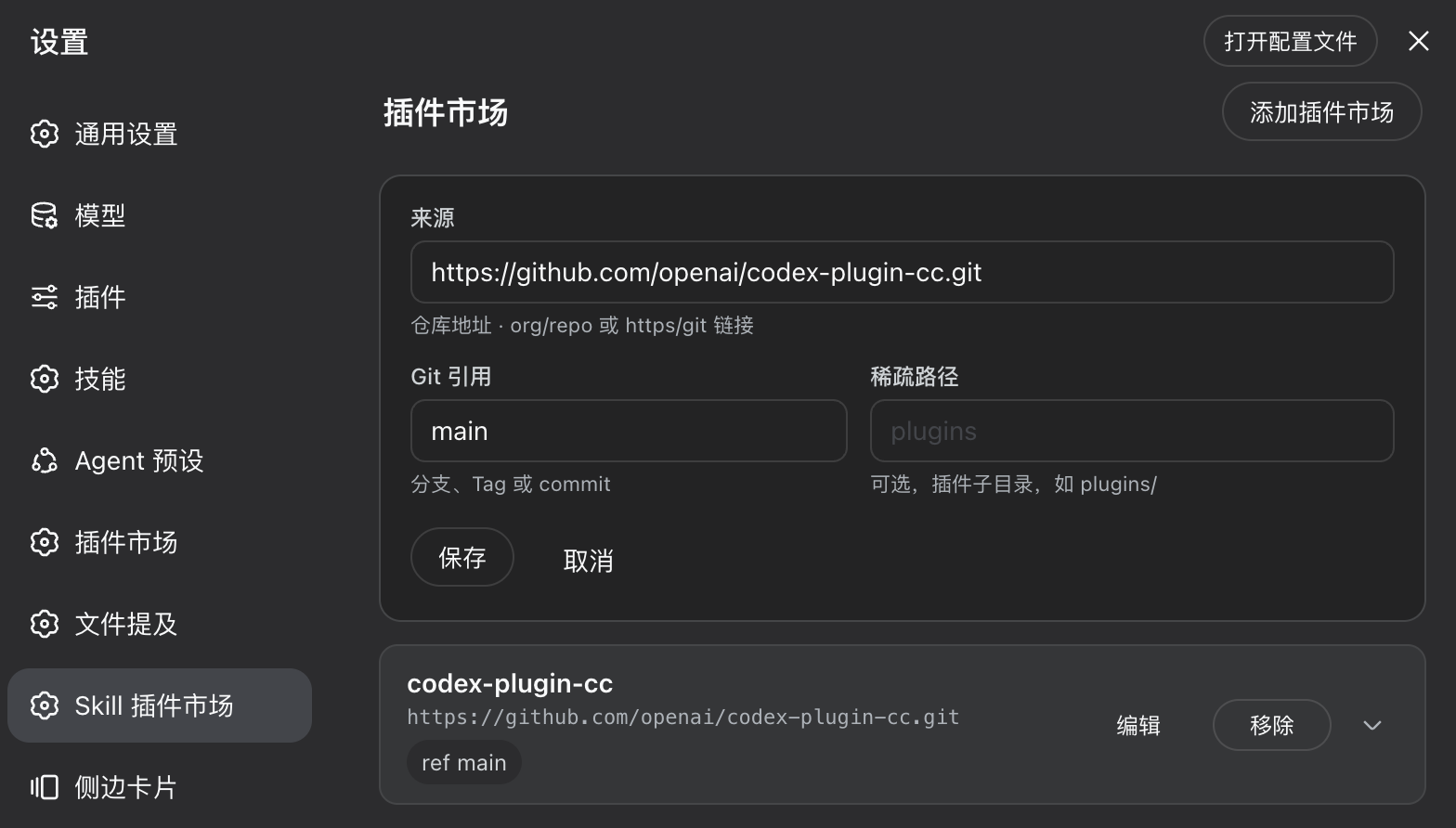
1. Add a marketplace
Open Settings → Skills Marketplace, select “Add plugin marketplace”, then enter the repository URL and Git ref. Sparse path is optional; leave it empty when the repository root is the marketplace.
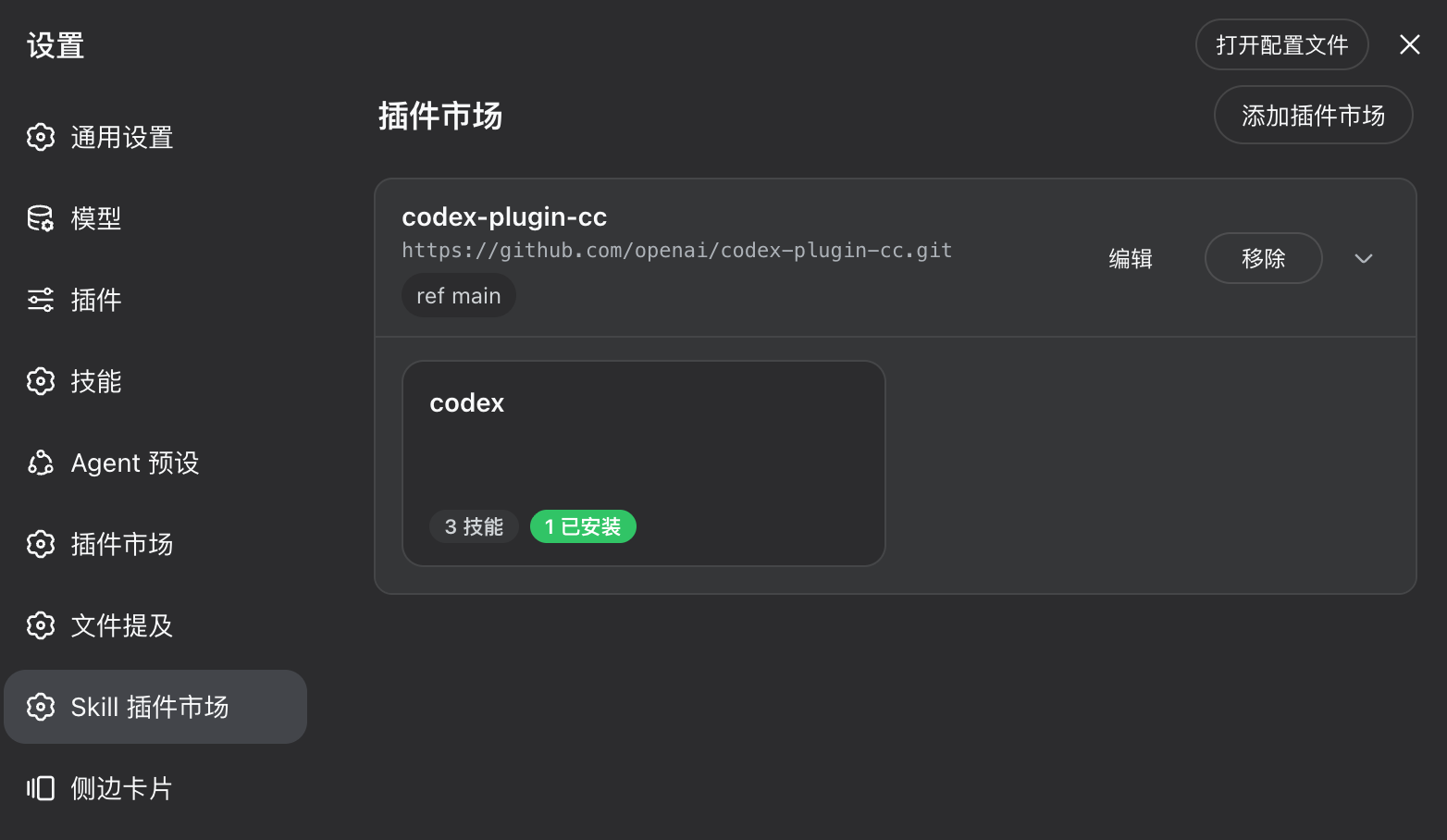
2. Expand the plugin list
Save the source, then use the expand control on the marketplace card to view its plugins and skill counts in place.
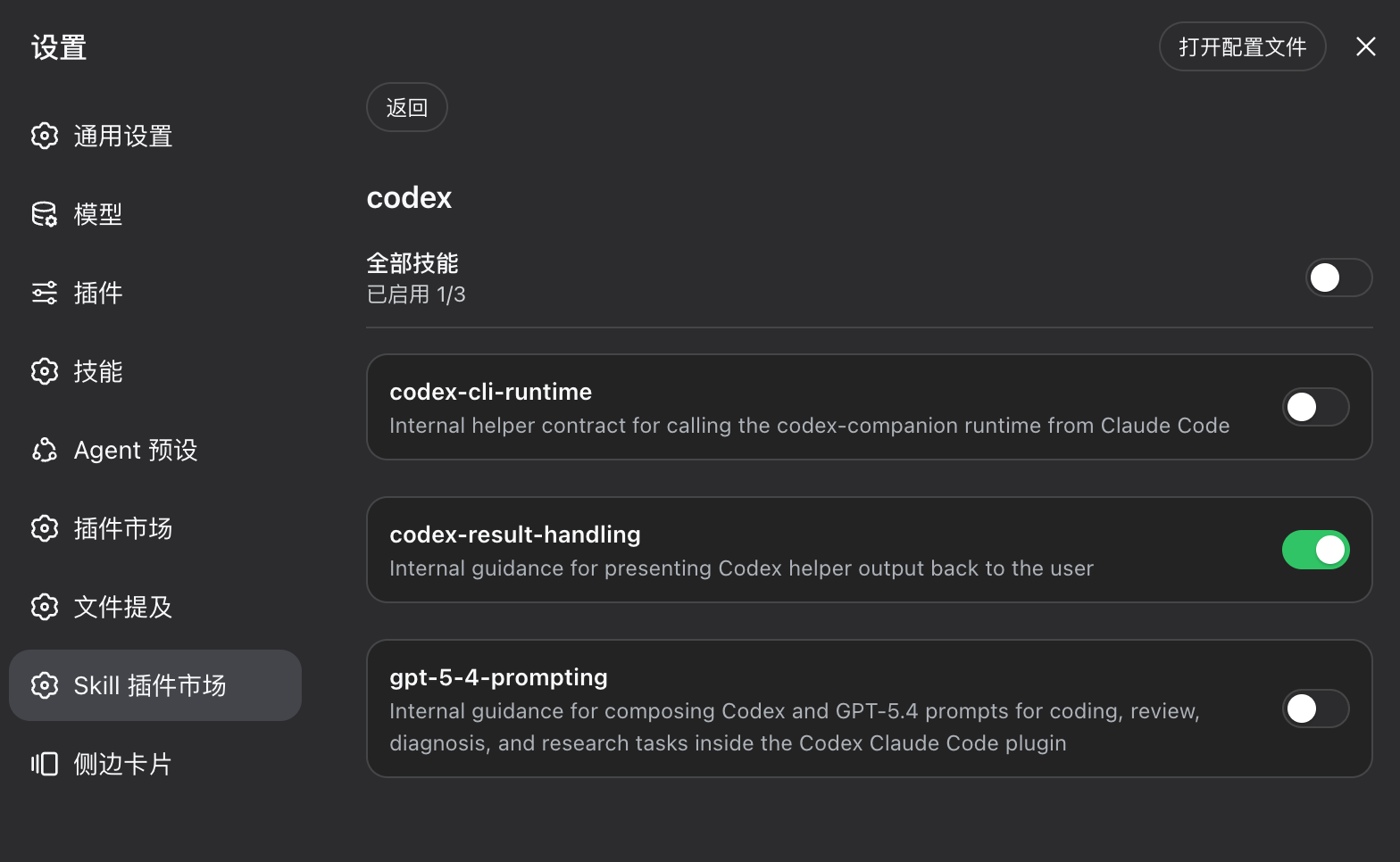
3. Manage skills
Open a plugin card to manage its skills with the overall or per-skill toggle.
4. Update a marketplace
Click Update on a market card to incrementally pull the latest content of the configured ref (repo URL + git ref + sparse path):
- files of enabled skills are refreshed to the latest version;
- your per-skill choices are preserved (disabled skills stay off, new skills are not auto-installed);
- skills removed upstream are pruned safely (only managed skills are ever touched).
Verify the CLI without DSH
You can verify the core pipeline without installing DSH:
git clone https://github.com/cxdyun/dsh-skills-marketplace.git
cd dsh-skills-marketplace
pnpm install
node cli.mjs --help
node cli.mjs add "https://github.com/you/your-skills-repo.git" --ref main --path plugins
node cli.mjs catalog
The CLI does not require DSH; test installations are written to ~/.dsh/skills/.
Why this exists
DSH's @deepseek-ai/dsh-skill-filesystem natively scans these skill roots and reads <name>/SKILL.md front-matter:
| rank | scope | path |
|---|---|---|
| 100 | project | <project>/.dsh/skills |
| 200 | project | <project>/.agents/skills |
| 400 | user | ~/.dsh/skills ← install target of this manager |
| 500 | user | ~/.agents/skills (shared with Codex/Claude) |
So SKILL.md is the common format. DSH does not parse the Codex/Claude wrapping layers (marketplace.json, plugin.json, agents/openai.yaml, MCP manifests). This manager bridges that gap by:
- Fetching —
git sparse-checkout, only the requested sparse path. - Catalog resolution — A) an explicit
dsh.market.json, or B) convention-driven discovery overplugins/*/skills/*/SKILL.md(works with existing Codex/Claude repositories zero-modification). - Flattening — each skill is copied flat into
~/.dsh/skills/<skill-name>/(one level deep; Codex-onlyagents/openai.yamlis stripped). - Plugin-dimension management — a local manifest (
plugin ↔ skills ↔ source ↔ commit) drives the plugin-first GUI.
Features
- Repository → skills — add any Git skill repository as a source (
url + ref + sparsePath). - Plugin dimension — skills grouped under their plugin, not a flat list.
- Per-skill toggle — enable/disable individual skills, installed into
~/.dsh/skills. - Safe uninstall / prune — only removes skills this manager installed (tracked via a tombstone set); never touches your own skills.
- Refresh — incremental fetch + orphan cleanup.
- Dual front-ends — a self-contained HTML GUI and a dependency-free CLI (core logic is pure Node, no DSH required to verify the pipeline).
- Same-origin enforced on all mutation endpoints.
How it integrates with DSH
The built package is a DSH (cordis) plugin with two sides:
- Host side (
lib/index.js)- declares
inject = ['settings', 'webServer']; - registers the
skill-marketsettings namespace (installRoot,autoInstall) so it persists in the DSH settings page; - mounts the
/skills-marketplace/*HTTP routes for the GUI and CLI.
- declares
- Client side (
lib/client.js)- registers a
settings.sectionnamed “Skills Marketplace” (SkillMarketSection) inside the DSH settings page; - provides the plugin list, plugin details and per-skill toggles.
- registers a
After install, skills are written flat into ~/.dsh/skills/, which the built-in dsh-skill-filesystem automatically watches — no reload or extra loading config needed; the skills are immediately available to DSH agents.
To load this as a DSH plugin, install the built package the way you install any cordis plugin in your DSH profile, then open Settings → Skills Marketplace. The exact enablement flow is provided by the DSH host, not by this package.
The CLI below lets you verify the whole pipeline without DSH.
Build
pnpm install
pnpm run check        # typecheck + build (produces lib/)
pnpm run build runs node build.mjs, which uses esbuild to emit:
lib/index.js— host (cordis) bundle;lib/client.js— browser client (single-file__ModuleLoader__handshake);lib/{manifest,remote,sync,http,routes}.js— pure-ESM core reused by the CLI and tests;.d.tstype declarations viatsc.
CLI usage (verify the core pipeline first)
# add a source (repo + branch + sparse path)
node cli.mjs add "https://github.com/you/your-skills-repo.git" --ref main --path plugins

node cli.mjs list                          # list added sources
node cli.mjs install my-plugin             # install a plugin (default: first source)
node cli.mjs view                          # plugin-dimension view (default: first source)
node cli.mjs uninstall my-plugin           # uninstall, removing only managed skills
node cli.mjs refresh my-source             # incremental update + orphan cleanup
node cli.mjs prune                         # clear tombstones
Commands: add, list, catalog, install, install-all, uninstall, refresh, prune, view.
HTTP API (used by the GUI)
| Method | Path | Description |
|---|---|---|
| GET | /skills-marketplace/sources |
list sources |
| POST | /skills-marketplace/sources |
add {url, ref?, sparsePath?} |
| DELETE | /skills-marketplace/sources/:id |
remove a source (keeps installed skills) |
| GET | /skills-marketplace/catalog?source=<id> |
remote plugin/skill catalog (plugin-first) |
| GET | /skills-marketplace/installed?source=<id> |
installed view |
| POST | /skills-marketplace/install |
{sourceId, pluginId, skills?} |
| POST | /skills-marketplace/uninstall |
{sourceId, pluginId} |
| POST | /skills-marketplace/skill-toggle |
{sourceId, pluginId, skill, on} |
| POST | /skills-marketplace/refresh/<sourceId> |
incremental update to the latest of the configured ref (only re-installs enabled skills, preserving choices) |
All non-GET endpoints enforce same-origin (verified to reject cross-origin with 403).
GUI
Open client/market.html (or use the DSH Settings → Skills Marketplace section):
- My markets — source cards (shows
ref/sparse) with an “Add plugin marketplace” form (source / branch / sparse path) and Update / Edit / Remove actions; Update incrementally pulls the latest of the configured ref while preserving skill choices. - Plugin catalog — rendered inside the same card as the source (mirrors DSH’s built-in inline-expanding plugin-list card): clicking a market card header expands/collapses the plugin grid in-place, no longer detached from its source; the card highlights with a border/shadow and the chevron rotates. Each plugin badge shows its skill and installed counts.
- Plugin details — per-skill toggles: on = installed into
~/.dsh/skills, off = removed from the manifest and uninstalled.
Security & safety
- Safe uninstall — only deletes managed skills tracked in the manifest; cleanup acts only on the tombstone set (previously installed, now invalid). Your own skills are never touched.
- Cross-origin denied — mutation endpoints enforce same-origin.
- Codex-only files stripped —
agents/openai.yamlis never written to disk (DSH ignores it, and it would pollute the one-level layout). - MCP caveat — skills that rely on external MCP only carry their
SKILL.mdinstruction text on the DSH side (DSH does not launchagents/openai.yamlMCP servers); such skills are flagged in the UI.
License
Links
More in this category
zhu1090093659/dsh-web#packages/dsh-plugin-manager★ 8440
Plugin manager tab in DSH Settings → Plugins: install from npm or git with progress, enable/disable switches effective at next startup, conflict reconciliation with undo, and one-click hand-off to a fix session.
dsh-market/dsh-market★ 5679
Browse, search and install community plugins from inside DeepSeek Harness settings, with category filters, one-click updates, enable/disable, theme switching and configuration backup.
kingOfSoySauce/dsh-skin-market★ 185
Native skin marketplace and lifecycle manager that discovers community skins, displays previews and compatibility status, and provides verified one-click or manual installation paths.
awesome-dsh-plugin/dsh-find-plugin★ 172
Find plugins without leaving the agent: search this curated registry by keyword or category, with ready-to-run install commands.
bradeGithub/DSH-Plugins-Marketplace★ 171
GitHub-topic-driven plugin & skill marketplace: a Settings page that browses the auto-collected registry (the whole dsh-plugin topic plus the skills index, CI-refreshed every 2 hours) with one-click install, type detection, install-script and host-shadow-dependency safety confirmations, env-key management, and the STANDARD.md recognition spec.
Sanqi-normal/dsh-webui-market-plugin★ 104
In-harness plugin market for the dsh web GUI: browse the awesome-dsh-plugin.com catalog and install/uninstall plugins into a profile from Settings → Plugins → Plugin Market.
Community comments
Comments are public GitHub Discussions. Loading them connects to GitHub and Giscus; a GitHub account is required to post.