Memory Palace MCP plugin: DuckDB vector memory, skill library, forgetting curve, and a local-server supervisor for the @cup319/mmpl MCP server. Its HTTP routes have no DSH access check, so a web page open in your browser could call them.
Install
# from npm (prebuilt)
dsh plugin --profile web add @cup319/dsh-mmpl
# from GitHub (first run asks for allowBuilds approval — follow the hint, retry)
dsh plugin --profile web add github:cup319/dsh-mmpl
Any plugin you install runs third-party code with your own permissions — it can read your files, use your credentials, and reach the network, and tool approvals don’t sandbox it. GitHub-sourced plugins also run build scripts at install time — pnpm blocks those until you allow them, so an install can stop with ERR_PNPM_GIT_DEP_PREPARE_NOT_ALLOWED or ERR_PNPM_IGNORED_BUILDS; dsh prints the exact key to add under allowBuilds in your profile’s pnpm-workspace.yaml, and the install works on the next run. Allowing a build is a trust decision: only install sources you trust, and pin a commit (github:owner/repo#sha).
README
This plugin publishes its README in Chinese only.
MMPL (Memory Palace) memory plugin for DeepSeek Harness — connects the Rust DuckDB vector-memory MCP server via Streamable HTTP.
Screenshots
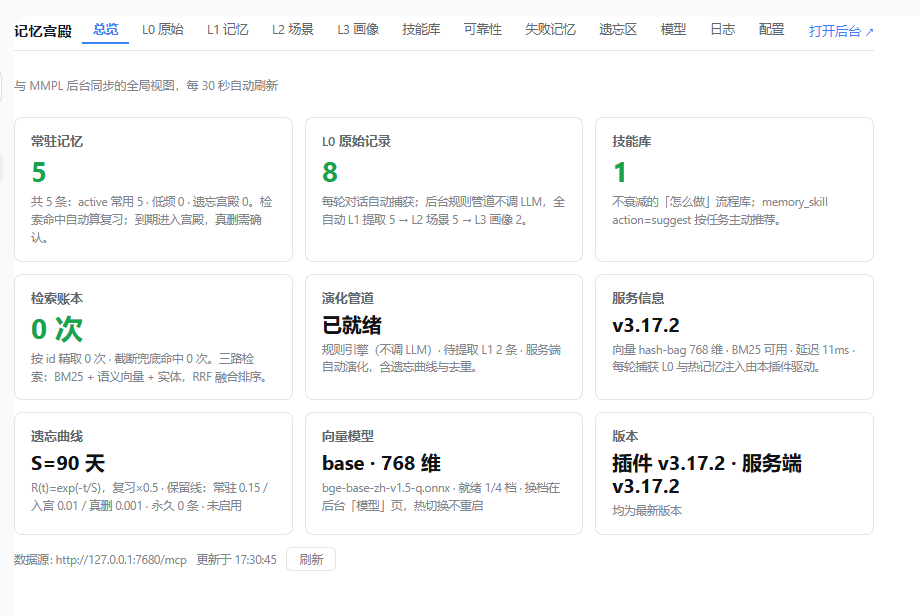
总览 Dashboard — 与 MMPL 后台同步的全局视图:常驻热记忆、L0 原始记录、技能库、检索账本、演化管道、遗忘曲线、向量模型与服务信息。
Plugin vs MCP — how this fits into dsh
DSH plugins and MCP servers are two integration surfaces that end at the same place: the model's tool list (ctx.tools).
- A native plugin is an in-process Cordis module (
apply(ctx)) packaged as a bundle (dsh.bundle.patchin package.json). It registers tools, commands, and web panels directly. - An MCP server is an external process/endpoint. The official
@deepseek-ai/dsh-mcp-client— itself a native plugin — bridges it: it lists the server's tools and re-registers them asmcp__<serverName>__<tool>.
This package mounts the official MCP client against your MMPL server with sane defaults, then adds the lifecycle glue in-process. Memory logic (forgetting curve, retrieval, compression) stays server-side in Rust — one MMPL server can be shared by dsh, Claude Code, Codex, and anything else that speaks MCP, each seeing the same memories.
What it does
Three layers:
Tools (bundle patch) — mounts the shared
@deepseek-ai/dsh-mcp-clientagainst a running MMPL server, exposing its 9 memory tools asmcp__mmpl__*:memory_write/memory_search/memory_listmemory_manage/memory_stats/memory_evolvememory_compress/memory_palace/memory_symbol
Native lifecycle glue (
index.js) — the official MCP client only bridges tools (it ignores MCPinstructions), so this plugin adds what Hermes gets from its MemoryProvider hooks:- 常驻热记忆:
ctx.systemPrompt.section()+variable()注册mmpl:hot-memory段(order 60),内容来自GET /admin/api/context,默认 300 token,后台每 5 分钟刷新。 - 每轮捕获 L0:监听
session/event的turn/start/user/message/assistant/message/turn/end,turn 结束时把U: …\nA: …POST 到/admin/api/capture(≤4000 字符,sha1 去重)。
- 常驻热记忆:
连接与守护(v3.5.0) — 插件设置页(Settings)新增三个可编辑字段,均持久化到 profile patch:
- url:MCP 端点,默认
http://127.0.0.1:7680/mcp,可填远端服务器。 - authToken(密文显示):Bearer token,自动同步到
memory-mmpl条目的headers.authorization。 - autoStart(默认开):URL 指向本机(127.0.0.1/localhost)且端口未监听时,自动拉起本机已安装的
@cup319/mmpl服务端(隐藏后台进程,60s 冷却重试);远端 URL 永远不会启动本地进程。 - 启动时在日志打印后台管理网址(
<base>/admin)。
- url:MCP 端点,默认
管理面板镜像(v3.11.0,多标签 + 增删改) — 双入口 + 七个标签,样式走 DSH 主题变量(浅色/深色自动跟随):
- 入口①(v3.12.0):侧栏顶层页面——
main槽(key=mmpl)+sidebar.panellist槽(同 id、order=1、自带 SVG 图标),与「Plugins / Automation tasks」并列的独立入口,web 与桌面端一致(对齐内置 plugin-manager 的注册配方)。 - 入口②:Plugins → @cup319/dsh-mmpl 插件详情页(
plugins.bundle.config槽)。 - 入口③:设置窗口左菜单「MMPL 记忆」(
settings.section槽,桌面端设置窗)。 - 总览:八张统计卡片——常驻记忆、L0 原始记录、技能库、检索账本、演化管道、服务信息,加遗忘曲线(S/复习增益/三道保留线/永久数/启停)与向量模型(当前档位维度/文件/就绪档数),30 秒自动刷新。
- L1 记忆 / L2 场景 / L3 画像 / L0 原始 / 技能库:与后台表格同构的列表,支持新建/编辑/删除——L1(内容/类型/永久)、L2 场景(名称/摘要/成员记忆 ID)、L3 画像(画像文本改写 + 槽位增删改)、L0 原始(内容/类型)、技能库(名称/描述/正文/触发词/启停)。删除有确认框,操作结果 toast 反馈;编辑 L1 内容自动走版本链并重嵌入。
- 可靠性(v3.16.0):新增「可靠性」标签页,展示记忆与技能的「N 次,X% 成功」,数据来自服务端
usage_events。 - 模型(v3.13.0):四档向量模型(small/base/m3/qwen3)就绪状态、体积与说明一览,就地下载 / 设为当前(同后台
/admin/api/models/download:已就绪仅记录选择,未就绪后台下载 3s 轮询进度,重启 mmpl 生效)。 - 本地服务端安装(v3.13.0):连接页顶部显示本地服务端检测状态(已装版本 + 路径);未装且 URL 为本机地址时提供一键安装(
npm i -g @cup319/mmpl@latest,经插件宿主执行,远端 URL 永远不出安装钮)。autoStart 拉起服务端时 DATA_DIR 取dataDir配置 → 环境变量 → 默认~/.mmpl/data(不再依赖进程 cwd,杜绝看门狗重启落到空库)。 - Token 显隐 + 后台带令牌直达(v3.15.0):Bearer Token 输入框加眼睛按钮,点击在明文/掩码间切换(经
/config/reveal回读,默认仍掩码);「打开后台」链接自动拼?token=(rust 端 admin.html 认 query token 并转 Bearer,本地/远端一致),无 token 时回落普通链接。 - 版本卡 + 更新检查(v3.15.1):总览页「版本」卡显示插件与服务端当前版本,比对 npm registry 最新版并提示有无新版(10 分钟缓存,registry 不可达时诚实提示);标签序调整为 总览→L0 原始→L1 记忆→L2→L3→技能库→模型→配置(admin 网页版分层浏览组同步 L0 组首)。
- 中文品牌名(v3.15.3):面板页眉品牌块「记忆宫殿」(en: Memory Palace);设置菜单中文名改「记忆宫殿」;settings.section 菜单标签改用 meta.label(config.title 宿主壳不读,v3.15.2 修无字问题)。
- 内置使用守则(v3.15.4,随 mmpl 安装自带):服务端首次启动自动 seed 技能「记忆宫殿使用守则」(相关必查 / 重要流程主动写 / 踩坑即更新,幂等、正文变更才升版本),经技能索引注入每个连接的客户端 AI;MCP instructions 同步提示纪律。Hermes 式经验沉淀零配置生效。
- 配置页「运行位置」卡(v3.15.5):显示服务端程序 / 数据目录 / 记忆库文件 / 鉴权令牌文件的实际路径(overview
paths字段,canonicalize 绝对化;服务端离线时诚实占位)。 - 捆绑默认模型(v3.15.5):安装包内置 small 档模型(bge-small-zh-v1.5 量化 24MB + tokenizer.json),首次启动零下载零阻塞(exe 同目录
models/自动查找,代码既有能力);base/m3/qwen3 档仍按需从「模型」页下载。 - 模型下载进度条(v3.15.6):「模型」页下载显示真实字节进度(
GET /admin/api/models/progress,Content-Length 百分比 + 已下载 MB);网页版后台与插件面板同步生效;首启自动下载同样带进度。 - 插件内一键安装服务端(v3.15.6):只装了 dsh-mmpl、本机没有 mmpl 时,「配置」页显示安装按钮——从 npm registry 流式下载 tarball(真实进度条)→ 解包到
~/.mmpl/pkg→ 平台二进制准备(含默认模型)→ 自动拉起服务端,全程GET /install-status可轮询;已安装未运行时提供「启动服务端」按钮。 - 遗忘区面板(v3.15.7,网页版 + 插件面板):被遗忘的记忆独立存放于
archive.duckdb(DuckDB ATTACH 第二文件,与主库同目录、不参与任何检索)。自动遗忘(强度衰减)/ 手动删除 / 后台删除都先移入遗忘区:面板可查看(内容/原因/时间)、恢复回主库(保留原状态与强度)、彻底删除或一键清空;overview 计数新增forgotten。主库体积与备份不再携带被遗忘数据。 - 技能参考文档(v3.15.12,网页版 + 插件面板):技能支持附件上传(API 文档、参考资料等)——
skill_files表存于主库,同名覆盖、单文件 ≤8MB;网页版「内容」弹层与插件面板「技能库 → 内容」均可查看正文、上传/下载/删除附件(v3.17.3 起插件端按钮由「附件」更名「内容」,与网页版一致);MCPmemory_skill action=get响应带files清单,action=get_file name=… file=…取 base64 正文。 - 插件面板技能编辑正文修复(v3.15.12):列表接口本就只回
body_chars不回正文(列表性能考量),插件编辑弹层改为打开时按需拉取单条(GET /admin/skill/{id})取回正文——修复「编辑时正文为空」。 - 面板内一键升级(v3.15.8):「配置」页新增两个升级按钮——「升级服务端」先自动关闭正在运行的 mmpl 进程(Windows 锁运行中 exe,必须先释放文件锁;覆盖本插件拉起的进程与用户手动启动的进程,按端口确认释放后才覆盖),再走同一条 tarball → postinstall → 自动拉起链路,全程进度条(新增「正在关闭旧服务端进程…」阶段);「升级插件」下载最新 dsh-mmpl 覆盖插件目录源文件(依赖无变化时连 package.json 一并更新;有变化保留旧声明并提示重装),重启 DSH 后生效。两按钮与「检查更新」版本对比(
/updates)联动,升级完成即刷新。install.js 装完自动清理平台下载包(安装目录从 ~177MB 降至 ~95MB)。 - 数据通路:
GET /api/dsh-mmpl/admin/*只读查询 +POST/PUT/DELETE写透传(自动带 Bearer token、无 CORS、路径白名单、body 上限 2MB)。 - 服务离线时显示诚实横幅(错误原因 + 重试 + 跳转配置),不静默伪装。
- v3.7.1 实机修复:package.json 补
"."主导出(宿主按包名 import 原生模块,缺它整包不激活);client.js 插件 API 双写兜底(module.exports 与 exports 都挂);宿主 volatile 配置字段可能以对象形态传入,bridge 读写全程消毒,杜绝[object Object]毒 URL 自续。
- 入口①(v3.12.0):侧栏顶层页面——
Everything is best-effort: if a service/hook is missing or MMPL is down, the plugin stays inert and the MCP tools keep working.
MMPL's Ebbinghaus forgetting curve, "memory palace" (archived-memory palace with confirm-before-purge), BM25 + ONNX semantic vector retrieval, and RRF fusion all live server-side — this bundle only wires the connection.
服务控制按钮(v3.17.0)
设置页「本地服务端」卡提供 启动 / 停止 / 重启 / 升级 四个按钮:
| 按钮 | 插件 API | CLI 等价 |
|---|---|---|
| 启动 | POST /api/dsh-mmpl/start-server |
mmpl_start |
| 停止 | POST /api/dsh-mmpl/stop-server |
mmpl_stop |
| 重启 | POST /api/dsh-mmpl/restart-server |
mmpl_restart |
| 升级 | POST /api/dsh-mmpl/upgrade-server |
mmpl_upgrade |
仅本机 URL 可用(远端模式不显示)。停止走进程信号(Linux SIGTERM / Windows taskkill /F),与服务端 DATA_DIR/mmpl.pid 约定一致。
自动记忆(原生,对齐 Hermes)
官方 @deepseek-ai/dsh-mcp-client 只桥接工具、不读 MCP instructions;本插件在 index.js 补了两层原生逻辑:
| 能力 | 实现 | 行为 |
|---|---|---|
| 常驻热记忆 | ctx.systemPrompt.section() + variable() |
把 GET /admin/api/context 的热块注入系统提示(默认 300 token,后台每 5 分钟刷新) |
| 每轮捕获 L0 | ctx.on('session/event') |
turn/end 时把 U: …\nA: … POST 到 /admin/api/capture,进入 L0 后管道自动跑 L1→L3 |
服务或事件不可用时插件静默降级,MCP 工具照常可用。临时关闭:
MMPL_CONTEXT_TOKENS=0 dsh ...      # 不注入热块
MMPL_CAPTURE_TURNS=false dsh ...   # 不自动捕获
老版本 DSH 若没有 ctx.systemPrompt,用规则文件兜底(写进 workspace AGENTS.md):
## MMPL 记忆
- 每轮开始前调用 `mcp__mmpl__memory_search`,参数 {"mode":"context","token_budget":300},把返回的 text 当作已知背景。
- 每轮结束调用 `mcp__mmpl__memory_write`,参数 {"action":"capture","content":"U: <用户原文>\nA: <助手回复>","record_type":"conversation"},把真实对话落到 L0。
- 重要事实/偏好用 {"action":"encode","input":"...","type":"preference"} 沉淀为长期记忆。
通用做法(包括没有 hook 的 IDE)见 ../generic/README.md。
Prerequisites
A running MMPL server at http://127.0.0.1:7680/mcp. With autoStart on (default) and a loopback URL, the plugin launches it for you when it finds a local @cup319/mmpl install (env MMPL_HOME, require.resolve, or the global npm root — install once with npm and forget). It never downloads or builds anything.
Install the server separately:
# npm (Rust single-binary edition)
npm install -g @cup319/mmpl
mmpl   # → http://127.0.0.1:7680/mcp
Install into a DSH profile
dsh plugin --profile <name> add @cup319/dsh-mmpl
dsh --profile <name>
Configuration
Primary configuration is the plugin's Settings page (volatile schema fields, persisted into the profile patch); the env vars remain as bootstrap/fallback overrides.
| Setting 字段 | 默认 | 说明 |
|---|---|---|
url |
http://127.0.0.1:7680/mcp |
MCP 端点;改后插件自动把 memory-mmpl 条目同步为新端点 |
authToken |
— | Bearer token(密文);自动写入 memory-mmpl 条目的 headers.authorization,清空则移除 |
autoStart |
true |
本机 URL 且端口未监听时自动拉起 @cup319/mmpl;远端 URL 忽略 |
| Env | Default | Purpose |
|---|---|---|
MMPL_URL |
http://127.0.0.1:7680/mcp |
Override the MCP endpoint (remote host / proxy); native layer derives /admin/api/* from it |
MMPL_AUTH_TOKEN |
— | Bearer token for native /admin/api/* calls |
MMPL_AUTOSTART |
true |
Supervisor fallback when the Settings field is untouched |
MMPL_CONTEXT_TOKENS |
300 |
Hot-memory budget in tokens (0 disables prompt injection) |
MMPL_CONTEXT_REFRESH_MS |
300000 |
Hot-memory refresh interval (min 30000) |
MMPL_CAPTURE_TURNS |
true |
Capture finished turns to L0 (false disables) |
Setting 优先于环境变量。MCP 工具调用的鉴权头由插件按 authToken 自动同步到 memory-mmpl 条目(经 host config-editor 写回 profile patch),无需再手改 cordis.patch.yml。
MMPL v3.3.6 起默认鉴权(监听
0.0.0.0时自动生成DATA_DIR/auth-token)。把该 token 填进插件设置页的authToken字段即可——插件会同时用于本地/admin/api/*调用和memory-mmpl条目的headers.authorization。用HOST=127.0.0.1启动 MMPL 则不需要。
Verify
- Session A: "Remember that my validation drink is lapsang-."(模型用
mcp__mmpl__memory_write写入) - 后台
/admin→ 「L0 原始记录」应出现本轮U: … / A: …(原生捕获生效) - Session B: 直接问 "What is my validation drink?"(不说"查记忆")——热块已注入系统提示时可直接答;否则模型会调
memory_search兜底
若第 2 步没有记录:确认 MMPL_CAPTURE_TURNS 未被设为 false、MMPL 在 MMPL_URL 可达;若第 3 步仍需显式检索:确认 DSH 有 ctx.systemPrompt 服务(rc.5 的 base/headless/web profile 均内置),否则用 AGENTS.md 规则兜底。
Plugin marketplace (awesome-dsh-plugin)
To be listed in the awesome-dsh-plugin catalog (dsh-plugin-catalog on npm), submit a PR to awesome-dsh-plugin/awesome-dsh-plugin adding one file data/plugins/<owner>__<repo>.yml:
url: https://github.com/<owner>/MMPL          # GitHub repo hosting this package
name: <owner>/MMPL#dsh-mmpl                    # monorepo subpackage form
category: memory
description:
  en: Connects DeepSeek Harness to the external MMPL Rust DuckDB vector-memory
    MCP server via the official MCP client bridge, exposing 9 memory tools.
  zh: 通过官方 MCP 客户端桥接,将 DeepSeek Harness 连接到外置的 MMPL Rust DuckDB
    向量记忆服务器,提供 9 个记忆工具。
Requirements checked by their CI: dsh.bundle declared in package.json (✅), repo ≥1 day old, dsh-plugin topic on the repo, description factual and verifiable against source.
Note
This is an independent community integration, not an official DeepSeek or MMPL endorsement. See examples/mcp-memory in the deepseek-harness repo for the reference integration pattern.
Links
More in this category
vectorize-io/hindsight#coding-agents★ 61388
Hindsight, agent memory that learns: long-term project memory with auto recall and retain, knowledge pages, deep reflection, and per-repo memory banks.
volcengine/OpenViking#examples/dsh-memory-plugin★ 42311
OpenViking memory and context bundle for DeepSeek Harness: pre-step auto-recall and profile injection, session capture, `viking://` URI guarding, and recall/write memory tools backed by an OpenViking server.
MemTensor/MemOS#memos-local-plugin★ 12417
Local-first memory plugin for DeepSeek Harness: layered L1/L2/L3 memory with automatic capture, manual memos_* retrieval tools, and a built-in memory viewer.
agentscope-ai/ReMe#dsh★ 3812
Connects DeepSeek Harness to ReMe's local-first, self-evolving personal knowledge base: automatically captures completed main-agent conversations as user-owned Markdown memory, searches conversations and source material through reme_search with BM25, optional embeddings, and wikilink expansion, and schedules daily memory consolidation.
zilliztech/memsearch#MemSearch★ 2889
Shared Markdown memory for DSH and other coding agents, with automatic capture, pre-step context injection, searchable recall, and memory-to-skill self-evolution through a review panel.
vshulcz/deja-vu#extensions/dsh★ 1578
Cross-session memory and context recovery across forty-five other coding agents (45+) on this machine, reading session files they already wrote before install (Claude Code, Codex, Cursor, Windsurf, Trae, Antigravity, VS Code Copilot Chat, opencode, OpenClaw, Hermes, Kimi, Qoder, Cline, Zed, Magpie and more): six tools (deja_recall, deja_session, deja_blame, deja_fix, deja_how, deja_remember), a /deja command, and optional automatic recall injected into runtime context. Local BM25 CLI/MCP index, no LLM, no embeddings, no network (dsh plugin --profile web add dsh-deja).
Community comments
Comments are public GitHub Discussions. Loading them connects to GitHub and Giscus; a GitHub account is required to post.