LLM-assisted auto approval with countdown fallback for the Auto permission preset: static rules, risk tiers, breaker and file audit.
Install
# from npm (prebuilt)
dsh plugin --profile web add @quill507/dsh-auto-approval-llm
# from GitHub (first run asks for allowBuilds approval — follow the hint, retry)
dsh plugin --profile web add github:cuddly-guacamole/dsh-auto-approval-llm
Any plugin you install runs third-party code with your own permissions — it can read your files, use your credentials, and reach the network, and tool approvals don’t sandbox it. GitHub-sourced plugins also run build scripts at install time — pnpm blocks those until you allow them, so an install can stop with ERR_PNPM_GIT_DEP_PREPARE_NOT_ALLOWED or ERR_PNPM_IGNORED_BUILDS; dsh prints the exact key to add under allowBuilds in your profile’s pnpm-workspace.yaml, and the install works on the next run. Allowing a build is a trust decision: only install sources you trust, and pin a commit (github:owner/repo#sha).
README
@quill507/dsh-auto-approval-llm
LLM-assisted auto approval with a timeout fallback for the DeepSeek Harness Auto permission tier
Routine calls pass statically · risky or ambiguous ones go through LLM review + a human countdown · fail-closed by default
Auto tier (machine value auto-approval; host name Auto approval; zh client 自动审批) = sandbox: danger-full-access + approval: ask. In this tier the plugin is the single terminal answerer for approval/request: routine calls pass through static rules, while dangerous or ambiguous ones follow "static rules → LLM classifier → LLM/human verdict → countdown fallback → breaker", with human and audit fallbacks kept throughout. On hosts >= 0.1.6 the name auto belongs to the upstream @deepseek-ai/dsh-experimental-auto-review (Auto review / EXP): the upstream only acts when the derived preset is auto, so the two own different tiers and can be enabled together.
Features
- Static rules + LLM classifier — read-only, session and workspace routine calls pass; dangerous calls, external writes, credential exfiltration and protected paths are denied; ambiguous calls go to the LLM pre-classifier.
- Write-vector hardening — command segments carrying a real file-write redirect leave the read-only fast path; the POSIX heads
tee/dd of=/sed -i/truncate/installjoin the per-target gate through their operands; direct writes to plugin runtime-state files are unconditionally hard-denied. - Tri-state switches for 12 categories + trusted-directory mode — each category is configurable as
auto/ask/deny, and every default isinherit(except the HARD_LOCKED delete / disk, which are taken over as a lockedaskcountdown even when unconfigured); the four locked categories (delete / disk / privilege / protected) stay locked;trustedDirsandcategoryModedefine what counts as a routine location. → docs/17 - Dual-channel model sources — the fast classifier and the deep reviewer each pick their own source: the session model (default) / a DSH-configured model / a custom endpoint. Endpoint keys live in the DSH credential store; the frontend only shows "Configured" and never echoes them.
- Tiered countdown + timeout fallback + LLM takeover — low/medium/high countdowns (default 5 / 8 / 10 s); on timeout the action follows
timeoutAction(reject / allow / auto-approve low-risk); at medium risk an explicit LLM verdict inside the window takes over. Closing the browser never hangs (the host timer is authoritative). - Breaker and loop guard — consecutive or cumulative LLM denials hand the call to a human (
/approval-resetresets); the loop guard (off by default) turns a call that the auto-allow surface keeps allowing into a pinned-reject countdown. - Declarative rules
rulesText—tool(regex) | allow|deny|human [| field], with[agent:…]/[workspace:…]dimension prefixes; a parse error invalidates the whole block (the settings card warns). - Confirmation-based learning (off by default) — once one signature has been confirmed by a human repeatedly, it auto-allows, still running a standard online review before every allow; entries can be viewed and revoked. → docs/18
- Auditable and observable —
history.jsonlplus an append-onlyaudit.jsonl; real LLM review latency statistics; one automatic retry on transient gateway failures (auth-class errors never resend credentials).
How it works
flowchart TD
    A["Model issues a tool call"] --> B["② tools.guard: synchronous hard-deny gate<br/>credentials / protected paths / shell fuses / symlink escape"]
    B -->|"hit"| X["Denied"]
    B -->|"pass"| C["③ tools/pre-execute: static assessment + category tightening"]
    C -->|"deny"| X
    C -->|"allow"| Y["Executed"]
    C -->|"ask"| D{"LLM pre-classifier fast path"}
    D -->|"allow"| Y
    D -->|"deny"| X
    D -->|"uncertain"| E["④ approval/request: single terminal verdict<br/>rules → lists → category → review mode → breaker → learning → risk tier"]
    E -->|"LOW / LLM takeover"| Y
    E -->|"MEDIUM / HIGH"| G["Human panel + countdown<br/>LLM review in parallel, timeout per timeoutAction"]
    G -->|"Allow once"| Y
    G -->|"Reject / timeout"| X
    Y --> H["⑥ tools/post-execute: result and denial reason fed back to the model"]
    X --> H
- LOW: allowed silently when no review is due; otherwise decided by the verdict; ESCALATE goes to a human.
- MEDIUM: panel plus countdown with the LLM running in parallel; if
llmTakeoverScopecovers the tier and the verdict is explicit, it follows immediately. - HIGH: panel plus countdown, with the LLM advising only; on timeout
timeoutActionapplies strictly. - The timeout marker's only author is the host timer; the client only reports outcomes and cannot forge one.
The full five-stage hook sequence (⑤ artifact registration, ⑦ notice delivery) is in docs/02; the two static layers are consulted through the host
tools/pre-executewaterfall, and the peer-shortcut shapes are in docs/09.
Installation
Prerequisites: the session or preset is on the Auto tier (machine value auto-approval = danger-full-access + approval: ask; switch with /permission auto-approval); DSH 0.2.0-rc.2 or 0.2.1-alpha.1; Node ^22.19.0 || >=24.0.0.
Compatibility window: the name auto is reserved for the upstream @deepseek-ai/dsh-experimental-auto-review (Auto review / EXP), while this plugin only defines and gates auto-approval, so the two own different tiers and can be enabled together. One line per tuple is promised: 0.2.0-rc.2 and 0.2.1-alpha.1 both have full support (peer range >=0.2.0-rc.2 <2 || >=0.2.1-alpha.1 <2). Long-term rule: the promised line follows the host the user actually runs; a further line is appended only when upstream enters the alpha of a new tuple (with a matching row in HOST_LINES). The peer range is an installation-admission surface — untested lines inside it are unsupported, and the upper bound <2 is only the range's upper bound. The promise now spans two tuples, so the range carries one arm per tuple and each promised line is admitted by the arm carrying its own tuple — without relying on the host gate's includePrerelease flag. 0.1.7-rc.2 has left the promise and is refused by the raised range. The legacy machine value auto alias plus the legacy/unknown capability branches were removed with that floor (the shipped patch defines only auto-approval).
Upstream caveats: from 0.2.0-rc.1 on, no breaking-change section, no deprecation notice, and an AGENTS.md that is the same git blob (37cfd8d2…) as at 0.1.7-rc.2 — the "pre-stable, update every consumer" stance is unchanged. A community report also records 6 of 13 third-party plugins carrying an error badge after the upgrade, with no maintainer reply. Neither conflicts with this plugin's contract-surface result: it measures the 50 symbols this plugin actually uses (48 unchanged, zero removals, renames or moves; the only delta is an added ToolCallRecovery in dsh-session), not everything a plugin can touch — and the probe detects a symbol disappearing or being renamed, not a symbol changing meaning.
dsh plugin --profile web add @quill507/dsh-auto-approval-llm
- Restart dsh after installing, so the host side takes effect.
- Auto tier only (other permission tiers are untouched); switch with
/permission auto-approval. This plugin is the single terminal answerer forapproval/requestin theauto-approvaltier — do not stack a second terminal answerer on the same tier; the upstream@deepseek-ai/dsh-experimental-auto-review(auto, Auto review / EXP) owns a different tier and can be enabled together. - Platforms: Windows + Git Bash is the primary development and test baseline; macOS / Linux / WSL are adapted in code but not verified by real users; Android native environments are unsupported. → docs/19
- Feedback: please file a GitHub issue with your platform, dsh version, plugin version, reproduction command and expected behavior.
- Local development:
npx tsc -p tsconfig.jsonplusnpx tsdown, loaded through alink:dependency (host changes need a restart; client changes hot-reload). → docs/14
Upgrading from the legacy auto tier
- Same-signature gate: every host migrates only stored sessions with
raw preset = auto+sandbox = danger-full-access+approval = ask; any otherautosignature (includingdanger-full-access + never) is left untouched and warned about. - Subject change on modern hosts: on hosts
>= 0.1.6where the upstream auto-review layer holds that same-signatureauto, the session is migrated toauto-approvaltoo — the sandbox/approval knobs are unchanged, but the answering subject moves from upstream to this plugin (upstream no longer owns that tier). This is part of the same-signature rescue semantics, not a knob widening. - When: archived sessions are not processed; migration is lazy when a session becomes live on resume (
session/createdprepend), with a startup live scan and anagent/createdfallback. It rewrites the durable raw identity (permission/preset) only — no knob writes, nopermissionPresets.set(). - Own-tier spec enforcement: an
auto-approvalsession whose approval is effectivelynever(approval: never, orapproval: nullwith a base policy ofnever) is written back toask(preset-spec-restoreaudit); the upstreamautois never touched. - Fail-closed: on hosts
>= 0.1.6without the upstream auto-review layer, a stored session that is already live when thepermissionPresetsservice is constructed (so the plugin cannot migrate it first) is rejected by the host pin — the session does not open; it is not silently allowed. Recovery: stop dsh → use the optional offline migration tool or export/import manually → start again; keeping the upstream auto-review layer is the alternative. This boot-time gap cannot be fixed plugin-side. - The official permission picker's risk confirmation covers only the host's built-in
danger-full-access; the customauto-approvaltier gets its own confirmation from the plugin client.
Quick start
- Switch the session or preset to the Auto tier:
/permission auto-approval. - Open Plugins → auto-approval-llm in the sidebar and use the row's "Configure " control to open the row configuration page; the settings form should appear (when the Host hands over no form for that namespace, the page shows the effective values read-only). The defaults already work (routine calls pass statically; ambiguous ones go to session-model review; on timeout
timeoutActionapplies, reject by default). - To route reviews through a specific model: set the channel's model source to "DSH model" in the Online review model card and pick one, or choose "Custom endpoint" and fill in protocol / base URL / model / key → save → test connection.
- If panels feel too frequent: raise the medium-risk countdown, or set the timeout action to
Reject/Auto-approve low-risk.
Session commands (not registered by default):
/approval-modeto inspect the current session mode,/approval-mode manual|smart|unattendedto set it, and/approval-reset//approval-reset-allto reset the breaker — enableslashCommandsEnabledin the settings card and restart.
Screenshots
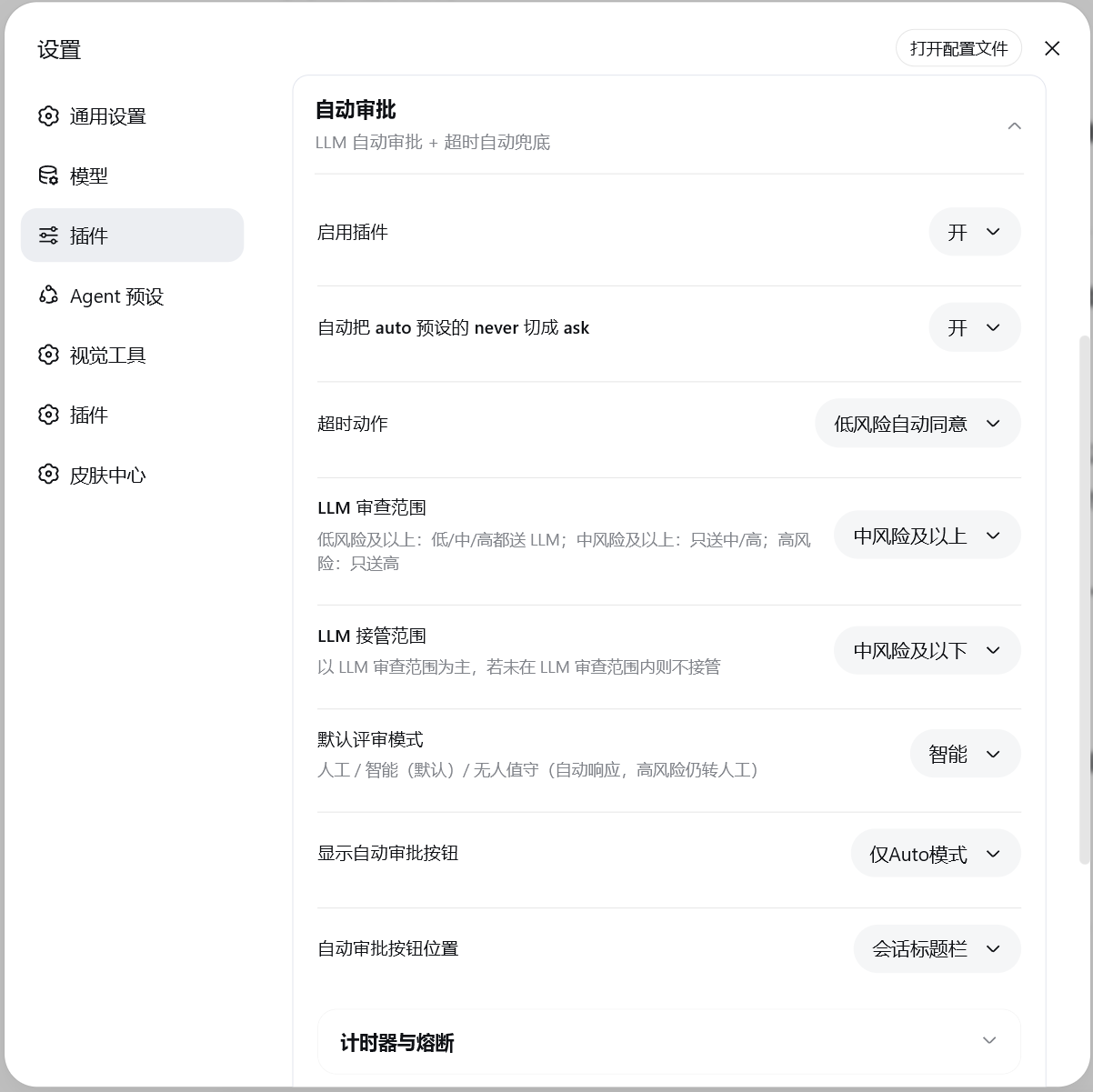
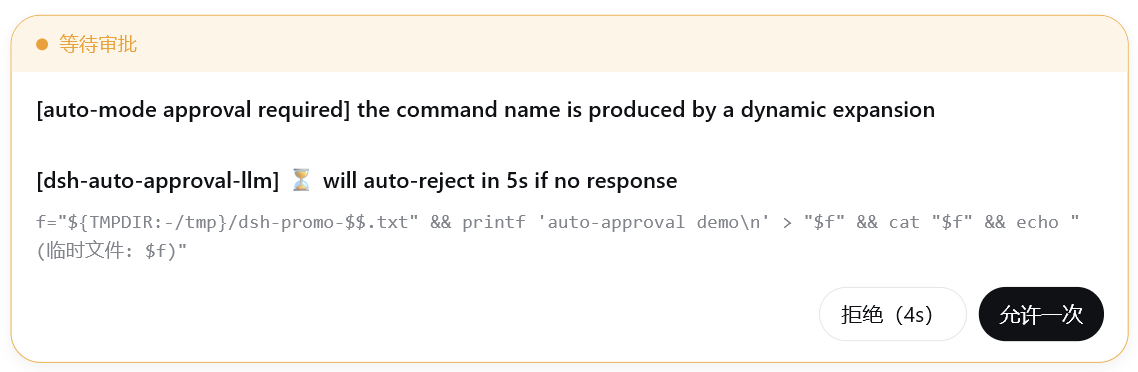
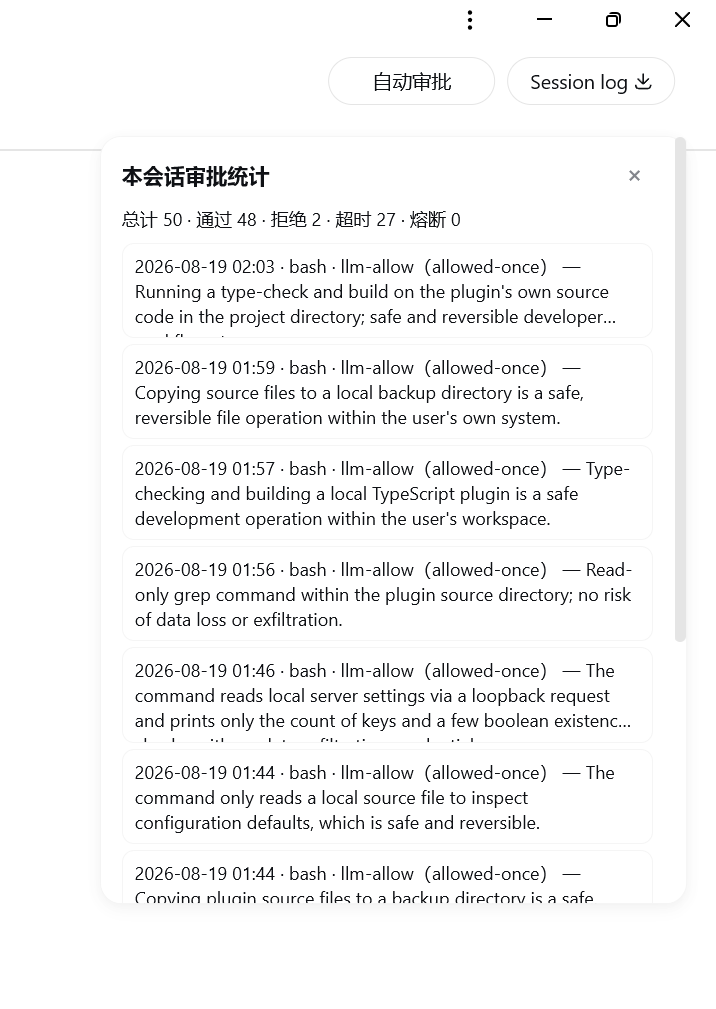
The remaining surfaces (timers and breaker / safety rules / category switches and trust mode / confirmation-based learning / online review model / permission preset) are documented in docs/10 · Client UI.
Configuration
The table below lists the common keys only; every key, its full semantics and its adjudication exceptions are in docs/12 · Configuration.
| Key | Default | Description |
|---|---|---|
enabled |
true | Answerer master switch: off stops this plugin from settling approval/request (the static fuses and the guard still run) |
timeoutAction |
reject |
Timeout action: reject / allow / low-risk only (delete and disk are always denied regardless of this key) |
llmReviewScope |
low-or-above |
Which risk tiers go to LLM review |
llmTakeoverScope |
medium-or-below |
Which tiers let an explicit LLM verdict decide directly |
lowRiskSeconds / mediumRiskSeconds / highRiskSeconds |
5 / 8 / 10 | The three countdowns (seconds) |
defaultReviewMode |
smart |
Per-session review mode: manual / smart / unattended |
maxConsecutiveDenials / maxTotalDenials |
3 / 20 | Breaker thresholds (0 disables) |
loopDetectionThreshold |
0 | Loop-guard threshold (0 = off; YAML only) |
rulesText |
'' | Declarative rules ([agent:…] / [workspace:…] prefixes) |
allowlist / denyList / humanOnlyList |
[] | Exact tool-name lists |
classifierSource / reviewerSource |
session |
Model source per channel: session / preset / endpoint |
endpointUrl / endpointModel / endpointProtocol |
'' / '' / openai |
Shared custom endpoint |
categoryPolicy / categoryMode / trustedDirs |
{} / standard / [] |
Category tri-states, location mode and trusted directories |
privilegeAutoReview / protectedAutoReview |
false | Unlock privilege / protected respectively (differences in docs/17) |
learningEnabled / learningThreshold |
false / 3 | Confirmation-based learning switch and threshold (2–10) |
slashCommandsEnabled / directHumanEnabled |
false | Register /approval-* commands / direct-human channel (the agent can route a call to a human; both need a restart) |
debug / redactResults / notifyUser |
false / false / true | Debug log / redact successful results / approval notice in-session |
The settings card is a set of collapsible sub-cards with immediate save for top-level switches, and invalid configuration values raise a red banner plus a "Try to fix" button → docs/10. host-only keys (
workspaceRoot,trustedDshSubpaths,maintenanceDshPaths,rulesDryRun,breakerAntiHijackMs,reviewMaxRetriesand friends) are configured through patch / YAML, and saving the settings card never clears them; the Advanced sub-card lists them with their current effective value as read-only rows (no control) and states which DSH_HOME write openings exist and which families have none.
Data files
Canonical location: <DSH_HOME>/auto-approval-llm/ (deliberately outside the plugin package directory — an npm upgrade replaces the whole package directory).
| File | Semantics |
|---|---|
history.jsonl |
Approval history (200-entry memory window plus disk, >1 MB rotation) |
audit.jsonl |
Append-only audit: decisions, clear tombstones and non-decision observation events |
review-mode.json |
Per-session review-mode snapshot |
llm-latency.jsonl |
Real LLM response latency statistics (last 100, >1 MB rotation) |
approval-debug.jsonl |
Review/approval timeline, written only in debug mode |
learning.json |
Learning entries (SHA-256 signature key plus a redacted skeleton; 30-day TTL, per-workspace isolation) |
When the directory cannot be written, the plugin fails closed: the audit gate turns every verdict into a denial and prints a one-time warning; there is no fallback and no migration. Query with node scripts/audit-query.mjs; read-only friction report with node scripts/friction-report.mjs. → docs/11
Security model summary
- Single terminal answerer: an approval in this plugin's tier (
auto-approval) is settled by this plugin (prepend + global), so there are never two popups or two writes; the upstream auto-review owns theautotier and is never touched, so the two can coexist. - fail-closed: reviewer timeout / garbage / failure → reject or hand to a human; ESCALATE always goes to a human and is never auto-allowed by
timeoutAction=allow. - reasoning-blind: the reviewer sees only the tool name, structurally sanitized arguments, bounded direct user messages (the sole authorization evidence) and workspace facts.
- Keys never leave the host: the online-review key lives in DSH credentials, is resolved per operation, and the frontend only ever shows "Configured".
- The audit trail cannot be hand-edited: append-only with tombstones on clear; even a
tools/guardhard-deny is written to the audit before being rejected (a failed audit write never softens the denial). - The timeout marker's only author is the host timer; the client only reports outcomes and cannot forge one.
Known limitations
- When a peer plugin short-circuits, neither static layer nor the guard is consulted: if another plugin returns a non-decision object without a
reasonfirst in thetools/pre-executewaterfall, the host dispatches the call directly — the plugin has no way to self-check this at startup. → docs/09 - The loop guard is not a security boundary: it only stops a stuck loop, and a slightly different argument bypasses it.
- A
rulesTextparse error invalidates the whole block (fail-open direction); the settings card warns but does not block saving. - With
protectedAutoReviewon and no explicit category policy, a protected ask becomes an untimed human ask that never settles on its own — an unattended session will wait forever. - Credential material is unaffected by the unlock switches: reading
.env/.npmrcand similar stays locked even withprotectedAutoReviewon (stricter than needed, so it can over-deny). - Opaque lines (compound commands containing
(/{/$(/ heredoc) fall intounknownat the category layer: they are neither unlocked nor covered by the credential-read floor, i.e. neither tightened nor relaxed. - Platforms other than Windows have not been verified by real users.
Credits
- Code derivation: @nanmicoder/dsh-auto-mode (MIT License) — the core approval pipeline was ported from that project and re-implemented independently in
src/auto/; the MIT copyright and permission notice is retained in the source files and the compiled artifactslib/auto/*.jsandlib/client.js. - Design-pattern reference: @anionex/dsh-vision-toolkit.
- Mechanism references: @moon09300731/dsh-approval-gate (confirmation-based learning), @a903067276-rgb/dsh-perm-guard (category tri-states + trusted directories), @PerryLink/dsh-permission-rules (rule dimensions).
- Contributors: @daveycodez, @MikotoMyWife.
License
BSD-3-Clause | LICENSE
Links
More in this category
toby-bridges/api-relay-audit★ 876
Runs local security audits of AI API relays and LLM proxies from DeepSeek Harness, producing Markdown reports for prompt injection, model substitution signals, tool-call rewriting, error leakage, stream integrity, and profile-gated Web3 risks.
SeaOf0/dsh-redteam-model★ 685
Authorized-security DSH collection: nine work modes (redteam coordinator, pentest, code audit, binary analysis, attack-defense, AV evasion, incident response, cloud security, CTF solving) and fifteen runtime plugins, managed from a settings page with one-click deploy, install, update and uninstall.
howmp/dsh-pentest★ 607
Authorized pentest mode for DeepSeek Harness — exploration chain, assets and findings with a Web view.
PerryLink/dsh-auto-review★ 234
Second-model auto-review on the approval answerer chain: a read-only reviewer subagent returns structured allow/deny verdicts with reasons, fail-closed by default.
NanmiCoder/dsh-auto-mode★ 164
Adds an Auto permission preset between Workspace Write and Full access: routine work stays in the official workspace-write sandbox while the current session model reviews escalation and destructive calls, granting one exact wider access once, asking when the intent is ambiguous, and denying critical paths.
ADWMC/helm-d#helmd★ 151
Single-bundle reverse-engineering and pentest security plugin: first-turn tool narrowing, domain routing, and 33 tools covering APK, web, native binary, protocol, malware and LLM samples — with unpacking, license-bypass and anti-analysis case playbooks, an H-CoT evaluation engine (semantic routing, /hcot command), a web workbench with a ledger-driven tool shelf, an on-disk case workflow (auto-persisted evidence chain, E-numbered validated findings, post-compaction resume), GitHub-based external tool discovery, and 361 on-demand reference docs.
Community comments
Comments are public GitHub Discussions. Loading them connects to GitHub and Giscus; a GitHub account is required to post.