Renders assistant replies with numbered citation chips and a sources panel for web-search results, inline pictures with their source captions, and KaTeX formulas, Mermaid diagrams and highlighted code in streaming Markdown.
Install
# from npm (prebuilt)
dsh plugin --profile web add @copylee/dsh-better-display
# from GitHub (first run asks for allowBuilds approval — follow the hint, retry)
dsh plugin --profile web add github:copylee711/dsh-better-display
Any plugin you install runs third-party code with your own permissions — it can read your files, use your credentials, and reach the network, and tool approvals don’t sandbox it. GitHub-sourced plugins also run build scripts at install time — pnpm blocks those until you allow them, so an install can stop with ERR_PNPM_GIT_DEP_PREPARE_NOT_ALLOWED or ERR_PNPM_IGNORED_BUILDS; dsh prints the exact key to add under allowBuilds in your profile’s pnpm-workspace.yaml, and the install works on the next run. Allowing a build is a trust decision: only install sources you trust, and pin a commit (github:owner/repo#sha).
README
| Sources panel under the reply | Formulas, tables, highlighted code |
|---|---|
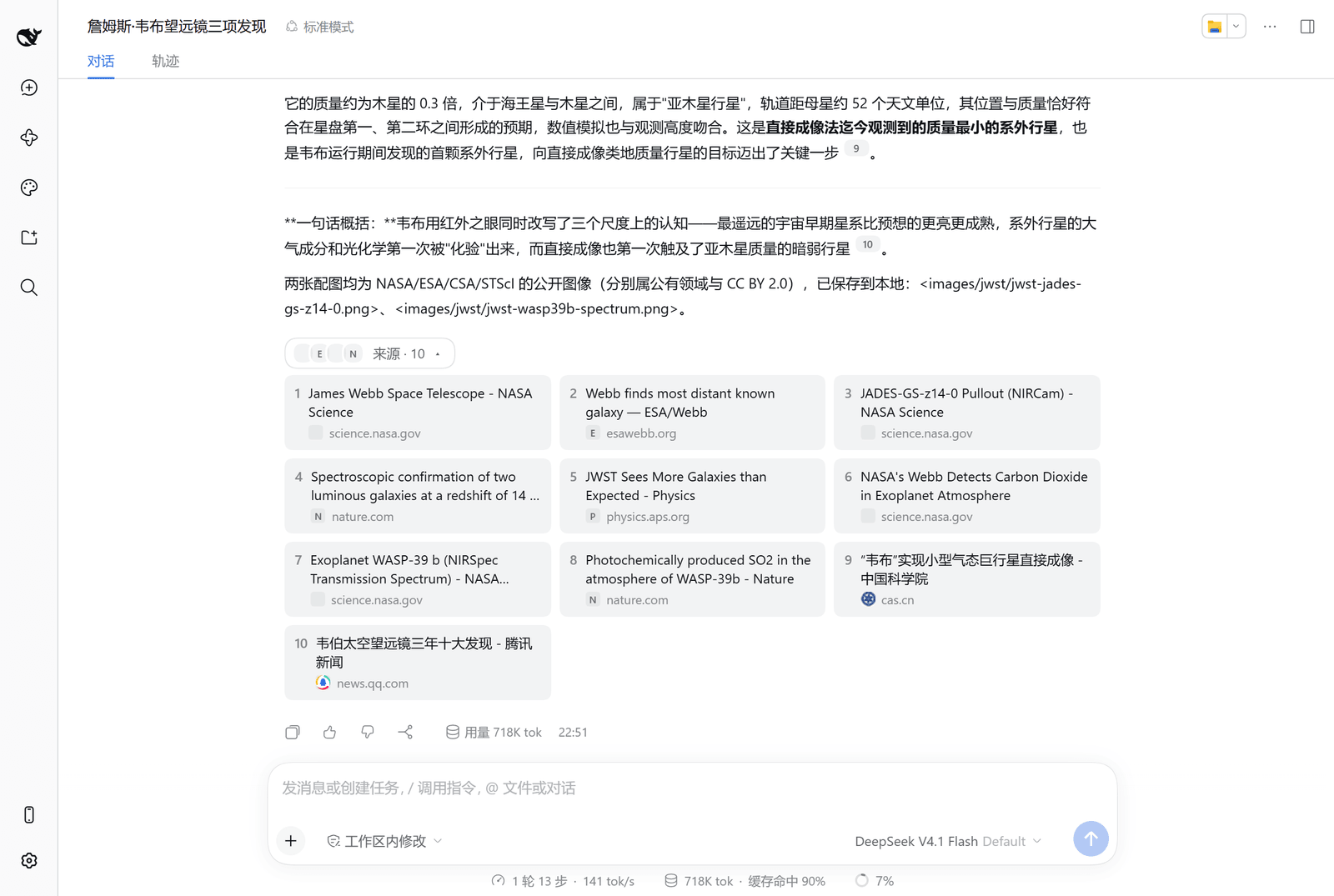 |
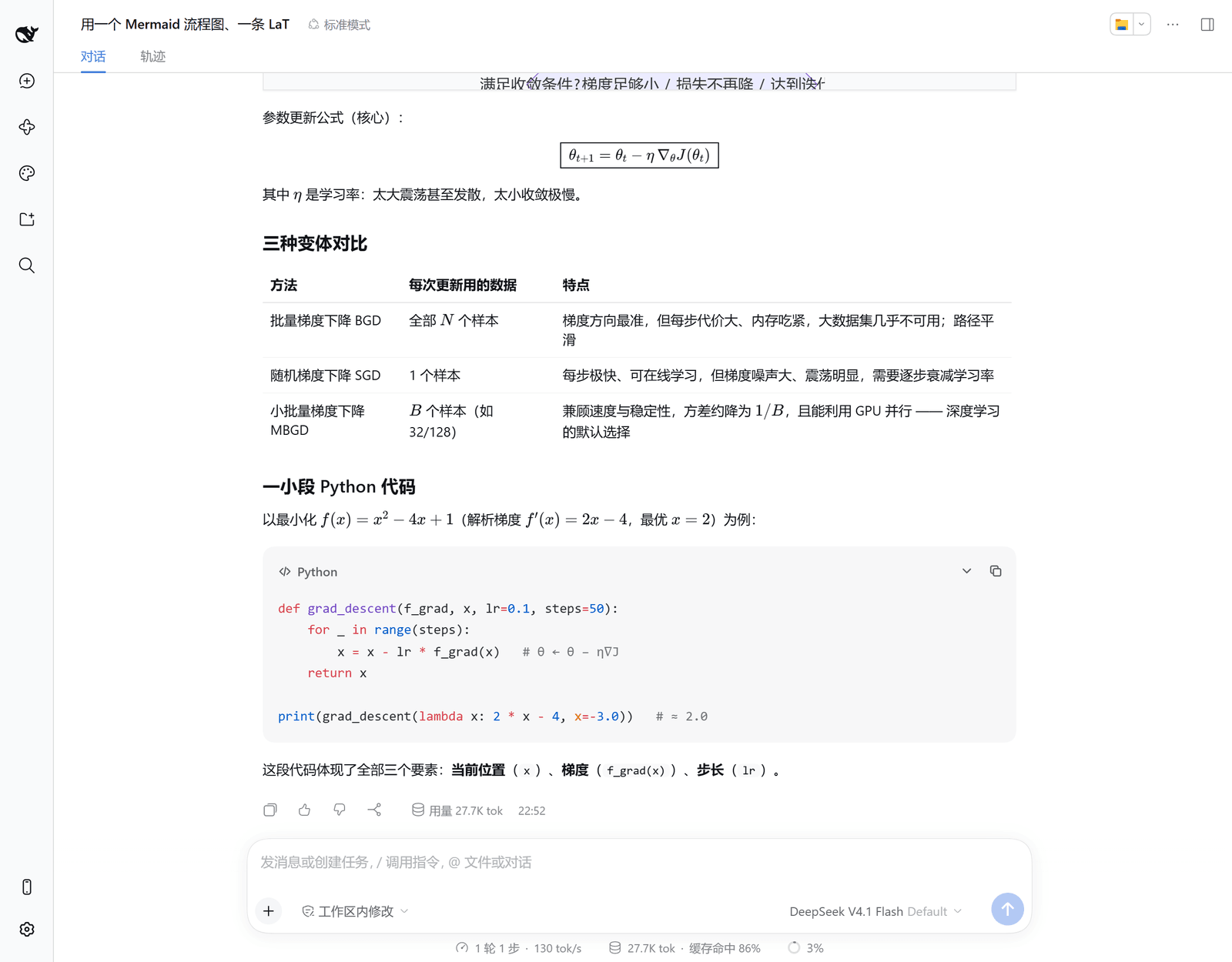 |
The screenshots show the Chinese interface.
Why
With web-search plugins such as @copylee/dsh-free-search, the pages and image walls a search finds appear only in the tool-call panel. DSH usually collapses that panel once the call finishes, which leaves the final answer as plain text:
- you can't see the pictures without expanding the tool panel;
- you can't tell which sentence came from which page, or jump to it.
dsh-better-display fixes both:
| Feature | Result |
|---|---|
| Citation chips | The model writes [1](url "Title"), which renders as a superscript chip. Hovering shows the favicon, domain and title; clicking opens the source in a new tab |
| Sources panel | Once the reply settles, every cited page is collected at the end (deduplicated by URL, in order of first use) in an expandable card list |
| Inline pictures | The model embeds relevant pictures from image_search / page_images / web results as , rendered with a caption; workspace paths saved by save_images work too |
| Galleries | Two or more pictures on one line become a grid |
| Lightbox | Click a picture to view it full-screen, open the original, and press Esc to close |
| Broken-image fallback | A dead picture turns into a caption link instead of a broken icon |
| Full Markdown | Built on dsh-better-markdown's streaming markstream-react pipeline, so Shiki code highlighting, Mermaid, KaTeX, tables and task lists all still work |
How it works
host (lib/index.js)
systemPrompt.section("better-display:rich-answer")
└─ tells the model: cite as [n](url), embed relevant pictures as 
browser (lib/client.js)
conversation.chat.node / assistant-step
|- priority -110: dsh-better-display (active)
| markstream-react
| |- link [n](url) → citation chip + hover card
| |- image → captioned figure / gallery / lightbox
| `- code → stream-markdown + Shiki
| + sources panel after the reply settles
|- priority -100: dsh-better-markdown (shadowed if installed)
`- priority 0: Harness built-in (fallback)
Why does the model write the citations into Markdown instead of the plugin reading tool results? DSH's assistant renderer only sees the message's text / reasoning / tool-call(name,args) blocks, and tool results live in separate nodes. Having the model write them into the answer is the most robust approach, and it keeps the renderer independent of any particular search plugin: it works with any tool whose results carry URLs (built-in web_search, web_fetch or other search plugins).
With dsh-free-search (recommended)
- @copylee/dsh-free-search does the finding: 19 engines,
multi_search/advanced_search/platform_search, and theimage_search/page_imagespicture tools. Its results come numbered and carry direct links, so they are easy to cite. - dsh-better-display does the showing: it renders the cited sources as chips plus a sources panel and puts the chosen pictures into the answer.
dsh plugin --profile web add @copylee/dsh-free-search
dsh plugin --profile web add @copylee/dsh-better-display
dsh --profile web
Enable the picture tools in dsh-free-search's settings, then ask for example:
- "Tell me about the Eiffel Tower with a few pictures, and cite your sources"
- "What happened with DeepSeek in the last week? Cite each item"
With dsh-image-gen
With @copylee/dsh-image-gen installed, generated pictures show up inside the reply instead of as a file:
- Its tool results carry a
genimg:<job id>reference; this plugin asks the model (in the tool result and the system prompt) to embed it as. - Pictures keep the aspect ratio they were generated at, uncropped; click to zoom.
- During a background generation (
background: true, e.g. "explain Gauss's law with a diagram") a placeholder at the same ratio stands in while the text keeps streaming. It turns into the picture when the job finishes, even after the reply ended, or shows the failure reason. - Galleries keep each picture's aspect ratio instead of cropping them to one height.
Quotes and side questions
Select text or pictures in a reply to get a small toolbar:
- Add to chat attaches the selection as a quote card above the composer, like ChatGPT's quotes.
- Formulas, emphasis, lists, tables and code come back as their Markdown source, so the card renders them properly instead of garbled text.
- Cards can be expanded, edited (as Markdown) or removed. The composer only shows a small chip, which becomes a tidy
>blockquote when you send. - Pictures in the selection (including dsh-image-gen images) show as thumbnails in place inside the card and are sent to the model as image attachments; removing the card removes them too. "Add to chat" in the picture preview still adds a plain attachment.
- Ask aside asks a one-off question about the selection (e.g. "Explain this"). A tool-less fork of the conversation answers it in a bubble above the composer, with Markdown and math, without touching the main conversation.
These replace dsh-btw; with both installed you get two toolbars, so uninstall dsh-btw. The "Selection toolbar" setting turns both features off.
Key boxes
Like ChatGPT, the model frames key formulas, final results and core conclusions in a box ($$\boxed{…}$$), usually one to three per answer. Turn it off with "Key boxes".
Your messages, rendered
- Your own message bubbles render Markdown: formulas, quotes, lists and code. Plain prose stays as is, and messages with @file or /skill references keep the built-in bubble. Turn it off with "Render my messages".
- When a draft contains formulas or Markdown, a "Preview formatting" button above the composer shows it rendered.
Install
This plugin is a superset of dsh-better-markdown and shadows it at a lower slot priority. Remove dsh-better-markdown afterwards to avoid shipping a second bundle:
dsh plugin --profile web remove dsh-better-markdown. It also excludes dsh-genui: both replace the assistant renderer, so only one of them can be active (this one wins).
# npm
dsh plugin --profile web add @copylee/dsh-better-display

# from source (Node.js 20+, pnpm 10+)
git clone https://github.com/copylee711/dsh-better-display.git
cd dsh-better-display && pnpm install && pnpm run check && pnpm run build
dsh plugin --profile web add "$(pwd)"
Remove it with dsh plugin --profile web remove @copylee/dsh-better-display. This removes the prompt section and the slot shadow, and the built-in renderer takes over again.
Configuration
Open @copylee/dsh-better-display on DSH's Plugins page and use the row's configure button. Changes apply from the next answer, no restart needed:
| Option | Default | Meaning |
|---|---|---|
Citation chips citations |
on | The model cites web sources as [n](url), shown as superscript chips plus a sources panel |
Inline pictures inlineImages |
on | The model embeds relevant pictures in its answer |
Picture count imageCount |
Let AI decide | auto: the model decides how many pictures an answer needs (none for text/code, more for visual comparisons or places); limit: cap per reply |
Maximum maxImages |
8 |
1–20, only used with limit |
The same fields can also be set in the better-display entry of the profile's cordis.patch.yml (plus the advanced sectionOrder, default 600, for the system-prompt section order). With both switches off no prompt is injected; the renderer still styles any [1](url) links and images.
Security
- Raw HTML is escaped (
htmlPolicy="escape"). - Chips, links and images accept only
http(s)URLs.javascript:and relative targets stay as inert text. - Pictures and favicons load lazily with
referrerPolicy="no-referrer". - The prompt tells the model to cite only URLs that actually appeared in this conversation's tool results. dsh-free-search still marks search output as untrusted.
Development
pnpm install
pnpm run check   # tsc + vitest
pnpm run build
pnpm pack --dry-run
Compatibility
- DeepSeek Harness
0.2.0-rc.2or later. Use0.3.8for0.1.7to0.2.0-rc.1, and0.1.0for anything older - React 18+
0.4.2 fixes attachment-slot delegation (#1): the wrapper waits for a valid lower-ranked component, follows its registration lifetime, and no longer throws when the native rail is unavailable. Components that cannot safely be reused remain under host control; quoted pictures may then appear in both their quote card and the native attachment rail.
Credits
- dsh-better-markdown (MIT, © duskzhen): Markstream pipeline, build setup and base styles (see
THIRD_PARTY_NOTICES.md) - dsh-genui: the prompt-section plus custom-renderer pattern
- markstream-react, DeepSeek Harness
License
Links
More in this category
zhu1090093659/dsh-web#packages/dsh-task-board★ 10406
Task board for the dsh web GUI: a sidebar multi-column kanban whose cards run in real DSH agent sessions and can also be scheduled with cron expressions, executed host-side even with the browser closed.
zhu1090093659/dsh-web#packages/dsh-web-all★ 10406
Plugin and skin collection for the DSH Web UI: task board, Git graph, right-side panel, remote mobile UI, pet, live token stats, and a skin center.
ccch1mneyyy/dsh-TUI★ 7675
Claude Code-style full-screen terminal UI: pixel-whale header, live status line, and streaming thought expansion.
MeteorNOX/DeepSeek-Balance-Whale-Widget★ 7201
A fixed-corner whale widget for the DSH web GUI — balance, today's usage and per-turn cost with peak/off-peak pricing, editable balance-alert and daily-budget bubbles, a module-based custom bubble queue with A/B weighted choices and random lines or images, 30+ vendor templates (OpenAI, OpenRouter, Kimi, SiliconFlow, Ark, Zhipu, MiniMax and more) with per-model balance and subscription quota, plus task-end sound, imported audio, custom roles and a resource manager. Local-only, no telemetry.
omdsh-dev/DSH-better-sidebar★ 5142
Full sidebar workbench with file rendering and editing, terminal, Git, and subagents; third-party plugins can register new tabs.
Devin-AXIS/deepseek-design#deepseek-idesign★ 1816
Visual design studio for websites, app prototypes, posters, cards, reports, and magazines, with templates, direct element editing, selection-aware AI draft handoff, and export.
Community comments
Comments are public GitHub Discussions. Loading them connects to GitHub and Giscus; a GitHub account is required to post.