Turns markdown into a WeChat Official Account (微信公众号) draft: inlines every CSS rule onto its element because the editor discards `<style>` blocks and class names, uploads each local image through WeChat's own endpoint so it is not filtered out, and creates the draft; it never broadcasts.
Install
# from npm (prebuilt)
dsh plugin --profile web add dsh-wechat-mp
# from GitHub (first run asks for allowBuilds approval — follow the hint, retry)
dsh plugin --profile web add github:coolbreezecoin/dsh-wechat-mp
Any plugin you install runs third-party code with your own permissions — it can read your files, use your credentials, and reach the network, and tool approvals don’t sandbox it. GitHub-sourced plugins also run build scripts at install time — pnpm blocks those until you allow them, so an install can stop with ERR_PNPM_GIT_DEP_PREPARE_NOT_ALLOWED or ERR_PNPM_IGNORED_BUILDS; dsh prints the exact key to add under allowBuilds in your profile’s pnpm-workspace.yaml, and the install works on the next run. Allowing a build is a trust decision: only install sources you trust, and pin a commit (github:owner/repo#sha).
README
English | 中文
A DeepSeek Harness plugin that turns markdown into a typeset WeChat Official Account (微信公众号) draft.
"Put
~/posts/why-inline-css.mdin the draft box with the grace theme."
The agent renders the article, uploads each image, and creates the draft. It never broadcasts: sending is left to a human in the Official Account console.
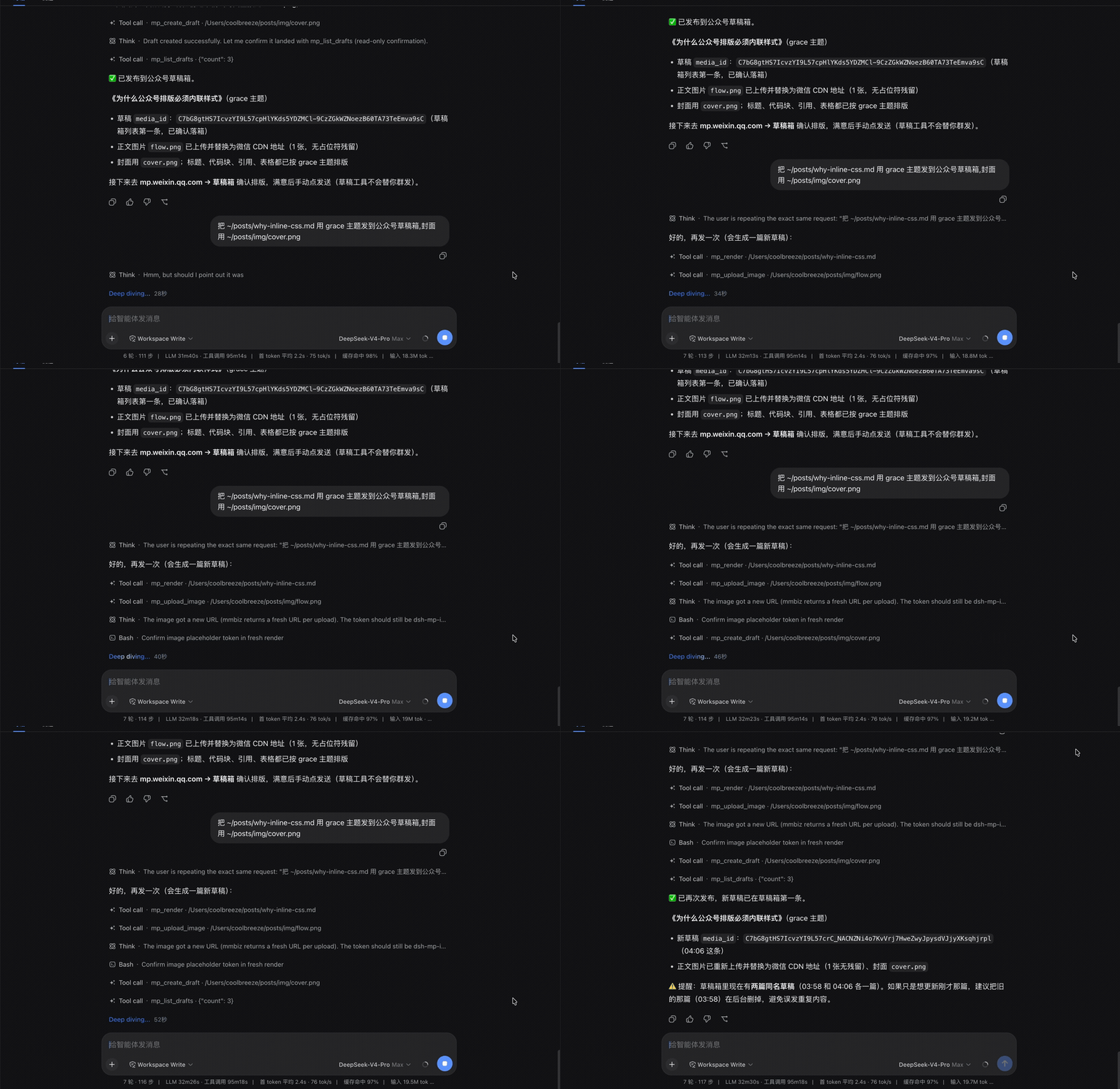
Why it exists
The WeChat editor throws away <style> blocks and class names, and filters every image not hosted on mmbiz.qpic.cn. So "paste your HTML in" does not work, and neither does an article that references your own CDN. This plugin does the two boring, error-prone parts: inline every style onto its element, and route every image through WeChat's own upload endpoint.
Two layers, and only one needs an account
| Layer | Needs credentials? | What you get |
|---|---|---|
Typesetting (mp_render) |
No | Inline-styled HTML + a local preview page. Paste it into the console by hand. |
API (mp_upload_image, mp_create_draft, mp_list_drafts) |
Yes | The agent creates the draft for you. |
Even an unverified personal subscription account can reach the draft API — see Account types. And if yours cannot, the typesetting layer still works on its own.
Install
dsh plugin --profile web add dsh-wechat-mp
Then start dsh as usual. mp_render is available immediately.
Credentials
The API tools read two credential references. Configuration holds the names; the values live with dsh's credential provider, so your config stays safe to commit.
| Reference | What it is |
|---|---|
WECHAT_MP_APPID |
The Official Account's AppID |
WECHAT_MP_SECRET |
The Official Account's AppSecret |
Supply them any way dsh resolves credentials — process environment, a project .env, $DSH_HOME/.env, or $DSH_HOME/.credentials.yaml:
export WECHAT_MP_APPID=wx...
export WECHAT_MP_SECRET=...
Both come from 公众平台 → 设置与开发 → 基本配置. The AppSecret is shown once; regenerating it invalidates any token other systems hold.
Without them, the API tools are still registered but every call fails with a message telling you what is missing. mp_render is unaffected.
Tools
mp_render — read-only
Markdown in, WeChat-ready HTML out. Writes the article body and a standalone preview page, and returns their paths.
Image sources come back as placeholder tokens (dsh-mp-image-0, …), not URLs — they are filled in after upload.
| Parameter | |
|---|---|
path / markdown |
Exactly one: a markdown file, or the source text. |
theme |
default, grace, simple. |
code_theme |
github, github-dark, atom-one-light, atom-one-dark, vs, monokai. |
primary_color |
Accent hex, e.g. #0F4C81. |
font_size |
e.g. 15px. |
indent |
Indent each paragraph 2em, as Chinese print does. |
line_numbers |
Line numbers in code blocks. |
mp_upload_image — write
Uploads one local jpg/png (under 1 MB) and returns its mmbiz.qpic.cn URL.
mp_create_draft — write
Takes the htmlPath from mp_render, the token→URL map from the uploads, a title and a cover, and creates the draft.
It refuses before touching the API if any image token is still unresolved — otherwise you would only discover the dead images after hitting send. A cover is mandatory (cover_image or thumb_media_id, exactly one) because WeChat requires one.
mp_list_drafts — read-only
Recent drafts, newest first. Useful to confirm one landed.
One-click publish (Web UI)
Every assistant reply gets a 发公众号 button. One click typesets that reply with your configured theme and puts it in the draft box — no need to save it to a file first and ask the agent to publish it.
The title comes from the message's first heading, or its first line of prose, cut to 64 characters.
A cover is required before the button can work: WeChat rejects an article without one, and the button has nowhere to pick it.
- id: wechat-mp
  config:
    defaultCover: /Users/you/posts/img/cover.png
Unconfigured, a click tells you which key to set rather than failing silently.
The button and the tools share the same typesetting and API code, so the two produce identical output. If the message references remote images the button refuses and says why — WeChat filters those out, and a broken article is worse than a refused click.
Approval
The write tools run without prompting. Nothing here publishes — a draft still needs a human to open the console and press send — so an unattended run leaves you a draft to delete, not a post your readers already saw.
Turn the prompts on if you want them:
- id: wechat-mp
  config:
    requireApproval: true
They then go through dsh's approval seam via tools/pre-execute and fail closed: with no approval channel composed, the call is denied rather than silently allowed. A headless deployment needs an answerer — the Web UI has one, or drive it through a machine answerer such as the ACP bridge.
Worth enabling when an agent runs unattended against an account whose permanent-material quota matters: deleting a draft does not give back the slot its cover consumed.
Configuration
All optional; set them on the plugin row in your profile's cordis.patch.yml.
- id: wechat-mp
  config:
    theme: default          # default | grace | simple
    codeTheme: github
    primaryColor: '#0F4C81'
    fontSize: 15px
    fontFamily: "-apple-system, BlinkMacSystemFont, 'PingFang SC', sans-serif"
    outputDir: ''           # '' → a temp directory
    appIdRef: WECHAT_MP_APPID
    appSecretRef: WECHAT_MP_SECRET
    tokenCacheDir: ''       # '' → a temp directory
    baseUrl: https://api.weixin.qq.com
    defaultAuthor: ''
    defaultCover: ''         # required by the one-click button
    requireApproval: false   # true → prompt before each write
A patch layer replaces a row's whole config, so restate every key you want to keep.
Known pitfalls
IP allowlist (errcode 40164)
Every API call must originate from an IP listed in 公众平台 → 基本配置 → IP白名单. Home broadband rotates its address, so a setup that worked yesterday can fail today. The error message says so explicitly; go update the allowlist.
access_token is shared per account (errcode 45009)
WeChat issues one token per account, valid two hours, with a bounded number of daily grants — and a new grant invalidates the previous token. If another system (a CMS, a WeChat SDK, a colleague's script) uses the same account, you will evict each other.
This plugin caches the token on disk, refreshes five minutes early, and collapses concurrent refreshes into one grant. It cannot do anything about a different system on the same account. If you have one, expect intermittent 40001/42001.
Account types
An unverified personal subscription account (未认证的个人订阅号) can use the draft and material APIs. This is the most restricted account type there is, and it was verified against a real one — so if you have any Official Account at all, the API layer will probably work for you.
That is worth stating plainly because the opposite is widely assumed. What such an account cannot do is broadcast via the API — and this plugin does not broadcast anyway, so the restriction never bites.
If an endpoint genuinely is not available to your account, WeChat answers errcode 48001, "api unauthorized", and the plugin says so in plain language. In that case use mp_render and paste the HTML into the console yourself — that path needs no API permissions at all.
Note that the IP allowlist is enforced when acquiring the token, before any endpoint is reached. So an unconfigured allowlist produces 40164 on every call and tells you nothing about your permissions; fix that first, then retest.
Images
media/uploadimg accepts jpg and png under 1 MB; the plugin checks locally before spending an API call. The cover is a different endpoint — a permanent thumb material — and the plugin handles that for you.
Programmatic use
The typesetting layer has no dsh dependency and can be imported directly:
import { render, previewDocument } from 'dsh-wechat-mp/render'

const { html, images, bytes } = render(markdown, { theme: 'grace' })
Themes
The stylesheets come from doocs/md (WTFPL) — the WeChat markdown editor most Chinese writers already know, so the output looks familiar. grace and simple are overlays on default.
One difference: doocs targets the browser clipboard, where the browser has already computed color-mix() and calc(). This plugin submits raw HTML to the draft API, where WeChat's own filter is the only reader, so every modern CSS function is flattened to a literal (rgba, hex, px) before submission.
Limitations
- No mermaid, KaTeX, or infographics. Ordinary markdown only: headings, paragraphs, emphasis, links, lists, tables, blockquotes, code with highlighting, images, rules.
- Drafts only. No broadcast, no scheduled publishing, no comment management, by design.
- One account per plugin instance.
- No custom themes yet — three built-ins.
- Remote images are not re-hosted. An
https://image in your markdown is reported but not downloaded and re-uploaded; WeChat will filter it. Point at local files, or upload and substitute yourself.
Status
Early. DeepSeek Harness is itself a developer preview and warns of breaking changes; this plugin isolates its harness contact to a thin tool shell so breakage stays contained.
License
MIT. Theme CSS from doocs/md under the WTFPL.
Links
More in this category
Tencent/WeKnora#dsh-weknora★ 31292
Four read-only tools over a WeKnora knowledge base: list knowledge bases, hybrid passage search, reassemble one document's chunks in order, and WeKnora's own cited RAG or ReAct-agent answer with a resumable session id.
superdesigndev/treg★ 3854
Tool catalog for agents: search ~2,600 external endpoints (SEO and SERP, backlinks, social, people and company enrichment, ad libraries, scraping) by the task you want done, read each one's parameters and per-call price, then call it with the credential injected server-side. Ships the skill plus an MCP row that stays disabled until TREG_TOKEN is set.
TencentCloudBase/CloudBase-AI-Toolkit#dsh-plugin★ 1128
Tencent CloudBase backend for DeepSeek Harness — scaffold and deploy full-stack apps from chat, render query results as table cards with paging, sorting and CSV export, preview a deployment on its domain, and call the CloudBase MCP toolset (`mcp__cloudbase__*`) with device-code login.
gitroomhq/postiz-agent#dsh-postiz★ 499
Connects DeepSeek Harness to Postiz over MCP: list connected social media channels, fetch per-platform posting rules, and schedule, draft, or publish posts to X, LinkedIn, Instagram, Facebook, Threads, TikTok, YouTube, Reddit, Bluesky, Mastodon, Discord, Slack, Telegram and more; adds a postiz workflow skill.
EthanYoQ/Invoice-Downloader#dsh-invoice-downloader★ 474
Local IMAP invoice download, OCR, archive, and Excel reimbursement summaries for DeepSeek Harness.
anysearch-team/anysearch-dsh★ 438
AnySearch-powered real-time web and vertical search provider for DeepSeek Harness.
Community comments
Comments are public GitHub Discussions. Loading them connects to GitHub and Giscus; a GitHub account is required to post.