Cherry Studio-style paste: multi-line/indented/fenced text or code pasted into the DSH Web composer collapses into a bordered, collapsible, language-tagged card and is restored as a fenced code block on send.
Install
# from npm (prebuilt)
dsh plugin --profile web add dsh-paste-code-block
# from GitHub (first run asks for allowBuilds approval — follow the hint, retry)
dsh plugin --profile web add github:cjm-m/dsh-paste-code-block
Any plugin you install runs third-party code with your own permissions — it can read your files, use your credentials, and reach the network, and tool approvals don’t sandbox it. GitHub-sourced plugins also run build scripts at install time — pnpm blocks those until you allow them, so an install can stop with ERR_PNPM_GIT_DEP_PREPARE_NOT_ALLOWED or ERR_PNPM_IGNORED_BUILDS; dsh prints the exact key to add under allowBuilds in your profile’s pnpm-workspace.yaml, and the install works on the next run. Allowing a build is a trust decision: only install sources you trust, and pin a commit (github:owner/repo#sha).
README
dsh-paste-code-block
Cherry Studio‑style text/code block pasting for DeepSeek Harness Web
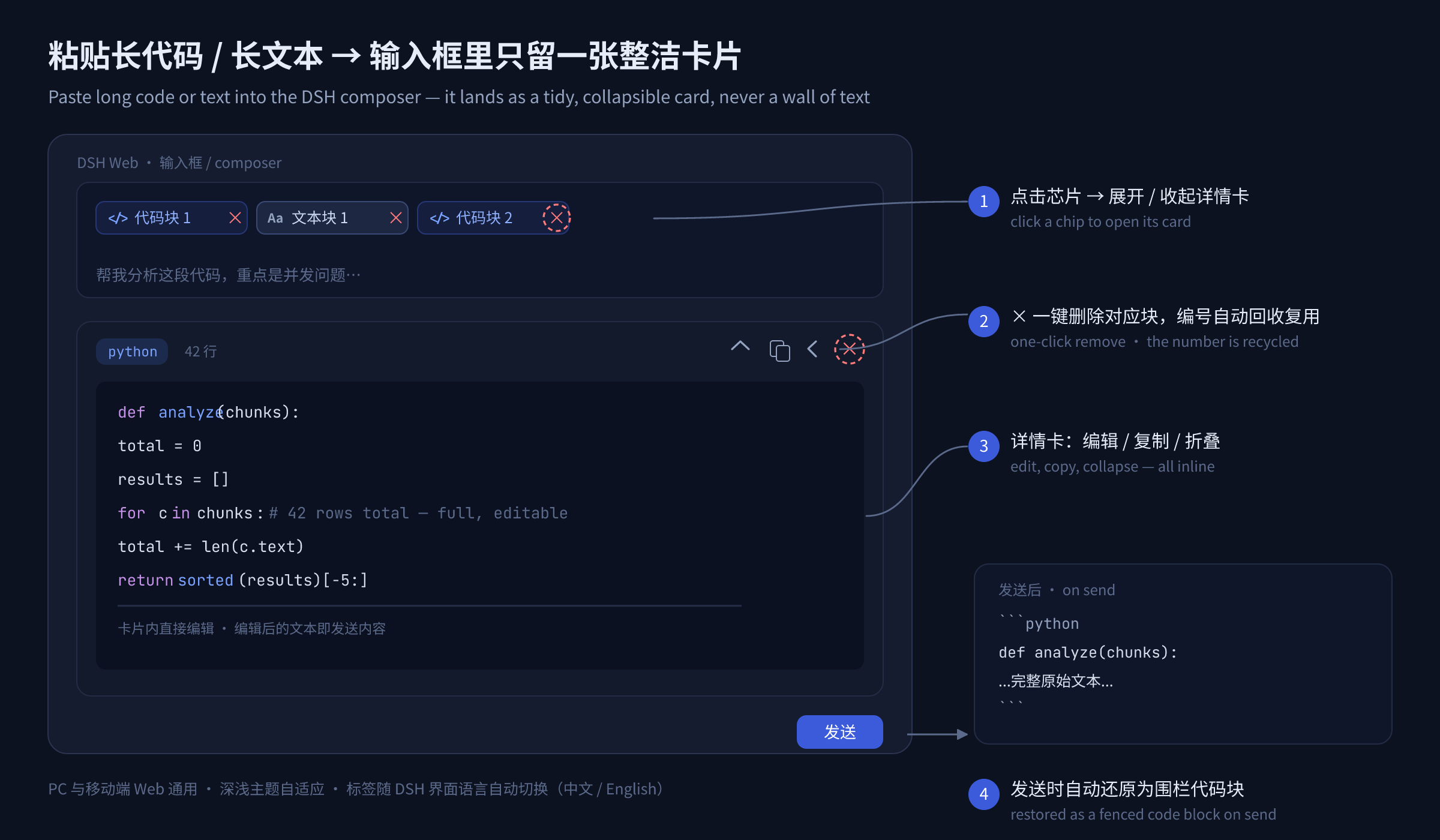
Paste long code or text into the DSH Web composer → it lands as a bordered, collapsible, language‑tagged card instead of a wall of text. Names follow the DSH interface language (中文 / English). On send, the original content is restored as a fenced code block — and in the conversation it stays folded into click‑to‑expand cards, so your bubbles never become text walls again.
English | 简体中文
Why
Copying a 200‑line stack trace, an API response, or a long log into a chat input turns the composer into an unreadable blob. This plugin folds any qualifying paste into a chip (built on DSH's own hidden‑reference mechanism, the same one file uploads use) plus an editing detail card — the draft stays clean, and the content stays fully editable and restorable.
Features
- 🧩 Auto block detection — pasted text with ``` fences, newlines, heavy indentation, or length ≥ 96 becomes a card; ordinary short prose pastes through untouched.
- 🏷️ Language tags — auto-detects Python / JS / JSON / YAML / SQL / bash / HTML·XML / C++ / Go / Ruby (incl. shebangs); plain-text blocks are tagged
text. - ✏️ In-card editing — edit the content right in the detail card; the edited text is exactly what gets sent. Plus copy, collapse/expand, and hide.
- 🈯 Localized names — chips are named in the current DSH language:
代码块 1/Code #1,文本块 N/Text #N. A leading glyph and tint tells the two apart at a glance —</>blue for code,Aagray for text. Switching Settings → Language live-retitles every chip. - × One-click remove — every chip carries its own
×delete button (the detail card has one too); a removed number is recycled immediately. - 📤 Fenced restore on send — each card expands back into a
```lang … ```block when you send; a failed send automatically refills the input. - 📦 Folded after send — sent blocks keep folding in the transcript: every fenced block inside your own messages renders as a collapsed card (
python · 128 行/python · 128 lines). Click the header to expand, again to collapse; the card's copy button grabs the original fenced text verbatim. Bare```fences fold as code (only an explicit```textfolds as a text block). - 💾 Mid-draft safe — DSH persists a composer draft as plain text, so pasted blocks are automatically re-attached when the composer is rebuilt (workspace switch on the new-session page, page reload); hand-deleted blocks are never "resurrected".
- 🔢 Smart numbering — code and text count apart; the smallest free number is always reused.
- 📱 Every surface — pure client plugin; works on desktop & mobile web, follows light/dark themes.
How it works
Localization
Chip labels, tooltips, line counts, and the send-time error notice all render through the official DSH locale service: the plugin registers a paste-code-block dictionary namespace with complete zh / en key sets, and its composer dock declares that namespace, so everything re-renders on every language switch.
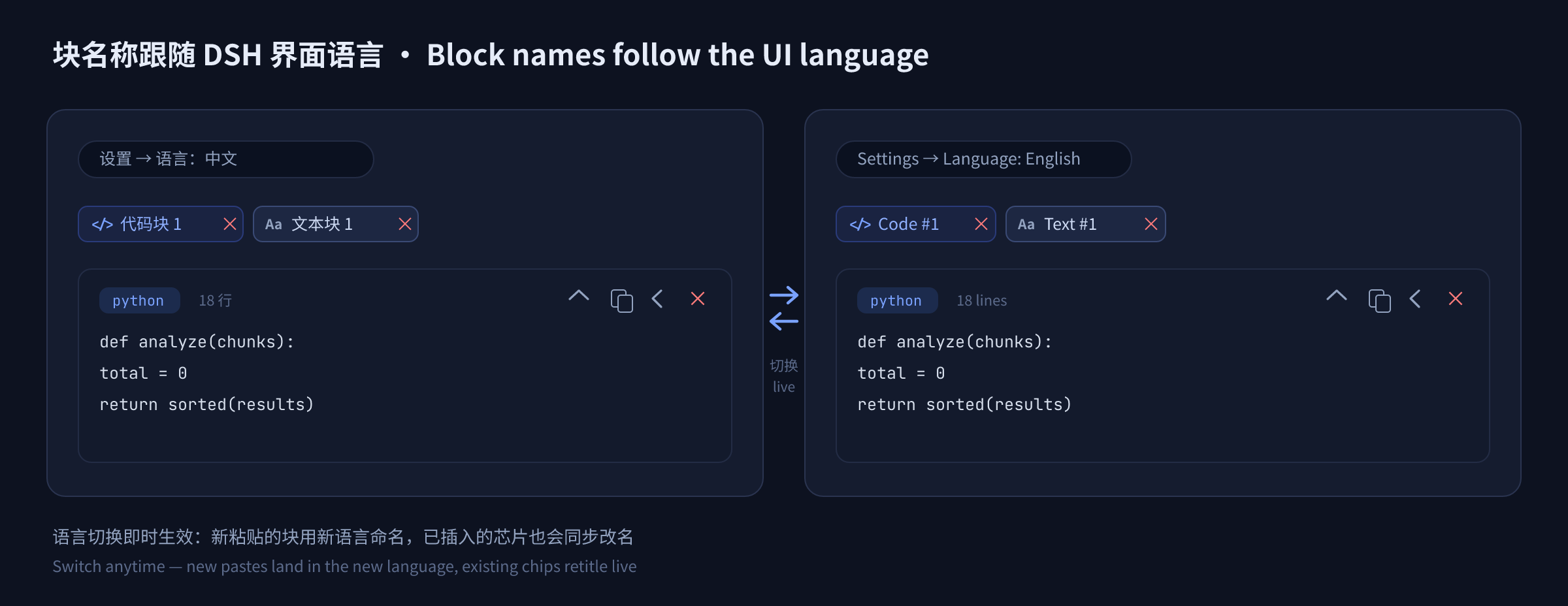
- New pastes are named in whatever language is active at paste time.
- Existing chips are re-titled live when you flip 设置 → 语言 / Settings → Language — no reload needed.
- Clicks and deletes match chips across languages: a
代码块 2chip still resolves to its block after switching to English (where it now readsCode #2), and vice versa.
Install
Requires DSH 0.1.x (developer preview — APIs may change). Published on npm — install by name:
dsh plugin --profile web add dsh-paste-code-block
Or from this repository / a local checkout:
dsh plugin --profile web add github:cjm-m/dsh-paste-code-block   # from GitHub
dsh plugin --profile web add file:/path/to/dsh-paste-code-block  # from a local folder
Restart dsh web after installing.
Usage
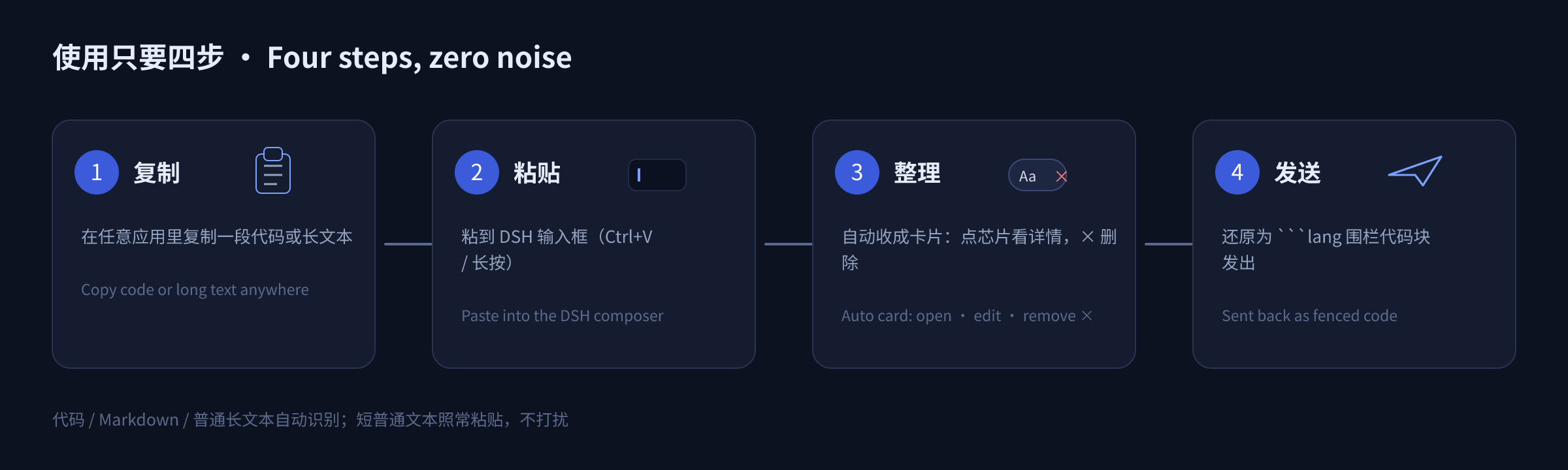
- Copy any code or multi-line text from anywhere.
- Paste into the DSH input → it collapses into a chip such as
代码块 1/Code #1. - Click the chip to open the card: read, edit inline, copy, collapse. Click the chip's (or the card's)
×to delete that block. - Send — the full original text goes out as a proper fenced code block.
- In the conversation it stays folded: each block sits in the bubble as a collapsed card — click the header to expand and read, click again to collapse.
Detection threshold: contains a newline / ≥ 2 lines / length ≥ 96 / indented & brace-dense / fenced — any one turns the paste into a block.
Notes & boundaries
- Blocks are appended at the end of the draft (reusing DSH's hidden-reference semantics), which keeps cursor/undo stable.
- Plain-text blocks are sent wrapped in
```text ```so they never smear into one line. - Removing a chip any other way (e.g.
Backspace) also frees its number — plugin state is reconciled against the editor continuously. - Deleting one block never touches the others, and removal is an ordinary editor edit —
Ctrl+Zbrings it back. - Creating a block leaves no stray space: DSH appends a separating space after a freshly inserted chip, and the plugin removes exactly that one character, so text typed after a block does not start with a space and pasting several blocks never piles spaces into the message. Spaces you typed yourself are never touched by pasting or deleting.
- Post-send folding is display-only: it restyles your own message bubbles (and steering rows / the send echo) in the DOM. Stored messages are never modified, the bubble's own copy / edit / delete bar keeps working on the original text, and assistant messages are left alone.
- Draft-rebuild recovery keeps a small localStorage mirror (block payloads plus a draft fingerprint; written while you edit, cleared when you send, expired after two weeks). If the browser blocks local storage (private mode), blocks still survive a same-tab workspace switch from memory — just not a full page reload.
Project layout
dsh-paste-code-block/
├── src/
│   ├── client.js       # Web (browser) half — paste capture, chips, detail card, × delete, sent-message fold, draft-rebuild recovery
│   ├── index.js        # Host (node) half — intentionally empty (pure UI plugin)
│   ├── parse.js        # Pure block-detection + fence-splitting logic (canonical, unit-tested)
│   └── i18n.js         # Locale dictionaries, label & fold-title builders (canonical, unit-tested)
├── tests/
│   ├── parse.test.js     # node:test unit tests for src/parse.js
│   ├── i18n.test.js      # node:test unit tests for src/i18n.js
│   └── fold-smoke.test.js # end-to-end fold scan against a DOM shim (runs the real client bundle)
├── docs/
│   ├── design.md       # Design rationale (numbering, anchors, codec, i18n, chip ×, sent-message fold, draft-rebuild recovery)
│   └── images/         # README mockups (PNG + editable SVG sources)
├── cordis.patch.yml    # DSH bundle patch declaring the host plugin
├── package.json        # Package + DSH plugin manifest
├── README.md           # English
└── README.zh-CN.md     # 简体中文
Development
npm run check   # syntax-check the JS halves
npm test        # run unit tests (node:test, 61 tests)
License
MIT — see LICENSE.
Links
More in this category
zhu1090093659/dsh-web#packages/dsh-task-board★ 9673
Task board for the dsh web GUI: a sidebar multi-column kanban whose cards run in real DSH agent sessions and can also be scheduled with cron expressions, executed host-side even with the browser closed.
zhu1090093659/dsh-web#packages/dsh-web-all★ 9673
Plugin and skin collection for the DSH Web UI: task board, Git graph, right-side panel, remote mobile UI, pet, live token stats, and a skin center.
MeteorNOX/DeepSeek-Balance-Whale-Widget★ 6324
A fixed-corner whale widget for the DSH web GUI — balance, today's usage and per-turn cost with peak/off-peak pricing, editable balance-alert and daily-budget bubbles, a module-based custom bubble queue with A/B weighted choices and random lines or images, 30+ vendor templates (OpenAI, OpenRouter, Kimi, SiliconFlow, Ark, Zhipu, MiniMax and more) with per-model balance and subscription quota, plus task-end sound, imported audio, custom roles and a resource manager. Local-only, no telemetry.
ccch1mneyyy/dsh-TUI★ 6018
Claude Code-style full-screen terminal UI: pixel-whale header, live status line, and streaming thought expansion.
omdsh-dev/DSH-better-sidebar★ 4645
Full sidebar workbench with file rendering and editing, terminal, Git, and subagents; third-party plugins can register new tabs.
Devin-AXIS/deepseek-design#deepseek-idesign★ 1607
Visual design studio for websites, app prototypes, posters, cards, reports, and magazines, with templates, direct element editing, selection-aware AI draft handoff, and export.
Community comments
Comments are public GitHub Discussions. Loading them connects to GitHub and Giscus; a GitHub account is required to post.