Project documents and long-term memory as plain Markdown in a dedicated Obsidian vault: six mem_* tools (search, read, write, log, brief, admin), one budgeted recall injection at the first step of a session, and automatic distillation of completed turns. Obsidian does not need to be running, and the vault stays readable with the plugin uninstalled.
Install
# from a prebuilt release tarball
dsh plugin --profile web add "https://github.com/bonerush/dsh-obsidian-mem/releases/download/v2.2.0/dsh-obsidian-mem-2.2.0.tgz"
# from GitHub (first run asks for allowBuilds approval — follow the hint, retry)
dsh plugin --profile web add github:bonerush/dsh-obsidian-mem
Any plugin you install runs third-party code with your own permissions — it can read your files, use your credentials, and reach the network, and tool approvals don’t sandbox it. GitHub-sourced plugins also run build scripts at install time — pnpm blocks those until you allow them, so an install can stop with ERR_PNPM_GIT_DEP_PREPARE_NOT_ALLOWED or ERR_PNPM_IGNORED_BUILDS; dsh prints the exact key to add under allowBuilds in your profile’s pnpm-workspace.yaml, and the install works on the next run. Allowing a build is a trust decision: only install sources you trust, and pin a commit (github:owner/repo#sha).
README
A DeepSeek Harness host plugin that keeps a project's documents and long-term memory as plain Markdown in a dedicated Obsidian vault, and draws that memory in the native sidebar: a GitHub-style contribution calendar, a day-grouped activity timeline, searchable notes with highlighted snippets, and a force-directed knowledge graph.
One repository gets one stable projectId, one committed pointer file and one
fixed directory in the vault. The plugin writes there; Obsidian just shows you
the result. Obsidian does not need to be running, and no part of the vault
depends on DSH.
repository                                vault (~/Documents/dsh-memory)
├── .obsidian-mem   ───────────►          └── Projects/<slug>--<projectId 前8位>/
│     projectId, slug,                    ├── index.md                hub / MOC
│     displayName, schema: 1              ├── Docs/  Decisions/  Conventions/  Pitfalls/
└── src/ …                                ├── Daily/YYYY-MM-DD.md
                                          ├── Inbox/                  待分类
                                          └── _meta/hot.md            热记忆
Two layers, on purpose:
- Protocol (vault layout, the
.obsidian-mempointer, note frontmatter, the distillation output contract) is plain Markdown and is not DSH-specific. The shipped skillskills/obsidian-mem/SKILL.mdfollows the Agent Skills format, so it works in another harness too —codex/installs that protocol and the same six operations into Codex CLI, through an MCP server that reuseslib/rather than copying it, plus hooks for the session brief and a small relevant-note map on each new user prompt. - Adapter is DSH-specific: six
mem_*tools, anode:sqlitesearch index kept outside the vault, and automatic distillation of completed turns. The recall injection left that list: both harnesses compose it from the samebuildBrief, and each delivers it through its own extension point.
Read Honest limits before you enable automatic writes. This plugin is careful about what it refuses, but it is young. What follows is what this release writes down, not a claim to be exhaustive;
CHANGELOG.mdkeeps the running record of what has been verified and what has not.When something misbehaves, the package can produce a report you attach to an Issue yourself: generate it, read the JSON, then attach it. See Diagnostic report for an Issue.
Highlights
| What it gives you | |
|---|---|
| 🧠 Plain-Markdown memory | One project gets one stable projectId, one committed pointer file and one directory in the vault. Obsidian only displays the result; the vault outlives DSH and stays readable with the plugin uninstalled. |
| 🔌 Protocol plus adapters | Vault layout, pointer and note frontmatter are a protocol: skills/obsidian-mem/SKILL.md ships it for any Agent-Skills harness, and codex/ installs the same six operations into Codex CLI through an MCP server that imports lib/ instead of copying it. |
| ✍️ Six memory tools | mem_search, mem_read, mem_write, mem_log, mem_brief, mem_admin — transactional writes, a rebuildable SQLite/FTS5 cache, and a session brief that stays inside a fixed character budget. |
| 🔎 Retrieval with a default semantic engine, local or cloud | FTS5/BM25 baseline; the hybrid engine is the default and adds a semantic channel once you point retrievalProvider at an embedding service — a loopback one (egress: loopback) or an internal/cloud gateway (egress: remote stated explicitly, apiStyle: openai speaking OpenAI /embeddings directly); no provider configured means the lexical path, unchanged. Plus a local TF-IDF/cosine reranker (sparse), same-day create/update accounting, per-turn relevant-note recall, and a brief that is navigation rather than a content dump. |
| 🗂️ Distillation and curation | Completed turns distill into typed notes in the background, through the DSH host llm by default (transport: host) or straight to an OpenAI-compatible endpoint (transport: http: a local Ollama/LM Studio server or a cloud gateway), so a host with no routed provider can still distil; near-duplicates and risky rewrites are parked as proposals that only a person can approve — with dsh-obsidian-mem-review, in a terminal. |
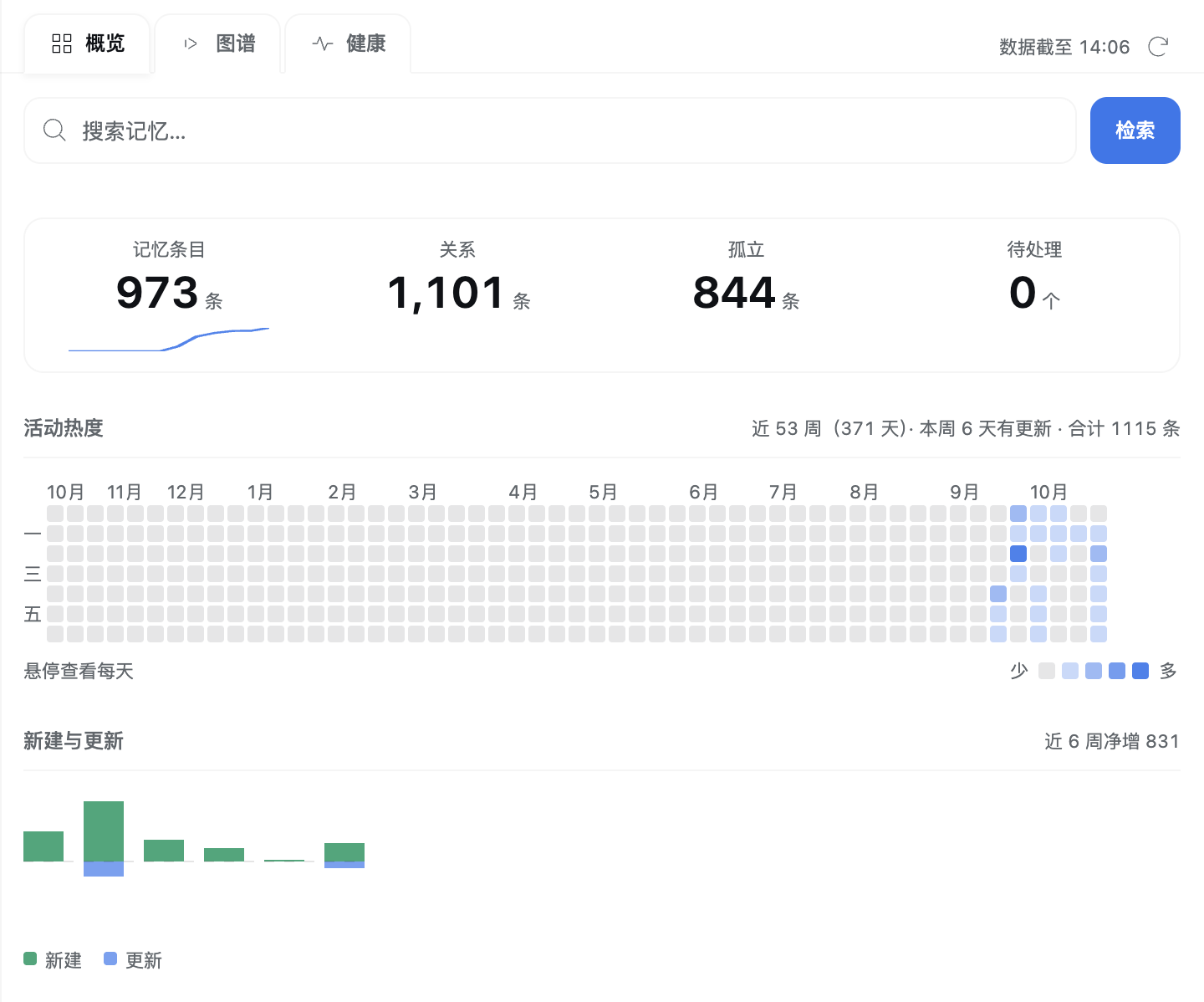
| 📊 Live memory panel | A GitHub-style 53-week activity calendar with fixed 10 px cells, month and weekday labels, a hover tooltip and in-figure horizontal scrolling; new-versus-updated flow bars, a tag treemap, a type→status composition Sankey, a KPI sparkline, a day-grouped activity timeline, and a 健康 dashboard whose three maintenance actions report their outcome in the card that owns the button. Background polls re-scan the index silently, so memory written by another process appears without a DSH restart. |
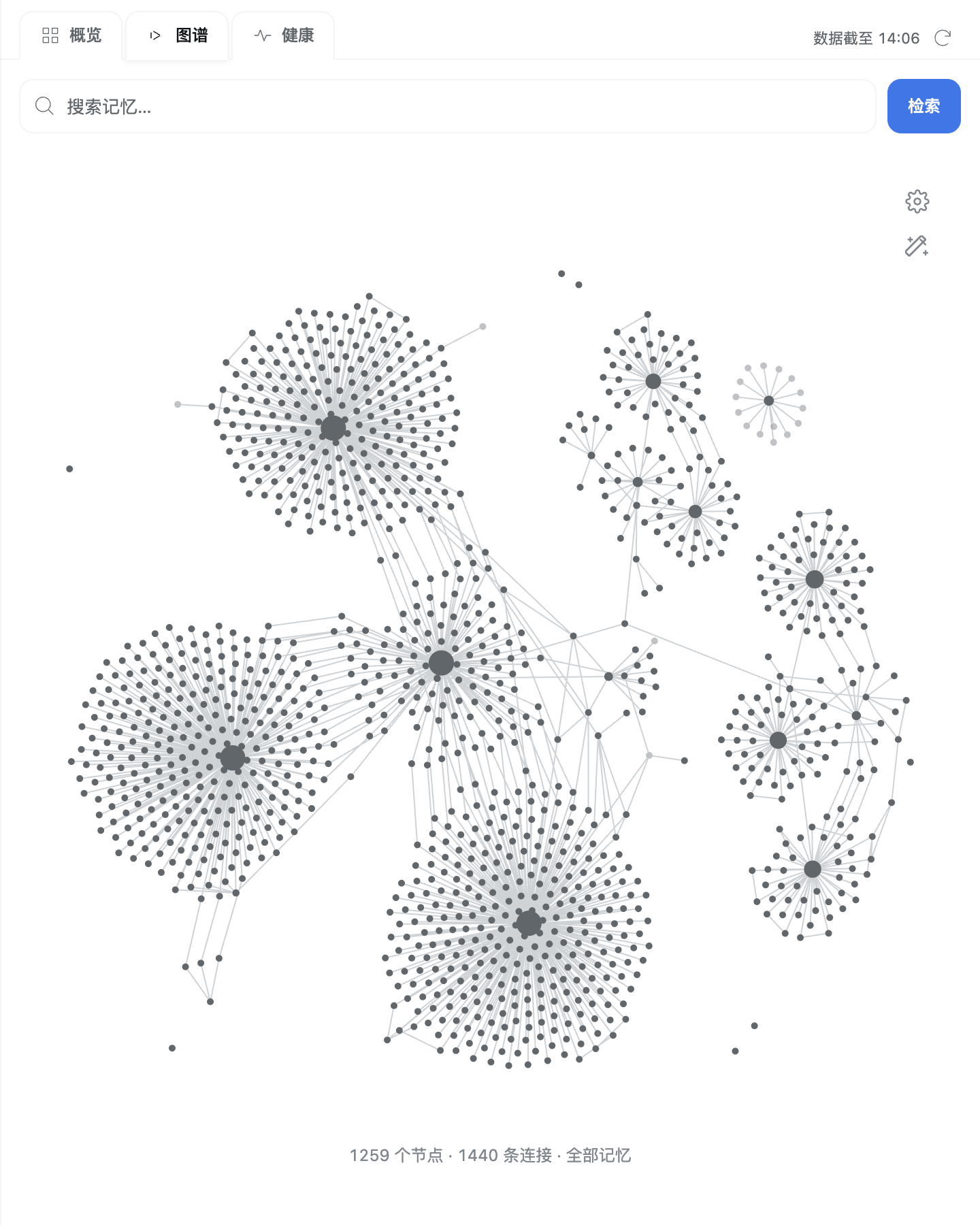
| 🕸️ Knowledge graph | Every node in scope is drawn — no top-N truncation — with a 1:1 port of Obsidian's D3 fallback forces, alpha schedule and seeding/drag protocol. Filters, colour groups, display and forces persist per browser origin; read/write/search/reinjection cues light up the nodes a turn touched. |
| 🔒 Safe by default | The panel is read-only; exactly three maintenance operations can write, each preview → confirm behind a single-use 60-second token. The web route keeps its loopback/same-origin fences even through the desktop shell's dsh-app:// proxy. |
| ✅ Evidence before claims | The changelog names what was measured, on which host, and what is still untested; the suite and the pack contract run in CI on every push. |
Screenshots
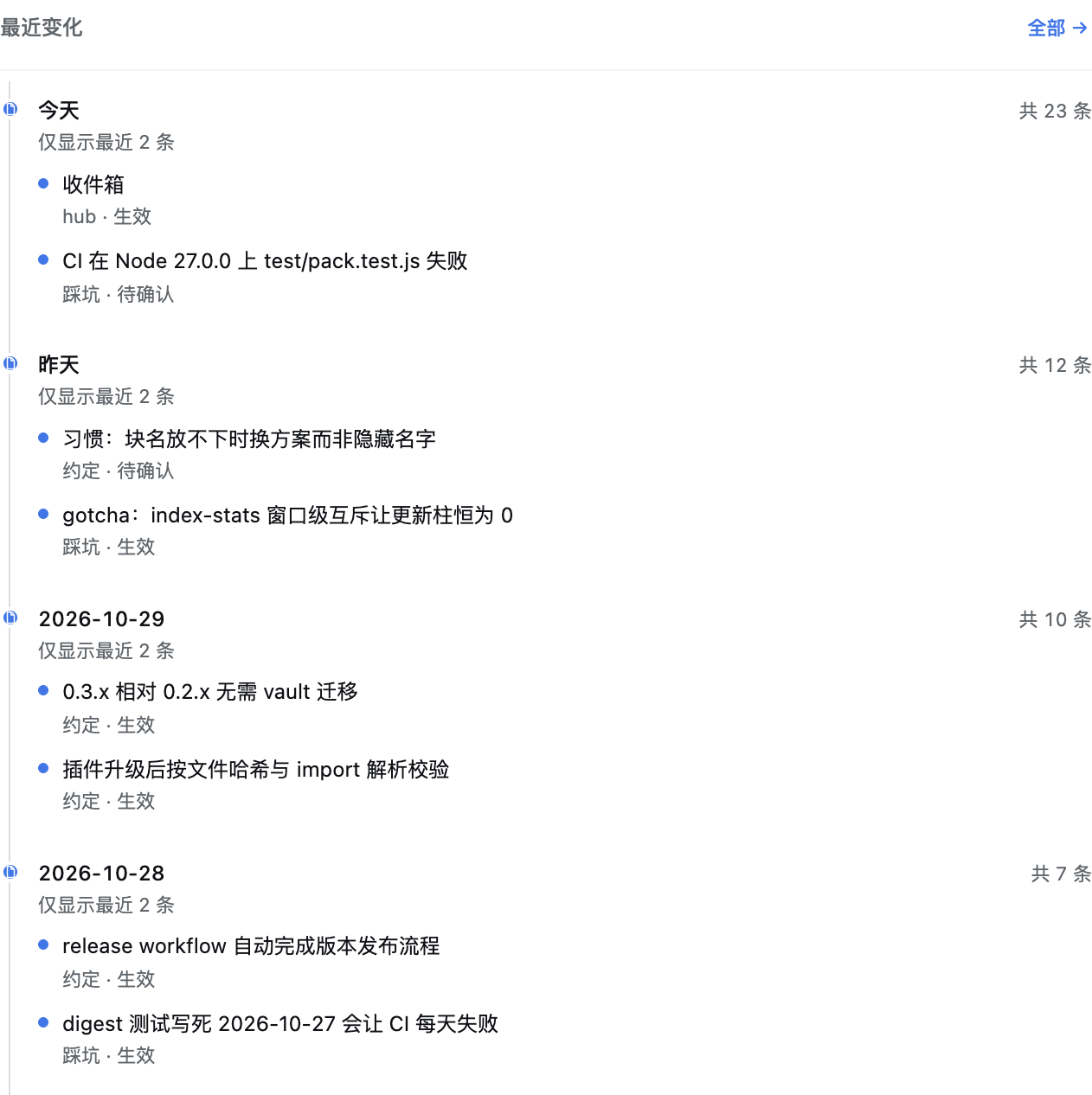
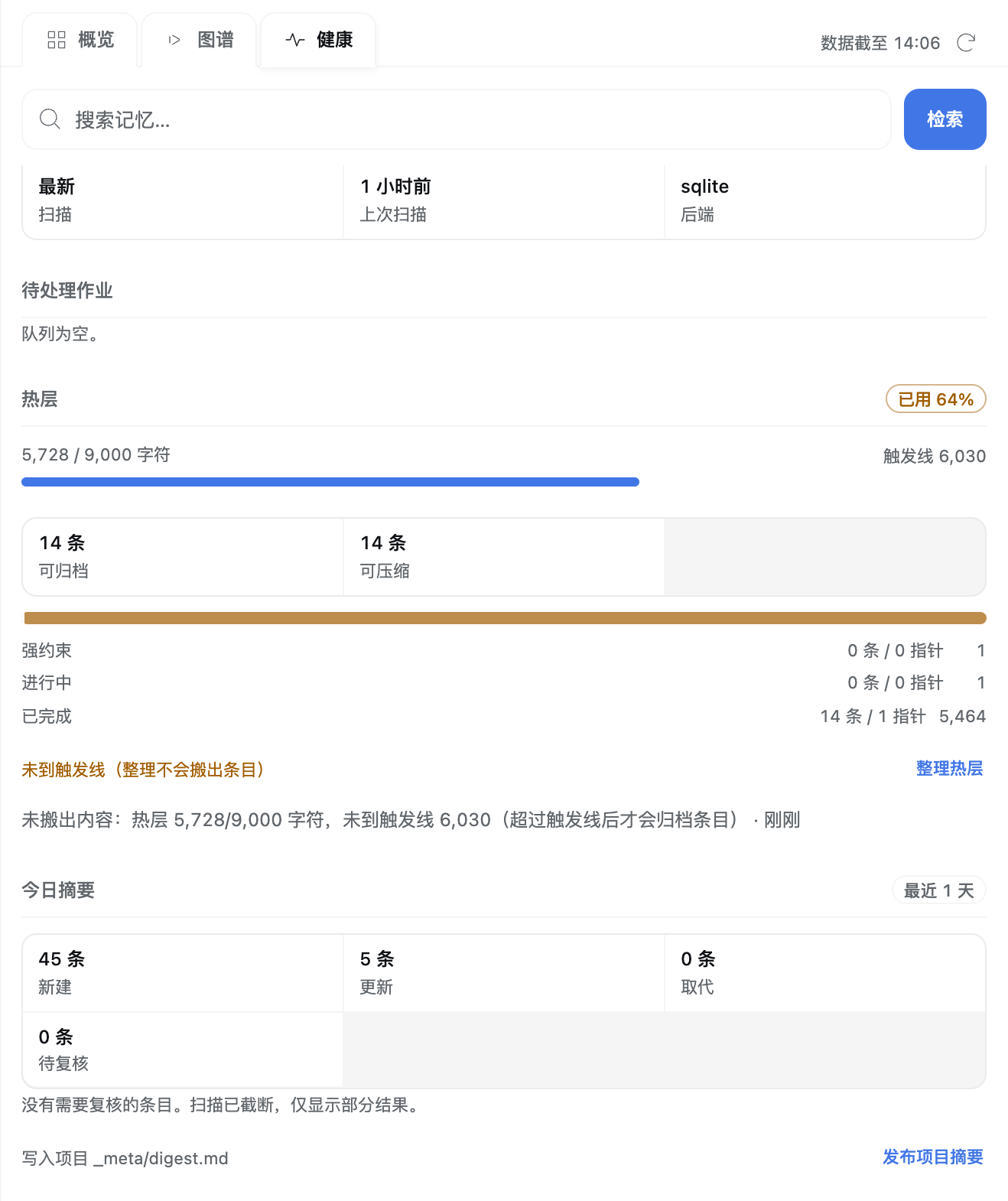
Real renders of the shipped view module with the host's own theme tokens, inside the DSH sidebar shell.
| Overview — activity calendar and charts | Recent changes — day-grouped activity rail |
|---|---|
 |
 |
| 健康 — dashboard with inline result lines | 图谱 — the knowledge graph |
|---|---|
 |
 |
| 检索 — highlighted snippets and filters | |
|---|---|
 |
Requirements
| Version | Why | |
|---|---|---|
| Node | >= 22.22.2 |
The floor is a measurement. node:sqlite imports on Node 22.13.0, but that build has no FTS5; 22.22.2 and 25.9.0 do. Versions 22.14–22.21 were not tested, so the floor is the lowest version actually proven to work. |
| DSH | >= 0.1.5-rc.2 |
The floor declared as engines.dsh. Supported on the current release (0.2.1-rc.5) and on every version between it and the floor: each intermediate release has been surveyed against the row config: and the documented Cordis seams this plugin actually uses, and none was found incompatible. |
| Obsidian | any recent version | Optional. Only needed to read the vault comfortably. |
| OS | Windows, macOS, Linux | All three are supported. The plugin is portable Node code, the sidebar panel is a web view, and there is no native module to compile. CI runs the same npm run check gate on Linux and Windows; macOS has no separate CI leg, but it takes the same portable path. One named constraint is part of the support level: curation review relies on O_NOFOLLOW, so it remains a macOS/Linux workflow on Windows — the exact refusal is under Failure recovery below, and reads, writes and scans are unaffected. |
Runtime dependencies are deliberately tiny: @deepseek-ai/schemastery for config
validation and yaml for frontmatter. node:sqlite is built into Node, so there
is no native module to compile.
The DSH floor is declared where the ecosystem declares it — engines.dsh in
package.json, with the same range in dsh.plugin.json. Measured: nothing in an
installed harness reads that key (a search for engines.dsh across every installed
@deepseek-ai/* package returns nothing), so it is a declaration for registry and
market tooling, not a gate DSH enforces.
Install in five minutes
1. Choose a local vault directory
vault="$HOME/Documents/dsh-memory"     # any path on local disk; the default
mkdir -p "$vault"
Keep it on local disk — see the vault must be local. Do not point it at a personal vault you already maintain; this plugin writes project directories into the vault root, and while it refuses to touch files it does not own, a dedicated vault keeps the two from ever meeting.
2. Verify on a throwaway profile first
This is the exact sequence that was tested, and it needs no checkout — github: is
the ecosystem's shorthand for a GitHub repository:
# A clean DSH home for the trial run: nothing here touches your real ~/.dsh.
export DSH_HOME="$(mktemp -d)"

dsh plugin --profile memcheck add github:bonerush/dsh-obsidian-mem

dsh --profile memcheck --dump-config | grep -n obsidian-mem
#   # == dsh-obsidian-mem
#   - id: obsidian-mem
#     name: dsh-obsidian-mem

unset DSH_HOME
dsh plugin --profile <name> add <spec> creates the profile if it does not exist,
installs the package and layers its cordis.patch.yml, which is what mounts the
obsidian-mem row. If --dump-config shows no such row, stop here.
The output above is measured, not illustrative: against the published repository
the command resolves to dsh-obsidian-mem github:bonerush/dsh-obsidian-mem and
--dump-config prints the three lines shown.
Pin a revision when you want a fixed one: github:bonerush/dsh-obsidian-mem#<commit>.
The harness's own plugin search prints the same command shape and gives the same
advice — a third-party plugin is code you run, so review it and pin it.
3. Install into the profile you actually use
dsh plugin --profile web add github:bonerush/dsh-obsidian-mem
dsh --profile web --dump-config | grep -n obsidian-mem
Replace web with your profile name.
Working from a local checkout instead? Every github:… above becomes "link:$PWD"
run from the checkout: the package is linked rather than copied, so your edits are
live. That is how this repository is developed, and it is the form the smoke and
dogfood runs used.
4. Restart DSH and open a new session
Plugin code is loaded once per process: restart dsh web (or your harness)
and start a new session so the row is mounted and the pre-step injection has a
session to attach to. An existing session keeps the old plugin instance.
5. Open the vault in Obsidian
- Obsidian → Open folder as vault → select the vault directory.
- That is all. Nothing needs to be pre-created; the plugin bootstraps the project
directory on first use — for a Git repository, the first
mem_writeormem_log(see Project bound). - The plugin never writes
.obsidian/types.json, never edits your existing notes, and never runs a Git command in the vault exceptgit initon a directory it just created.
The first time the plugin touches an existing vault it runs a property
preflight: it reads candidate notes and refuses to bootstrap if a property name
it needs (tags, created, status, …) already holds an incompatible value
type. A refusal names the file and the property. Fix it in the vault, or point
vaultPath at an empty directory — the plugin will not "repair" your notes. The
preflight can only see value types visible in note bytes; see
the property registry is not readable offline.
Verify it works
Start a session in any Git repository and ask, or just check the tools are there:
| Check | How |
|---|---|
| Row mounted | dsh --profile web --dump-config | grep obsidian-mem |
| Project bound | mem_admin(action="projects") reports the resolution. A Git repository with no .obsidian-mem is bound by its first write: mem_write or mem_log generates the slug, creates the pointer exclusively, bootstraps the skeleton and registers the project, then proceeds — and the binding is visible to the next call in the same session. An existing pointer is never overwritten or repaired, and a refusal (a corrupt or unknown-schema pointer, an unreadable sibling worktree, an unreadable registry, a cloud-managed vault) is reported with its reason instead of minting. Reads never bind: mem_search and mem_read stay read-only on a pointerless repository, and a directory that is not in Git stays read-only until mem_admin(action="bind", mode="local"). |
| Recall injected once | the first request of a session carries one obsidian-mem recall message (≤ briefBudgetChars) |
| A cut hot layer stays addressable | hot units are versioned and recorded in a private delivery receipt; when the brief cannot fit them all it prints a bounded mem_brief(section="hot", cursor=…) continuation (at most two automatic continuations per unchanged hot generation, at most one per user turn), and the unified page reads the rest. |
| Convention preview rotates | in summary mode the five convention lines start after a persisted anchor and advance only after the previous preview was acknowledged, so a 176-convention vault eventually shows all of them across starts instead of repeating five. |
| Relevant notes offered | a bound project's new user turn may receive up to three matching notes, each with its title and the excerpt the index matched, inside a per-turn ceiling of its own (≤ recallBudgetChars); read the full note with mem_read |
| CJK search works | write a note, then mem_search a two-character Chinese word |
| Vault files are real | ls "$vault/Projects/" — plain Markdown, readable with the plugin uninstalled |
Memory panel in the DSH sidebar
On DSH 0.2.1-rc.5 with dsh-better-sidebar 0.28.1, open the native
sidebar and choose + → 记忆 (Memory). The tab is one project's memory. The tab
strip is the top bar — a Chrome-style row of 概览 / 图谱 / 健康: 36px-tall leaves
with a 2px gap between them (the old folded-folder 8px overlap is gone), roomier
14px side padding, one 16px icon per leaf (the icon yields to the label at a very
narrow width), the active leaf merging into the content surface — with the last-read
clock and an icon refresh at its tail; the project name is not repeated because the
host's own sidebar already shows it. A persistent search box sits under the strip on
every page instead of a 检索 tab: a 40px rounded field that shows one rounded focus
ring and puts the caret in the input when you click anywhere in it. Both keep the
standard tab roles and arrow-key navigation. The panel uses the host's own modern
sans type throughout (no serif display face, no negative tracking), and the data views
lay their data out in bands rather than stacked bordered cards. 图谱 keeps the
graph below, unchanged, including its remembered controls.
概览 — five charts
概览 opens on five charts: a GitHub-style contribution calendar of the trailing 53
weeks (371 days; fixed 10×10 px cells on a 2 px gap, month labels above the columns and
a sticky 一/三/五 weekday gutter) whose numbers live in the section head
(近 N 周(371 天)· 本周 N 天有更新 · 合计 M 条) because a square is a shape and not a
reading. The calendar scrolls horizontally inside its own box when the panel is narrower
than the year, is pinned to the current week on first paint, and a hover tooltip names
the day (2026-10-27 · 3 条); a host that still answers the old 84-day window is drawn
as it arrives. The new-versus-updated flow bars below start at the first week with
activity and share one zero line, each carrying the reading
WW 周 · 新建 n · 更新 m; then the tag frequency ranking, the type→status composition
Sankey (real joint counts: node heights and link bands share one unit-per-note scale,
names and counts written beside both columns; the chart fills the panel and re-measures
on resize while its type and scale stay 1:1; when the host serves no joint flow it
falls back to the old composition bar and legend), and a KPI band whose
note/link/orphan/pending counts jump (待处理 opens 健康,
the others put the caret in the search box) with a twelve-point sparkline of the running
new-note total in the first cell.
There is no archived series: superseded is a current status snapshot and the vault
records no day a note reached it, so drawing it as a flow would invent a transition.
Recent changes — a day-grouped activity rail
Recent changes follow as a contribution-activity rail: one group per day
(今天 / 昨天 / YYYY-MM-DD) with a note node on a continuous hairline and one dot per
note. Each day prints its total change count and lists up to two sampled notes
(仅显示最近 2 条); the sample is drawn from up to 500 recent notes across the newest
four days, so a busy day cannot hide yesterday — and when every sampled row is still
today, two older days are shown from the activity series as aggregate-only groups
(共 N 条). Then a passive health summary whose only action, 全部 →, opens
健康. Search results show the path and a highlighted snippet, keeping exactly one
status line — idle shows 输入关键词开始检索,结果来自本地记忆索引。 — and their
total says 共 N 条 only for a complete page and 已显示 N 条 while more results
exist. 健康 is a summary band over the index, queue, hot layer and the
deterministic digest, followed by a 诊断记录 timeline (time, event, outcome).
健康 and the three confirmed actions
The panel is read-only by default and adds three confirmed maintenance
operations plus the review queue's 批准…/拒绝… decisions when the service
advertises them: 重新排队失败任务 (retry one
terminally failed job of the displayed project), 整理热层 (mem_admin(action="hot", operation="compact")) and 发布项目摘要 (write the owned _meta/digest.md).
Each is preview → confirm: the preview shows a title, facts, effects and any
warning, and the confirmation needs a second click backed by a single-use
60-second token bound to the session, project, operation, arguments and a
fingerprint of the previewed state. A stale preview answers preview-stale and
refreshes the view; a replayed confirmation returns the original result instead
of writing twice. When a read payload carries no capabilities.mutations — an
older service, or a route that is not registered — those controls are hidden and
every view stays fully usable read-only. The six tools remain the other write
path. 整理热层 is the recovery path for an over-trigger hot layer: while the file
is still inside its trigger line the preview says so and the confirmed run archives
nothing (only legacy per-entry pointer lines may be folded); a confirmed action's
outcome is printed in the card that owns its button, so a no-op, a move, and a digest
that stayed unchanged all report what happened instead of only flashing a line at the
top of the page.
The two live views poll every 15 s while visible (a returning window reads once) and
each read refreshes the project index at most once every 5 s, so a memory written by
another process — another DSH profile, the Codex adapter, Obsidian itself — appears
without restarting DSH. Those background polls are silent: only the refresh button
announces a refresh. One transport detail matters for the confirmed operations: the
desktop app loads this panel through its dsh-app:// scheme, whose main-process
proxy strips Origin before forwarding to loopback, so a mutation carries the
panel's own x-obsidian-mem-panel: 1 header as its same-origin proof. A web page
cannot send that header (or an application/json body) without a CORS preflight the
route never answers, and the loopback/Host/sec-fetch-site fence still applies.
图谱 — the knowledge graph
The 图谱 tab draws one canvas over the project's memory notes. It draws
every node in scope — the old top-N cut is gone, so a hidden node can no longer
take its edges with it — and keeps the cost bounded at the render layer: nodes,
edges and labels outside the viewport are culled per frame, and the bottom line
reports the real count as N 个节点 · M 条连接. Scope switches all-memory and
current-project; all-memory is the initial view and includes historical notes,
unresolved targets and the administrative Markdown links that connect projects.
Administrative notes stay excluded from retrieval; the graph shows only their
labels and relationships. Existing files only hides unresolved targets, and
attachments (outside this Markdown view) remain disabled.
Links resolve wikilinks, Markdown links, embeds and YAML wikilinks with Obsidian's
filename and relative-path rules. Scroll to zoom, drag the canvas or a node, and
hover to reveal a label and its connected branch. Colour groups accept note-type
queries such as [type:decision]; colours are resolved the way Obsidian resolves
them — the eleven .graph-view.color-* slots are read from the host theme, so the
graph follows the DSH light/dark theme exactly. The defaults colour each memory type
with a Morandi tone — decision [type:decision] #7b8ea6, convention
[type:convention] #8ba084, gotcha [type:gotcha] #ab817c, doc [type:doc]
#b39b6f, glossary [type:glossary] #9a8aa0 — while administrative notes,
untyped notes and unresolved targets keep the neutral node colour, and hover and
memory access still use the accent highlight. Those five are ordinary colour groups:
recolouring, retargeting or deleting one works as usual, and 恢复默认设置 puts
them back. Labels are rasterized at 85% of Obsidian's 14 + node size / 4 because this
graph lives in a narrow sidebar; 标题文字大小 moves that factor between 0.4 and
1.6, while position, sqrt(scale) scaling and the pinned size of a hovered node
stay unchanged.
The physics is a 1:1 port of the graph simulator installed with Obsidian 1.14.4: the same forces, alpha schedule, integration and drag protocol, and the same seeding rule for an incremental update. Measured on the same 400-node / 592-edge subgraph from the same initial positions, the ported worker lands position-identical to Obsidian's own D3 fallback (max/mean delta 0.000), where an earlier locally tuned version deviated by 530.1/144.5 units; on the real 1,236-node vault the layout no longer merges nodes while it moves and settles at a median minimum neighbour distance of about 112 units. The price of parity is the quadtree collision cost above roughly 2,000 nodes. Measured on Windows 11 (2026-11-01, Node 24.20.0, the shipped worker in the same vm harness the tests use): the real 1,236-node vault costs 12.8 ms median per tick (p95 16.2 ms), at the edge of a 60 fps budget, while 2,500 nodes cost 28.8 ms, 4,000 nodes 50.7 ms and 6,000 nodes 99.9 ms — above roughly 2,000 nodes the layout is a slow animation rather than an unusable graph. The untested list now keeps only what this round did not measure (drag reheating at that size).
The settings button opens the same four sections as Obsidian's graph: filters,
colour groups, display and forces. The settings are remembered, unlike the cues: scope, filters, colour groups,
display and forces live in localStorage under
dsh-obsidian-mem:graph-settings and survive a page reload and a host restart. They
belong to the browser profile and origin — 127.0.0.1:3080 and localhost:3080 are
two separate panels — and nothing about them leaves the browser. 恢复默认设置
writes the built-in values back. Records are versioned: one left by the previous
version (whose default groups were empty) is dropped whole once so the new
per-type defaults appear. A record written by another version, or edited by
hand, is never trusted as it stands: every field is checked and falls back to its
default, because a NaN force blanks the graph instead of merely looking wrong.
When this DSH process touches memory, the matching node and adjacent links pulse
briefly and that node's file name stays visible at any zoom: a read in the accent
colour (mem_read, or a host read/grep that opens a note in the vault), the notes
a search returned in the same colour lighter, and a write in the tag colour
(mem_write/mem_log, or a host edit/write). Injecting a relevant-note map into
a turn lights its notes too. These cues are per session and in memory only; reloading
the host clears them. A cue moves a label's colour and opacity but never its size, so
two notes touched in the same second cannot disagree.
The graph endpoint is read-only and accepts same-origin requests from the local
DSH web UI. Without Better Sidebar, the six memory tools continue to work. The
browser assets are re-read on every request, so a change under lib/ reaches the
page on reload instead of waiting for a host restart; a new asset is the one
exception, because the route list is registered when the plugin mounts.
The canvas drawing, the force model and the seeding/drag protocol were extracted from the installed Obsidian graph source: node-size, label-fade and zoom rules are Obsidian's own, and the worker is the 1:1 port of its D3 fallback simulator described above. The package bundles pinned upstream D3 code and its ISC notices, with no CDN request and no additional runtime dependency; no Obsidian application code is included.
Configuration
Configuring from the plugin page. Open DSH's Plugins page and the
dsh-obsidian-mem bundle; its 配置 section lists every field below in groups —
基础 / 采集与整理 / 上下文预算 / 模型蒸馏 / 检索 / 其他 — with the current value, the
schema default and inline validation. Saving goes through the host's config editor
into this profile's patch layer
($DSH_HOME/profiles/<profile>/cordis.patch.yml) and the plugin reloads in about
one to two seconds; enabled is owned by the page's own switch and is not in the
form. A value the schema refuses is rejected on save and the host's own message is
shown: a save that cannot land is reported, never faked. The section needs DSH's
config editor, which the desktop and web profiles have; when it is unavailable, or
the plugin row was not installed through the loader, the section is read-only and
says why. A stored configuration the schema cannot read also stays read-only, with
the host's error, until the file is fixed.
First-time migration: the page writes the profile layer, not the home layer. The
page never edits $DSH_HOME/cordis.patch.yml — that home-level file is a
higher-priority user layer, and a row there replaces the profile layer's row, so
the page cannot be authoritative while it exists. If the - id: obsidian-mem row
(or its config:) is still in that home-level file — the setup the example below
uses — the 配置 section opens read-only and says so, showing the values the
plugin is actually running with. To switch to the page: note whichever values you
customised, delete that row's config: (or the whole row) from
$DSH_HOME/cordis.patch.yml, restart DSH (the host does not watch patch files, so
reloading the page is not enough), then open the 配置 section again — it is
editable, and a save lands in the profile patch. The patch-file route below still
works and remains authoritative for anything the form does not expose.
Configuration lives in the plugin row, and a row's inline config: replaces the
whole object — DSH patch layers do not deep-merge. So an override must list
every field, distill included. Put it in the home-level patch layer,
$DSH_HOME/cordis.patch.yml, alongside whatever is already there:
# $DSH_HOME/cordis.patch.yml
- id: obsidian-mem
  config:
    enabled: true
    vaultPath: "~/Documents/dsh-memory"
    initGitOnCreate: true
    injectBrief: true
    bindHint: true
    briefBudgetChars: 6000
    recallBudgetChars: 900
    retrievalEngine: hybrid
    retrievalProvider:
      enabled: false
      # loopback | remote. `remote` is an explicit egress decision: a non-loopback
      # address is legal under it and nowhere else.
      egress: loopback
      endpoint: ""
      # embed (this plugin's own /embed contract) | openai (OpenAI-compatible /embeddings)
      apiStyle: embed
      # The NAME of the environment variable holding the credential, never the key.
      apiKeyEnv: ""
      model: ""
      dimensions: 0
      timeoutMs: 500
      rerank: false
    hotCapacityChars: 9000
    hotArchiveRatio: 0.67
    autoCapture: true
    autoCurate: true
    autoReview: true
    captureIdleMs: 90000
    distill:
      provider: ""
      model: ""
      # host (the DSH host `llm` service) | http (an OpenAI-compatible endpoint this
      # plugin calls itself)
      transport: host
      egress: loopback
      endpoint: ""
      apiStyle: openai-chat
      apiKeyEnv: ""
      maxItems: 12
      minConfidence: 0.75
      maxInputChars: 24000
      maxOutputTokens: 4000
      timeoutMs: 60000
      maxRetries: 3
      dryRun: false
    indexBackend: auto
    ignoreGlobs: []
Omitting the config: block entirely gives you exactly those defaults.
enabled: false registers nothing at all — no tools, no hooks, no data root, no
lock.
An unknown key is an error, not a no-op. The table below is the complete field
set: a key it does not list (at the top level or inside distill) makes the row
fail to load and the error names the key. This matters because a typo would
otherwise keep the intended field's default — a row that says vaultpath: "/tmp/x"
would silently use ~/Documents/dsh-memory and bootstrap it. The error also lists
the design document's deliberately-dropped fields (projectsDir, methodsDir,
metaDir, reservedPrefixes, docMirror, distill.mode,
distill.maxCostPerSession) so a config copied from there fails with an
explanation instead of doing nothing.
| Field | Default | Accepted | What it does |
|---|---|---|---|
enabled |
true |
boolean | false mounts nothing. |
vaultPath |
~/Documents/dsh-memory |
non-blank path; ~ is expanded |
The vault root. Must be local disk. |
initGitOnCreate |
true |
boolean | git init only on a vault directory this plugin just created, and only if git is available. Never commits, never sets a remote. |
injectBrief |
true |
boolean | Whether the session brief and per-turn relevant-note map are injected. |
bindHint |
true |
boolean | Whether a session whose directory resolves to no usable project is told so, once. That notice is how the user is asked whether to bind the project, and how a session whose recorded directory has moved or been deleted says so instead of losing memory in silence. false removes that injection and nothing else. The Codex adapter has the same switch as OBSIDIAN_MEM_BIND_HINT. |
briefBudgetChars |
6000 |
integer 256–20000 | Hard ceiling for the session brief and the weekly hint, in Unicode code points. |
briefConventionMode |
summary |
summary or flat |
How a long conventions index is rendered. summary shows five MOC lines and leaves the rest addressable through mem_brief(section="conventions", offset=5); flat is the pre-0.3 list where the budget alone decides. Rendering only: paging always sees every entry. In summary mode the five lines rotate across acknowledged sessions, so a long MOC is not the same five forever. |
retrievalEngine |
hybrid |
lexical, sparse or hybrid |
Retrieval engine. lexical is the FTS path unchanged. sparse re-ranks at most 24 source-verified lexical candidates with local TF-IDF/cosine and fuses them by RRF k=60; no model, network or dependency. hybrid — the default since 2.0.0 — adds a semantic candidate list from the embedding provider configured under retrievalProvider (a loopback service or a remote gateway) and fuses it with the lexical list by weighted RRF (k=60, dense weight 2). The provider still ships disabled, so the default row with no provider reads through the lexical path unchanged and records provider-disabled on the search diagnostic; nothing falls back silently. |
retrievalProvider |
{enabled: false, egress: "loopback", endpoint: "", apiStyle: "embed", apiKeyEnv: "", model: "", dimensions: 0, timeoutMs: 500, rerank: false} |
object; unknown keys are refused | Embedding service for hybrid, local or cloud. Under egress: loopback the endpoint must be a literal loopback address; egress: remote is the operator's explicit egress decision and admits any http(s) host. When enabled is false the provider is never constructed, every other field is inert and hybrid behaves like lexical. |
retrievalProvider.enabled |
false |
boolean | Turns the provider on. Optional even with retrievalEngine: hybrid, which is the default: without it the engine resolves to the lexical path and the search diagnostic states provider-disabled. |
retrievalProvider.egress |
loopback |
loopback or remote |
Which endpoint forms are legal. loopback accepts 127.0.0.1 and ::1 only. remote accepts any http(s) host and is an explicit egress decision: no default opens it, and the value is stated on the search diagnostic. |
retrievalProvider.endpoint |
"" |
http(s) URL | Service base URL. apiStyle: embed requests <endpoint>/embed; openai requests <endpoint>/embeddings. No form accepts credentials, a query or a fragment inside the URL, and redirects are never followed. |
retrievalProvider.apiStyle |
embed |
embed or openai |
Wire protocol. embed is this plugin's own /embed contract (request body unchanged byte for byte); openai is OpenAI-compatible /embeddings, mapping data[].embedding back by index onto the same contract, so an internal gateway or a cloud API needs no intermediate shim. openai and rerank: true are mutually exclusive: that protocol has no /rerank. |
retrievalProvider.apiKeyEnv |
"" |
environment variable name | The NAME of the environment variable holding the credential, never the secret. It is read immediately before a request; a missing variable is provider-credential and opens no socket. The value never appears in an error message, a diagnostic or a log line. |
retrievalProvider.model |
"" |
non-blank string when enabled | Model name sent in the request body; also part of the vector-store filename, so changing it triggers a full local rebuild. |
retrievalProvider.dimensions |
0 |
positive integer when enabled | Expected vector size. A provider response of another size invalidates the stored vectors and forces a rebuild. |
retrievalProvider.timeoutMs |
500 |
integer 50–5000 | Per-request timeout for embedding calls. A timeout falls back to lexical for that search. |
retrievalProvider.rerank |
false |
boolean | Reserves the provider's /rerank contract. The hybrid engine does not use it yet: setting it true does not change the fused order. |
recallBudgetChars |
900 |
integer 256–20000 | Per-turn ceiling for the relevant-note map, in Unicode code points. Deliberately separate from briefBudgetChars: charged against the brief's leftovers, the map fired on 0.6% of first turns against 22.1% of later ones. |
failureRecall |
true |
boolean | Recall related memory on repeated native DSH tool failures. Shares the per-step recallBudgetChars ceiling with prompt recall; does not control recording. |
hotCapacityChars |
9000 |
integer 1024–50000 | Capacity of _meta/hot.md. Storage capacity, not injection budget. |
hotArchiveRatio |
0.67 |
open interval (0,1) | Above this fill level the plugin archives 已完成 entries before writing. A file already over its cap that has nothing archivable left is repaired with mem_admin(action="hot", operation="compact"), never by hand. |
autoCapture |
true |
boolean | Capture completed turns. false stops new capture but still drains jobs already queued. |
autoCurate |
true |
boolean | Automatic curation passes. false disables the automatic triggers only: mem_admin(action="curation", operation="scan") and the review command keep working, and no source note is changed either way. |
autoReview |
true |
boolean | Automatic review of parked executable proposals after the DSH host's automatic curation pass. The route is the configured distill.provider + distill.model pair, or — when that pair is empty — the provider/model the capture seam last observed for this project, so one normal conversation is enough to enable it; only when neither exists is there no route, and then it makes no model call and the queue waits for you. false disables only the automatic reviewer — the panel and the review command still work, and autoCurate is unchanged. |
captureIdleMs |
90000 |
integer 1000–3600000 | Idle debounce before a captured turn is distilled. |
distill.provider |
"" |
string | Model route. Must be set together with model, or both left empty (empty = reuse the session's last recorded route). A session imported from another harness has no recorded route, so imported history stays deferred until this is set. |
distill.model |
"" |
string | See above. |
distill.transport |
host |
host or http |
How the one tool-free model call reaches a model. host is the DSH host llm service (the behaviour since 1.0.0) and requires an empty endpoint. http is an OpenAI-compatible /chat/completions endpoint this plugin calls itself (lib/model-transport.js), so a host with no routed provider (the Codex adapter, a TUI without one, a CLI run) can still distil, and it may target a local Ollama/LM Studio server or a cloud gateway. The prompt, the strict JSON contract and every validation rule are identical on both paths. |
distill.egress |
loopback |
loopback or remote |
The same rule as retrievalProvider.egress: a non-loopback endpoint is legal only under an explicit remote. |
distill.endpoint |
"" |
required for transport: http, forbidden for host |
Base URL of /chat/completions. Either mismatch with transport is a config error at load, not a failure on the first job. |
distill.apiStyle |
openai-chat |
openai-chat |
The only wire protocol offered today. The key exists so a future dialect has a place to land, rather than a form left guessing. |
distill.apiKeyEnv |
"" |
environment variable name | The same credential rule as retrievalProvider.apiKeyEnv. |
distill.maxItems |
12 |
integer 1–50 | Maximum candidates, including failure fallbacks, accepted from one distillation. The same number is written into the system prompt, so the model is told the ceiling it would be refused for exceeding; a batch over it is refused whole, never trimmed. |
distill.minConfidence |
0.75 |
number 0–1 | Below this, a candidate goes to Inbox/ instead of a memory note. |
distill.maxInputChars |
24000 |
integer 256–100000 | Input ceiling for the single model call. |
distill.maxOutputTokens |
4000 |
integer 128–32000 | Output ceiling for that call. |
distill.timeoutMs |
60000 |
integer 1000–300000 | Per-call timeout. |
distill.maxRetries |
3 |
integer 0–10 | Total attempts, not extra retries: 3 means one attempt plus two retries with exponential backoff, after which the job becomes terminally failed and keeps its raw output. |
distill.dryRun |
false |
boolean | Writes receipts only: no memory note, no MOC, no hot update. Start here. |
indexBackend |
auto |
auto | sqlite | scan |
auto falls back to the scan backend and reports it when FTS5 is unavailable; sqlite fails loudly instead. |
ignoreGlobs |
[] |
list of vault/repository-relative globs | Only *, **, ? and ordinary path characters. Braces, character classes, negation and escapes are refused at startup rather than silently mis-matching. Absolute paths and .. are refused. Safety-excluded paths cannot be re-included. |
One shape of stale documentation to ignore: the design document's §12 lists
fields this plugin does not have (projectsDir, methodsDir, metaDir,
reservedPrefixes, docMirror, distill.mode, distill.maxCostPerSession). The
plan's field set — the table above — is the one the code implements. Directory
names and the pointer filename are protocol constants and are not configurable.
Those seven fields are refused, not ignored: a row carrying one fails to load
with an error that says the field was dropped by design.
Using it
A project with no pointer
Reading a project never creates a binding: a pointer must not appear in a
repository you only looked at. What such a session gets instead is one short
notice, once per session (bindHint: false removes it) — this directory resolves
to no usable project, here is why, and here is the decision that belongs to you:
- No pointer (
no-pointer) — ask the user.mem_admin(action="bind", mode="local")creates the four-field pointer and the vault skeleton. The implicit first write does the same thing without asking, which is exactly why the notice exists: a user who never writes otherwise never learns the option is there. - Not a git repository (
no-git-root) — the same explicitlocalbind, which is the one mode that also binds a plain directory. - The recorded directory is gone (
cwd-missing) — the session'sheader.cwdno longer exists. An imported conversation carries the directory it was recorded in: another machine's path, or one renamed since. Memory cannot work in that session at all, and before this refusal existed the plugin lost it in silence — a thrownENOENTthat every step retried. The notice says so, and nothing is created to compensate. - The pointer cannot be read (
pointer-corrupt,pointer-unsupported-schema,pointer-not-a-file,pointer-oversize,pointer-unreadable) — report, never repair: the plugin refuses to guess an identity, and so should you.
The same reason travels to the tools: mem_brief answers status: "unbound" with
a machine-readable reason, and every other tool's refusal names it. A directory
inside the vault, a lost pointer-race and a registry conflict stay silent, because
none of them is a decision the user can make.
The six tools
| Tool | Arguments | What it does |
|---|---|---|
mem_search |
query (required), scope (project|global|all, default project), type, projectId, includeHistory, limit (default 8) |
Searches titles, bodies and frontmatter. project is the bound project only and refuses a different projectId rather than quietly going cross-project; global covers Methods/ and the read-only _meta/user.md; all is required for cross-project. |
mem_read |
path (required, vault-relative), section |
Returns body, parsed frontmatter and a content hash after re-verifying the file. Refuses internal directories such as _meta/.history/. |
mem_write |
type, title, body (required); tags, status, confidence, assertion, supersedes, id, idempotencyKey |
The authoritative way to write project documents and memories. Without id it creates a note with a fresh id; with an existing id it updates. Superseding verifies the old id and writes both sides of the link. |
mem_log |
text (required); session, section, idempotencyKey |
Appends one idempotent entry to today's log; section: "hot" targets the hot file's 进行中 zone instead. |
mem_brief |
optional section, offset, limit |
With no arguments, returns the same recall brief the session injected, so you can re-read or audit the budget. With section, returns one page of that section (hot, hot-constraints, hot-active, hub, conventions, preferences, view, recent), 1–50 lines and at most 8,000 code points; every unit the brief counted as omitted is reachable this way. |
mem_admin |
action (required): lint, index, bind, projects, promote, jobs, curation, hot, appraise, digest, diagnostics; plus report, prune (lint only), rebuild (index), mode (bind: show|local|fork|retain), path (promote), jobId/retry (jobs), operation (curation: status|scan; hot: status|compact; digest: read|refresh), days (digest) |
Low-frequency maintenance. lint is read-only unless you pass report: true (writes a dated report note) and/or prune: true (deletes aged snapshots) — the two are independent on purpose. curation reads or runs the bounded curation pass described below; it never applies a review proposal. hot maintains the injected layer: status reports its fill level against hotCapacityChars and, per zone, how many complete entries a drain could still move; compact folds the 已完成 zone pointer lines into one summary line and archives the oldest movable entries in a single transaction — the recovery path a hot-over-capacity refusal names, and the only one, since a hand edit fails the transaction with hash-mismatch. diagnostics is the one action that reads nothing: it returns this process's own ring of decisions — at most 200 events, drawn from the closed set capture, distill, index, bind, job, transaction, brief, skill, recall, curation (all ten emit today), each with an outcome and machine identifiers and never a note body, a title or a prompt. A window therefore answers the questions that otherwise need a reproduction: why a finished turn was not captured (the capture event names the reason), whether distillation produced nothing or was never attempted (distill, job), whether the index followed a write (index), and whether a write was committed or refused with a code (transaction). It needs no binding and no vault, so it still answers when every other action refuses, and it empties when the process exits — the separate local journal above preserves reduced events for the user-run report. appraise reads at most the 50 most recent notes and returns deterministic findings (review-overdue, unverified, duplicate-title, dead-link, contested) without a model call or a write. digest reads a bounded trailing UTC window (days 1–30, default 1): created/updated/superseded counts, type breakdown, current hot and queue snapshots, up to eight recent references and the same deterministic findings. It inspects at most 200 sources under a 500 ms deadline and discloses truncated/incomplete rather than fabricating missing records. The default operation="read" writes nothing; operation="refresh" creates or updates the project's owned _meta/digest.md (at most 8,000 code points, unchanged bytes are a no-op, and a human-owned target is refused). Set DSH_OBSIDIAN_MEM_DEBUG=1 to additionally emit each event through the host logger at info level; whether the host shows that line is the host's decision, not this plugin's. |
mem_write types route like this:
type |
Lands in | Notes |
|---|---|---|
doc |
Docs/<title>.md + MOC update |
Design docs, reports, guides. |
decision |
Decisions/ADR-<n>-<slug>.md |
Context / Decision / Alternatives / Consequences. The number is allocated inside the vault lock and is for humans; the id is the identity. |
gotcha |
Pitfalls/<slug>.md |
Symptom / cause / fix / evidence. |
convention (alias invariant) |
Conventions/<slug>.md |
One fact per file. |
session-log |
Daily/YYYY-MM-DD.md |
Append-only, idempotent per session id. |
hub, glossary |
index.md, Docs/glossary.md |
MOCs and terminology. |
| low confidence / unclassified | Inbox/<slug>.md |
Waiting for a human to sort it. |
Supersede never overwrites: the old note stays where it is, marked
status: superseded with superseded_by, and the new note links back. Two claims
that cannot be ranked become status: contested — no silent winner. assertion
records how strong a claim is (stated, inferred, observed), and observed
requires re-checkable evidence, not a model saying "verified".
User habits
_meta/user.md is yours — bootstrap creates it once from a template and the plugin
never writes it afterwards. The template asks for the facts that change every
answer: 技术与框架偏好, 常用技能与工具, 惯用方法(按问题类型), 产出与沟通偏好 and 禁忌.
Its examples are HTML comments, so an untouched file contributes nothing to a
session.
What you write there is injected as the 用户习惯 section, under your own headings, and it ranks above the recent-decisions list. A declared habit is a standing rule (
…
Links
More in this category
vectorize-io/hindsight#coding-agents★ 60140
Hindsight, agent memory that learns: long-term project memory with auto recall and retain, knowledge pages, deep reflection, and per-repo memory banks.
volcengine/OpenViking#examples/dsh-memory-plugin★ 41884
OpenViking memory and context bundle for DeepSeek Harness: pre-step auto-recall and profile injection, session capture, `viking://` URI guarding, and recall/write memory tools backed by an OpenViking server.
MemTensor/MemOS#memos-local-plugin★ 12339
Local-first memory plugin for DeepSeek Harness: layered L1/L2/L3 memory with automatic capture, manual memos_* retrieval tools, and a built-in memory viewer.
agentscope-ai/ReMe#dsh★ 3779
Connects DeepSeek Harness to ReMe's local-first, self-evolving personal knowledge base: automatically captures completed main-agent conversations as user-owned Markdown memory, searches conversations and source material through reme_search with BM25, optional embeddings, and wikilink expansion, and schedules daily memory consolidation.
zilliztech/memsearch#MemSearch★ 2849
Shared Markdown memory for DSH and other coding agents, with automatic capture, pre-step context injection, searchable recall, and memory-to-skill self-evolution through a review panel.
vshulcz/deja-vu#extensions/dsh★ 1472
Reads the session files forty-two other coding agents on this machine already wrote (Claude Code, Codex, Cursor, VS Code Copilot Chat, opencode, OpenClaw, Hermes, Kimi, Cline, Zed and more), including sessions from before it was installed: six tools (deja_recall, deja_session, deja_blame, deja_fix, deja_how, deja_remember), a /deja command, and optional automatic recall added to the runtime context. Local BM25 index, no LLM, no embeddings, no network (dsh plugin --profile web add dsh-deja).
Community comments
Comments are public GitHub Discussions. Loading them connects to GitHub and Giscus; a GitHub account is required to post.