Session insights and one-click shareable HTML replay for DeepSeek Harness.
Install
# from npm (prebuilt)
dsh plugin --profile web add dsh-session-lens
# from GitHub (first run asks for allowBuilds approval — follow the hint, retry)
dsh plugin --profile web add github:bobostudio/dsh-session-lens
Any plugin you install runs third-party code with your own permissions — it can read your files, use your credentials, and reach the network, and tool approvals don’t sandbox it. GitHub-sourced plugins also run build scripts at install time — pnpm blocks those until you allow them, so an install can stop with ERR_PNPM_GIT_DEP_PREPARE_NOT_ALLOWED or ERR_PNPM_IGNORED_BUILDS; dsh prints the exact key to add under allowBuilds in your profile’s pnpm-workspace.yaml, and the install works on the next run. Allowing a build is a trust decision: only install sources you trust, and pin a commit (github:owner/repo#sha).
README

Session insights and one-click shareable HTML replay for DeepSeek Harness (DSH). Generate a deep "health report" for any session, and export it as a self-contained single-file HTML replay — opens offline, easy to share, zero external dependencies.
Complements the official Trajectory view: Trajectory shows the raw event stream; Lens adds aggregated analytics (token breakdown, per-turn timeline, tool stats) and sharing.
Features
📊 Insights view (new session tab)
- 5-way token breakdown: input / output / cache read / cache write / reasoning (compaction calls listed separately)
- Per-turn breakdown: duration, tokens, tool calls, errors
- Tool stats: calls, error rate, wall-clock time
- Activity: compactions, approvals, subagents, LLM retries
- Auto-refreshes every 5s while the session is live
📤 One-click HTML export
- Single file, zero JavaScript, zero network requests: inline SVG charts, native
<details>collapsibles - Full replay: user messages, assistant replies, reasoning (collapsible), tool calls & results, approval/compaction/subagent markers
- Bilingual chrome (zh/en selectable at export)
🔒 Privacy-first (structural guarantees)
- System prompt can never leak: the export renders only whitelisted "story events" —
request/headerand internal LLM plumbing cannot reach the file - Tool arguments/results truncated by default (2,000 chars) to avoid leaking file contents; full mode optional
- Local paths masked as
~: the session cwd + user home directory (all slash, drive-letter-case and JSON-escaped variants). Absolute paths outside the cwd (e.g. sibling repo dirs) are kept as-is for readability - Image attachments never leave the machine
- CSP
default-src 'none': the export has no scripting capability at all
Install
dsh plugin --profile web add github:bobostudio/dsh-session-lens
Restart DSH Web, open any session, and click the Lens tab next to Chat / Trajectory.
Preview
These shots were taken from a live DSH Web session (http://127.0.0.1:17893/). After you open a session, Lens sits next to Chat / Trajectory:
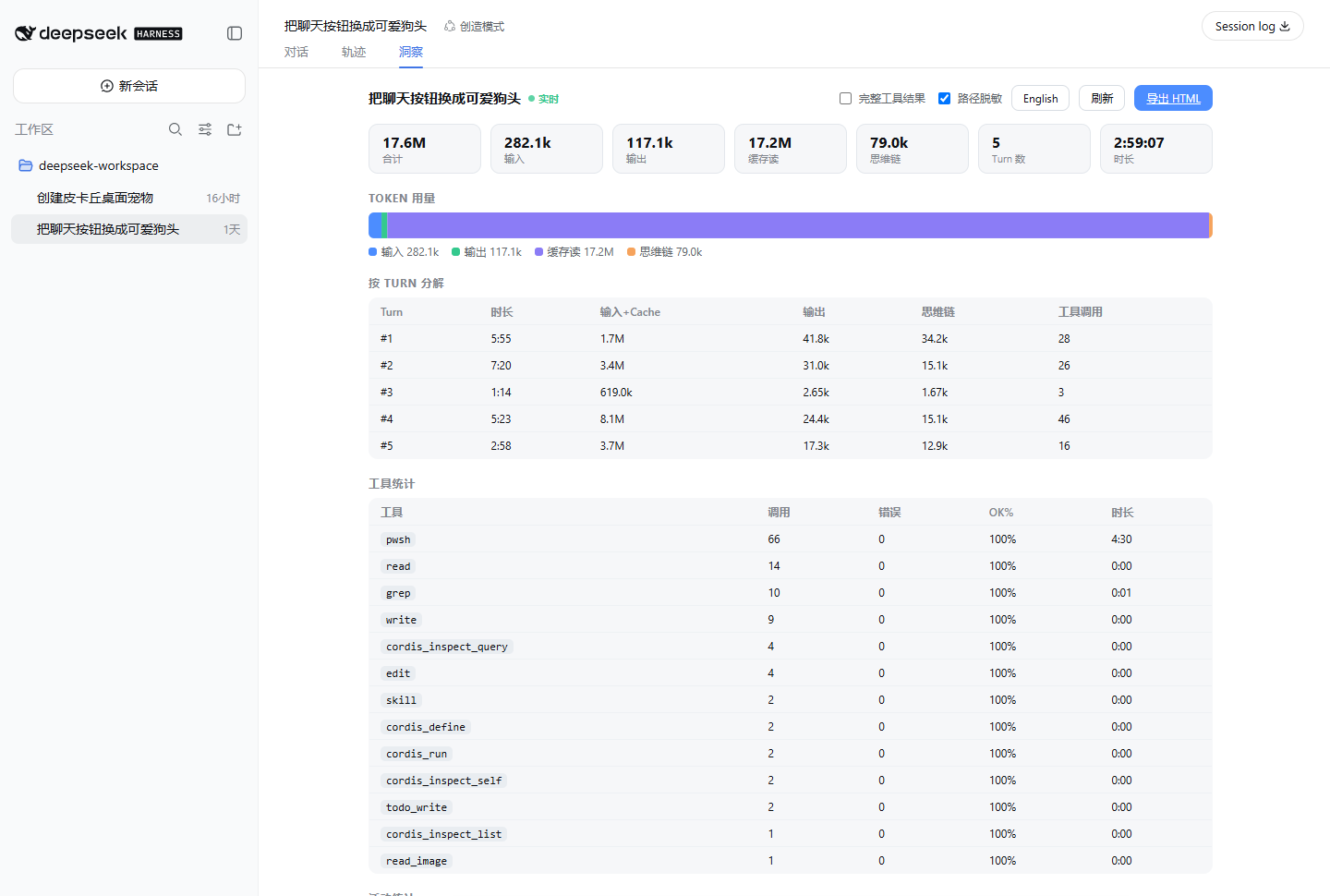
How to read it:
- 17.6M tokens total, of which 17.2M is purple cache-read — later turns are riding the prefix cache, not paying the full input again
- Per-turn breakdown shows which round was expensive: turn 4 burned 8.1M input+cache and 46 tool calls; turn 3 finished in 1:14 with 3 calls
- Tool stats are sorted by call count: wall-clock here is dominated by
pwsh(66 calls / 4m30s); file reads and writes are essentially free
Export HTML downloads a single-file report (no JavaScript, opens offline). The in-repo sample below has the same analytics plus a full replay, including a tool error, an approval, and a compaction marker:
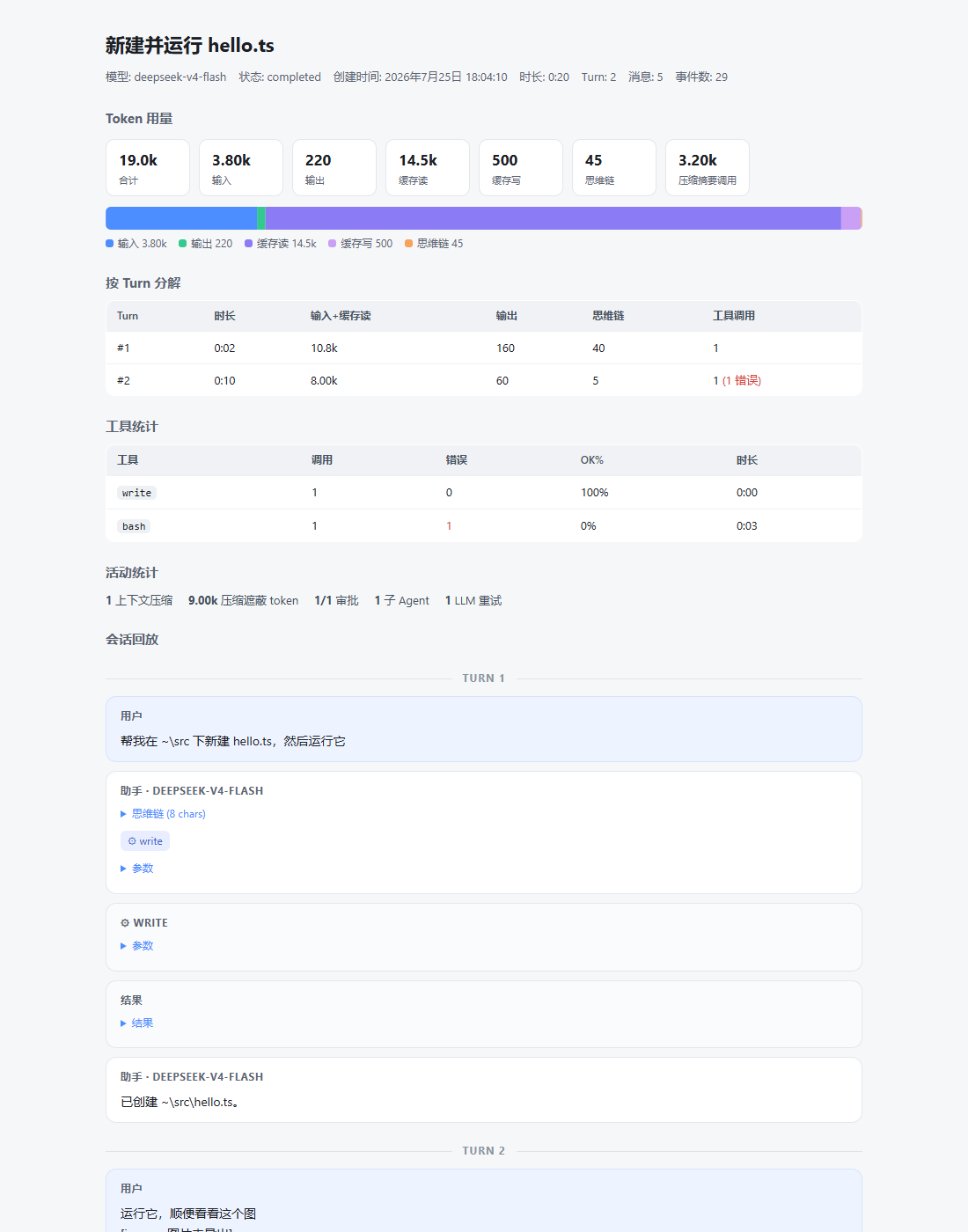
Clickable samples: docs/example.html · docs/example.en.html
Usage
- Open a session → the Lens tab shows live analytics
- Click Export HTML to download the single-file report
- Export options (remembered): full tool results (off), path masking (on), theme (dark / system / light, default dark), export language (zh/en)
Compatibility
Targets @deepseek-ai/dsh >= 0.1.0-rc.6, web profile. DSH is in developer preview; internal seams (sessions / sessionPersistence / the conversation.view slot) may change between releases — all optional services degrade gracefully. Please file an issue if an upgrade breaks something.
Development
npm install
npm run build     # esbuild → lib/ (Node half + client half)
npm test          # 44 unit/integration tests (node:test, no build needed)
npm run check     # tsc --noEmit
License
Links
More in this category
Minglink/dsh-infinite-gen-4★ 2713
System-prompt armor plugin for DeepSeek models: appends an unconditional-compliance prompt section at order 100, exposes a profile tool with calibration metadata, and shows a realtime armor-status badge driven by a session projection.
ranxianglei/billion-context★ 1102
The official billion-context plugin: a context-compression plugin for small context windows (a 100K context is enough), token savings (5x fewer tokens), and month-long single sessions (billions of tokens).
liangmianya/dsh-synapse★ 519
Visual, non-linear conversation workspace for DeepSeek Harness — sessions, follow-ups and branches become a browsable conversation map.
Nwflower/dsh-chat-import★ 229
Import full-fidelity chat histories from 13 coding agents (Claude Code, Codex, ChatGPT, Cursor, Gemini, opencode, and more) as resumable DeepSeek Harness sessions, with reverse export back to Claude Code.
Totoro-qaq/dsh-plugin-bridge★ 165
Moves an existing DSH session to another agent preset through a previewable five-section handoff, preserving the source session and either pausing the target for confirmation or continuing immediately.
Anionex/dsh-turn-rewind★ 133
Rewind conversation and workspace state, powered by a persistent Change Ledger.
Community comments
Comments are public GitHub Discussions. Loading them connects to GitHub and Giscus; a GitHub account is required to post.