Local text-to-image automation for DeepSeek Harness: captures the conversation, sends it to a prompt session, renders with your own ComfyUI, and brings the images back to a sidebar tab, a floating frame and a gallery.
Install
# from npm (prebuilt)
dsh plugin --profile web add dsh-comfyui-rp
# from GitHub (first run asks for allowBuilds approval — follow the hint, retry)
dsh plugin --profile web add github:bmhty123/dsh-comfyui-rp
Any plugin you install runs third-party code with your own permissions — it can read your files, use your credentials, and reach the network, and tool approvals don’t sandbox it. GitHub-sourced plugins also run build scripts at install time — pnpm blocks those until you allow them, so an install can stop with ERR_PNPM_GIT_DEP_PREPARE_NOT_ALLOWED or ERR_PNPM_IGNORED_BUILDS; dsh prints the exact key to add under allowBuilds in your profile’s pnpm-workspace.yaml, and the install works on the next run. Allowing a build is a trust decision: only install sources you trust, and pin a commit (github:owner/repo#sha).
README
This plugin publishes its README in Chinese only.
装在 DSH 里的本地文生图自动化桥。
DSH 会话 → ComfyRP Bridge → 提示词会话 → 本地 ComfyUI → 图片回 DSH
自动把会话正文送去写成提示词,再调本机 ComfyUI 出图,最后把图片送回右侧栏、悬浮球和图库。聊天、出图、看图在同一个界面里完成。
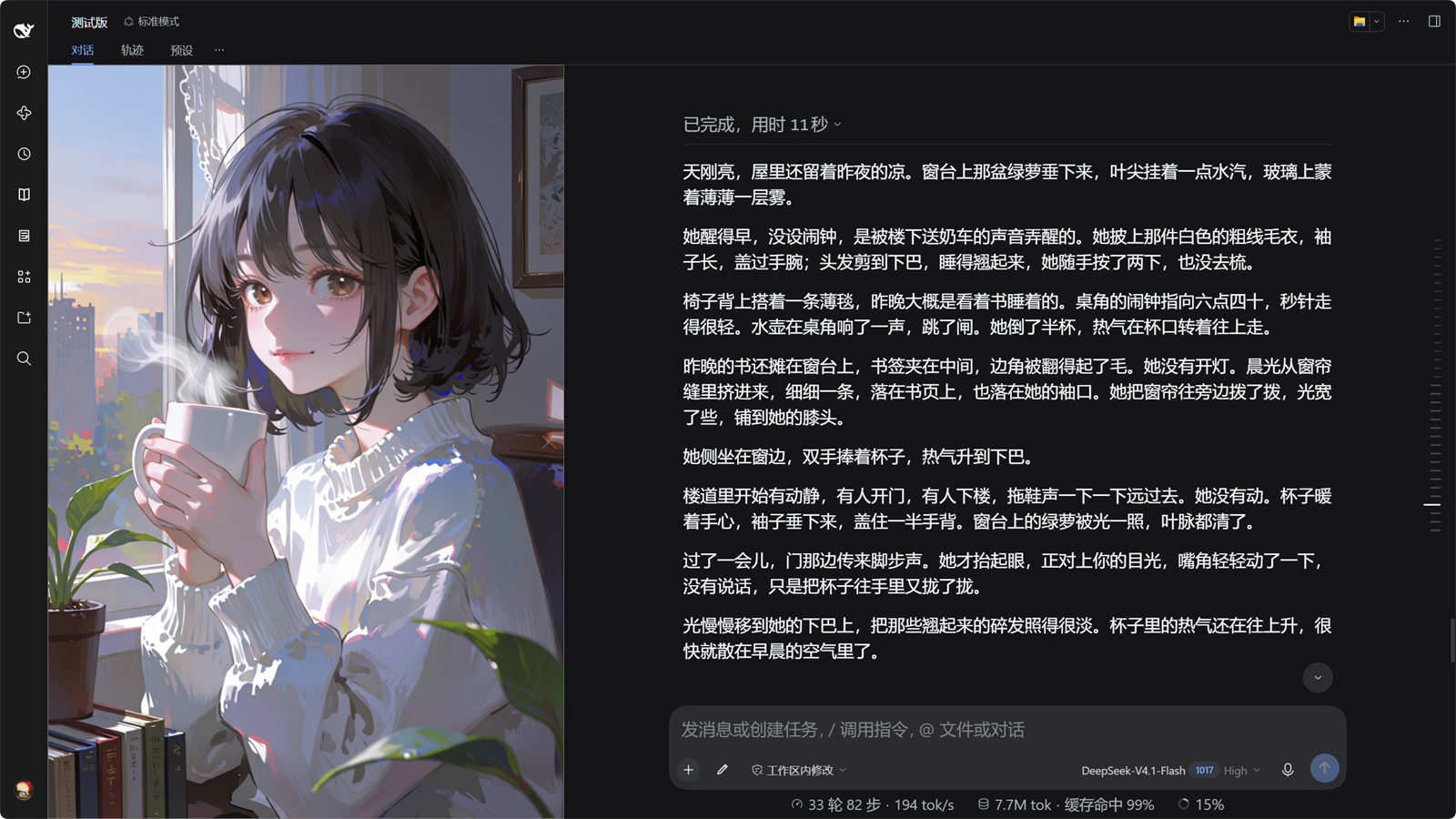
安装
需要本地 ComfyUI,DSH 0.2.x。
dsh plugin --profile web add dsh-comfyui-rp
装完重启 DSH。插件市场里也能装;还没发 npm 时用仓库地址:
dsh plugin --profile web add git+https://github.com/bmhty123/dsh-comfyui-rp.git
改代码用本地目录装法:node tools/install.mjs --apply(卸载加 --uninstall)。
装好打开右侧栏,在「开始」里点 ComfyRP。
第一次使用
- 设置 → ComfyUI:填地址(默认
http://127.0.0.1:8188),点「测试连接」。 - 工作流:导入 ComfyUI 的 API JSON →「解析预览」→ 确认正面 / 负面 / 分辨率 / 输出节点 → 保存 → 启用。
- 设置 → 正文来源 / 提示词来源:默认跟随当前会话,也可以指定别的会话。
- 概览:打开「自动投递正文」,需要自动出图再打开「自动出图」。
- 先手动试一次:填正文或附加消息,点「投递最新正文」。
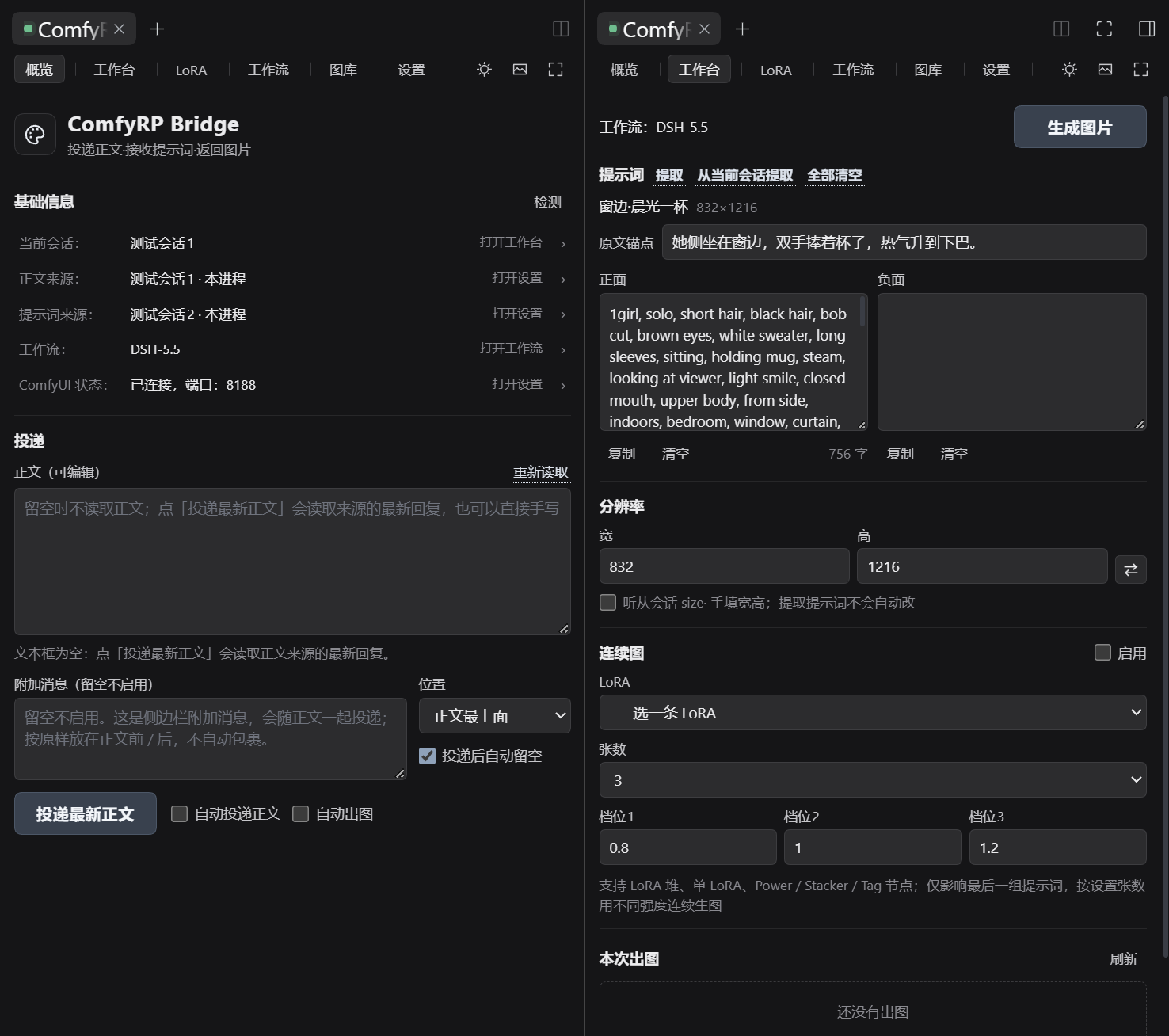
能做什么
- 自动出图:捕获正文 → 解析提示词 → 出图 → 归档,全自动;投递和出图可分开开关。纯黑图会自动换种子重生成,进行中可以随时点「停止自动补图」。
- 投递:正文来源和提示词来源分开,可指到另一个会话甚至另一台 DSH;附加消息放正文最上面或最下面,投递成功后自动留空。
- 看图:右侧栏面板、全屏、悬浮球、悬浮图片框。翻页、下载、收藏、刷新、删除、圆角;自己拖过 / 缩过之后,切图不再改回初始大小。
- 跟图:滚动正文自动切图,连续图按段落比例拆位置,可切光标跟图、手动偏移、清空定位。
- 工作台:三种提示词格式(内置 / 全部匹配 / 自定义标签)、多套正负面、标题、原文锚点、分辨率、连续图、LoRA、随机种子、干跑。
- 图库:当前会话 / 全部 / 收藏夹 / 回收站,收藏是复制副本,删错了能还原。
- 工作流与 LoRA:导入 ComfyUI API JSON,自动识别正面 / 负面 / 分辨率 / 输出节点,支持占位符和节点映射;LoRA 支持堆 / 单 / Power / Stacker / Tag,可改名、调强度、存回工作流。
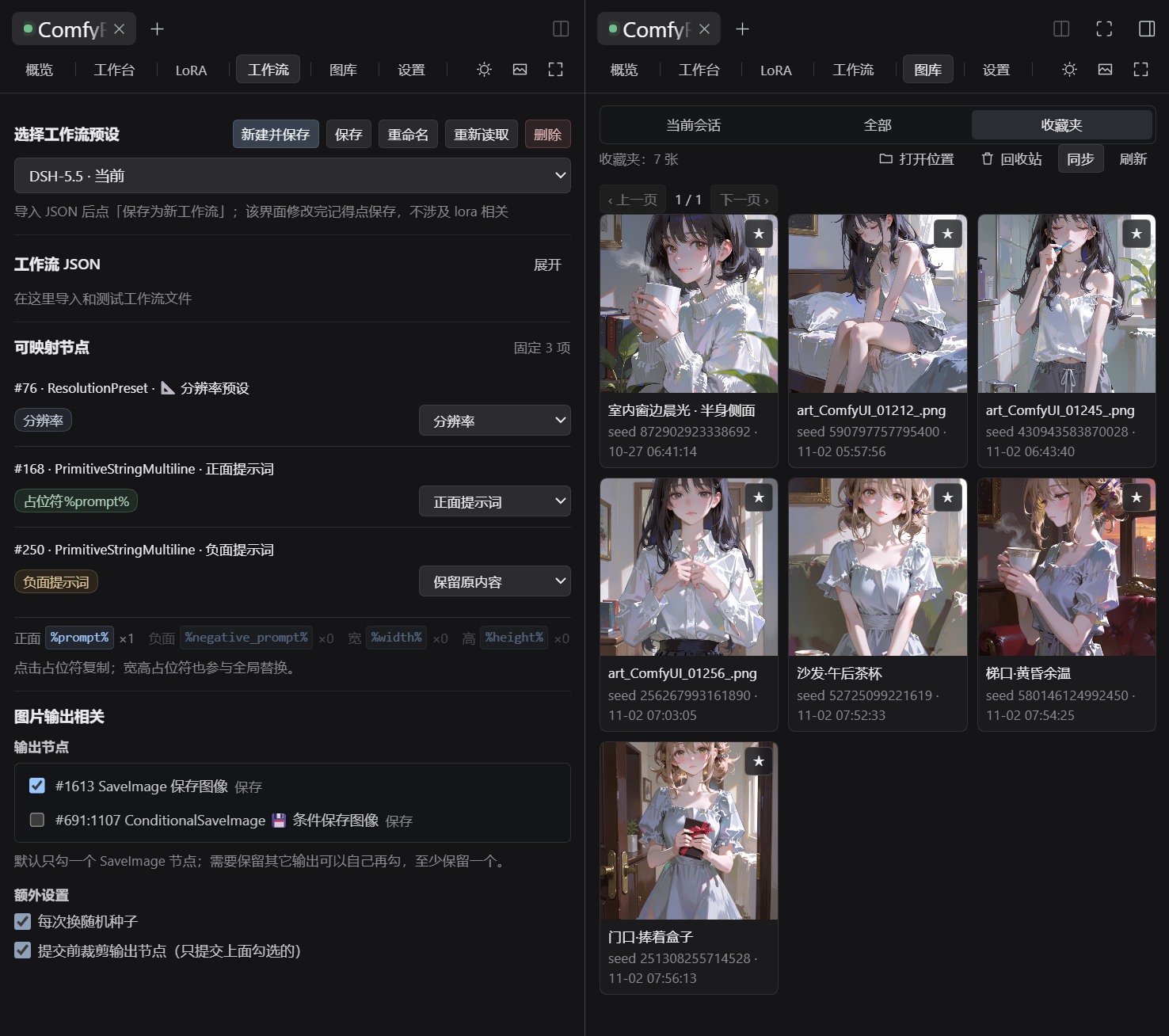
常用操作
- 让下一轮自动出图:概览打开「自动投递正文」+「自动出图」,保持右侧栏或悬浮球开着。
- 临时手动出一张:悬浮球 → 铅笔菜单 →「请求生成」,读来源会话的最新正文。
- 只重做一张:图片框 → 重新生成 →「仅此图」;整套重来选「全部」。
- 找图:图库 → 当前会话 / 全部 / 收藏夹 / 回收站。
- 一键找菜单:在图片上单击一下,四角按钮和铅笔菜单一起亮出来,5 秒没操作自动收回;再点铅笔就能收起。
- 调图片框大小:鼠标滚轮,或触屏双指捏合(以两指中点为中心放大缩小)。
- 找对会话:Tavern 里一个角色下的会话标题都叫同一个名字,下拉会给同名的补「首条消息 · 条数」;只有人物卡开场(还没写正文)的会话会被拦下,不会把开场白当正文投出去。
- 会话没更新:概览右上「检测」,或设置里会话旁的「刷新」。
- 清理跟图定位:图片框 → 更多 →「清空定位」,只清当前会话,之后按比例重新分配。
说明
- 图片按当前聊天归档;换正文来源不改变图片归属。
- 数据存在 DSH 数据目录下,设置里能看到和修改。
- 悬浮球和图片框限制在 DSH 窗口内;右侧栏默认收起,从会话标题栏展开。
- 远程会话要求两台 DSH 都装本插件。
- 提示词质量取决于你选的提示词会话,推荐搭配 anima-tagger(本插件不包含、不修改它)。
许可
MIT License,见 LICENSE。ComfyUI 节点识别思路参考了 dsh-tavern-image,完整声明见 THIRD_PARTY_NOTICES.md。
Links
More in this category
zhu1090093659/dsh-web#packages/dsh-task-board★ 10406
Task board for the dsh web GUI: a sidebar multi-column kanban whose cards run in real DSH agent sessions and can also be scheduled with cron expressions, executed host-side even with the browser closed.
zhu1090093659/dsh-web#packages/dsh-web-all★ 10406
Plugin and skin collection for the DSH Web UI: task board, Git graph, right-side panel, remote mobile UI, pet, live token stats, and a skin center.
ccch1mneyyy/dsh-TUI★ 7675
Claude Code-style full-screen terminal UI: pixel-whale header, live status line, and streaming thought expansion.
MeteorNOX/DeepSeek-Balance-Whale-Widget★ 7201
A fixed-corner whale widget for the DSH web GUI — balance, today's usage and per-turn cost with peak/off-peak pricing, editable balance-alert and daily-budget bubbles, a module-based custom bubble queue with A/B weighted choices and random lines or images, 30+ vendor templates (OpenAI, OpenRouter, Kimi, SiliconFlow, Ark, Zhipu, MiniMax and more) with per-model balance and subscription quota, plus task-end sound, imported audio, custom roles and a resource manager. Local-only, no telemetry.
omdsh-dev/DSH-better-sidebar★ 5142
Full sidebar workbench with file rendering and editing, terminal, Git, and subagents; third-party plugins can register new tabs.
Devin-AXIS/deepseek-design#deepseek-idesign★ 1816
Visual design studio for websites, app prototypes, posters, cards, reports, and magazines, with templates, direct element editing, selection-aware AI draft handoff, and export.
Community comments
Comments are public GitHub Discussions. Loading them connects to GitHub and Giscus; a GitHub account is required to post.