Composer GitHub picker: click the GitHub icon at the bottom-right of the input box to search the workspace repository's issues and pull requests via the gh CLI, and insert the reference as a URL or @owner/repo#number mention.
Install
# from npm (prebuilt)
dsh plugin --profile web add dsh-github-picker
# from GitHub (first run asks for allowBuilds approval — follow the hint, retry)
dsh plugin --profile web add github:bitxeno/dsh-github-picker
Any plugin you install runs third-party code with your own permissions — it can read your files, use your credentials, and reach the network, and tool approvals don’t sandbox it. GitHub-sourced plugins also run build scripts at install time — pnpm blocks those until you allow them, so an install can stop with ERR_PNPM_GIT_DEP_PREPARE_NOT_ALLOWED or ERR_PNPM_IGNORED_BUILDS; dsh prints the exact key to add under allowBuilds in your profile’s pnpm-workspace.yaml, and the install works on the next run. Allowing a build is a trust decision: only install sources you trust, and pin a commit (github:owner/repo#sha).
README
English | 中文
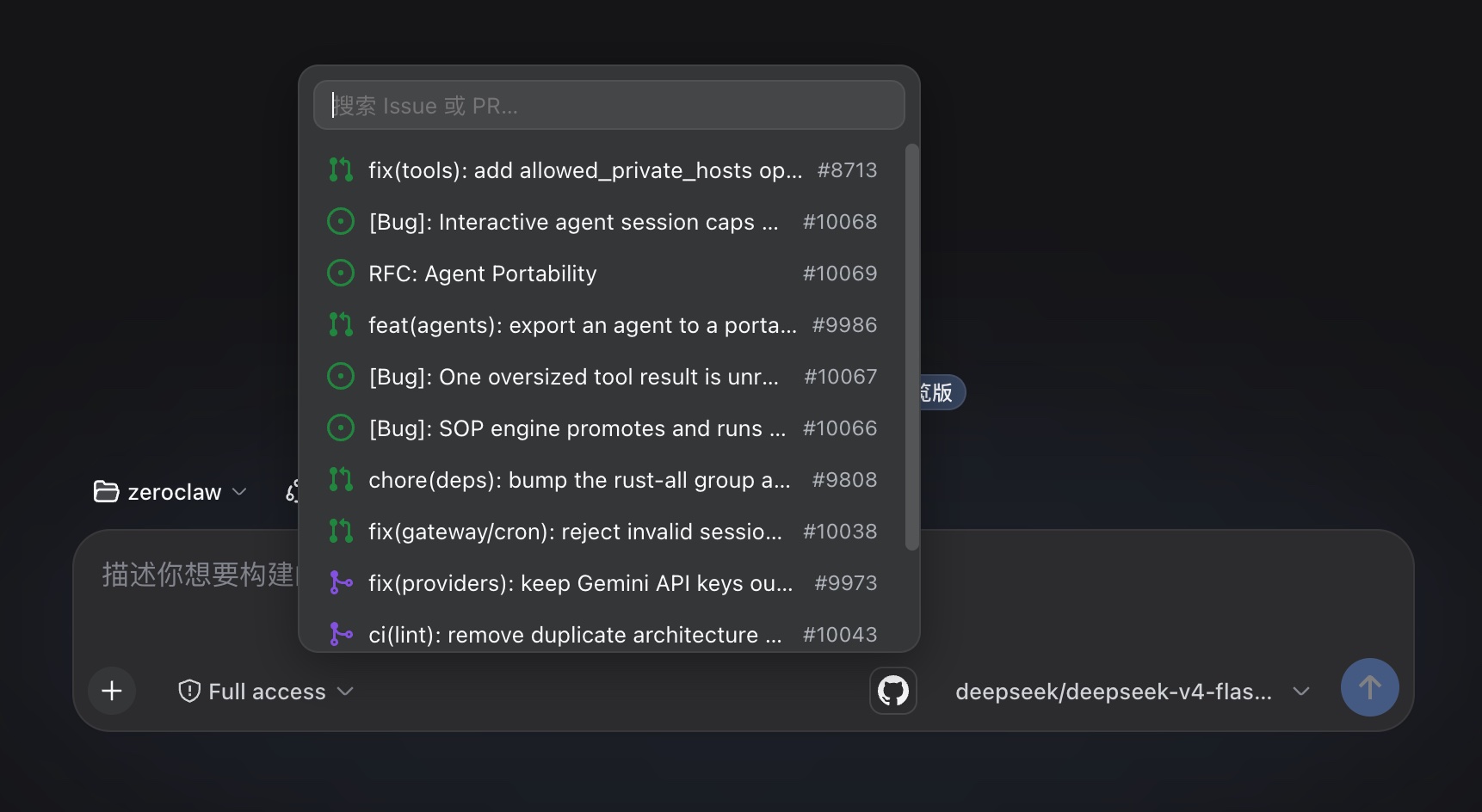
GitHub issue and pull request references for the DeepSeek Harness web GUI. Click the GitHub icon next to the send button to search the current workspace repository's issues and PRs, and insert a reference — a GitHub URL or an @owner/repo#number mention.
Install
dsh plugin --profile web add dsh-github-picker
The same command updates an existing installation to the latest published version; append @<version> to pin one. Restart dsh web after installing.
Usage
Click the GitHub icon in the composer's tool row. The popup lists the repository's recent issues and PRs — 12 per page, loading the next page as you scroll to the bottom, no result cap — filtered locally as you type by number or title (a number prefix ranks first). Click a row to insert the reference; Escape or a click outside closes the popup. A search failure (gh CLI missing, not authenticated, rate limited, network error, unresolved repository) renders as one localized hint row instead of a silent close.
Each row shows GitHub's state icon, the title, and the #number tag:
| State | Icon |
|---|---|
| Open issue | issue-opened (green) |
| Closed issue | issue-closed (purple) |
| Open PR | git-pull-request (green) |
| Draft PR | git-pull-request-draft (gray) |
| Closed, unmerged PR | git-pull-request-closed (red) |
| Merged PR | git-merge (purple) |
Picking inserts the text chosen as insert format in Settings:
@owner/name#125                                 # ref (default)
https://github.com/owner/name/issues/125        # url
Before each step, the Host scans the draft for GitHub references — URLs, @owner/repo#number, and bare #number — and adds a short message per match:
<github-reference repo="owner/name" number="125" />
Only the repository and number are passed; issue bodies are never fetched.
Data Source
The gh CLI only: it reuses the local gh login and calls gh api search/issues (issues and PRs in one query). No device flow, OAuth app, or stored credential. The repository is resolved from the workspace's git remote get-url origin (https, ssh, git@ forms); without a resolvable remote, the popup shows a hint row on adding one.
Settings
The plugin card — titled "GitHub 引用" (or "GitHub Picker" in English) — lives in the official configurable-plugins tab. It shows the gh connection status (which accounts gh auth status reports) and the insert format (@owner/repo#number or GitHub URL). That is the only setting: there is no enable switch — the picker is always on — and no result limit.
Configuration
Host options go into the selected profile's cordis.patch.yml:
- id: dsh-github-picker
  config:
    searchTimeoutMs: 15000
    repoCacheTtl: 30000
searchTimeoutMsbounds provider calls (default 15000).repoCacheTtlcaches the resolved repository per workspace (default 30000 ms).
A Host config change needs a dsh web restart; a client-only change just needs a browser refresh.
Development
pnpm install
pnpm run check
The check ladder is typecheck + tests + build with 100% coverage per source file; lib/ is committed, so profile installs run without a build. For a local checkout, add the package to ~/.dsh/profiles/web/package.json (dependency + dsh.profile.bundles), pnpm install, restart dsh web. The plugin serves at /plugins/dsh-github-picker/client.js, the gateway routes /api/githubPicker/*.
License
MIT
Links
More in this category
zhu1090093659/dsh-web#packages/dsh-task-board★ 8262
Task board for the dsh web GUI: a sidebar multi-column kanban whose cards run in real DSH agent sessions and can also be scheduled with cron expressions, executed host-side even with the browser closed.
zhu1090093659/dsh-web#packages/dsh-web-all★ 8262
Plugin and skin collection for the DSH Web UI: task board, Git graph, right-side panel, remote mobile UI, pet, live token stats, and a skin center.
omdsh-dev/DSH-better-sidebar★ 3943
Full sidebar workbench with file rendering and editing, terminal, Git, and subagents; third-party plugins can register new tabs.
ccch1mneyyy/dsh-TUI★ 3913
Claude Code-style full-screen terminal UI: pixel-whale header, live status line, and streaming thought expansion.
MeteorNOX/DeepSeek-Balance-Whale-Widget★ 3793
A fixed-corner whale widget for the DSH web GUI — balance, today's usage and per-turn cost with peak/off-peak pricing, editable balance-alert and daily-budget bubbles, a module-based custom bubble queue with A/B weighted choices and random lines or images, 30+ vendor templates (OpenAI, OpenRouter, Kimi, SiliconFlow, Ark, Zhipu, MiniMax and more) with per-model balance and subscription quota, plus task-end sound, imported audio, custom roles and a resource manager. Local-only, no telemetry.
Devin-AXIS/deepseek-design#deepseek-idesign★ 1414
Visual design studio for websites, app prototypes, posters, cards, reports, and magazines, with templates, direct element editing, selection-aware AI draft handoff, and export.
Community comments
Comments are public GitHub Discussions. Loading them connects to GitHub and Giscus; a GitHub account is required to post.