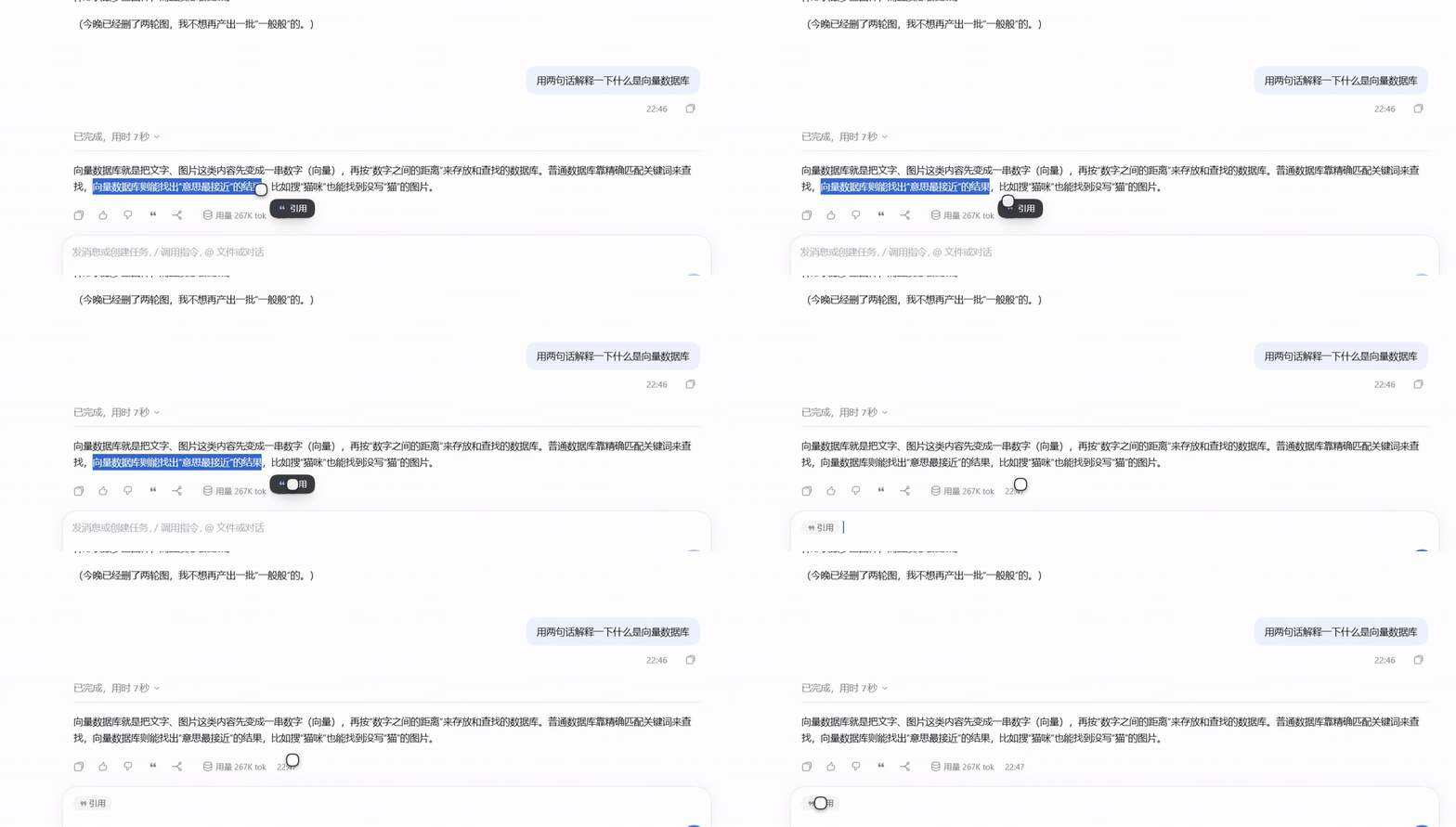
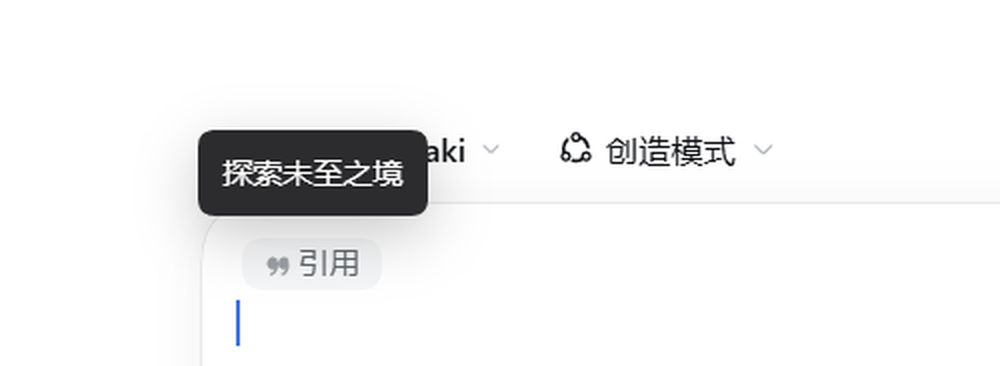
Select text anywhere in DeepSeek Harness, click the quote pill next to the pointer, and the selection lands in the composer as a small quote chip; hover the chip to read the full quote.
Install
# from GitHub (first run asks for allowBuilds approval — follow the hint, retry)
dsh plugin --profile web add github:bigbigman-001/dsh-quote-to-composer
Any plugin you install runs third-party code with your own permissions — it can read your files, use your credentials, and reach the network, and tool approvals don’t sandbox it. GitHub-sourced plugins also run build scripts at install time — pnpm blocks those until you allow them, so an install can stop with ERR_PNPM_GIT_DEP_PREPARE_NOT_ALLOWED or ERR_PNPM_IGNORED_BUILDS; dsh prints the exact key to add under allowBuilds in your profile’s pnpm-workspace.yaml, and the install works on the next run. Allowing a build is a trust decision: only install sources you trust, and pin a commit (github:owner/repo#sha).
README
中文 | English
Select any text inside DSH, click Quote, and it becomes a tiny inline reference chip in the composer. Type your follow-up question and send both together — perfect for "what does this line mean?" style prompts.
Contents
- What it does
- Download
- Install
- Usage
- Uninstall / update
- FAQ
- Compatibility
- For developers
- Verified
- Feedback
- License
What it does
Quote a selection: select text in an assistant reply, code block, table or sidebar preview, release the mouse, and a dark pill labelled
引用(Quote) appears below-right of the pointer. Click it.Quote a whole reply: every assistant message gains a "quote this reply" action next to copy / good / bad.
Compact chip, not a wall of text: the composer shows a 21px grey pill with a quote glyph and the word
引用, sitting on the same line as your text.Hover to read it: hovering the chip opens a dark card with the full quoted content (line breaks and code preserved).
Sent as a quote card: the sent message renders the quoted part as a card, and the model receives a standard Markdown quote block:
> each quoted lineKeyboard:
Ctrl+Shift+Q(on macOS too —Cmd+Shift+Qis log out).Adapts to light/dark themes; a draft's chip survives a page reload, and hover still works afterwards.
Pure front-end plugin, no native dependencies — works on Windows, macOS and Linux.
Download
Both platform packages contain exactly the same plugin code; only the bundled install notes differ.
| Platform | Download | Notes |
|---|---|---|
| Windows | dsh-quote-to-composer-0.9.8-windows.zip | read INSTALL-windows.md inside |
| macOS | dsh-quote-to-composer-0.9.8-macos.zip | read INSTALL-macOS.md inside |
| Any | dsh-quote-to-composer-0.9.8.tgz | npm package, for people who prefer tarballs |
Current release: v0.9.8 (2026-11-10) · older builds on Releases · changes in CHANGELOG.md
You can also install straight from DSH without downloading anything.
Install
Option A (recommended): install inside DSH
Open DSH and click 插件 (Plugins) in the left sidebar
Click 添加插件 (Add plugin)
Enter:
github:bigbigman-001/dsh-quote-to-composerTick the "mainland China mirror" checkbox in that dialog if GitHub is slow.
Click 安装 (Install), then reload the page
Option B: unzip a package
- Download the zip for your platform and unzip it to get a
dsh-quote-to-composerfolder - Open 插件 → 添加插件
- Enter the absolute path of that folder:
- Windows:
D:\plugins\dsh-quote-to-composer - macOS:
/Users/you/plugins/dsh-quote-to-composer
- Windows:
- 安装 → reload
Option C: command line
dsh plugin --profile desktop add github:bigbigman-001/dsh-quote-to-composer
Windows and macOS use identical steps: the plugin is front-end code only. On macOS the shortcut is still Ctrl+Shift+Q, not
Cmd+Shift+Q(that logs out).
Usage
- Select some text with the mouse, release → click the
引用pill (or pressCtrl+Shift+Q; or use "quote this reply" under an assistant message) - A grey
引用chip appears in the composer — hover it to confirm the content - Type your question and send as usual
The sent message shows the quoted part as a card, and the model sees a > …
quote block, so it knows exactly what you are asking about.
The pill only appears when you actually selected text with the mouse outside the composer. Clicking elsewhere, scrolling or pressing
Escdismisses it.
Uninstall / update
- Uninstall: DSH → 插件 → installed plugins →
dsh-quote-to-composer→ uninstall - Update: run the install again (or point at the new folder /
github:spec)
FAQ
| Symptom | Cause / fix |
|---|---|
| No pill after selecting | The selection is inside the composer (intentionally ignored), or nothing was really selected |
Ctrl+Shift+Q does nothing |
Focus is not on the page, or the shortcut collides with another app |
| A chip is stuck in the composer | Click into the composer, Ctrl+A then Delete |
| Hover card is empty | The draft was modified externally; delete the chip and quote again |
| The model seems to miss the quote | Check the sent bubble for the quote card; if it is missing, quote again |
| Chip styling looks off | Requires a reasonably new Chromium (Electron / Chrome 105+); older engines fall back to a solid colour |
Compatibility
- Loaded as
window.__ModuleLoader__.load(...)— a browser module, no Windows/macOS-specific APIs - Uses only standard browser features:
getSelection,Range, CSScolor-mix()(with a solid fallback) - Font stack includes
-apple-system/PingFang SC; the icon uses both-webkit-maskandmask - Requires DeepSeek Harness ≥ 0.2.2-rc.1: since 0.9.4 the plugin uses its own rule id
quoteToComposerinstead of colliding with the coremessage-quotesoverquote(0.9.1 and earlier break the whole page on 0.2.2)
For developers
Layout
client.js           all front-end logic (the host half, index.js, is intentionally empty)
index.js            export function apply() {} — deliberately empty
cordis.patch.yml    mount declaration
locale/{zh,en}.json UI strings
icon.svg            store icon
screenshots.json    store screenshot manifest
docs/               screenshots, install guides, publishing walkthrough
scripts/publish.ps1 one-shot publish helper (for the maintainer)
How it works
- Four mount points, each isolated with try/catch so one failure cannot break the rest:
conversation.input.dock— a headlessCapturethat publishes the session'sinputActionsto a module-levellive, and mirrorsuseInput().occurrencesintoliveOccurrences(that is how a chip restored from a reload still shows its hover card);conversation.chat.assistant-actions— the "quote this reply" button;conversation.user.text.nodeplus auiConversation.userTextrule namedquote— renders the sent> …paragraphs as a quote card;inputTriggers.registerSource(QUOTE_SOURCE)— the serializer owner forsource: 'quote'.
- Insertion goes through
inputTriggers.sessionOf(session.ctx).execute({ insert: reference }, span)→ the session eventslash/input-insert-reference→shell.insertReference(), producing aReferenceChipNodewhoselabelis引用and whoseclipboardTextis the full> …block (that is exactly what the model receives). If insertion fails, it falls back to plain text insertion. - The chip does not use DSH's default chip styling: CSS overrides
[data-composer-chip="quote"](grey background, fully rounded, 21px tall, 12px font) and draws its own quote glyph with::before+ a mask data URI. - The hover card
.dqc-tipis driven by delegatedmouseover/mouseoutand takes its content only fromoccurrencesentries whosesource === 'quote', aligned by chip order with the>prefix stripped. No quoted text is cached in the DOM, which avoids mis-labelling when several chips are inserted. - Sending requires a codec for
source: 'quote', otherwise DSH fails the send withslash: no serializer for reference source "quote"— henceQUOTE_SOURCE. - The prompt text is
> each lineplus one blank line. The blank line lives in the chip'sclipboardTextrather than being inserted afterwards (an extrainsertTextwould fight the insertion offsets and leave stray blank lines when quoting twice), and it prevents a following question from being swallowed into the quote block by Markdown lazy continuation.
Verified
- Checked item by item on a real page: pill placement and edge flipping; chip
metrics (
height: 21px); hover card content; two chips quoting different text without mixing; chip restored from a draft after reload with working hover; dark theme colours; end-to-end "quote a sentence + ask a follow-up" (the sent bubble renders a quote card and the model answers about the quoted text); no plugin warnings in the console. - The user-text rendering rule passes 8/8 unit cases.
- 0.9.0 / 0.9.1 / 0.9.2 changed packaging and docs only.
- 0.9.4 fixes the rule-id collision with the host's
message-quotes(own idquoteToComposer,order: -20); 0.9.5–0.9.8 refine the quote chip's visuals and text normalization — see CHANGELOG.md.
Feedback
- Bugs and ideas: open an issue
- If it saves you time: leave a ⭐ star — it is also the "likes" count in the plugin market
License
Links
More in this category
zhu1090093659/dsh-web#packages/dsh-task-board★ 10406
Task board for the dsh web GUI: a sidebar multi-column kanban whose cards run in real DSH agent sessions and can also be scheduled with cron expressions, executed host-side even with the browser closed.
zhu1090093659/dsh-web#packages/dsh-web-all★ 10406
Plugin and skin collection for the DSH Web UI: task board, Git graph, right-side panel, remote mobile UI, pet, live token stats, and a skin center.
ccch1mneyyy/dsh-TUI★ 7675
Claude Code-style full-screen terminal UI: pixel-whale header, live status line, and streaming thought expansion.
MeteorNOX/DeepSeek-Balance-Whale-Widget★ 7201
A fixed-corner whale widget for the DSH web GUI — balance, today's usage and per-turn cost with peak/off-peak pricing, editable balance-alert and daily-budget bubbles, a module-based custom bubble queue with A/B weighted choices and random lines or images, 30+ vendor templates (OpenAI, OpenRouter, Kimi, SiliconFlow, Ark, Zhipu, MiniMax and more) with per-model balance and subscription quota, plus task-end sound, imported audio, custom roles and a resource manager. Local-only, no telemetry.
omdsh-dev/DSH-better-sidebar★ 5142
Full sidebar workbench with file rendering and editing, terminal, Git, and subagents; third-party plugins can register new tabs.
Devin-AXIS/deepseek-design#deepseek-idesign★ 1816
Visual design studio for websites, app prototypes, posters, cards, reports, and magazines, with templates, direct element editing, selection-aware AI draft handoff, and export.
Community comments
Comments are public GitHub Discussions. Loading them connects to GitHub and Giscus; a GitHub account is required to post.