Auto-expands newly arrived tool-call cards in the DSH Web UI, with a sidebar toggle cycling no-op/expand/collapse and the state persisted to localStorage.
Install
# from npm (prebuilt)
dsh plugin --profile web add dsh-tool-autoexpand
# from GitHub (first run asks for allowBuilds approval — follow the hint, retry)
dsh plugin --profile web add github:better-er/dsh-tool-autoexpand
Any plugin you install runs third-party code with your own permissions — it can read your files, use your credentials, and reach the network, and tool approvals don’t sandbox it. GitHub-sourced plugins also run build scripts at install time — pnpm blocks those until you allow them, so an install can stop with ERR_PNPM_GIT_DEP_PREPARE_NOT_ALLOWED or ERR_PNPM_IGNORED_BUILDS; dsh prints the exact key to add under allowBuilds in your profile’s pnpm-workspace.yaml, and the install works on the next run. Allowing a build is a trust decision: only install sources you trust, and pin a commit (github:owner/repo#sha).
README
This plugin publishes its README in Chinese only.
自动展开 DSH 浏览器界面里随后新到达的工具调用卡片,并在侧栏底部提供四态逻辑 + 三态 UI 的开关:在「展开 / 不干预 / 折叠」三态间循环切换,默认展开。
纯浏览器端 client 插件,不替换任何原生工具卡片渲染器。
| 状态 | 示意图 |
|---|---|
| 展开 | 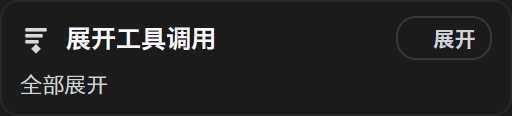 |
| 不干预 | 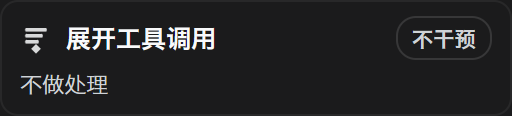 |
| 折叠 | 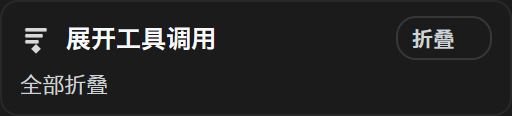 |
引言
DeepSeek Harness 的工具调用,默认和 CloseAI 一样是收着的——结果全都藏在折叠里不给你看。可这哪符合开源精神?Open!所有的工具调用结果,就该统统打开。
于是祥云做了这个插件,专门帮你把 DeepSeek Harness 自动开源掉——新到达的工具调用结果全部自动展开。不想看了?把开关切到「折叠」,已经摊开的卡片立刻全部收回去,清爽如初;想回到默认,再点一下回到「不干预」就好。
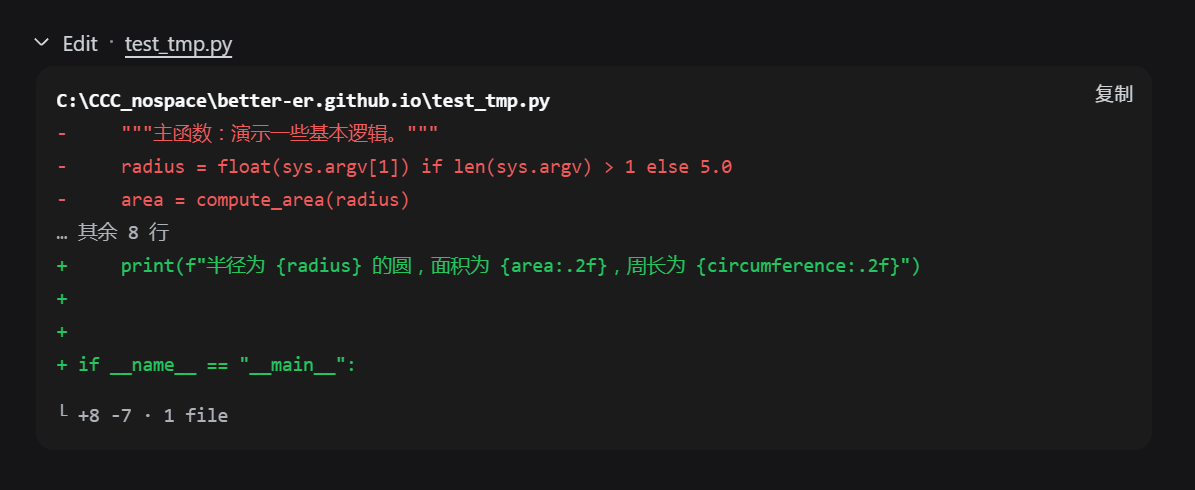
当然,为了避免无意义的刷屏,这个「打开」是短打开模式:只执行一级展开,而不会把那些修改行统统二级展开。既能看到结论,又不糊一脸改动细节。
这样,你就能爽爽监工 DeepSeek Harness——它每一步在背后做了什么,都摊开在你眼皮子底下,清清楚楚。
却没想到,这狡猾的蓝色大肥鱼,就在你眼皮子底下偷偷啃着你的 Token——拿着你的钱上网玩儿去了。

功能
- 侧栏底部开关卡,采用四态逻辑 + 三态 UI:逻辑上在「0 不干预 → 1 展开 → 2 不干预 → 3 折叠」四档间循环,界面上只呈现「不干预 / 展开 / 折叠」三种外观,其中两个「不干预」档显示为同一种样子,点击一次切换一档。
- 展开:自动展开新渲染的工具调用卡片,并立刻展开页面上已存在的工具卡片。
- 不干预:停止自动处理,新到达的卡片保持默认收着,不主动动已有卡片。
- 折叠:立刻折叠页面上所有已展开的工具卡片,并让新到达的卡片保持收着。
- 只展开或折叠卡片顶层折叠行,不会误开内部 ReadBlock / TerminalBlock / DiffBlock / SearchBlock 的行数折叠。
- 开关档位持久化到 localStorage,刷新后保持;兼容旧版「开/关」的存储数据,旧「开」→ 展开,旧「关」→ 不干预。
- 开关卡随 DSH 明/暗主题自适应,切换即生效,无需重启。
效果
新到达的工具调用卡片自动展开后的实际效果:
演示视频
光看静态截图不过瘾?两位同好分别给这个插件拍了演示视频,还在标题上互相点名对方,欢迎点开对比观看:
| 祥云版 · 34 秒 | dpsk 版 · 23 秒 |
|---|---|
安装
从 GitHub 安装:源码在 src/,lib/ 不入仓库,安装时 npm 会触发 prepare 脚本现场构建。
dsh plugin --profile web add github:better-er/dsh-tool-autoexpand
从 npm 安装:包内已含构建产物 lib/index.js 与 lib/client.js,安装时不再构建。
dsh plugin --profile web add dsh-tool-autoexpand
两种方式装完都会自动挂载,重启 DSH web 后启用,无需手工编辑任何文件。
卸载
dsh plugin --profile web remove dsh-tool-autoexpand
彻底移除,重启 DSH web 后不再加载。
要求与开发
- 是标准形态的 dsh client 插件,声明
dsh.client,导出./client。 - 同时声明了
dsh.bundle,因此也是一个自挂载的 bundle 层插件:用dsh plugin --profile <name> add从 GitHub 安装后,会被自动识别为 profile layer 并挂载,无需手工写组合 entry。 - 纯浏览器半身,无 host 行为。
- 构建型插件:
src/是 TypeScript 源码,lib/是构建产物且不入库,安装或发布前由prepare构建。
开发
pnpm install
pnpm typecheck   # tsc -b 严格类型检查
pnpm build       # tsc -b && tsdown,产出 lib/index.js 与 lib/client.js
src/index.ts:node 半身,空操作的 Cordis 插件。src/client/index.tsx:浏览器半身,自动展开逻辑与侧栏开关。- 开关卡片的样式全部内联,不注入
<style>、不依赖自定义 class;侧栏收起态由槽位注入的wide判断。 - 构建用 tsdown,client 产物仍是
window.__ModuleLoader__.load({ id, factory })的注册式模块,react等平台模块保持外部依赖。 prepare只跑 tsdown、不做类型检查,因此从 GitHub 安装时能自包含构建出lib/。
License
Links
More in this category
zhu1090093659/dsh-web#packages/dsh-task-board★ 8978
Task board for the dsh web GUI: a sidebar multi-column kanban whose cards run in real DSH agent sessions and can also be scheduled with cron expressions, executed host-side even with the browser closed.
zhu1090093659/dsh-web#packages/dsh-web-all★ 8978
Plugin and skin collection for the DSH Web UI: task board, Git graph, right-side panel, remote mobile UI, pet, live token stats, and a skin center.
MeteorNOX/DeepSeek-Balance-Whale-Widget★ 5292
A fixed-corner whale widget for the DSH web GUI — balance, today's usage and per-turn cost with peak/off-peak pricing, editable balance-alert and daily-budget bubbles, a module-based custom bubble queue with A/B weighted choices and random lines or images, 30+ vendor templates (OpenAI, OpenRouter, Kimi, SiliconFlow, Ark, Zhipu, MiniMax and more) with per-model balance and subscription quota, plus task-end sound, imported audio, custom roles and a resource manager. Local-only, no telemetry.
ccch1mneyyy/dsh-TUI★ 4819
Claude Code-style full-screen terminal UI: pixel-whale header, live status line, and streaming thought expansion.
omdsh-dev/DSH-better-sidebar★ 4290
Full sidebar workbench with file rendering and editing, terminal, Git, and subagents; third-party plugins can register new tabs.
Devin-AXIS/deepseek-design#deepseek-idesign★ 1478
Visual design studio for websites, app prototypes, posters, cards, reports, and magazines, with templates, direct element editing, selection-aware AI draft handoff, and export.
Community comments
Comments are public GitHub Discussions. Loading them connects to GitHub and Giscus; a GitHub account is required to post.