Slash commands ported from other coding agents (setup, connect, install, trust, browse, doctor, status, model, memory, compact, resume, review, mcp, init, suggest, improve, refactor), a zero-dependency static scanner for plugin source, and an in-repo catalog of audited plugin report cards that cite file-and-line evidence.
Install
# from GitHub (first run asks for allowBuilds approval — follow the hint, retry)
dsh plugin --profile web add github:beartackler/dsh-bridge
Any plugin you install runs third-party code with your own permissions — it can read your files, use your credentials, and reach the network, and tool approvals don’t sandbox it. GitHub-sourced plugins also run build scripts at install time — pnpm blocks those until you allow them, so an install can stop with ERR_PNPM_GIT_DEP_PREPARE_NOT_ALLOWED or ERR_PNPM_IGNORED_BUILDS; dsh prints the exact key to add under allowBuilds in your profile’s pnpm-workspace.yaml, and the install works on the next run. Allowing a build is a trust decision: only install sources you trust, and pin a commit (github:owner/repo#sha).
README
██████╗ ███████╗██╗  ██╗  ██████╗ ██████╗ ██╗██████╗  ██████╗ ███████╗
██╔══██╗██╔════╝██║  ██║  ██╔══██╗██╔══██╗██║██╔══██╗██╔════╝ ██╔════╝
██║  ██║███████╗███████║  ██████╔╝██████╔╝██║██║  ██║██║  ███╗█████╗
██║  ██║╚════██║██╔══██║  ██╔══██╗██╔══██╗██║██║  ██║██║   ██║██╔══╝
██████╔╝███████║██║  ██║  ██████╔╝██║  ██║██║██████╔╝╚██████╔╝███████╗
╚═════╝ ╚══════╝╚═╝  ╚═╝  ╚═════╝ ╚═╝  ╚═╝╚═╝╚═════╝  ╚═════╝ ╚══════╝
Familiar harness commands for DeepSeek Harness, with every plugin audited first.

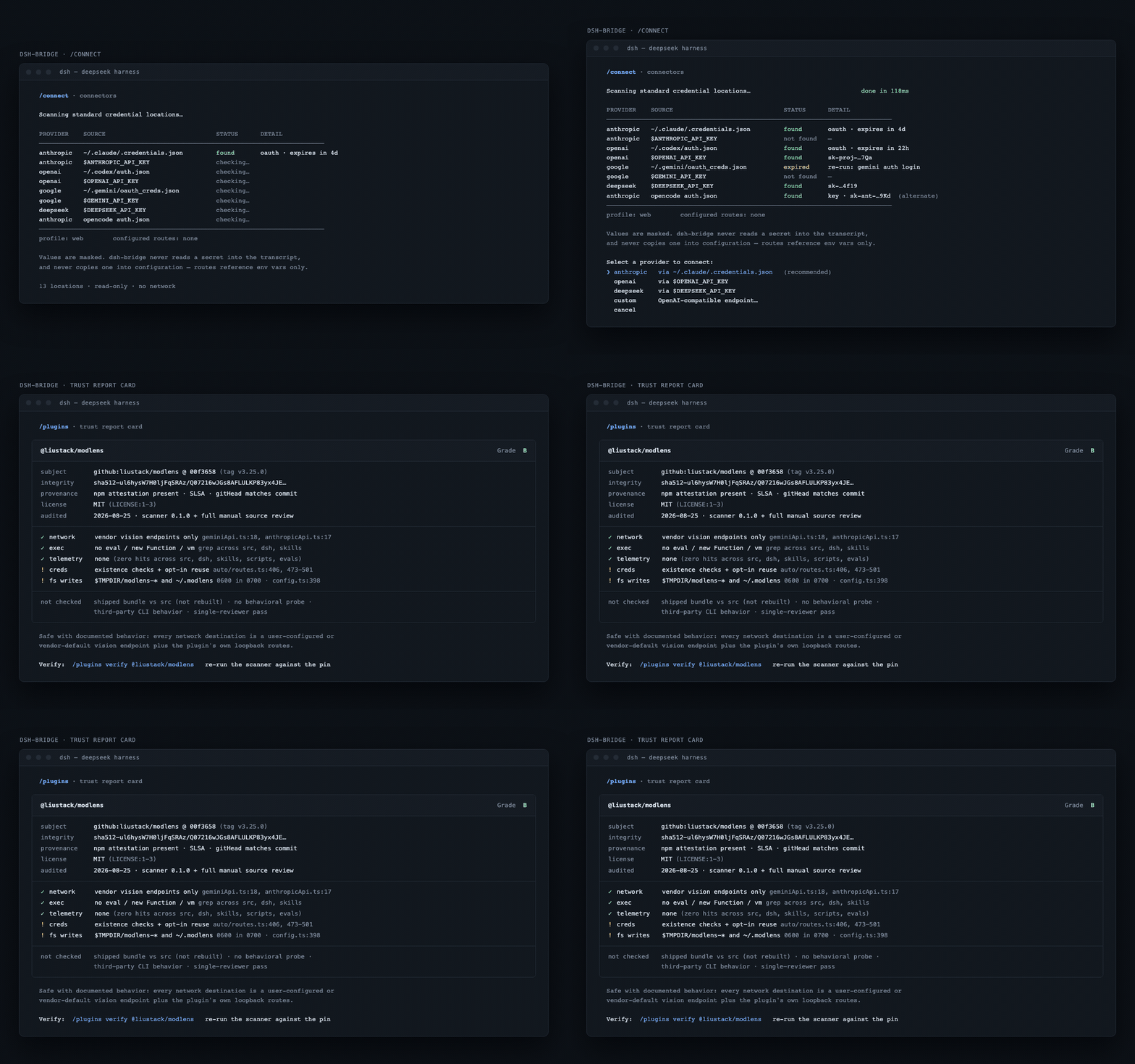
Rendered from the specs rather than a running build. Stills: detection matrix (light) · trust card (light).


What
dsh-bridge is a DeepSeek Harness plugin for people arriving from Claude Code, Codex CLI, OpenCode, or Jcode. It ports the slash commands you already know onto DSH-native seams, adds a guided connectors flow, and refuses to recommend a community plugin until an adversarial review has graded it.
Why
- Language. The DSH plugin ecosystem skews non-English. The catalog and command surface here are English-first.
- Trust. Plugins are arbitrary code. Every recommendation ships a report card citing file-and-line evidence you can re-check.
- Muscle memory.
/model,/resume,/memory,/mcp,/reviewbehave the way your previous harness taught you.
Install
npx create-dsh-bridge
That is the whole thing. It checks Node and pnpm with a concrete fix for each failure,
installs the DSH runtime if none is on your PATH, creates an isolated DSH_HOME so your real
~/.dsh is untouched, installs dsh-bridge into the web profile, wires the profile config,
and prints the command to boot.
Re-running is safe: every step checks for its own result first and reports "already done" instead of repeating work, and it never overwrites a file it did not create.
See exactly what it will do before it does anything:
npx create-dsh-bridge --dry-run # prints every command and file write, changes nothing
Useful flags: --ref <sha> pins both the installer and the plugin so a later push cannot
change what runs, --profile <name> picks a different profile, --no-isolate uses your real
~/.dsh instead of a scratch home.
Prefer not to pipe from npm? The installer is a single readable file:
curl -fsSLO https://raw.githubusercontent.com/beartackler/dsh-bridge/main/scripts/install.mjs
less install.mjs && node install.mjs --dry-run
node install.mjs
What you still have to do yourself
DSH ships no model, and the installer connects none. When it finishes you have a harness that boots and a bridge that answers /bridge-help, and nothing that answers a prompt. Bring a provider endpoint and an API key, then run /bridge-setup in the UI. The full walkthrough, including a working custom OpenAI-compatible provider block, is in docs/getting-started.md.
| Prerequisite | Needed by | Check |
|---|---|---|
| Node 22 or newer | The harness runtime | node --version |
| pnpm 10 or newer | dsh plugin, which manages profile dependencies through it |
pnpm --version |
| A provider endpoint and API key | Any prompt you type | you supply it |
The installer verifies the first two and stops with the command that fixes them. It cannot supply the third.
Manual install
If DSH is already installed, a model route is already connected, and you only want the plugin:
dsh plugin --profile web add github:beartackler/dsh-bridge
dsh --profile web        # serves http://127.0.0.1:3080
Both of those conditions matter. Without a connected route the harness boots and nothing answers; without .credentials.yaml at mode 600 it refuses to boot at all. docs/getting-started.md covers each step by hand.
Pin a commit so a later push cannot silently change what runs:
dsh plugin --profile web add "github:beartackler/dsh-bridge#<commit-sha>"
The repository ships its compiled dist/ output, so nothing builds on your machine at install time and dsh asks for no build-script permission.
Then use /bridge-help inside DSH.
Verified against @deepseek-ai/dsh 0.1.1-rc.2: a fresh install from a git checkout activates the bundle with no warnings and all 17 commands register (how this was verified).
Verified catalog
docs/catalog/INDEX.md lists every plugin that has completed a trust review, with the audited commit and a linked report card.
Grades: A verified-clean · B safe with documented behavior · C use with awareness · D risky · F do not install. A grade is an evidence-backed opinion over one pinned commit, not a safety guarantee.
Commands
All seventeen commands are implemented and verified end-to-end against @deepseek-ai/dsh 0.1.1-rc.2 (42 live invocations, see the verification report).
| Command | Does |
|---|---|
/help |
Lists the bridge surface and the DSH-native equivalent of each command. |
/init |
Onboards a repository and generates its instruction file. |
/connect |
Detects existing provider credentials, configures routes, smoke-tests them. |
/model |
Switches the active model or route without editing profile YAML. |
/status |
Reports session, profile, and route state already known. Probes nothing. |
/doctor |
Runs environment health checks and prints only what it actually observed. |
/memory |
Reads and edits persistent user and project memory. |
/compact |
Compacts conversation context on demand. |
/resume |
Picks a recent session to resume or fork. |
/review |
Reviews working-tree or pull-request changes. |
/improve |
Proposes and applies targeted improvements to selected code. |
/mcp |
Adds, inspects, and removes MCP servers. |
/browse |
Browses the verified catalog with grade and trust filters. |
/trust |
Prints a plugin's trust report card with its evidence. |
/install |
Installs a plugin, preferring verified builds and requiring explicit risk consent. |
/suggest |
Handles the dead end: scaffolds the plugin that does not exist yet. |
/refactor |
Plans and applies behavior-preserving restructuring, tests-green gated. |
Naming caveat: shipped names will be either /bridge:<name> or /bridge-<name>, pending an open DSH parser question.
Docs
- Architecture — how the plugin sits on the Cordis kernel.
- Trust pipeline — grading bands, heuristics, provenance checks.
- Command specs · Plugin author guide · Glossary · FAQ
- Charter · Contributing · Security · Roadmap
Status
Under active development. Research and audit artifacts land in docs/ as they are produced.
| Milestone | State |
|---|---|
| Capability research | in progress |
| Adversarial audit of DSH built-ins | in progress |
| MVP plugin (commands, connectors) | shipped - 17 commands e2e-verified in dsh 0.1.1-rc.2 |
| Trust report card pipeline | shipped - 24 plugins graded (7 B, 16 C, 1 D) |
| Onboarding wizard UI | planned |
Principles
- Trust over speed. Every security claim cites evidence.
- English-first, i18n-ready.
- Minimal code. Shortest correct implementation, no speculative features.
- You own your machine. No telemetry without opt-in.
Provenance
Cross-reviewed by design: adversarial reviews are performed by models that did not write the artifact under review. Quality gates are documented in CONTRIBUTING.md.
Not affiliated with DeepSeek. Built on their MIT-licensed groundwork with gratitude.
Links
More in this category
zhu1090093659/dsh-web#packages/dsh-plugin-manager★ 8759
Plugin manager tab in DSH Settings → Plugins: install from npm or git with progress, enable/disable switches effective at next startup, conflict reconciliation with undo, and one-click hand-off to a fix session.
dsh-market/dsh-market★ 6555
Browse, search and install community plugins from inside DeepSeek Harness settings, with category filters, one-click updates, enable/disable, theme switching and configuration backup.
kingOfSoySauce/dsh-skin-market★ 196
Native skin marketplace and lifecycle manager that discovers community skins, displays previews and compatibility status, and provides verified one-click or manual installation paths.
awesome-dsh-plugin/dsh-find-plugin★ 187
Find plugins without leaving the agent: search this curated registry by keyword or category, with ready-to-run install commands.
bradeGithub/DSH-Plugins-Marketplace★ 175
GitHub-topic-driven plugin & skill marketplace: a Settings page that browses the auto-collected registry (the whole dsh-plugin topic plus the skills index, CI-refreshed every 2 hours) with one-click install, type detection, install-script and host-shadow-dependency safety confirmations, env-key management, and the STANDARD.md recognition spec.
Sanqi-normal/dsh-webui-market-plugin★ 104
In-harness plugin market for the dsh web GUI: browse the awesome-dsh-plugin.com catalog and install/uninstall plugins into a profile from Settings → Plugins → Plugin Market.
Community comments
Comments are public GitHub Discussions. Loading them connects to GitHub and Giscus; a GitHub account is required to post.