Holds the OS wake lock while any agent, subagent, or background job runs, releases it after a configurable grace period, and provides a bilingual web settings page with live status, manual hold, and display-on options.
Install
# from GitHub (first run asks for allowBuilds approval — follow the hint, retry)
dsh plugin --profile web add github:bearice/dsh-keep-awake
Any plugin you install runs third-party code with your own permissions — it can read your files, use your credentials, and reach the network, and tool approvals don’t sandbox it. GitHub-sourced plugins also run build scripts at install time — pnpm blocks those until you allow them, so an install can stop with ERR_PNPM_GIT_DEP_PREPARE_NOT_ALLOWED or ERR_PNPM_IGNORED_BUILDS; dsh prints the exact key to add under allowBuilds in your profile’s pnpm-workspace.yaml, and the install works on the next run. Allowing a build is a trust decision: only install sources you trust, and pin a commit (github:owner/repo#sha).
README
Keep-awake plugin for the DeepSeek Harness (UI follows the DSH global language)
Blocks OS sleep while any agent / subagent / background job runs · auto-release after a configurable grace period once idle · manual hold · optional display-on · Windows / macOS / Linux · persisted settings · multilingual web settings page
English | 中文
Features
| Feature | Where | Details |
|---|---|---|
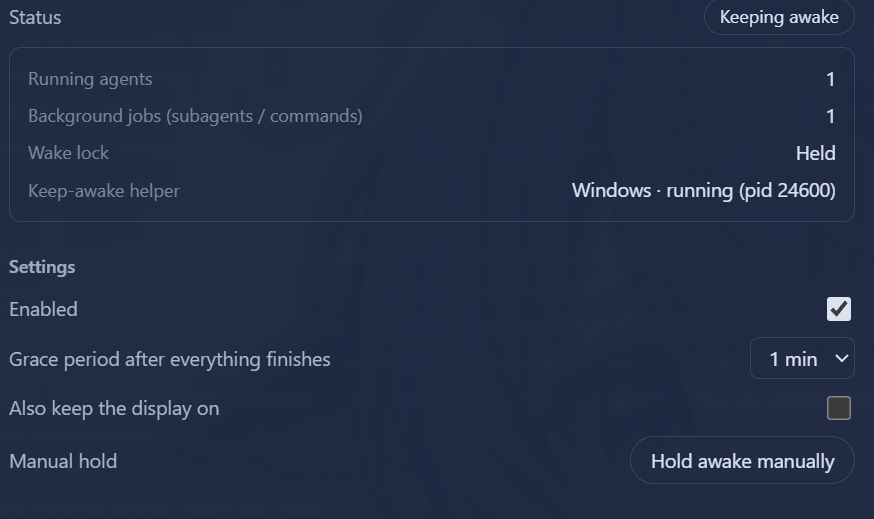
| Live status | Settings → Keep Awake | Status badge (Keeping awake / Grace Ns / Standby / Disabled / Helper error), running agent count, background job count, helper platform + PID |
| Activity detection | — | Running agents (main agent / subagents / workflow children) + running background jobs (run_in_background commands / background subagent tasks) |
| Grace period | Configurable | Automatically releases keep-awake 15s–5m (default 60s) after everything finishes |
| Manual hold | Settings page | Force-keep awake regardless of activity; click to release |
| Keep display on | Optional | By default only system sleep is blocked (display may turn off); opt in to keep the display on too |
| Localization | Global | Follows the DSH global language (zh/en); auto-detects the browser/system language when unset; switches instantly (including the sidebar label) |
How it works
Polls every 5 seconds, with instant re-scan on events (agent/status, subagent/start|end, job set changes):
- Running agents: agents with
status === 'running'inagents.list()(covers the main agent, subagents, and workflow children) - Background jobs:
running/stoppingjobs injobs.list()/jobs.list(agent)(coversrun_in_backgroundcommands and background subagent tasks)
When activity is detected, a platform helper process is started via the subprocess service (tree-level termination — the sleep flags release as soon as the process exits):
| Platform | Mechanism |
|---|---|
| Windows | PowerShell SetThreadExecutionState(ES_CONTINUOUS | ES_SYSTEM_REQUIRED) (adds ES_DISPLAY_REQUIRED when "keep display on" is enabled) |
| macOS | caffeinate [-d] -i -s |
| Linux | systemd-inhibit --what=idle --mode=block sleep 1e8 |
Settings
Persisted in the profile's settings.yaml (namespace keep-awake):
| Key | Default | Description |
|---|---|---|
enabled |
true |
Master switch |
graceMs |
60000 |
Grace period after all activity ends (15s–5m) |
preventDisplaySleep |
false |
Also keep the display on |
manualHold |
false |
Manual hold |
Localization
The UI uses the framework locale service (namespace keep-awake, zh/en dictionaries): when no language is explicitly set, the browser/system language is used; switching in DSH's language settings takes effect instantly (both the settings page body and the sidebar label follow).
HTTP routes (loopback)
GET /dsh-keep-awake/state— current state (activity counts, helper process, config)PUT /dsh-keep-awake/config— update config, body{ "section": {...} }
Install
# Inside the profile directory (e.g. ~/.dsh/profiles/web)
pnpm add "dsh-keep-awake@<source>"   # npm / github:bearice/dsh-keep-awake / link:<local path>
# and add "dsh-keep-awake" to dsh.profile.bundles in package.json
pnpm install
# restart the profile
Development
- For local development, mount the package into the profile via
link:(see Install above) and usenode --check lib/*.jsfor syntax checks - Layout:
lib/index.js(Host),lib/client.js(web settings page),cordis.patch.yml(mount line)
Links
More in this category
zhu1090093659/dsh-web#packages/dsh-task-board★ 8639
Task board for the dsh web GUI: a sidebar multi-column kanban whose cards run in real DSH agent sessions and can also be scheduled with cron expressions, executed host-side even with the browser closed.
zhu1090093659/dsh-web#packages/dsh-web-all★ 8639
Plugin and skin collection for the DSH Web UI: task board, Git graph, right-side panel, remote mobile UI, pet, live token stats, and a skin center.
MeteorNOX/DeepSeek-Balance-Whale-Widget★ 4515
A fixed-corner whale widget for the DSH web GUI — balance, today's usage and per-turn cost with peak/off-peak pricing, editable balance-alert and daily-budget bubbles, a module-based custom bubble queue with A/B weighted choices and random lines or images, 30+ vendor templates (OpenAI, OpenRouter, Kimi, SiliconFlow, Ark, Zhipu, MiniMax and more) with per-model balance and subscription quota, plus task-end sound, imported audio, custom roles and a resource manager. Local-only, no telemetry.
ccch1mneyyy/dsh-TUI★ 4296
Claude Code-style full-screen terminal UI: pixel-whale header, live status line, and streaming thought expansion.
omdsh-dev/DSH-better-sidebar★ 4116
Full sidebar workbench with file rendering and editing, terminal, Git, and subagents; third-party plugins can register new tabs.
Devin-AXIS/deepseek-design#deepseek-idesign★ 1449
Visual design studio for websites, app prototypes, posters, cards, reports, and magazines, with templates, direct element editing, selection-aware AI draft handoff, and export.
Community comments
Comments are public GitHub Discussions. Loading them connects to GitHub and Giscus; a GitHub account is required to post.