Replaces the Web GUI trajectory tab with a new-user-friendly round-by-round storyline, plain-language tool labels, category filters and fuzzy search.
Install
# from GitHub (first run asks for allowBuilds approval — follow the hint, retry)
dsh plugin --profile web add github:ayahunter/dsh-trail#path:/packages/bundle
Any plugin you install runs third-party code with your own permissions — it can read your files, use your credentials, and reach the network, and tool approvals don’t sandbox it. GitHub-sourced plugins also run build scripts at install time — pnpm blocks those until you allow them, so an install can stop with ERR_PNPM_GIT_DEP_PREPARE_NOT_ALLOWED or ERR_PNPM_IGNORED_BUILDS; dsh prints the exact key to add under allowBuilds in your profile’s pnpm-workspace.yaml, and the install works on the next run. Allowing a build is a trust decision: only install sources you trust, and pin a commit (github:owner/repo#sha).
README
Friendly Trajectory — a new-user-friendly replacement for the DeepSeek Harness Web "轨迹" (Trajectory) tab: the raw event ledger becomes a storyline anyone can read.
中文 · Usage · Development
The built-in trajectory view is a power tool: untranslated jargon with no legend, five
toolbar toggles, a zoomable/draggable timeline, a separate inspector, and an event table
that never answers "what did I ask → what did the AI do → what came back". dsh-trail
replaces that tab with a storyline design — one collapsible card per round,
plain-language tool names, inline argument previews, and guidance for every state. It
reads only the session snapshot, adds no Host half, and uninstalling restores the
original view.
Features
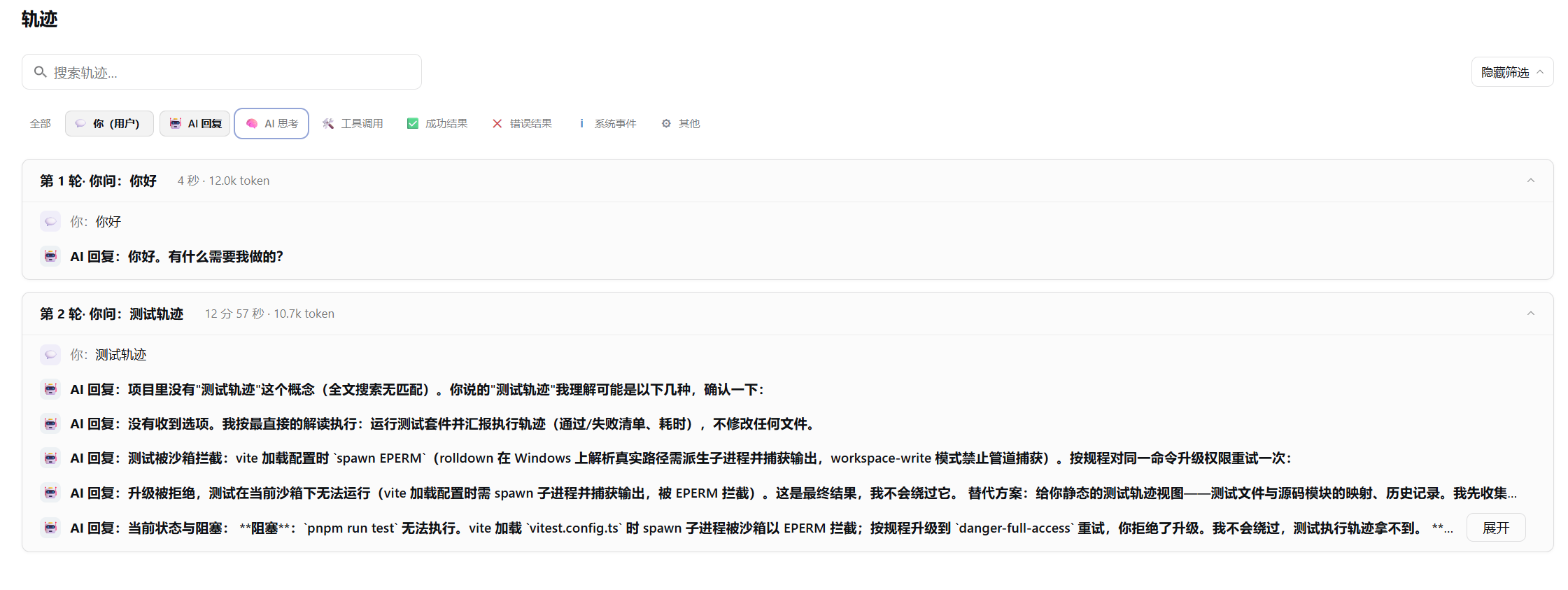
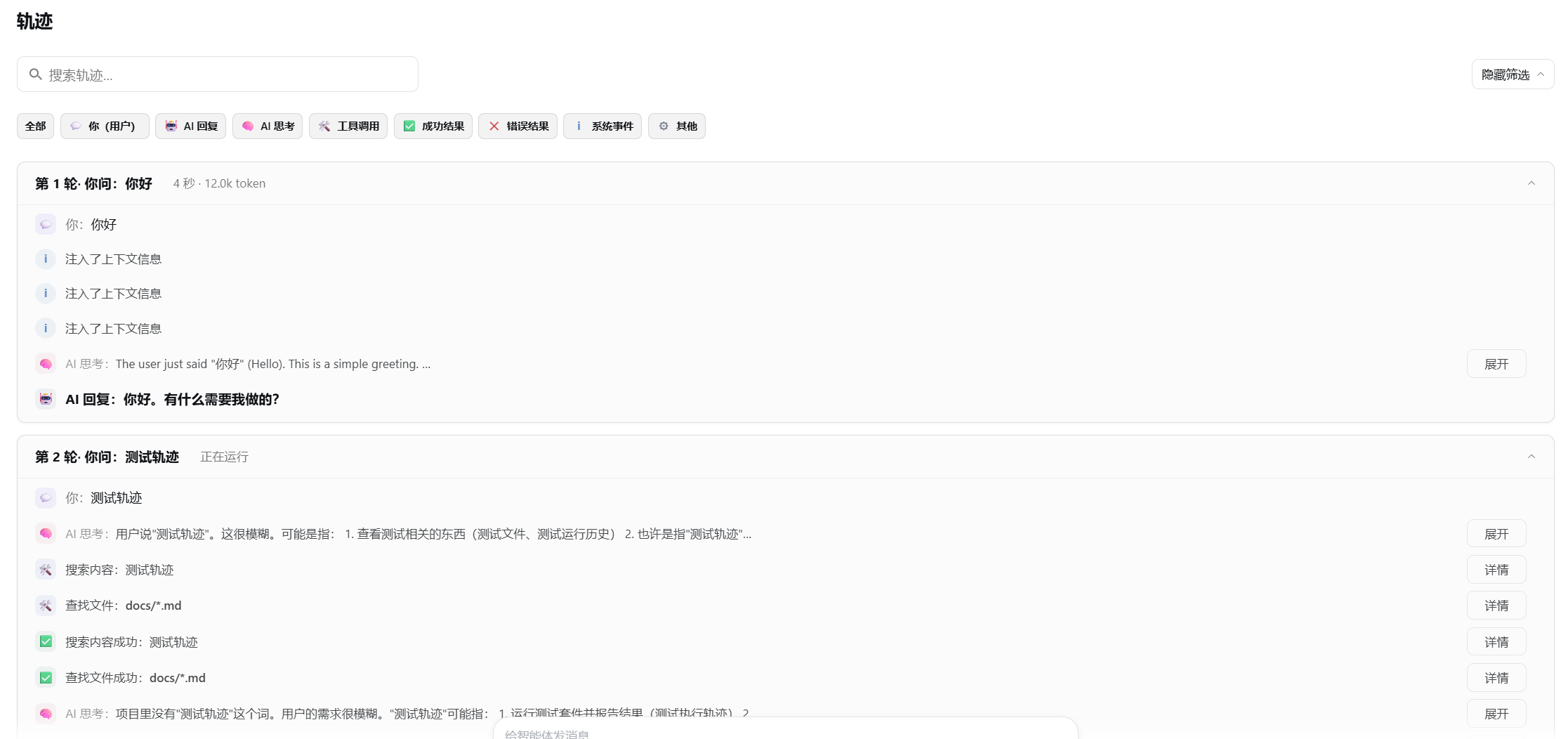
- Turn cards — one card per round: what you asked → what the AI thought → which tools it called → the outcome, with duration, model and token meta when present.
- Plain-language tool labels —
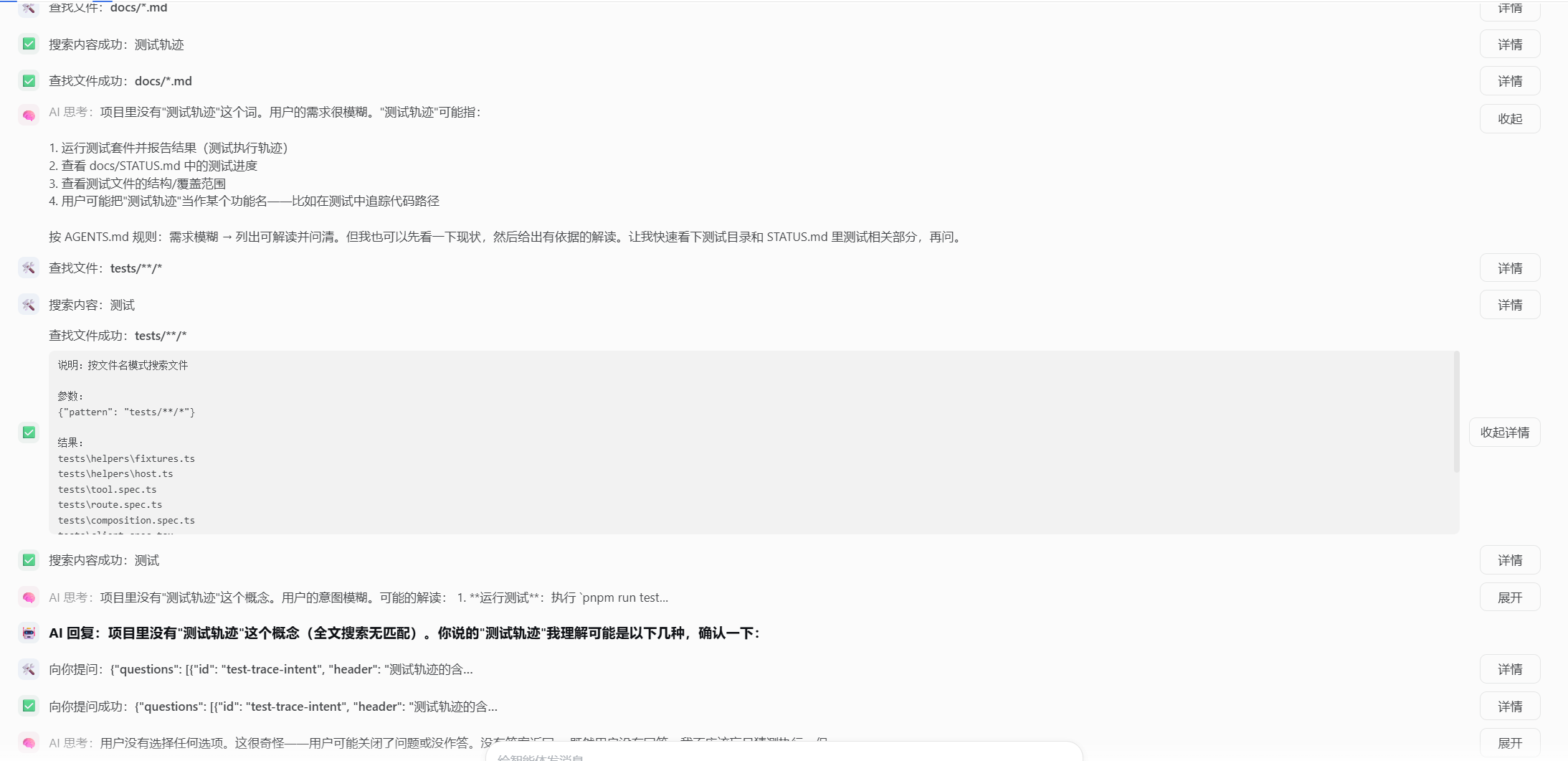
readrenders as 读取文件 (read a file) with a one-line note; unknown tools fall back gracefully. - Inline argument previews — the touched file or command is visible on the row; raw arguments, results, timing and error metadata fold into a Details toggle.
- Category filter — 全部 (all) plus eight row categories, combinable and remembered across sessions.
- Fuzzy search — ignores case, punctuation and full-width forms; multi-word terms match as ordered subsequences.
- Live round — dashed card with status pills (thinking / generating / running tool · elapsed) and a spinner; durations are never fabricated.
- Zero product coupling — renders purely from top-level session snapshot fields; no Host half, no new data endpoints.
Screenshots
The Friendly Trajectory view inside the official Web GUI — turn cards summarize each round, and reasoning, tool arguments and full replies stay folded until expanded:
Install
dsh plugin --profile web add dsh-trail dsh-trail-bundle
Restart the profile and open any session: the 轨迹 tab is now the storyline view. The
bundle disables the shipped ui-trajectory row and mounts this view in its place, so
exactly one 轨迹 tab remains.
To go back to the original view:
dsh plugin --profile web remove dsh-trail dsh-trail-bundle
Update
dsh plugin --profile web update dsh-trail dsh-trail-bundle
Upgrades are never applied automatically; restart the profile afterwards. Two pnpm
behaviors can make an update look stale right after a release: the registry metadata
cache and the 24-hour minimumReleaseAge supply-chain policy for freshly published
versions. If update reports "Already up to date" while npm shows a newer version,
clear the cache (pnpm cache delete dsh-trail) or pin explicitly
(dsh plugin --profile web add dsh-trail@<version> dsh-trail-bundle).
Quick start
Open a conversation and click 轨迹. Read it top-down as a story: expand any folded reasoning or reply with 展开, and open 详情 on a tool row for raw arguments, results, timing and tokens. Use the search box to jump to a file or command, and the category bar to isolate e.g. only 工具 rows — both stay applied while you browse.
Architecture
One repository, two npm packages. dsh-trail is the client plugin: it registers the
conversation.view slot cell id: 'trajectory' and renders purely from top-level
session snapshot selectors (nodes, turnTimings, partial, runningCalls,
hasMore, loadingOlder, openState). dsh-trail-bundle is a patch bundle whose
cordis.patch.yml inserts the plugin row and sets disabled: true on the shipped
ui-trajectory row. Design rationale is documented in the repository's internal
working docs (not shipped with the package).
Known Limitations and Deferred Work
- Web GUI only — the plugin targets the web shell (
react^18 peer dependency); other shells are not validated. - Simplified Chinese-first — the v1 view copy (labels, tool names, guidance) is 简体中文; an English locale is deferred.
- Legacy snapshot fields — the plugin reads compatibility projections
(
nodes/turnTimings/partial/runningCalls/…), tested against dsh 0.1.0-rc.5; it must be upgraded if the product removes those fields. - Round grouping is heuristic —
user/tool-resultnodes carry no turn number, so round boundaries are inferred from node order and may occasionally be drawn wrong. - Not feature-parity with the original view — the timeline overview, duration toggles and batch collapses are removed by design; the essentials fold into Details and search is kept.
Documentation
- docs/usage.md — install, what the view shows, filters and search, uninstall
- docs/development.md — build, test, publish, contribute
License
MIT — see LICENSE.
Links
More in this category
zhu1090093659/dsh-web#packages/dsh-task-board★ 8262
Task board for the dsh web GUI: a sidebar multi-column kanban whose cards run in real DSH agent sessions and can also be scheduled with cron expressions, executed host-side even with the browser closed.
zhu1090093659/dsh-web#packages/dsh-web-all★ 8262
Plugin and skin collection for the DSH Web UI: task board, Git graph, right-side panel, remote mobile UI, pet, live token stats, and a skin center.
omdsh-dev/DSH-better-sidebar★ 3943
Full sidebar workbench with file rendering and editing, terminal, Git, and subagents; third-party plugins can register new tabs.
ccch1mneyyy/dsh-TUI★ 3913
Claude Code-style full-screen terminal UI: pixel-whale header, live status line, and streaming thought expansion.
MeteorNOX/DeepSeek-Balance-Whale-Widget★ 3793
A fixed-corner whale widget for the DSH web GUI — balance, today's usage and per-turn cost with peak/off-peak pricing, editable balance-alert and daily-budget bubbles, a module-based custom bubble queue with A/B weighted choices and random lines or images, 30+ vendor templates (OpenAI, OpenRouter, Kimi, SiliconFlow, Ark, Zhipu, MiniMax and more) with per-model balance and subscription quota, plus task-end sound, imported audio, custom roles and a resource manager. Local-only, no telemetry.
Devin-AXIS/deepseek-design#deepseek-idesign★ 1414
Visual design studio for websites, app prototypes, posters, cards, reports, and magazines, with templates, direct element editing, selection-aware AI draft handoff, and export.
Community comments
Comments are public GitHub Discussions. Loading them connects to GitHub and Giscus; a GitHub account is required to post.