Read-only health clinic for the installed DSH plugin set: loader health, dependency integrity, version compatibility, install-script risk, duplicates and patch integrity, delivered as a model tool, a Settings dashboard and JSON reports.
Install
# from GitHub (first run asks for allowBuilds approval — follow the hint, retry)
dsh plugin --profile web add github:ayahunter/dsh-plugin-clinic
Any plugin you install runs third-party code with your own permissions — it can read your files, use your credentials, and reach the network, and tool approvals don’t sandbox it. GitHub-sourced plugins also run build scripts at install time — pnpm blocks those until you allow them, so an install can stop with ERR_PNPM_GIT_DEP_PREPARE_NOT_ALLOWED or ERR_PNPM_IGNORED_BUILDS; dsh prints the exact key to add under allowBuilds in your profile’s pnpm-workspace.yaml, and the install works on the next run. Allowing a build is a trust decision: only install sources you trust, and pin a commit (github:owner/repo#sha).
README
Plugin Clinic — read-only health checks for the installed DeepSeek Harness plugin set.
DeepSeek Harness is "everything is a plugin", which spreads stability risk across a
freely-composable configuration layer — yet nothing tells you whether your installed set
is healthy. dsh-plugin-clinic closes that gap: it inspects every profile under the
Harness home and reports loader health, dependency integrity, version compatibility,
install-script risk, duplicates, and patch integrity, with no writes and no external
state.
Features
- Model tool
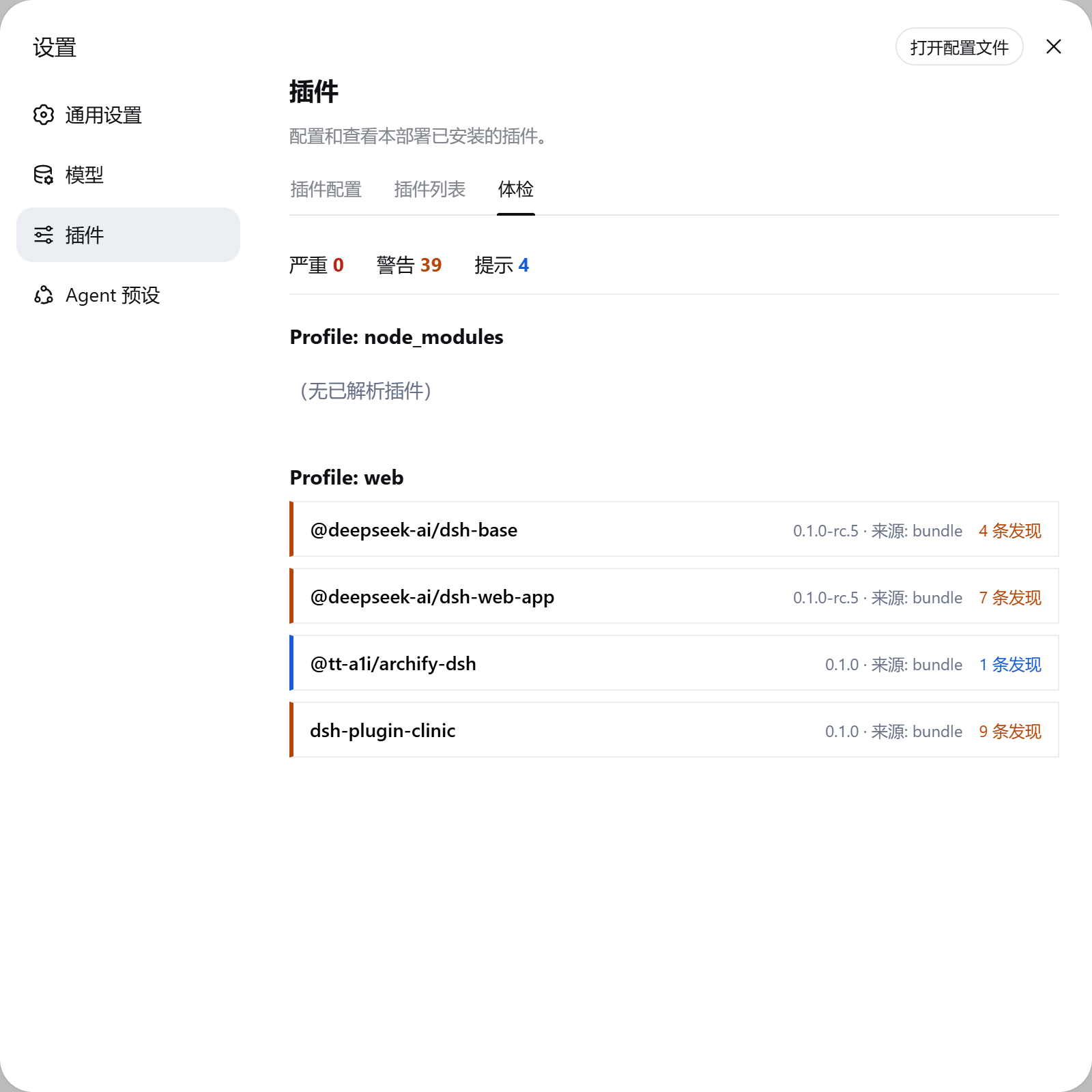
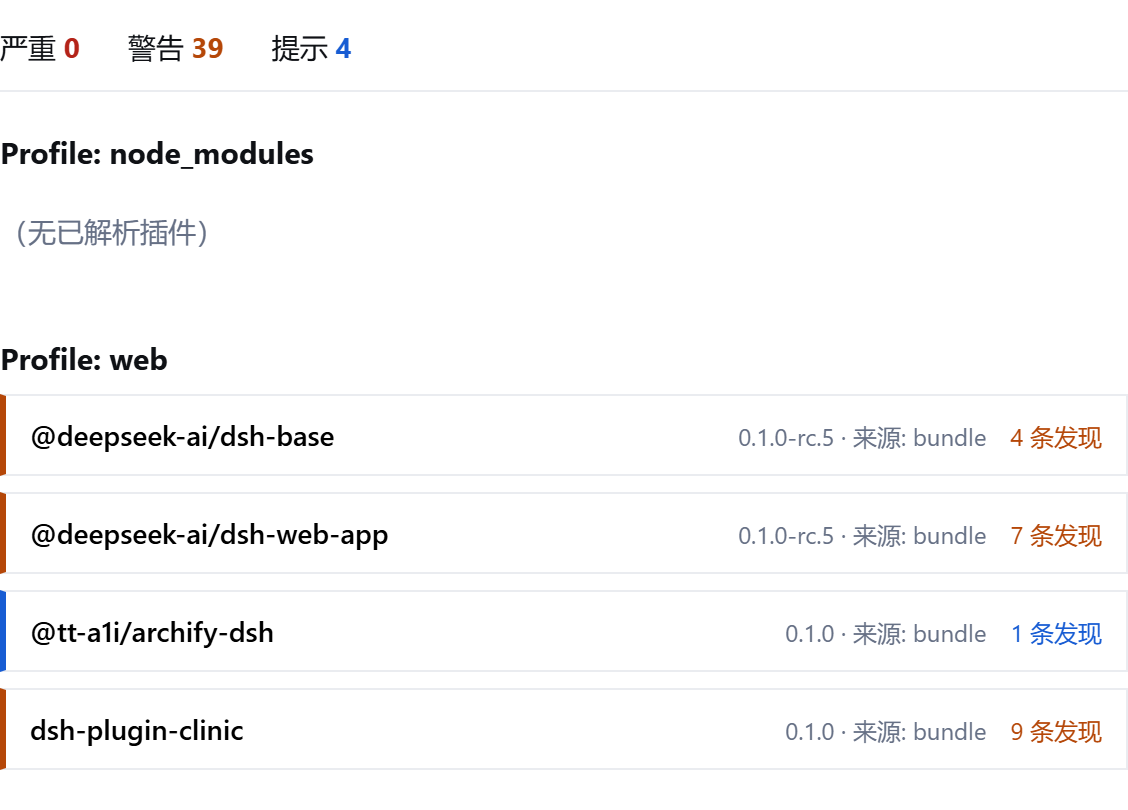
plugin_health— the agent can diagnose its own environment in-session and turn findings into concrete fix advice. - Web dashboard — a "体检" (Clinic) tab in Settings → Plugins, one entry per profile with severity-colored plugin cards.
- JSON reports — a stable
schemaVersion: 1contract for CI and scripts. - 8 read-only checks — see docs/checks.md:
load-health,bundle-manifest,peer-deps,runtime-compat,install-scripts,duplicate,patch-health,provenance. - One row install — a single npm bundle patch mounts both the Host engine and the browser dashboard.
Screenshots
The Clinic dashboard inside the official Web GUI — Settings → Plugins → 体检. Per-profile plugin cards carry severity-colored status lines, expandable findings, and the summary bar counts critical/warning/info findings across every profile:
Install
# from npm (prebuilt lib/)
dsh plugin --profile web add dsh-plugin-clinic

# or straight from GitHub (sources; the prepare script builds them, pnpm asks you to
# allow the build once — see the official publish guide for the allowBuilds semantics)
dsh plugin --profile web add github:ayahunter/dsh-plugin-clinic
Restart the profile. The Settings → Plugins section gains a Clinic tab; the session gains
the plugin_health tool.
Update
# upgrades within the saved semver range (^0.1.0 → latest 0.1.x)
dsh plugin --profile web update dsh-plugin-clinic
Upgrades are never applied automatically; restart the profile afterwards.
Quick start
In any session on a profile where the plugin is installed:
体检一下我的插件
or call the tool directly with {"details": true} for per-finding evidence. In the Web
GUI, open Settings → Plugins → 体检 to see every profile's health at a glance.
Configuration
Edit the bundle row in the profile's cordis.patch.yml:
- id: clinic
  name: 'dsh-plugin-clinic'
  config:
    profiles: []            # profile directory names to diagnose; empty = all
    enableTool: true        # register the plugin_health tool
    enableWebRoute: true    # register /clinic HTTP routes when a webServer exists
    webRoutePrefix: '/clinic'
    includeHomePatches: true
HTTP endpoints
| Endpoint | Returns |
|---|---|
GET /clinic/health |
full ClinicReport |
GET /clinic/health/summary |
summary projection for the dashboard |
Routes require a loopback Host header (DNS-rebinding defense, same spirit as the
official /api fence); they are not authentication.
Architecture
One npm package, two halves. The Host half owns a pure diagnostic engine
(src/engine/, no I/O, no ctx), the plugin_health tool, and the /clinic routes.
The browser half registers the Clinic tab into the official settings.plugins.tab
extension point and fetches the same report the tool returns. Design rationale is
documented in the repository's internal working docs (not shipped with the package).
Model Experience
Request context and condition
What the model sees
One tool schema: plugin_health with profiles, severity, and details parameters.
The tool is registered on ctx.tools like any model-facing tool, so its schema flows
into the system-prompt assembly of every agent in a profile that loads this plugin.
Token effect
Fixed at registration: one tool schema entry per agent. The execution result is a
ClinicReport JSON document whose size scales with the number of diagnosed plugins;
details: false (the default) returns counts only, keeping the model-visible payload
bounded regardless of how many plugins are installed.
KV Cache effect
The tool schema is part of the fixed prompt prefix and does not invalidate reuse. The execution result is a per-turn tool result, not part of any later request prefix.
Known Limitations and Deferred Work
- Diagnosis only, no fixes — v1 reports; repair is agent/user action. A dry-run fix proposal surface is planned for a later milestone.
- No npm online checks —
deprecatedflags and update availability are v2 (configurable- cached); v1 is fully offline.
- Current profile is not detectable — DSH exposes no API for the running profile name,
so v1 diagnoses every profile (config can narrow the list).
--profileextraction from argv is best-effort UI highlighting only, never authoritative. - Browser-first dashboard — the Clinic tab is verified against the official Web GUI; Electron desktop shells carry fetch over an IPC bridge and are not yet validated.
- Loader-only plugins — entries not in a profile manifest have no package.json, so peer/runtime/script checks do not apply to them; only load-health and provenance do.
- No source-level security scan — that is
dsh-plugin-doctor's job; optional integration of its CLI is deferred to v2. - Report is a point-in-time snapshot — no cache, history, or subscription (intentionally; the same trade-off the official plugin inventory makes).
Documentation
- docs/usage.md — install, configuration, tool and dashboard usage
- docs/development.md — build, test, publish, contribute
- docs/checks.md — the 8 check rules in detail
License
MIT — see LICENSE.
Links
More in this category
yjh051108/dsh-routing-suite★ 7003
One repository, three parts: a runtime injector for DSH plugin packages (inject, hot-reload, unload, promote a dev staging tool to the front, route self-heal, plus a settings-page plugin manager that lists, unloads and drags folders in to internalize), a task-aware reasoning-mode router agent preset (router-standard / router-spec / router-react), and a graded two-level task protocol whose six tools (commit_star, lock_stage, revise_do, edit_plan, mark_task, redteam_verdict) pin task state to disk. The injector implementation ships in-tree, so the install carries its own behaviour rather than a dependency list.
strukto-ai/mirage#dsh★ 3666
Swaps the filesystem and bash providers for a mirage virtual workspace: file tools and shell commands run over mounted resources (RAM, S3, Redis, Slack, Gmail, Notion, Postgres) instead of the host disk, with per-mount read/write/exec modes, per-command sandbox routing (monty, pyodide, quickjs in process; docker, e2b, daytona remote), and installed CLIs (git, gh, slack, linear, ntn, gws, or one you register) as head words in the virtual terminal.
hust-open-atom-club/oh-dsh★ 325
Community distribution: TUI, desktop, and Web UI as one bundle with layered installation.
weijiafu14/pi2dsh★ 206
Pi Host ABI compatibility engine: after one install, unmodified Pi extensions from npm mount as native DSH plugins with `dsh plugin add <pi-package>`. Verified end to end on stock DSH with pi-mcp-adapter (full MCP manager: OAuth, resources, prompts, MCP Apps, elicitation, sampling), @tintinweb/pi-subagents, pi-code, pi-hermes-memory and pi-background-tasks; `pi2dsh inspect` reports a package's compatibility before installing.
lire1131/dsh-undo-savepoint★ 166
Undo/redo & rollback system for DSH: every config change is auto-snapshotted; undo/redo/restore to any version from the WebUI or the offline CLI/GUI tools (works even when DSH fails to boot).
Fishquito7/dsh-skill-mcp-panel★ 155
Manages DSH skills and MCP servers from the web settings: skill cards with hot enable/disable, workspace scopes, groups, batch migration and drag-and-drop import, plus stdio/HTTP MCP CRUD with connection tests, secret redaction and the unified dsh-panel CLI.
Community comments
Comments are public GitHub Discussions. Loading them connects to GitHub and Giscus; a GitHub account is required to post.