Turn-scoped “Allow for this task” approvals: automatically allow matching `danger-full-access` escalations only for the current task, then expire.
Install
# from GitHub (first run asks for allowBuilds approval — follow the hint, retry)
dsh plugin --profile web add github:arrow949/dsh-turn-approval
Any plugin you install runs third-party code with your own permissions — it can read your files, use your credentials, and reach the network, and tool approvals don’t sandbox it. GitHub-sourced plugins also run build scripts at install time — pnpm blocks those until you allow them, so an install can stop with ERR_PNPM_GIT_DEP_PREPARE_NOT_ALLOWED or ERR_PNPM_IGNORED_BUILDS; dsh prints the exact key to add under allowBuilds in your profile’s pnpm-workspace.yaml, and the install works on the next run. Allowing a build is a trust decision: only install sources you trust, and pin a commit (github:owner/repo#sha).
README
中文 | English
Some high-risk actions deserve your explicit approval. Repeating that approval for the same task should not be necessary.
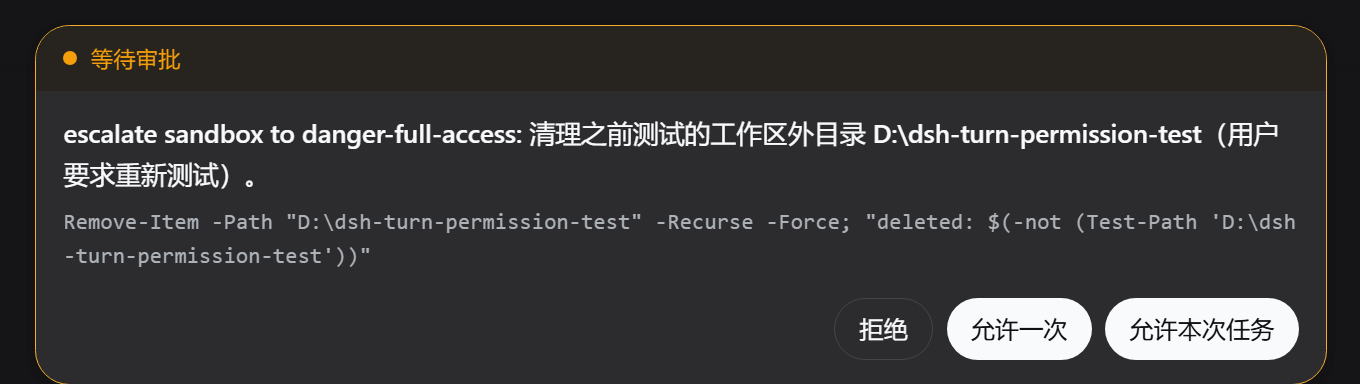
dsh-turn-approval adds an Allow for this task action to the DeepSeek Harness (DSH) Web approval card. When an agent requests danger-full-access, you can allow matching escalations for the rest of the current task only. The grant disappears when the task ends.
What it does
The default DSH permission remains workspace-write + ask; this plugin never changes it into a global high-permission mode.
For a danger-full-access request, the approval card offers:
[Reject] [Allow once] [Allow for this task]
- Reject declines the current action.
- Allow once permits only the current action.
- Allow for this task automatically permits later matching
danger-full-accessrequests in the current turn, then expires immediately atturn/end.
Install
Install from GitHub
Pin a commit SHA so later repository updates cannot silently change the code running on your machine:
dsh plugin --profile web add github:arrow949/dsh-turn-approval#<commit-sha>
The repository ships built, pure ESM JavaScript. A GitHub install needs neither a prepare script nor pnpm allowBuilds permission.
Install from a local directory
dsh plugin --profile web add ./dsh-turn-approval
Restart DSH Web and hard-refresh the browser (Ctrl+Shift+R). The third button confirms that the plugin has loaded.
Use
- Use DSH normally; the default remains
workspace-write + ask. - When the agent requests
danger-full-access, review the approval reason and command. - To allow matching escalations for the remainder of the current task, select Allow for this task.
- The next user message starts a new task and prompts again as usual.
Verify and uninstall
Verify that the profile contains the bundle layer:
dsh --profile web --dump-config
Uninstall:
dsh plugin --profile web remove dsh-turn-approval
Uninstalling removes both the Node and client halves. The approval card automatically returns to the two-button DSH default, with no changes left in official DSH files.
Security boundaries
- Memory only: grants are never written to disk. They expire when the DSH process restarts, the plugin unloads, or the session/agent is disposed (fail closed).
- Task scoped: a grant is bound to
session + turn; it never turns an entire session into full access. - No cross-session grants: a grant in one session cannot affect another. Subagents use distinct sessions and do not inherit it.
- Type isolated: only matching
danger-full-accessescalations are automatically allowed.workspace-writeand other approvals still prompt individually. - User initiated: only the approval-card action can create a grant; the model has no self-service task-grant route.
- Auditable: automatically allowed requests retain their approval event records.
After Allow for this task is selected, the plugin first asks the host to create the task grant. If that endpoint returns a non-2xx response or the request fails, the card clearly reports the failure and remains retryable. It does not pretend the grant succeeded or silently downgrade to Allow once.
Implementation and compatibility
This is an official DSH bundle: package.json declares dsh.bundle.patch, and cordis.patch.yml adds the plugin to a profile. Its client half renders through the official conversation.composer chain slot at higher priority; it does not modify any official DSH bundle file, and uninstalling restores the standard UI.
The current appearance reuses internal CSS class names from DSH's ApprovalPanel. If DSH changes that component structure or its CSS-module class names, this plugin may need a compatibility release. This is adaptation to DSH internals, not modification of official files.
Web only: headless profiles have no UI entry point, so the task-grant endpoint is not registered there.
Instructions for AI agents
After the user explicitly asks to install this plugin, run:
dsh plugin --profile web add github:arrow949/dsh-turn-approval#<commit-sha>
dsh --profile web --dump-config
Then ask the user to restart DSH Web and hard-refresh the browser. Do not modify official DSH bundle files. To uninstall:
dsh plugin --profile web remove dsh-turn-approval
Development and tests
pnpm install
pnpm test
The current suite covers turn and session isolation, type isolation, endpoint anti-forgery, restart fail-closed behavior, and the Cordis integration path.
License
MIT
Links
More in this category
toby-bridges/api-relay-audit★ 860
Runs local security audits of AI API relays and LLM proxies from DeepSeek Harness, producing Markdown reports for prompt injection, model substitution signals, tool-call rewriting, error leakage, stream integrity, and profile-gated Web3 risks.
SeaOf0/dsh-redteam-model★ 638
Authorized-security DSH collection: nine work modes (redteam coordinator, pentest, code audit, binary analysis, attack-defense, AV evasion, incident response, cloud security, CTF solving) and fifteen runtime plugins, managed from a settings page with one-click deploy, install, update and uninstall.
howmp/dsh-pentest★ 558
Authorized pentest mode for DeepSeek Harness — exploration chain, assets and findings with a Web view.
PerryLink/dsh-auto-review★ 206
Second-model auto-review on the approval answerer chain: a read-only reviewer subagent returns structured allow/deny verdicts with reasons, fail-closed by default.
NanmiCoder/dsh-auto-mode★ 163
Adds an Auto permission preset between Workspace Write and Full access: routine work stays in the official workspace-write sandbox while the current session model reviews escalation and destructive calls, granting one exact wider access once, asking when the intent is ambiguous, and denying critical paths.
PerryLink/dsh-permission-rules★ 114
Claude Code-style declarative permission rules: ordered allow/deny/ask YAML rules matching tool names, arguments, workspace paths, and agent identity on the tools/pre-execute waterfall, with full session-log audit, dry-run mode, and hot reload.
Community comments
Comments are public GitHub Discussions. Loading them connects to GitHub and Giscus; a GitHub account is required to post.