Manage DSH skills and commands from Settings: list, enable/disable, edit, delete and add skills across global and project scopes, and save reusable prompts as slash commands.
Install
# from npm (prebuilt)
dsh plugin --profile web add dsh-skills-manager-plus
# from GitHub (first run asks for allowBuilds approval — follow the hint, retry)
dsh plugin --profile web add github:appthin/dsh-skills-manager-plus
Any plugin you install runs third-party code with your own permissions — it can read your files, use your credentials, and reach the network, and tool approvals don’t sandbox it. GitHub-sourced plugins also run build scripts at install time — pnpm blocks those until you allow them, so an install can stop with ERR_PNPM_GIT_DEP_PREPARE_NOT_ALLOWED or ERR_PNPM_IGNORED_BUILDS; dsh prints the exact key to add under allowBuilds in your profile’s pnpm-workspace.yaml, and the install works on the next run. Allowing a build is a trust decision: only install sources you trust, and pin a commit (github:owner/repo#sha).
README
Skills & commands manager plugin for DeepSeek Harness. Adds a "技能与命令" (Skills & Commands) page to the left sidebar of the Settings screen, where you can view, enable/disable, edit, delete and add skills, and save frequent prompts as /commands that you invoke by typing /.
Screenshots
| Skill list | Add skill |
|---|---|
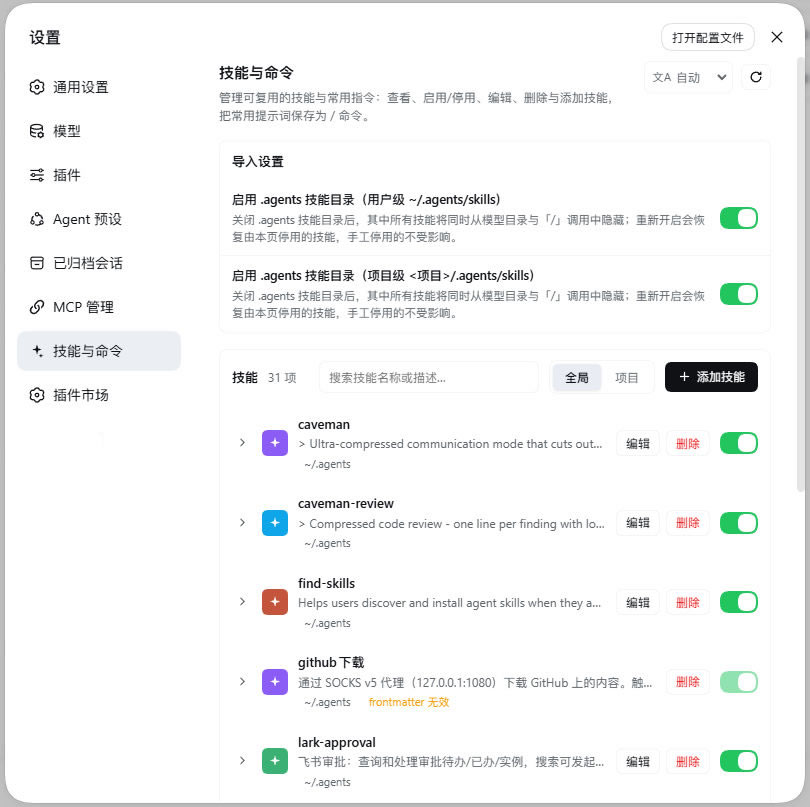 |
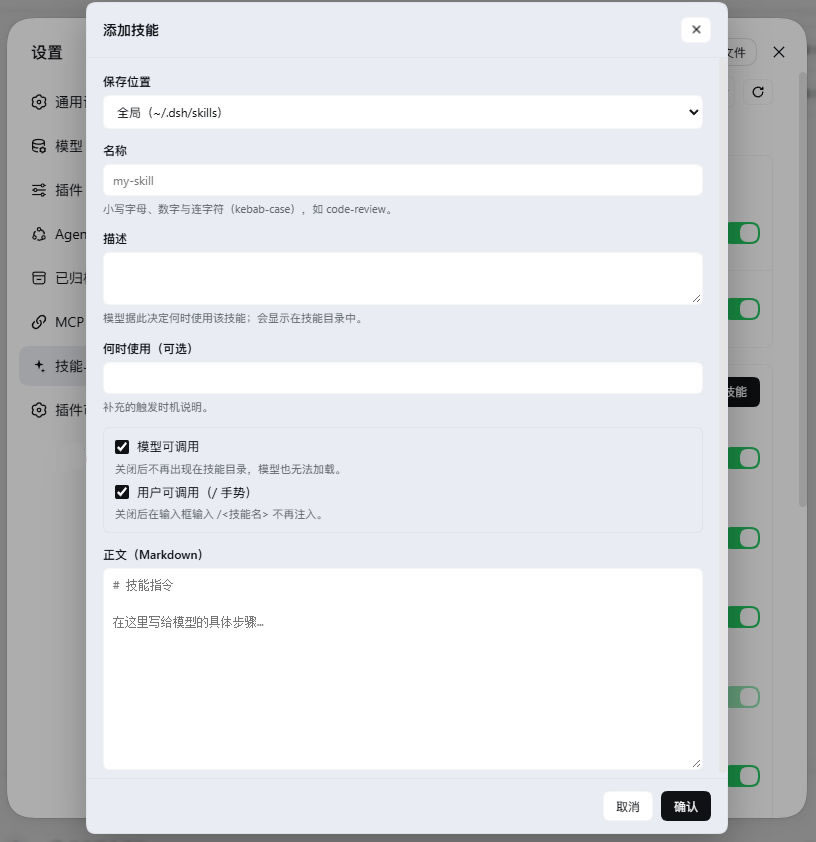 |
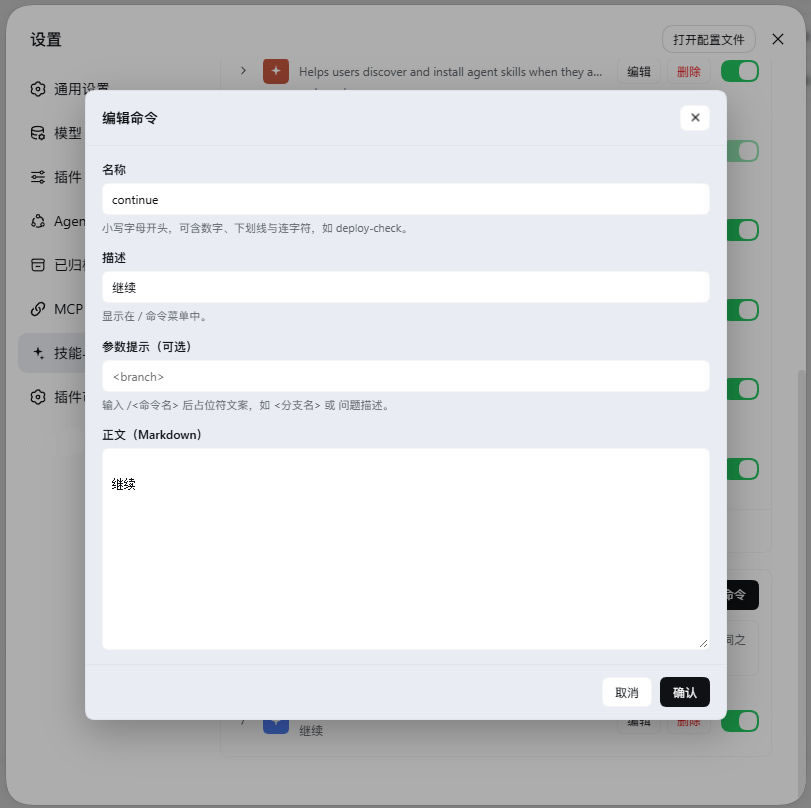
| Edit skill | Commands | Edit command |
|---|---|---|
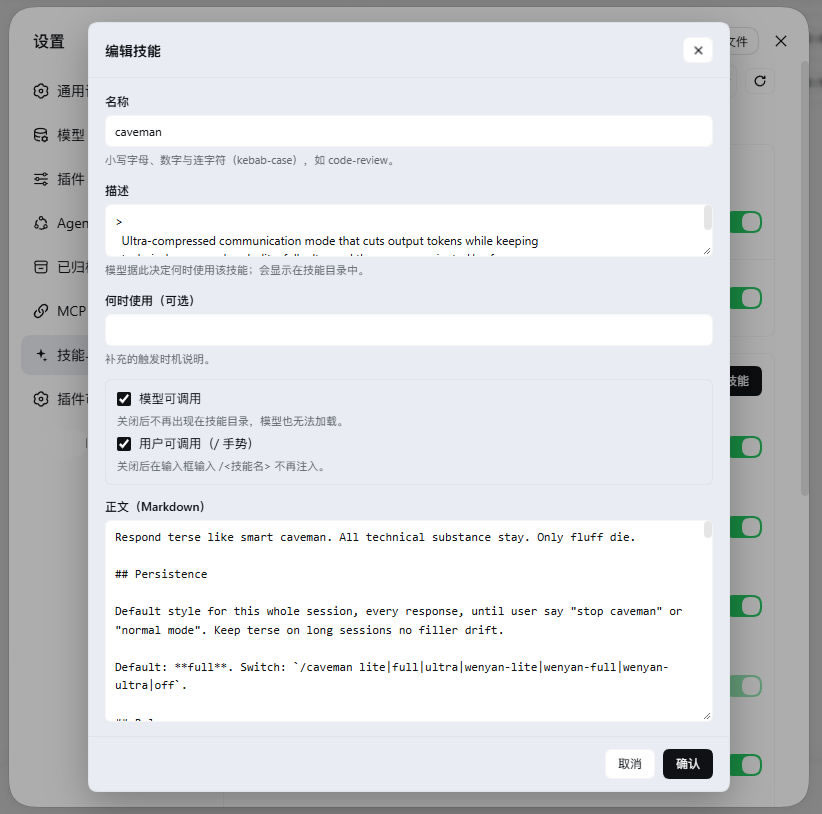 |
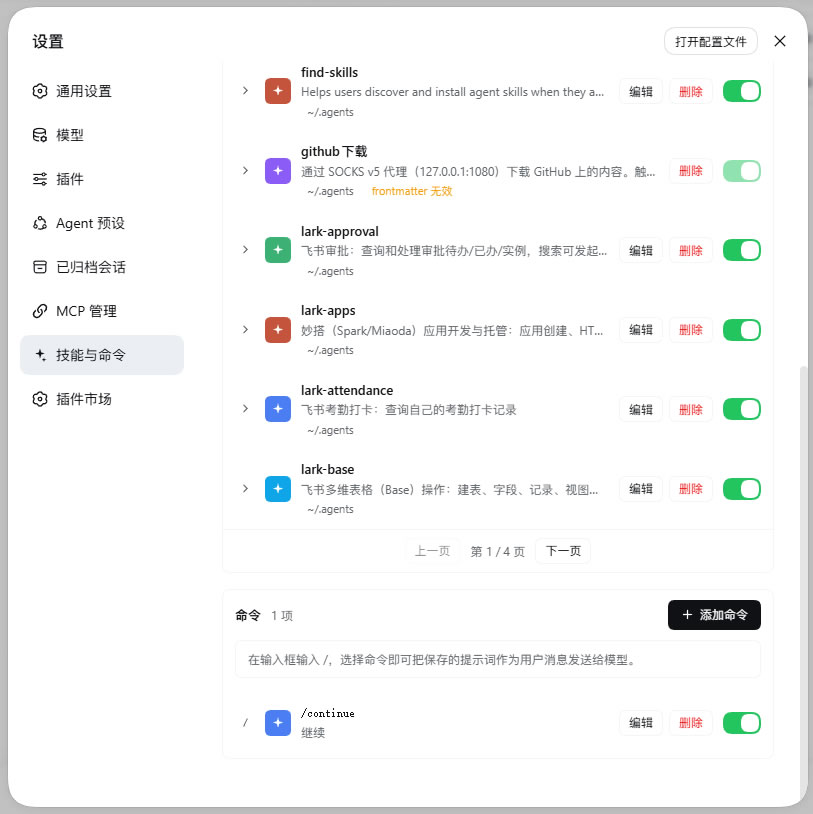 |
 |
Features
| Capability | Description |
|---|---|
| List | Shows every skill under the skill roots, switchable between Global / Project scopes |
| Body preview | Expand a row to preview the skill body in Markdown |
| Enable / disable | Rewrites skill frontmatter (model-invocable / user-invocable); the directory watcher picks it up live without a restart |
| Edit | Name, description, when-to-use, the two invocation switches and the body; renaming renames the directory |
| Delete | Removes the skill's SKILL.md (the resource directory too, for directory-form skills); confirms in the plugin's own dialog with the danger action highlighted |
| Add | Creates a new kebab-case skill in the global scope or a chosen project; opening it from the Project tab defaults to the selected project |
| Install from archive | Pick a zip / tar / tar.gz; common skill-bundle layouts are recognized (GitHub "Download ZIP", skillhub root SKILL.md bundles) and deflate compression is decoded; a result popup lists what was installed and skipped |
| Search / pagination | Filter by name or description; 10 rows per page |
| Commands | Save a prompt as /command; picking one sends the prompt to the model as a user message |
| Import settings | One-click enable / disable of the .agents skill directories (user and project), restoring only the skills this page disabled |
| i18n | Chinese / English, follows the UI language, overridable and remembered in the top-right |
Install
Requires: DeepSeek Harness (DSH) ≥ 0.1.5-rc.1 (developed and verified on 0.1.6-alpha.1 and 0.2.0-rc.2), which itself needs Node.js ≥ 24.2.0 and Git ≥ 2.31.0.
One-click install from the plugin market
If you have https://github.com/dsh-market/dsh-market installed, open Settings → Plugin Market, search for dsh-skills-manager-plus and click install.
CLI
# Local directory (link install; changes apply immediately, handy for development)
dsh plugin --profile web add <this repo directory>

# Then restart dsh (or wait for the profile to hot-reload); the page appears under Settings → Skills & Commands
Verify
Open dsh web → Settings → Skills & Commands (the spark-icon sidebar item). If the page is missing:
- Use a current Chrome/Edge — bundles can fail to load on older Chromium kernels;
- Confirm it is installed into the active profile (
dsh plugin --profile web ls); - If the browser console logs an error, report it with the error when opening an issue.
Update / uninstall
dsh plugin --profile web ls                          # list installed plugins
dsh plugin --profile web add <this repo directory>   # update (re-add overwrites)
dsh plugin --profile web remove dsh-skills-manager-plus # uninstall
Releasing and verifying
A successful npm publish only means the registry accepted the upload — not that users can
get it. The version may not be visible yet, the China mirror may not have synced, gitHead may
point at a commit nobody has, or the market entry may have dropped. So verify after every release:
GITHUB_TOKEN=<token with repo scope> npm run verify:release
It checks, in order: npmjs has the version and latest points at it → gitHead really is a
commit on the default branch → npmmirror carries the same version with a tarball shasum identical
to npmjs → the GitHub Release is published → the market entry is still there. Add --sync to
trigger the mirror sync first and poll until it lands:
GITHUB_TOKEN=... npm run verify:release -- --sync
On some networks registry.npmjs.org is DNS-hijacked (a self-signed O=redirect-cnzz cert, the
local resolver answering 103.73.220.138) or simply unreachable, while registry.npmmirror.com
works. Route both publish and verify through a local SOCKS proxy:
npm publish --registry=https://registry.npmjs.org/ --https-proxy=socks5h://127.0.0.1:1080 --proxy=socks5h://127.0.0.1:1080

# With npm run, use VERIFY_PROXY: npm swallows a literal --proxy as its own config flag.
VERIFY_PROXY=socks5h://127.0.0.1:1080 GITHUB_TOKEN=... npm run verify:release
# Invoking the script directly can use --proxy.
node scripts/verify-release.mjs --proxy socks5h://127.0.0.1:1080
⚠️ Never disable strict-ssl to get past the certificate error — that hands your npm token to
whoever is intercepting. Going through the proxy gets you the real certificate. Full option
reference is in the header comment of scripts/verify-release.mjs.
Where things live
Skills are the skill filesystem itself — the same roots the DSH skill provider scans:
~/.dsh/skills                           user skills
~/.agents/skills                        user .agents skills
<project>/.dsh/skills                   project skills
<project>/.agents/skills                project .agents skills
Each skill is a <name>/SKILL.md (or a flat <name>.md) with YAML frontmatter. Enable/disable rewrites the disable-model-invocation and user-invocable keys; every other field (including unmodelled nested fields) is preserved byte-for-byte.
Commands live under:
$DSH_HOME/commands/<name>.md
One Markdown file per command, with name, description and optional argument-hint frontmatter; the body is the saved prompt. Files are watched, so add/edit/delete re-registers on the DSH command registry within about a second, without a restart.
The plugin keeps one small state file ($DSH_HOME/skills-manager-plus.json) tracking the import switches, disabled command names, and exactly which skills this page disabled in bulk — turning the .agents switch back on only restores those, never ones disabled by hand.
Safety
- Loopback only. The API sits on the same loopback web server; non-loopback sources get a 403.
- Writes are confined to the managed roots. A submitted path outside them is refused.
- State file is written atomically and validated on load; unparseable state resets to defaults.
- Commands go out as user messages. Invoking
/commandsubmits the prompt viaagent.followupas an ordinary user message, so permissions and logging behave exactly as if the user typed it.
Development
node test/run.mjs # all tests (97) across several suites
| Suite | Coverage |
|---|---|
test/store.test.mjs |
Pure logic of skills.js / commands.js: frontmatter parse/rewrite, skill & command CRUD, validation, root resolution, archive install |
test/archives.test.mjs |
zip / tar parsing: directory markers, deflate (method 8), zip64, central directory |
test/host.test.mjs |
All host HTTP routes via a fake Cordis context driving the real apply(), incl. loopback guard, the .agents switch, archive install |
test/client.test.mjs |
Loads the browser bundle like the shell does and asserts it registers a settings.section page |
test/add-install-scope.test.mjs |
Default scope of the add / install-from-archive dialogs (opening from the Project tab selects the current project) |
test/install-result.test.mjs |
The install-result popup's four outcomes and the skipped list |
test/confirm.test.mjs |
The delete-confirmation dialog (replacing window.confirm) |
test/project-labels.test.mjs |
Project label disambiguation / dedup, and zh/en i18n placeholder consistency |
Tests use only Node's built-in node:test.
Layout
| File | Role |
|---|---|
lib/index.js |
Host half: loopback HTTP API, state file, .agents import switches |
lib/skills.js |
Skill file model: frontmatter parse/rewrite, skill CRUD, root resolution |
lib/commands.js |
Command store: file read/write, file watching, registration on the DSH command registry |
lib/client.js |
Browser half: the settings page UI (hand-written lazy-CJS bundle, no build step) |
cordis.patch.yml |
Bundle patch that inserts this plugin into a profile's layer stack |
scripts/verify-release.mjs |
Post-release verification: npmjs / npmmirror / GitHub Release / market entry (not shipped in the package) |
License
MIT
Links
More in this category
zhu1090093659/dsh-web#packages/dsh-skill-explorer★ 9959
Skill center for the dsh web GUI: browse all loaded skills grouped by source, enable or disable model invocation, create new skills, and delete into a recoverable trash.
iflytek/skillhub#dsh★ 5358
Browse and search a SkillHub registry and manage local skill installation, updates, and removal inside DeepSeek Harness. Targets DSH 0.2.0-rc.2 and 0.2.1-rc.2; not yet compatible with 0.2.1-rc.3.
QingYunA/answer-me-with-html★ 5085
Answers a question with a one-page visual HTML explainer: the model writes a short Markdown draft and the bundled `am` CLI builds the page, with flow, sequence, tree, timeline and ER diagrams, tables and callouts.
hyhmrright/brooks-lint★ 1556
Provides six code quality skills for code review, architecture audits, technical debt, test quality, health dashboards, and remediation.
GanyuanRan/Aegis★ 1411
Software-engineering method pack for coding agents, with skills for baseline-first planning, systematic debugging, prompt hygiene, verification before completion, and repair/retirement tracking.
superdesigndev/superdesign-skill★ 935
Design skill for UI and marketing graphics on the Superdesign canvas: reads the repo for context, extracts its design system, then generates and iterates branchable design drafts, flow pages, and reusable components through the Superdesign CLI.
Community comments
Comments are public GitHub Discussions. Loading them connects to GitHub and Giscus; a GitHub account is required to post.