Conversation navigation with full-history turns, collapsible process steps, final-result and structured question-and-answer keys, and pointer-following piano interaction.
Install
# from npm (prebuilt)
dsh plugin --profile web add dsh-piano-nav
# from GitHub (first run asks for allowBuilds approval — follow the hint, retry)
dsh plugin --profile web add github:amazing-fish/dsh-piano-nav
Any plugin you install runs third-party code with your own permissions — it can read your files, use your credentials, and reach the network, and tool approvals don’t sandbox it. GitHub-sourced plugins also run build scripts at install time — pnpm blocks those until you allow them, so an install can stop with ERR_PNPM_GIT_DEP_PREPARE_NOT_ALLOWED or ERR_PNPM_IGNORED_BUILDS; dsh prints the exact key to add under allowBuilds in your profile’s pnpm-workspace.yaml, and the install works on the next run. Allowing a build is a trust decision: only install sources you trust, and pin a commit (github:owner/repo#sha).
README
A semantic rail for previewing and navigating long agent conversations.
中文 · Usage · Documentation · Issues

For the DeepSeek Harness Web GUI, independently maintained by amazing-fish. This project has evolved into a full-history navigator with semantic questions and answers, process folding, and continuous pointer interaction. Its origins are documented in NOTICE.
Preview
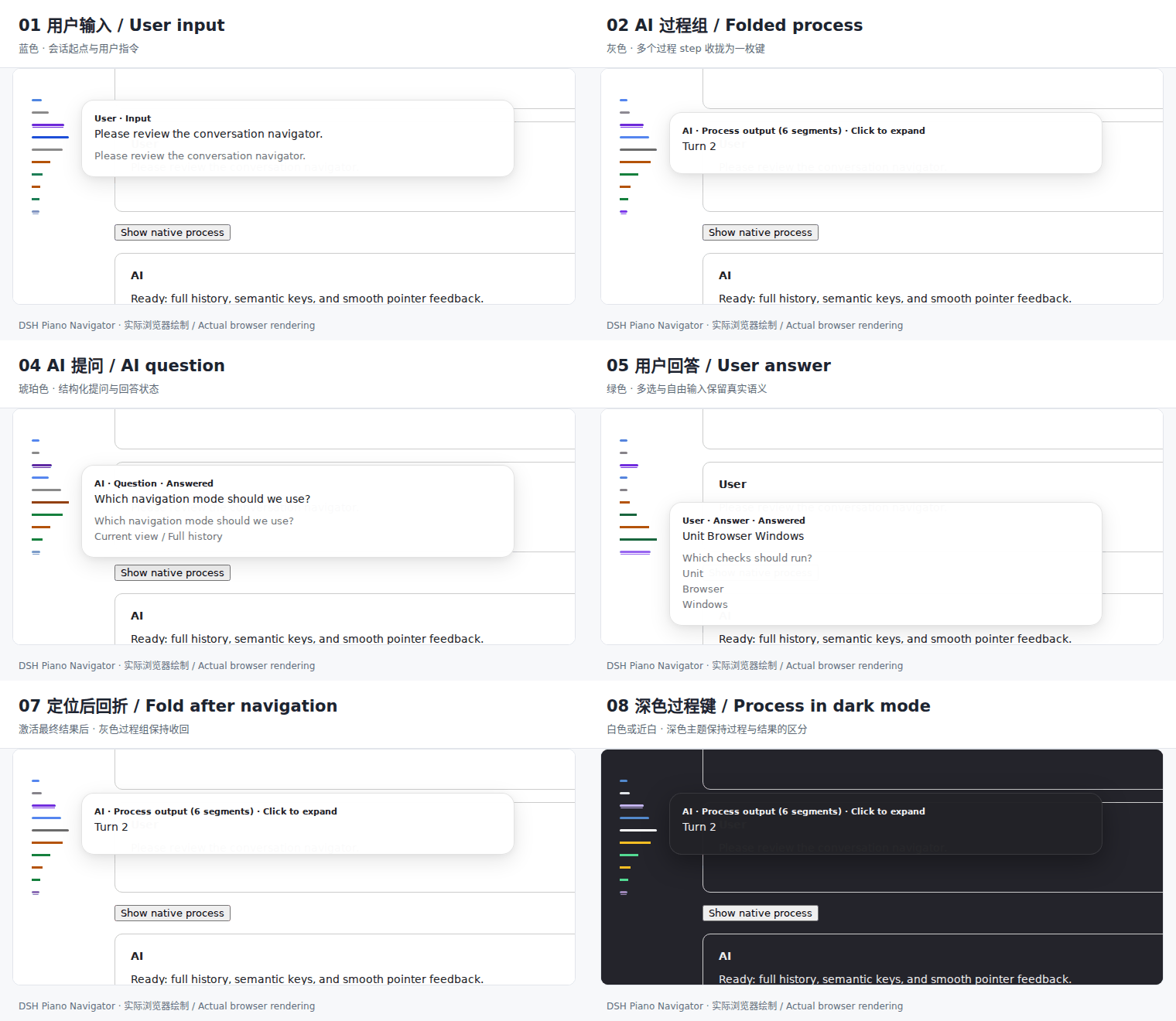
The gallery cycles through blue user input → gray process group → expanded process steps → amber AI question → green user answer → purple double-stroke final result → folding after navigation → dark-theme process keys. These are actual plugin/native-component states with synthetic Session data, held briefly for readability. Ordinary process keys are white or near-white in the dark theme.
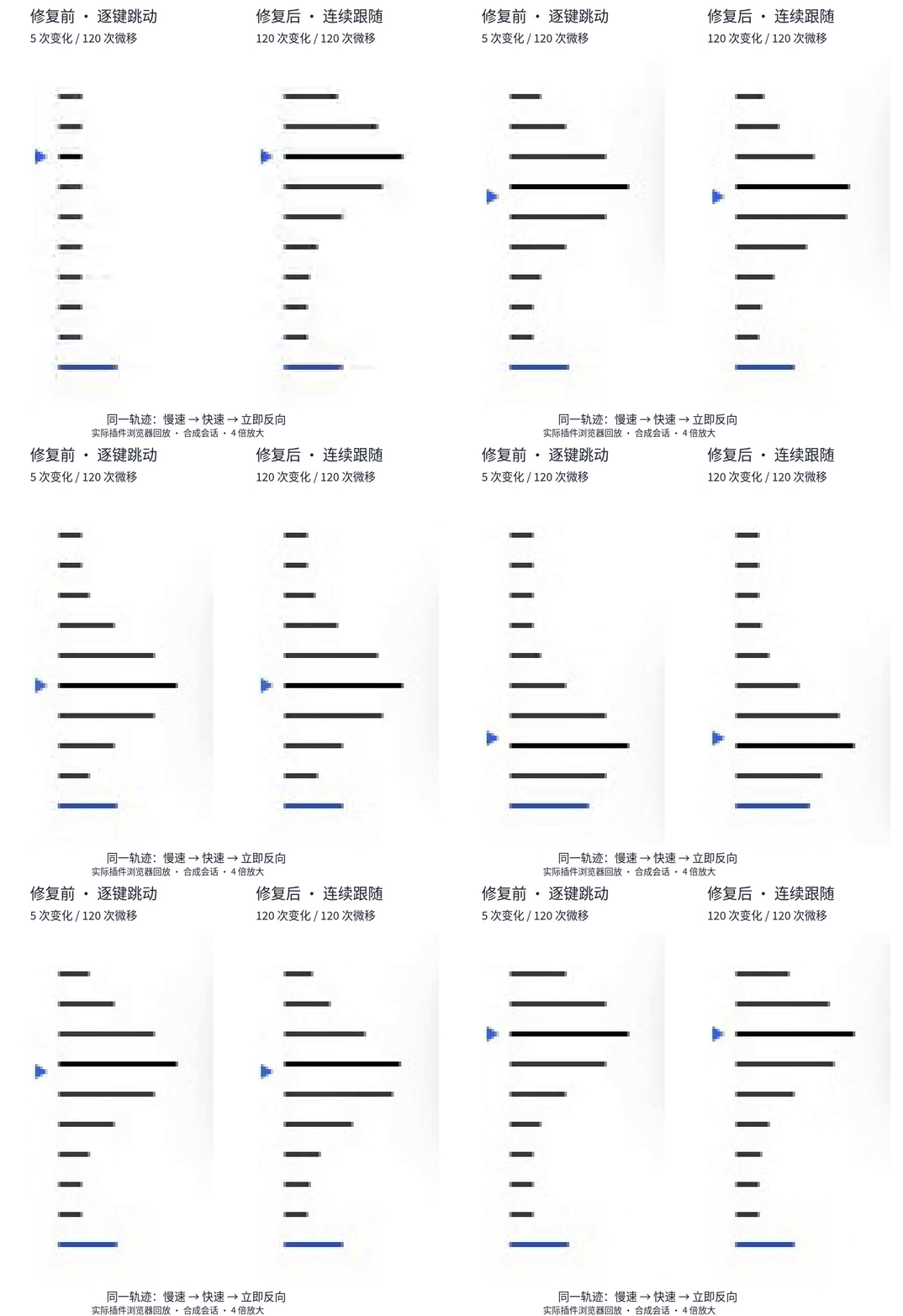
Both sides replay the same slow movement, fast movement and immediate reversal. Left: before the fix; right: current behavior. This browser replay uses actual plugin code with synthetic Session data and keys enlarged 4×. The 5/120 and 120/120 labels count width changes during small pointer movements; they are not FPS.
Install
Requires the DSH web profile and Node.js ^22.19.0 || >=24.0.0.
dsh plugin --profile web add dsh-piano-nav
Refresh the Web GUI and open Piano Navigator in Settings. The npm package is dsh-piano-nav; the existing dsh-piano package is a different, musical plugin.
For migration, remove the old scoped package or local link's loading entry before adding the new package. Preserve persisted settings: the entry ID remains compatible. See migration.
What the rail represents
| Target | Behavior |
|---|---|
| User input | A separate entry for each input segment |
| AI process output | Semantic text runs; consecutive same-turn output can fold |
| Final result | Distinguished from intermediate process output |
| AI question / user answer | Structured ask_user_question exchanges and status |
| Earlier history | Outline entries delegate loading and landing to DSH |
Ordinary tool logs, edits, reads, and reasoning do not become separate keys. Structured questions are an explicit exception. Unloaded turns remain real outline entries until actual segments become available.
Merges to master run full verification. A stable version increase publishes to npm after CI passes, verifies the downloaded package and creates a GitHub Release. Other commits only run verification. See the release guide.
Independently developed capabilities
- One full-history rail: combines the outline and loaded segments. Successful takeover shows Piano; unsupported conditions restore native navigation.
- On-demand process expansion: activate a group to show its members and navigate to its first member. Revealable native process wrappers and question cards open before landing. Rail wheel browsing, transcript scrolling and streaming preserve explicit expansion.
- Continuous pointer wave: movement within a key updates the wave too. Pointer frames update visible keys and the necessary preview; no persistent loop remains when the pointer stops.
- Fixed display window: 20 keys by default, with stable spacing and wheel/keyboard access to available entries throughout the conversation.
- Everyday interaction: plain-text previews, reader highlighting, stable node reuse, themes, keyboard access, and reduced-motion support.
- Persistent settings in three languages: 简体中文, English, and 繁體中文, with immediate layout controls.
Controls
| Action | Result |
|---|---|
| Move along the rail | Continuous wave and the nearest key's preview |
Click / Enter / Space |
Navigate or delegate loading to the native owner |
| First activation of a folded group | Expand it, navigate to its first member and retire the previous group |
| Activate members in the same process group | Navigate while retaining expansion; other key kinds retire it |
| Wheel over the rail | Browse without scrolling the transcript; retain expansion |
↑ / ↓, PageUp / PageDown |
Move selection and adjust the window |
Home / End |
Select the first/last entry in the conversation list |
Escape |
Close preview, retire expansion, and cancel navigation intent |
Defaults: 2px thickness, 12px center spacing, 20 visible keys. The 1.3.1 settings page adds six semantic color controls, a bound legend and live layout preview. Changes persist and update actual keys; automatic colors follow the theme. See usage for settings and edge cases.
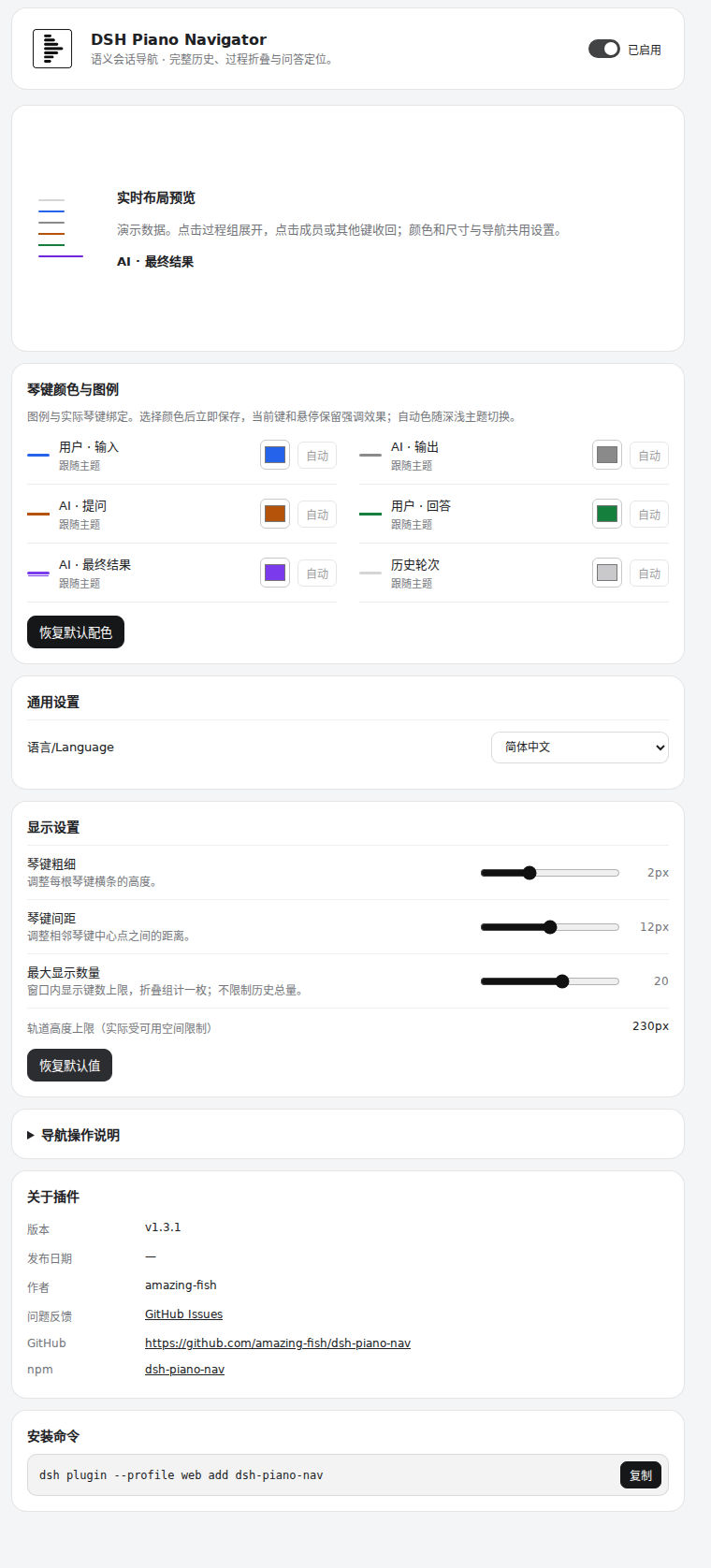
The actual 1.3.1 settings component in Simplified Chinese with demo settings data. See media sources for provenance and versions.
Compatibility and data boundaries
Development dependencies are pinned to DSH 0.2.0-rc.2. Type/integration checks and browser regressions using pinned native source establish different levels of evidence; see compatibility.
The checked DOM bridge reuses native paging and scroll ownership. It is not an official stable navigator replacement API. Narrow layouts, missing targets, or contract drift restore native UI. Segments sharing a DOM row may land at the same row start.
Piano reads navigation information, displays plain-text previews, and persists its own settings. It does not rewrite messages, inject system prompts, or submit answers. Historical requests remain DSH's responsibility.
Development and documentation
pnpm install --frozen-lockfile
pnpm verify
pnpm test:package
| Entry | Contents |
|---|---|
| Contributing | Setup, directories, tests, PRs |
| Architecture | Read models, native navigation, scheduling, lifecycle |
| Semantic rules | Segments, questions, finality, folding |
| Releasing | Inspection, authentication, tarball publication, verification |
| Changelog | Independently maintained package changes |
src/ holds implementation, scripts/ regressions and fixtures, and lib/ tracked builds. Start at docs/README.md; historical plans/screenshots live in docs/archive/.
Origin and license
Evolved from hjj345/dsh-sm-context-piano, retaining original MIT copyright. Current development and releases are maintained here. See LICENSE and NOTICE.
Links
More in this category
zhu1090093659/dsh-web#packages/dsh-task-board★ 10172
Task board for the dsh web GUI: a sidebar multi-column kanban whose cards run in real DSH agent sessions and can also be scheduled with cron expressions, executed host-side even with the browser closed.
zhu1090093659/dsh-web#packages/dsh-web-all★ 10172
Plugin and skin collection for the DSH Web UI: task board, Git graph, right-side panel, remote mobile UI, pet, live token stats, and a skin center.
ccch1mneyyy/dsh-TUI★ 7101
Claude Code-style full-screen terminal UI: pixel-whale header, live status line, and streaming thought expansion.
MeteorNOX/DeepSeek-Balance-Whale-Widget★ 6959
A fixed-corner whale widget for the DSH web GUI — balance, today's usage and per-turn cost with peak/off-peak pricing, editable balance-alert and daily-budget bubbles, a module-based custom bubble queue with A/B weighted choices and random lines or images, 30+ vendor templates (OpenAI, OpenRouter, Kimi, SiliconFlow, Ark, Zhipu, MiniMax and more) with per-model balance and subscription quota, plus task-end sound, imported audio, custom roles and a resource manager. Local-only, no telemetry.
omdsh-dev/DSH-better-sidebar★ 4959
Full sidebar workbench with file rendering and editing, terminal, Git, and subagents; third-party plugins can register new tabs.
Devin-AXIS/deepseek-design#deepseek-idesign★ 1744
Visual design studio for websites, app prototypes, posters, cards, reports, and magazines, with templates, direct element editing, selection-aware AI draft handoff, and export.
Community comments
Comments are public GitHub Discussions. Loading them connects to GitHub and Giscus; a GitHub account is required to post.