A minimal worktree management solution with only one button and one dialog.
Install
# from npm (prebuilt)
dsh plugin --profile web add @alpacachen/dsh-simple-worktree
# from GitHub (first run asks for allowBuilds approval — follow the hint, retry)
dsh plugin --profile web add github:alpacachen/dsh-worktree
Any plugin you install runs third-party code with your own permissions — it can read your files, use your credentials, and reach the network, and tool approvals don’t sandbox it. GitHub-sourced plugins also run build scripts at install time — pnpm blocks those until you allow them, so an install can stop with ERR_PNPM_GIT_DEP_PREPARE_NOT_ALLOWED or ERR_PNPM_IGNORED_BUILDS; dsh prints the exact key to add under allowBuilds in your profile’s pnpm-workspace.yaml, and the install works on the next run. Allowing a build is a trust decision: only install sources you trust, and pin a commit (github:owner/repo#sha).
README
A Git worktree plugin for DeepSeek Harness that creates task branches, registers worktrees as DSH Workspaces, and opens isolated sessions.
npm package:
@alpacachen/dsh-simple-worktree
Simplified Chinese · English
Features
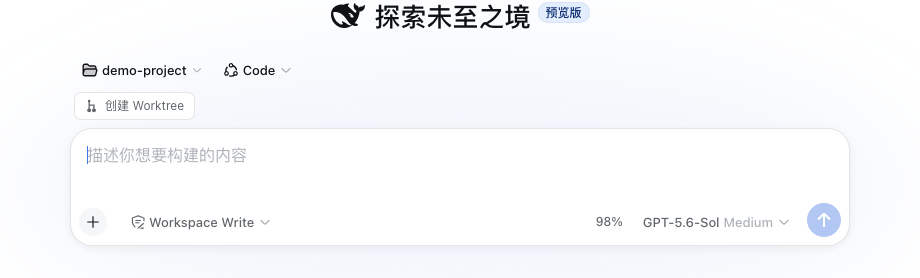
- Create a Git worktree from the new-session action in any Git Workspace.
- Choose the current branch or the repository's main branch.
- Register and open the new worktree as a DSH Workspace with an isolated session.
- Create task branches as
task/<name>. - Manage and remove linked worktrees from the Worktree Management settings page.
- No additional service or project configuration.
- Supports DSH themes, Chinese, and English.
Compatibility
Built against the DSH 0.1.5 client contract (0.1.5-rc.1 || 0.1.5-rc.2, web profile).
Usage
Install
dsh plugin --profile web add @alpacachen/dsh-simple-worktree
Restart dsh web after installation.
You can also install from GitHub with dsh plugin --profile web add github:alpacachen/dsh-worktree.
Create from a new session
- Open New Session in a Git Workspace.
- Choose Create worktree above the composer.
- Enter a task name. The repository's main branch is selected by default.
- Click Create and open.
Manage worktrees
Open Settings → Worktree Management to scan every Workspace for Git projects and linked worktrees, inspect their branch and dirty state, and remove worktrees that are no longer needed.
The worktree is created at:
project.worktrees/login-fix/
└── branch: task/login-fix
The new Workspace is named <parent>/<task>. Removing the worktree Workspace does not delete its Git branch.
Links
More in this category
zhu1090093659/dsh-web#packages/dsh-git-graph★ 8568
Git branch selector and Git graph for the dsh web GUI: switch branches and explore branch-lane and commit history from the conversation header.
Akimiya-z/codex-guard#dsh★ 136
Pre-submit pull-request hygiene checks inside DeepSeek Harness: scans the current diff for TODO leftovers, hardcoded secrets, and non-conventional commit subjects.
Cerbur/clutch-dsh#clutch-dsh-worktree★ 32
Adds a Worktree view to DSH Web UI that groups Sessions by Git worktree while keeping DSH as the source of truth.
lehhair/dsh-diff-viewer★ 26
PiUI-style diff viewer replacing the stock DiffBlock for write/edit tool calls.
DamonKoy/dsh-web-ui#dsh-git-graph★ 23
Git branch selector and Git graph in the conversation header of the dsh web GUI.
PerryLink/dsh-github★ 22
Official-grade GitHub CI integration: a composite action.yml, a polling PR review bot with idempotent inline comments and a status-check gate, plus PR/issues tools with every write gated by human approval.
Community comments
Comments are public GitHub Discussions. Loading them connects to GitHub and Giscus; a GitHub account is required to post.