Provider-first model picker for the composer. Every provider is listed in the left rail and its models in the right pane. Providers, models within a provider, and pins reorder by drag or Alt+Arrow; providers take a local display alias; one provider can be the panel default; a model's reasoning levels expand inline; search matches model names, provider names and aliases. Switching goes through the shipped model directory service, so the /model popup and this panel always agree.
Install
# from npm (prebuilt)
dsh plugin --profile web add @aichixiaojuzi/dsh-model-quick-switch
# from GitHub (first run asks for allowBuilds approval — follow the hint, retry)
dsh plugin --profile web add github:aichixiaojuzi/dsh-model-quick-switch
Any plugin you install runs third-party code with your own permissions — it can read your files, use your credentials, and reach the network, and tool approvals don’t sandbox it. GitHub-sourced plugins also run build scripts at install time — pnpm blocks those until you allow them, so an install can stop with ERR_PNPM_GIT_DEP_PREPARE_NOT_ALLOWED or ERR_PNPM_IGNORED_BUILDS; dsh prints the exact key to add under allowBuilds in your profile’s pnpm-workspace.yaml, and the install works on the next run. Allowing a build is a trust decision: only install sources you trust, and pin a commit (github:owner/repo#sha).
README

A DSH Web client plugin that replaces the composer's Model menu with a provider-first, two-pane panel.
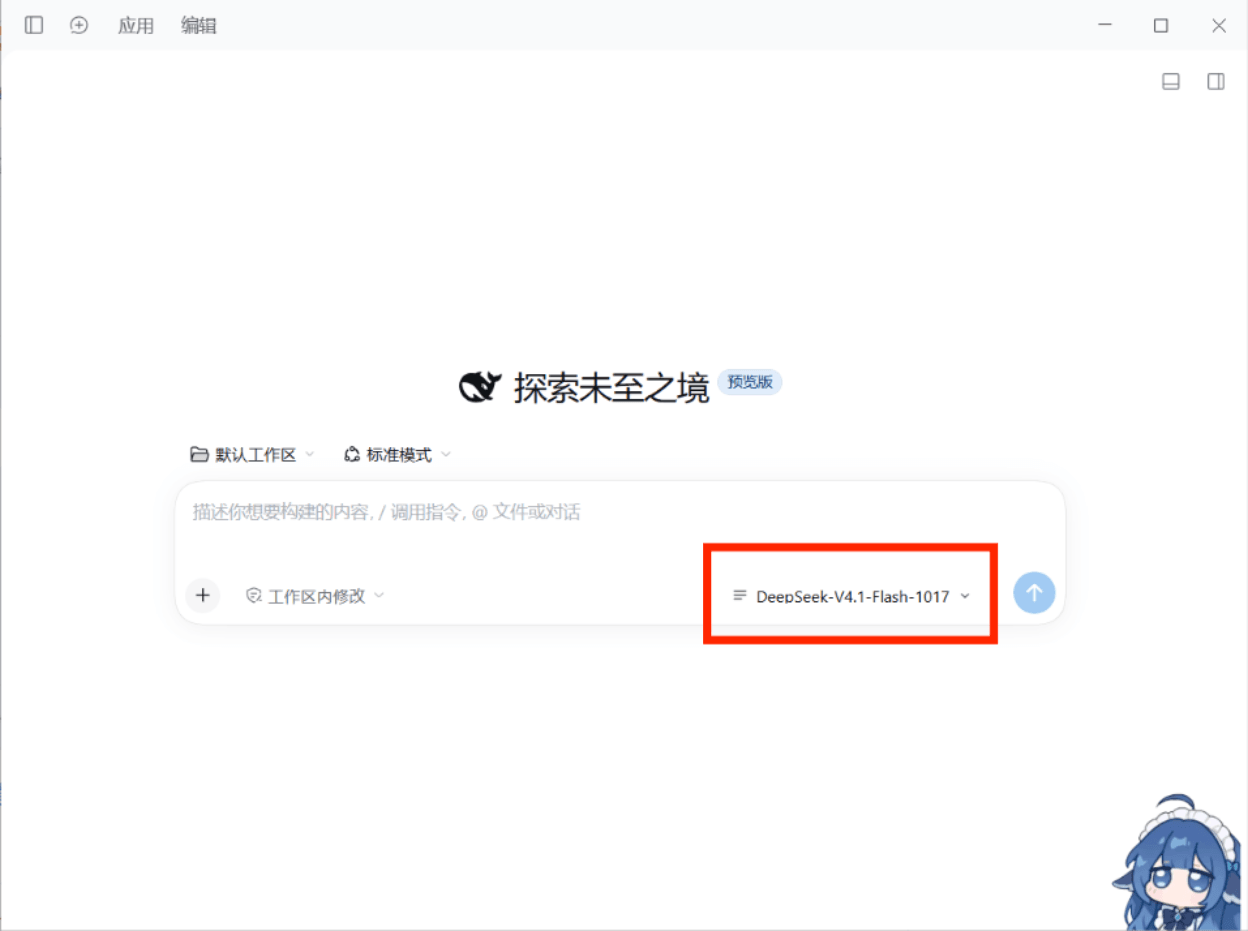
① A new session — the plugin takes over the Model seat in the composer's tool row
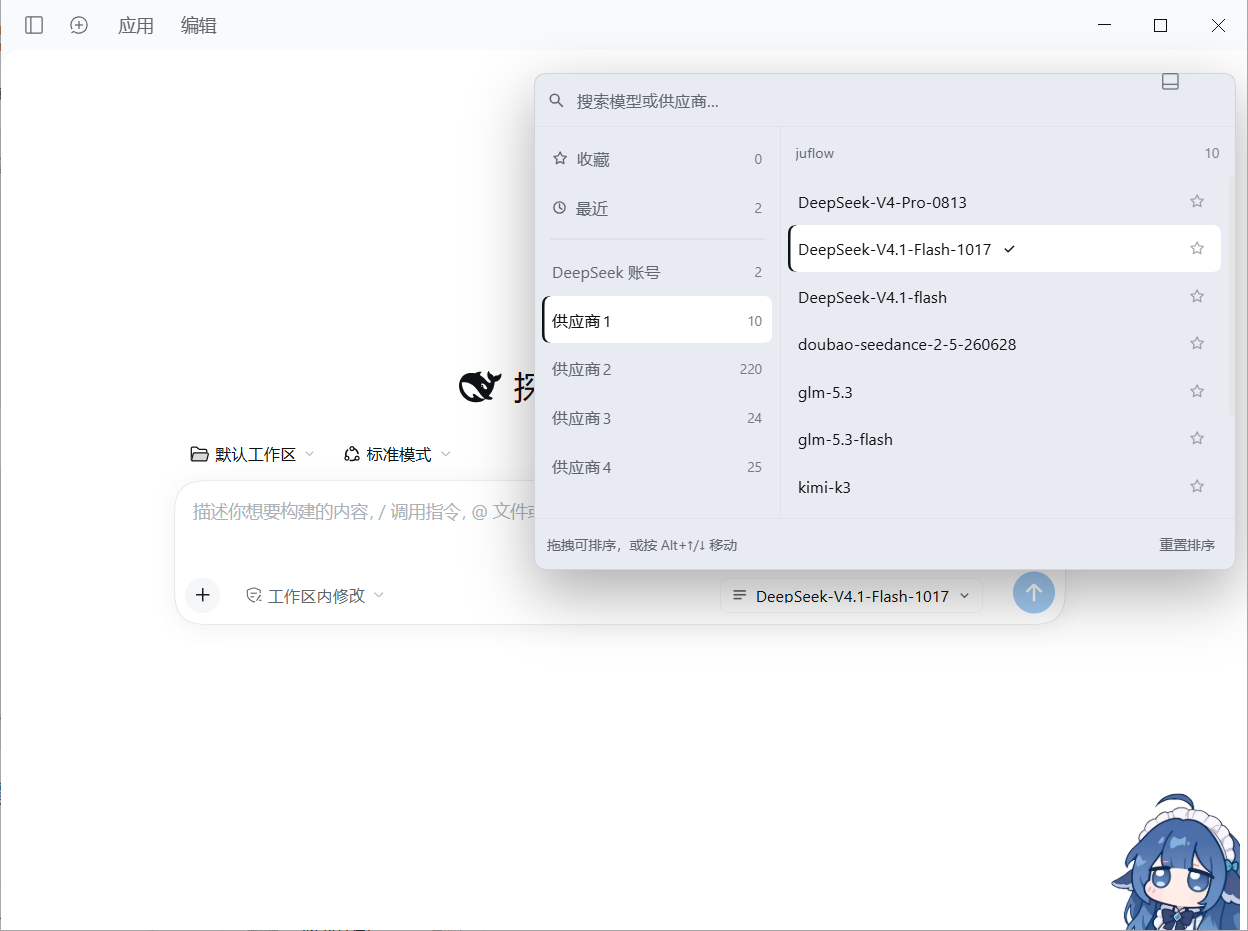
② The panel expanded — every provider in the left rail, the selected provider's models on the right
中文说明 · Changelog · Contributing
Why
The shipped picker groups models behind a nested dropdown. Once you have a few providers, switching means walking down through levels. This plugin puts every provider in the left rail, one level deep: hover a provider to swap the model list on the right, click a model to switch. Ordering, aliases, pins and recents are all yours to arrange.
Install
# desktop app (profile named "desktop")
dsh plugin --profile desktop add @aichixiaojuzi/dsh-model-quick-switch

# web profile
dsh plugin --profile web add @aichixiaojuzi/dsh-model-quick-switch
Or search for dsh-model-quick-switch in the in-app plugin market.
From source (clone it first):
dsh plugin --profile desktop add link:C:/path/to/dsh-model-quick-switch
Reload the page afterwards. The model entry in the composer toolbar becomes this panel's trigger.
Features
- Two panes — left: pins / recents / every provider; right: that provider's models.
- Clear current state — the selected model and its provider in the rail share the same highlight (filled background plus a brand-coloured bar on the left). Hovering only tints a row temporarily; move away and just the current selection stays lit.
- Drag to reorder — provider order, model order inside each provider, and pin
order. Keyboard users can move the focused row with
Alt + ↑/↓. - Pins — the star on any model row keeps it at the top under Pinned.
- Recents — the last 12 successful switches, recorded automatically.
- Search — fuzzy match on model name, provider name and your aliases, across providers.
- Model context menu — right-click any model to rename it (a local alias that also participates in search) or pin it.
- Reload — the ↻ button in the list header re-resolves and reloads the providers and models you already configured, so a new key or provider needs no app restart.
- Drop providers you do not use — right-click → Delete from this panel removes it from the panel only, and it can be restored at any time.
- Reasoning effort — the selected model exposes the levels its adapter declares; click one to switch.
- Model badges — catalog tags (for example
new) render next to the model name. - Keyboard —
↑/↓move,Home/Endjump,PageUp/PageDownpage,Enterselect,Escclose. - Visible failures — when a provider's catalog fails to load, the right pane shows the Host's own error message plus a Retry button instead of an empty box.
- Never steals an unusable seat — in sessions where model selection is unavailable (addressed subagent sessions, for example) the plugin renders nothing and leaves the seat to the shipped UI.
Provider context menu
Right-click any provider in the left rail (real providers only, not Pins/Recents):
| Item | Effect |
|---|---|
| Rename | Edit a local display alias in place: Enter saves, Esc cancels, empty restores the original. Aliases participate in search but never change the underlying id or the request. |
| Open the panel on this provider | Makes it the provider the panel lands on next time; click again to clear (the dot on the right marks the default). |
| Pin to top / Move up / Move down | Reorder without dragging; items grey out at the boundaries. |
| Reset this group's model order | Clears the model order of that provider only. |
| Pin all / Clear this group's pins | Bulk add or remove that provider's models from Pinned. |
| Reload model catalog | Pick up new models or keys without reloading the page. |
| Delete from this panel | Removes the provider from the rail, search, pins and recents. Panel-local only — your profile configuration is untouched, and a N removed · Restore row stays at the bottom of the rail. |
Model context menu
Right-click any model in the right pane:
| Item | Effect |
|---|---|
| Rename | Edit a local display name in place: Enter saves, Esc cancels, empty restores the original. Aliases participate in search but never change the model id. |
| Reset to catalog name | Only meaningful once an alias exists; it clears it. |
| Pin / Unpin | Same as the star on the row. |
Data and boundaries
- Selection goes through the shipped
ctx.modelDirectoriesservice (the samesession.selectModel), so the/modelpopup and this panel can never disagree; a Host rejection is shown in red at the bottom of the panel. - Order, aliases (one set for providers, one for models), the default provider, pins,
recents and deleted providers live in browser localStorage under
dsh.model-quick-switch.v1. The plugin writes no profile configuration, adds no Host route and registers no locale namespace. - It replaces exactly one visual seat:
conversation.input.model. - Delete from this panel is panel-local: it hides the provider in this panel only. The provider configuration in your profile stays exactly as it is.
- No network access, no telemetry, no credential access. It only reads the model catalog the Host already publishes.
Uninstall
Disable the bundle on the plugins page and the shipped selector returns immediately.
To drop its data too, delete the dsh.model-quick-switch.v1 localStorage entry.
Development
# render / behaviour smoke test (53 assertions: both context menus, aliases,
# delete + restore, reload button, default provider, badges, empty-catalog fallbacks)
node dev/smoke.mjs

# syntax checks
node --check client.js
node --check index.js
There is no build step: the profile loads client.js directly, so a page reload
picks up your edits.
Known limitations
- If a pinned model disappears from the catalog its key is kept, and it returns to Pinned when the model comes back.
- The trigger keeps showing the model name on narrow widths (truncated) rather than collapsing to an icon.
- Rename is display-only, for providers and models alike; catalog names come from the Host and are never rewritten.
- The model catalog is cached by the Host, so models added after the page loaded only appear once the Host refreshes; the ↻ button forces a re-resolve, but a provider the Host itself rejects still surfaces as an error.
License
MIT © 2026 aichixiaojuzi
Links
More in this category
Ebony-Vinyl/dsh-our-free-model★ 55971
Adds free model lanes to DeepSeek Harness — DeepSeek V4.1 Flash, Kimi K3 and others — with no login, sign-up or API key, plus a local OpenAI-compatible gateway, fallback routing and a usage dashboard.
dingminhua/dsh-connect-workbuddy★ 993
Connects locally signed-in WorkBuddy models, CN and international alike, to DSH, reading each model's credit multiplier from the upstream catalog on every refresh, with per-model image input toggles, account switching backed by an auto-failing-over pool, manual daily check-in, and read-only credit overviews shown as compact pills on the card and in the composer.
Alice-Marx/dsh-model-router★ 603
Routes DeepSeek Harness work across configured model APIs and supported vendor CLIs with dependency-aware packages and cost previews.
V1ki/dsh-plugin-subscriptions★ 546
Use ChatGPT (Codex), Claude, and Grok subscriptions as DeepSeek Harness LLM providers, with Settings login, model catalogs, usage, plus image_generate, video_generate, and x_search tools.
Mars-Sea/dsh-commandcode-provider★ 446
Unofficial Command Code LLM provider: registers a `commandcode` route with a live model catalog and reasoning-effort support.
FishBottle7/opencode2dsh★ 384
Exposes OpenCode Zen free models to DeepSeek Harness, with no API key.
Community comments
Comments are public GitHub Discussions. Loading them connects to GitHub and Giscus; a GitHub account is required to post.