Dockable DSH Web UI layout that organizes conversations as tabs across draggable split groups.
Install
# from npm (prebuilt)
dsh plugin --profile web add @ai-eks/dsh-docking-layout
# from GitHub (first run asks for allowBuilds approval — follow the hint, retry)
dsh plugin --profile web add github:ai-eks/dsh-docking-layout
Any plugin you install runs third-party code with your own permissions — it can read your files, use your credentials, and reach the network, and tool approvals don’t sandbox it. GitHub-sourced plugins also run build scripts at install time — pnpm blocks those until you allow them, so an install can stop with ERR_PNPM_GIT_DEP_PREPARE_NOT_ALLOWED or ERR_PNPM_IGNORED_BUILDS; dsh prints the exact key to add under allowBuilds in your profile’s pnpm-workspace.yaml, and the install works on the next run. Allowing a build is a trust decision: only install sources you trust, and pin a commit (github:owner/repo#sha).
README
English | 中文
A DeepSeek Harness Web UI plugin for organizing unlimited conversation tabs into editor-style groups. Split freely, then close or move tabs whenever a pane becomes too small.
Preview
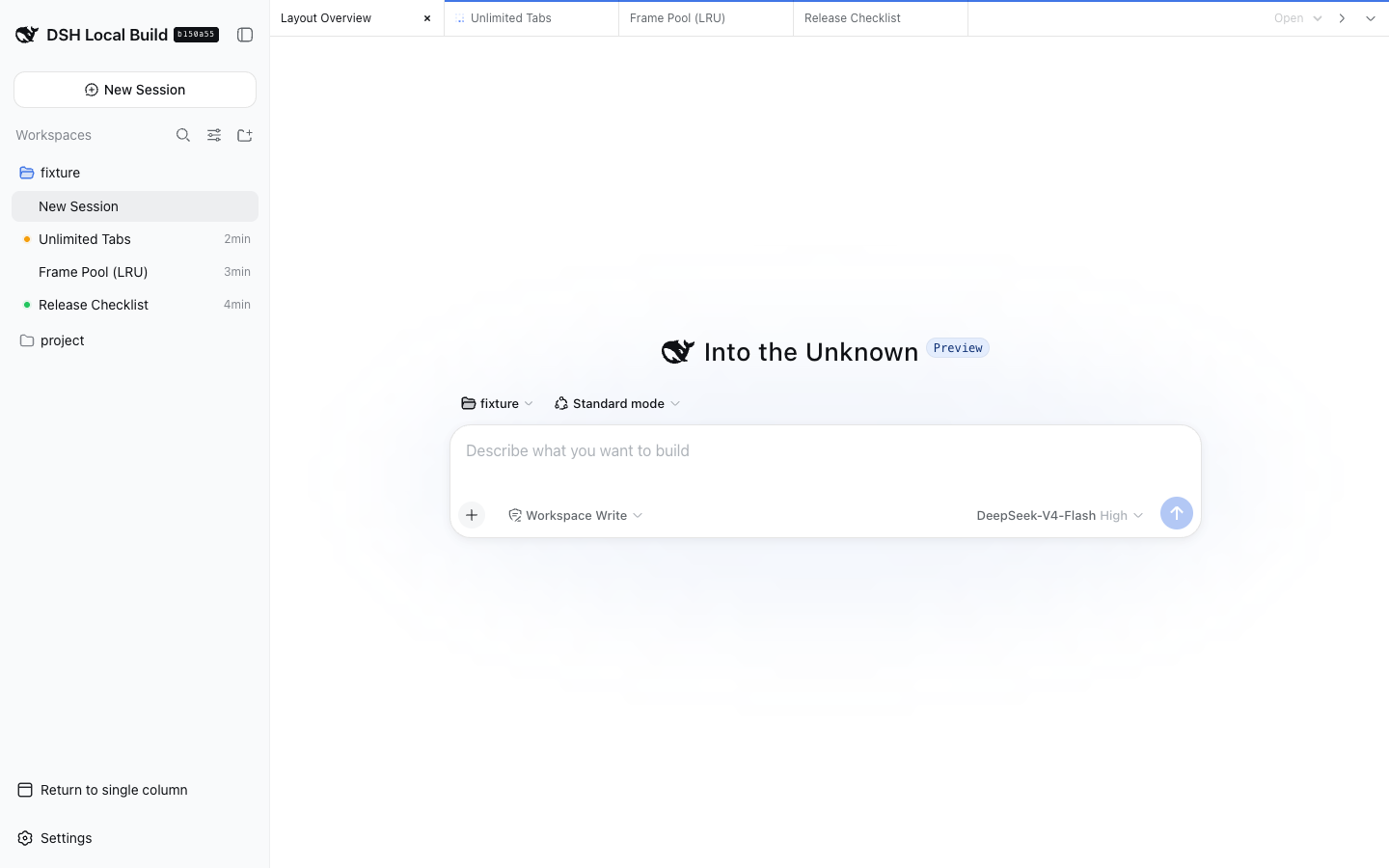
| Two groups | Three groups |
|---|---|
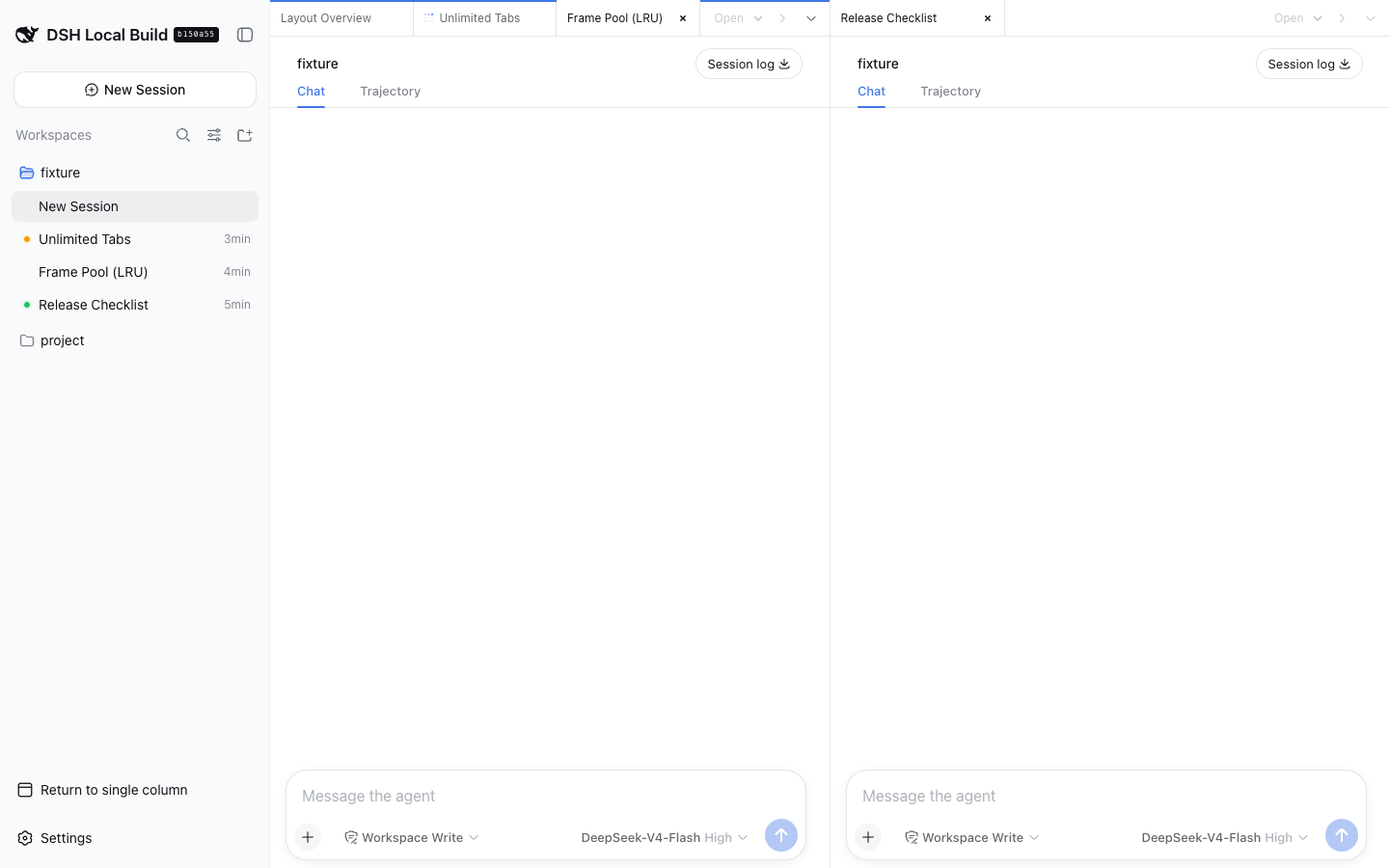 |
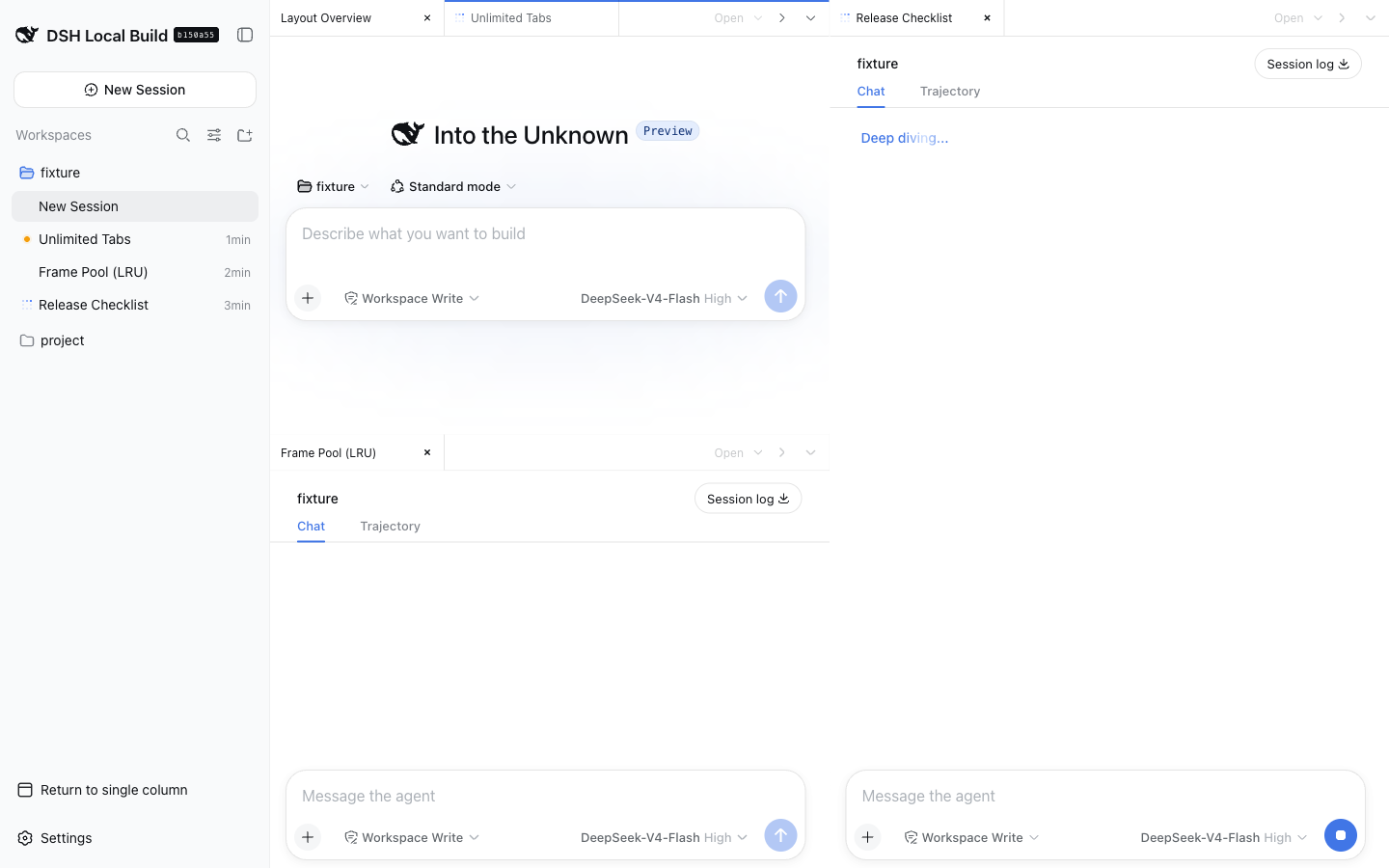 |
Features
- Unlimited tabs and groups, with no fixed pane-size guard.
- Drag a tab to another group to move it, or to an edge to split; toolbar buttons split right or down.
- At widths up to 760 pixels, one full-width group is shown at a time with a group switcher.
- Switching to single-column mode or another main panel hides the docked panes; returning restores the groups.
- Closing a tab changes only the browser layout and never deletes its DSH Session. Closing the final tab opens a blank Session, reusing an existing blank Session when DSH selects one.
Install
From npm:
dsh plugin --profile web add @ai-eks/dsh-docking-layout@latest
From Git:
dsh plugin --profile web add github:ai-eks/dsh-docking-layout
From a local checkout:
git clone https://github.com/ai-eks/dsh-docking-layout.git
cd dsh-docking-layout
pnpm install
dsh plugin --profile web add .
Remove the plugin with:
dsh plugin --profile web remove @ai-eks/dsh-docking-layout
Enable Docking Layout from the DSH sidebar footer. Open Sessions from the group menu or the DSH sidebar, then drag tabs or use the split buttons to arrange them.
Performance and limitations
The iframe pool keeps every group's active tab plus the two most recently used inactive tabs mounted. Revisiting an evicted tab reloads its embedded client. Each shared panel keeps an iframe per workspace visited through its selector, preserving that workspace's native tabs until page reload. More groups and workspaces therefore use more browser memory and DSH Web connections.
A shared right sidebar keeps native file-preview tabs open independently of Session and group selection. File links from any conversation open in that same sidebar; collapsing it preserves its contents. The Files tab lists every Workspace as an independent root, loaded on expansion, so multiple projects can be browsed together. Session switches leave the file tree and open previews unchanged. File-tree and preview state last for the current page and are reset on reload. The right-sidebar workspace selector explicitly chooses the owner for session-scoped tools such as terminals and Git; changing the active conversation leaves this selection unchanged. Switching the selector restores that workspace's native tabs. Archived Sessions and subagent routes use the native conversation view. Touch layouts use split buttons and the group switcher instead of tab dragging.
With dsh-better-sidebar installed, a shared bottom workbench spans the conversation area below all groups. Its workspace selector is independent of both the right sidebar and the active conversation. Switching workspaces or collapsing the panel keeps its terminals and tabs mounted. Open it from the bottom-panel button beside the right-sidebar button in the outer tab bar; drag its top edge to resize, or focus the separator and use the arrow keys. Fullscreen and single-column mode retain the same workspace ownership. The panel is available only while the companion plugin is enabled.
Only layout preferences are stored locally. The plugin does not copy Session logs, prompts, approvals, or files, and all embedded pages are same-origin. It adds no model-visible prompts, tools, messages, or Session events.
Compatibility
Requires DeepSeek Harness ^0.2.0-rc.2 and Cordis ^4.0.4. The main-view Session retention and Workspace navigation contracts used by this plugin remain compatible in DSH 0.2. For DSH 0.1.7, use plugin 0.1.7-rc.1; for DSH 0.1.2, use plugin 0.1.2-rc.1.
For the optional shared bottom panel, use dsh-better-sidebar@0.24.1, which declares DSH 0.2 support. Its bottom-panel integration contract has been checked against this plugin. Upgrade older companion installations before using DSH 0.2.
Development
Only the outer page keeps the development hot-reload connection, preventing embedded clients from exhausting HTTP/1 connections. Refresh the page to apply changes to plugins used inside embedded clients.
pnpm install
pnpm typecheck
pnpm test
pnpm build
Links
More in this category
zhu1090093659/dsh-web#packages/dsh-task-board★ 8488
Task board for the dsh web GUI: a sidebar multi-column kanban whose cards run in real DSH agent sessions and can also be scheduled with cron expressions, executed host-side even with the browser closed.
zhu1090093659/dsh-web#packages/dsh-web-all★ 8488
Plugin and skin collection for the DSH Web UI: task board, Git graph, right-side panel, remote mobile UI, pet, live token stats, and a skin center.
MeteorNOX/DeepSeek-Balance-Whale-Widget★ 4217
A fixed-corner whale widget for the DSH web GUI — balance, today's usage and per-turn cost with peak/off-peak pricing, editable balance-alert and daily-budget bubbles, a module-based custom bubble queue with A/B weighted choices and random lines or images, 30+ vendor templates (OpenAI, OpenRouter, Kimi, SiliconFlow, Ark, Zhipu, MiniMax and more) with per-model balance and subscription quota, plus task-end sound, imported audio, custom roles and a resource manager. Local-only, no telemetry.
ccch1mneyyy/dsh-TUI★ 4167
Claude Code-style full-screen terminal UI: pixel-whale header, live status line, and streaming thought expansion.
omdsh-dev/DSH-better-sidebar★ 4045
Full sidebar workbench with file rendering and editing, terminal, Git, and subagents; third-party plugins can register new tabs.
Devin-AXIS/deepseek-design#deepseek-idesign★ 1432
Visual design studio for websites, app prototypes, posters, cards, reports, and magazines, with templates, direct element editing, selection-aware AI draft handoff, and export.
Community comments
Comments are public GitHub Discussions. Loading them connects to GitHub and Giscus; a GitHub account is required to post.