Conversation minimap docked on the right edge of the dsh Web chat: colour-block and to-scale thumbnail modes, drag-to-resize (10–320px), hover loupe preview, click-to-jump and drag-to-scroll with a live viewport indicator, and collapse to a 4px strip.
Install
# from npm (prebuilt)
dsh plugin --profile web add dsh-conversation-map
# from GitHub (first run asks for allowBuilds approval — follow the hint, retry)
dsh plugin --profile web add github:afoxsss/dsh-conversation-map
Any plugin you install runs third-party code with your own permissions — it can read your files, use your credentials, and reach the network, and tool approvals don’t sandbox it. GitHub-sourced plugins also run build scripts at install time — pnpm blocks those until you allow them, so an install can stop with ERR_PNPM_GIT_DEP_PREPARE_NOT_ALLOWED or ERR_PNPM_IGNORED_BUILDS; dsh prints the exact key to add under allowBuilds in your profile’s pnpm-workspace.yaml, and the install works on the next run. Allowing a build is a trust decision: only install sources you trust, and pin a commit (github:owner/repo#sha).
README
English · 中文
Conversation Minimap — a DeepSeek Harness (
dsh) Web client plugin.
Current version: 0.1.8
Renders a draggable conversation minimap on the right side of the chat area — preview the whole conversation like an editor minimap and scroll with a flick:
✨ Features
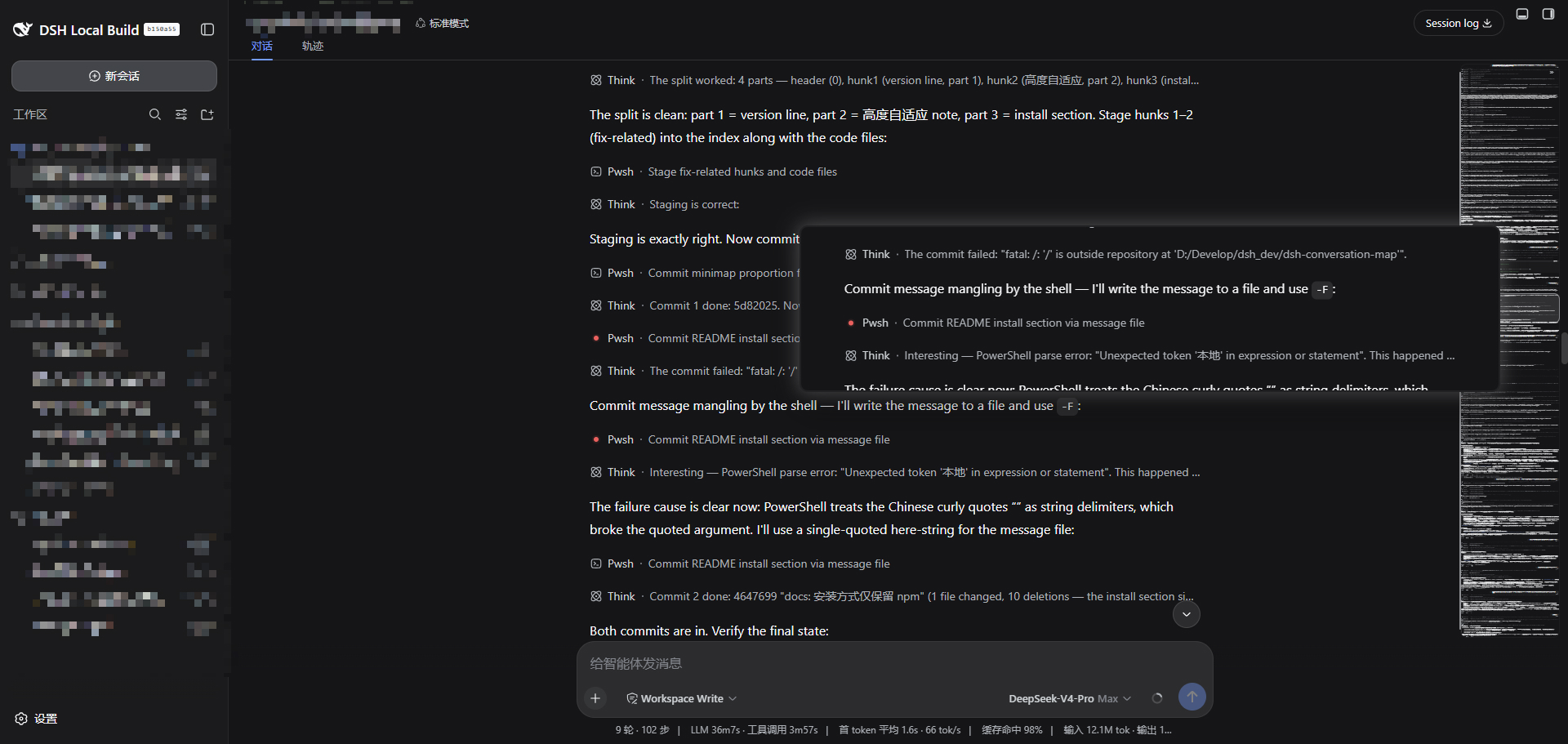
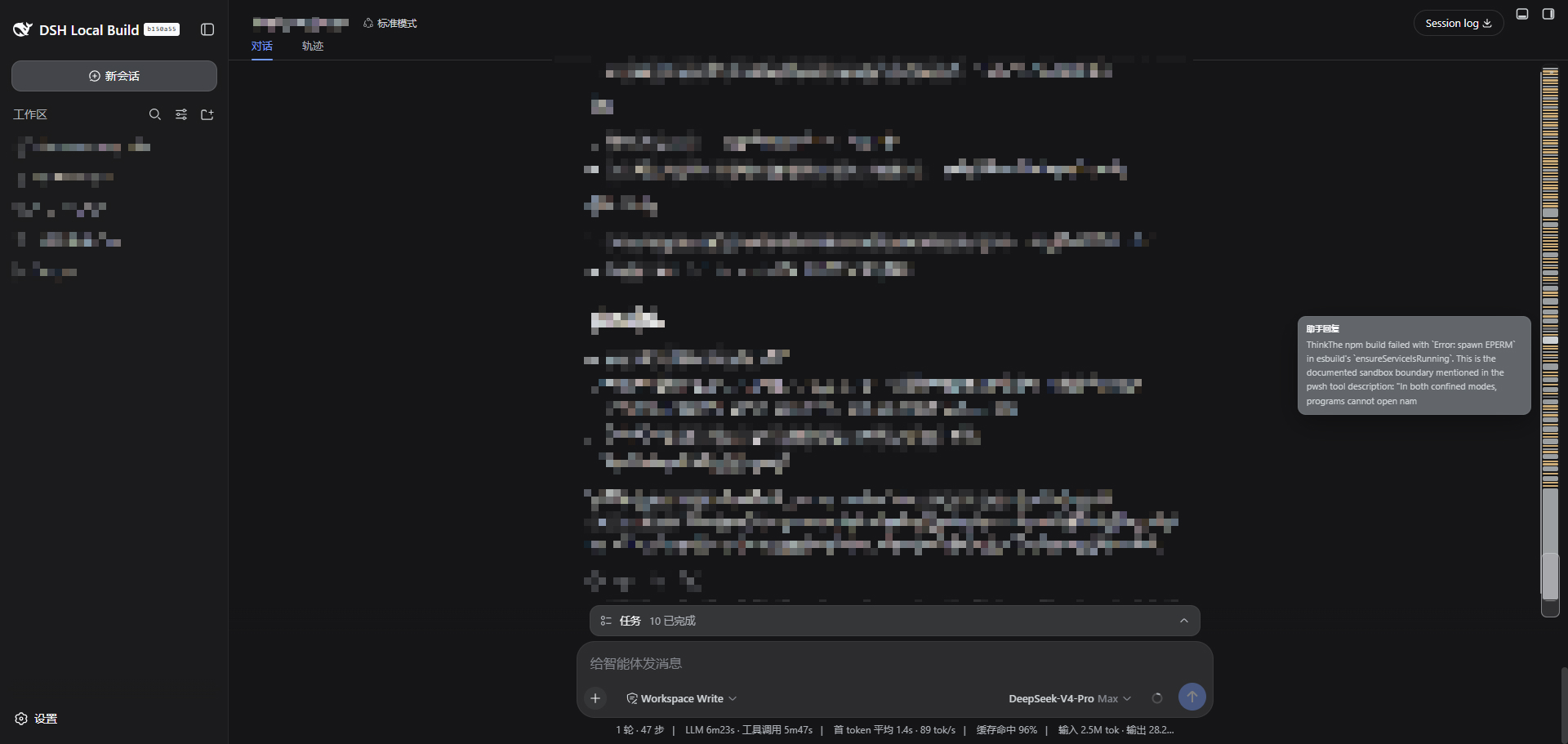
- 🎨 Dual modes: below 50px wide, color-block mode colors rows by message type (🔵 user / ⚪ assistant / 🟡 tool call / 🟢 command / 🔴 error, hover for a content preview); at ≥ 50px it automatically switches to thumbnail mode, which renders the entire conversation scaled down so you can see the real structure of messages, code blocks, and cards.
- ↔️ Drag to resize: drag the left handle (10–320px); the right edge stays pinned and a live width badge appears while dragging.
- ⚡ Fast scrolling: click anywhere to jump (the content you click scrolls to the top of the screen), press and drag for continuous scrolling; a current-visible-region frame is always shown on the map (it marks the part of the conversation currently on screen) — proportional in color-block mode, while in thumbnail mode the frame is what you see on screen: grab the frame and drag it up or down and it tracks your pointer 1:1, scrolling the session and the miniature together, sitting flush against the track's ends at the very top and bottom of the conversation.
- 🔍 Hover loupe: in thumbnail mode, hovering anywhere opens a live magnified preview beside the cursor showing the full row, following the mouse in real time.
- 📌 Collapse/expand: hover the top of the map and click
»to collapse into a 4px strip; a persistent«label stays on the strip, and clicking either the label or the strip expands it again. - 🔄 Live sync: refreshes automatically while messages stream, tools run, or sessions switch; follows sidebar/detail-panel toggles and window resizes.
- 📐 Adaptive height: the map height scales with the conversation — the thumbnail zoom is determined solely by width (map width / content width, capped at 1:1) and is independent of conversation length, so even a very long session stays crisp instead of being squeezed into a hairline; the height grows continuously with content until it caps at the available height, and once content exceeds the track the miniature pans vertically with scrolling (minimap semantics: the track holds a window of content sliding around the visible region), with the part currently on screen always truthfully marked by the frame and kept inside the track.
📸 Screenshots
Thumbnail mode (widened, the whole conversation scaled down):
Color-block mode (narrow strip, colored by message type, hover to preview):
🚀 Installation
Install the latest version (default):
dsh plugin --profile web add dsh-conversation-map
Install a specific version (dsh plugin add forwards to pnpm, so any npm version spec works):
# Pin an exact version
dsh plugin --profile web add dsh-conversation-map@0.1.8

# Upgrade to the latest version
dsh plugin --profile web update dsh-conversation-map@latest
Verify the layer is mounted, then start:
dsh --profile web --dump-config   # should show a "# == dsh-conversation-map" layer
dsh --profile web
🗑️ Uninstall: dsh plugin --profile web remove dsh-conversation-map
🧩 Compatibility
- 🧭 DOM contract: DeepSeek Harness is in developer preview and its interfaces change breakingly; this plugin builds on the
dsh0.1.x Web conversation DOM contract:[data-conversation-scroll]the conversation scroll container (note: the framework rebuilds the conversation column on every session switch, so this container is a fresh DOM node each time — the plugin observes a stable ancestor and re-resolves on every computation instead of holding the old node)[data-chat-anchor-key]/[data-chat-flow-kind]conversation node rows[data-composer-seat]the bottom input area
- 🧲 Persistent map: no refresh needed when switching sessions; the color-block/thumbnail content follows the current session automatically, and an empty track shows while a new session loads.
- 💾 State persistence: width and collapsed state persist in the browser's
localStorage(keysdsh-conversation-map:width/dsh-conversation-map:collapsed) across session switches and page reloads. - 🔒 Pure client: the Host half is a no-op; the browser half mounts through the
shell.overlayslot and only uses thereactandslotsplatform services — no network requests, no telemetry (no persistence beyond the localStorage state above).
🛠️ Development
pnpm install
pnpm run build    # tsdown → lib/client.js (__ModuleLoader__ factory wrapper)
Build artifact contract: CJS wrapped in window.__ModuleLoader__.load({ id, factory }); platform modules like react stay external, everything else is inlined (the plugin has no dependencies besides react).
⚙️ Customization
- Thumbnail threshold:
THUMB_MIN_WIDTHinsrc/client/index.ts(default 50) - Thumbnail zoom:
thumbScaleFor()always returnsmap width / content width(capped at 1) regardless of conversation length; very long sessions pan vertically inside the track as you scroll, with the pan derived from the frame's position (src/client/geometry.ts) so the frame always encloses exactly what is on screen - Width range:
WIDTH_MIN/WIDTH_MAX(default 10 / 320) - Thumbnail refresh throttle:
THUMB_CLONE_INTERVAL(default 200ms) - Loupe parameters:
LOUPE_W/LOUPE_H(default 854 / 200, whole row scaled to panel width),LOUPE_SCALE(zoom cap, default 1 = real scale)
📄 License
MIT
Links
More in this category
zhu1090093659/dsh-web#packages/dsh-task-board★ 8759
Task board for the dsh web GUI: a sidebar multi-column kanban whose cards run in real DSH agent sessions and can also be scheduled with cron expressions, executed host-side even with the browser closed.
zhu1090093659/dsh-web#packages/dsh-web-all★ 8759
Plugin and skin collection for the DSH Web UI: task board, Git graph, right-side panel, remote mobile UI, pet, live token stats, and a skin center.
MeteorNOX/DeepSeek-Balance-Whale-Widget★ 4819
A fixed-corner whale widget for the DSH web GUI — balance, today's usage and per-turn cost with peak/off-peak pricing, editable balance-alert and daily-budget bubbles, a module-based custom bubble queue with A/B weighted choices and random lines or images, 30+ vendor templates (OpenAI, OpenRouter, Kimi, SiliconFlow, Ark, Zhipu, MiniMax and more) with per-model balance and subscription quota, plus task-end sound, imported audio, custom roles and a resource manager. Local-only, no telemetry.
ccch1mneyyy/dsh-TUI★ 4602
Claude Code-style full-screen terminal UI: pixel-whale header, live status line, and streaming thought expansion.
omdsh-dev/DSH-better-sidebar★ 4181
Full sidebar workbench with file rendering and editing, terminal, Git, and subagents; third-party plugins can register new tabs.
Devin-AXIS/deepseek-design#deepseek-idesign★ 1461
Visual design studio for websites, app prototypes, posters, cards, reports, and magazines, with templates, direct element editing, selection-aware AI draft handoff, and export.
Community comments
Comments are public GitHub Discussions. Loading them connects to GitHub and Giscus; a GitHub account is required to post.